
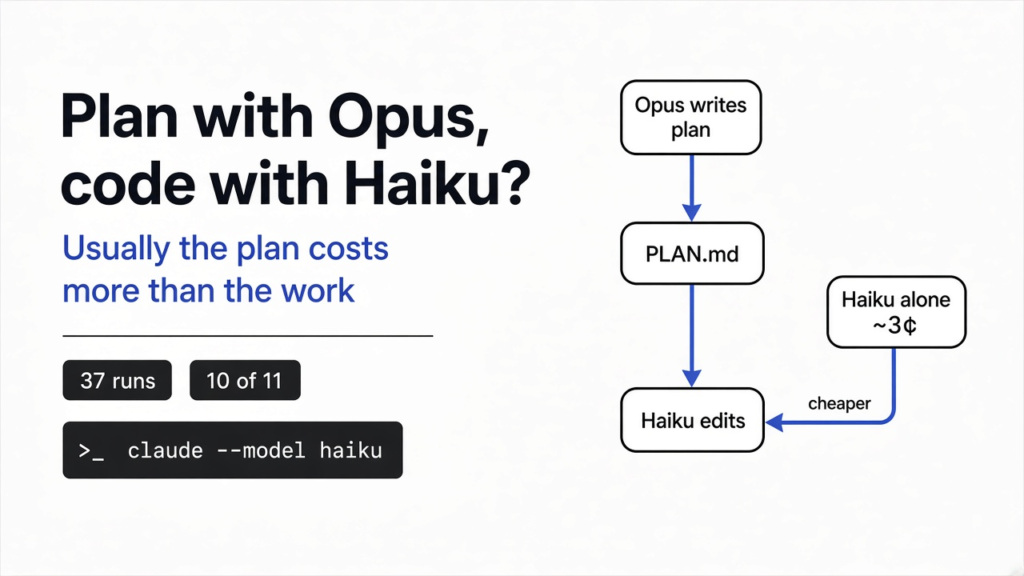

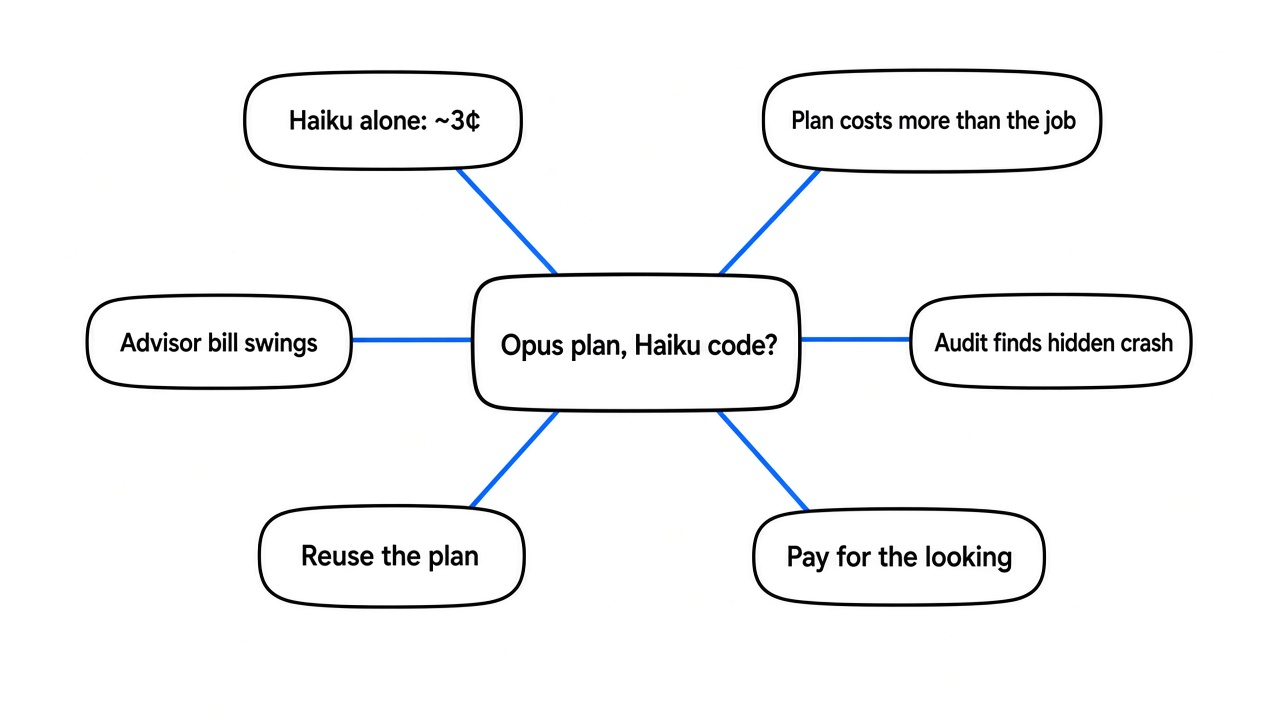
Short answer: usually not. In my tests it was rarely worth it to use Opus to plan and Haiku to code. Haiku working alone fixed almost everything on four coding tasks for about three cents a run. Having Opus write a plan first cost 25 to 100 times more, because the plan itself is the expensive part. The split paid off once: when Opus audited the code and found a crash nobody had asked about.
Picture it: you have a pile of bugs and a budget. Opus is the strongest of Claude Code’s three everyday models, and the priciest. Haiku is the cheapest.
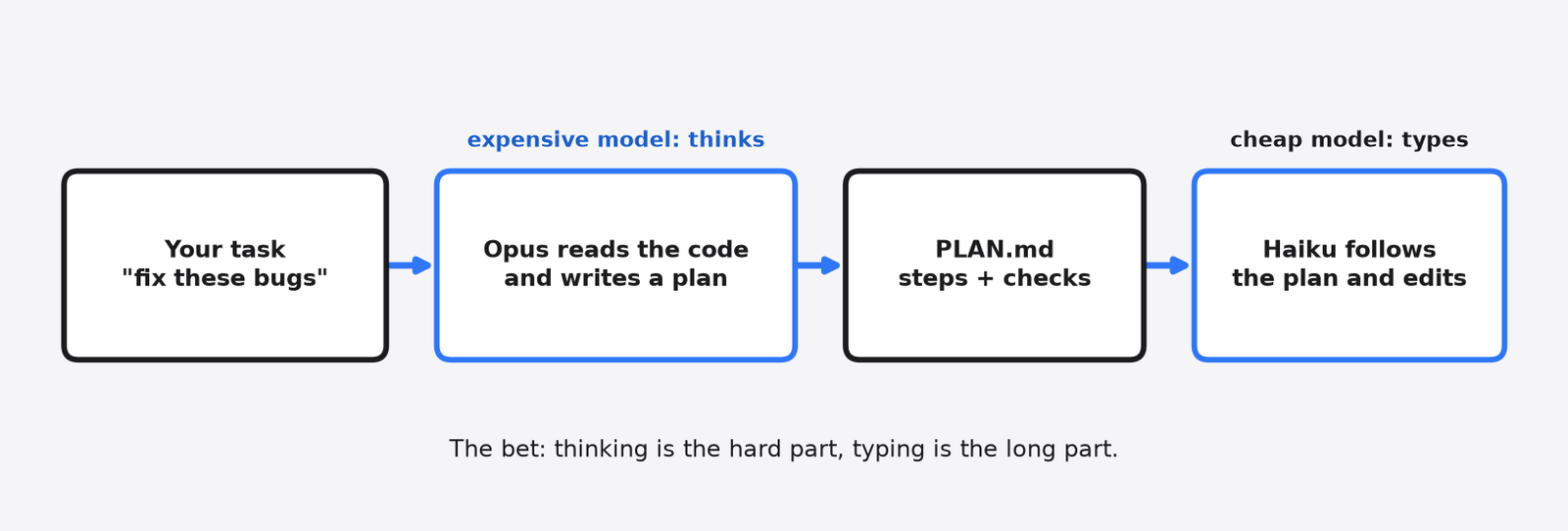
So a popular trick goes like this: let Opus think, let Haiku type. Opus reads the code and writes a plan. Haiku follows the plan.
It sounds like hiring an architect and a cheaper builder. I wanted to know if the money works out, so I ran 37 test runs on four small codebases and graded every one with tests the models never saw. This post gives you the numbers and a simple rule for when the split is worth it.
What Does “Plan With Opus, Code With Haiku” Mean?
It means one model decides what to change and a cheaper model makes the change.
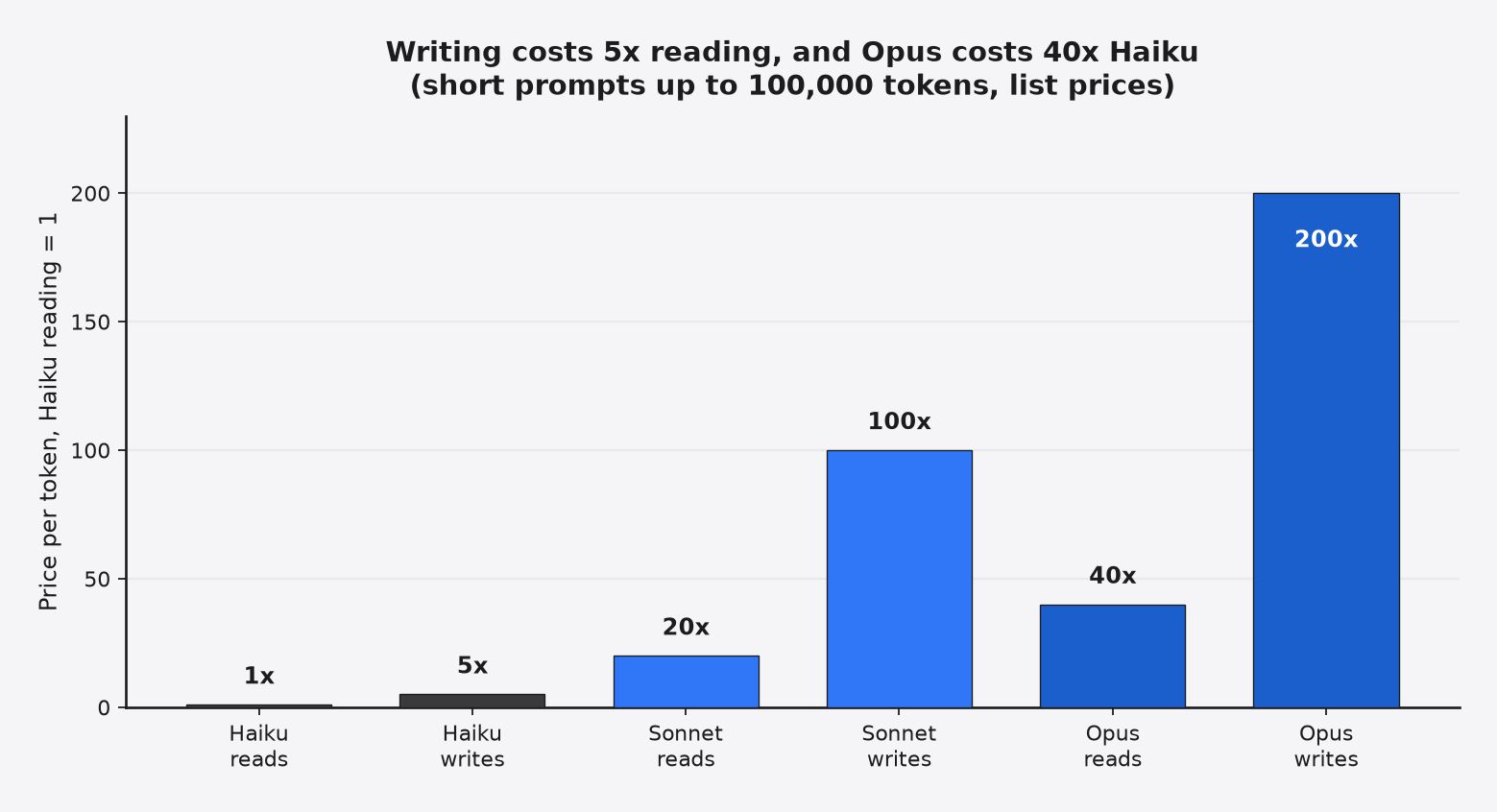
To see why, start with how you pay. Every AI model reads and writes text in tokens (small chunks of text, a few characters each). You pay per token, and Opus costs up to 40 times more per token than Haiku on the short-prompt tier, for prompts up to 100,000 tokens (the list price is not the whole story, as Haiku’s own pricing shows).
Writing costs more than reading. Output tokens (the text the model writes) cost five times as much as input tokens (the text it reads) on Haiku 5.5, Sonnet 5.5 and Opus 5.5. List prices were checked against Anthropic’s pricing page on 12 November 2026.
That is the whole logic of the split. Thinking takes few tokens but needs a smart model. Editing 30 files takes many tokens but looks simple. So you put the smart model on the short, hard part and the cheap model on the long, easy part.
You can set up this split in Claude Code three ways:
- Write the plan yourself with Opus, then hand the plan file to Haiku in a fresh session.
- Use an agent skill (a folder of instructions Claude loads on demand) built for this. The one I tested is
improveby shadcn: Opus audits your repo and writes plans “for a less capable model”, and it never edits code itself. - Use a built-in mode.
opusplanruns Opus in plan mode and Sonnet for the edits. The advisor tool lets a cheap model call Opus for advice in the middle of a task.
How Did I Test It?
Same task, same prompt, fresh copy of the code, graded by hidden tests.
So I built four small Python projects. Each had real bugs or a real chore, plus a set of hidden tests (tests kept outside the project, so no model could read them or tweak them to pass).
- Task A: an invoice library with 6 user bug reports (rounding, discounts, month-end dates, CSV quotes). 22 hidden tests.
- Task B: a tiny spreadsheet engine with 7 user bug reports (math order, stale values, circular references, column letters past Z). 26 hidden tests.
- Task C: the same spreadsheet engine, but no bug reports. Just a README describing how it should behave and “users say it’s buggy, find and fix it.” Same 26 tests.
- Task D: a 30-file migration. Swap a deprecated (marked for removal) network function for its replacement at 56 call sites (places in the code that use it), with tricky rules (0 means “no retry”, -1 means “retry forever”). 58 hidden tests.
Each setup ran through claude -p (Claude Code’s non-interactive mode) with the same allowed tools. The models were Haiku 5.5, Sonnet 5.5 and Opus 5.5. The dollar figures are what Claude Code itself reported for each run.
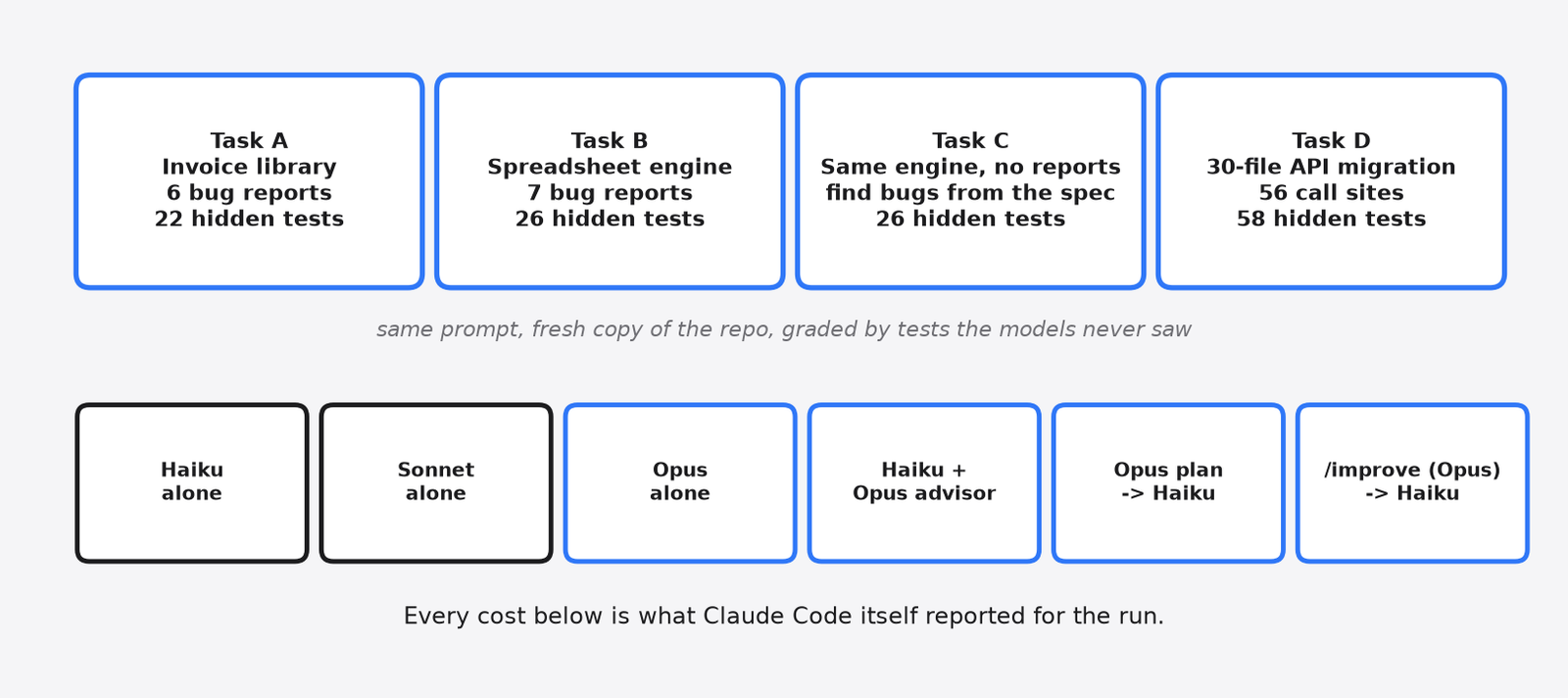
Why four of them? Because the split should shine on different things. Task C tests finding bugs. Task D tests long, boring editing, which is exactly where a cheap typist should save money.
Did Haiku Need the Plan?
Almost never. Haiku alone passed every hidden test in 10 of 11 runs.
I expected the cheap model to stumble on the harder tasks and the plans to catch it. Did it?
It didn’t stumble. On the invoice bugs, the spreadsheet bugs and the 56-site migration, Haiku alone went perfect every time. It even caught a trap I planted: recurring invoices that start on January 31 must land on Feb 28, then Mar 31, not drift to the 28th forever.
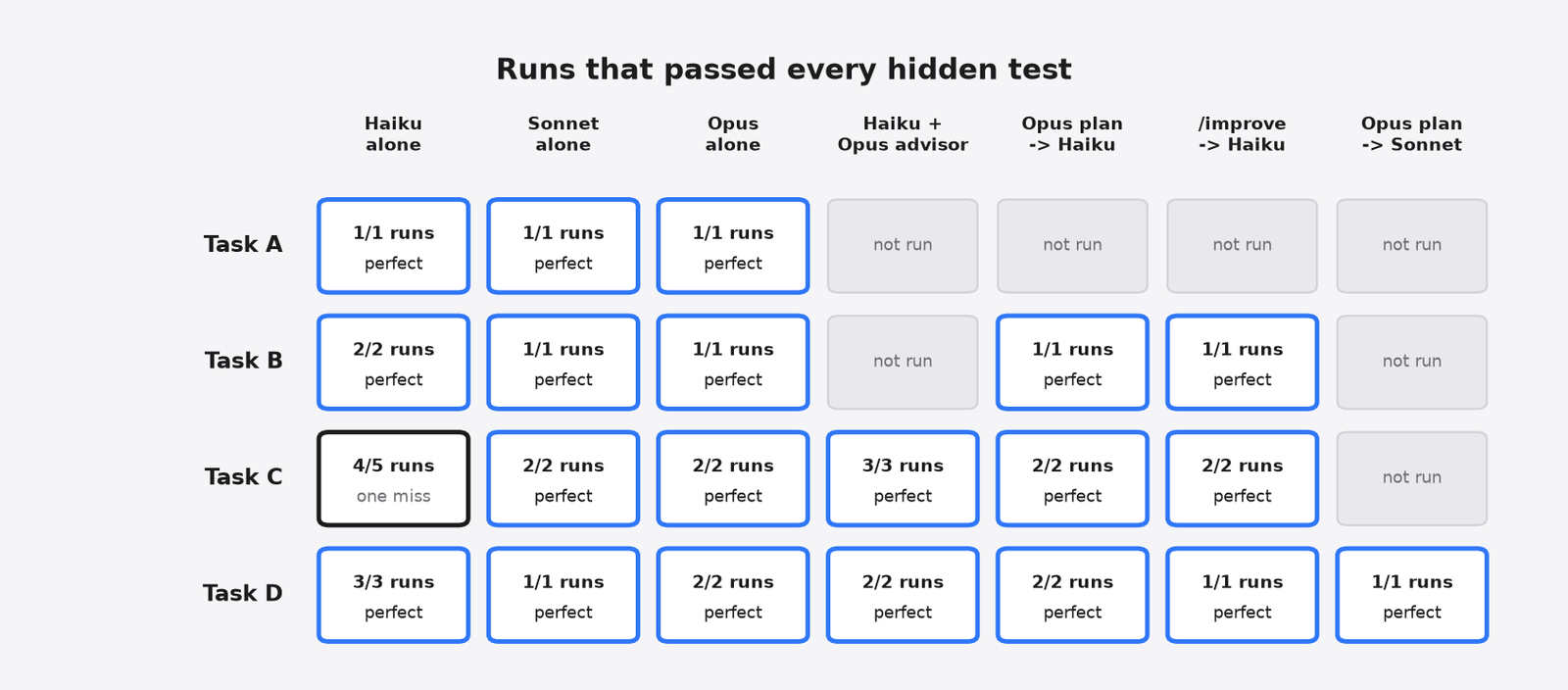
The one miss came on Task C, the “find the bugs yourself” job. In one of five runs, Haiku fixed six problems and skipped the column-letter bug (column Z turning into a broken character). Every Opus-backed setup got all 26.
So the plan does buy something. It buys reliability on vague work. The question is the price.
Why Is Planning With Opus More Expensive Than Opus Just Doing It?
Because a plan good enough for a weaker model is a long document, and Opus writes every word of it at Opus prices.
Here’s the part the trick leaves out. When Opus fixes the bugs itself, it reads the code, makes a few small edits and runs the tests. Short output, short bill.
When Opus writes a plan for Haiku, it has to spell everything out. Which file, which lines, what the code looks like before the change, what to type, how to check it, when to stop. The plain plans ran about 1,700 to 2,000 words. The improve skill’s plans ran 3,500 to 11,000 words.
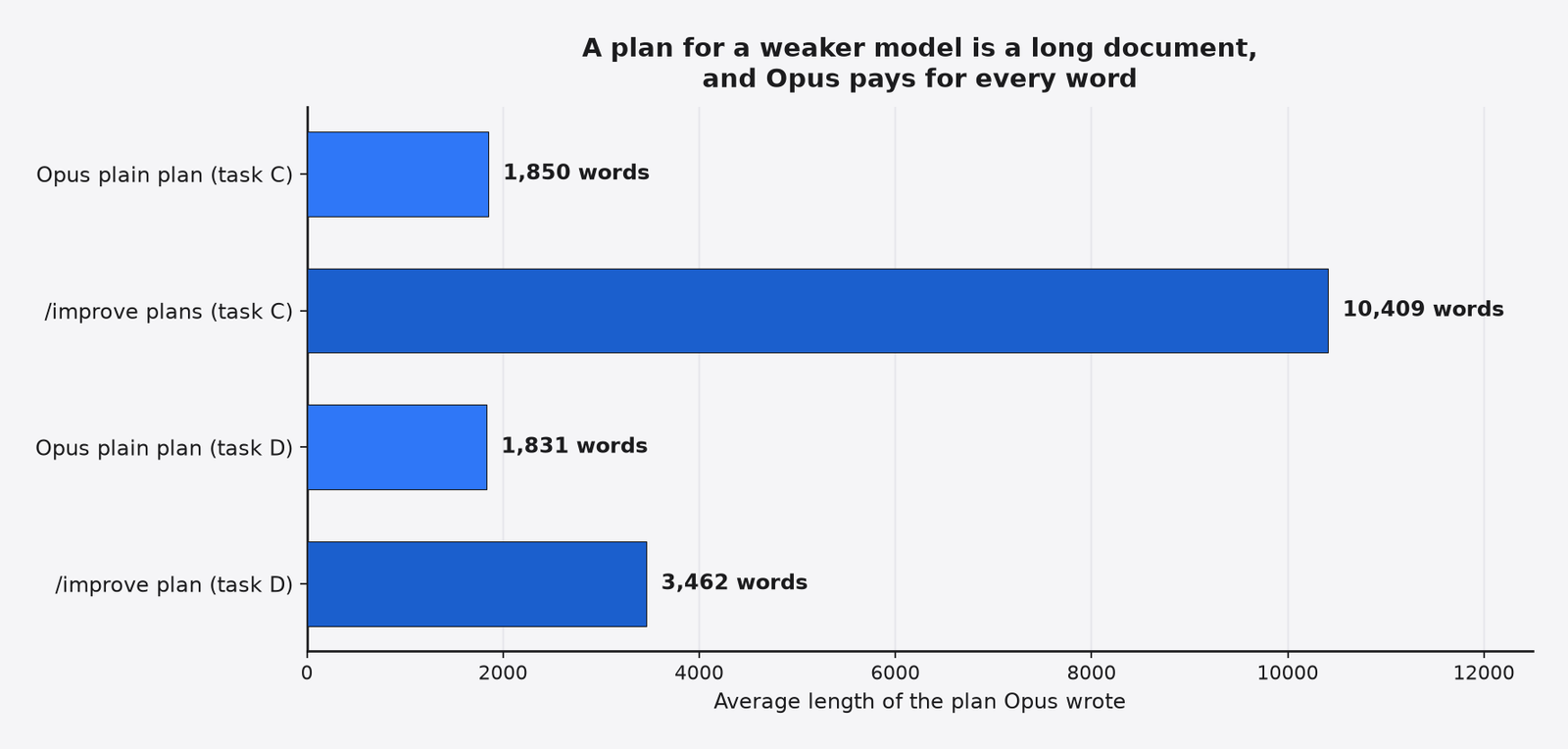
And writing is the expensive half. So the planner’s bill alone was bigger than Opus doing the entire job.
On the 30-file migration, the job the split was made for, Opus alone cost about $0.38. Opus planning plus Haiku executing cost $0.84. Haiku’s share of that was two cents.
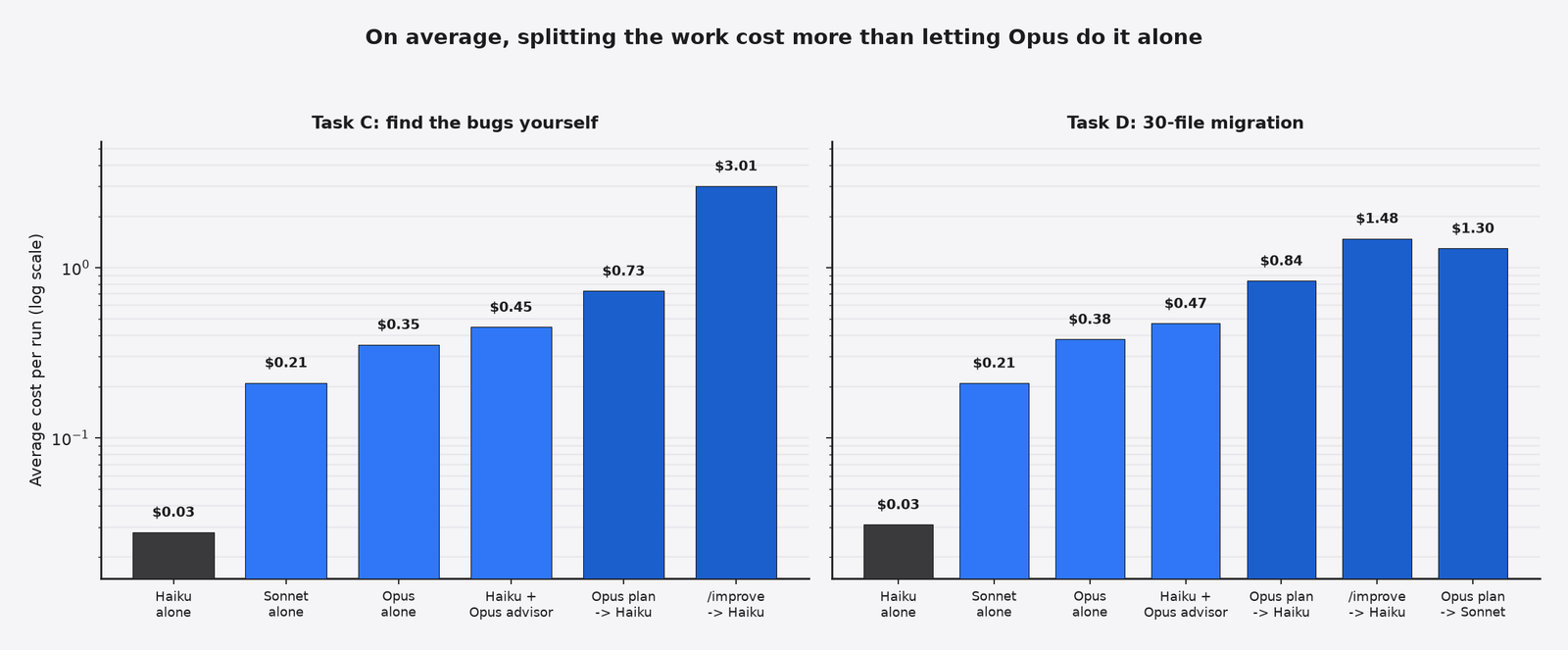
So that’s the core finding. The cheap typist was cheap, just as promised. The architect’s drawings cost more than the house.
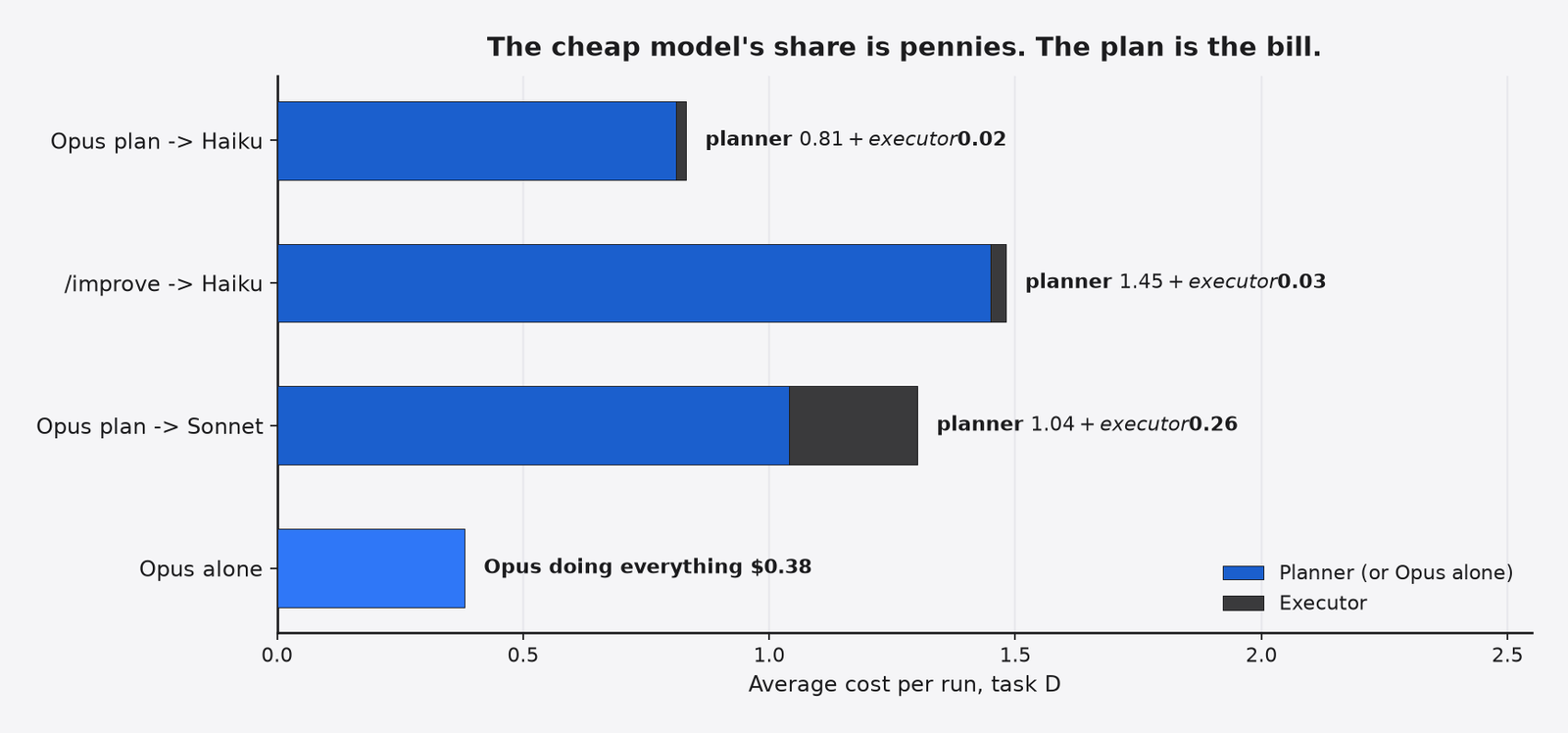
Speed went the same way, too. Opus alone finished the migration in about 70 seconds. The plan-then-execute version took over three minutes, because two models had to read the same code.
Here are the average costs Claude Code reported, plus how many of those runs passed every hidden test. A dash means that setup was not run on that task. For the advisor on the migration, the two runs were $0.04 and $0.90, so the $0.47 average hides a wide swing.
| Setup | Invoice bugs (A) | Spreadsheet bugs (B) | Find the bugs (C) | 30-file migration (D) |
|---|---|---|---|---|
| Haiku alone | 1/1, $0.024 | 2/2, $0.023 | 4/5, $0.028 | 3/3, $0.031 |
| Sonnet alone | 1/1, $0.242 | 1/1, $0.125 | 2/2, $0.211 | 1/1, $0.210 |
| Opus alone | 1/1, $0.569 | 1/1, $0.374 | 2/2, $0.353 | 2/2, $0.379 |
| Haiku + Opus advisor | — | — | 3/3, $0.447 | 2/2, $0.04 and $0.90 |
| Opus plain plan then Haiku | — | 1/1, $0.803 | 2/2, $0.729 | 2/2, $0.836 |
| /improve (Opus) then Haiku | — | 1/1, $1.393 | 2/2, $3.010 | 1/1, $1.482 |
| Opus plain plan then Sonnet | — | — | — | 1/1, $1.296 |
Where Did the Expensive Model Earn Its Money?
The improve audit found a crash that no other setup fixed, including Opus working alone.
On Task C, improve didn’t just fix my seven planted bugs. It wrote ten or eleven plans, and some were for bugs I hadn’t planted.
One of those extra bugs stood out. The spreadsheet worked out a cell’s value by asking the cell above it, which asked the cell above that, and so on. Python only allows so many of these nested calls before it gives up with a RecursionError (Python’s “this chain is too deep” crash).
The audit measured it: a running total works at 150 rows and crashes at 200. That is a normal-sized spreadsheet.
I checked every finished run with a 300-row running total. Only the two improve runs survived. Haiku, Sonnet, Opus alone, the advisor and the plain Opus plans all left the crash in.
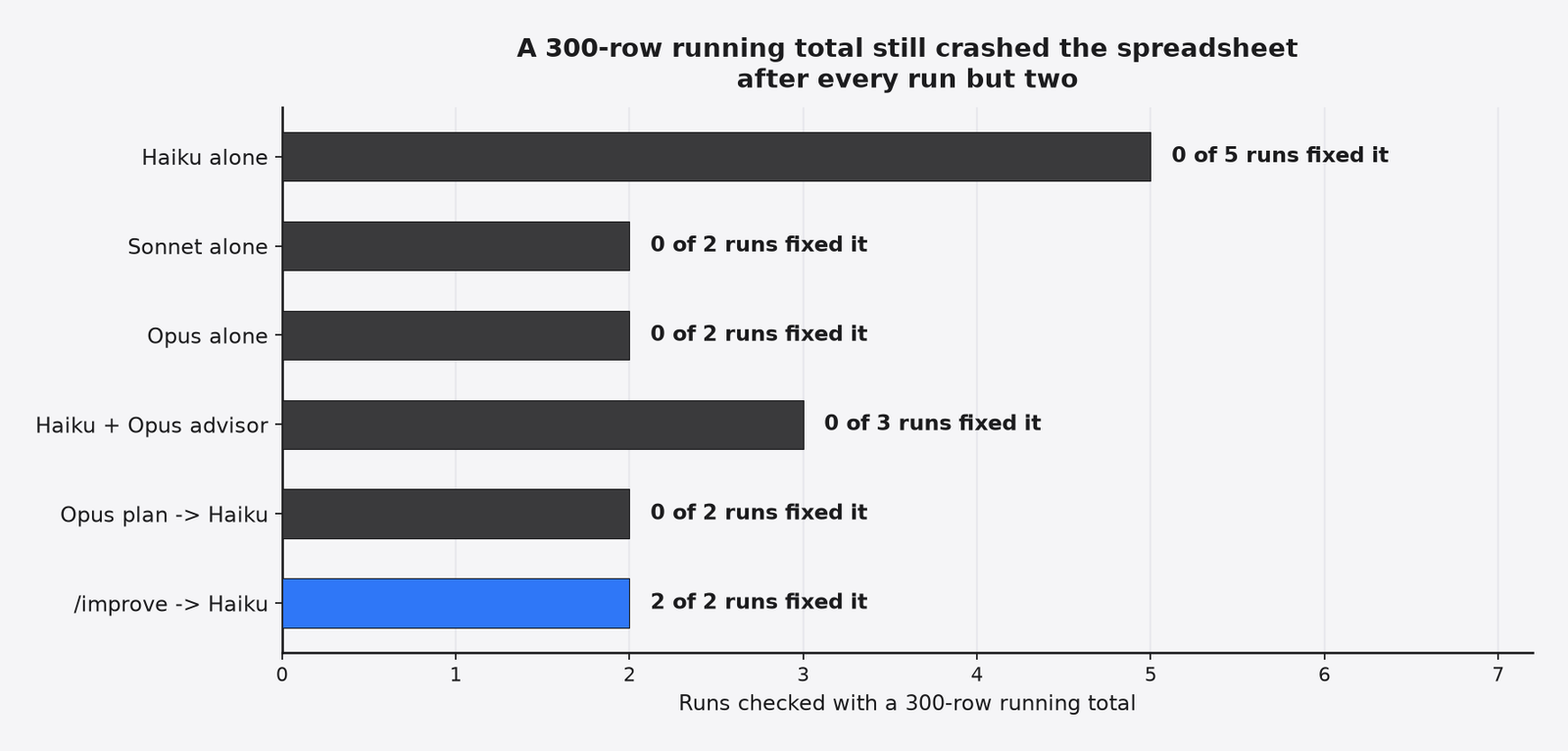
So the value wasn’t the split between thinking and typing. It was the audit: a strong model told to look for trouble, with time to measure, finds trouble you didn’t know to ask about.
Was that worth it? The audit cost about $3 a run, against three cents for Haiku alone. On a real product, one avoided crash on a customer’s spreadsheet is worth far more than $3. On a weekend script, it isn’t.
What About opusplan and the Advisor?
They are the same idea built into Claude Code, and the advisor has a cost you can’t predict.
Start with opusplan. It’s a model setting. It uses Opus while you’re in plan mode (Claude Code’s read-only mode, where it proposes changes before making them) and switches to Sonnet when you approve. I couldn’t drive plan mode from a script, so I tested the closest match: Opus writes a plan, Sonnet executes it. It passed everything and cost $1.30 on the migration, more than three times Opus alone.
The advisor splits the work differently. You keep Haiku as the main model and give it Opus as a consultant. Haiku decides when to ask.
claude --model haiku --advisor opus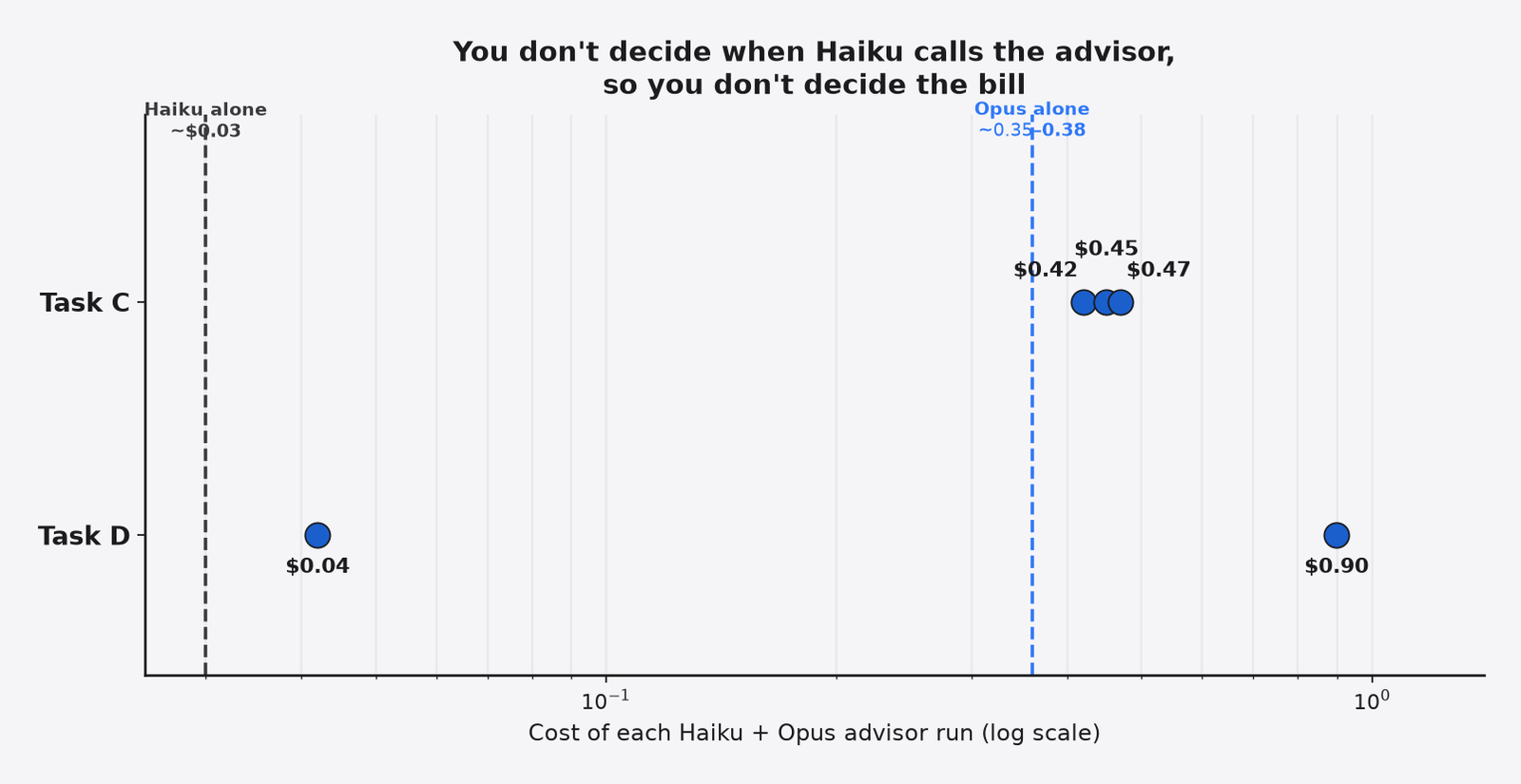
The catch is that word “decides”. On the migration, one advisor run never called Opus and cost four cents. The next run called it and cost 90 cents for the same result.
That swing showed up on the harder task too. On Task C, the three runs cost 42 to 47 cents each, more than Opus doing the job alone. Anthropic’s own guidance says a Haiku plus Opus advisor setup should cost less than switching to the larger model. On my short tasks, it didn’t.
The advisor is a fair choice for long sessions where most turns are routine. On short, clear tasks you pay Opus prices for advice Haiku didn’t need.
When Should You Split Planning and Coding?
Split when the hard part is figuring out what to do, and the plan will be used more than once.
There are good reasons to like the split. It gives you a written plan you can review before any code changes, and a plan you can hand to anyone. For a team, that alone can be worth the money, the same argument behind spec-driven development.
But if you only care about getting the fix done, here’s the rule I’d use:
- You know what’s broken: run Haiku alone. Keep your tests as the safety net, and make Claude Code keep working until they pass. If it misses, rerun or step up to Sonnet.
- You don’t know what’s broken, small codebase: let Opus find it and fix it in one go. It’s cheaper than Opus writing instructions for someone else.
- You don’t know what’s broken, big codebase or long backlog: first get Claude Code to explain the codebase, then run an audit like
improveonce. Read the findings, then hand the plans out over days or weeks.
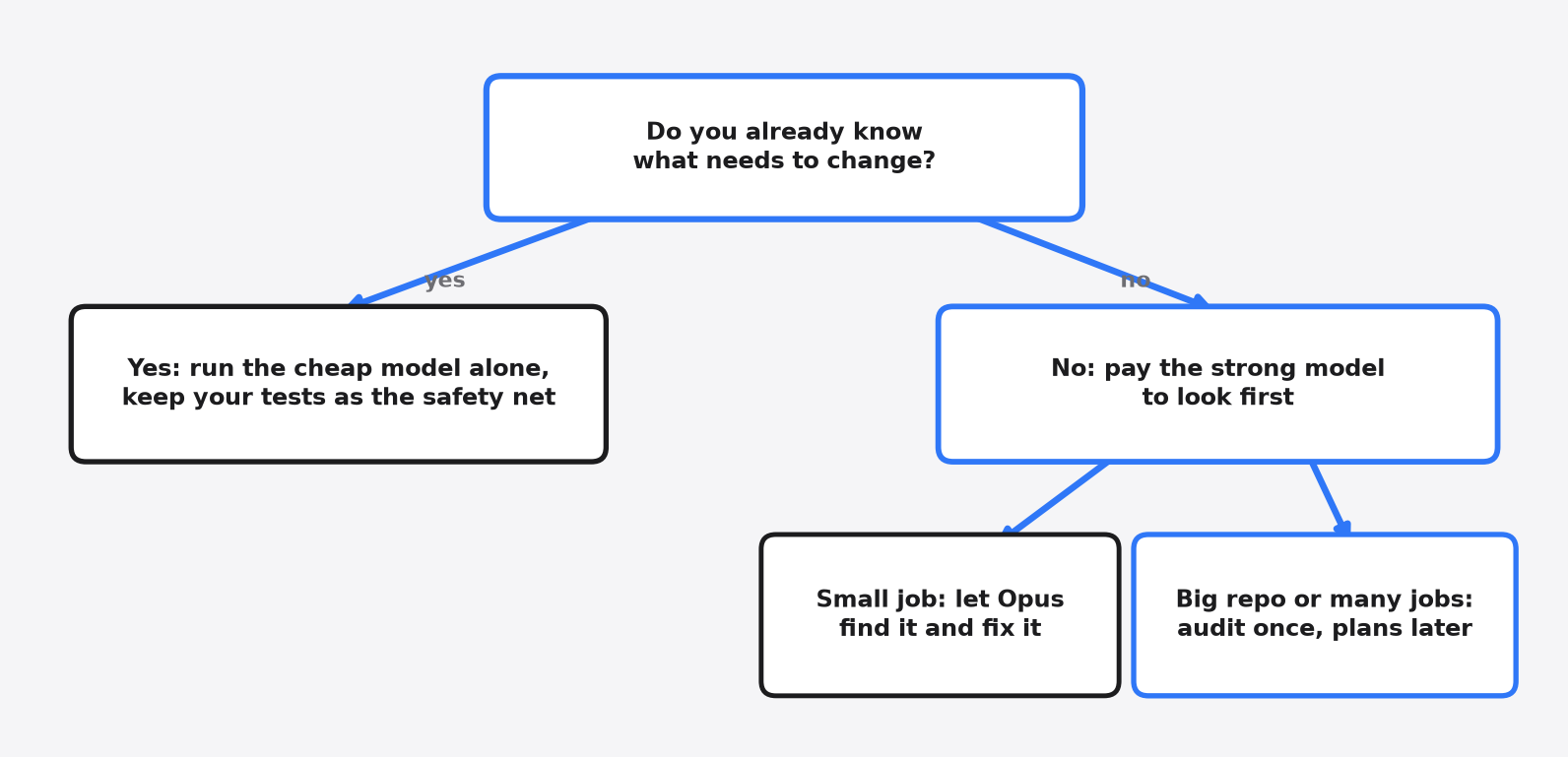
That third case is where the split makes sense. One expensive look, many cheap jobs. The plan has to be reused for the money to come back.
How Do I Try This in Claude Code?
Each setup is one command, so you can test it on your own repo in a few minutes.
# Cheap model alone
claude --model haiku

# Opus alone
claude --model opus

# Haiku with an Opus advisor
claude --model haiku --advisor opus- Opus plans, Sonnet edits: run
/model opusplaninside a session, then use plan mode. - The
improveaudit: install it withnpx skills add shadcn/improve, or copy itsskills/improvefolder into your project’s.claude/skills. Then run/improvewith Opus.
The advisor is experimental. It needs the Anthropic API, or Claude Platform on AWS with Claude Code v2.1.300 or later. It is not available on Amazon Bedrock, Google Cloud’s Agent Platform, or Microsoft Foundry. Haiku 4.5 can call an advisor but cannot be one; Haiku 5.5 can be either. In the command above, Haiku is the main model and Opus is the advisor.
Run /usage at the end of each session to see what it really cost you. Your codebase isn’t mine, and one afternoon of your own numbers beats any blog post.
One honest limit: my test repos were small. On a huge codebase, Opus reading everything twice would cost even more, and Haiku might miss more too. Measure before you build a habit.
So the typing was never the expensive part. Pay for the looking.
Common questions about planning with Opus and coding with Haiku
Is it cheaper to plan with Opus and code with Haiku?
Not in my tests. Opus writing a detailed plan cost more than Opus doing the whole job, and Haiku’s part of the bill was only a few cents.
Is Haiku good enough for coding?
For clear bug reports and mechanical edits, yes. Haiku alone passed every hidden test in 10 of 11 runs, and its one miss came on a vague “find the bugs yourself” task.
What is opusplan in Claude Code?
It’s a model setting that uses Opus in plan mode and switches to Sonnet when you start making changes. Turn it on with /model opusplan.
Does the Claude Code advisor save money?
It can, on long tasks where the cheap model rarely needs help. On short tasks it often cost more than running Opus alone, because Haiku decides when to call Opus.
1 comment