
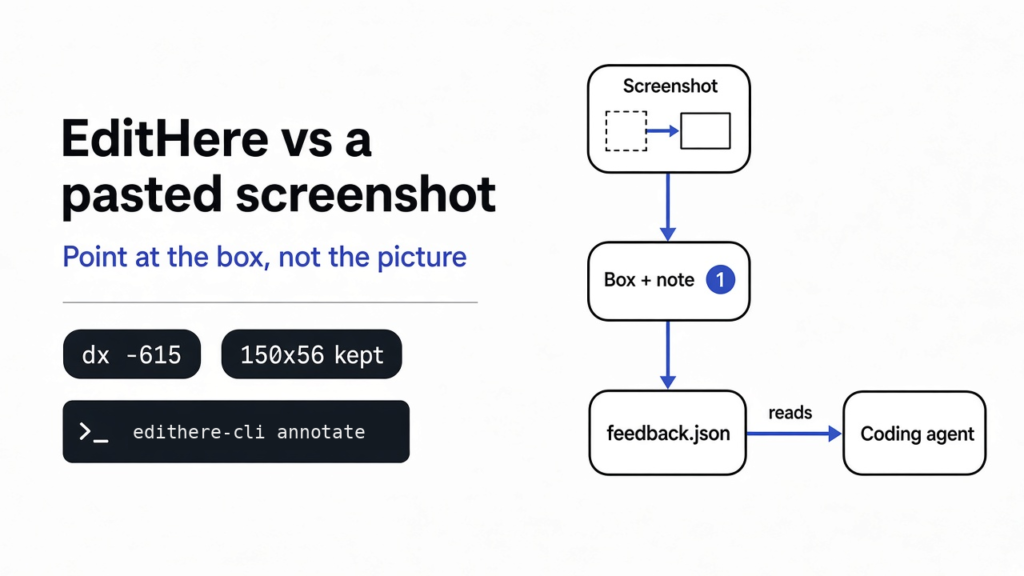

Ask a coding agent to “move the export button next to the title” and it can just as easily slide the whole top bar. That is the real question behind EditHere vs pasting a screenshot: a pasted picture still leaves the agent guessing which box you meant, while EditHere writes the box down as numbers. Tested on EditHere 0.12.8 (web edition), November 2026.
A screen is a grid of tiny colored dots, called pixels, and a button is just a rectangle of them. “Next to the title” is not a rectangle. EditHere is a program, on your computer or in one web page, that lets you draw the rectangle, drag it to where it should go, write a note on it, and save all of that as a JSON file. Use it when the argument is about where something sits. Paste the plain picture when you only need the agent to read the words in an error.
What Is EditHere?
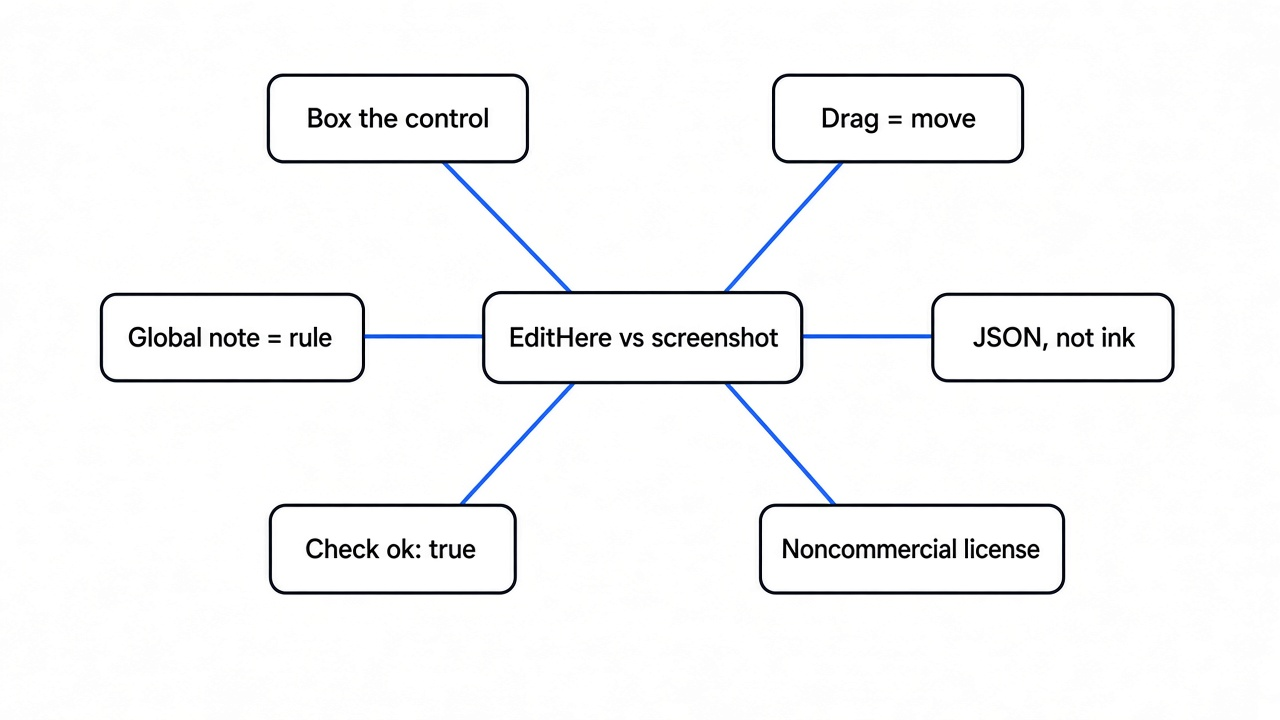
EditHere is a marker for pictures of interfaces. It is not a designer and, in the 0.12.8 release, it does not call a model.
You start with a picture of the screen as it is now. You draw a box around the thing that is wrong, or you drag that thing to the place you want it. You type a short note, like “red label” or “leave the colors alone.” EditHere then writes a text file with an id for each box, the old corners, the new corners if you moved it, and the note. A coding agent reads that file the same way it reads any other file in the folder.
The picture stays clean. The ink is not baked into the pixels, which matters because a red circle drawn on a button can hide the very color you wanted kept. The note lives beside the picture, tied to a number, the way a callout in a manual points at one control and not at the whole window.
There is a desktop app and a single web page. The desktop app can freeze your real screen, including a long scrolling capture, and it reads text inside a box with the system’s own engine (Windows OCR, macOS Vision, or Tesseract on Linux), offline. The web page is one HTML file. In the 0.12.8 web zip, EditHere.html is 316,338 bytes. You open it in a browser and drop in a picture you already saved. It cannot press a global shortcut and it cannot see the rest of your screen, because a web page is not allowed to.
Some tools in this space draw on the picture and hand you a new image. EditHere hands you the numbers. If the job is “make the page look less generated,” that is a different problem: the design skill test is about taste, not about which button moved.
How Do I Show a Coding Agent Which Button to Move?
Draw the old box, drag it to the new place, and put one sentence on that object. Do not describe the direction in chat and hope.
To see what the agent really receives, we loaded a 1280 by 720 test page (a title on the left, a blue Export button on the right) into the 0.12.8 web edition in Chrome. In the Explode mode we boxed the Export button as a component, dragged it left until it sat beside the title, and added one global note.
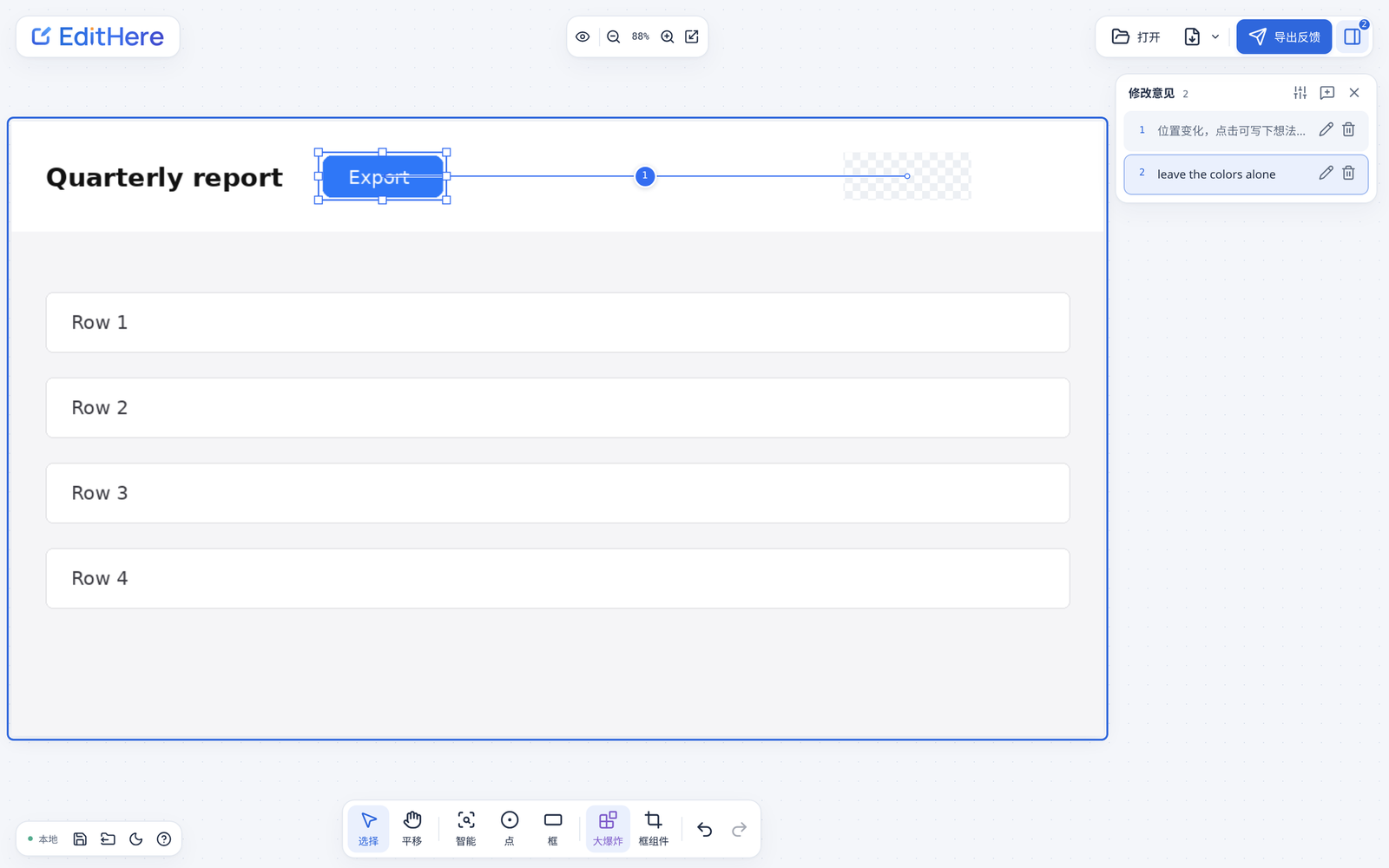
This is the JSON the web page exported, unedited:
{
  "annotationSpace": "result",
  "capture": {"capturedAt":"2026-11-12T03:48:50.460Z","fileName":"sample.png","source":"file"},
  "schemaVersion": "feedback-minimal-4",
  "tool": {"name":"EditHere","version":"0.12.8"},
  "image": {"devicePixelRatio":null,"file":"sample-feedback.png","mimeType":"image/png","mode":"file","sha256":"1299ef1b96154658af6ce008da4289777b85aa3592577137fc3bafb946bfedc0","width":1280,"height":720},
  "objects": [
    {"annotations":[],"id":"o1","kind":"region","movement":{"dx":-615,"dy":0,"rect":{"x1":360,"x2":510,"y1":36,"y2":92}},"source":{"x1":975,"x2":1125,"y1":36,"y2":92}},
    {"annotations":[{"number":2,"text":"leave the colors alone"}],"id":"o2","kind":"global"}
  ]
}Read it from the inside out. source is where the button is now: the left edge is 975 dots from the left of the picture, the top is 36 down, the right is 1125 and the bottom is 92, so the button is 150 wide and 56 tall. movement.rect is where we dragged it: the left edge is now 360, just past the end of the title. dx is the horizontal change, 360 minus 975, so -615: the button moved left by 615 dots. dy is 0, so it did not move up or down. The new box is still 150 by 56, and that check is how you tell a move from a resize. If the width had changed, the agent should change the size, not only the margin.
Two details showed up only in the real export. The dragged box has an empty annotations list, because we never typed a note on it, and the web page labelled it “position changed, click to write” in its notes panel. A movement without a note is still a request: the new rectangle is the instruction. The global note, “leave the colors alone,” has no coordinates at all, because it applies to the whole picture. That second object is the right place for “do not restyle this.” Say it in chat only and the agent can treat it as a suggestion.
The short version of the file is easy to get wrong by hand. A hand-typed copy with only schemaVersion, a bare image and objects failed the project’s own feedback-minimal-v4.schema.json with three errors: annotationSpace and tool are required, and image needs mode, mimeType, devicePixelRatio and a sha256. The exported file above passed the same schema with zero errors. Let the app write the file.
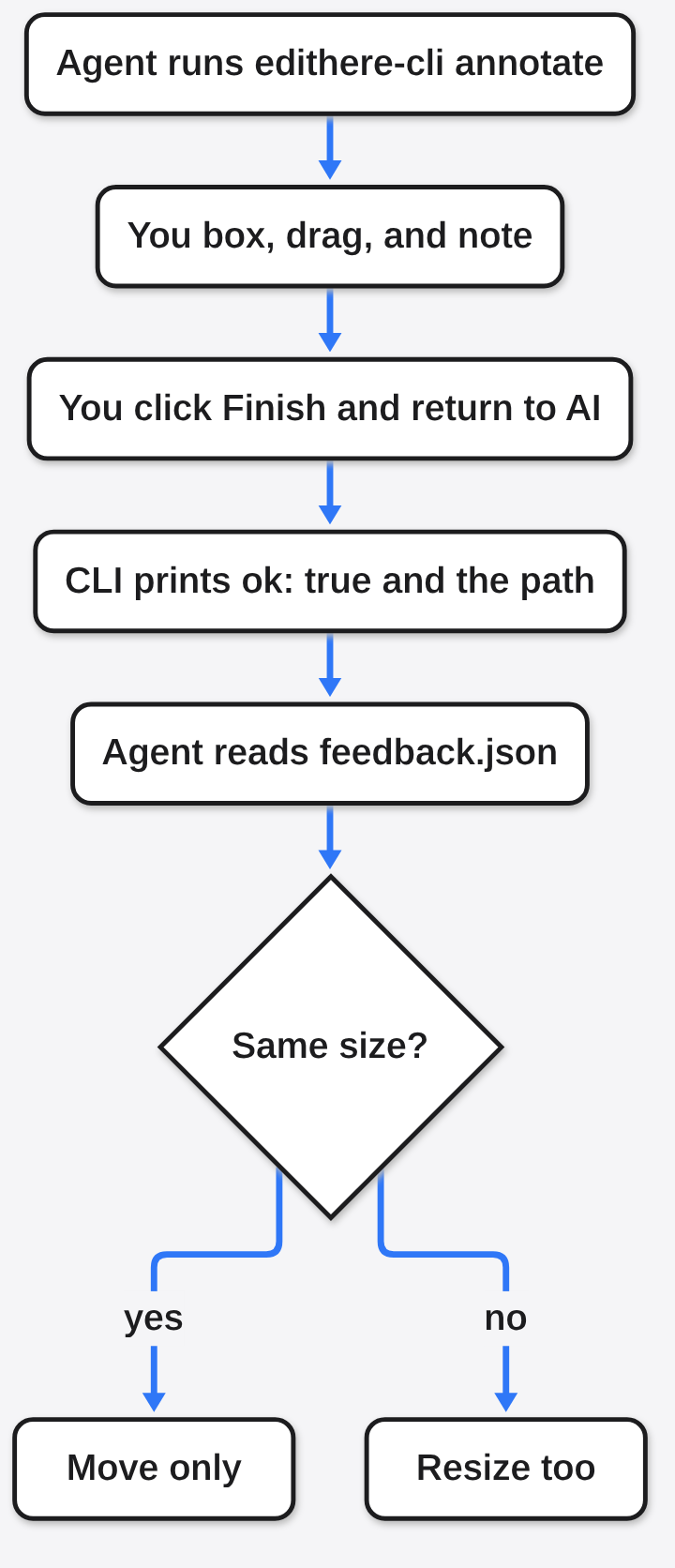
On the desktop app the loop is: the agent runs a command, you draw, you click Finish and return to AI, and the waiting command receives the file. The command line tool is named edithere-cli.
edithere-cli annotate ./page.png --output ./feedback-unique.json --previewTwo rules bite. The output file must not already exist, and its parent folder must. If you reuse yesterday’s path, the command refuses rather than overwrite, which is safer and also looks like a bug the first time. The wait defaults to 1,800 seconds and can be set from 1 to 86,400. When it finishes, the command prints one line of JSON with "ok": true and the path it wrote. Read that line before you open the file. If ok is missing or false, you are looking at an old file or a failed run.
The desktop app was not run for this article; this box has no desktop screen session. The web export above is the same feedback-minimal-4 format the CLI documents.
EditHere vs Pasting a Screenshot: Which Should You Use?
Paste the screenshot when the agent must read text. Use EditHere when it must pick one control out of five that look alike.
A model that can see pictures is good at “what does this error say” and weak at “which of these blue buttons.” The pixels are all there. Your priority is not. A numbered box is a shared name: you say “match the spacing of 2 to 1” and both of you mean the same rectangle.
| Pasted screenshot | EditHere file | |
|---|---|---|
| What arrives | The picture, plus whatever sentence you typed | The picture, plus a box, a number, and the sentence for that box |
| “Move it left” | A guess | Old corners, new corners, and the difference in dots |
| Ink on the picture | Often, if you marked it up in another app | The original stays clean; the marks are data |
| Calls a model | No | No in 0.12.8 (an optional API step is in development, see below) |
| Grabs the live screen | You do that yourself, then paste | Desktop app can; the web page cannot |
| License | None, it is just a picture | Free for noncommercial use; a company needs written permission |
| Skip it when | The bug is a sentence in a dialog | The screen has a stable control name you can use instead |
A rough sketch is still useful before any of this. A wireframe is a drawing of boxes with almost no color, so you can argue about placement without arguing about fonts. EditHere is the step after that, when a real screen already exists and one control is in the wrong place.
Pasting is also the right tool when you want a diagram of an idea, not a change to a button. A diagram skill answers “draw this,” which is a different request from “move this.” The diagram how-to covers that first request.
There is a cousin mistake. Some agents find a button by its name in the accessibility tree, the list of controls a screen reader already has, and then click it. That beats a screenshot when the control has a real name, and it fails when the app is one painted canvas, which is common in games and some design tools. EditHere does not read that tree; it only knows the dots you boxed. Our accessibility tree vs CLI wrapper post covers that side. For a file you are building rather than a picture of one, a path like /slide[1]/shape[2] is clearer than either, which is what OfficeCLI is for.
How Do I Install EditHere?
Install the desktop app if you need to grab the live screen. Use the single HTML file if you already have the picture.
For the web edition, download EditHere-web.zip from the project releases, unzip it, and open EditHere.html. There is no Node, no account and no server. The 0.12.8 zip unpacked to ten files, and build-info.json reported productSourceVersion 0.12.8. Later packages will move that number, so read the file in the zip you have.
One gotcha: the 0.12.8 web page opened with a Simplified Chinese interface in an English browser, and the HTML file declares lang="zh-CN" with no English text inside it. The tool icons still make sense (box, point, Explode, Export), but expect Chinese labels. The desktop app’s README lists English and Chinese interfaces. The plain web zip also does not include the connector that embeds the page inside an AI workbench; that is the separate EditHere-web-agent.zip.
Desktop builds, per the project docs:
- Windows: the x64 installer installs under your own user, by default
%LOCALAPPDATA%\Programs\EditHere, and can addedithere-clito PATH. Reopen your terminal afterwards so it sees the new PATH. - Linux: an AppImage, which you mark executable with
chmod +xand run. The target is Ubuntu 24.04 x86_64, and Wayland permission prompts and multi-screen behavior are still listed as needing real-machine checks. Treat it as a preview. - Mac: a preview build for macOS 14 and newer. It is not notarized, so the system will warn you the first time you open it.
The default desktop shortcut for freezing the screen is Alt+Shift+2. If it does not fire, use the capture button in the app. A shortcut is a convenience, not the product.
For a coding agent that supports skills, copy the edithere skill folder into that agent’s skills directory, then ask it to annotate. A plain chat box cannot run edithere-cli. In that case, export the file yourself and attach it.
How Should an Agent Read the EditHere JSON?
Read schemaVersion first. If it is not a version you know, stop and look up the new shape instead of guessing. The project’s own docs say an unknown explicit version is rejected, not guessed.
The current shape is feedback-minimal-4. The fields that matter:
imagesays how the picture is stored.filemeans a PNG beside the JSON,embeddedputs the picture inside the text, andnonekeeps only its size and fingerprint. Embedded is one file to pass around, but a large one.sha256is a fingerprint of the picture. If someone swaps the PNG and keeps the notes, the fingerprint will not match. Check it when the picture and the notes came from different people.devicePixelRatiowasnullin our browser export, so do not assume a screen scale.objectsis the list.kindisregionfor a box,pointfor one dot, orglobalfor a note about the whole picture. A point has no width, so do not treat it as a button.annotationsholds the notes. Each has anumberthat matches the badge on screen and atext. Numbers are labels, not a count, and they start over on the next picture.movementis optional. No movement means “this box is wrong, but no new place is shown,” so the note has to carry the change. A movement with no note is still useful: the new rectangle is the request.childrenis new in v4. A note boxed inside a moved component belongs to that component instead of becoming a separate object.
This short reader is what we ran on the exported file. It refuses unknown versions and separates a move from a resize:
import json, sys

fb = json.load(open(sys.argv[1]))
assert fb["schemaVersion"] == "feedback-minimal-4", fb["schemaVersion"]

for o in fb["objects"]:
    notes = "; ".join(a["text"] for a in o["annotations"]) or "(no note)"
    if o["kind"] == "global":
        print(f'{o["id"]} rule for whole picture: {notes}')
    elif "movement" in o:
        a, b = o["source"], o["movement"]["rect"]
        before = (a["x2"] - a["x1"], a["y2"] - a["y1"])
        after = (b["x2"] - b["x1"], b["y2"] - b["y1"])
        kind = "move only" if before == after else "resize"
        print(f'{o["id"]} {kind}: dx={o["movement"]["dx"]} dy={o["movement"]["dy"]} '
              f'size {before[0]}x{before[1]} -> {after[0]}x{after[1]} | {notes}')
    else:
print(f'{o["id"]} {o["kind"]} with no new position: {notes}')Its output on the export above:
o1 move only: dx=-615 dy=0 size 150x56 -> 150x56 | (no note)
o2 rule for whole picture: leave the colors aloneOne pass worth keeping in the agent instructions:
- Parse the one-line result from
edithere-cliand requireokto be true. - Open the path it names and require a
schemaVersionyou know. - For each region with a movement, compare width and height before and after. If they match, change position only. If not, change size too.
- Apply global notes as constraints, not as a second redesign.
- Do not restyle controls that have no object.
That last line is the one the top-bar story at the start was missing.
When Should I Skip EditHere?
Skip it when a name, a file path, or a one-line error already identifies the target.
If the button’s accessible name is Export, tell the agent to press Export. Coordinates go stale the moment the window is resized, and they mean nothing on a phone with a different width. A name survives a resize. If you are generating a slide or a sheet, a path into the file beats a picture of it. If the task is “explain this stack trace,” paste the text; a picture of a stack trace is harder to copy and easier to misread.
Skip it for a commercial product until you have a commercial license (more below). Skip the Linux and Mac builds if you need a tool you can hand a whole team tomorrow; they are previews. The web page is ready for a picture you already saved and not much else.
Also skip it when you want a new component, not a moved one. Astryx vs shadcn is about where the button’s code lives. EditHere will not answer that. It only tells the agent which pixels to chase.
Is EditHere Free for a Company?
No, not on the license that ships in the package. Personal and noncommercial use is free. A for-profit business needs written permission.
The LICENSE file in the web zip is the PolyForm Noncommercial License 1.0.0. The companion LICENSING.md says it in plainer words: the code is source-available, and this is not an open source license. Open source, in the usual meaning, lets a company use the code inside a product. This license draws the line at purpose, not at who you are.
Free without asking: personal research, experiments, private study, hobby projects, and use by charities, schools, public research bodies, public safety or health bodies, environmental groups and government offices. Not covered: anything aimed at commercial advantage, internal deployment inside a for-profit business, shipping it inside something you sell or rent, or hosting it as a paid service. COMMERCIAL-LICENSE.md is blunt that internal use at a company usually counts as commercial even if you sell nothing. Prices are not published; the file asks you to email the author with your use case.
The license also keeps the name: you can change the code for a permitted use, but you cannot present your build as the official EditHere. You cannot sublicense or transfer your license to someone else. If you claim in writing that the software infringes a patent, your patent license ends. After a first written notice of a violation, you get 32 days to fix it before the license ends.
For a personal project, the web page is a reasonable way to stop saying “a bit to the left.” It is not something to copy into a product you sell, or to hand a contractor as fine because the code is on GitHub. The LICENSE file is part of the product, as much as the button you drag.
Common questions about EditHere
Does EditHere call an AI model?
Not in the 0.12.8 release. Marking, OCR and export run on your machine, and the coding agent you hand the file to is a separate program that might. The project’s in-development 0.13.0 notes add an optional desktop “AI parse” preview that sends the current screenshot and notes to a provider you configure with your own API key. If that matters to you, check the version you installed and leave that setting empty.
Can I use EditHere with Claude Code?
Yes, if Claude Code can run a command on your machine or read a file you saved. Put the skill folder where Claude Code loads skills, then ask it to annotate the current screen. It should call edithere-cli annotate and wait while you draw and click Finish. In a chat that cannot run commands, export the file and attach it plus the picture, say which object numbers are in scope, and say that anything without a number must stay put.
Does the web page take a screenshot?
No. It annotates a picture you already have. Save the screen yourself, then drop the file onto EditHere.html. You still get boxes, moves and notes. You do not get the hotkey, the long scrolling capture or automatic text reading. For “watch my actual window while I scroll,” install the desktop app.
What if the output file already exists?
Pick a new name. The command will not replace the old file, on purpose: an agent that reuses feedback.json could treat last week’s notes as this week’s request. Use a new path each run, check the ok line, then read. With the web page, save the download under a new name yourself.
The button does not need a better adjective. It needs a rectangle.