
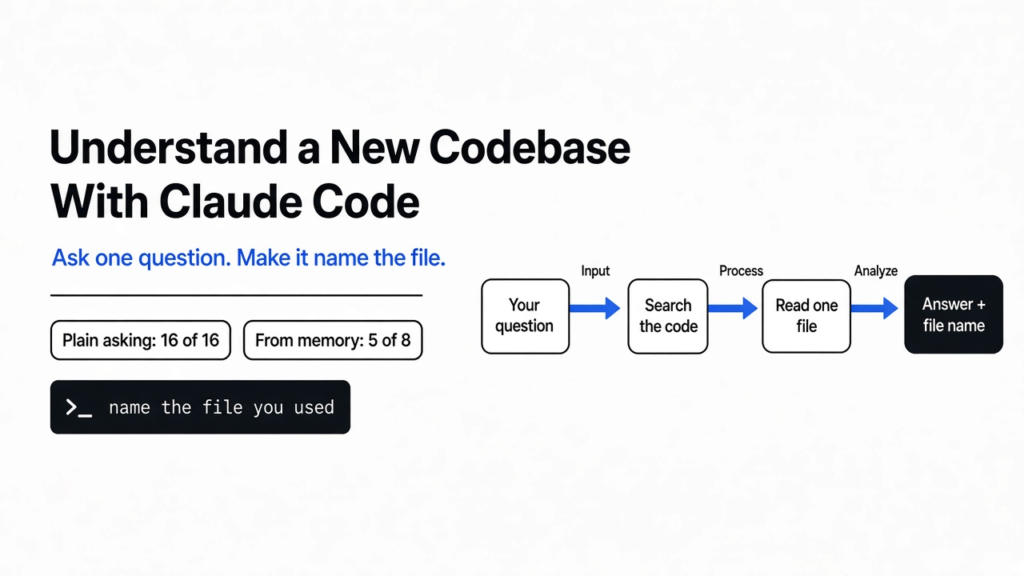

Short answer: to understand a new codebase with Claude Code, open Claude Code inside the project. Ask one question at a time, and end each with “name the file you used.” It searches the code and answers from what it reads, which got 16 of 16 lookups right in my test. A codebase map made those answers cost more, not better. Read the map yourself.
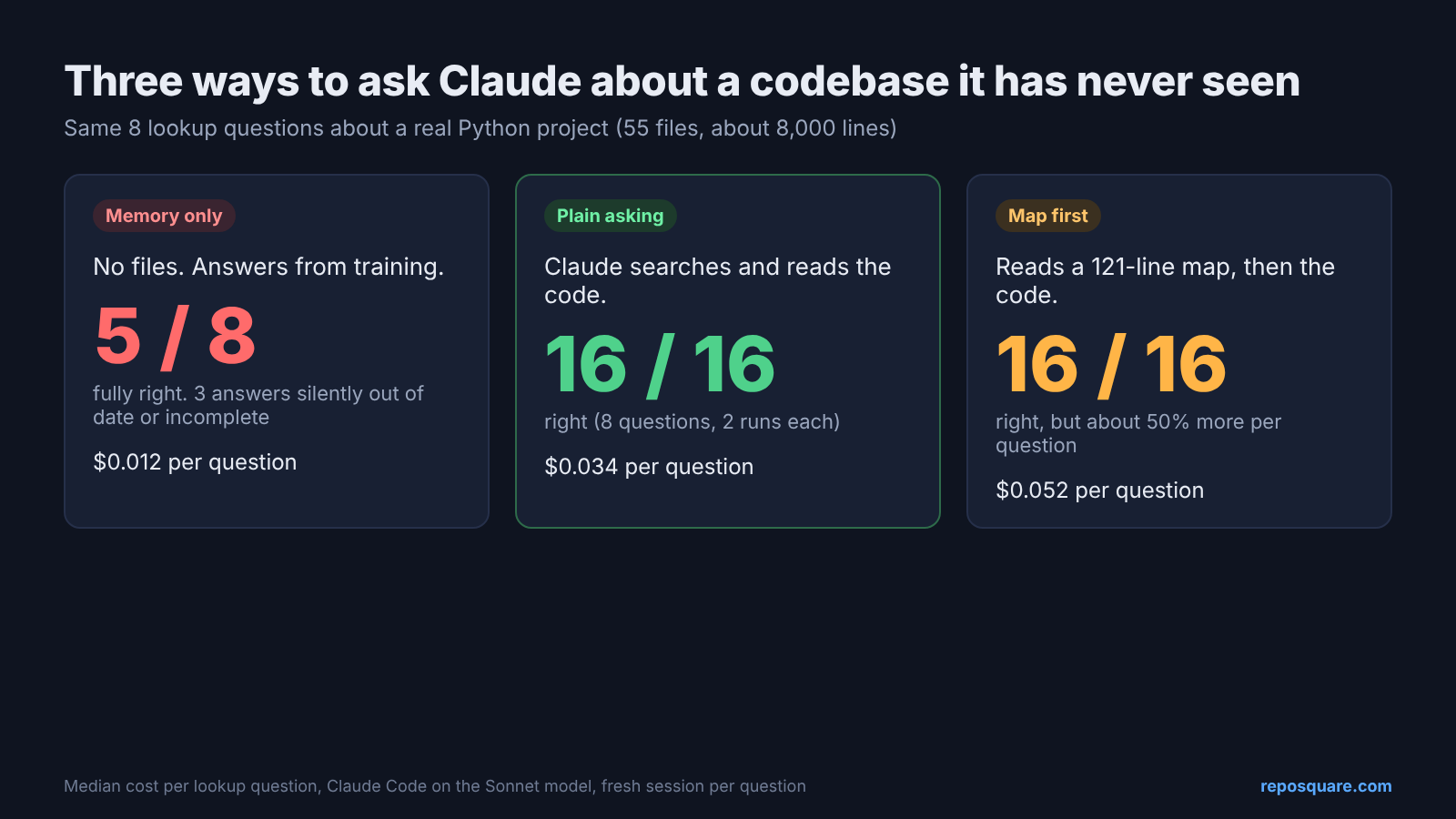
You open a project you have never seen. There are 55 Python files and about 8,000 lines, and the ticket says “retries fire too fast, fix it.” You don’t know where retries live, or what a retry even is in this code.
That first hour is the expensive part of every new job, every open source contribution, every inherited project. Claude Code (Anthropic’s AI coding assistant that runs in your terminal) can cut it down, but only if you ask it the right way.
So I ran the same questions through three setups and counted right answers, time and cost. One idea came out of it, and the rest of this post follows it: the map is for you, not for Claude.
Tested in October 2026 with the Claude Code CLI on the Sonnet model, against Dramatiq 2.2.1 from PyPI. Every number below comes from those runs.
Can Claude Code explain a codebase it has never seen?
Yes, because it reads the code before it answers, the same way you would.
Start from the base fact. An AI model only knows two things: what it learned in training, and what is in front of it in this conversation. The “in front of it” part is called the context window (the amount of text the model can see at once).
A whole project does not fit in that window, and it does not need to. Claude Code has search tools. Grep (a tool that finds every line containing a word) and Glob (a tool that finds files by name) let it jump to the right file, read only that part, and answer.
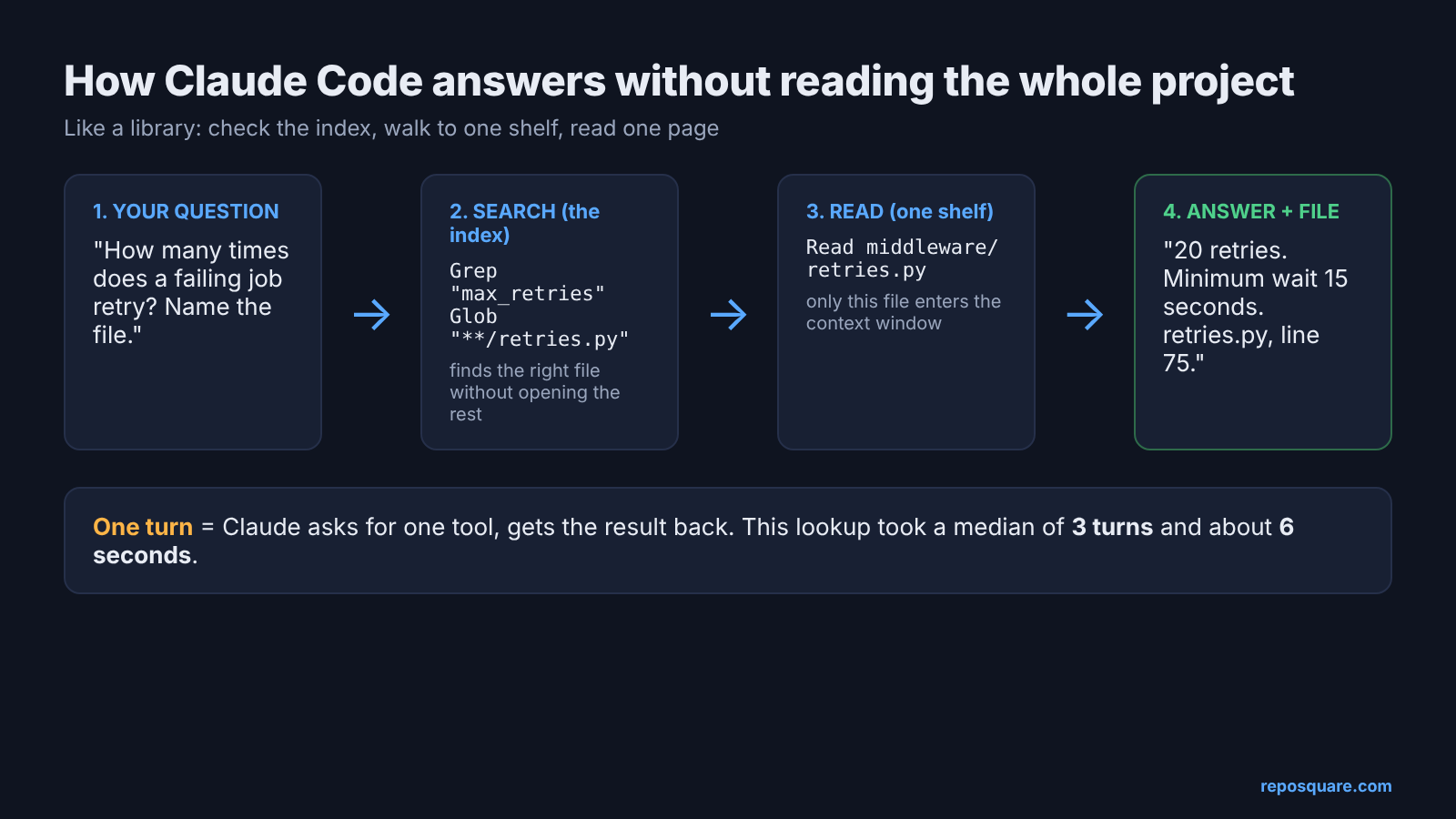
Think of a library you have never visited. You don’t read every book to find one fact. You check the index, walk to the shelf, and read one page. Grep is the index, and each trip to a shelf is one turn (one round where Claude runs a tool and reads the result).
That means the answer is only as good as the page it read. Which raises the obvious question: what if it skips the shelf?
What happens if Claude answers from memory?
It sounds sure, and on the details that changed between versions, it is wrong.
To see this, I needed a real project with checkable answers. I picked Dramatiq, a task queue library for Python. A task queue is a waiting line for slow jobs: your app drops a job in, and background workers pick it up later. Dramatiq calls each background function an actor, and the service holding the line is the broker.
Then I wrote eight questions with exact answers in the source. How many times does a failing job retry? What is the default time limit? Which broker do you get if you never pick one? I also added a trap: “where is the built-in cron scheduler configured?” There isn’t one.
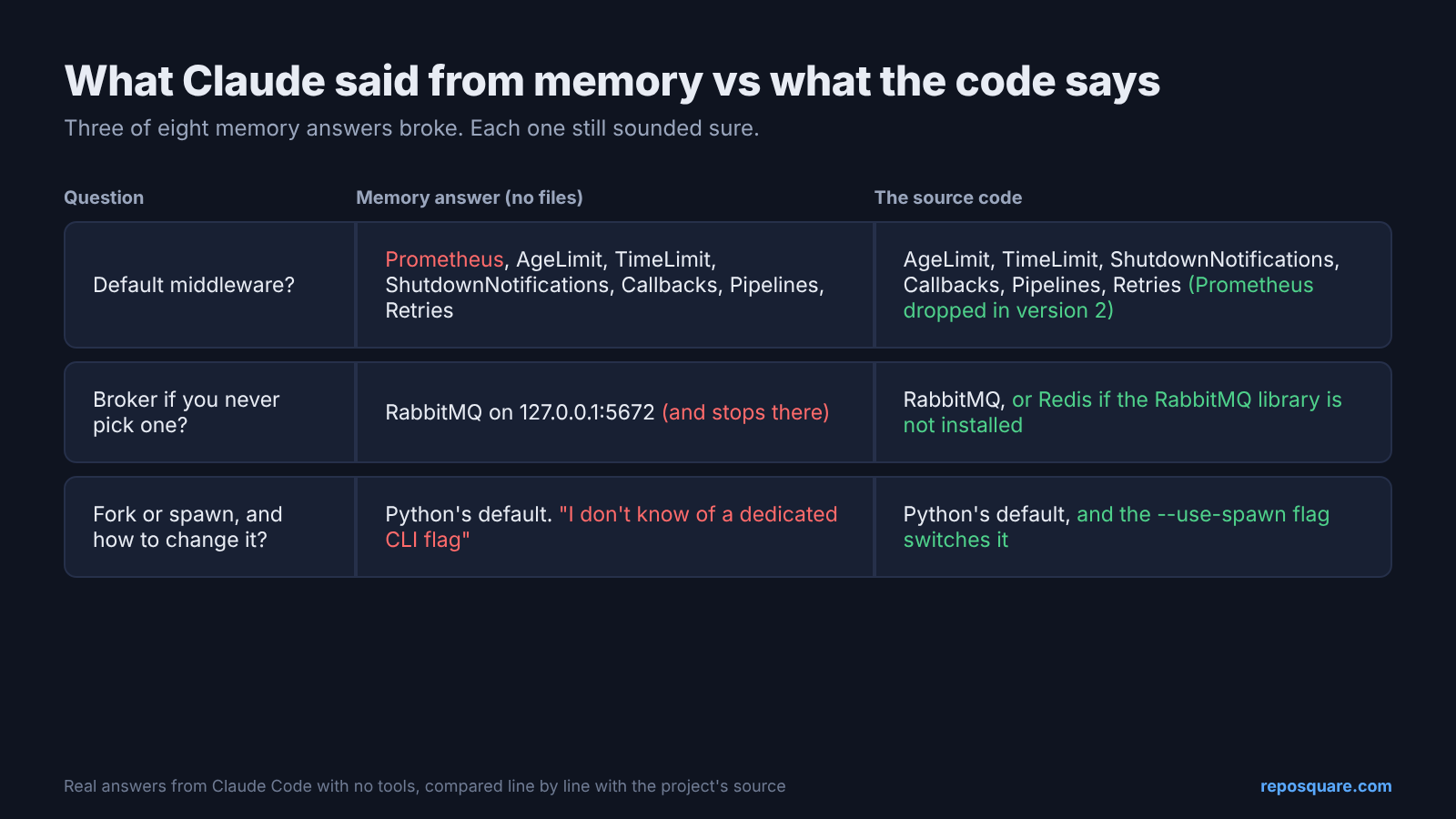
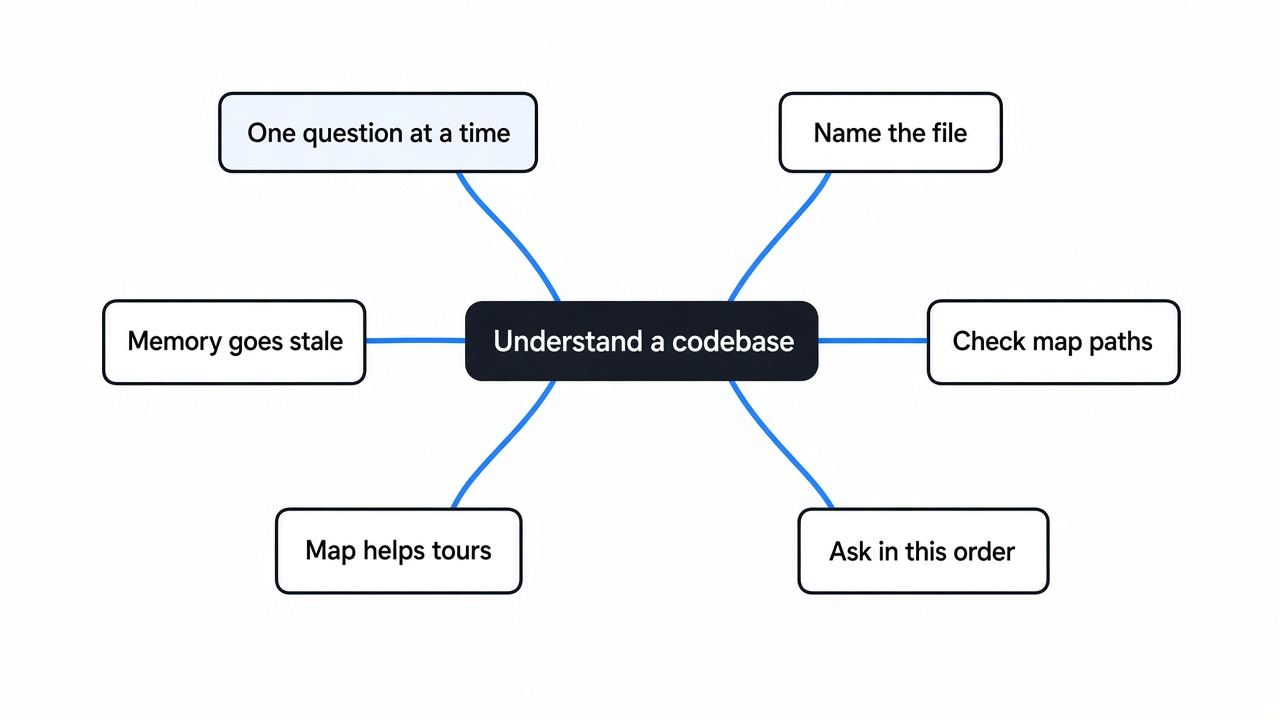
First setup: Claude with no tools, answering from training alone. It got 5 of 8 fully right. Three answers broke in a way you would not notice:
- It listed the default middleware (code that runs before and after every job) with Prometheus first. That was true in version 1. Version 2 removed it.
- It said the default broker is RabbitMQ and stopped. The code falls back to Redis when the RabbitMQ library is not installed.
- It did not know the
--use-spawnflag exists, and suggested a workaround it had not tested.
To be fair, every one of those answers said “I haven’t checked this version.” But a hedge at the end of a confident paragraph is easy to skim past. That is how a wrong default ends up in your fix.
So the rule is simple. Make it read before it answers.
Do you need a codebase map file before asking questions?
For quick lookup questions, no. Plain asking was just as accurate and cheaper.
A popular tip says: before asking anything, have Claude write a codebase map, a short document of what lives where. Then point Claude at it through CLAUDE.md (a file in your project that Claude Code reads at the start of every session, per the Claude Code memory docs). If you are new to that file, these four CLAUDE.md rules are a good start. Several open source tools draw these maps for you automatically.
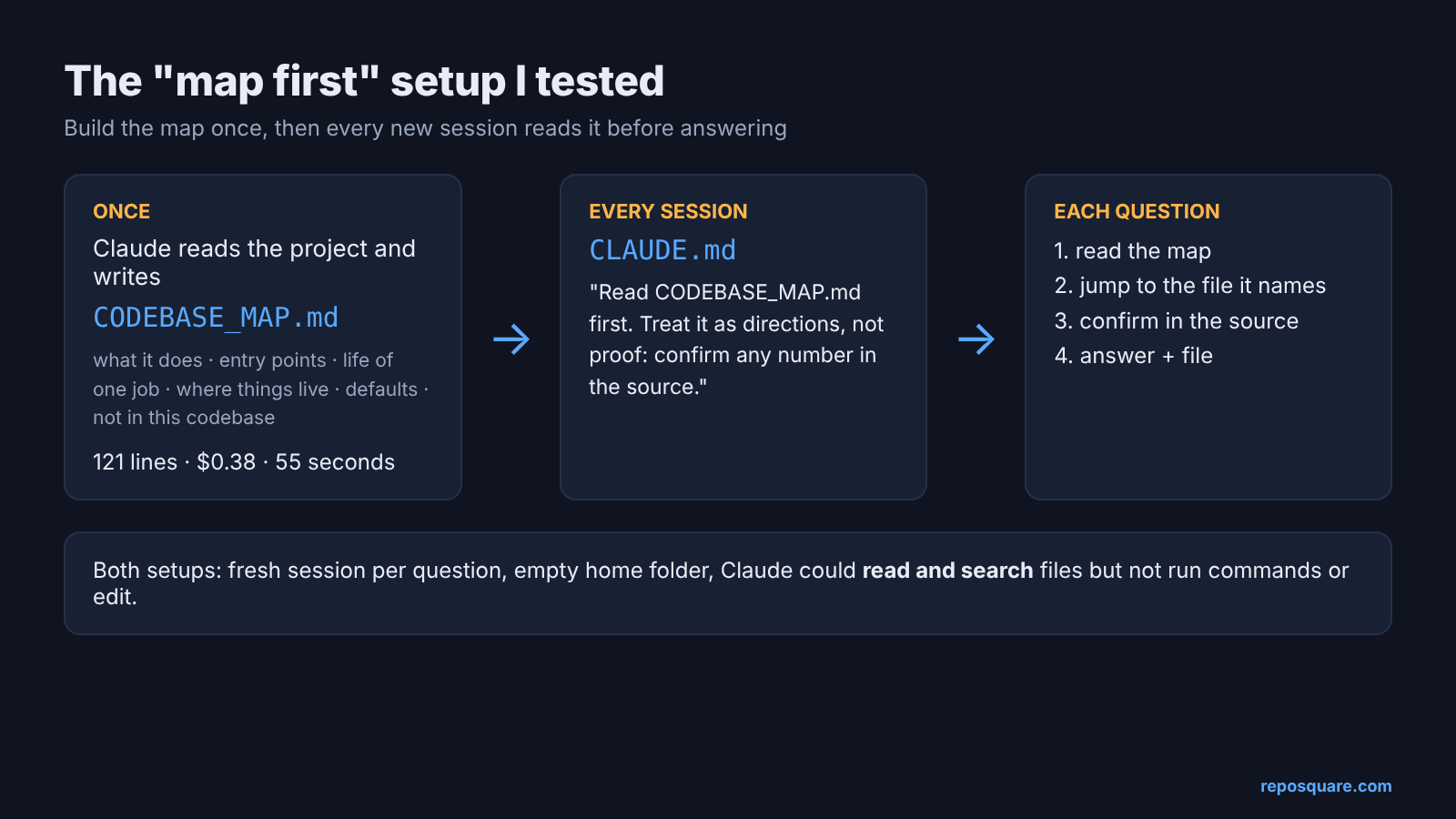
I tested that tip directly. Each question ran in a fresh session with an empty home folder, so nothing carried over between runs. Claude could read and search files but could not run commands or edit anything. If you want to know what those reads send off your machine, see what Claude Code sends to Anthropic. Every question ran twice per setup.
- Plain asking: Claude Code opened in the project, no map. 16 of 16 right.
- Map first: same project plus a 121-line map and a two-line
CLAUDE.mdtelling Claude to read the map, then confirm in the source. 16 of 16 right. - Memory only: no files at all. 5 of 8 right.
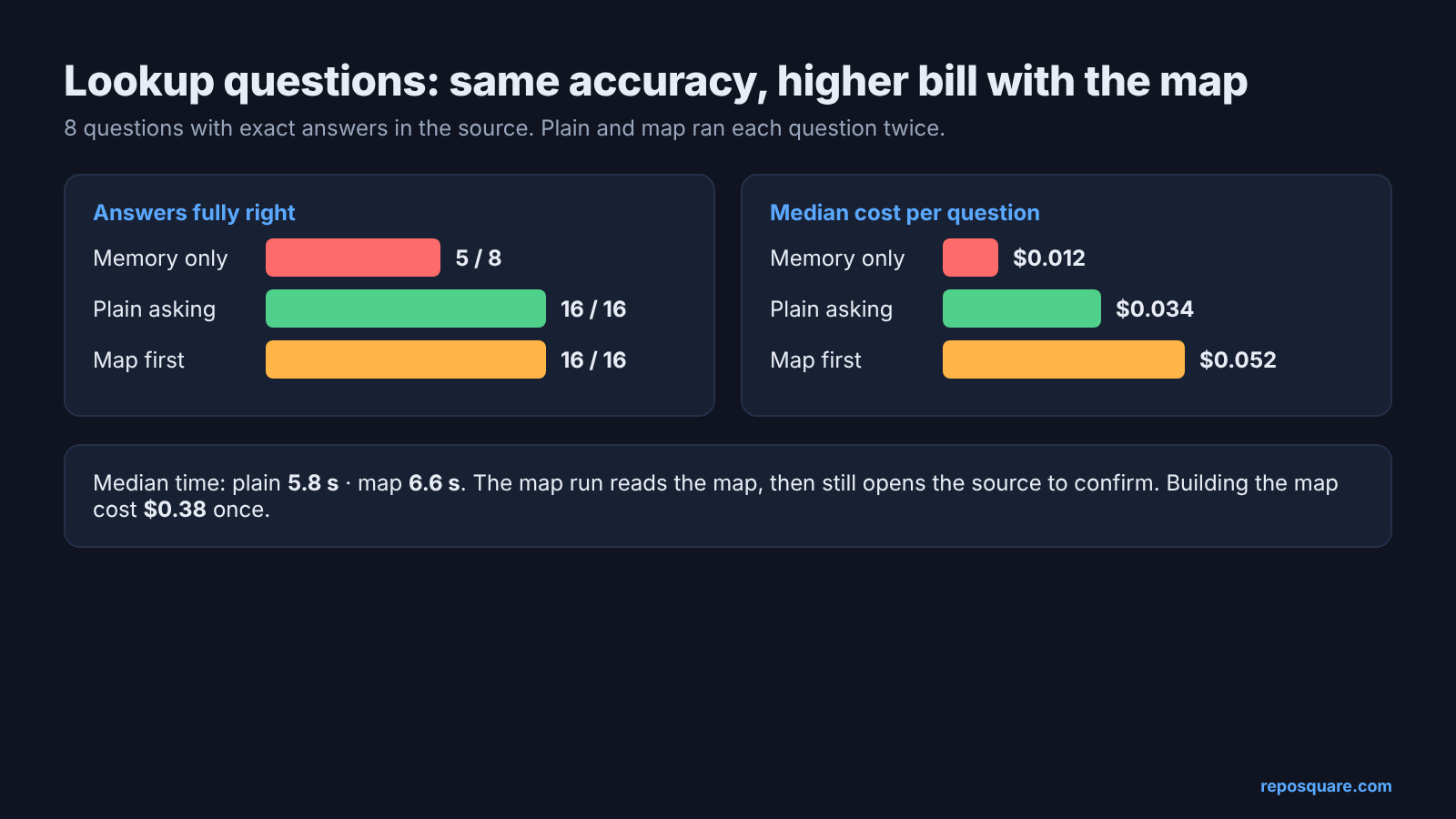
Accuracy tied, so the difference is cost. A plain lookup cost a median of $0.034 and took 5.8 seconds. With the map it cost $0.052 and took 6.6 seconds. Claude read the map, then still opened the source file to check, because I told it to. That extra reading was pure overhead on a question grep could answer in one hop.
Building the map also cost $0.38 and 55 seconds up front. On lookups, it never pays that back.
When does a codebase map actually help?
On “explain the whole flow” questions, and for the human reading it.
Lookups are one shelf. A tour is the whole building. So I asked a bigger question twice per setup: “Walk me through the life of one message, from calling .send() to the message being acknowledged. Name the file and function at each step.”
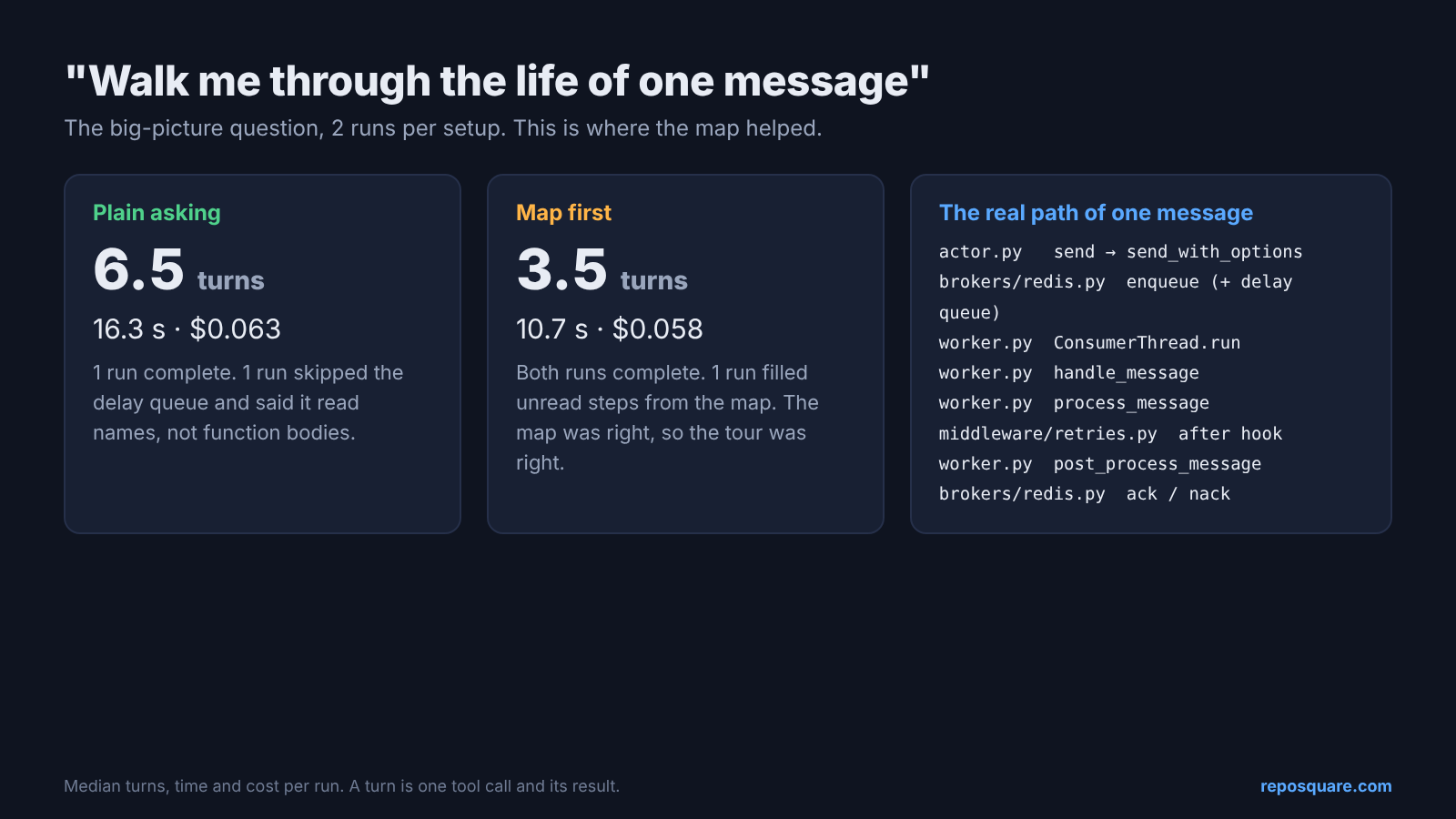
Here the map helped, mostly with speed. Without it, Claude took a median of 6.5 turns and 16.3 seconds. With it, 3.5 turns and 10.7 seconds, at slightly lower cost.
Accuracy was closer than the speed. One plain run gave a full, correct tour. The other skipped the delay queue and admitted it had read function names but not their bodies, so the middle was a guess. One map run said the same thing, but filled the gap from the map instead. The map happened to be right, so the tour was right.
That is the real trade. A map turns Claude’s guesses into informed guesses. If the map is wrong, the same error lands in every answer, which is why the check in the next section is not optional.
Two design questions (“how do I add a new broker?”, “can I cap an actor at two copies at once?”) came out the same as lookups. Both setups were fully right, and the map runs cost more.
There is a fair case for the map that the numbers don’t show. A team that onboards someone every month gets the same document every time. Still, the biggest win was not Claude’s. Those 121 lines are about a five-minute read, and after it I knew where every part of the project lived. The map is for you, not for Claude.
How do I make a codebase map with Claude Code?
One prompt, one check, and two lines in CLAUDE.md if you want Claude to use it too.
Open Claude Code in the project folder and paste this. The last two lines matter most, because they stop it from filling gaps with guesses.
Read this codebase and write CODEBASE_MAP.md in the project root for a
developer who has never seen it. Keep it under 150 lines. Include:
1. What the project does, in 3 sentences.
2. The entry points (command line, main public API).
3. The life of one unit of work from start to finish, naming the file
   and function at each step.
4. A table "Where things live": concern -> file path.
5. A table "Defaults": setting -> value -> file path.
6. A short list "Not in this codebase": common features a newcomer
   might expect that this project does not have.
Every file path you write must exist. Only write what you read in the
code. Do not guess.Then check it. A map with a wrong file path is worse than no map, because you will trust it. Run this from the project root. It prints every path in the map that does not exist anywhere in the project:
grep -oE '[A-Za-z0-9_./-]+\.(py|ts|js|go|rs|md)' CODEBASE_MAP.md | sort -u | while read p; do [ -e "$p" ] || [ -n "$(find . -path "*/$p" -print -quit)" ] || echo "missing: $p"; doneNo output means every path is real. To be sure the check works, I added a fake line pointing at a scheduler file that does not exist, and it printed exactly that one path.
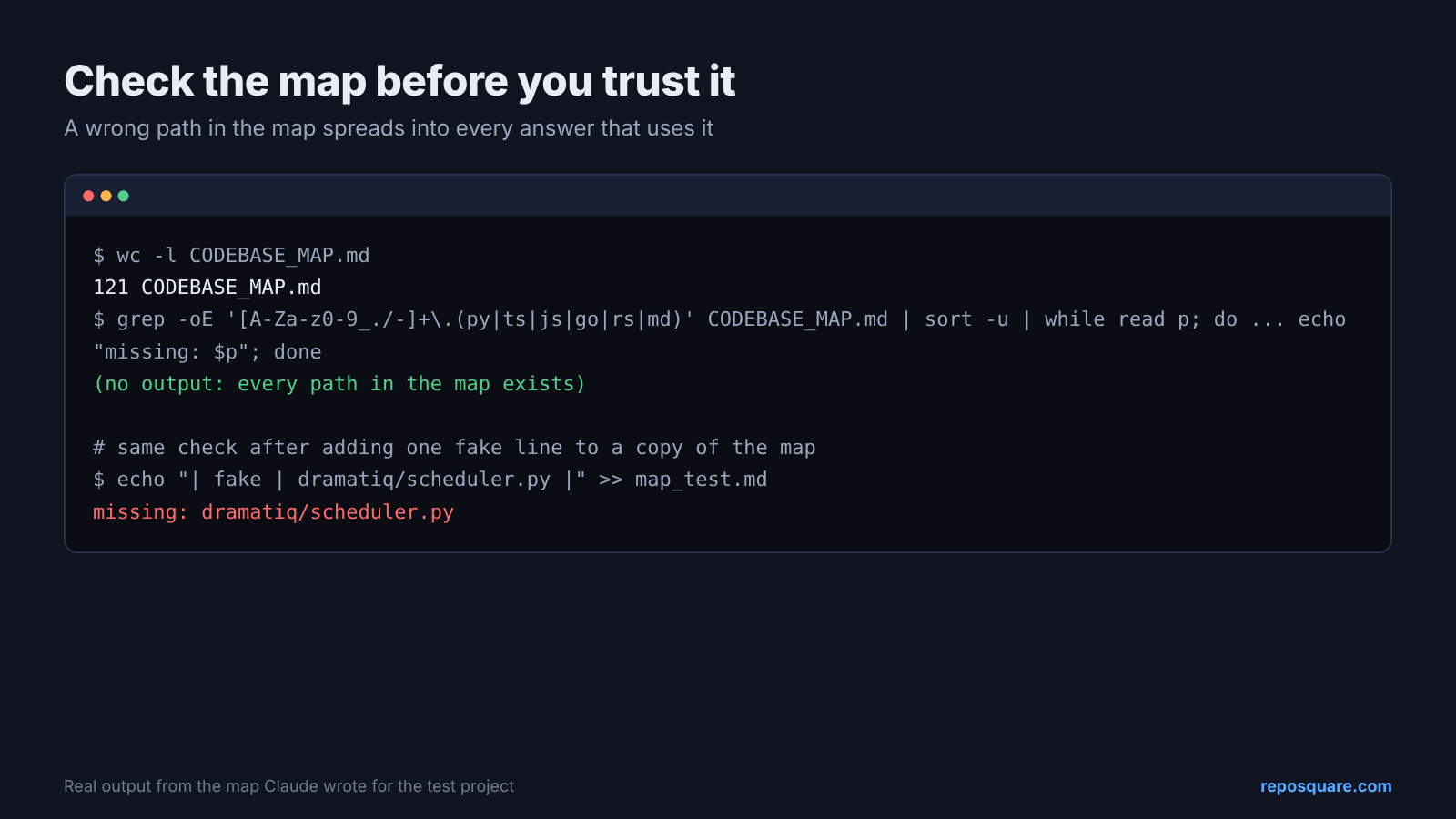
My map passed. I also checked all 24 values in its defaults table against the source by hand, and none were wrong. If you want Claude to use the map, add this to CLAUDE.md (and if Claude seems to skip the file, Claude Code not reading AGENTS.md covers the fixes):
Before answering a question about this codebase, read CODEBASE_MAP.md.
Treat the map as directions, not proof: open the file it points to and
confirm any number or behaviour in the source before you answer.What questions should I ask Claude Code first?
Go from the big picture down to the line you need to change.
Order matters because each answer gives you the words for the next question. In my tests this order worked well:
- “What does this project do, and what are its entry points?”
- “Walk me through the life of one [request / job / message], naming the file and function at each step.”
- “Where is [the thing in your ticket] decided? Name the file.”
- “What happens if [the edge case in your ticket]? Show the lines.”
- “Is there already something for [what you planned to build]?”
Question 5 is the cheap insurance. When I asked about capping an actor at two copies, both setups found a ready-made limiter that already does it. That is an afternoon you don’t spend writing one.
How do I know Claude’s answer is right?
Make it name the file, then open that file yourself for any number you will act on.
Every right answer in my test named a file and usually a line. The trap question is the clean example: in plain asking, Claude searched for “cron”, “schedule” and “periodic”, found one unrelated hit in the file watcher, and said there is no scheduler. That is an answer you can check in ten seconds.
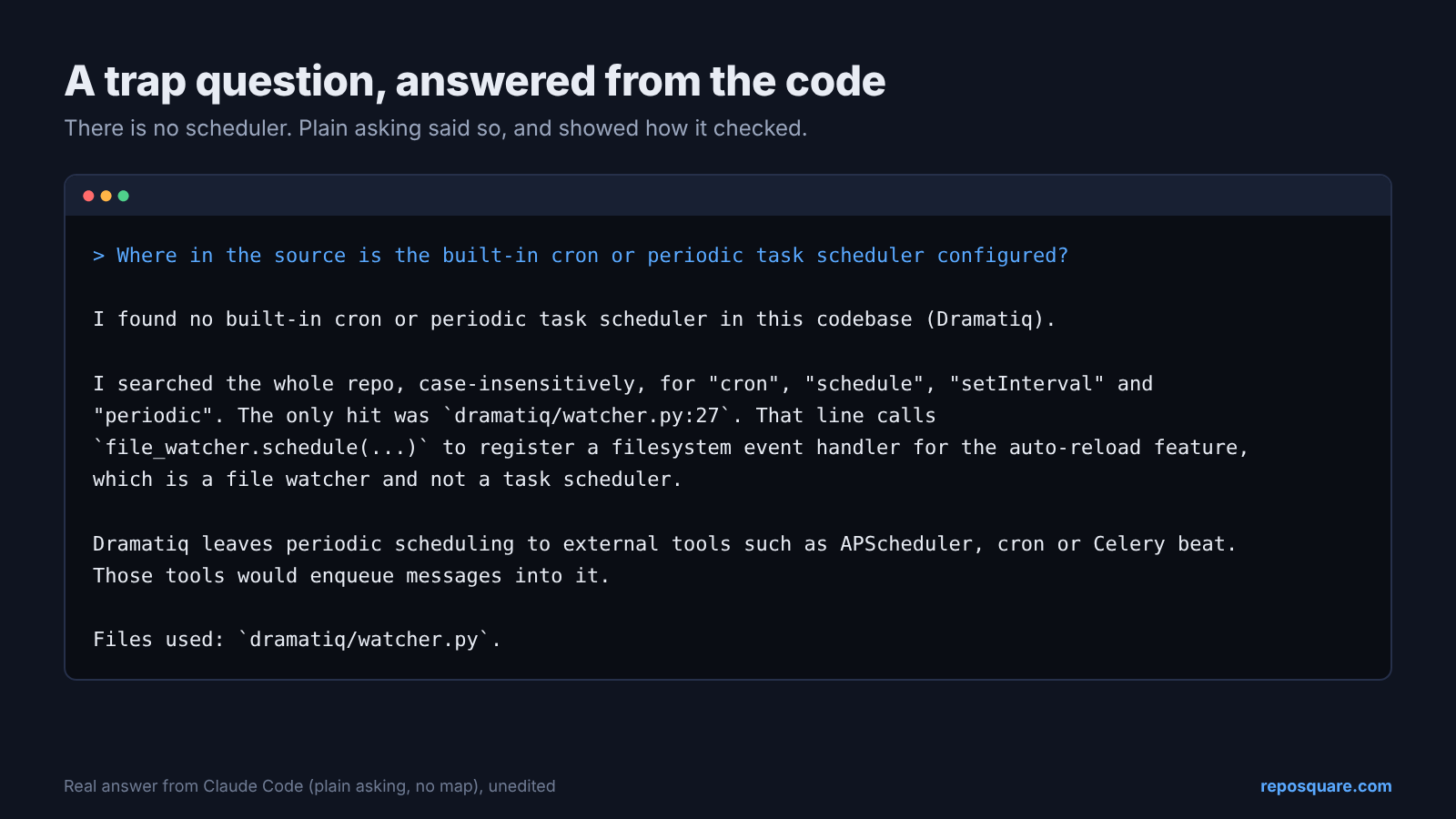
Watch for the admission lines too. “I didn’t open the bodies of the other functions” came from the run that skipped a step on the tour. When you see that sentence, ask a follow-up about the part it skipped.
So open the project, ask it to name the file, and save the map for the person reading it. That’s you.
Common questions about understanding a codebase with Claude Code
Can Claude Code read my whole codebase at once?
No, and it doesn’t need to. It searches by word and file name, then reads only the parts that answer your question, like using a book’s index.
Should I put a codebase map in CLAUDE.md?
Only if you ask a lot of “explain the whole flow” questions. For quick lookups it gave the same accuracy at about 50% more cost per question in my test.
Why did Claude give a wrong answer about a library it knows?
It answered from training, which reflected an older version. The default middleware list changed between versions, and memory had the old one.
How much does it cost to ask Claude Code about a codebase?
In my test a lookup question cost a median of about three and a half cents on the Sonnet model, and a full walkthrough about six cents. Building a 121-line map cost about 38 cents once.