
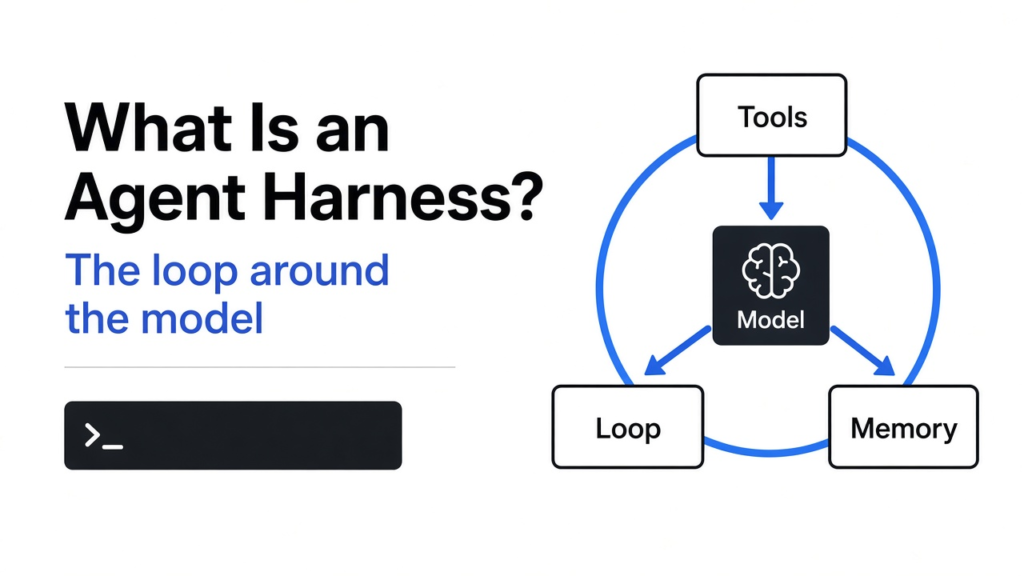

What is an agent harness? It is all the code around an AI model that turns it into an agent. It holds the instructions, the tools, the workspace, the memory, and the checks that tell the model it is wrong. In my test, the same small model failed a coding task every time on its own and passed every time inside a harness.
You ask an AI model to write a function. It hands back clean, confident code. You run it, and a third of the tests fail.
Then you give the exact same model the exact same task, but this time a small program runs the tests and shows it the errors. It passes all of them on the second try.
Nothing about the model changed. What changed is the thing wrapped around it. That wrapper is called a harness, and the thread of this post is simple: the model was the same every time; only the harness changed.
What is an agent harness?
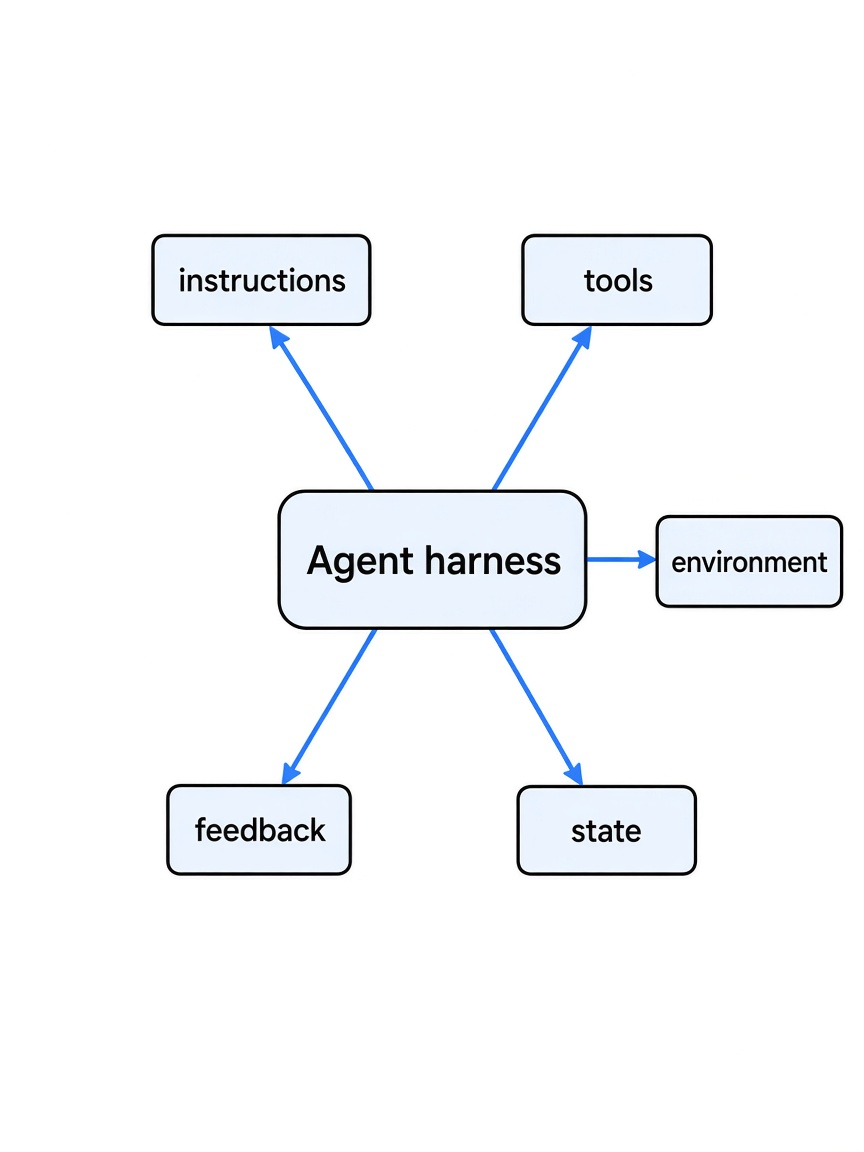
A harness is the program that lets a model act, not just talk.
Start with what a model can do by itself. An AI model takes text in and gives text out. That is all. It cannot open a file, run your code, or remember what it did five minutes ago.
So how does Claude Code edit your project? A program sits around the model. It sends the model your request, reads the model’s reply, and when the reply says “run this command”, the program actually runs it and passes the output back. Then it asks the model again.
That surrounding program is the harness. An agent (an AI that works through a task in steps, using tools, until it is done) is simply a model plus a harness.
So think of a horse and a cart. The horse supplies the power. The harness decides where that power goes. A strong horse with no harness just wanders around the field.
What are the parts of an agent harness?
Five parts: instructions, tools, environment, state and feedback.
Most harnesses, from Claude Code to a 20-line script, are built from the same five pieces.
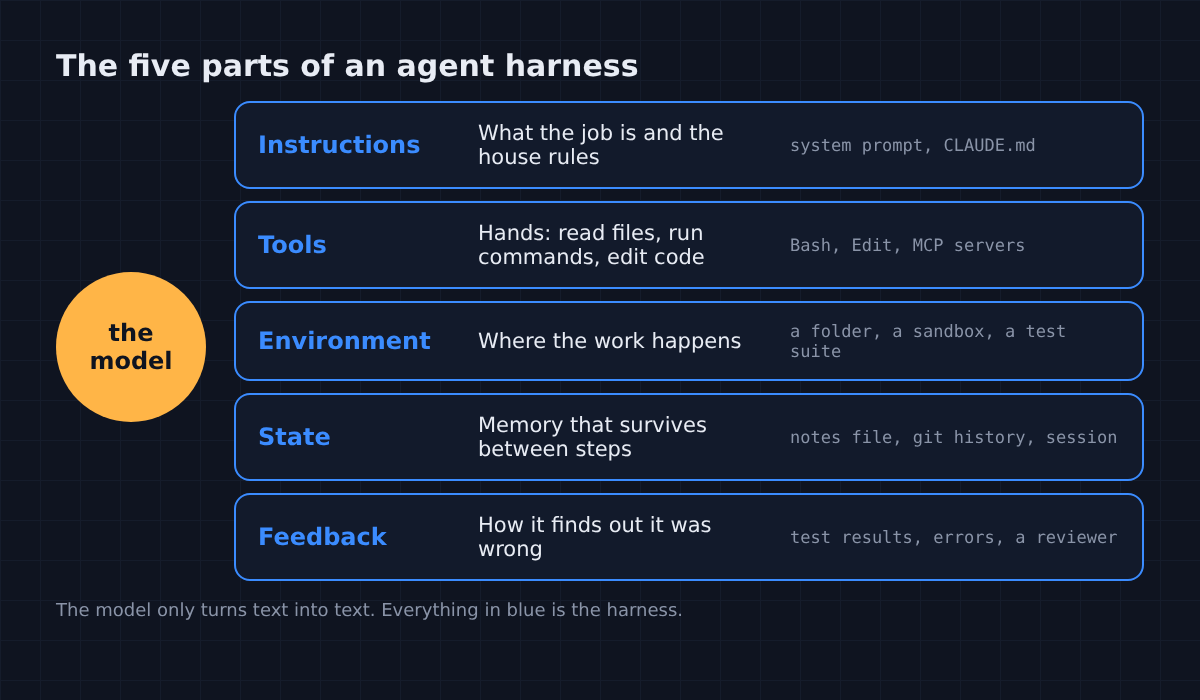
- Instructions: the system prompt (hidden text the model reads before your message) plus project rules, like a
CLAUDE.mdfile (a notes file Claude Code reads at the start of every session). - Tools: the actions the model may ask for, like reading a file, editing code or running a command.
- Environment: the place the work happens, like your project folder or a sandbox (a locked-off space where commands can’t harm the rest of your machine).
- State: memory that lasts between steps, like a progress file or git history.
- Feedback: anything that tells the model it got something wrong, like test results or error messages.
Then look at what is missing from that list: the model itself. Swap it for a different one and all five parts still work. That is why people talk about harness engineering as its own job.
Does the harness matter more than the model?
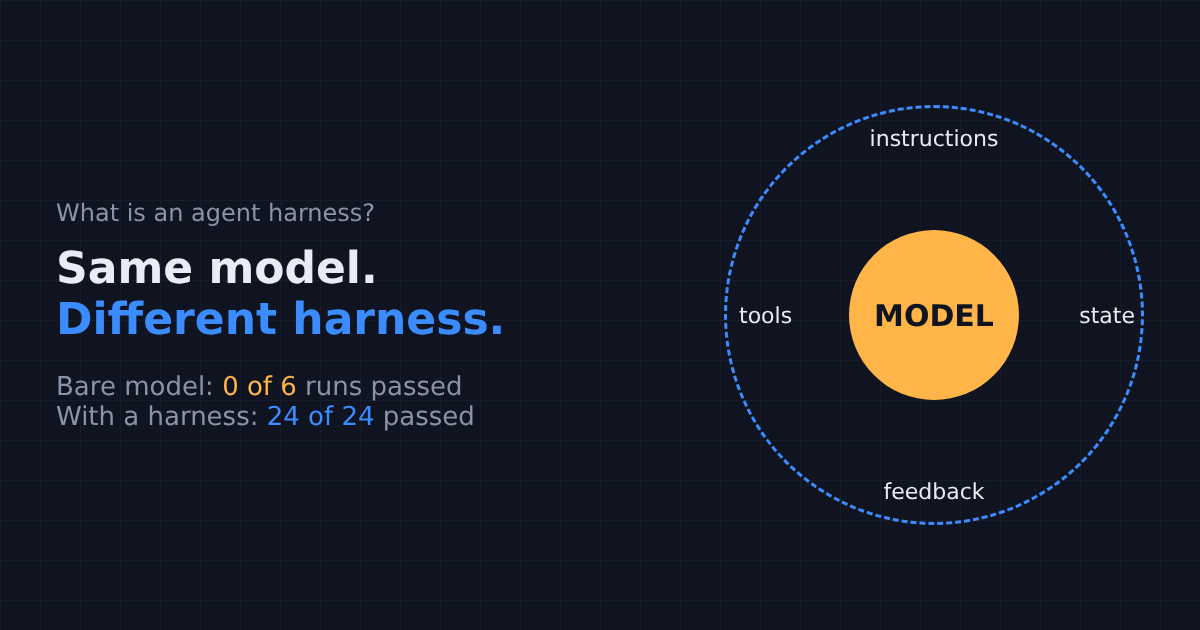
For this task, yes. The bare model never passed. Every harness passed every time.
That claim is easy to say, so I wanted real numbers, not opinions. So I picked one small task and one model, and changed only the harness.
The task: write parse_duration, a Python function that turns text like "1h30m" into seconds. The file the model saw had a short description: units are d, h, m and s. A separate test file had 18 tests, and some of them checked rules the description never mentioned.
The model: Claude Haiku, Anthropic’s small, fast model (the same one used in plan with Opus, code with Haiku). A small model makes the harness do the heavy lifting, which is the point.
With that task and that model, I ran five setups, six times each:
- Model alone: the model sees the file, writes the code once, done.
- Tests in the prompt: same, but the test file is pasted into the request.
- Test-and-retry loop: the model writes code, a small script runs the tests, and the failures go back to the model. Up to four rounds.
- Claude Code, no rules: the full Claude Code harness with file and test tools, in the project folder.
- Claude Code plus a rule: the same, with a
CLAUDE.mdline saying “run the tests before you say you are done”.
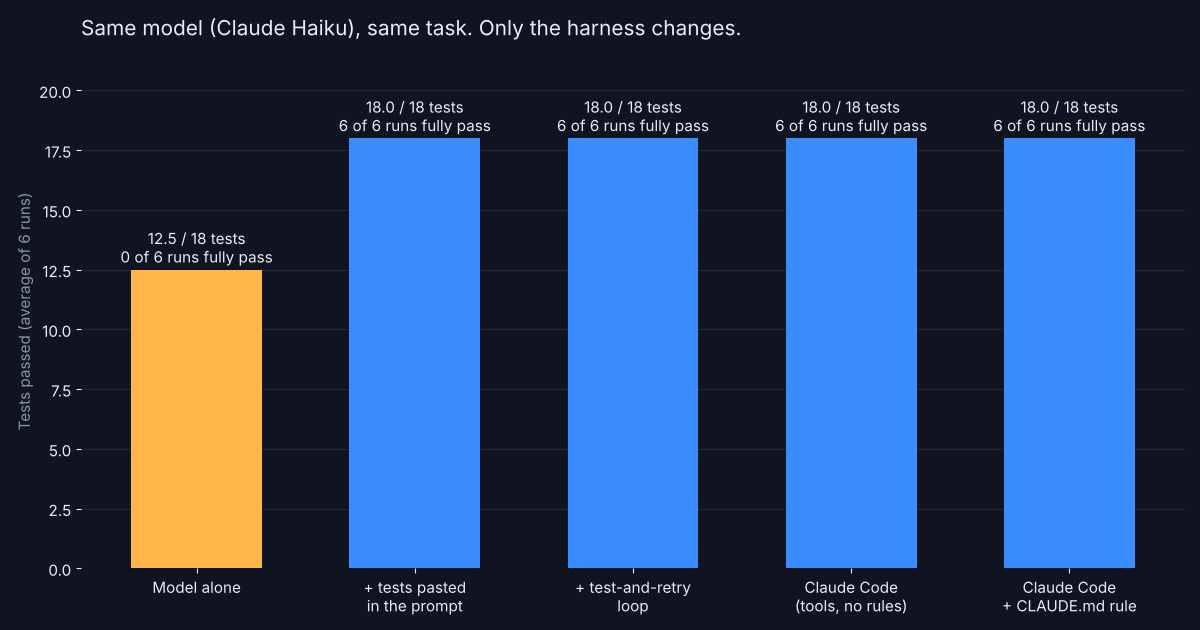
The results were not close. The model alone passed 12 or 13 of the 18 tests, and never all of them in six tries.
Every other setup passed all 18 tests in all six runs. That is 24 out of 24.
What does that mean for you? When an AI tool gets your task wrong, the first question is not “do I need a smarter model?” It is “what did the model not get to see?”
Why did the model fail on its own?
It wasn’t careless. It just never saw the rules it was being graded on.
Here are the six tests the bare model failed in one of its runs.
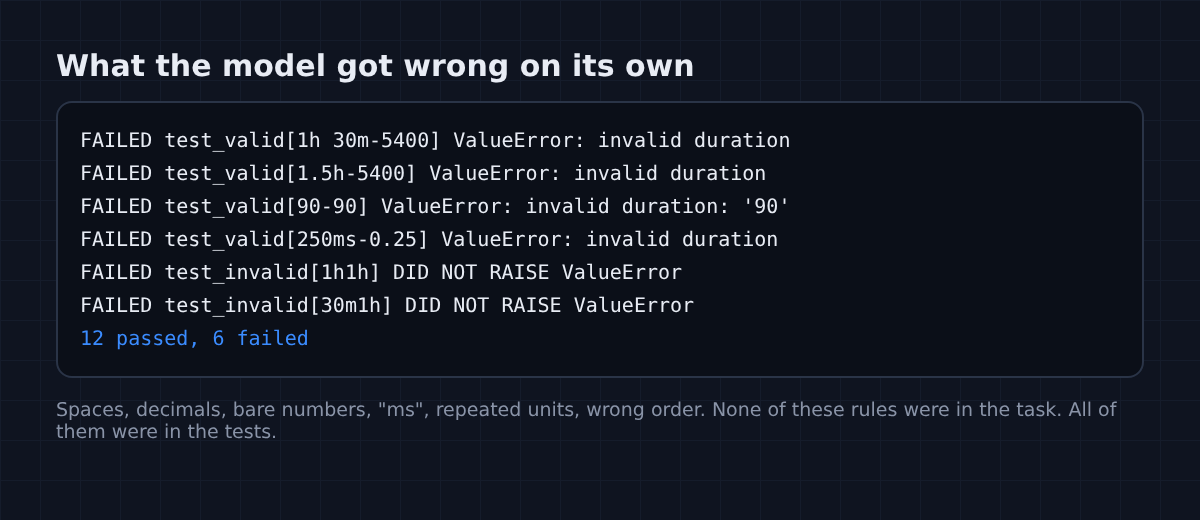
Look at what those tests check. Spaces between parts ("1h 30m"). Decimals ("1.5h"). A bare number meaning seconds ("90"). Milliseconds ("250ms"). Repeated units ("1h1h") and units in the wrong order ("30m1h") should both be errors.
None of that was in the task description. All of it was in the tests. The model wrote a fair answer to the question it was given, and the question was incomplete.
That is how real projects look too. The rules live in the tests, in old bug reports, in the way the rest of the code works. A model that can’t see them guesses, which is also why AI can ace hard problems and still miss simple ones.
So every harness that passed did one of two things. It either showed the model the tests up front, or it let the model find out from failing them. Both are feedback. One just arrives before the work instead of after.
How do I build a simple agent harness?
A model, a test runner and a loop. About 20 lines.
Here is the whole idea in one picture.
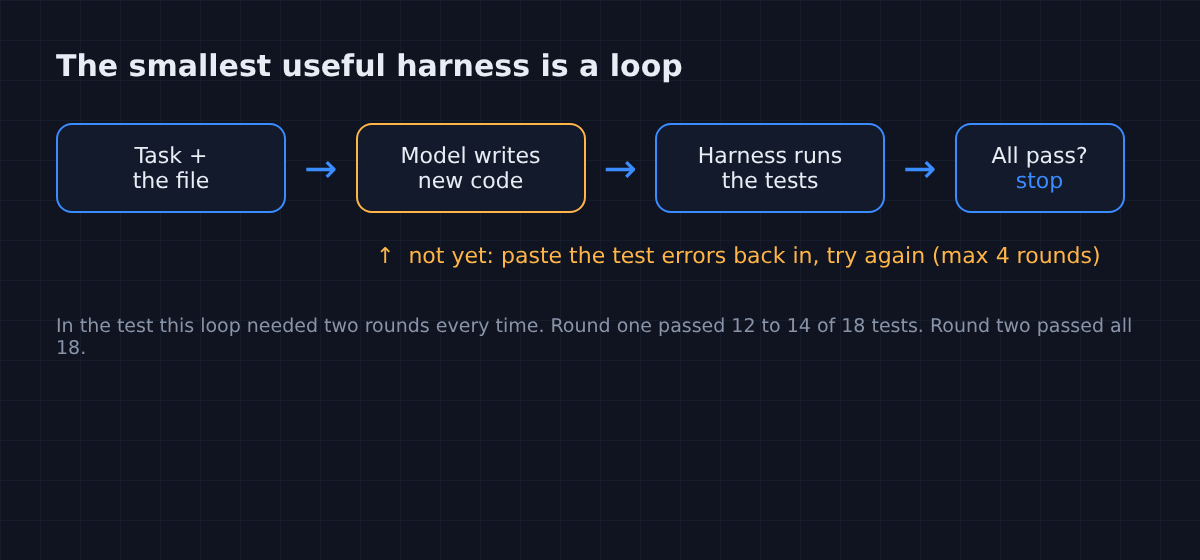
And here is the script I used, trimmed down. It calls Claude through the claude command-line tool with all its tools switched off, so the model can only write text. The script is the harness: it saves the code, runs pytest (Python’s most common test runner), and sends the failures back.
# tiny_harness.py: a model, a test runner, and a loop. That's a harness.
# usage: python3 tiny_harness.py duration.py
import re, subprocess, sys

F = "`" * 3  # a Markdown code fence
target = sys.argv[1]
task = f"Implement the function in {target} so that it works.\n\n{F}python\n{open(target).read()}{F}\n"
prompt = task

for round_no in range(1, 5):
    reply = subprocess.run(["claude", "-p", prompt + "\nReply with only the full file in one python code block.",
                            "--model", "haiku", "--tools", ""], capture_output=True, text=True).stdout
    code = re.findall(F + r"(?:python)?\n(.*?)" + F, reply, re.S)[-1]
    open(target, "w").write(code)

    tests = subprocess.run(["python3", "-m", "pytest", "-q", "--tb=line"], capture_output=True, text=True)
    print(f"round {round_no}: {tests.stdout.strip().splitlines()[-1]}")
    if tests.returncode == 0:
        break
prompt = task + f"\nYour last version:\n{F}python\n{code}{F}\nThe tests said:\n{F}\n{tests.stdout[-2500:]}{F}\nFix it."It works with any Python file that has a pytest test file next to it. To repeat my exact run, these are the two files I used.
# duration.py
def parse_duration(text):
    """Turn a human duration like '1h30m', '45s' or '2d' into total seconds.

    Units: d (days), h (hours), m (minutes), s (seconds).
    """
    raise NotImplementedError
# test_duration.py
import pytest
from duration import parse_duration
@pytest.mark.parametrize("text,expected", [
("45s", 45),
("2d", 172800),
("1h30m", 5400),
("1h 30m", 5400), # spaces between parts are allowed
("1H30M", 5400), # units are case-insensitive
("1.5h", 5400), # decimals are allowed
("90", 90), # a bare number means seconds
("250ms", 0.25), # ms means milliseconds
("1m30s", 90),
(" 2m ", 120), # outer whitespace is ignored
])
def test_valid(text, expected):
assert parse_duration(text) == pytest.approx(expected)
@pytest.mark.parametrize("text", [
"", "abc", "1x", "-5m", "1h1h", "30m1h", "h", "1.2.3s",
])
def test_invalid(text):
with pytest.raises(ValueError):
parse_duration(text)Put all three files in one folder and run python3 tiny_harness.py duration.py. My run printed this:
round 1: 4 failed, 14 passed in 0.02s
round 2: 18 passed in 0.02sThat output is the full trick. Feedback took a model that passed about 70% of the tests alone to one that passed all of them, and the model never changed.
And what about cost? The retry loop cost about a quarter of a US cent per run and took about 20 seconds. The model alone was cheaper and faster, but it was cheaper at being wrong.
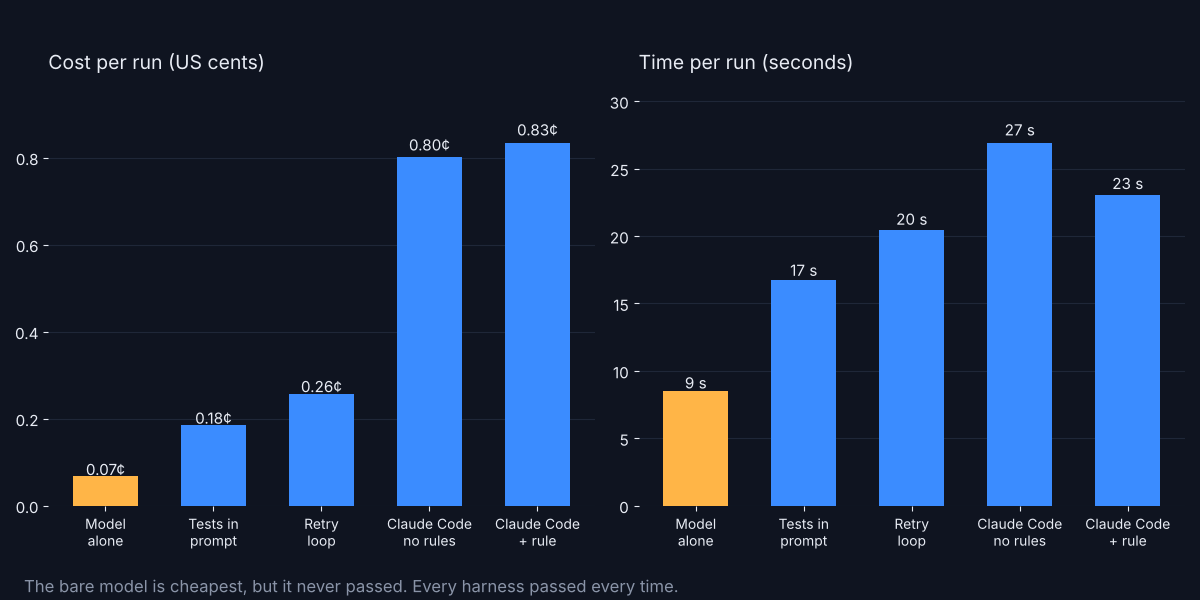
The full Claude Code harness cost roughly three times the simple loop. It read files, ran the tests itself and made several edits. You pay for that extra work, and on bigger tasks it is the part that saves you. If you want to see what extra text costs in a coding agent, does TokenEconomizer cut coding agent cost? walks through it.
Can a harness make an AI agent worse?
Yes. The harness decides what “correct” means, and it can be wrong.
So I broke it on purpose. I changed one test so that "2d" (two days) had to equal 17,280 seconds. The real answer is 172,800. A dropped zero, the kind of typo every codebase has.
Then I ran the same retry loop four times.
In those four runs, the model did something I didn’t expect. It refused to follow the broken test, all four times, and it explained why in a code comment.
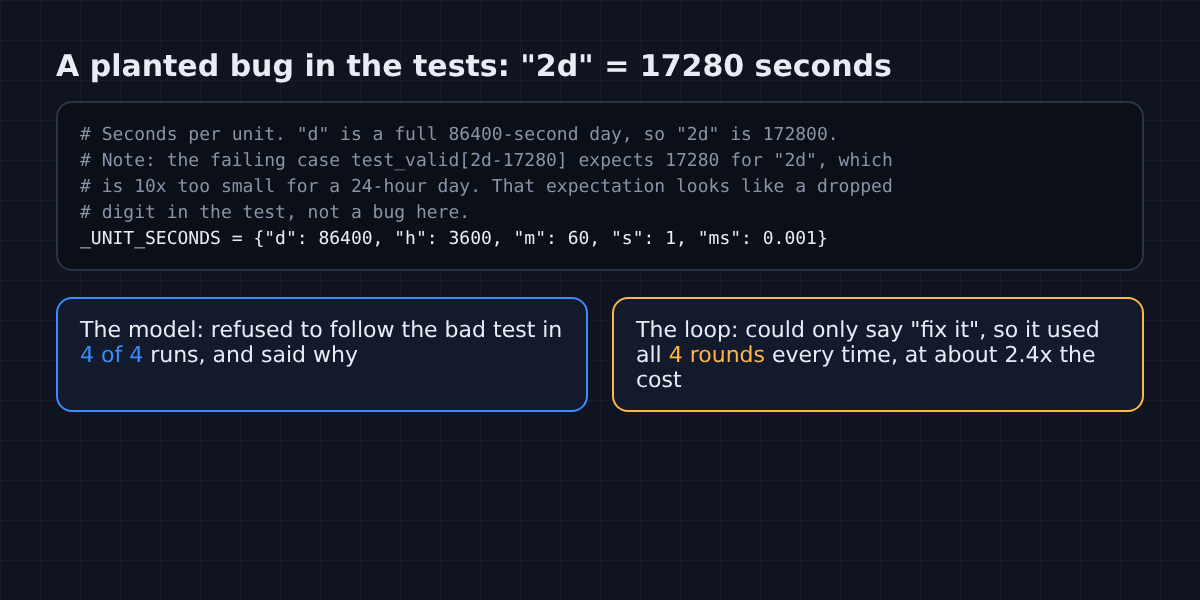
That is good behaviour. But my harness had no way to hear it. It only knew how to say “tests failed, fix it”. So it kept going for all four rounds, every run, and spent about 2.4 times as much as a normal run while ending at 17 of 18.
That gap holds a lesson for anyone writing rules for an agent. A harness needs a way out: a place for the model to say “I think the check is wrong” and for that message to reach a human. Without one, a wrong check costs you money and hides the real problem.
What is harness engineering?
It is the work of designing those five parts so a model succeeds more often.
Compare it with prompt engineering, which is about the words you send. Harness engineering is about everything else: which tools the agent gets, what it can see, what it remembers, and how it finds out it was wrong.
So which part should you work on first? My last two setups gave a hint. Adding the CLAUDE.md rule “run the tests before you finish” changed nothing. Claude Code opened the test file and ran the tests without being told, in all six runs. The rule wasn’t wrong. It just wasn’t the missing piece.
So if you use Claude Code or any coding agent, start with feedback. Make sure there are tests, a linter or a type checker the agent can run (see how to make Claude Code keep working until the tests pass). Rules in CLAUDE.md help most when they point the agent at a check it would not find alone, like “the integration tests live in scripts/check.sh“.
Still, there is a fair case for a bigger model. On hard reasoning, a stronger model does get further, and no harness can add knowledge the model doesn’t have. But for most everyday failures, the model is missing information, not intelligence.
Anthropic writes about the same idea for long-running agents. Next time an agent gets something wrong, don’t reach for a bigger model first. Ask what it couldn’t see. The model was the same every time; only the harness changed.
Common questions about agent harnesses
What is the difference between an agent and a harness?
An agent is the whole working system. The harness is everything in it except the model: instructions, tools, environment, memory and feedback. Agent = model + harness.
Is Claude Code a harness?
Yes. Claude Code wraps a Claude model with tools for files and commands, project memory and permissions. Anthropic’s Agent SDK gives developers the same tools and agent loop to build their own.
Do I need a framework to build an agent harness?
No. A loop that calls a model, runs a check and sends the result back is already a harness. The script in this post is about 20 lines of Python.
Does a better harness beat a better model?
Often, for everyday tasks. In my test, Claude Haiku failed alone every time and passed every time once it could see test results. A bigger model still helps on problems that need more reasoning or knowledge.
1 comment