
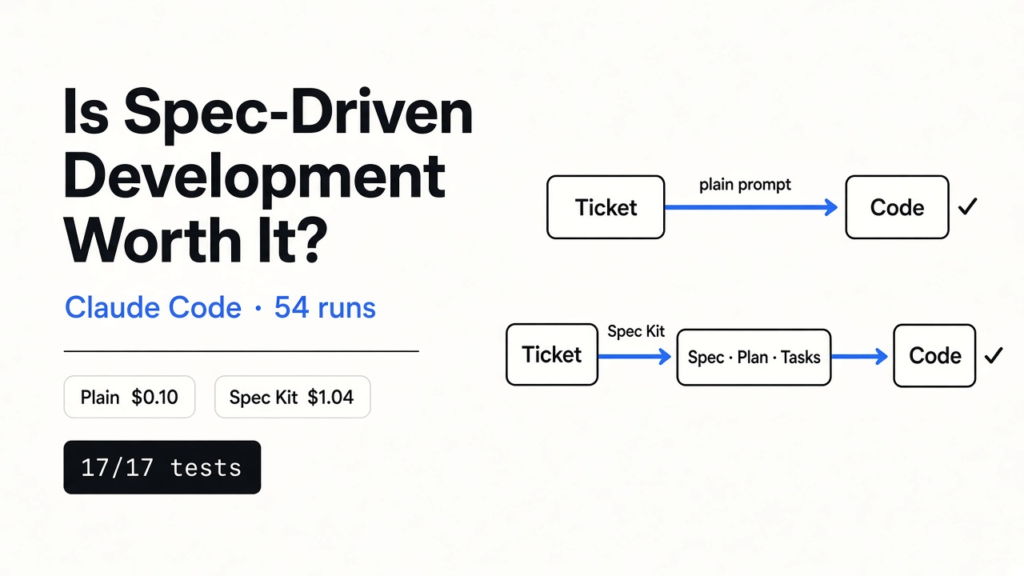

Is spec-driven development worth it with Claude Code? For a small, clearly written feature, no.
I ran Claude Code 54 times on three tickets with hidden tests. The plain prompt and GitHub’s Spec Kit passed every test, every time, but Spec Kit cost about 10 times more on Sonnet and took 5 to 9 times longer. Its real value is a written plan you can check before any code exists.
Tested with Claude Code 2.1.318 on Sonnet and Haiku, headless (claude -p), Spec Kit via specify-cli 1.3.1 Lean preset, hidden pytest suites kept outside each project folder. Commands checked against the Spec Kit docs and the Spec Kit repo in November 2026.
You install Spec Kit, type /speckit-specify, and four minutes later your repo holds 4,500 words of spec, plan and task list. The feature itself is 63 lines of Python. Was all that paper worth it?
That question matters because spec-driven development is the loudest fix for “the AI built the wrong thing”. It promises fewer misunderstandings in exchange for more steps, more tokens and more waiting.
So I measured it. Below: what spec-driven development is, how Spec Kit runs it in Claude Code, and what changed in real runs. Then the cheaper middle path that gave me most of the benefit for a fraction of the bill.
What is spec-driven development?
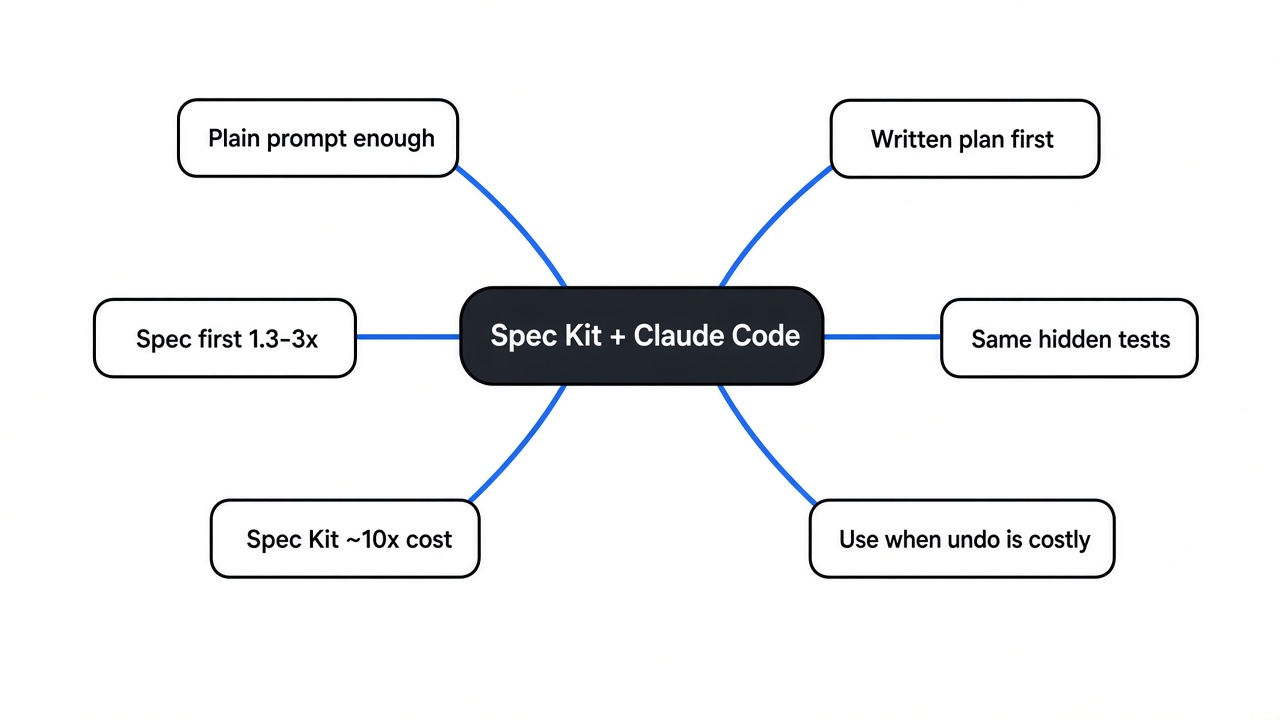
It means the AI writes down what it will build, and you check it, before any code exists.
Start with how a normal prompt works. You hand Claude Code a ticket, it reads it, makes a few dozen small decisions in its head, and writes code. You only see those decisions later, buried in the diff (the list of changed lines).
Most of the time those silent decisions are fine. The trouble starts when one is wrong, because by then it is spread across five files and a test suite.
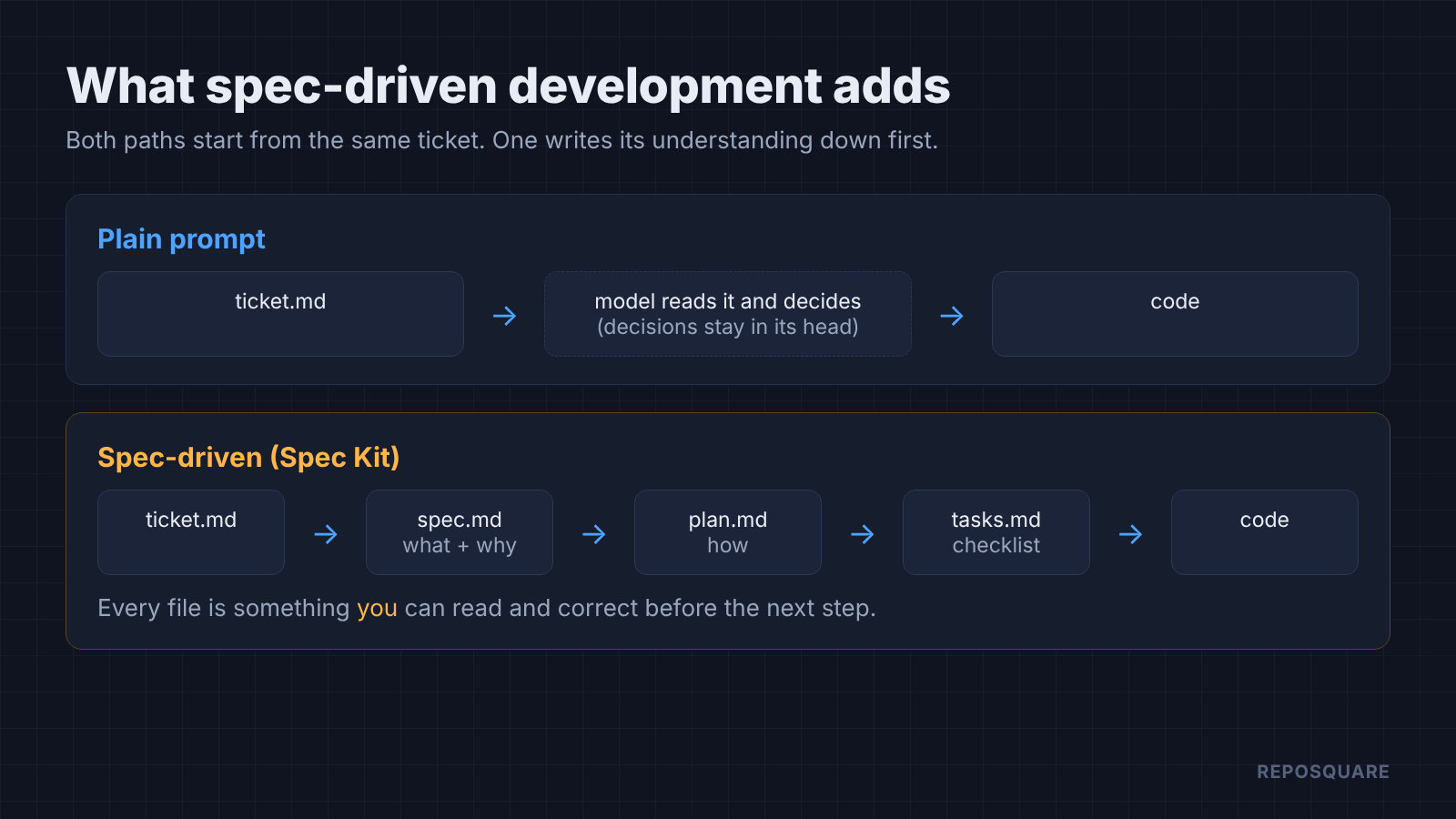
Spec-driven development moves those decisions onto paper first. A spec (a plain document listing what the software must do, one testable rule per line) comes before the plan, the plan comes before a task list, and only then does code get written.
Think of a builder who shows you a floor plan before pouring concrete. Moving a wall on paper costs nothing. Moving it after the concrete sets is expensive.
How does Spec Kit work in Claude Code?
Spec Kit is GitHub’s open source toolkit that turns each step of that process into a command.
You install the specify command line tool, run it once in your project, and it adds a set of skills (instruction files Claude Code can load on demand) to .claude/skills. If you are already picking Claude Code plugins worth installing, Spec Kit is another skill pack, just a heavier one. Each skill is a long prompt that tells Claude exactly which file to write and what goes in it.
uv tool install specify-cli
specify init my-app --integration claudeIt needs Python 3.11 or newer and uv (a fast Python package manager). Then you work inside Claude Code, one step at a time, reading each file before you run the next command.
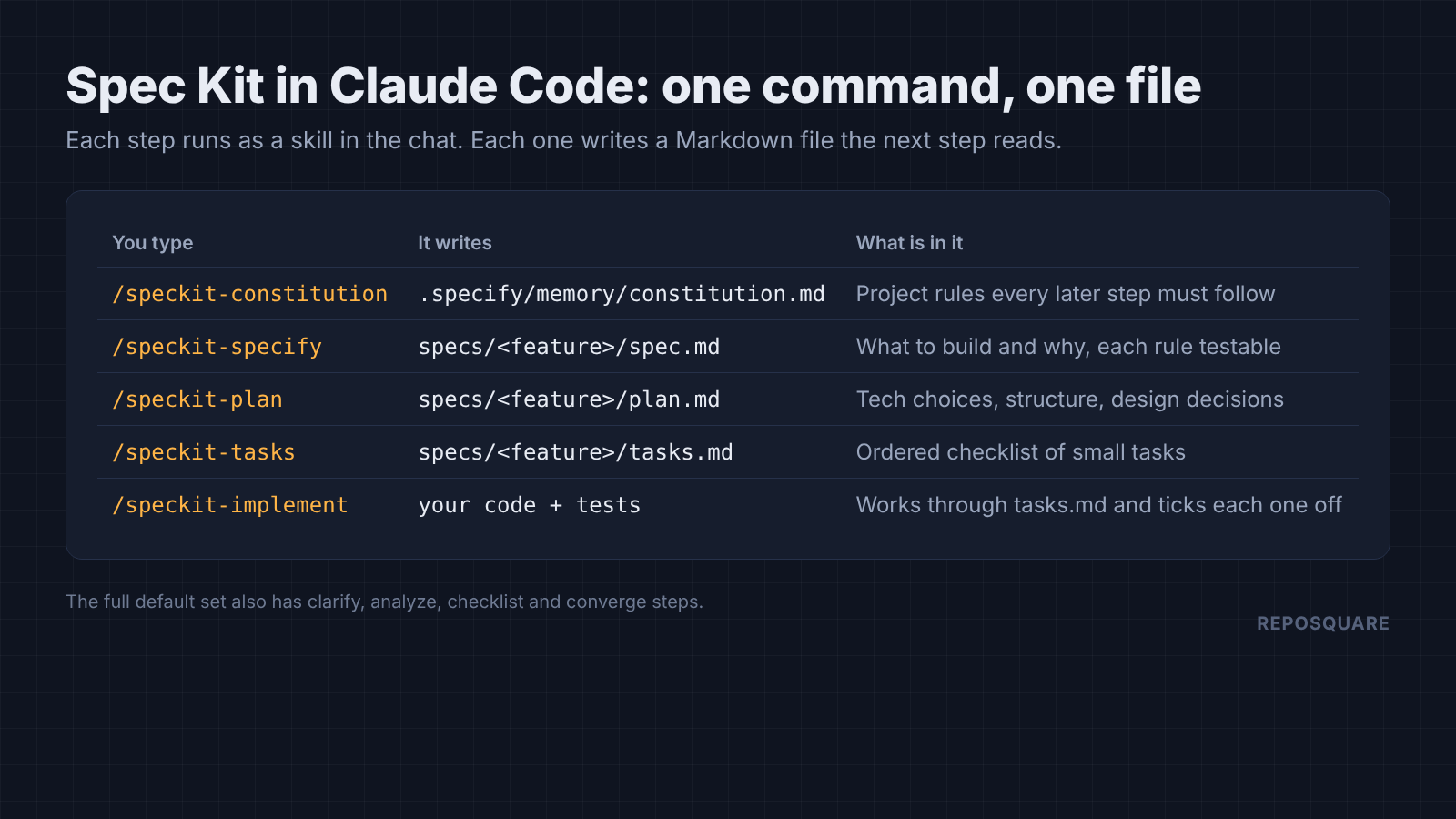
The constitution step writes your project’s ground rules, like “standard library only” or “every behavior gets a test”. Every later step reads it. After that, each feature gets its own folder under specs/ with a spec.md, plan.md and tasks.md, and /speckit-implement works through the task list, ticking boxes as it goes.
The default set adds more steps. Clarify asks you about vague spots, analyze checks the files agree with each other, and converge compares the code to the spec and adds missing work to the task list. That is a lot of ceremony. So does it pay off?
Does Spec Kit make Claude Code write better code?
In my tests, no. Every setup passed every hidden test, on both models, in all 54 runs.
Here is how I set it up. I wrote three tickets the messy way real tickets get written, then wrote tests for each one and kept them outside the project folder, where Claude could not see them.
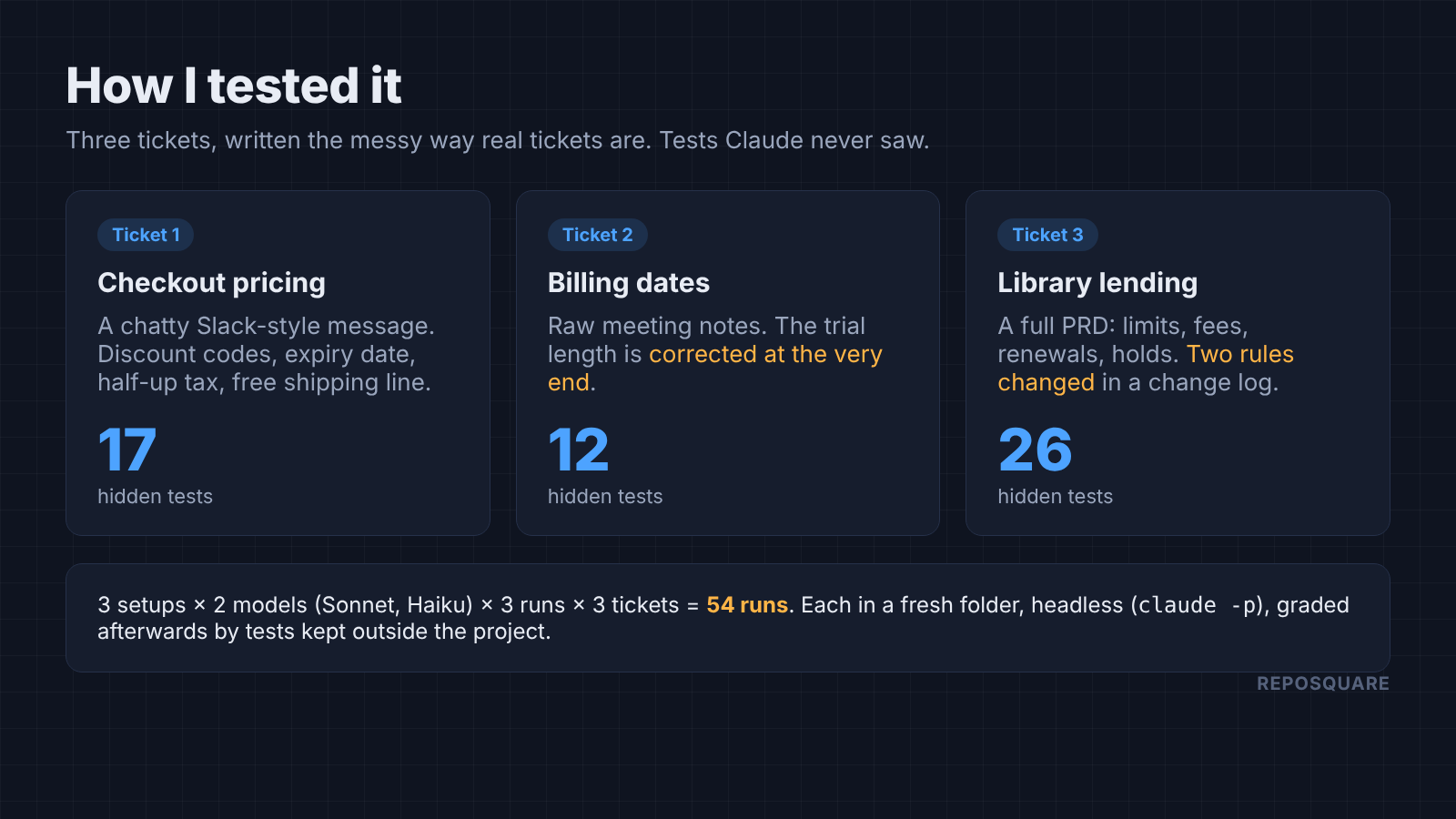
The pricing ticket is a chatty message with discount codes, an expiry date and “round tax half up, not the bankers thing”. The billing ticket is raw meeting notes where the trial length gets corrected in the last line. The library ticket is a full product doc with 26 rules, two of which change in a change log at the bottom.
Each ticket ran three ways: a plain prompt (“Implement the feature described in ticket.md“), a one-prompt spec-first version, and Spec Kit’s five commands. I ran each three times on Claude Sonnet and three times on Claude Haiku, headless (claude -p, no chat window), each in a fresh folder.
For Spec Kit I used its bundled Lean preset, which runs the same five steps with shorter prompts and no helper scripts, and I copied the skill files into place by hand. The full default templates are longer, so they would likely cost more, not less.
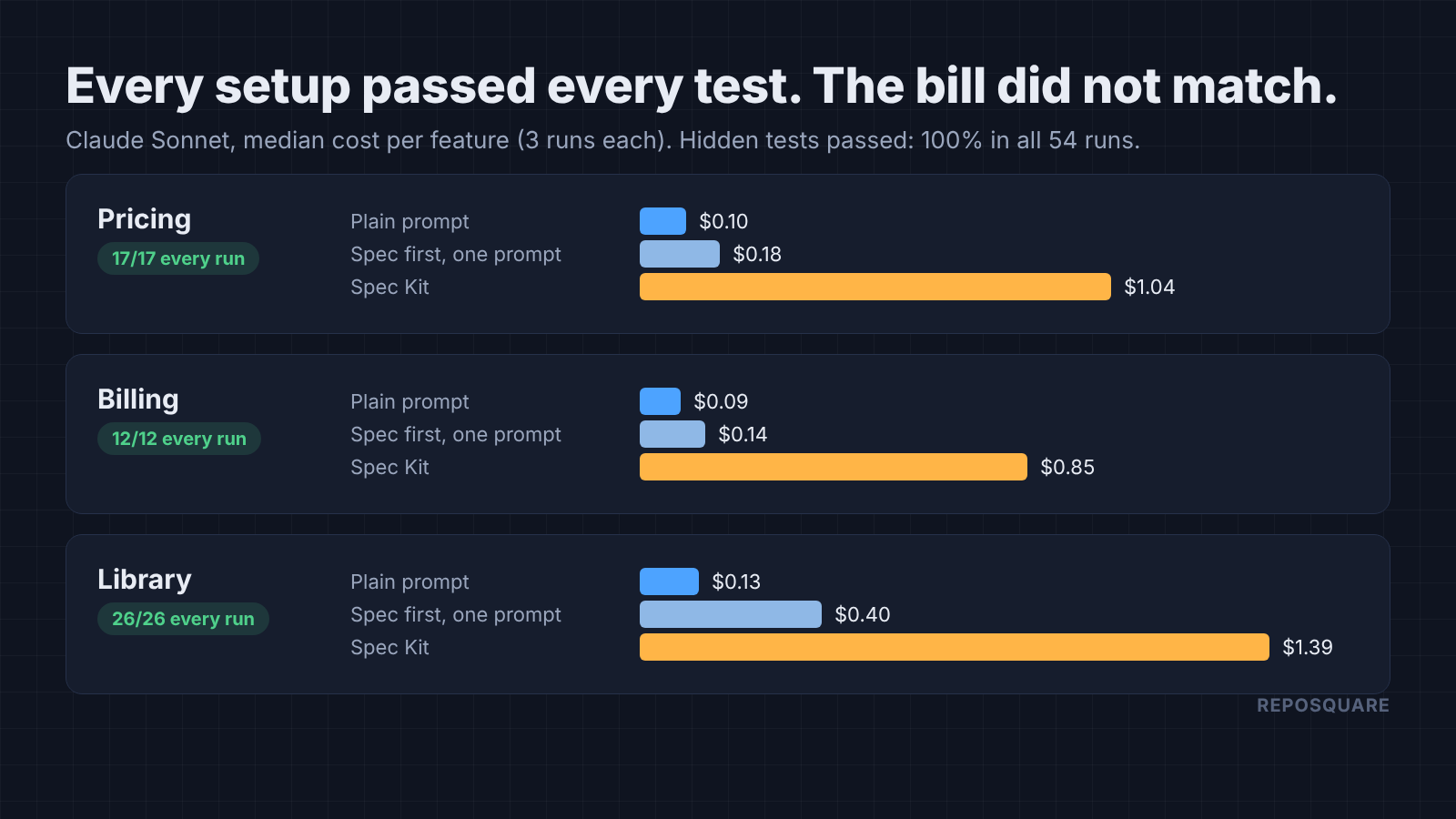
The traps I planted all got caught. Every run used the corrected trial length, the changed staff limit and the lower fee cap from the change log. Every run rounded the 22.5 cent tax up to 23, not down to 22.
That surprised me more than anything else. Why write a spec when the ticket already is one? A clear ticket under two pages turned out to be enough on its own.
How much more does Spec Kit cost?
About 9 to 11 times more on Sonnet, 6 to 23 times more on Haiku, and minutes instead of seconds.
Spec Kit’s cost comes from what it writes. Each step reads the files before it and produces another long Markdown document, so the token count (the small chunks of text AI models read and bill by) climbs with every step. That is the same pressure that shows up when token-saving tricks shrink in real Claude Code work.
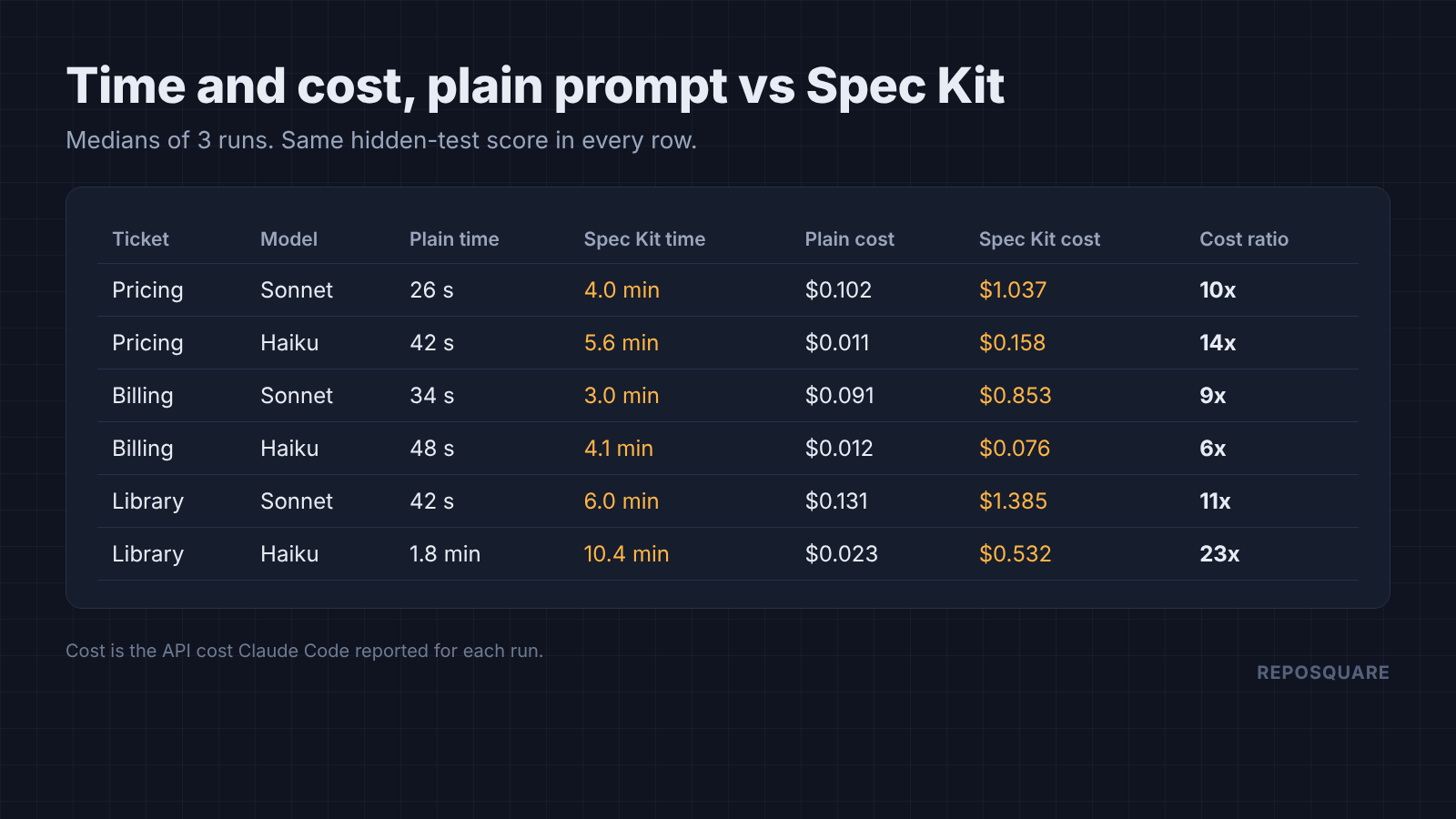
On the pricing ticket, Sonnet with a plain prompt cost $0.10 and finished in 26 seconds. Spec Kit cost $1.04 and took four minutes. On the library ticket the gap was $0.13 against $1.39.
The catch is the sample. Three runs per cell, single-module features, one sitting each. Your bill will differ, but a 10x gap does not close by luck.
What do you actually get for the extra cost?
Paperwork and tests. The plain Sonnet prompt never left a single test behind.
This is the part that cuts the other way. In 9 of 9 Sonnet runs, the plain prompt wrote working code and zero tests. It spot-checked the code and stopped. Haiku wrote tests in 8 of its 9 plain runs.
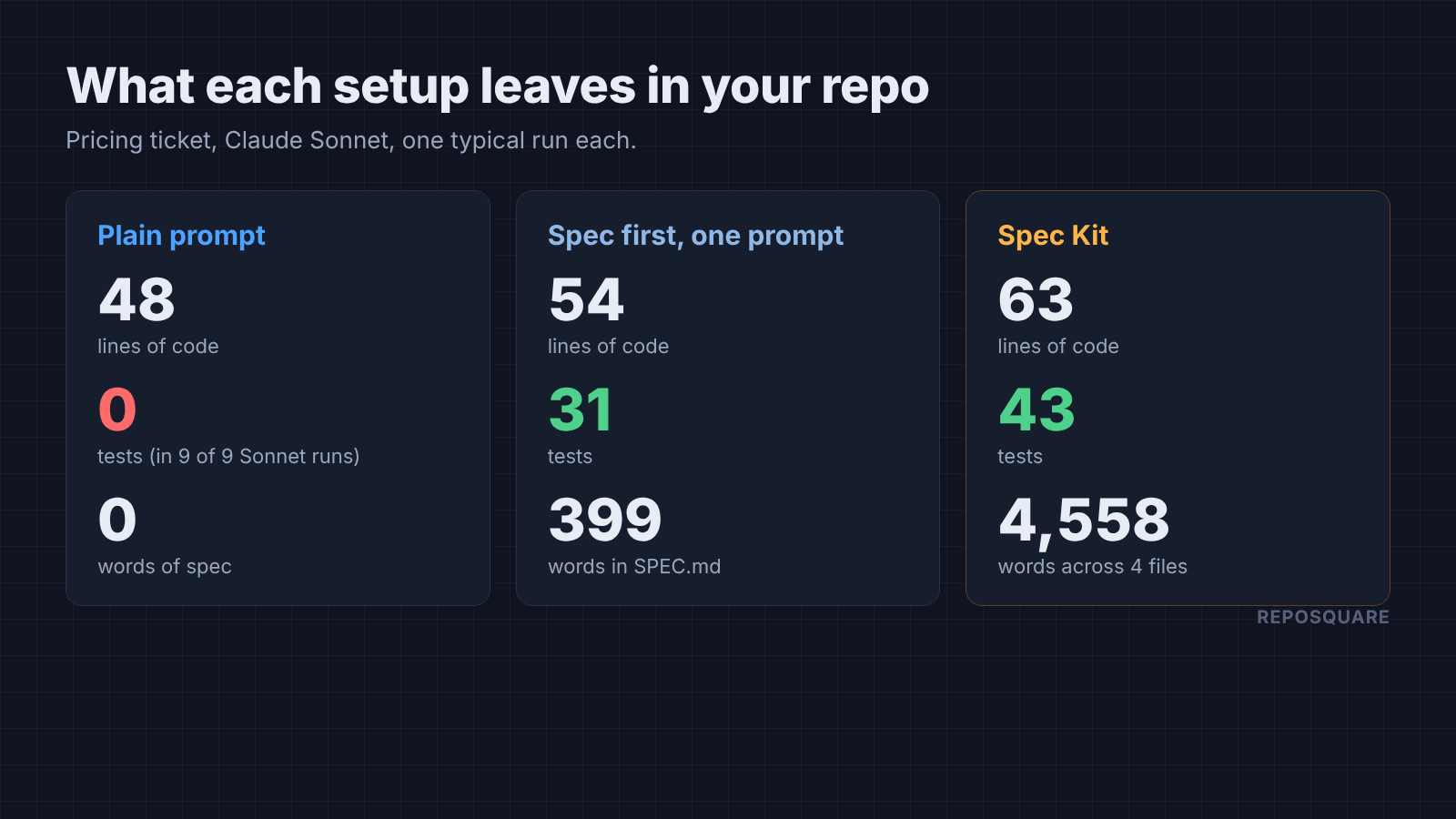
Spec Kit runs always left a test suite, between 16 and 115 tests. They also left the spec, plan and task list, which is useful when someone else picks up the feature next month.
Do you need five steps to get that? The one-prompt spec-first version left tests and a short spec too. I asked Claude to write SPEC.md with every rule as a numbered, testable line, then build, then test each rule. That cost 1.3 to 3 times the plain prompt, not 10.
When do you see Claude’s guesses?
Spec Kit shows them before the code. A plain prompt shows them after.
No ticket covers everything. Both setups had to guess about empty carts, bad input types and codes that do not expire. The difference is when you hear about it.
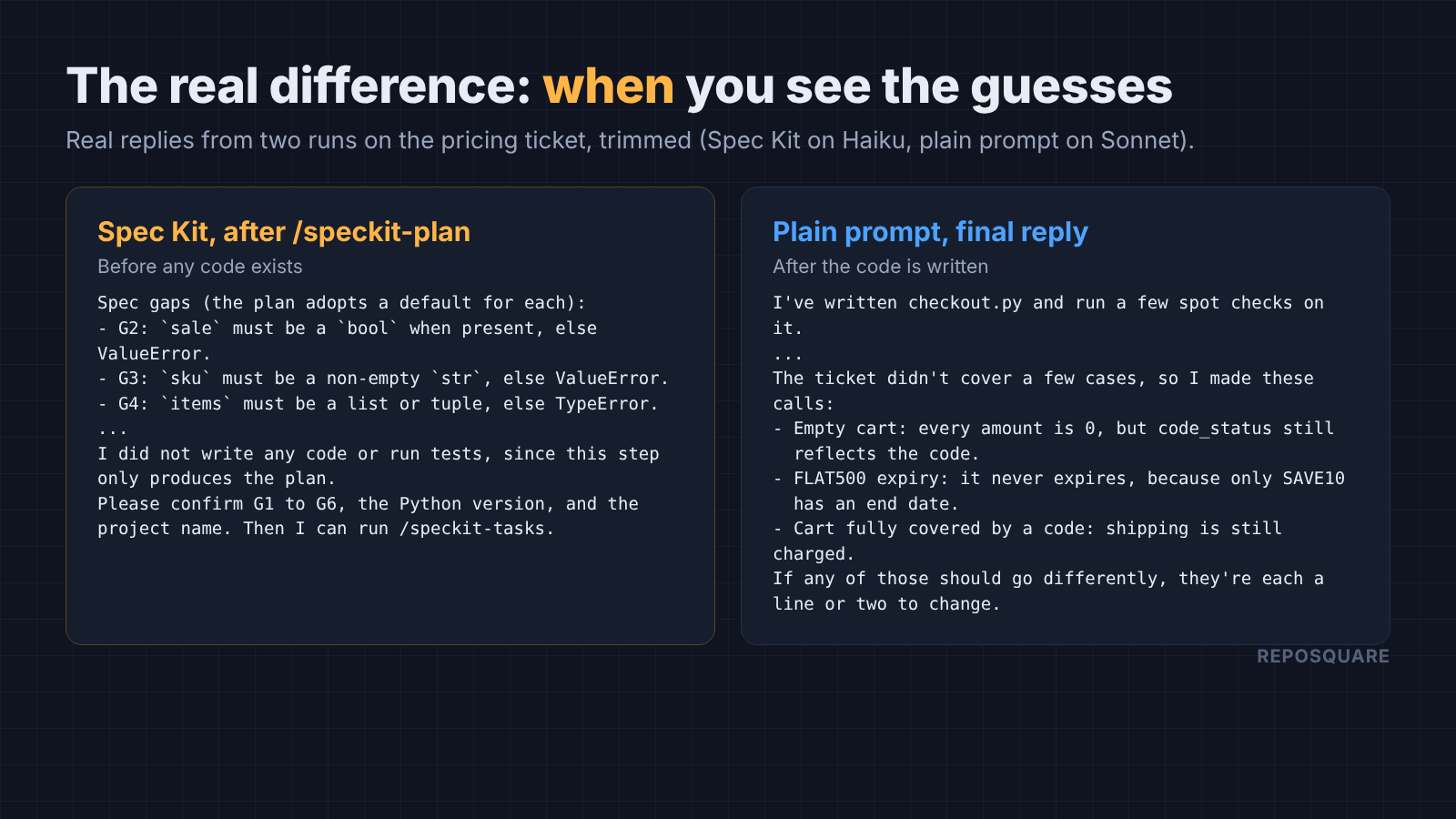
On the pricing ticket, Spec Kit’s plan step on Haiku listed six gaps, each with a default, and asked for a yes before moving on to tasks. The plain Sonnet run made its own calls, wrote the code, then listed them in its final reply with “each a line or two to change”.
On a 60-line function, fixing a wrong guess after the fact takes a minute. On a feature that touches the database, the API and three screens, it takes a day. That is where reviewing a plan first earns its cost.
When is Spec Kit worth it?
Use it when a wrong guess is expensive to undo. Skip it when the ticket is small and clear.
There is a fair case for Spec Kit. If a feature spans several sessions, the spec files carry context that a chat history loses. If a lead must approve the approach before work starts, plan.md is the thing to approve.
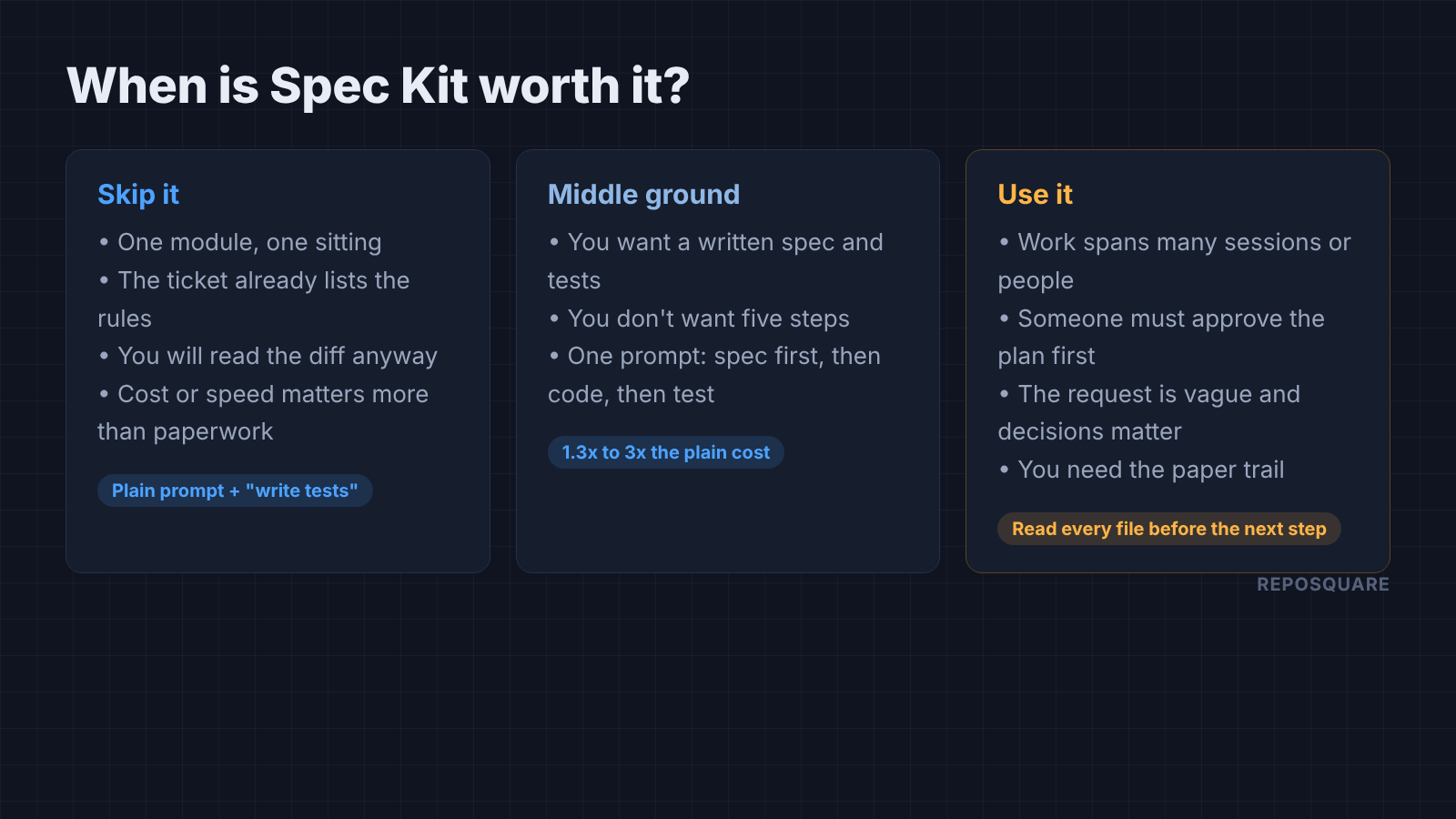
For one module in one sitting, with a ticket that already states the rules, my runs say skip it. Ask for tests in your prompt, put your house rules in CLAUDE.md, and read the diff. If Claude overbuilds simple code, a long spec will not help with that either.
And if you want the written spec without the five steps, use one prompt: spec first, then code, then a test for every rule. That gave me the spec and the tests for a fraction of the cost.
The plan is for you to read. If you won’t read it, don’t pay for it.
Common questions about Spec Kit and Claude Code
What is Spec Kit?
Spec Kit is GitHub’s open source toolkit for spec-driven development. It adds commands to your coding agent that write a constitution, spec, plan and task list before the code.
Does Spec Kit work with Claude Code?
Yes. Run specify init my-app --integration claude and it installs its steps as skills in .claude/skills, which you run as /speckit-specify, /speckit-plan and so on.
Is spec-driven development the same as plan mode?
No. In plan mode Claude explores your code without editing files and proposes a plan for you to approve. Spec Kit writes the spec, plan and tasks as files in your repo, where they stay with the code.
Does spec-driven development use more tokens?
Yes. In my runs, Spec Kit used roughly 6 to 23 times the cost of a plain prompt for the same result, because each step writes and rereads long documents.