
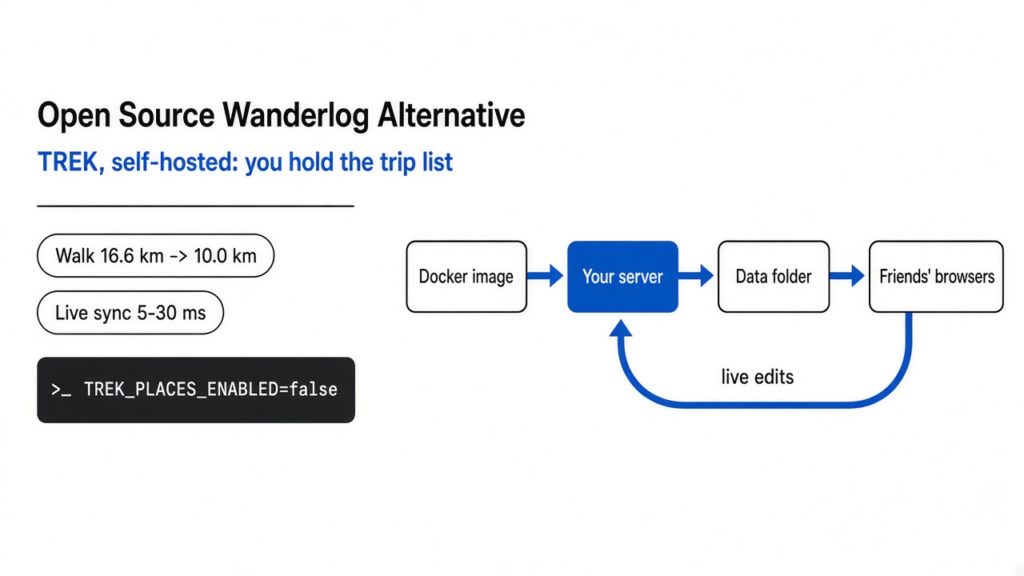
Short answer: yes. TREK is the closest free, open source Wanderlog alternative I found. I ran it on my own server and planned a three-day Lisbon trip with a friend. It handled day plans, maps, route sorting, live shared editing and split costs.
TRIP is a lighter pick if you only need a map and day lists. One catch: TREK sends what you type in its place search to its own online service unless you switch that off.
You and a friend are planning a long weekend. The plan lives in an app: the places, the days, who paid for the hostel. It works fine. But the whole plan sits on someone else’s server, under someone else’s rules.
That is the real question behind most searches for a Wanderlog alternative. Wanderlog itself is free, with an optional Pro plan. So people rarely leave over price. They leave because they want to hold the list themselves.
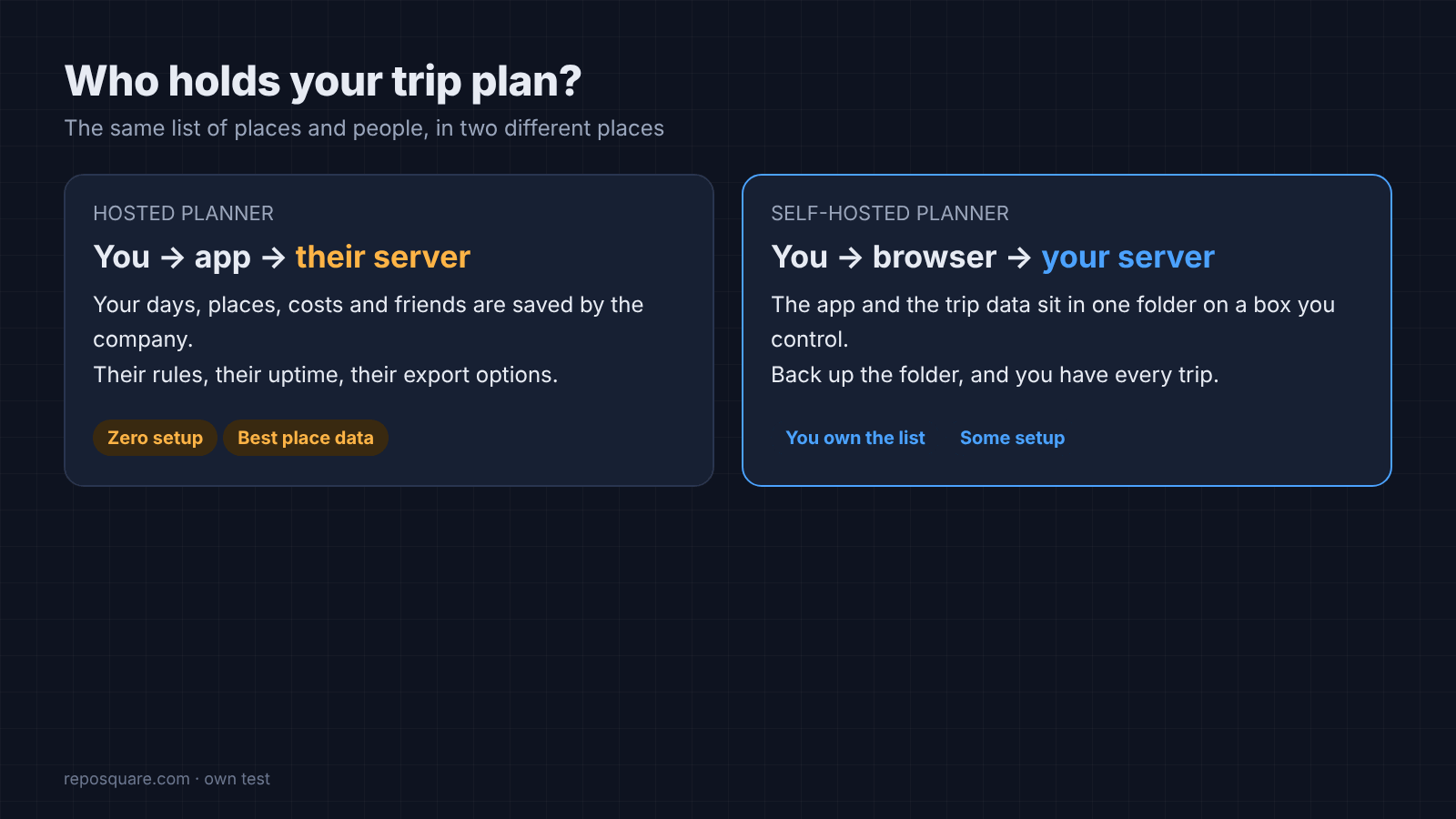
So that is the thread of this post. A trip plan is a list of places and people. I tested who ends up holding that list in each option, and what it costs you to hold it yourself.
What Does Self-Hosted Mean for a Travel Planner?
It means the app and your trip data run on a computer you control, and you open it in a browser.
Start with how a normal planner works. You open an app, it talks to the company’s servers, and your trips are saved there. If the company changes plans, prices or rules, your data goes along with it.
Self-hosted (running the app on a computer you control) flips that. The app runs on your own box: an old laptop, a home server, or a small rented VPS (a virtual server you rent by the month). You and your friends open it in a browser, like any website.
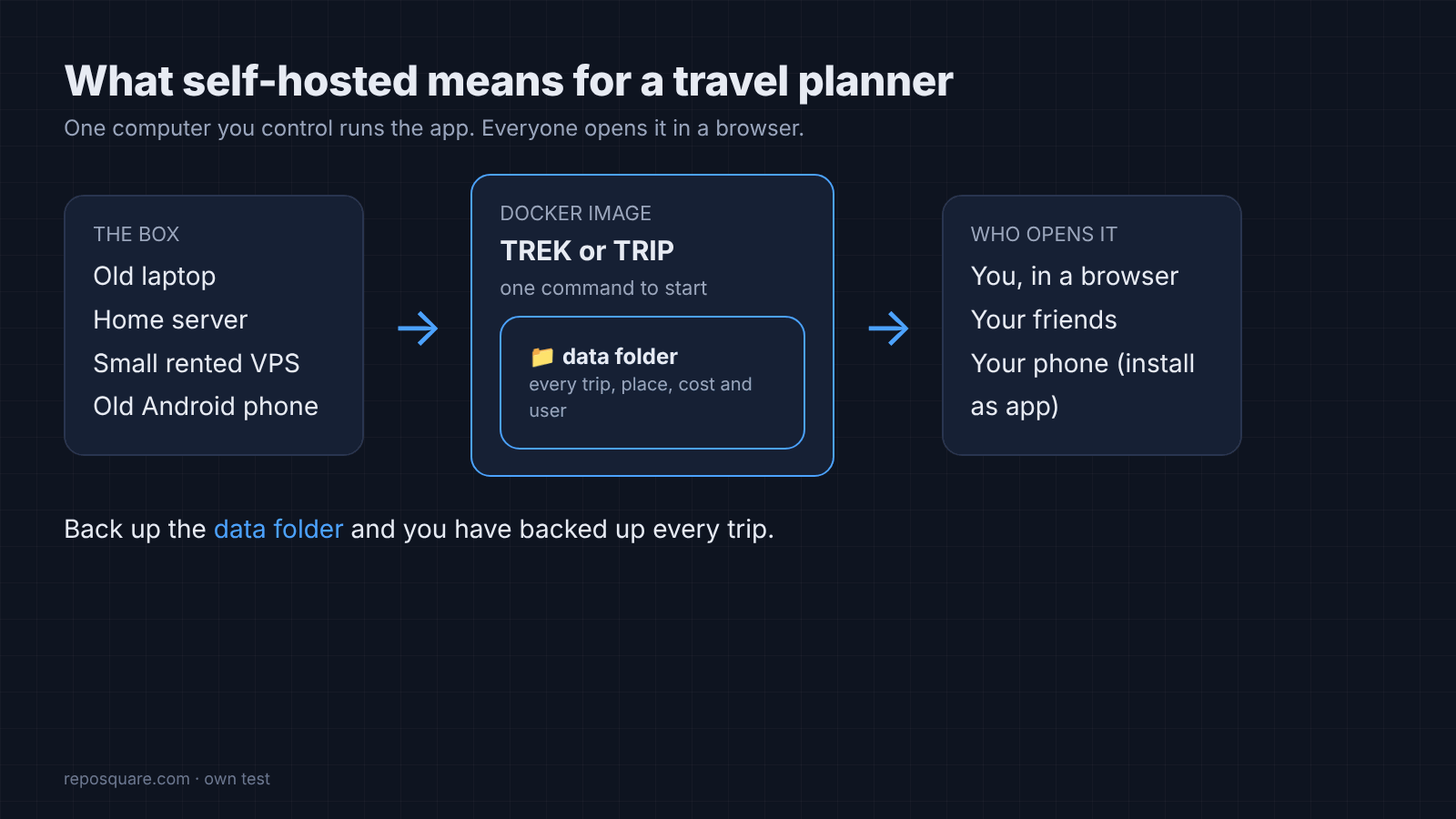
Most self-hosted apps ship as a Docker image (a sealed package with the app and everything it needs to run). You start it with one command, and it keeps its data in a folder on your disk. Back up that folder and you have backed up every trip.
That folder is the list. Everything below is about what happens to it.
Is There a Free Open Source Alternative to Wanderlog?
TREK comes closest. TRIP is the simpler, lighter option.
Both are free and open source, and both run with one Docker command. TREK is a full trip planner: day plans, maps, bookings, packing lists, costs, a travel journal and live shared editing. TRIP is a minimalist map tracker and trip planner: you pin places, build days and share with companions.
Here is how they line up against Wanderlog on the things people ask about most.
| Wanderlog | TREK | TRIP | |
|---|---|---|---|
| Where your data lives | Wanderlog’s servers | Your server | Your server |
| Cost | Free, optional Pro | Free | Free |
| Place search | Built in | Built in (own service or OpenStreetMap) | Built in (OpenStreetMap) |
| Route sorting | Yes | Yes | Not tested |
| Live shared editing | Yes | Yes, tested | Not tested |
| Split costs | Yes | Yes, with settle up | Not tested |
| License | Closed | AGPL-3.0 | MIT |
“Not tested” means that feature was outside my test, not that it is missing. My test went deepest on TREK, because it is the one that tries to replace Wanderlog feature for feature.
How I Tested TREK and TRIP
Same machine, same eight place searches, same Lisbon trip.
I ran both apps on a small Linux server, first from their official Docker images, then directly so they could reach the internet. Then I did what a real trip planner does. I searched for places, built days, sorted the route, invited a second person and split the costs.
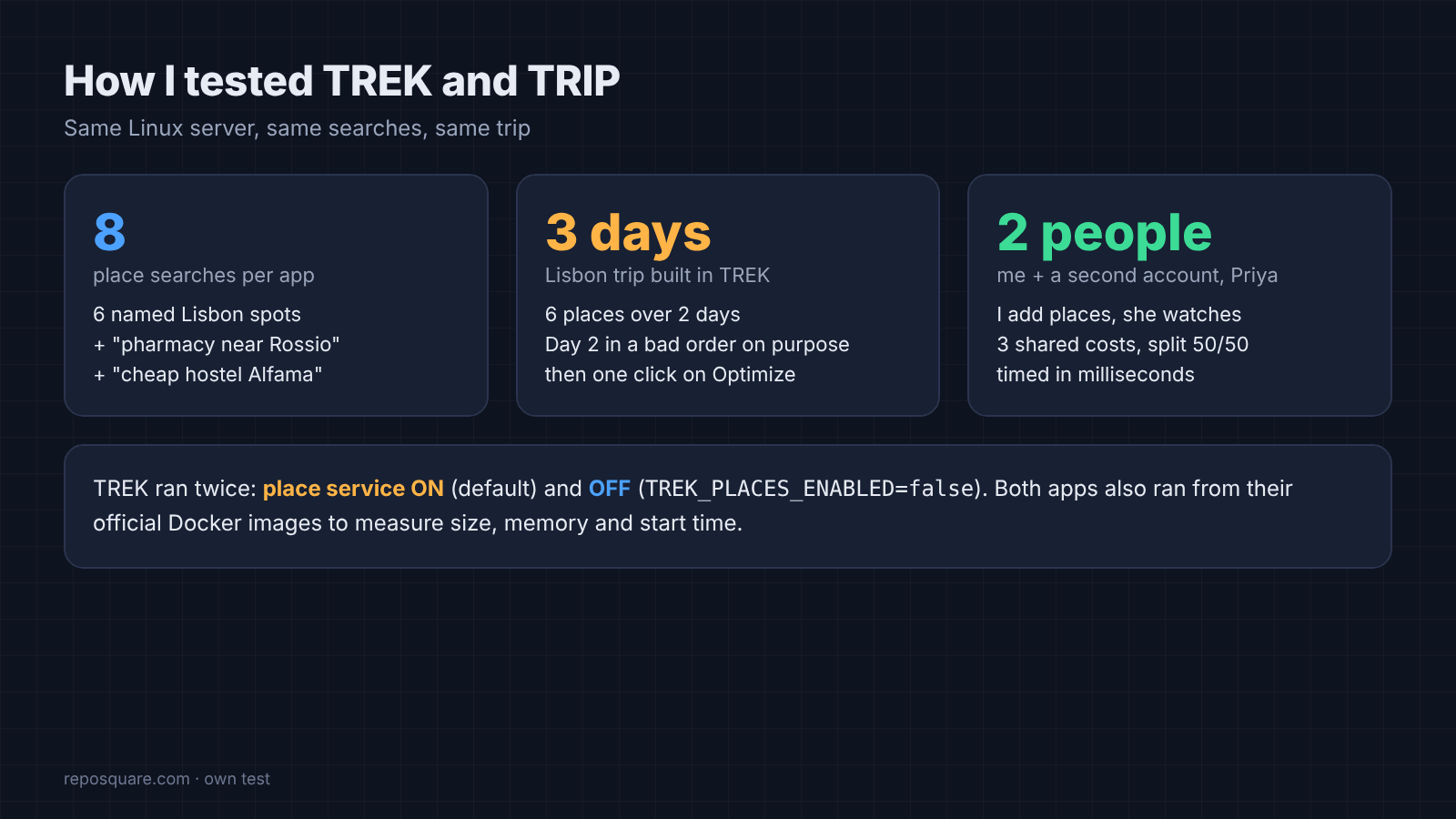
The searches were six well-known Lisbon spots, like Belém Tower, LX Factory and the Oceanário. Then two fuzzy ones: “pharmacy near Rossio” and “cheap hostel Alfama”. That is how people type when they are tired at 11 pm.
Then a second account, Priya, joined the trip, and I timed how fast my changes showed up on her screen.
What Is TREK Like to Plan a Trip With?
It feels like a real planner: days on the left, a map in the middle, your saved places on the right.
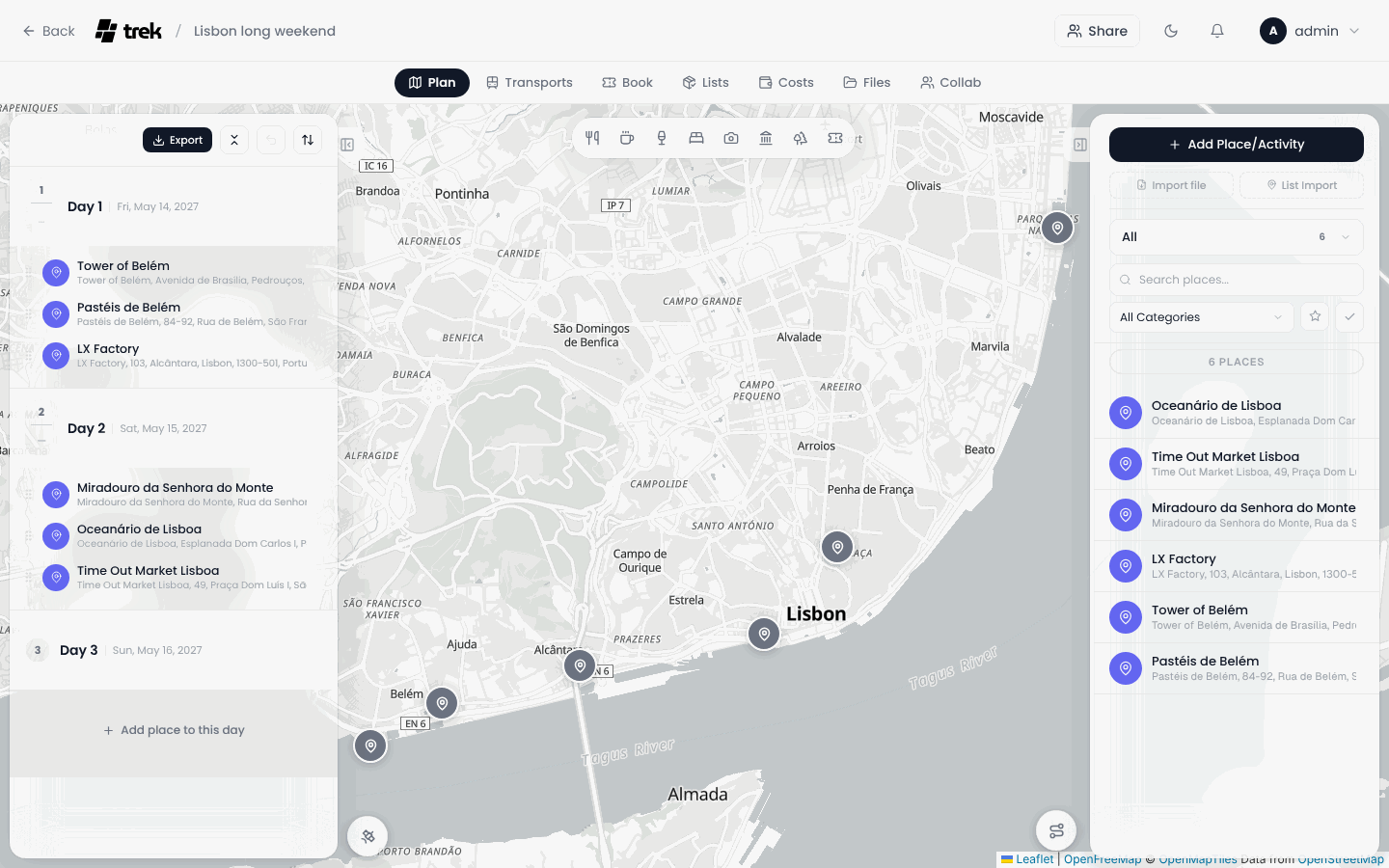
Adding the six places and spreading them over two days took a few seconds each. Every place lands on the map as a pin, and each day gets a weather forecast block. For dates far away it shows historical averages and says so, which is honest.
Then I tested route sorting, because that is where planners save you real walking. Route sorting (reordering a day’s stops so you don’t zig-zag across town) is one button in TREK, called Optimize.
I gave Day 2 a bad order on purpose: Miradouro in the old town, then the Oceanário far to the east, then back west to Time Out Market. One click turned it into Time Out Market, Miradouro, Oceanário. West to east, no doubling back.
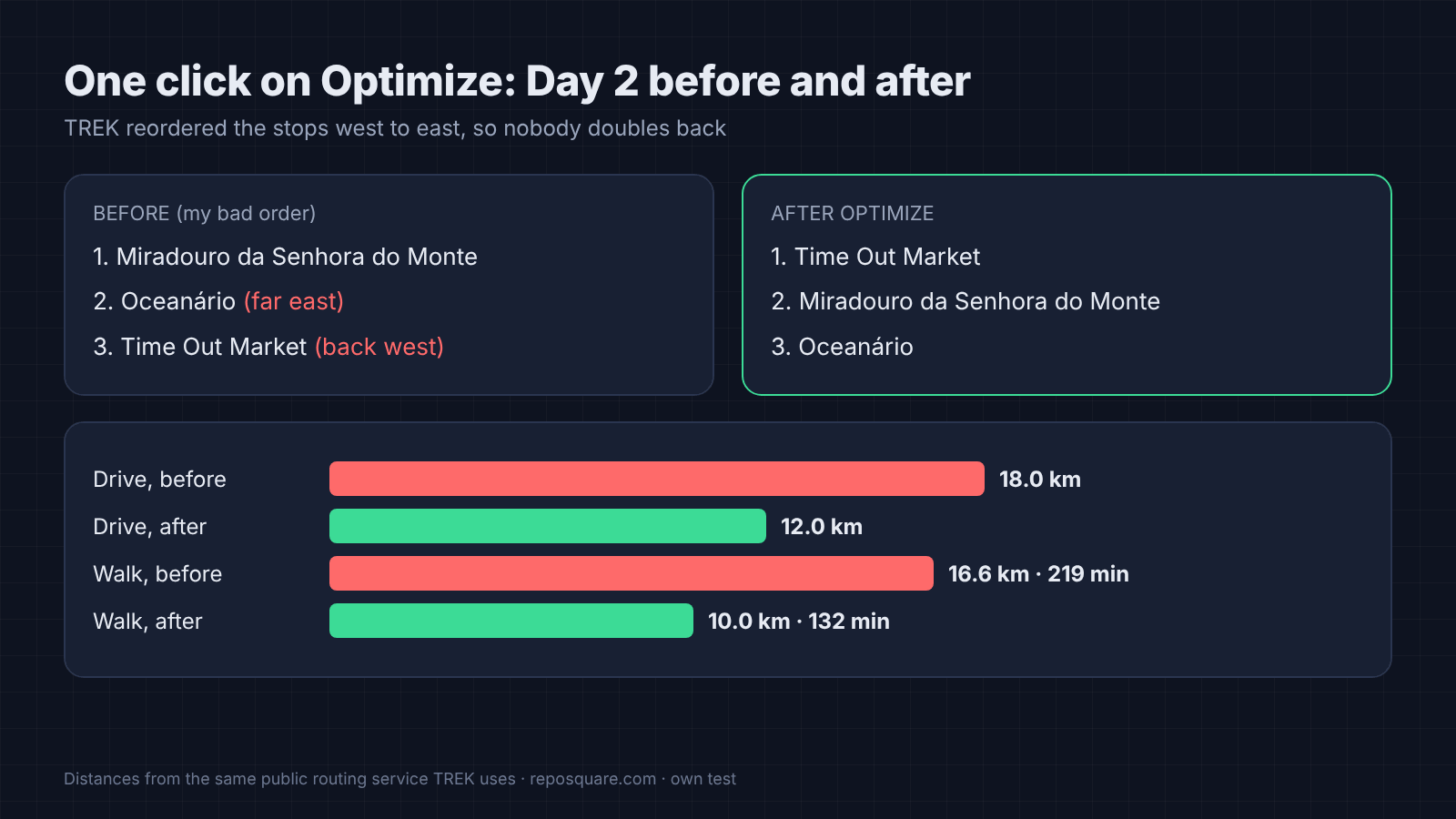
One click. The drive dropped from 18.0 km to 12.0 km. On foot it went from 16.6 km to 10.0 km, which is almost an hour and a half less walking by the routing estimate. On a trip, that is an afternoon back.
Does TREK Work for Planning With Friends?
Yes. Changes showed up on the second person’s screen almost instantly, and costs split themselves.
Live shared editing is the feature that makes Wanderlog feel easy, so it was the one I checked hardest. I logged in as Priya in a separate browser and kept the trip open. Then, as myself, I added three places: the castle, Praça do Comércio and Jerónimos Monastery.
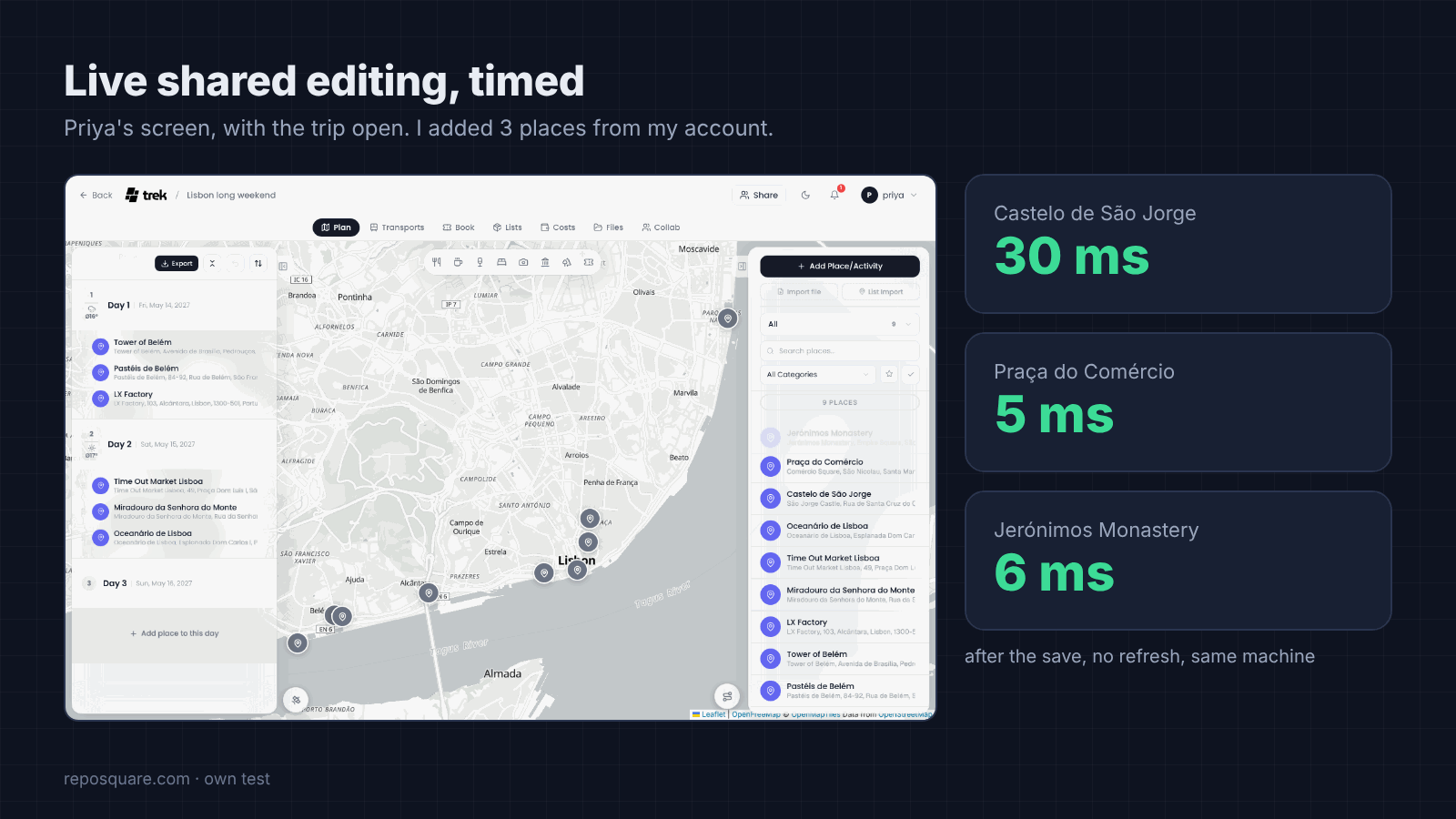
Each one appeared on Priya’s screen 5 to 30 milliseconds after it was saved. She never refreshed the page. On a real network the delay will be a little longer, but it is the same live feeling.
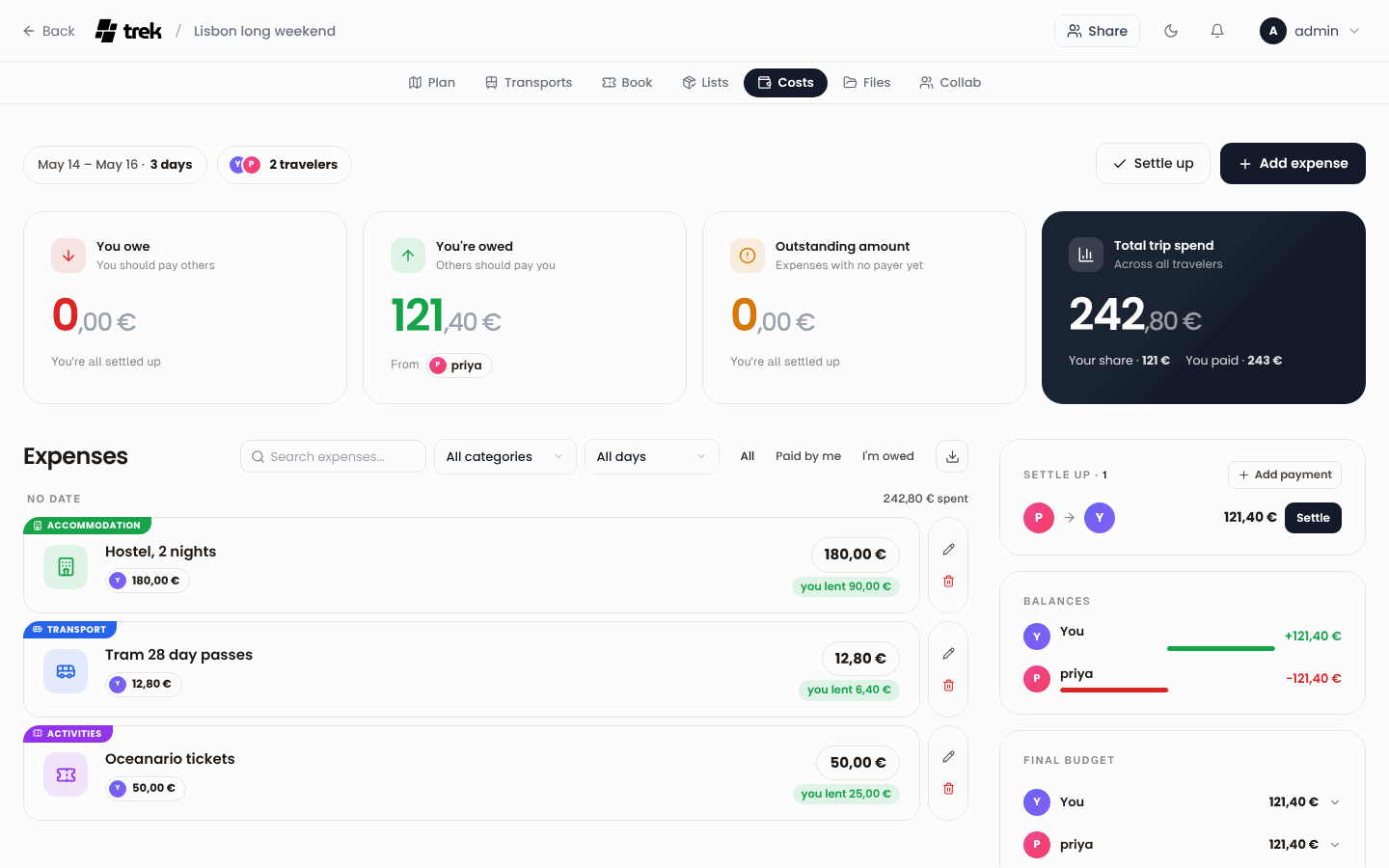
Costs work like Splitwise inside the trip. I added the hostel, tram passes and Oceanário tickets, 242.80 euros in total, marked myself as the payer and split each item between the two of us. TREK worked out that Priya owed me 121.40 euros and offered a settle-up button.
So the shared part works. But what leaves your server while you use it?
Does a Self-Hosted Travel Planner Keep Your Data Private?
Your trips stay on your server, but TREK’s place search goes out to TREK’s own online service by default.
Here is the catch I did not expect. When you type in TREK’s place search, your server sends that text to a service run by the TREK project. It is on unless you switch it off. The project says so plainly in its settings file.
The request carries an instance tag (a short code made from your server’s address, so the service can count requests per server). Not your name.
That is a trade, not a trick. The service gives better categories and more matches for free. But if you self-host so that nothing leaves your box, it matters.
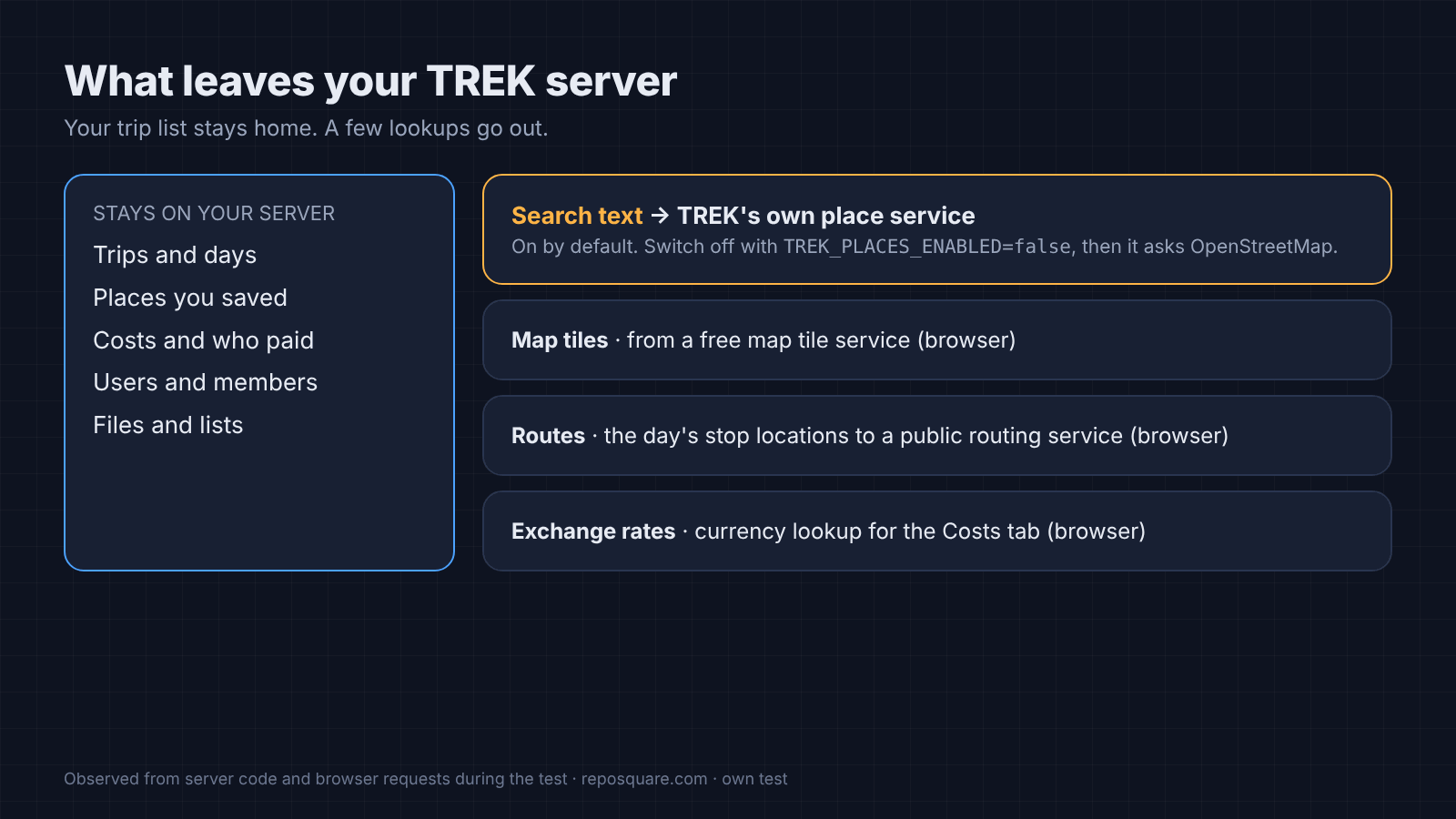
The fix is one environment variable (a setting you pass to the app when it starts): TREK_PLACES_ENABLED=false. With it off, TREK searches OpenStreetMap (a free, community-made world map) instead. I ran the same eight searches both ways.
| Search | TREK, service on | TREK, service off | TRIP |
|---|---|---|---|
| Six named Lisbon spots found | 6 of 6 | 6 of 6 | 6 of 6 |
| “pharmacy near Rossio” | Wrong towns | Wrong towns | Wrong towns |
| “cheap hostel Alfama” | Nothing | Nothing | Nothing |
| Ratings shown | None | None | None |
| Typical time per search | About 1 s | About 1 s | About 0.7 s |
Switching the service off lost nothing that mattered in my test. It even fixed one result: with the service on, “Time Out Market” came back as a single food stall inside the market. With it off, it found the market itself.
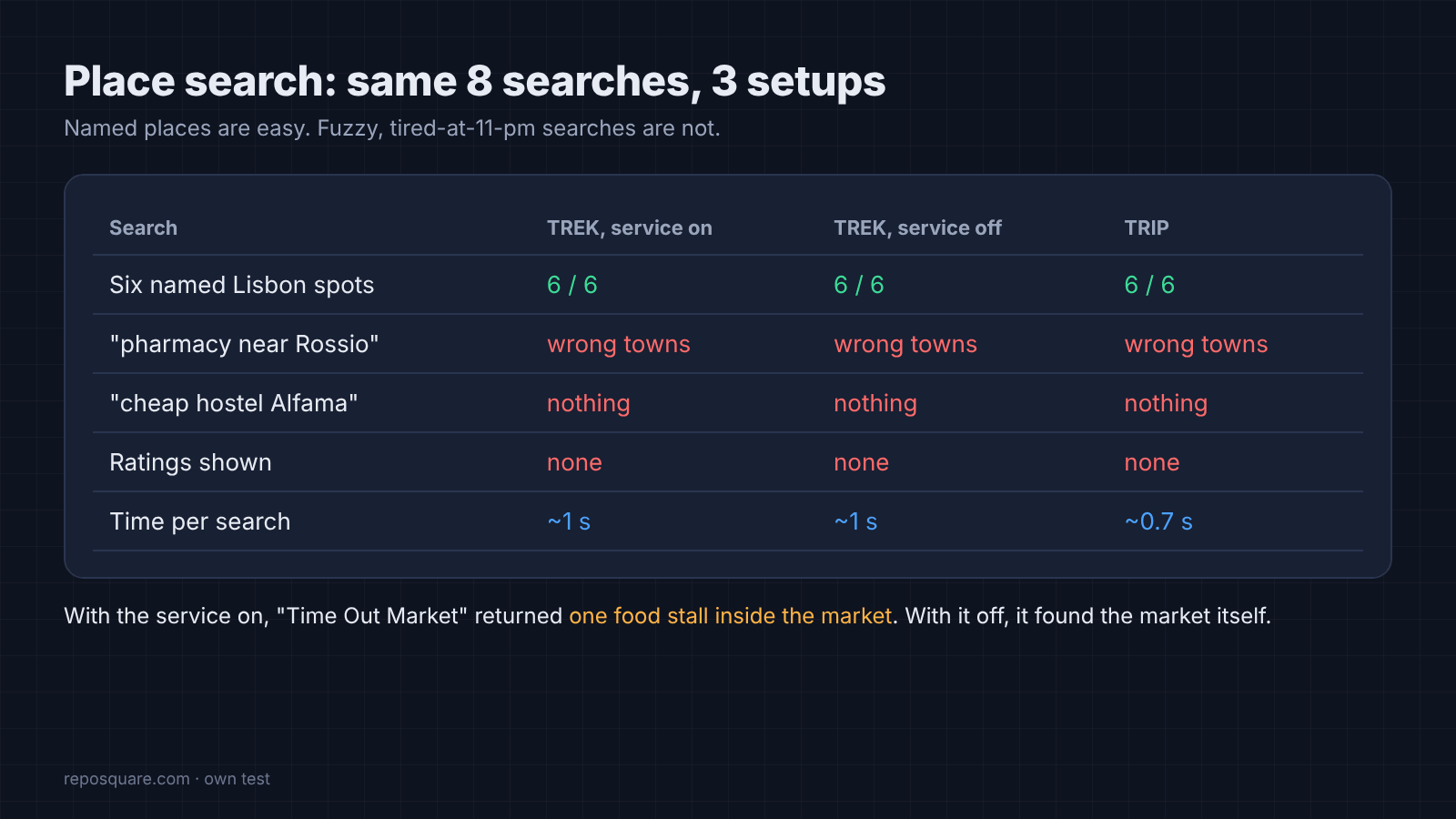
Notice what both apps miss, though. The pharmacy search returned pharmacies in towns outside Lisbon, and the hostel search returned nothing. Neither app showed ratings. That is the real gap with Wanderlog, which leans on big commercial place data. TREK can use Google’s place data if you add your own Google API key, and that adds photos, ratings and opening hours.
The browser also talks to a few outside services while you plan: map tiles, a free public routing service for driving and walking times, and an exchange-rate service for the costs tab. None of them gets your trip list.
How Hard Is TREK to Set Up?
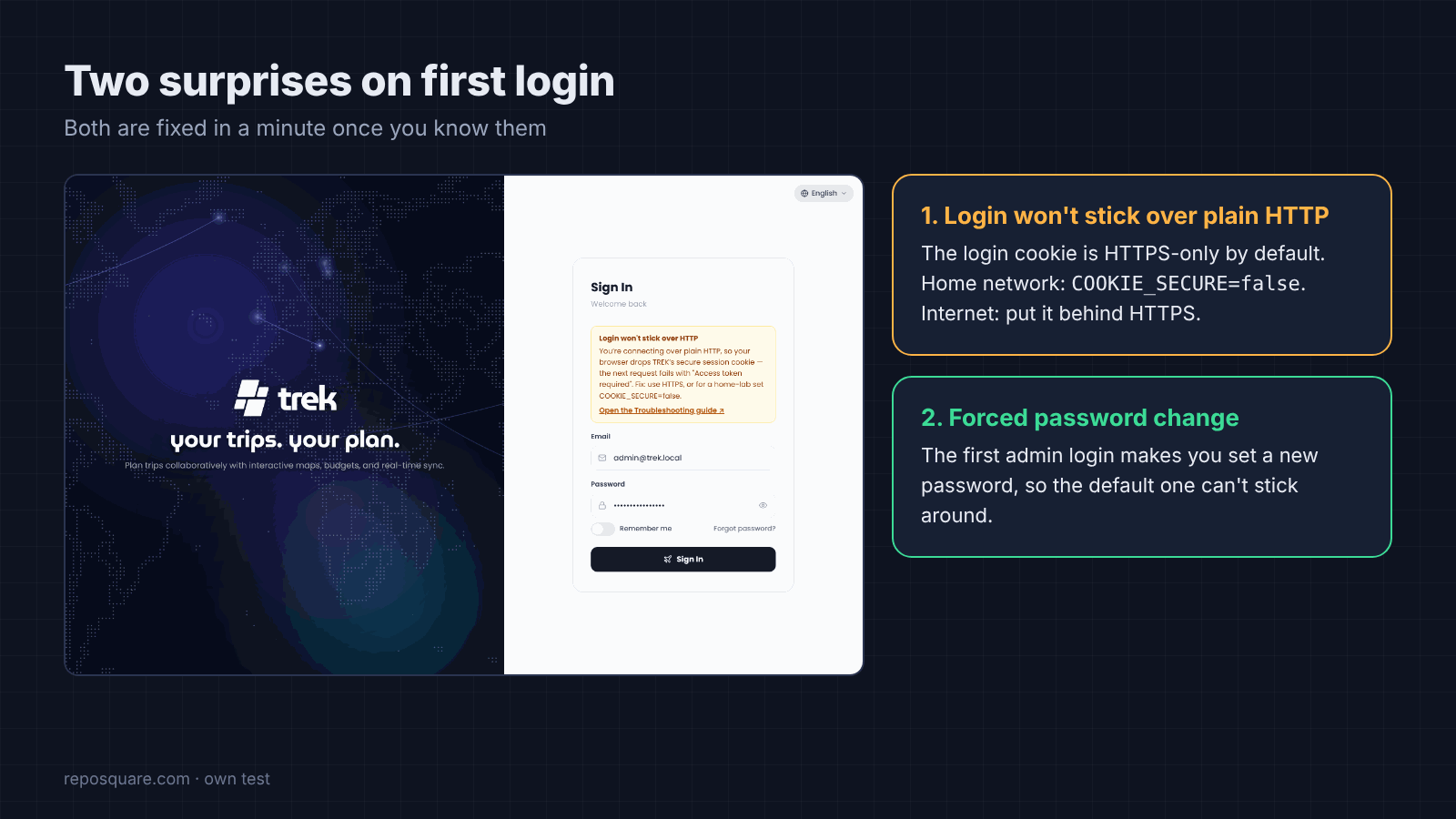
One Docker command, about four seconds to start, plus two surprises on first login.
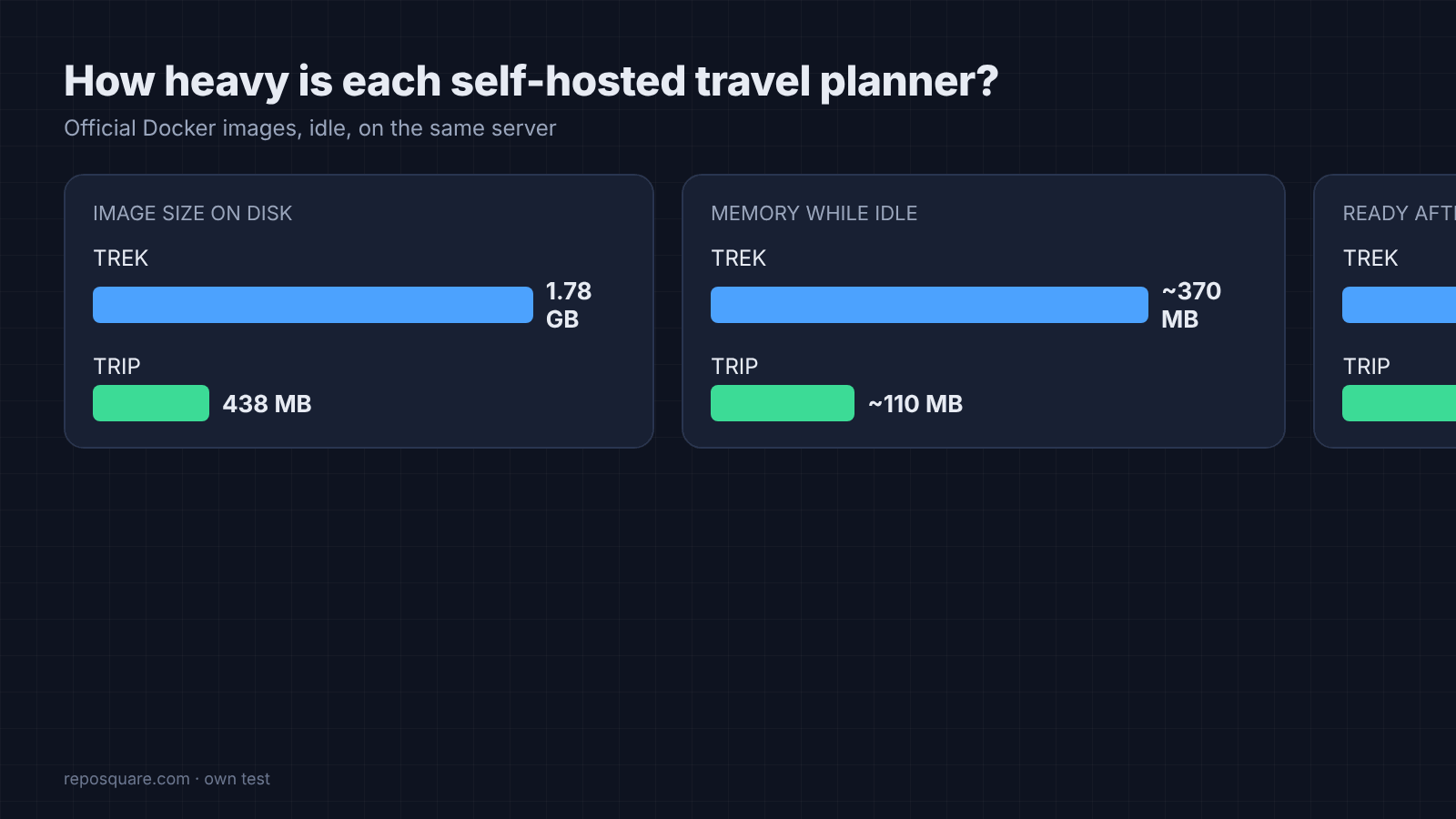
TREK’s image is big, about 1.8 GB, and it used about 370 MB of memory while idle. TRIP is much lighter: about 440 MB on disk and about 110 MB of memory. Both were ready in under four seconds.
The first surprise: TREK refused to keep me logged in. I was opening it over plain HTTP (no padlock), the way most people first try a home server, and TREK’s login cookie is set to secure by default (the browser only sends it over HTTPS). TREK shows a clear warning on the login page, and the fix is COOKIE_SECURE=false for a home network, or putting it behind HTTPS.
The second surprise is a good one. The first admin login forces a password change, so the default password can’t stick around.
Here is the start command I used, with the privacy switch and the home-network fix:
docker run -d --name trek -p 3000:3000 \
  -e TREK_PLACES_ENABLED=false \
  -e COOKIE_SECURE=false \
  -v ./data:/app/data -v ./uploads:/app/uploads \
  mauriceboe/trek:latest
Keep COOKIE_SECURE=false for a home network only. If friends reach it over the internet, put it behind HTTPS and drop that line. If it runs on a rented server, check that the VPS is locked down first. No spare server? An old Android phone can run Linux apps like this.
Which Wanderlog Alternative Should You Pick?
TREK if you plan trips with other people, TRIP if you mostly pin places for yourself, Wanderlog if you want the best place data with zero setup.
There are good reasons to stay on Wanderlog. Its place search is stronger, it has ratings, and there is nothing to install or back up. If a hosted app holding your list does not bother you, it is the easier tool.
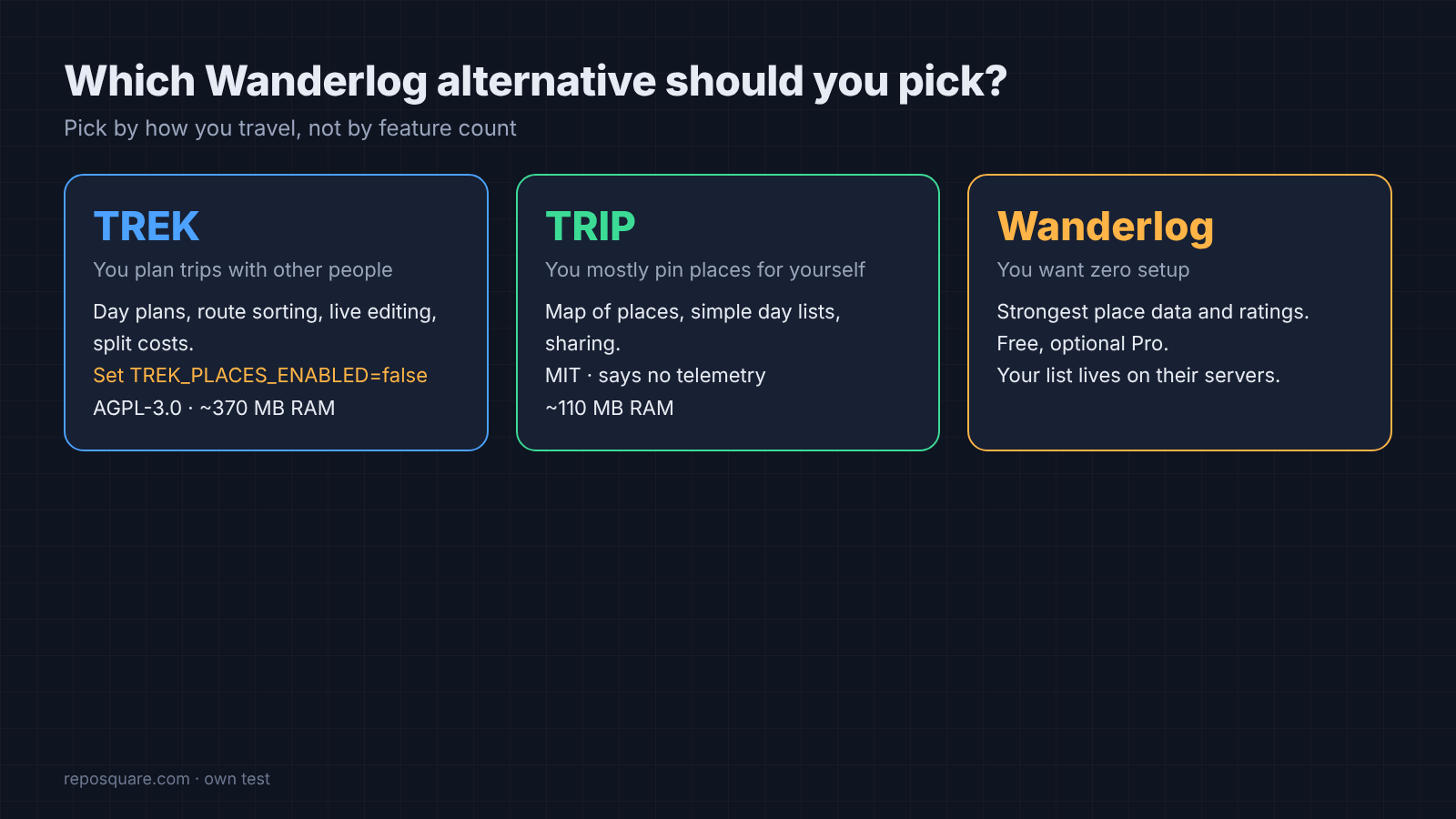
For everyone else, TREK is the Wanderlog alternative that did the whole job in my test: planning, route sorting, live editing and costs. Set TREK_PLACES_ENABLED=false on day one if privacy is why you came. Its license is AGPL-3.0 (if you change the code and run it for others, you must share your changes), which is fine for personal use.
TRIP is MIT licensed, says it has no telemetry, and needs a quarter of TREK’s disk space. If you want a map of places and a simple day list, it is the calmer choice.
This site has tested other self-hosted swaps the same way, like the free open source Canva alternative and the open source Semrush alternative.
Start TREK with the privacy switch, plan one weekend, and back up the data folder. That folder is the list. This time, you hold it.
Common questions about Open Source Wanderlog Alternatives
Is Wanderlog free?
Yes. Wanderlog is a free travel app with an optional Pro subscription, which adds things like exporting a trip to Google Maps and linking your Gmail.
Can I self-host a trip planner?
Yes. TREK and TRIP both run from one Docker command on a home server, old laptop or small VPS, and you open them in a browser.
Does TREK work offline?
TREK can save a trip’s map tiles and nearby places for offline use. Without that, place search, maps and routing need internet.
Is TREK better than TRIP?
For group trips, yes: it has live shared editing, split costs and route sorting. TRIP is lighter and simpler if you mostly plan alone.