
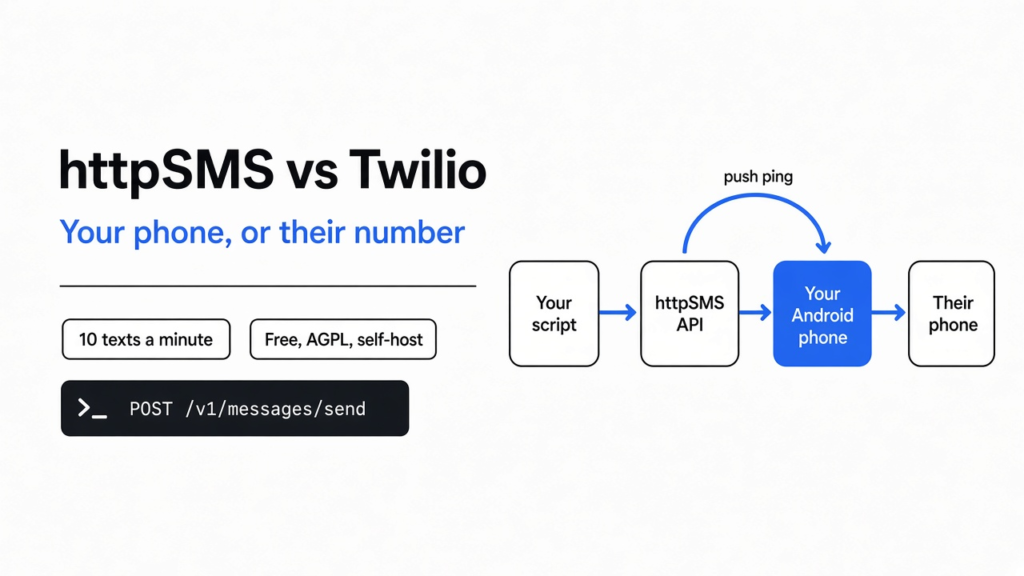
The email about the full disk was still unread at breakfast. A text would have woken someone. Twilio is the usual way a program sends that text: you rent a phone number from them, and they hand the message to a mobile carrier (the company that owns the cell towers). httpSMS is the other way. It is a small program that asks an Android phone you already own to send the text on its own plan.
httpsms vs twilio is a choice about who owns the number and who has to stay awake. httpSMS uses your phone. Twilio uses theirs, and your phone can be off.

Your script never talks to the cell tower. It talks to a web address. That address asks the phone. The phone sends a normal text.
What Is httpSMS?
httpSMS is an Android app plus a web API that turns one phone into a text sender your own programs can call.
Start from the phone, not the product name. A text message, the short kind people still call SMS, does not need a chat app. It rides the mobile plan inside the phone, the same plan that rings when someone calls. The little card that ties the phone to that plan is the SIM. If the SIM has no signal, no text leaves, no matter how good the software is.
A program on a server cannot press the phone’s buttons. It needs an API, which is just a web address that accepts a request and does a job. httpSMS is that address. You send it who the text is from, who it is to, and the words. It does not itself have a SIM. It wakes the Android app, and the app uses the phone’s normal text function.
The wake-up is a push ping. Even if you run the API on your own server, the phone still hears that ping through Google’s push service. The app has to be installed, signed in, and on a network. There is no iPhone app in the project. An iPhone cannot be this gateway (the box that turns a web request into a real text).
httpSMS vs Twilio
httpSMS sends from the number already on your Android phone, and Twilio sends from a number they rent you, so only Twilio works when the phone is off.
| httpSMS | Twilio | |
|---|---|---|
| Whose number | The SIM in your phone | A number they issue |
| What you pay | Your existing phone plan, plus the software is free to run | A fee per text, after a trial |
| Phone must be on and online | Yes | No |
| Server can read the text by default | Yes, unless you encrypt it first | Yes, they store it |
| Needs a Google push to reach the phone | Yes, including a self-hosted API | No |
| Fits a customer’s receipt or a marketing blast | Poor fit | Built for that |
Twilio is a company in the middle. You call them. They call the carrier. Your server can burn down and the text still goes, because the phone in your kitchen was never part of it.
httpSMS removes that company from the send path and puts your phone in it. That is cheaper for a personal alert. It is also fragile in a way Twilio is not. Unplug the phone, kill the app, or walk into a basement with no signal, and the text sits until it expires.
How Do I Send One Text?
You install the Android app, copy the key it gives you, and POST (send a request that carries a body) one JSON body (the text format of that request) to /v1/messages/send with the header x-api-key.
The body is three fields that mean what they say. from is the phone’s own number, with the country code. to is the person you are texting. content is the words. A single send looks like this:
curl -X POST https://api.httpsms.com/v1/messages/send \
  -H "x-api-key: YOUR_KEY" \
  -H "Content-Type: application/json" \
-d '{"from":"+15551230000","to":"+15551239999","content":"disk is full"}'Use your real numbers. The key is a password. Do not commit it.
That call does not wait for the other phone to buzz. It asks the API to queue a push. The Android app has to be logged in, the SIM has to be marked active in the app, and the phone has to have data for the push and signal for the text. If outgoing texts are switched off in the app, the phone refuses the job.
One call, one recipient, is the simple path. A list of people is a different address, /v1/messages/bulk-send, with to as a list. That split matters for speed, and the next section is why.
The same “do it on your own machine” split shows up in other jobs. A huge text table is xan versus csvkit. A PDF is pdfcraft versus qpdf. A picture is photocraft versus gimp. Driving a desktop program from the terminal is cli anything versus computer use. None of those send a text.
Does httpSMS Hide the Message From the Server?
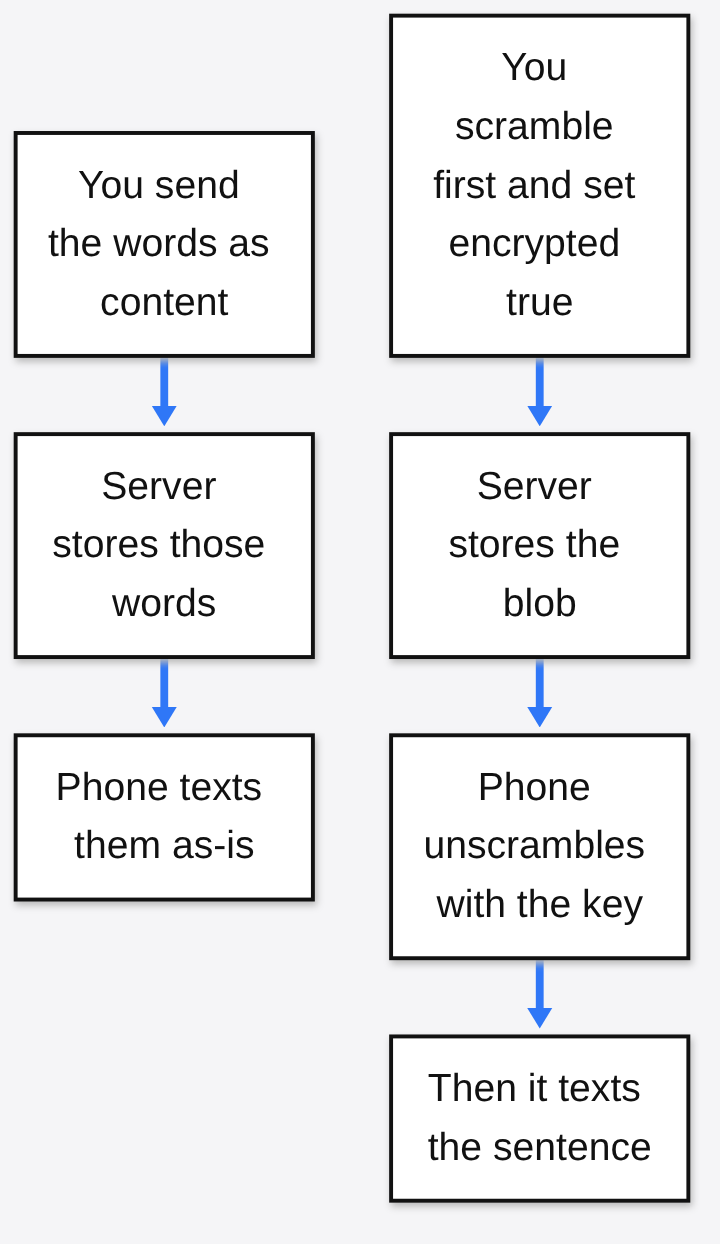
No. A normal send stores the words in plain text on the server. The server only sees scrambled text if you encrypt first and set encrypted to true.
The project says the key lives only on the phone, so the server cannot read the text. That is true for one path, and it is not the path the curl above uses. On a normal send, content is the sentence itself. The API stores that sentence and forwards it. Anyone who can read the database, or the push, can read “disk is full”.
Encryption (scrambling the words so only someone with the key can read them) is a switch, not the default. You set encrypted to true, and you must scramble content yourself with the same key typed into the Android app. The phone then unscrambles it before the text goes out. If you set the flag and forget to scramble, or the phone has no key saved, the app stops and reports that it cannot decrypt.
Incoming texts are the path the claim fits better. If you turn on encrypt-received in the app, the phone scrambles the body before it uploads. The server stores the scrambled form. The key never has to leave the phone for that direction.
I ran the same steps the phone uses. It hashes the key with SHA-256 (a fixed fingerprint of the key, not the key itself), scrambles with AES (a standard lock) in CFB mode (a way to use that lock on a sentence of any length), and sticks 16 random bytes on the front before base64 (a way to write bytes as letters). The sentence was disk is full, wake up. The key was only-on-the-phone.
The letters of that sentence were not inside the scrambled blob. Unscrambling with the same key gave the sentence back. Unscrambling with other-key did not throw an error. It returned junk.
That last part is the trap. The phone treats decrypt as failed only when the call throws. A wrong key, with this lock, does not throw. It yields garbage, and a garbage body can still be handed to the text function. Match the key on both sides before you trust the flag. Do not test that on a real person. Send it to your own phone and read what arrived.
How Many Texts Can httpSMS Send per Minute?
A new phone starts at 10 texts a minute, and that spacing applies to a bulk list, not to a pile of separate single calls.
The program’s own note says Android caps you around 30 texts a minute unless the user has granted a higher limit, so a new phone record starts at 10 to stay under that. You can change the number. The often-repeated example of 3 per minute is a setting you choose, not the starting value.
Spacing is an index times a gap. The gap is 60 seconds divided by the rate. I checked that arithmetic. At 10 per minute the gap is 6 seconds, so the 4th person in a bulk list (index 3) waits 18 seconds. The first person, index 0, waits 0.
One hundred people in one bulk send:
- At 3 per minute the last person waits 33 minutes.
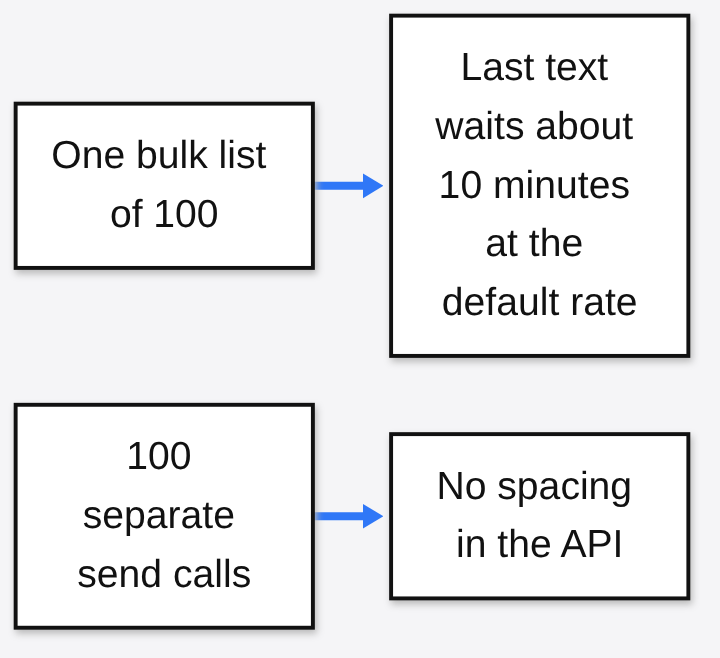
- At the default 10 per minute the last person waits 9.9 minutes.
A loop of one hundred separate calls to /v1/messages/send does not get that wait. Each of those calls has no index, so each delay is 0. The API will try to push them as fast as you call. Android may still slow the phone down near its own cap. Do not treat a fast loop as safe just because a bulk list is polite.
Two more defaults sit on a new phone. It tries a send at most twice. If the phone never takes the message, the message expires after 10 minutes. A phone that is asleep in a bag does not slowly drain a queue all afternoon. The text dies.
When httpSMS Is the Wrong Tool
Skip it when the text has to go out even if your phone is off, or when the number has to look like a business.
A receipt, a login code for a customer, or a blast to a list you do not personally know belongs on a service that owns the carrier relationship. A consumer SIM used as a tiny business line can get the number limited or cut off. The software will not warn you about your carrier’s rules.
Skip it on iPhone. Skip it if you cannot leave an Android phone plugged in, signed in, and on a network. Skip it if you need the text to survive your house losing power. Twilio, or any carrier API, still sends from their side.
Skip the privacy story if you are not going to encrypt first. The default path is convenient because the words are right there in the JSON. Convenient means readable.
Can I Self-Host httpSMS?
Yes. The API, the website, and the Android app are published under AGPL (a license that says people who use your modified server can ask for the source). Self-hosting does not remove Google from the wake-up.
The Docker setup still asks you to create a Firebase project, drop in a service account file, set email, and set a captcha. The push that tells the phone “send this now” comes from that Firebase project. Running the database on your machine changes who stores the queue. It does not change who pings the handset.
That is a fine trade for a homelab alert: your disk, your phone, your plan, and a Google ping you already accepted by installing the app. It is a bad trade if the whole point was “no outside company in the path.” Twilio is an outside company in the send path. A self-hosted httpSMS is an outside company in the wake-up path, plus your phone company in the send path.
If the message is “the disk is full, wake me,” and a phone can sit on a charger with signal, httpSMS is the one to use. If the message is for someone else’s customer, pay for a number that does not depend on a handset in the kitchen.
Common questions about httpSMS vs Twilio
Does the phone have to stay on?
Yes. The app has to be signed in, the phone needs a network for the push, and the SIM needs signal to send. A powered-off phone does not send the text. A message the phone never takes expires after 10 minutes on a new setup.
Is httpSMS free?
The program is free to run, and you can host it yourself. Your mobile plan is the bill that remains. A hosted copy of the API may add its own limits. Those limits are separate from the phone plan, so read them on the site you sign in to before you depend on them.
Can I use an iPhone?
No. The app is Android. It sends with the phone’s own text function. There is no iPhone build.
Will a wrong encryption key stop the send?
Do not count on it. I unscrambled with the wrong key and got junk, not an error. The phone reports failure when decrypt throws. This lock does not throw on a wrong key. Check the text on your own phone before you point it at anyone else.