
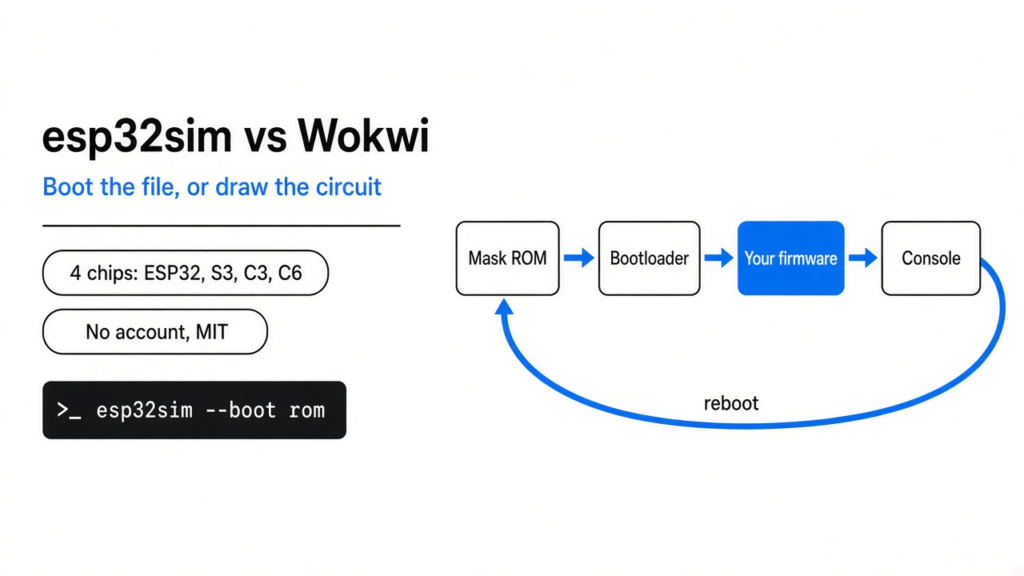
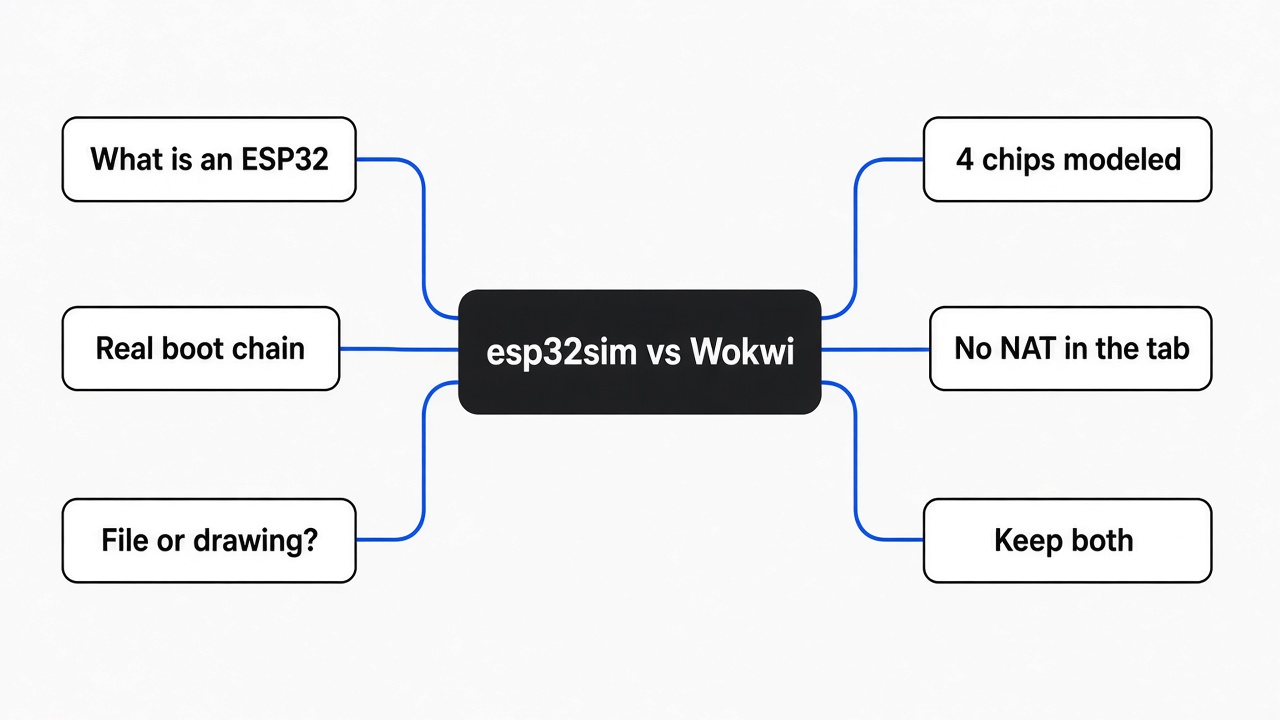
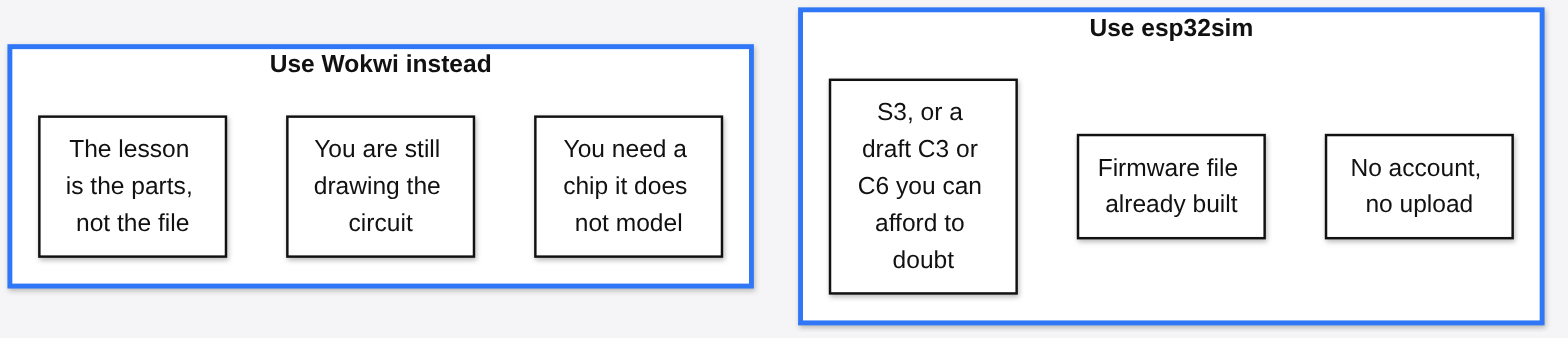
The board was not on the desk. What I had was a firmware file (the program stored on the chip) and a browser tab. An ESP32 is a microcontroller (a small computer on one chip, built to run one device, not to feel like a laptop). It will not blink a light, join a network, or draw a screen until that file is actually running. Wokwi is the page most people open, because you can draw the wires there. esp32sim is the other kind of tool. It tries to be the chip and boot the file you already built. esp32sim vs wokwi comes down to that split. Use esp32sim when the firmware file already exists and you do not want an account. Use Wokwi when you are still deciding which pin the button sits on.
What Is an ESP32?
An ESP32 is one chip that already holds a processor, some memory, and a radio, so a gadget can think and talk without a second computer beside it.
A normal computer waits for you. This one waits for a wire. The metal legs around the black square are pins. The ones you hook to a button or a light are GPIO pins (general pins you can treat as on or off, or sometimes as a number). Power goes in one pin. Ground, the return path for that power, goes in another. A USB socket on a development board (a ready-made little circuit around the chip, so you do not have to solder the chip itself) is only there so your laptop can feed it power and a new program.
The program is not an app you double-click. It is firmware, and it sits in flash (memory that keeps its contents after the power is off). When you “upload,” you are copying that file into the flash. After that, the chip runs it by itself. If you do not own the board yet, you need something else to pretend to be that chip. That something else is the whole argument of this page.
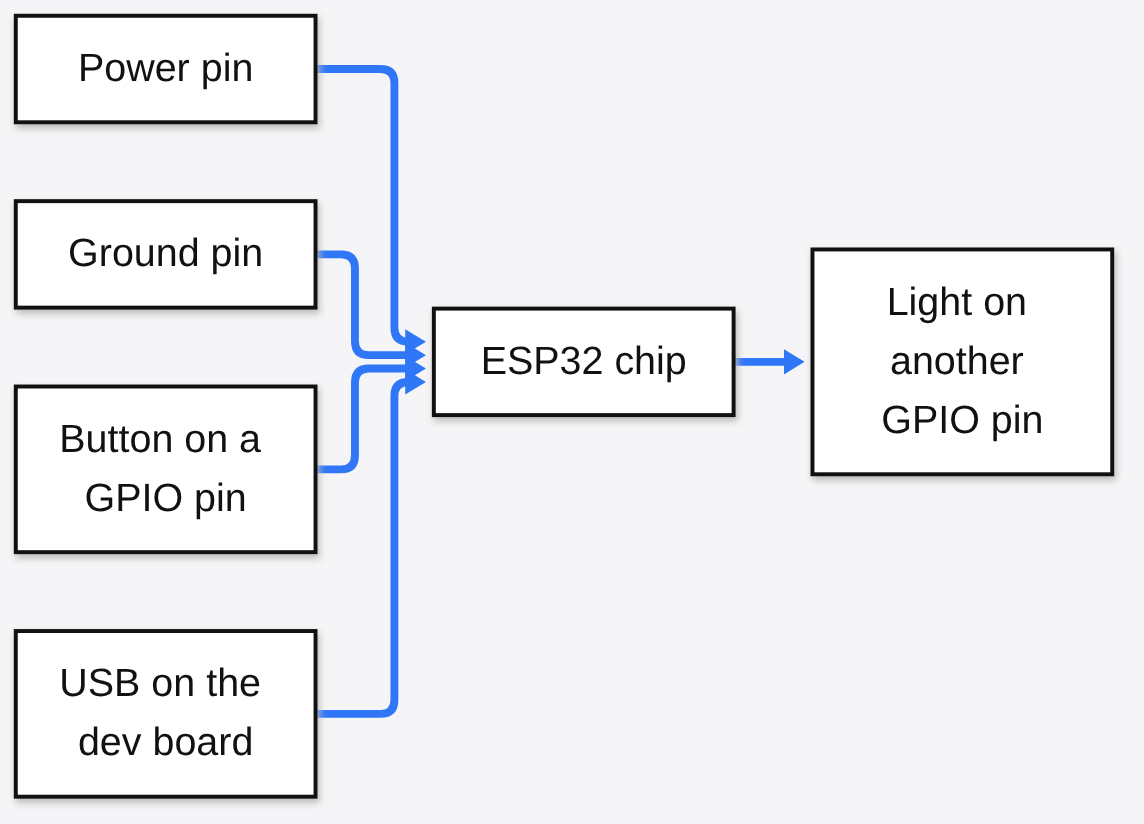
That sketch is the habit Wokwi is copying: parts you can point at. If your problem is not a picture of parts, and it is a file you already compiled, the picture is the wrong first step. I have made that mistake. I opened a simulator, looked for an upload button, and only then noticed I was supposed to redraw a circuit I had already built at the office.
What an Emulator Actually Does
An emulator (a program that carries out the chip’s own instructions, one by one) is not the same thing as a drawing of a board.
Here is the order the real chip uses, before your code even starts. First comes the mask ROM (a tiny program burned in at the factory, the first thing that runs). It looks at the flash and hands off to a bootloader (the next program, whose job is to find your app and start it). Then your app runs. Often that app sits on FreeRTOS (a tiny system that lets several tasks take turns on one chip). If a tool skips that chain and jumps straight to “your loop,” it can still be useful, and it is not the same test.
A simulator, in the way people use the word for Wokwi, fakes the outcome. You place an LED, you write a sketch, the picture of the LED changes when the pretend pin changes. An emulator is fussier. It reads the same bytes the chip would read and performs the same instructions. esp32sim is in that second camp. It says it boots the real factory ROM, then the real bootloader, then an unmodified app. I opened the public browser page and the Linux demo’s own console text is sitting in the page: Linux buildroot 6.11.0 #1 PREEMPT xtensa GNU/Linux. Xtensa (the instruction language the S3 chip speaks) is right there in the line the pretend machine printed. A drawing of a board does not print that.

That chain is why a file from a normal build can be dropped in. You are not rewriting the program so a website will accept it. You are handing over the same images a real board would boot: bootloader, partition table, app.
esp32sim vs Wokwi
esp32sim vs wokwi is a choice about what you already have in your hand, not about which logo is newer.
Wokwi lets you start from nothing. You pick an ESP32, you drag a button and a display, you paste a sketch, you press run. The virtual WiFi access point is named Wokwi-GUEST, and it is open, so the usual call is WiFi.begin("Wokwi-GUEST", "", 6) with an empty password. That is a gift when you are learning, and it is a different gift from “run this .bin I built yesterday.”
esp32sim starts from the file. The chips it models are the original ESP32, the S3, the C3, and the C6. The S3 speaks Xtensa. The C3 and the C6 speak RISC-V (a different instruction language, simpler and open, not the same bytes). One program cannot be both. If you built for the S3, you run the S3 emulator. If you built for the C6, you run the C6 one. The project itself marks the S3 path as the mature one and the C3 and C6 paths as drafts. I would not bet a release on a draft chip model.
| esp32sim | Wokwi | |
|---|---|---|
| You start with | A firmware image you already built | A drawing plus a sketch |
| Account | Not required for the local run or the public demo | The public site is an account in practice for saved work |
| Where it runs | Your machine, or a browser tab | The browser, and a VS Code add-on |
| WiFi | A virtual access point you name, and on the command line it can share your real network | Wokwi-GUEST, no password |
| Wiring picture | A few modeled boards, not a free-form breadboard | Drag and drop parts |
| Chip coverage | ESP32, S3, C3, C6, with C3 and C6 marked draft | A long list of ESP32 family chips, kept as their product |
| Offline | Yes, once the program is on your disk | The website is not your disk |
The row that surprises people is the last one. “It opens in a browser” is not the same sentence as “it works on the train with the wifi off.” The public esp32sim page still has to download the emulator the first time, about 8 MB, and the Linux demo’s flash image is much larger. After that, the page says nothing runs on a server. Wokwi’s value is the opposite: the circuit, the parts library, and the examples live on their site, and that is why it feels instant.
How Does esp32sim Boot Real Firmware?
esp32sim boots real firmware by starting at the factory ROM and only then jumping into the file you pass it, instead of pretending your setup() is the reset vector.
Three files matter on a normal build. The bootloader image. The partition table (a small map that says which region of flash holds which thing). The app image. On the command line that looks like this, pointed at the demo images the project already ships:
FW=web/wasm/fw/public
esp32sim --boot rom \
  --bootloader $FW/atech-bootloader.bin \
  --ptable $FW/atech-ptable.bin \
  --app $FW/atech-firmware.bin \
--max-seconds 5--boot rom means “start where a real chip starts.” --boot app skips the ROM and the bootloader and jumps into the app. That second flag is a shortcut for a test that does not care about the boot, and it is a worse test if your bug is in the boot. --max-seconds is a mercy. An emulator will happily run forever, and a firmware that never exits will sit there until you stop it.
The factory ROM file is not always in the repo. Without Espressif’s own tools installed, the project tells you to run a fetch script so the ROM lands in web/wasm/fw/, then pass --rom or set ESP32SIM_ROM_DIR. I hit the practical version of this limit before I hit a compile: the release files I could download were a macOS archive. There was no Linux binary in that release. On this machine I could not double-click my way to a boot. The honest path on Linux is to build it, or to use the browser demo.
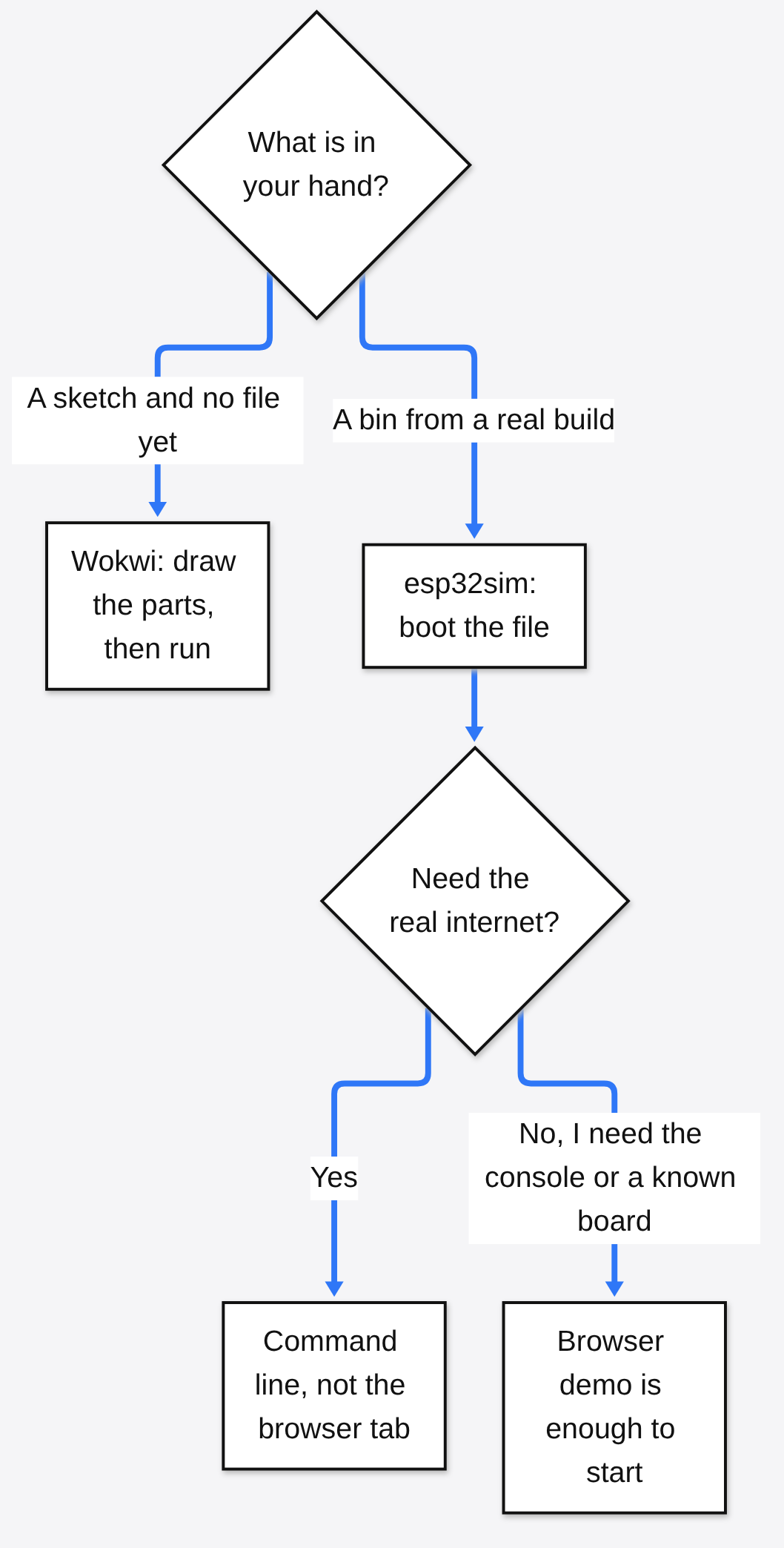
The browser demo is still a real boot chain, with one hard limit. The same document that shows the WebAssembly build (the emulator compiled into a form a browser tab can run) says there is no NAT there, because a browser has no sockets. NAT (a way for the pretend chip to borrow the computer’s real internet connection) works on the command-line run. It does not work in the tab. If your firmware’s first act is “download a config from the office,” the tab will not be the test that proves it. The tab will prove that the chip comes up, the console talks, and a modeled screen can draw.
How Do I Run ESP32 Firmware Without a Board?
You run esp32 firmware without a board by giving esp32sim the bootloader, the partition table, and the app, or by opening the public demo and loading your own image from disk.
The ten-minute path, if you only want to see a chip come up, is the public page. Open it, pick a demo, and read the console. The Linux one logs in and the uname line names xtensa. That is enough to learn what “boot” means here. It is not enough to trust your own product.
The path for your own file is the command line, after a build:
cargo build --releaseThen the same --boot rom shape as above, with your three images instead of the demo ones. For a C3 wifi example the project ships, the access point is named in the flag itself:
esp32sim-c3 --boot rom --flash-mb 4 --console usb \
  --bootloader bootloader.bin \
  --ptable partition-table.bin \
  --app app.bin \
  --wifi ssid=esp32sim,psk=esp32sim-pass \
  --max-seconds 14
esp32sim-c3 is the C3 chip. esp32sim-c6 is the C6. Plain esp32sim is the S3 unless you pass --chip. The wifi flag attaches a virtual access point that the chip’s own wifi code can see: scan, password, association. On the command line, that network can also reach the real one. In the browser, it cannot.
A few checks before you blame the emulator:
- The images match the chip. An S3 app will not boot on the C6 model. The bytes are a different language.
- You passed the bootloader and the partition table, not only the app, if you care about a real boot.
- You gave it a ROM file, or you installed the vendor tools that already contain one.
- You set
--max-seconds, so a quiet firmware does not look like a hang. - You are on a modeled board, or you accept console-only.
--board noneis a bare module. The C3 model has no board picture at all. It is a console.
If the job is “I want to learn what a resistor does,” stop. This is the wrong tool. A breadboard, or Wokwi’s parts, will teach that in an afternoon. esp32sim assumes you already know which file is the app.
Can I Use esp32sim Instead of Wokwi?
You can use esp32sim instead of Wokwi when the thing you need to prove is “this firmware image boots,” and you cannot when the thing you need to prove is “this wire goes to this pin.”
I expected a drop-in. What I found was a narrower tool that is better at one job. Wokwi will show you an LED on GPIO 2 because you placed that LED. esp32sim will show you a screen if you picked a board it already models, such as a TTGO T-Display, a Waveshare LCD, or the Atech board the demos use. It will not invent a sensor you just thought of. Adding a board means teaching it how that board’s pins behave. That is a project, not a setting.
Wokwi is also where you go for the long tail of chips and for examples you can click. Its ESP32 guide covers a family list that is wider than four parts, including chips esp32sim does not claim. If your boss handed you an S2 or a P4, do not force this emulator to be that chip. It is not.
The other way around matters too. If your company will not put the firmware on someone else’s website, Wokwi’s public editor is the wrong room. esp32sim is MIT-licensed (you can use it, change it, and ship it, including in a company, as long as you keep the license notice) and it runs on your machine. A local run is the point. The same reason shows up in other swaps on this site: a free download manager when the paid one is Windows-only, or running a large model on the computer you already own instead of renting the only machine that is allowed to see the file.
One caveat. “Local” does not mean “finished.” The C3 and C6 models are marked draft. The S3 is the one the project calls mature. A draft will boot hello-world and still be wrong on the one peripheral your product uses. Treat a draft chip the way you would treat a new employee’s first week: let it try, do not ship on its word.
Is esp32sim Worth It?
esp32sim is worth it if you already build ESP32 firmware and you are tired of waiting for a board to come back from a coworker.
It is worth it in four plain cases.
- You have a
.binand you want a console before the hardware arrives. - You want a test that does not need an account and does not upload the image to a website.
- You are on Linux or a Mac and the board on the shelf is the only Windows-shaped thing in the story. The emulator is not stuck to one desktop, even if the prebuilt file I found was a Mac archive and Linux meant a build.
- You want a coding agent, or a script, to boot a firmware image and read the console, because the run is a command with a time limit.
It is not worth it in three other cases.
- You are on lesson one and you need to see a resistor. Use Wokwi, or a real breadboard. The picture is the lesson.
- Your chip is outside the four it models.
- Your proof depends on a peripheral it does not implement. A missing radio mode or a missing camera will fail quietly or not at all, and you will think your firmware is the bug.
I would not throw Wokwi away. I would stop asking it to be a private boot of a file I am not willing to paste into a website. Those are two desks. PhotoCraft versus GIMP is the same kind of desk split in a different job: the new tool for the file you can afford to experiment on, the old tool for the file you cannot lose. A chip image is not a photo, and the habit is the same. Look at what the file is, then pick the program that understands that file.
If the file is a PDF rather than a firmware image, the sibling page is pdfcraft versus qpdf. If it is a huge text table, it is xan versus csvkit. None of those replace a board. They are here because the mistake is the same: grabbing the famous tool before you have named the file.
What esp32sim Cannot Do Yet
esp32sim cannot yet replace a full electronics bench, and it cannot share your real network from inside the browser tab.
The browser limit is the one I would write on a sticky note. No sockets, no NAT. A firmware that only talks on the pretend access point can still associate. A firmware that must open a connection to the public internet needs the command-line build, on a machine where you actually compiled or installed the emulator. Do not debug a “cloud login failed” bug in the tab and conclude the firmware is broken.
The draft chips are the second sticky note. C3 and C6 boot, and the project shows wifi examples for them, and it still labels those models draft. The S3 has the board list, the display models, the camera path, the audio path. If your product is a C6 with a radio mode the model only approximates, say so in the test report. An energy-detect stand-in is not a certification lab.
The third limit is the picture. There is no open canvas of parts. You get the boards that were written down, or you get text. Wokwi’s whole product is that canvas. Asking esp32sim to grow a parts bin by wishing will waste a week. If you need the canvas, go back to Wokwi. If you need the file, stay.
The fourth limit is speed of setup, not speed of the chip model. A Mac archive was published. A Linux binary was not, in the release I checked. cargo build --release is a real compile of a Rust program (Rust is the language the emulator is written in), and it is not a one-second install. Budget that once. After that, the command is boring, which is what you want from a test.
Common questions about esp32sim vs Wokwi
Is there an ESP32 emulator I can run offline?
Yes. Build esp32sim, or run a binary for your system, and it boots on that machine with no account. The browser demo still has to fetch the emulator once. After the files are on disk, the command-line run does not need their website.
Does Wokwi WiFi need a password?
No. The virtual access point is Wokwi-GUEST, and the password is empty. The channel in the usual snippet is 6. That gets the pretend chip onto the pretend network. Reaching a server from inside the chip is a separate gateway feature, not the same as the open access point.
Can I load my own firmware into esp32sim?
Yes. Pass your bootloader, partition table, and app on the command line, or load your own image from disk in the browser build. Match the chip. Give it a ROM file if you are booting from reset. Do not expect a random sensor to appear because the firmware mentions it.
Should I wait until the C3 and C6 are finished?
Wait if that chip is the product and a wrong peripheral would ship. Do not wait if you only need to see a console come up, and you will still run the same image on a real board before you trust it. The S3 path is the one marked mature. Use that one when you have a choice.
I would keep both tools. Wokwi stays open on the days the circuit is still a guess. esp32sim gets the file on the days the circuit is already decided and the board is in someone else’s bag. The first time the console prints a line you recognize from a real boot, you will know which desk you are at.