


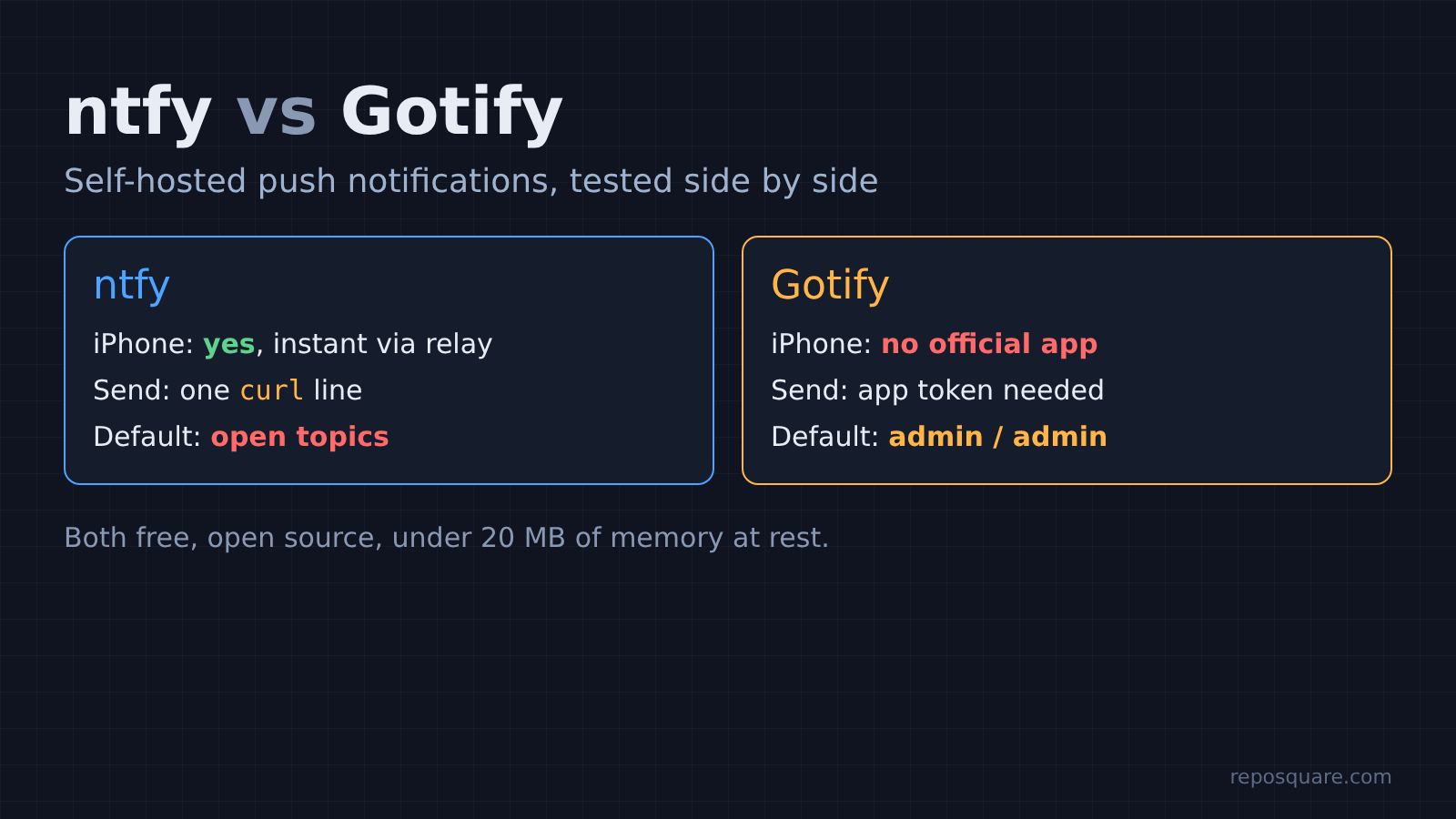
Short answer: For self hosted push notifications, use ntfy if you own an iPhone, want one-line curl alerts, or want files attached. Use Gotify if everyone is on Android and you want a server that is locked down from the first start.
Both are free, open source and tiny. In my tests each used under 20 MB of memory. The real differences are who can read your alerts by default and whether they reach an iPhone at all.
Your backup script fails at 2 AM. Nothing tells you. You find out a week later, when you need that backup.
Most people fix this with email, which lands in a folder nobody reads, or with a paid app like Pushover. A self-hosted push server is the third option. Your script sends one web request, and your phone buzzes a second later.
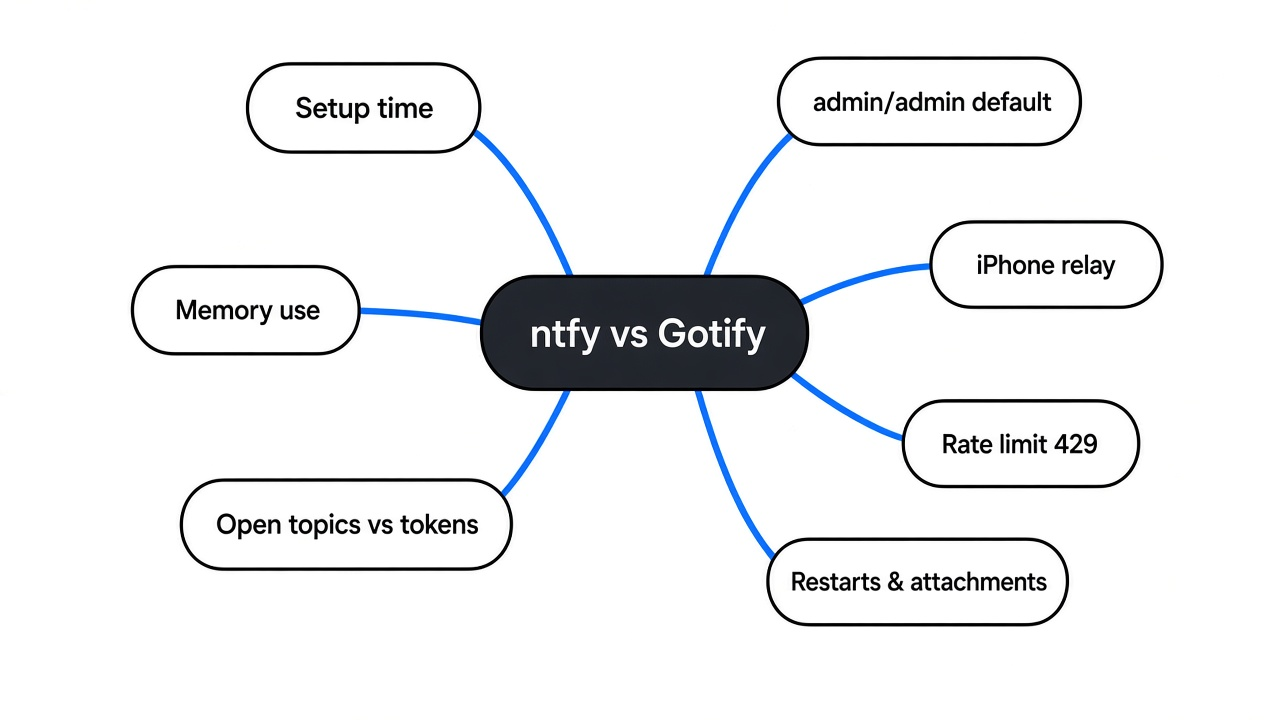
This post compares the two best-known open source choices, ntfy and Gotify. I ran both side by side and tested what matters: setup, default security, limits, restarts, and the iPhone question.
Tested in October 2026 with ntfy 2.34.0 and Gotify server 3.1.1 in Docker 29.9.2 on a 2 vCPU, 8 GB Linux VM. The phone apps were not tested on real devices; phone details come from the official docs and app READMEs.
How does a self-hosted push notification work?
Your script talks to your server, your phone keeps a line open to that same server, and the server passes messages along.
Start with the simplest picture. A notification server is a post office with mailboxes. Your script drops a letter into one mailbox. Your phone has a key to that mailbox and checks it constantly.
In software terms this is publish/subscribe (pub/sub: senders post to a named channel, listeners receive everything posted there). The script is the publisher. The phone app is the subscriber.
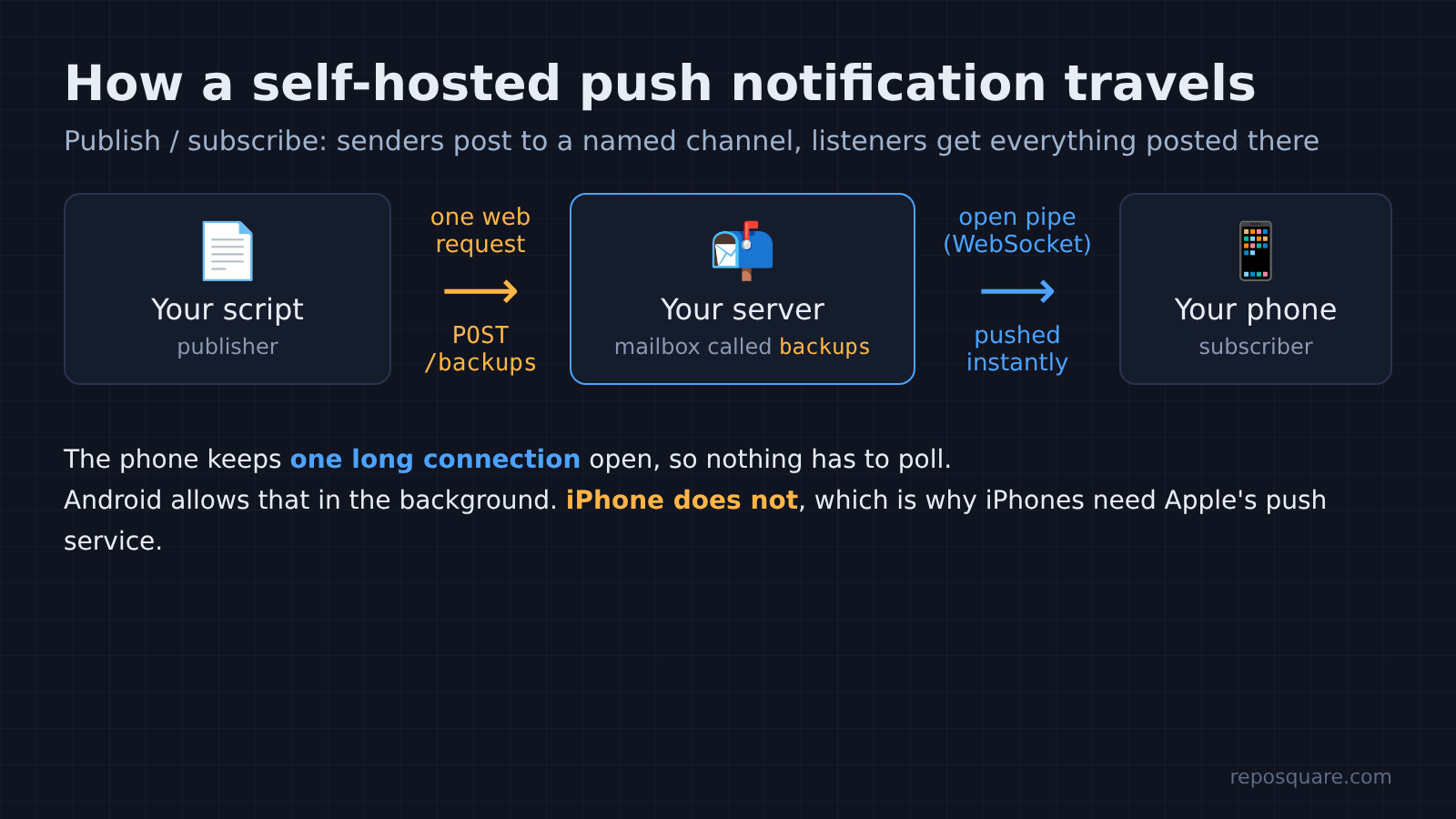
So how does the phone “check constantly” without draining the battery? It keeps one long connection open to your server, using a WebSocket (a connection that stays open so the server can push data the moment it arrives). Nothing polls every few seconds. The server simply writes into the open pipe.
That one detail explains most of the differences below. Android lets an app keep that pipe open in the background. An iPhone does not, so iPhone alerts need a detour through Apple. Hold on to that, because it decides the winner for a lot of people.
What is the difference between ntfy and Gotify?
ntfy uses named topics that anyone can post to unless you add logins, while Gotify uses a key for every sender and every phone from the start.
ntfy organises messages by topic (a channel name you pick, like backups). Posting to it takes one line, with no account:
curl -d "Backup finished on nas-01" http://your-server/backupsGotify works with tokens (long secret strings that act like keys). You log in, create an “application” for each sender, and it gives you an app token. Each phone or browser gets its own client token for reading.
curl -X POST "http://your-server/message?token=YOUR_APP_TOKEN" \
  -F "title=Backup" -F "message=Backup finished on nas-01" -F "priority=5"
Both projects document this well: ntfy docs and Gotify docs.
Think of it as a shared office mailbox versus a locked one. ntfy’s mailbox is opened by knowing its name. Gotify’s needs a key, cut separately for each person.
Both come with a clean web dashboard, so you can see your history in a browser as well as on your phone.

How do you set up ntfy and Gotify with Docker?
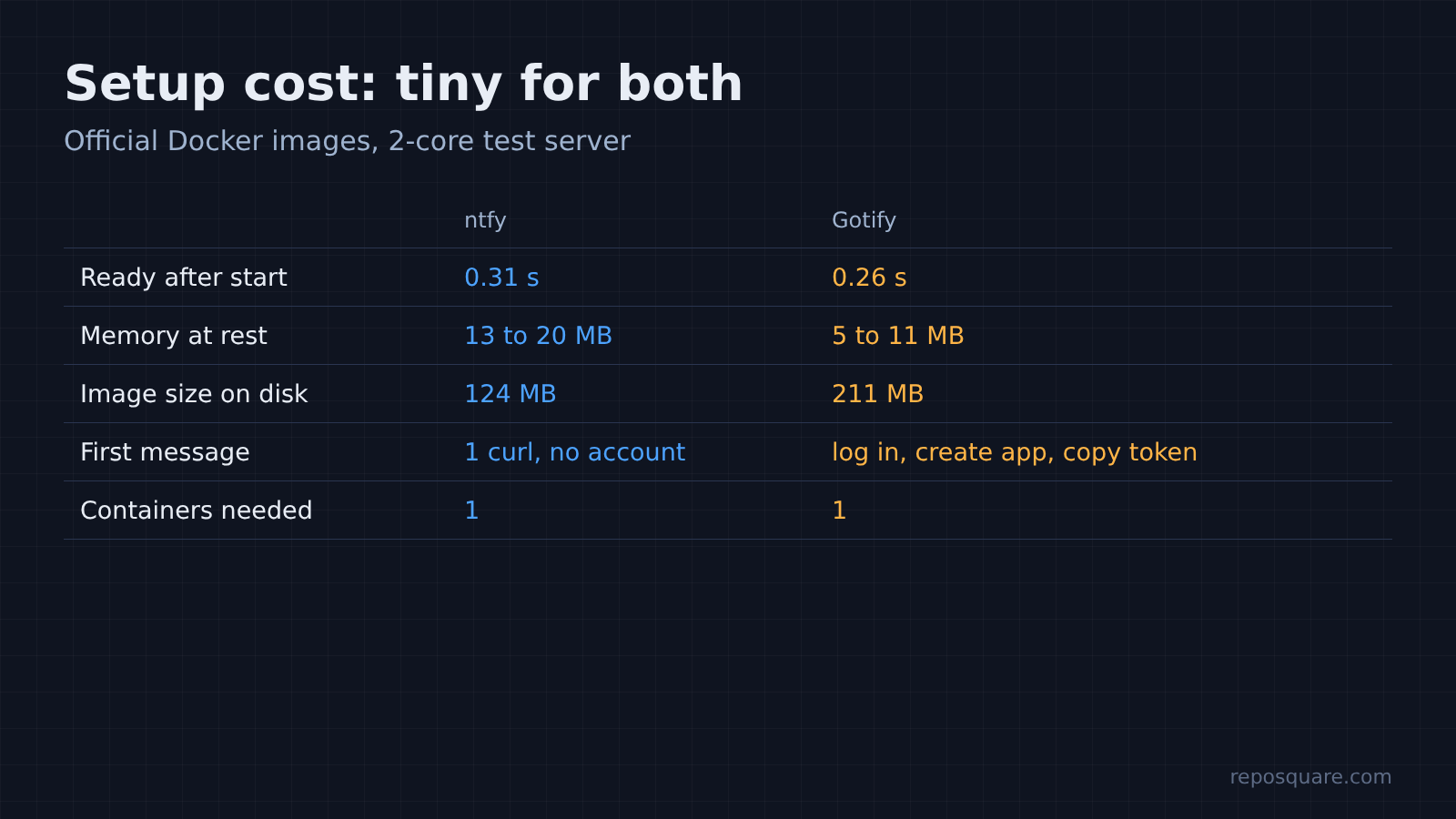
Each one is a single small container, and both answered requests in about a third of a second after starting.
Docker runs an app in a sealed box (a container) with everything it needs, so you do not install anything else. Here are the two commands I used:
# ntfy
docker run -d --name ntfy -p 8080:80 binwiederhier/ntfy serve

# Gotify
docker run -d --name gotify -p 8081:80 gotify/serverOn a 2-core test server, ntfy passed its health check 0.31 seconds after the start command and Gotify after 0.26 seconds. At rest, ntfy used about 13 to 20 MB of memory and Gotify about 5 to 11 MB.
Either fits next to everything else on a small home server or the cheapest VPS you can rent (here is how to benchmark a VPS before you trust one).
But those two commands are only the demo setup. Do not stop there, because the defaults hide two traps.
Is ntfy secure by default?
No. Out of the box, anyone who knows or guesses your topic name can read every message and post fake ones.
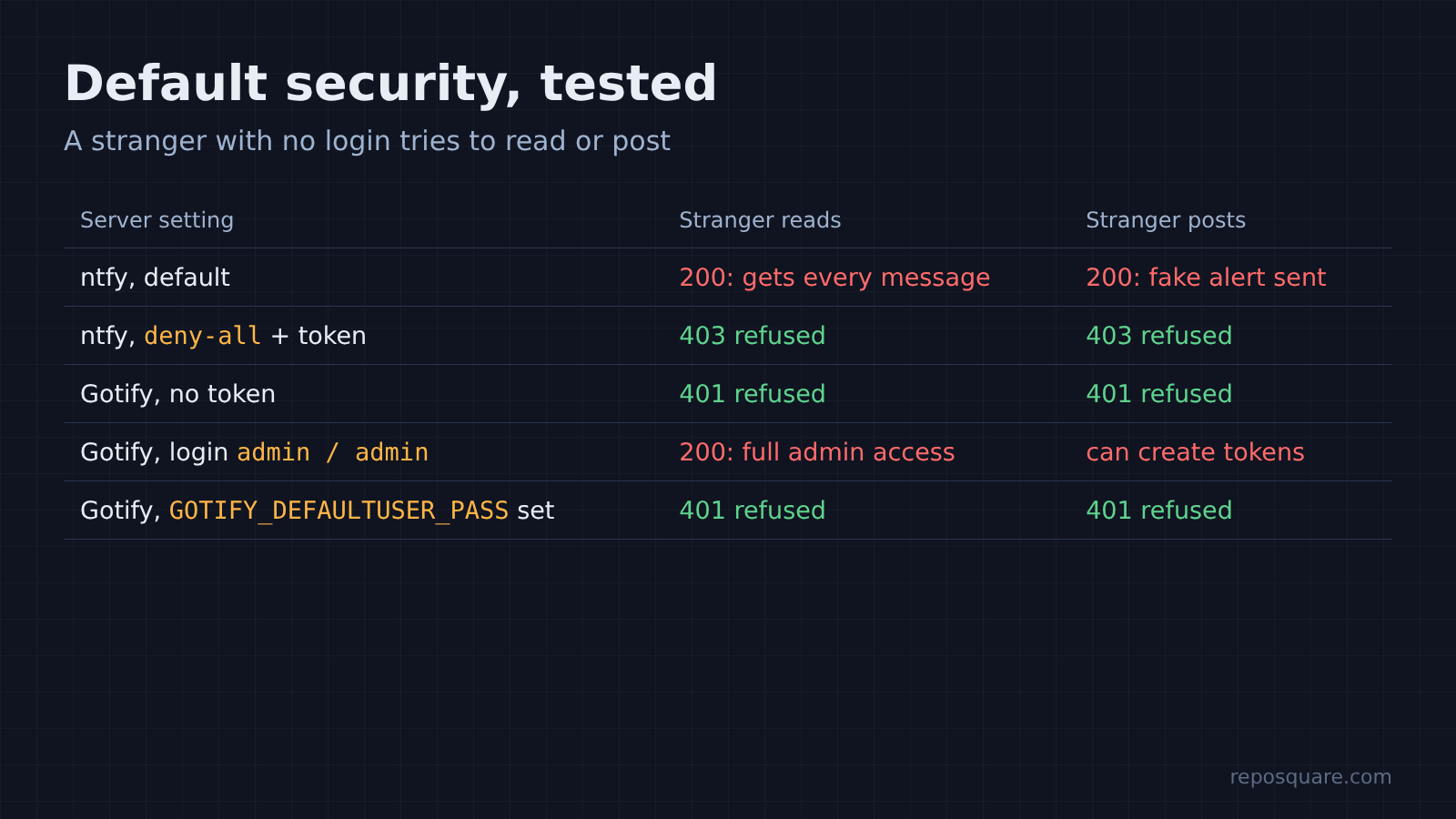
I posted “Backup finished on nas-01” to an ntfy server with default settings. Then, as a stranger with no login, I asked for the backups topic. The server handed the message right back, along with every other message from the last 12 hours.
That is by design. ntfy’s default access rule is read-write for everyone, and the topic name is treated as the password. So a topic called backups is a password called backups.
Two fixes, in order of strength:
- Turn on logins and deny everything by default: set
NTFY_AUTH_FILEandNTFY_AUTH_DEFAULT_ACCESS=deny-all. - Create a user and an access token, then send that token with each message.
docker exec -e NTFY_PASSWORD='a-long-password' ntfy ntfy user add --role=admin me
docker exec ntfy ntfy token add me
curl -H "Authorization: Bearer tk_yourtoken" -d "Backup finished" http://your-server/backupsAfter that change, a stranger got a 403 (the server’s “you are not allowed” reply) for both reading and posting. My token got through.
Is Gotify secure by default?
Mostly yes, with one big exception: the first admin login is admin / admin.
Gotify refused a message sent without a token, with a 401 (the “who are you?” reply). Reading needs a client token too. So a guessed URL gets a stranger nothing.
The weak spot is the starting account. A fresh Gotify server accepted admin / admin on my first try, and with that login anyone can create tokens and read everything. If the dashboard is reachable from the internet before you change it, it is wide open.
Set the password before the first start, because Gotify only reads it once, when it creates its database:
docker run -d --name gotify -p 8081:80 \
-e GOTIFY_DEFAULTUSER_PASS='a-long-password' gotify/serverWith that variable set, admin / admin returned a 401. The chosen password worked.
So which default is worse? ntfy’s open topics are a quiet leak that lasts forever. Gotify’s default password is one loud mistake that you fix in a single line. I prefer Gotify’s starting point, but both are fine once you spend two minutes on them.
Which one works on an iPhone?
ntfy works on iPhone, and it is instant with one relay step. Gotify has no official iPhone app at all.
This is where the open pipe from earlier comes back. iOS heavily limits what apps do in the background, so the ntfy app cannot keep its own pipe open. Instant alerts need a central server that can reach APNs (Apple’s push service, the road almost every iPhone notification travels).
Your home server is not that central server. Without help, alerts still arrive, but they can take hours when the phone is idle. The fix is one setting, upstream-base-url: "https://ntfy.sh", which tells your server to ping the public ntfy.sh server so it can wake your phone right away.
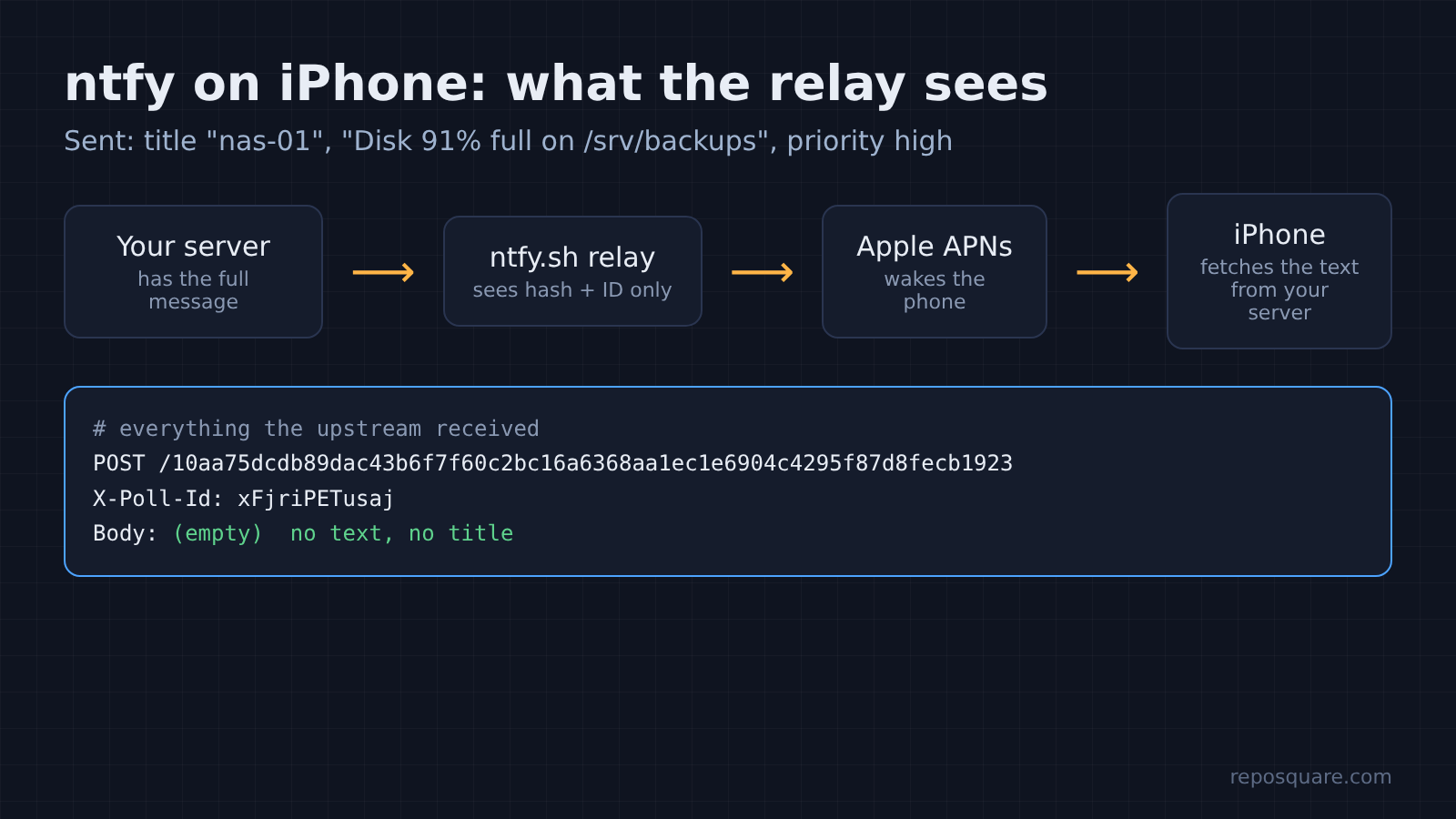
I wanted to know what that ping leaks. So I pointed the setting at a small listener of my own and sent “Disk 91% full on /srv/backups” with a title and a priority. Here is everything the upstream server received:
POST /10aa75dcdb89dac43b6f7f60c2bc16a6368aa1ec1e6904c4295f87d8fecb1923
X-Poll-Id: xFjriPETusaj
User-Agent: ntfy/...
Body: (empty)The path is a SHA-256 hash (a one-way fingerprint) of the server address plus topic. The header carries only a message ID. No message text and no title left my server.
The iPhone wakes up, then fetches the real message from your server directly. If it cannot reach your server, it shows a generic “New message”. The relay does learn three things: that a message happened, when, and your server’s IP address.
Gotify on iPhone means a third-party app, iGotify, plus a separate helper service that forwards alerts through another relay to Apple. It works, but it is a second project to install and trust.
On Android, both work without any relay. Gotify’s app shows a permanent status notification, and Android kills it if battery optimisation is left on for it. ntfy’s app runs the same kind of always-on connection for self-hosted servers, and ntfy’s F-Droid build (the open source Android app store) has no Google services at all.
What limits will you hit?
ntfy limits how fast one machine can send, forgets messages after 12 hours, and refuses files until you set it up. Gotify has no rate limit and no expiry, but no file attachments either.
The first one surprised me. I fired 100 messages in a row from one script at a default ntfy server. The first 60 went through, then every request got a 429 (the “too many requests” reply). After that it allowed one more message every 5 seconds.
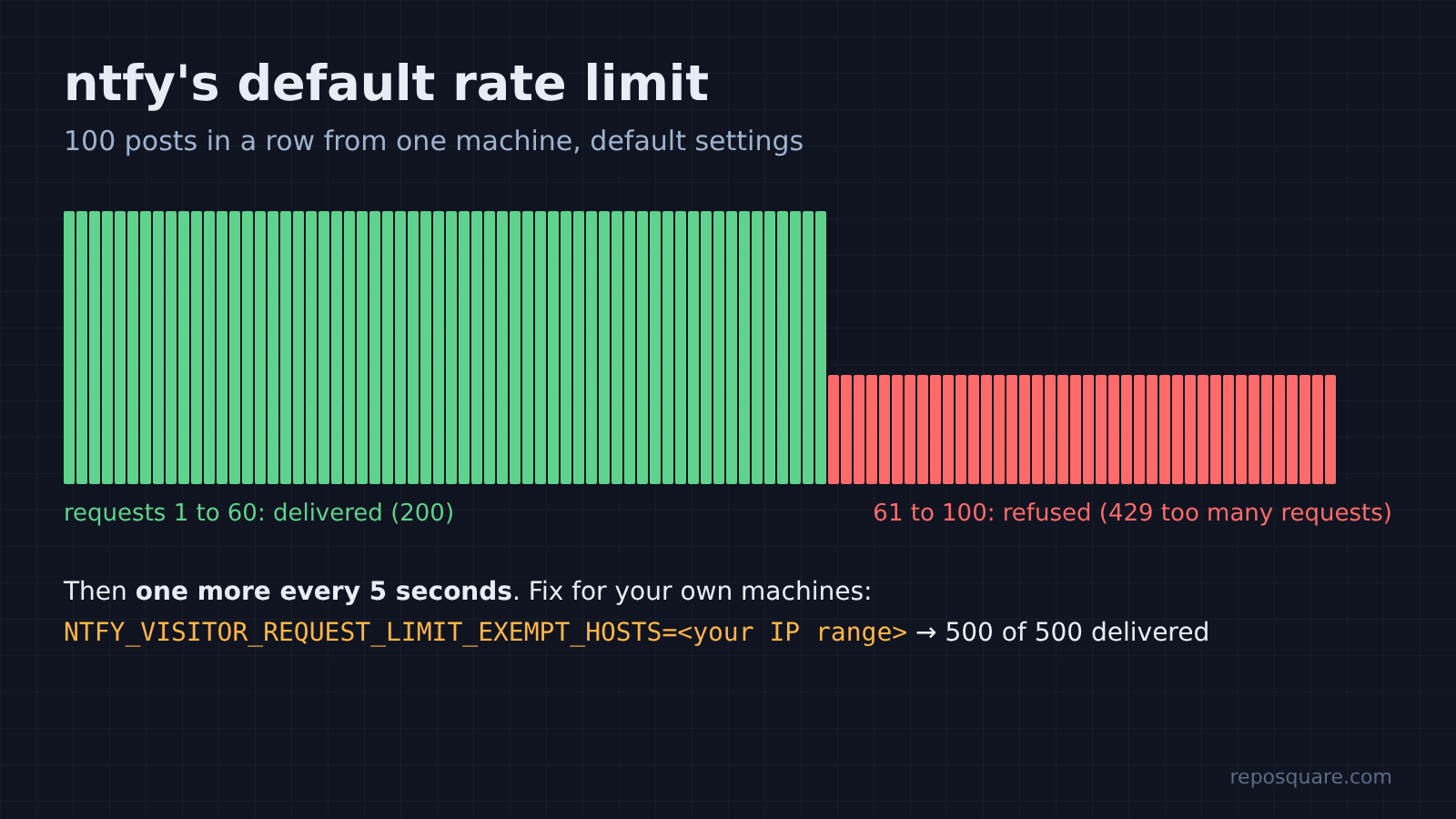
That is a rate limit (a cap on how many requests one sender gets in a time window), and it protects public servers from spam. On your own server it can swallow alerts when a cron job loops. Exempt your own machines with NTFY_VISITOR_REQUEST_LIMIT_EXEMPT_HOSTS, giving it their IP range. After I did, 500 messages in a row all went through.
The second limit is memory. By default ntfy keeps messages only in RAM for 12 hours, so a restart wipes them. I posted a message, restarted the container, and it was gone. Set NTFY_CACHE_FILE to a file on a mounted folder and messages survive restarts.
The third is files. ntfy can attach a log or a screenshot to an alert, which Gotify cannot. But a default server rejected my upload with “attachments not allowed”. It needs NTFY_BASE_URL and NTFY_ATTACHMENT_CACHE_DIR, and attachments expire after 3 hours by default. (For moving big files between your own devices, a transfer tool fits better: see magic wormhole vs LocalSend.)
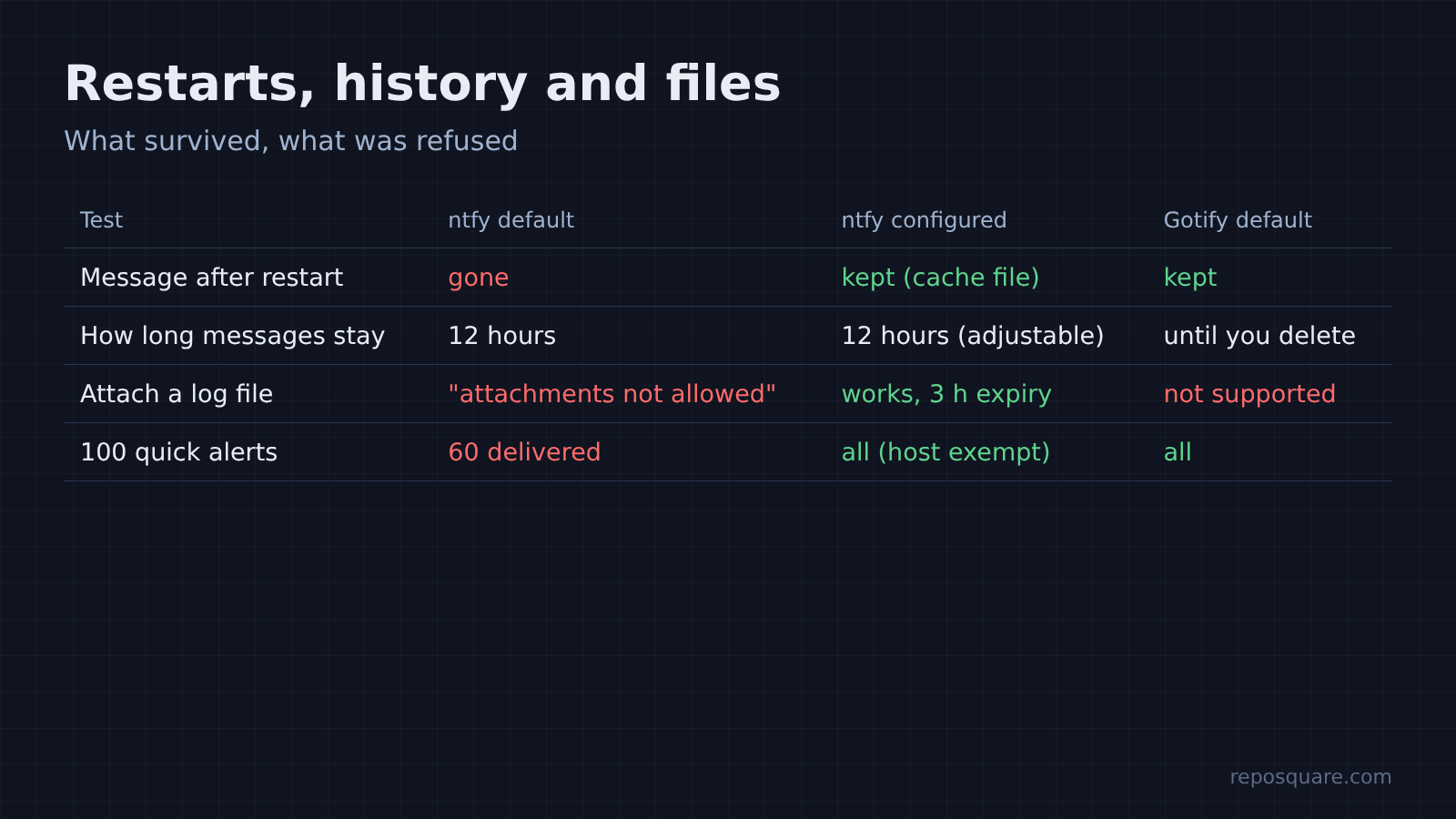
Gotify kept every message in its own database through restarts, with no extra setting. It also kept all of my roughly 13,000 test messages, so plan to clear old ones from the dashboard once in a while.
Is ntfy or Gotify faster?
Both deliver in a few milliseconds, so speed should not decide this.
I sent 200 messages to each and timed how long they took to reach a listening subscriber on the same machine. Three runs each. ntfy’s median was 0.7 to 0.8 milliseconds. Gotify’s was 2.0 to 2.5.
Then I fired 2,000 posts back to back. ntfy took 1.2 to 1.7 seconds, with my machine exempted from its rate limit. Gotify took 3.7 to 4.4 seconds.
That is a real gap on paper and none in practice. Your phone’s network adds far more delay than either server, and nobody sends thousands of alerts a second to themselves.
Is there an open source alternative to Pushover?
Yes. Both are, and they cost nothing except a small server you already run.
Pushover is the paid app many people use for this job. It costs $4.99 once per platform after a 30-day trial, and each user can send up to 10,000 messages a month for free. It works well, and its iPhone support is first class.
The case for paying is simple: no server to keep running. If you have no home server, Pushover is still the easy pick.
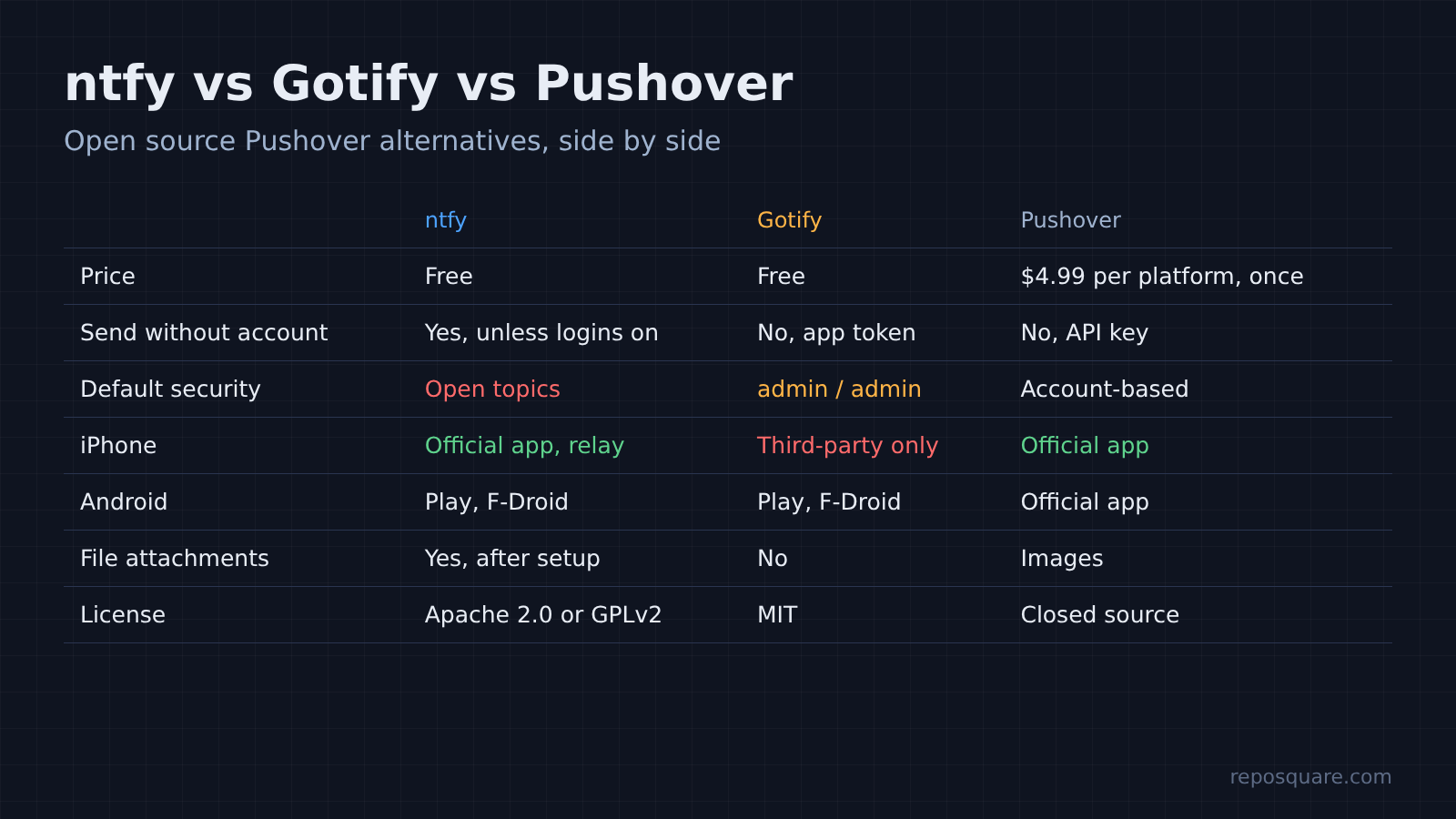
If you do, the self-hosted route keeps your alert text on your own machine and has no message cap. Here is how the three line up:
| ntfy | Gotify | Pushover | |
|---|---|---|---|
| Price | Free, open source | Free, open source | $4.99 per platform, once |
| Send without an account | Yes, unless you turn on logins | No, app token needed | No, API key needed |
| Default security | Open topics | Tokens, but admin / admin | Account-based |
| iPhone | Official app, instant via relay | Third-party app only | Official app |
| Android | Google Play, F-Droid | Google Play, F-Droid | Official app |
| File attachments | Yes, after setup | No | Images |
| License | Apache 2.0 or GPLv2 | MIT | Closed source |
Which one should you pick?
Pick ntfy if anyone in the house uses an iPhone. For an all-Android setup, either works, so pick the defaults you trust more.
Gotify deserves credit here. Its token-first design is the safer starting point, it keeps history without any setup, and it used less memory in every check. For an all-Android homelab, it is a great choice.
But most people have at least one iPhone somewhere, and ntfy is the only one of the two that reaches it officially, without your message text leaving your server. It also fits shell scripts better, since one curl line is all a cron job needs:
./backup.sh || curl -H "Authorization: Bearer tk_yourtoken" \
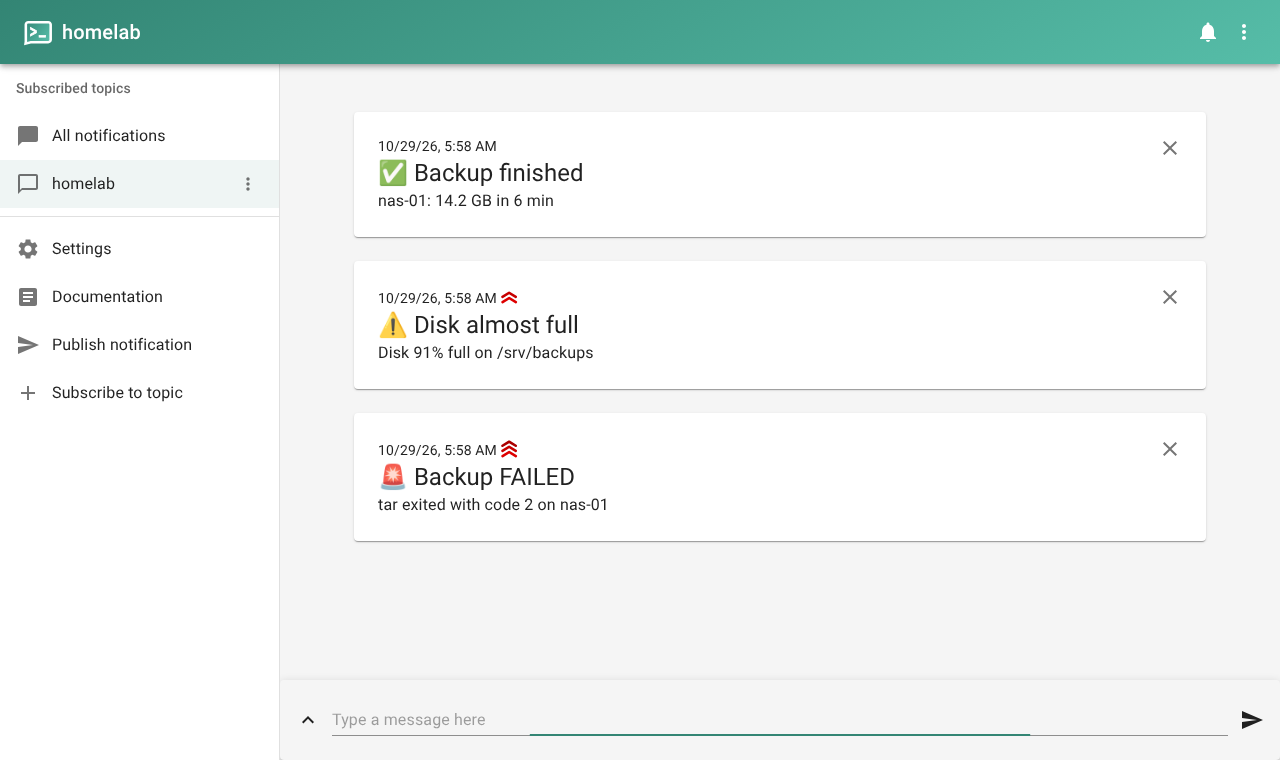
-H "Priority: urgent" -d "Backup FAILED on $(hostname)" http://your-server/backupsThe same line works from a Claude Code hook, so your phone buzzes when the agent is waiting on you.
If you go with ntfy, set three things on day one: deny-all with a token, a cache file, and the rate-limit exemption for your own machines. If you go with Gotify, set the admin password before the first start.
The 2 AM backup will still fail one day. This time your phone buzzes, and only your phone.
Common questions about self hosted push notifications
Is ntfy free to self-host?
Yes. The server and its Android app are free and open source. ntfy.sh also runs a paid hosted plan, but you never need it when you run your own server.
Can I use Gotify on iPhone?
Not with an official app. A third-party app called iGotify works with a separate helper service that relays alerts through Apple’s push service.
Does ntfy send my messages to ntfy.sh when I enable iPhone support?
No message text or title is sent. In my test the upstream server received only a hashed topic address and a message ID, and the iPhone then fetched the message from my own server.
Why does ntfy return “too many requests”?
Its default rate limit allows a burst of 60 requests per sender, then one every 5 seconds. Add your own machines to visitor-request-limit-exempt-hosts to lift it.