
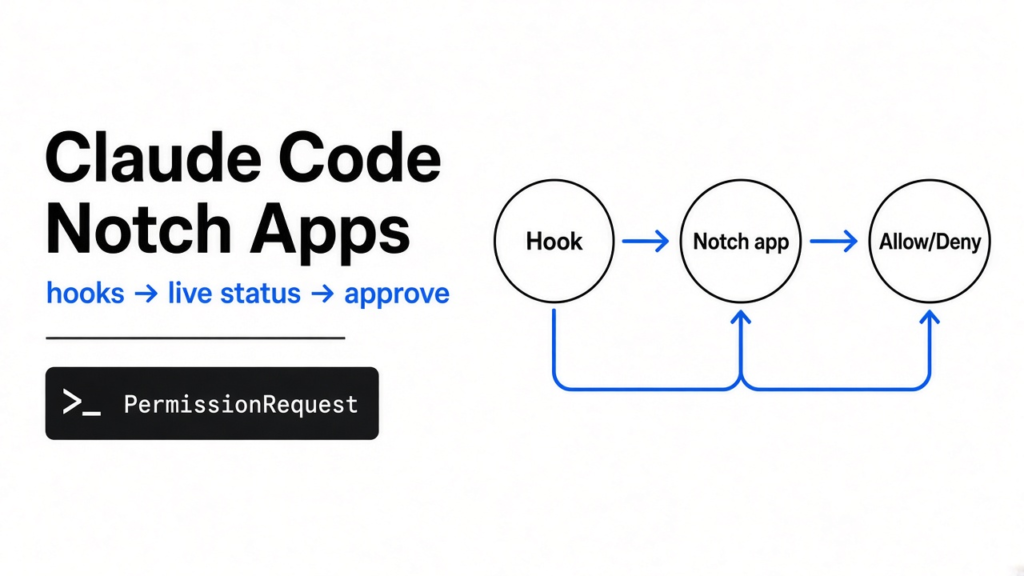
TL;DR: Coucou, Vibe Island and vibe-notch all show your Claude Code sessions in the MacBook notch and let you click Allow or Deny there. Under the hood they all use Claude Code hooks, the same feature you can set up yourself in five minutes. Get a notch app if you want one-click approvals. If you only want to know when Claude is done or stuck, a 10-line hook does it for free, on any OS.
You give Claude Code a task and switch to another window. Ten minutes later you check back and find it has been sitting there the whole time, waiting for you to approve one command.
That wasted wait is why notch apps for Claude Code are suddenly everywhere. This post shows how they actually work, compares the three main ones, and gives you a tested script that does the basic job without installing anything.
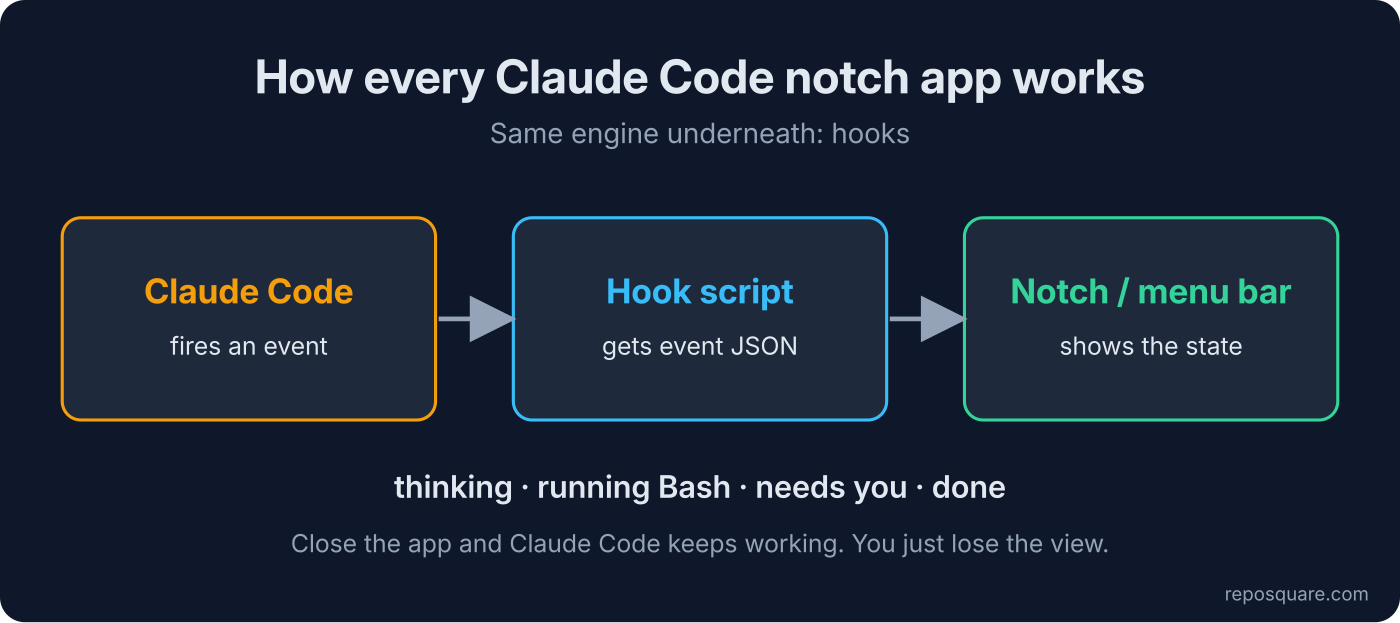
What is a Claude Code notch app?
It is a small Mac app that turns the black notch at the top of your screen into a live status light for Claude Code.
Claude Code is Anthropic’s coding agent (an AI that edits files and runs commands for you) that lives in your terminal. It works in steps: it thinks, runs a tool, reads the result, and repeats until it finishes or needs you.
The problem is that all of this happens inside one terminal window. If that window is hidden, you cannot see whether Claude is busy, done, or stuck on a question.
A notch app fixes that by showing a tiny panel in the notch (the camera cut-out at the top of newer MacBook screens). It says things like “running Bash” or “needs you”, and the better ones let you approve a request right there, without finding the terminal.
How do these apps know what Claude Code is doing?
Claude Code tells them, through a built-in feature called hooks.
A hook is a shell command that Claude Code runs automatically at fixed moments, like “before a tool runs” or “when Claude finishes”. You list hooks in a settings file, usually ~/.claude/settings.json.
Each moment is called an event. When an event happens, Claude Code starts your command and hands it a small block of JSON (a plain text format for structured data) on standard input (the text a program reads when it starts). That JSON says what just happened.
Think of it like a doorbell wired to every room. Claude Code rings it, and whatever is listening decides what to do.
To see this for real, I set up a hook on every main event that just saved the JSON to a file, then asked Claude Code to create one small file. Here is exactly what it sent, in order:
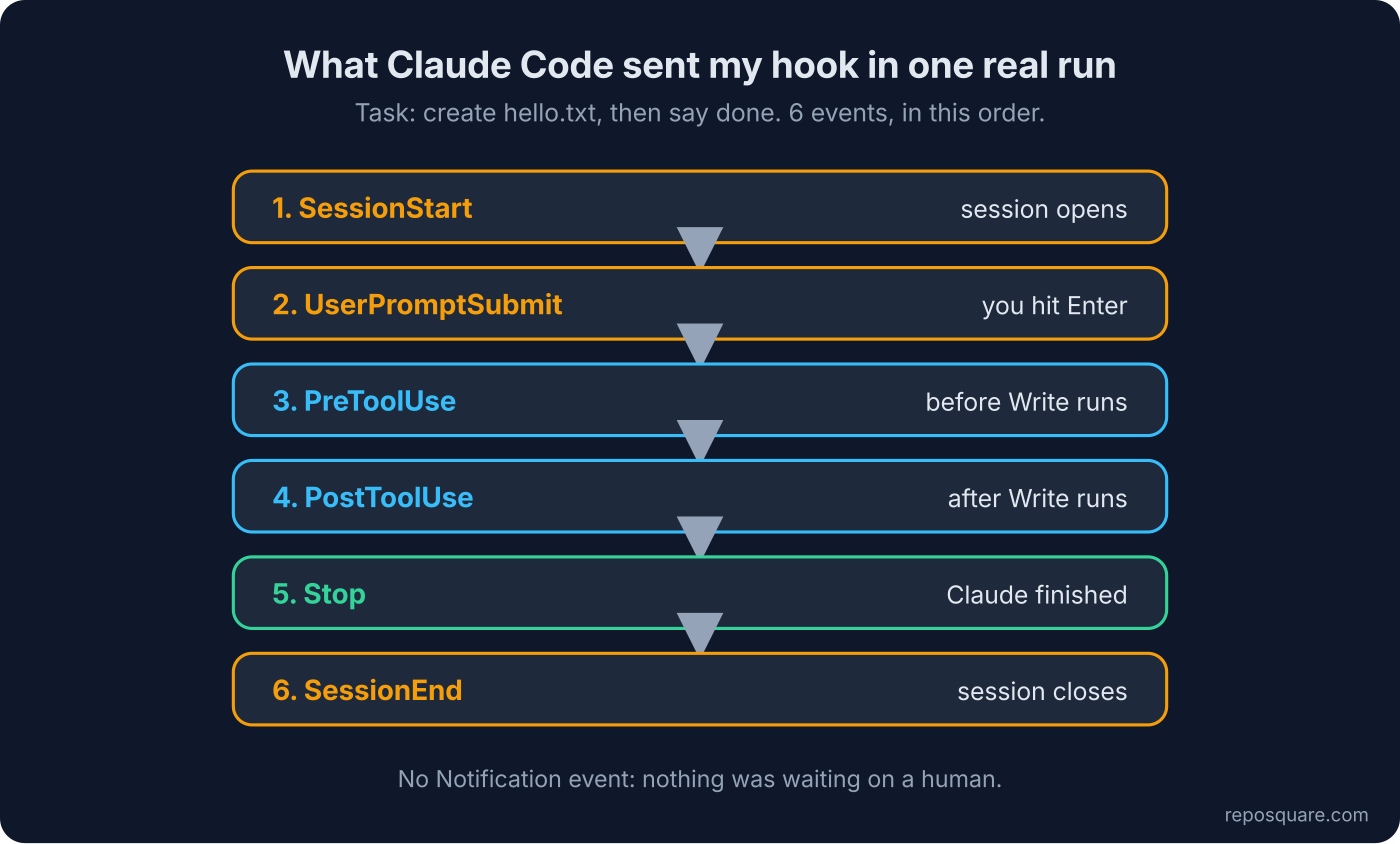
Every event carried a session_id (an ID for that one conversation), the folder Claude was working in, and the event name. PreToolUse also carried the tool name (Write) and its input. Stop even carried Claude’s last reply.
That is all a notch app needs. It installs a hook, the hook forwards each event to the app over a local socket (a private channel between two programs on the same computer), and the app draws it in the notch.
How does Approve in the notch work?
A special hook pauses Claude Code, waits for your click, and answers on your behalf.
Normally, when Claude wants to run something risky, it shows a permission prompt in the terminal and waits for you to type yes or no.
Just before that prompt, Claude Code fires an event called PermissionRequest. A hook on that event is allowed to answer the question itself by printing a short JSON reply. If it prints "behavior": "allow", Claude Code skips the prompt and runs the command.
Notch apps use this. Their hook sends the request to the app, then simply waits. Command hooks can wait up to 10 minutes by default. When you click Allow or Deny in the notch, the app tells the hook, and the hook prints the answer.
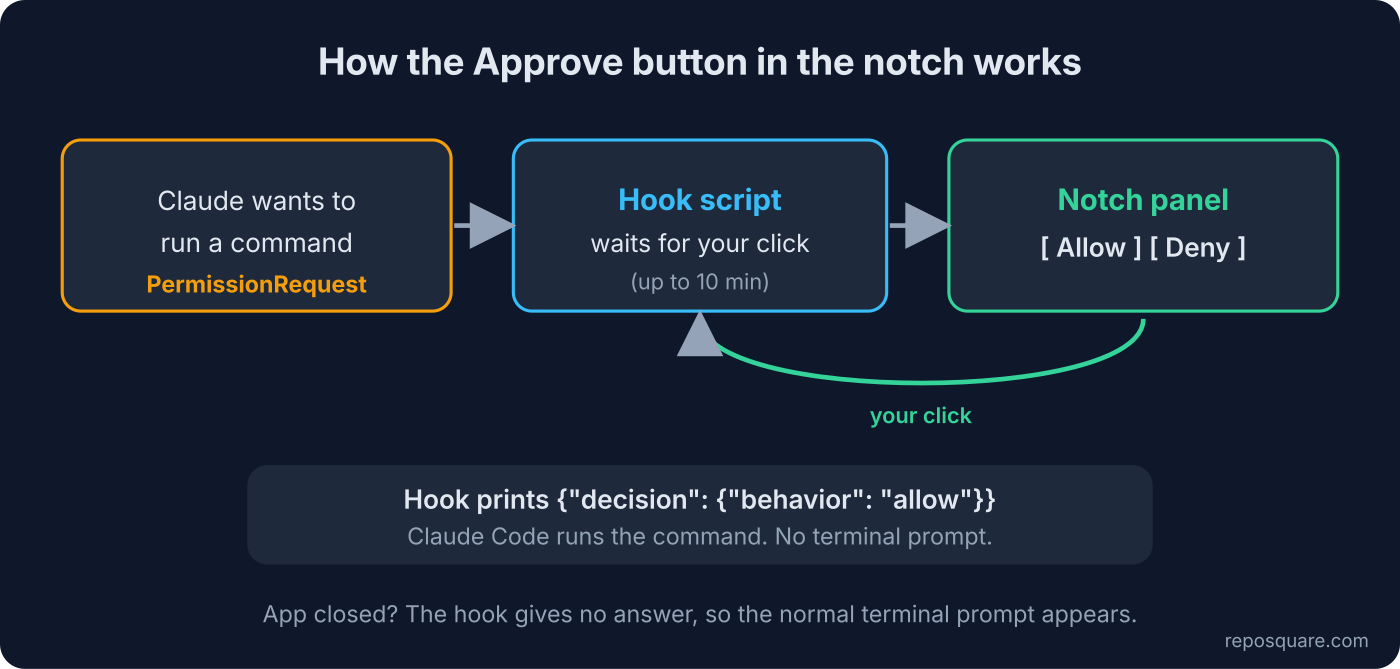
If the app is closed, the hook gets no answer and Claude Code falls back to the normal terminal prompt. Nothing breaks. You just lose the shortcut.
When does Claude Code say it needs you?
Two events matter: Stop fires when Claude finishes, and Notification fires when it has been waiting on you.
Stop fires every time Claude finishes a reply. It does not fire if you interrupt it yourself.
Notification fires later, and only when a human is actually needed. It comes with a type, so you can choose which ones ping you:
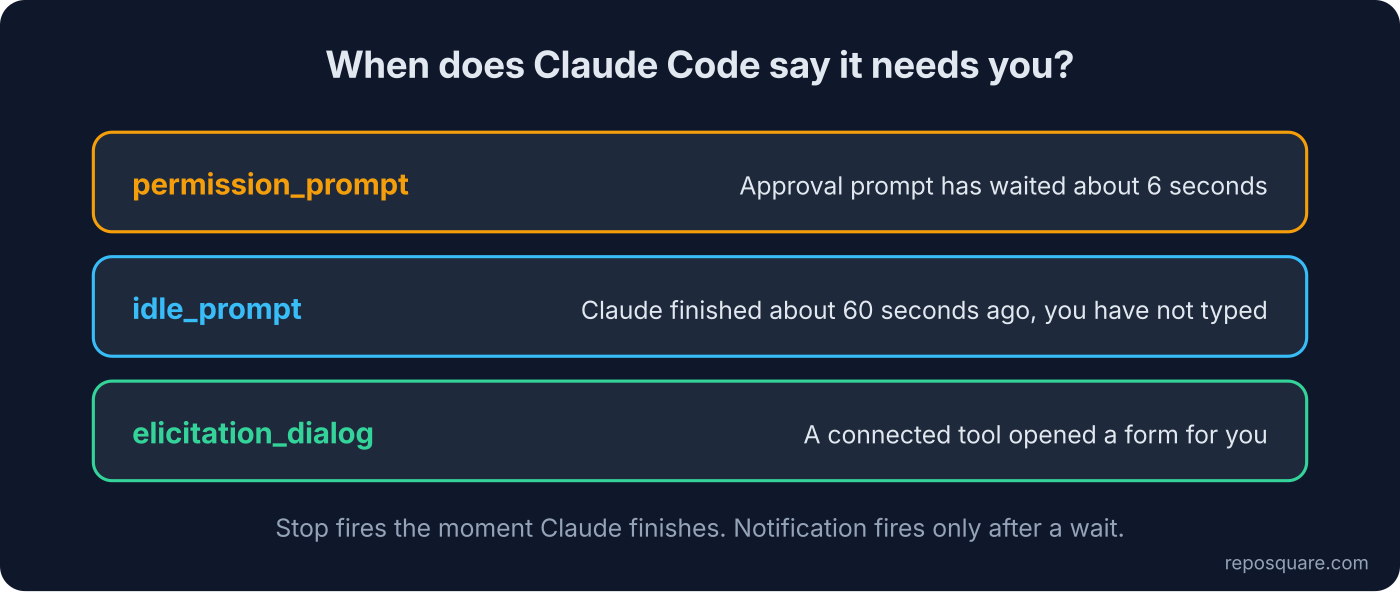
In my test run, no Notification event appeared at all. Claude never had to wait on anyone, so there was nothing to report. That is the point: it stays quiet until you are the bottleneck.
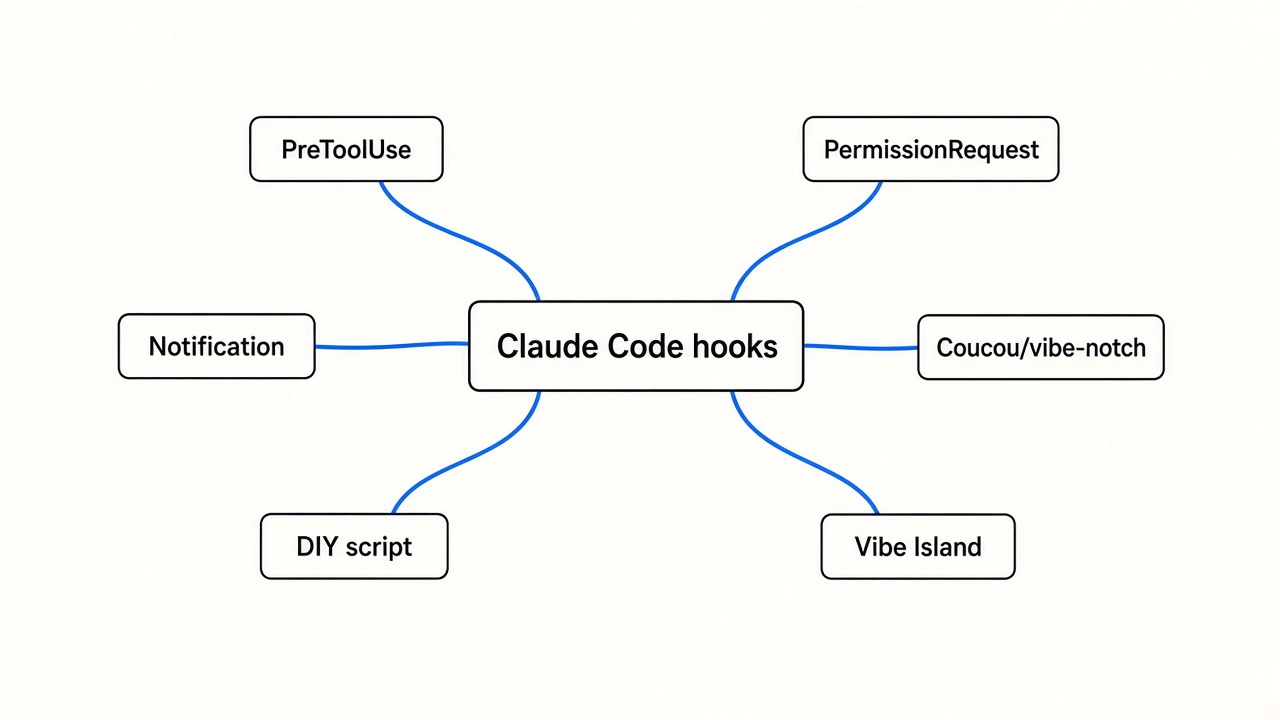
Coucou vs Vibe Island vs vibe-notch: what is different?
All three show live status and let you approve from the notch. They differ on price, platform, and extras.
- Coucou: free, open source code (MIT license, though its name, character and sounds are not open). Native app on macOS 15 or later. On Windows you build it from source for now. It adds a cute animated character, a chat panel, file drag and drop, and optional links to Stripe, GitHub, Vercel, n8n and more. No telemetry and no account. Before it edits
~/.claude/settings.json, it backs up the file and shows you the diff. - Vibe Island: paid after a 2-day free trial, no card needed for the trial. Needs macOS 14 or later and a Mac with a notch. Its big plus is reach: besides Claude Code it watches Codex CLI, Gemini CLI, Cursor Agent and 20+ other agents, and it can jump you straight to the right terminal. Everything stays local on your Mac.
- vibe-notch: free and open source (Apache 2.0). Needs macOS 15.6 or later. Claude Code only. It installs its hooks on first launch and adds a full chat history viewer.
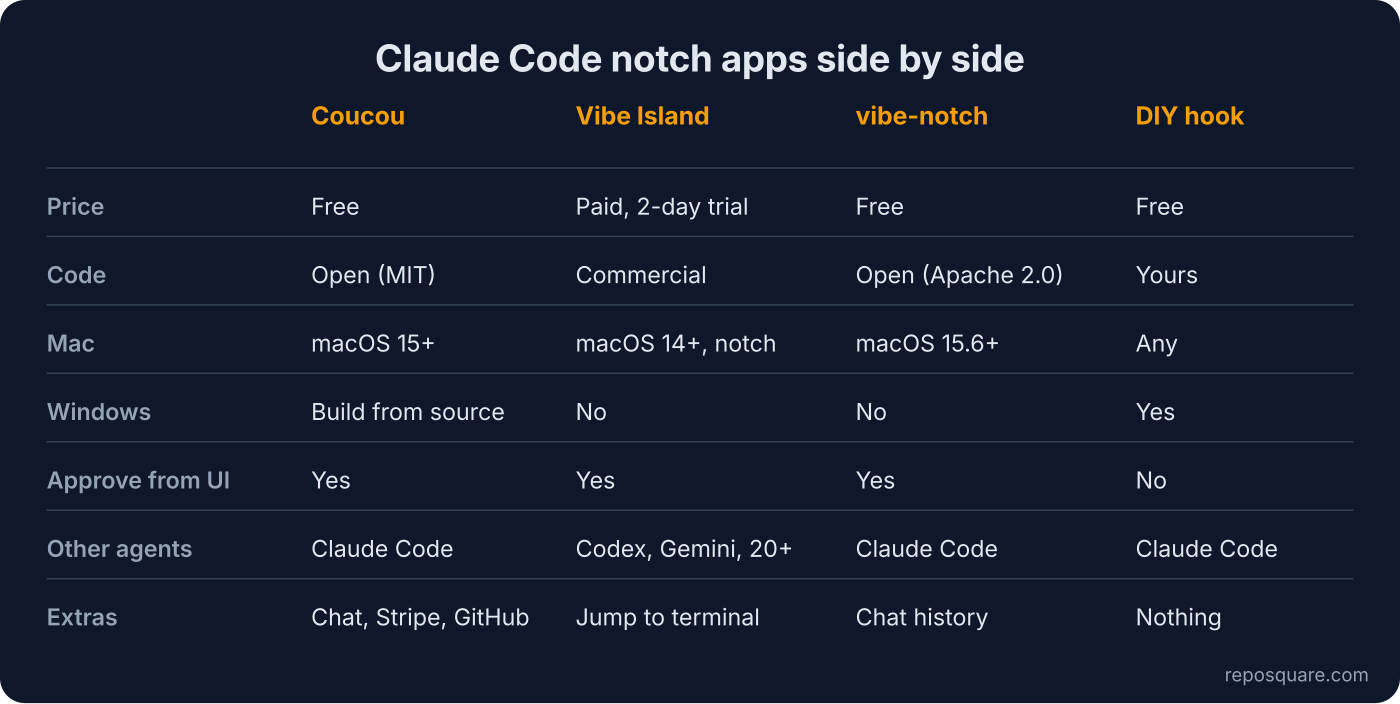
One thing all three share: they add a hook that runs on every tool call. That is normal and cheap, but it is still code running inside your workflow. Type /hooks inside Claude Code to see every hook that is set up and which file it came from.
Can you get the same thing without an app?
Yes for status and pings. No for one-click approvals.
If all you want is “tell me when Claude is done or stuck”, you do not need an app. Paste this into ~/.claude/settings.json on a Mac:
{
  "hooks": {
    "Notification": [{
      "matcher": "permission_prompt|idle_prompt",
      "hooks": [{ "type": "command",
        "command": "osascript -e 'display notification \"Claude needs you\" with title \"Claude Code\"'" }]
    }]
  }
}The matcher (a filter on the notification type) keeps it to the two pings that matter. On Linux, swap the command for notify-send 'Claude Code' 'Claude needs you'.
Two gotchas. On a Mac, osascript sends alerts through Script Editor, and if Script Editor has no notification permission it fails silently. Run osascript -e 'display notification "test"' once in Terminal so it shows up in your notification settings. On Linux, notify-send needs a desktop notification service, so it does nothing over SSH or inside a container.
How do you build your own status board?
One small Python script turns every hook event into a live status line per session.
This is the part notch apps hide from you. Save this as ~/.claude/status.py:
#!/usr/bin/env python3
# DIY "notch" feed: one status line per Claude Code session.
import json, os, sys, time, shutil, subprocess

STATE_FILE = os.path.expanduser("~/.claude/live-status.json")
ev = json.load(sys.stdin)
name = ev.get("hook_event_name")
sid = ev.get("session_id", "?")[:8]

if name == "PreToolUse":
    state = "running " + ev.get("tool_name", "tool")
elif name in ("UserPromptSubmit", "PostToolUse"):
    state = "thinking"
elif name == "Notification":
    state = "NEEDS YOU: " + ev.get("notification_type", "")
elif name == "Stop":
    state = "done"
else:
    state = name  # SessionStart / SessionEnd

try:
    board = json.load(open(STATE_FILE))
except Exception:
    board = {}
if name == "SessionEnd":
    board.pop(sid, None)
else:
    board[sid] = {"state": state, "dir": os.path.basename(ev.get("cwd", "")),
                  "at": time.strftime("%H:%M:%S")}
json.dump(board, open(STATE_FILE, "w"), indent=1)

# ping only when a human is actually needed
if name in ("Notification", "Stop"):
    msg = "Claude needs you" if name == "Notification" else "Claude is done"
    if shutil.which("osascript"):
        subprocess.run(["osascript", "-e", f'display notification "{msg}" with title "Claude Code"'])
    elif shutil.which("notify-send"):
        subprocess.run(["notify-send", "Claude Code", msg])
Then point these events at it in ~/.claude/settings.json: SessionStart, UserPromptSubmit, PreToolUse, PostToolUse, Notification, Stop and SessionEnd. Each one gets the same entry:
"PreToolUse": [{ "hooks": [{ "type": "command", "command": "python3 ~/.claude/status.py" }] }]I ran a real session with it (“run ls, then write a file”) and watched the status file change: SessionStart, then thinking, then running Bash, then thinking again, and the session vanished from the board when it closed. Each hook call took about 33 milliseconds on average over 50 runs, far too short to notice.
The file holds one line per open session, so it already works with several Claude Code windows at once. To see it, run watch -n1 cat ~/.claude/live-status.json in a spare terminal, or feed it to any menu bar tool that can show a script’s output, such as SwiftBar on a Mac.
Which one should you use?
Pick by the one job you need done, not by how cute the panel looks.

- You just want a ping when Claude is done or stuck: use the built-in
Notificationhook above. Five minutes, free, any OS. - You want to approve commands without hunting for the terminal: try Coucou or vibe-notch. Both are free.
- You run Codex, Gemini or several agents side by side: Vibe Island covers the most agents, if you are fine paying.
- You are on Linux or a Mac without a notch: use the DIY status script plus a menu bar or terminal watcher.
Whichever you pick, approving from a tiny panel makes it easy to click Allow without reading. Keep risky commands behind a real look. Running Claude Code inside a sandbox, as in Claude Code /sandbox vs NVIDIA OpenShell, makes a careless click much less costly.
If you are already running several agents at once, running Claude Code and Codex together pairs well with a notch monitor. Hooks also power token tools, which is why RTK vs Caveman is worth a read, and the CLAUDE.md file that fixes AI coding keeps the agent on track while you are away.
Links: Coucou · Vibe Island · vibe-notch · Claude Code hooks guide
Common questions about Claude Code notch apps
Do I need a notch app to get Claude Code notifications?
No. A Notification hook with osascript on Mac or notify-send on Linux sends a desktop alert when Claude needs you, with no app installed.
How does approving from the notch work?
The app installs a PermissionRequest hook that waits for your click, then prints an allow or deny answer that Claude Code accepts in place of the terminal prompt.
What happens if the notch app is closed?
Claude Code keeps working and shows the normal permission prompt in the terminal. You only lose the notch view.
Does Coucou work on Windows?
Yes, it shows a panel at the top of the screen on Windows 10 and 11, but for now you build it from source.
Real tests. Plain words. No hype.