
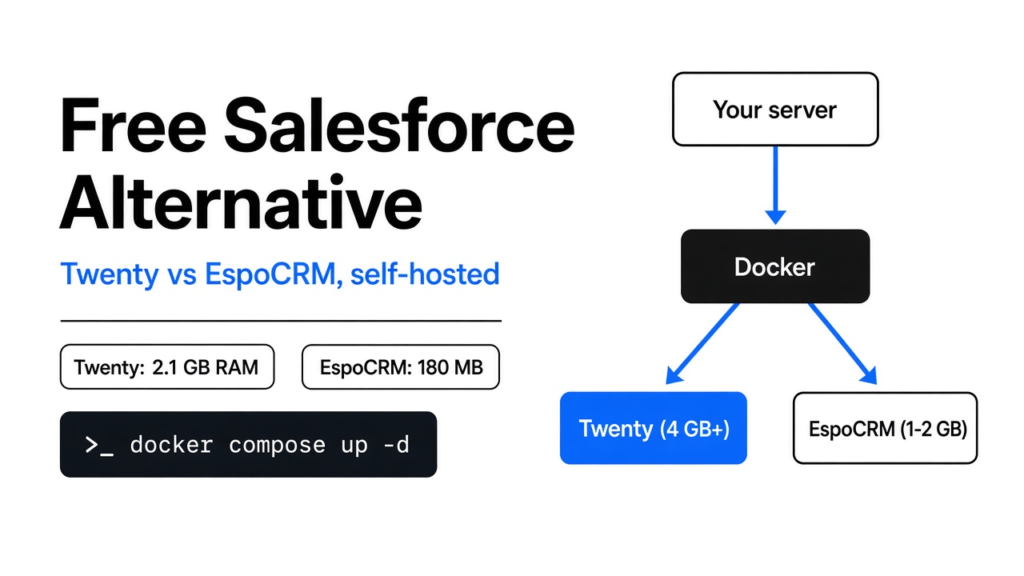

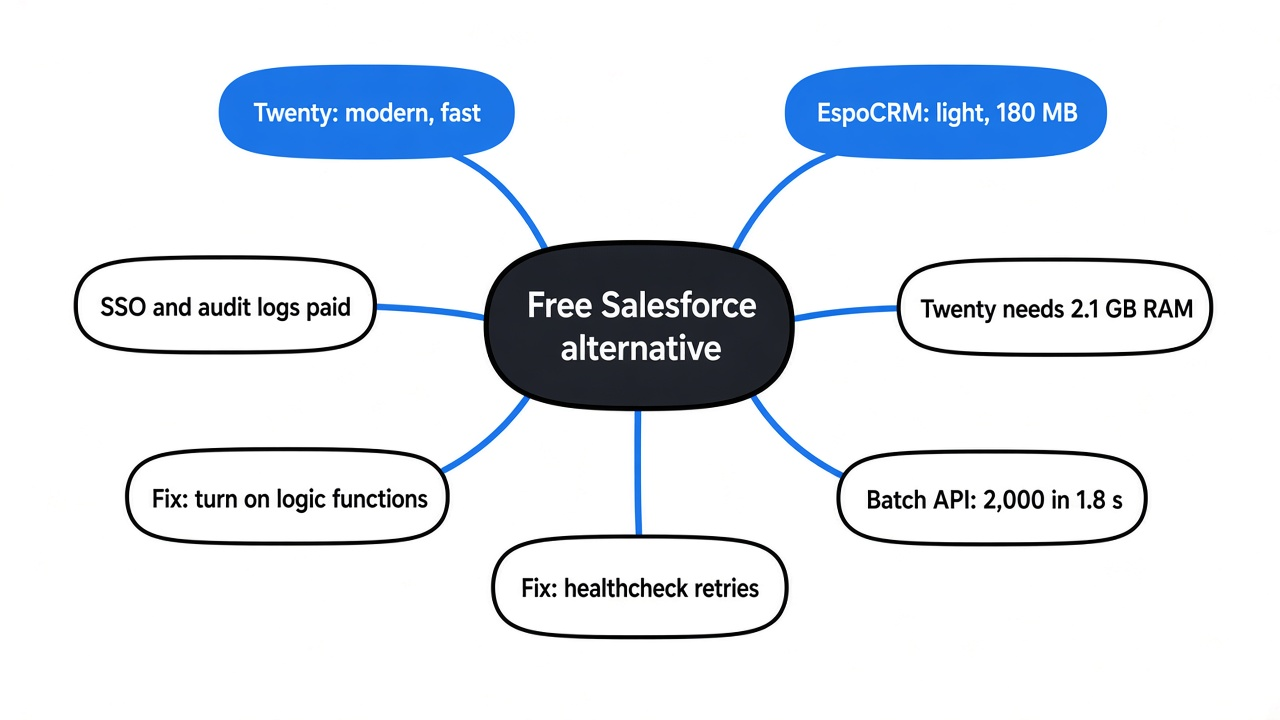
Yes, there is a free open source Salesforce alternative you can run yourself, and the closest match in October 2026 is Twenty: a modern CRM with companies, people, deals, workflows and an API, self-hosted with Docker. It was tested side by side with EspoCRM, the lightweight veteran, on the same 2-core, 8 GB server with the same 500 companies and 2,000 contacts (Twenty v2.51.0 and EspoCRM 10.0.11, both on their official Docker images). Twenty was the faster app once running, but it sat at about 2.1 GB of RAM before a single contact was added. EspoCRM stayed under 250 MB with all the data loaded.
So the honest answer depends on one thing: the size of the server you will run it on. Below are the measured numbers, the two default settings that break a fresh Twenty install, the features that stay behind a paid plan, and a simple rule for choosing.
What a CRM Does and Why Self-Host One
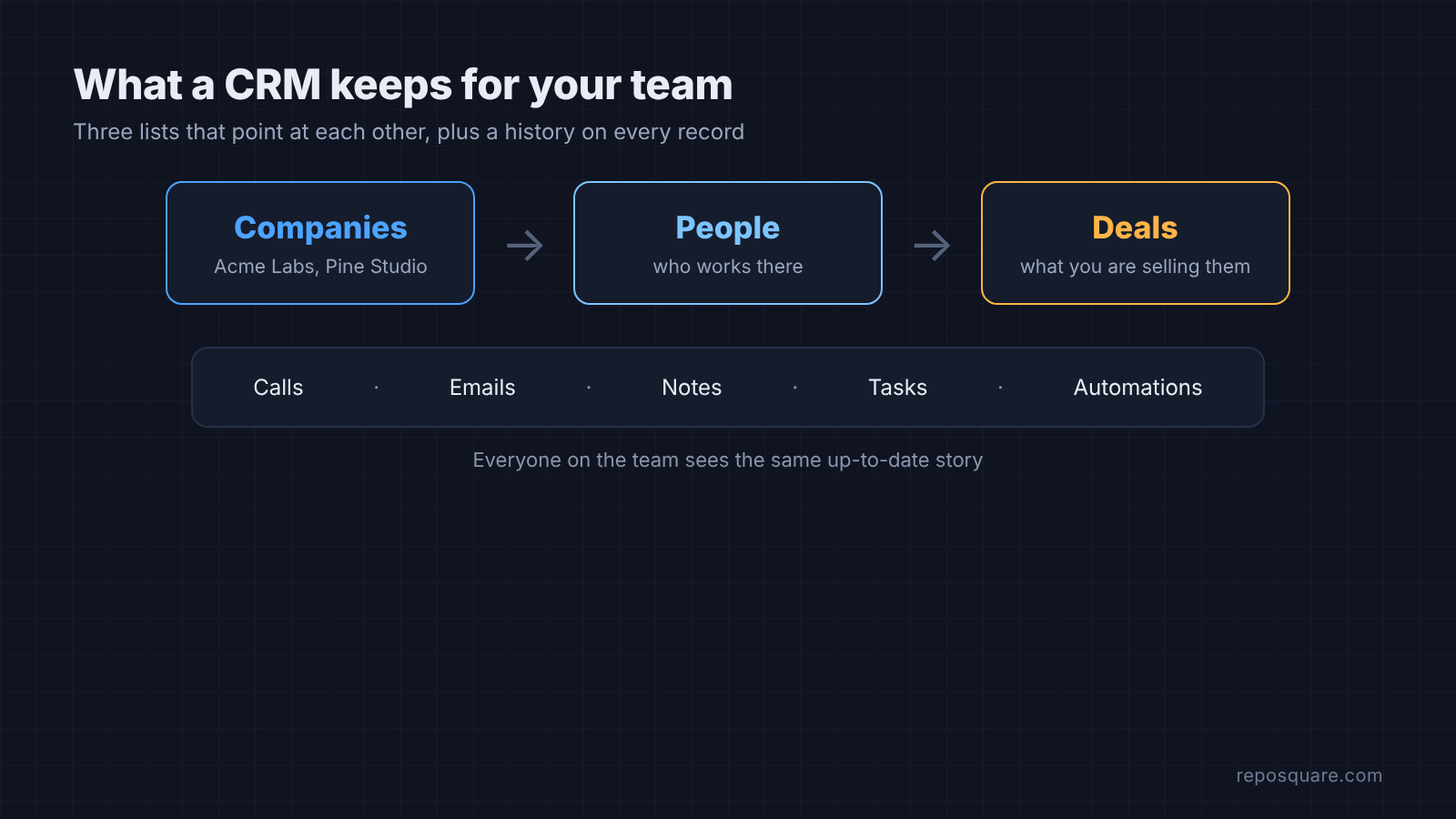
A CRM (customer relationship management app) keeps three lists that point at each other: companies, the people who work there, and the deals you are chasing with them. Every call, email and note hangs off one of those records, so anyone on the team can see the whole history instead of asking who last spoke to a client.
The hosted options charge per person. Salesforce prices Sales Cloud per user, per month, and every plan above the entry Starter Suite is billed annually. HubSpot’s free CRM allows up to 2 users, and its paid plans are priced per seat. Either way, the bill grows with the team.
An open source CRM moves that cost to a server. You run the app on a machine you control, such as a small VPS or an old office PC, and pay for the machine rather than each login. Your customer data also stays on your own disk. The trade is your time: you install it, update it and back it up yourself.
What Twenty Replaces in Salesforce or HubSpot
Twenty is an open source CRM built like a modern workspace app. Companies, people and deals sit in clean tables, deals also show as a board you drag cards across, and you can add your own fields and objects without code. A fresh self-hosted workspace includes:
- Companies, people, deals (Twenty calls them opportunities), tasks and notes, all linked
- A pipeline board grouped by deal stage
- Workflows that run when a record is created or changed
- REST and GraphQL APIs plus webhooks
- Custom roles to control who sees what
That covers the core of what a small sales team uses Salesforce or HubSpot for. The catches are memory, two default settings in the Docker setup, and a short list of business features that need a paid plan. Each gets its own section below.
How Twenty and EspoCRM Were Tested
EspoCRM was picked as the comparison because it is the opposite design. Twenty is a Node.js app split into four containers: the web server, a background worker, a Postgres database and Redis (an in-memory store it uses for job queues). EspoCRM is a PHP app, the same language behind WordPress, that runs as a classic website with a MariaDB database and a small cron daemon.
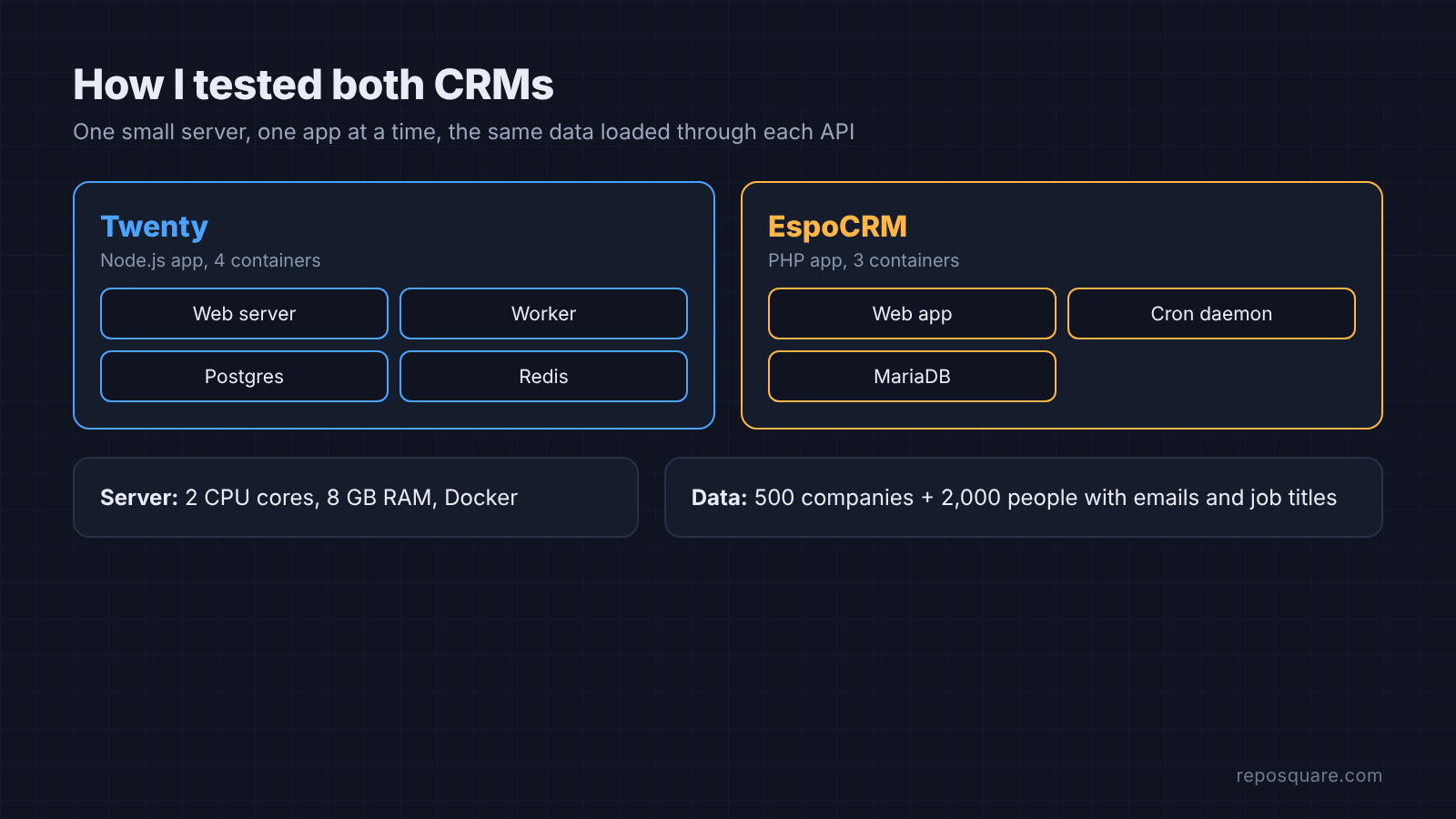
Both ran on one test server with 2 CPU cores, 8 GB of RAM and Docker, one app at a time, using each project’s own Docker instructions. The same fictional data set went into both through their APIs: 500 companies and 2,000 people with names, emails and job titles. Memory came from docker stats, and every API timing below is the median of repeated calls with an API key.
How Much RAM Twenty Needs Compared With EspoCRM
Twenty used about 2.1 GB of RAM at rest. The server and the worker each sat at roughly 1 GB, with Postgres at about 51 MB and Redis at 7 MB. EspoCRM used about 180 MB at rest and stayed under 250 MB after roughly 2,700 contacts were loaded.
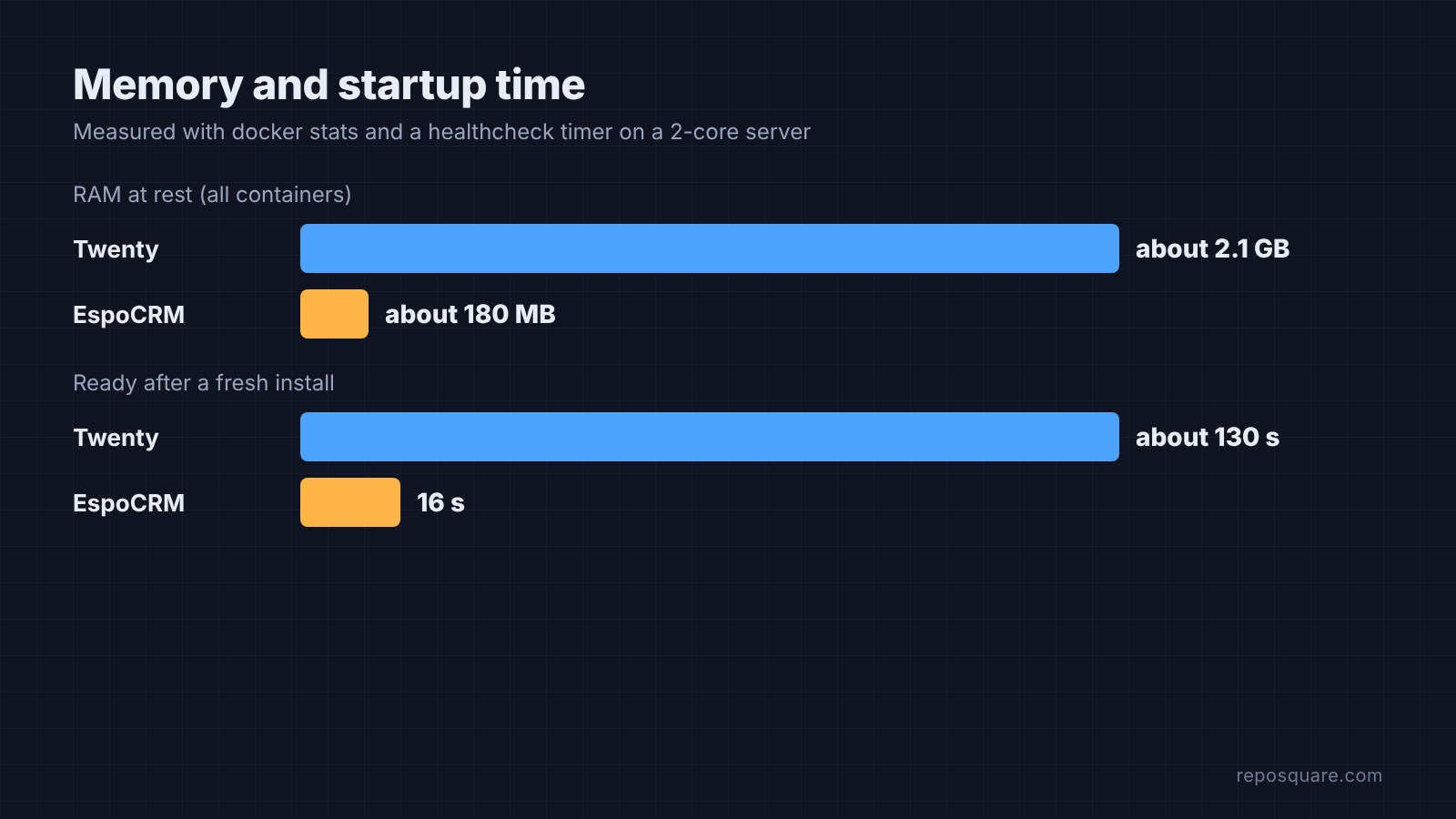
That matches Twenty’s own Docker Compose guide, which asks for at least 2 GB of RAM and warns that too little memory can crash processes. In practice, plan on a 4 GB server for Twenty so the operating system and backups have room. EspoCRM fits on a 1 GB server. If you are not sure what your current VPS can handle, benchmark the VPS first.
Startup time follows the same pattern. EspoCRM was ready 16 seconds after its first install. Twenty took about 130 seconds to report healthy on a first boot, across three fresh installs, and around 100 seconds on a plain restart, because the server checks and runs database upgrades every time it starts.
Twenty vs EspoCRM Speed With 2,000 Contacts
Once it is running, the heavy app is the quick one. Creating one company took a median of 35 ms in Twenty and 48 ms in EspoCRM. A filtered list of 200 people came back in 45 ms from Twenty and 97 ms from EspoCRM.
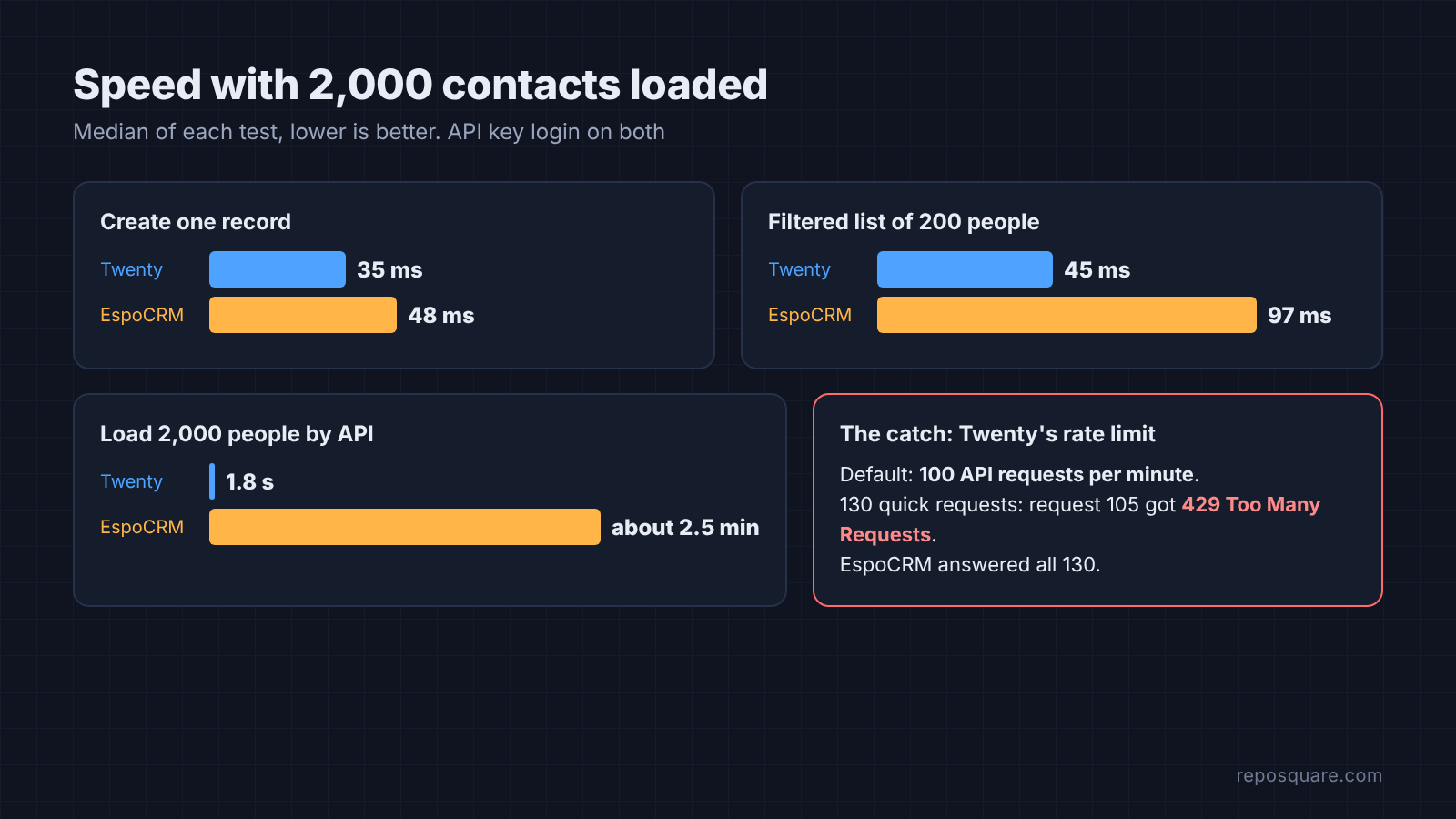
Bulk loading is where Twenty pulls away. It has a batch endpoint that creates up to 100 records in one call, so all 2,000 people went in through 20 calls in 1.8 seconds. EspoCRM’s API creates one record per call, at about 76 ms each, which works out to roughly two and a half minutes for the same list.
| Measured | Twenty | EspoCRM |
|---|---|---|
| RAM at rest | about 2.1 GB | about 180 MB |
| Ready after first install | about 130 s | 16 s |
| Create one record (median) | 35 ms | 48 ms |
| Filtered list of 200 people | 45 ms | 97 ms |
| Load 2,000 people by API | 1.8 s in batches of 100 | about 2.5 min, one per call |
| Default API rate limit | 100 requests per minute | none hit at 130 requests |
| Workflows | Included | Paid Advanced Pack |
There is one limit to know before a big import. Twenty caps API traffic at 100 requests per 60 seconds by default (API_RATE_LIMITING_LONG_LIMIT = 100 in its config source). In a burst of 130 quick requests, request 105 came back with 429 Too Many Requests. EspoCRM answered all 130. For a large migration, use Twenty’s batch endpoint or its CSV import, which takes up to 10,000 records per file, or raise the limit for the import window:
# docker-compose.yml, under services.server.environment
API_RATE_LIMITING_LONG_LIMIT: ${API_RATE_LIMITING_LONG_LIMIT:-100}

# .env (raise for the import, then set it back)
API_RATE_LIMITING_LONG_LIMIT=1000The Twenty docs say every environment variable has to be declared in docker-compose.yml at the server or worker level, so a value set only in .env is not enough. That rule comes up again in the workflow fix below.
How to Self-Host Twenty With Docker Compose
You need a Linux server with Docker and Docker Compose. The docs offer a one-line install script that downloads the compose file and .env, generates secrets and starts the stack:
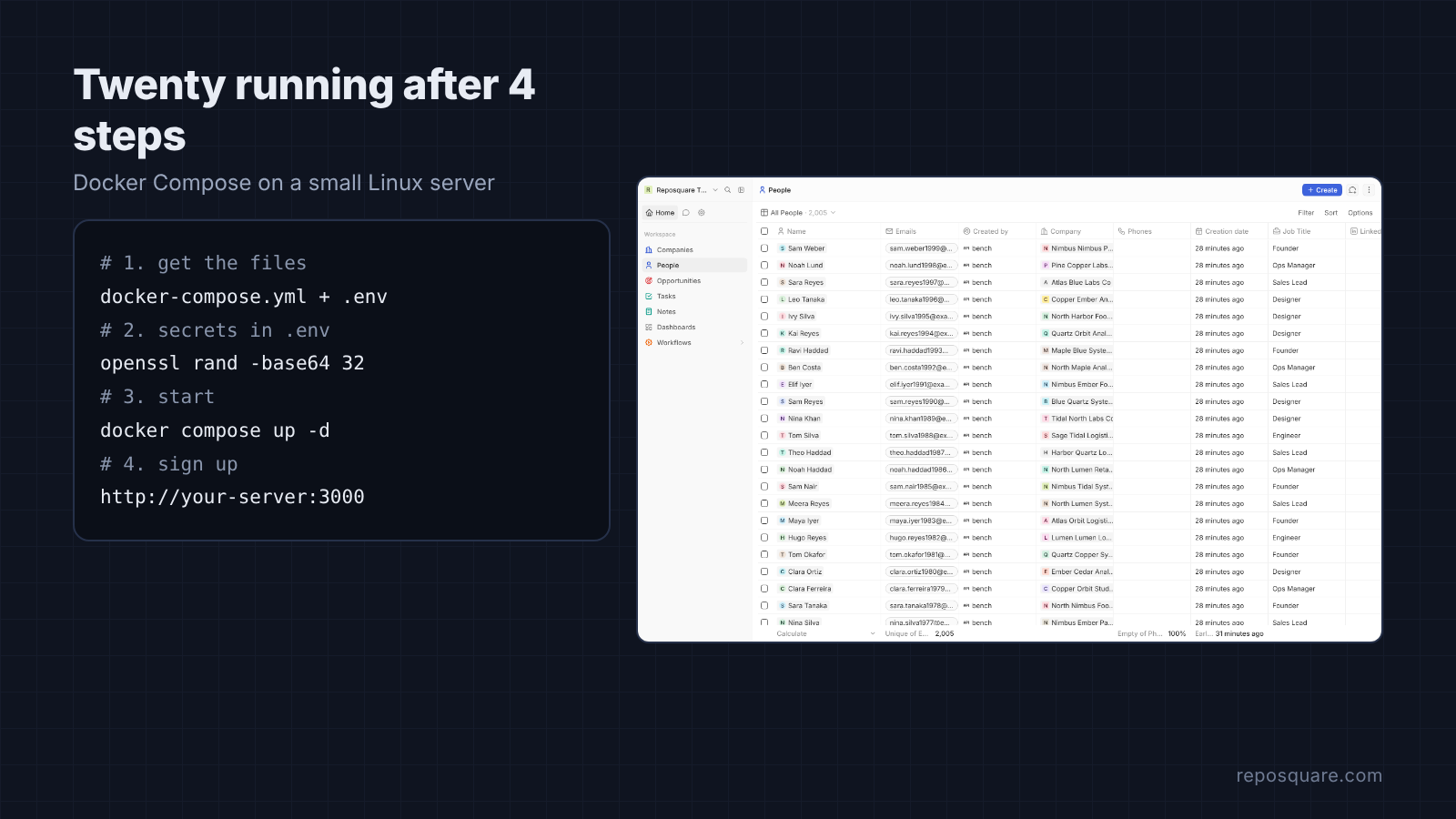
bash <(curl -sL https://raw.githubusercontent.com/twentyhq/twenty/main/packages/twenty-docker/scripts/install.sh)The manual route is four steps. Download docker-compose.yml and .env.example from the packages/twenty-docker folder of the repository, copy .env.example to .env, fill in two secrets, then start the stack:
curl -o docker-compose.yml https://raw.githubusercontent.com/twentyhq/twenty/refs/heads/main/packages/twenty-docker/docker-compose.yml
curl -o .env https://raw.githubusercontent.com/twentyhq/twenty/refs/heads/main/packages/twenty-docker/.env.example
echo "ENCRYPTION_KEY=$(openssl rand -base64 32)" >> .env
echo "PG_DATABASE_PASSWORD=$(openssl rand -hex 32)" >> .env
docker compose up -dOpen port 3000, create the first account and name the workspace. That sign-up is four short screens. Put the app behind HTTPS before any real customer data goes in, and run through a VPS security check first.
Fixing “dependency failed to start” on First Boot
The shipped compose file checks the server’s health every 5 seconds, 20 times, which gives it a 100-second window. Twenty needed about 130 seconds on 2 cores, so every first docker compose up -d printed dependency failed to start: container twenty-server-1 is unhealthy and left the worker container stopped. The server itself was fine. Without the worker, workflows and email sync quietly do nothing.
The quick fix is to run docker compose up -d again once the server shows as healthy. The lasting fix is to give the health check more retries:
# docker-compose.yml, services.server
healthcheck:
  test: curl --fail http://localhost:3000/healthz
  interval: 5s
  timeout: 5s
retries: 40 # shipped value is 20, about 100 secondsFixing the Sample Workflow That Fails on a Fresh Install
A new workspace ships with an active workflow called “Create company when adding a new person”, which reads a new contact’s email domain and creates the matching company. On the fresh Docker install it failed for every new contact with this error: “Logic function transpilation is disabled. Set LOGIC_FUNCTION_TYPE to LOCAL or LAMBDA to enable.”
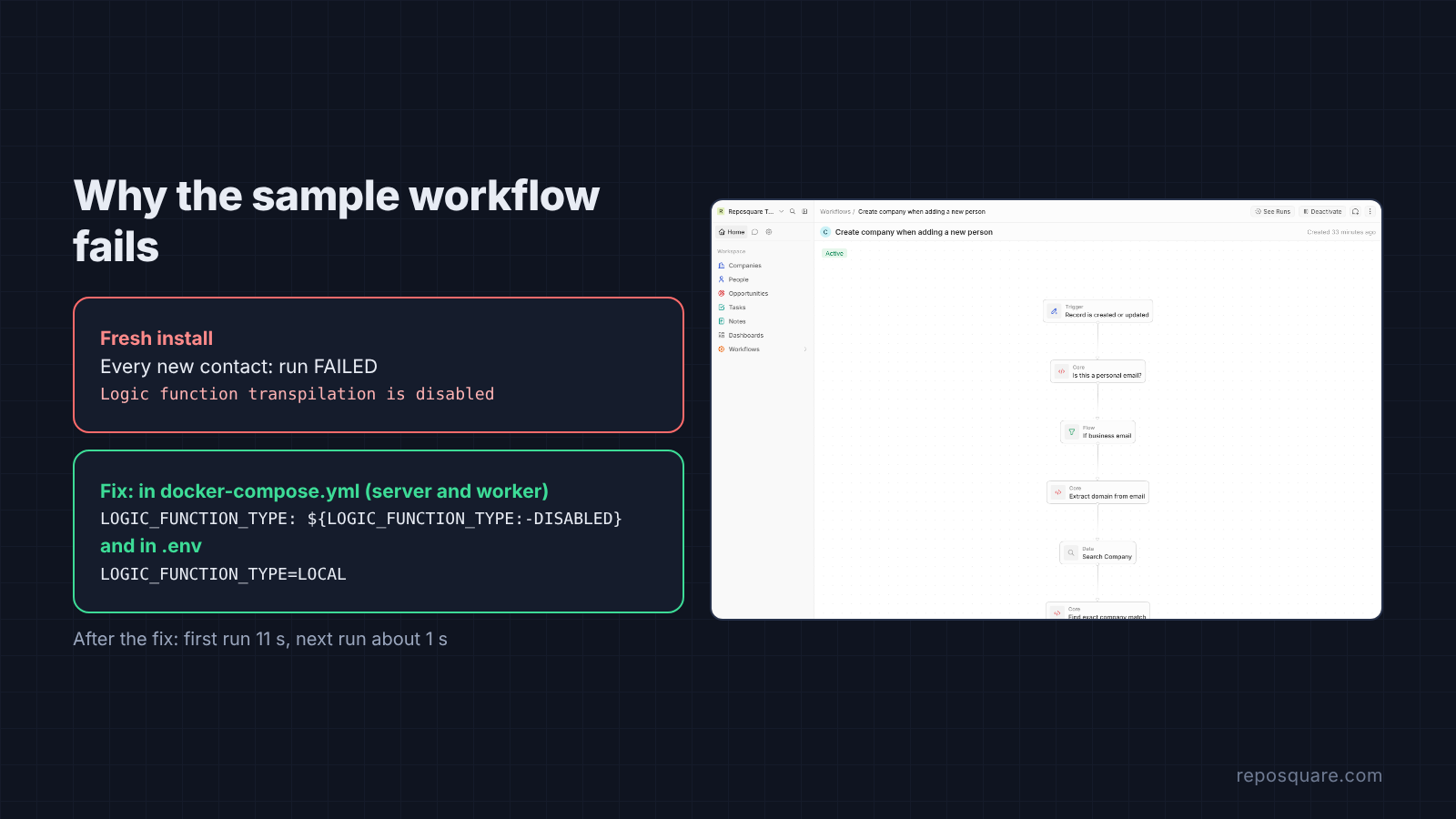
The reason is in Twenty’s config source: LOGIC_FUNCTION_TYPE defaults to DISABLED outside development, and the shipped compose file does not pass that variable through. Adding it to both the server and worker environment blocks and setting it in .env fixed it:
# docker-compose.yml: add to BOTH services.server.environment and services.worker.environment
LOGIC_FUNCTION_TYPE: ${LOGIC_FUNCTION_TYPE:-DISABLED}

# .env
LOGIC_FUNCTION_TYPE=LOCALAfter a restart, the same workflow completed and created the company. The first run took 11 seconds because it downloads the code step’s packages once; the next took about 1 second. One warning from Twenty’s setup docs: LOCAL runs workflow code directly on the host with no sandboxing, so only turn it on if everyone who can write workflows is trusted.
What Self-Hosted Twenty Leaves Behind a Paid Plan
The self-hosted version is the real app, not a demo, but some files in the repository carry a separate enterprise license. In the server code, a self-hosted instance without billing or an enterprise key gets exactly one paid entitlement for free: custom roles. Single sign-on, row-level security, record sharing, audit logs, validation rules and custom domains stay off. The security settings screen says so directly.
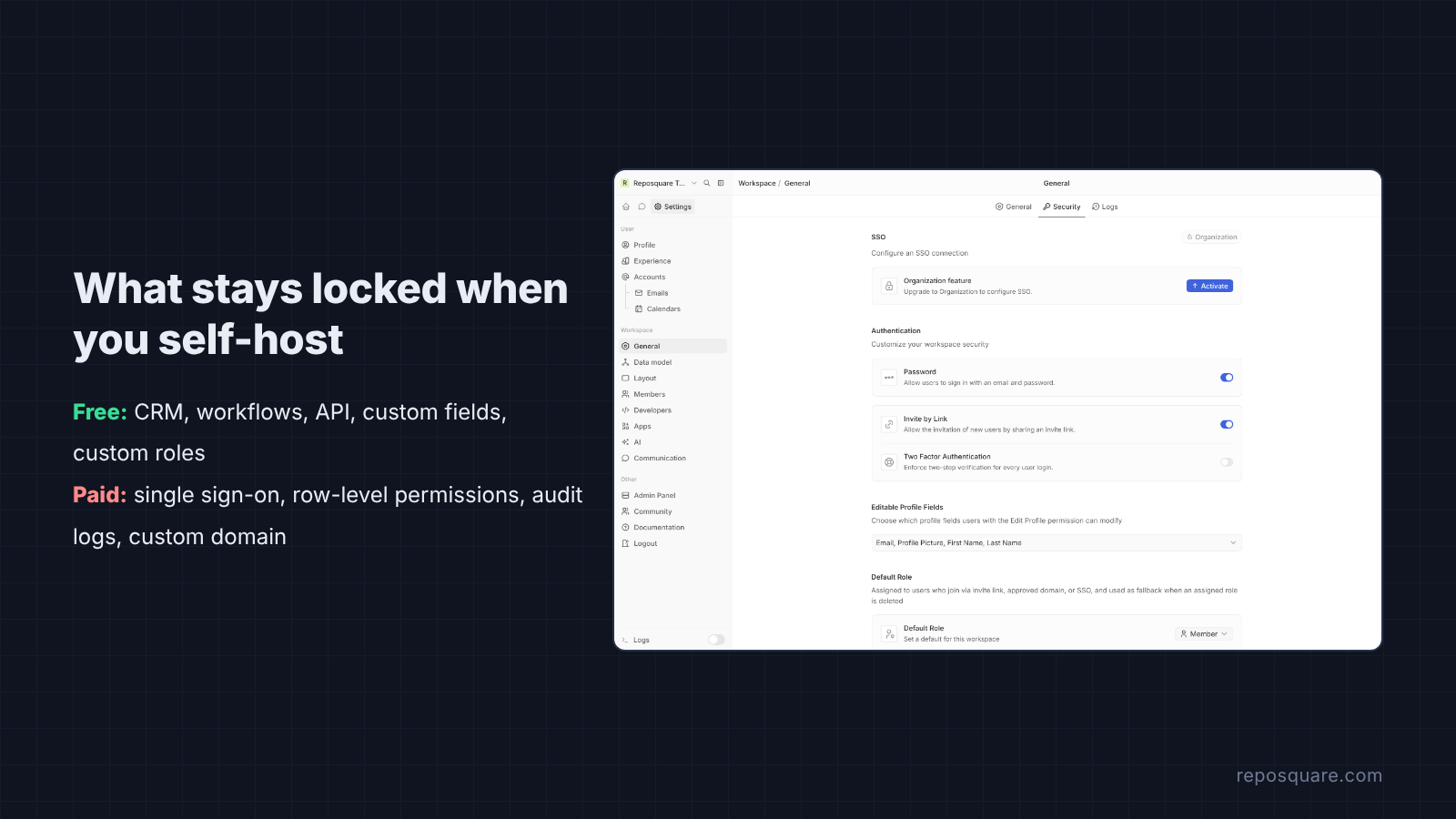
| Feature | Free self-hosted Twenty |
|---|---|
| Companies, people, deals, tasks, notes | Yes |
| Custom fields and custom objects | Yes |
| Workflows | Yes, code steps need the setting above |
| Custom roles | Yes |
| Single sign-on | No, shows “Upgrade to Organization” |
| Row-level security and record sharing | No |
| Audit logs | No |
| Custom domain | No |
The license matters too. Most of Twenty is under the AGPLv3, which says that if you modify the code and offer it to other people over a network, you must share your changes. Running it unchanged for your own team is fine.
Where EspoCRM Is the Better Pick
EspoCRM is far lighter, ready in seconds and mature, and it already includes email, calendar and support cases. Two details showed up in the API test. Logging in to the API with a username and password made every call slow, around 300 to 650 ms; an API user with an API key brought calls down to 50 to 100 ms, so use a key.
The second detail is a good one. EspoCRM checks for duplicates and refused same-name contacts with 409 Conflict until the import sent the X-Skip-Duplicate-Check: true header. That protects against messy imports. Twenty does something similar for companies and rejected a second company with the same website domain.
The main cost is automation. EspoCRM’s workflows, reports and business process management live in the Advanced Pack, an official paid extension. In Twenty, workflows are included in the free self-hosted version.
Which Open Source Salesforce Alternative to Pick
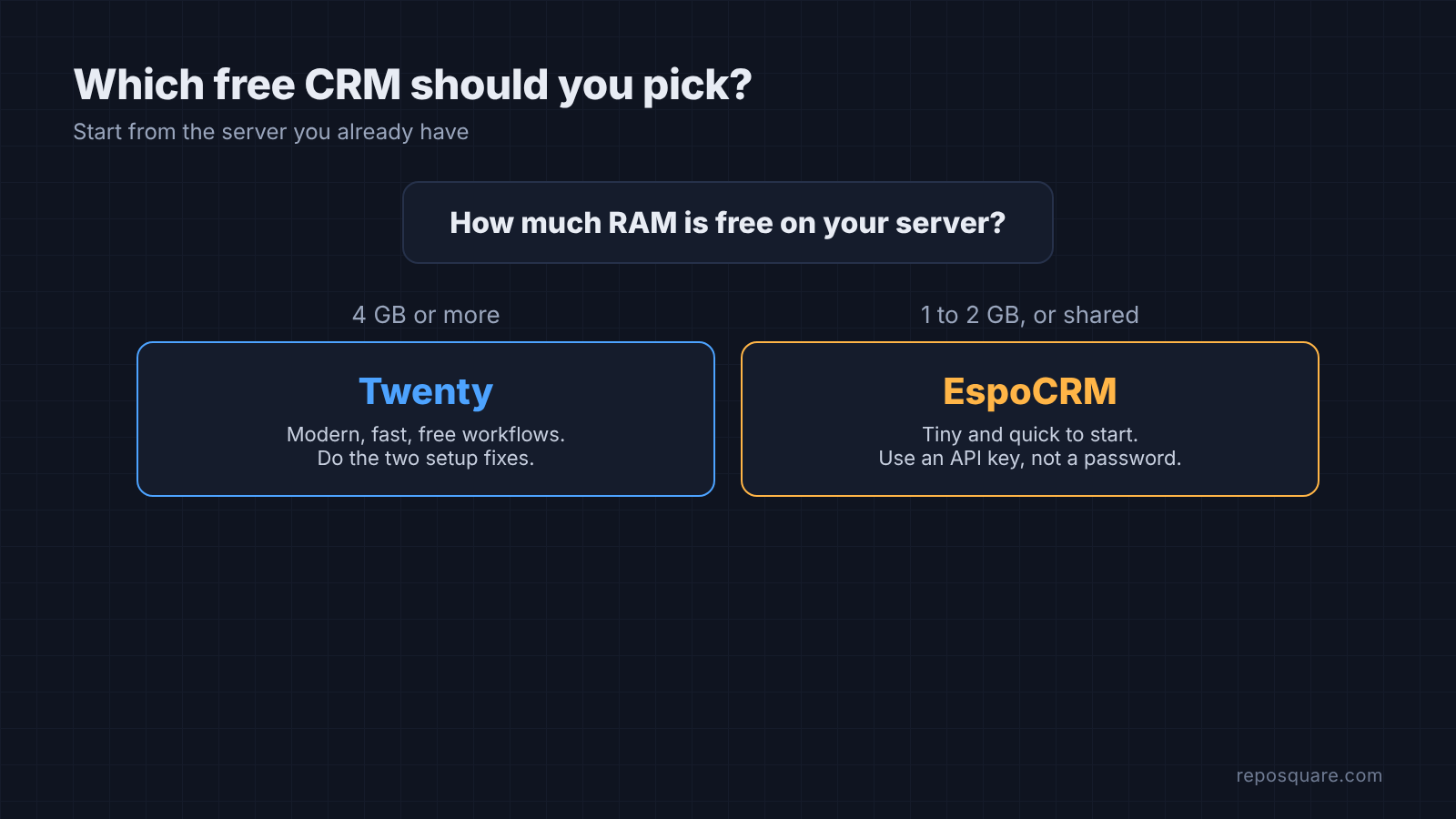
Pick by the server you have. With 4 GB of RAM or more, Twenty is the better daily tool: it is quicker under load, the interface is modern, workflows are included and the API is easy to script. Apply the two fixes above on day one.
On a 1 or 2 GB server, or a box that already runs other apps, use EspoCRM. You give up some polish and pay extra for automations, but it will not be the thing that runs your server out of memory. Either way, you stop paying per seat.
If you are replacing other paid tools as well, the open source Semrush alternative follows the same self-hosting approach, and if you test a CRM image locally before moving it to a server, here is how to push a Docker image without a registry.
Common questions about Twenty and EspoCRM
Is Twenty CRM really free?
Yes. The self-hosted version is free to run with no user limit; you pay only for the server. Single sign-on, row-level security and audit logs need a paid plan.
How much RAM does Twenty CRM need?
Its docs ask for at least 2 GB. In this test it used about 2.1 GB at rest across its four containers, so a 4 GB server is the safe choice.
What is the lightest open source CRM to self-host?
Of the two tested, EspoCRM. It used about 180 MB at rest and was ready 16 seconds after the first install.
Can I import my contacts into Twenty?
Yes. CSV import takes up to 10,000 records per file, and the API’s batch endpoint loaded 2,000 people in under 2 seconds in this test.
Why does Twenty say “dependency failed to start” after docker compose up?
The server’s health check gives up after 100 seconds, and a first boot on 2 cores took about 130. Run docker compose up -d again once the server is healthy, or raise the health check retries to 40.