


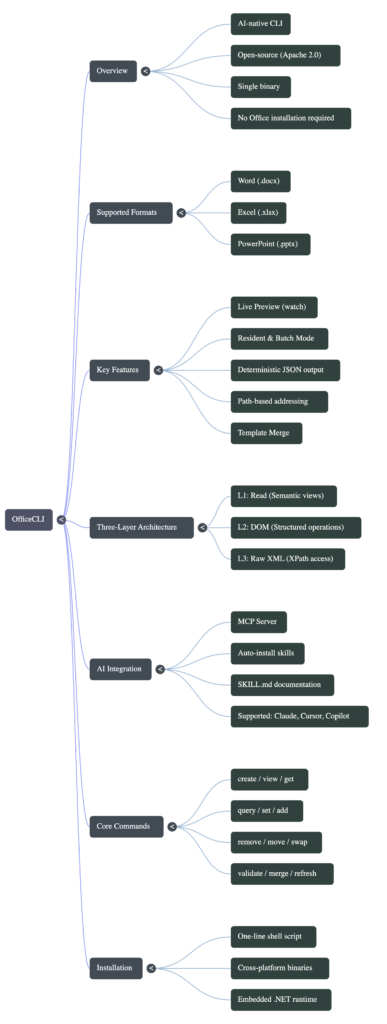
OfficeCLI is an Apache-2.0 command-line tool that creates and edits Word, Excel and PowerPoint files without Microsoft Office installed. It ships as one self-contained binary for Linux, macOS and Windows, and it is designed so an AI agent can drive it: every element in a document has a path like /slide[1]/shape[2] or /Sheet1/D2, and every command can return JSON.
I downloaded the Linux build, built a slide deck, a spreadsheet with a formula and a Word memo, opened all three in other software to make sure they were real Office files, and timed the different ways of sending it commands. Here is what worked, what surprised me, and the settings I would change before letting an agent loose with it.
Tested on Oct 23, 2026 with OfficeCLI v1.0.158 on Debian (x86-64, 8-core Xeon), LibreOffice and python-pptx for cross-checks.
Installing OfficeCLI and checking the download
The README offers an install script, Homebrew, npm and direct downloads. I took the direct route so I could verify the file first. The release publishes a SHA256SUMS file, and the 35.5 MB officecli-linux-x64 binary matched it.
curl -LO https://github.com/iOfficeAI/OfficeCLI/releases/download/v1.0.158/officecli-linux-x64
curl -LO https://github.com/iOfficeAI/OfficeCLI/releases/download/v1.0.158/SHA256SUMS
sha256sum --check --ignore-missing SHA256SUMS
chmod +x officecli-linux-x64 && mv officecli-linux-x64 ~/.local/bin/officecli
officecli --version # 1.0.158Two behaviours to know before your first run. Running officecli with no arguments starts an install, not a help screen. And the first real command writes ~/.officecli/config.json with automatic updates switched on, then checks for updates in the background. On a server or in CI I would turn that off so the binary you verified is the binary that runs:
officecli config autoUpdate false
# or per command:
OFFICECLI_SKIP_UPDATE=1 officecli --versionThere is also officecli install, which goes further: it detects agents on your machine (Claude Code, Cursor, Codex and others) and installs OfficeCLI skills and an MCP server into them. That is convenient, but it edits other tools’ config, so run it deliberately rather than by accident.
Building a PowerPoint slide with OfficeCLI
Every edit is verb file path --prop key=value. These four commands create a deck, add a titled slide, drop a text box on it and print an outline:
officecli create deck.pptx
officecli add deck.pptx / --type slide --prop title="Q3 numbers"
officecli add deck.pptx '/slide[1]' --type shape --prop text="Revenue up 12%" --prop x=2cm --prop y=5cm
officecli view deck.pptx outlineCreated: deck.pptx (kept open in background for faster subsequent commands)
totalSlides: 0
slideWidth: 960pt
slideHeight: 540pt
Added slide at /slide[1]
Added shape at /slide[1]/shape[@id=100000]
File: deck.pptx | 1 slides
├── Slide 1: "Q3 numbers" - 1 text box(es)The outline format differs from the README example, which lists shapes as Shape 1 [TextBox]. If you write a script that parses outline text, add --json instead and parse that. officecli validate deck.pptx returned “Validation passed: no errors found.”
The real test is whether other software agrees. LibreOffice converted the deck to PDF with the title and text box where I put them, and python-pptx read the slide as one title placeholder plus one text box. officecli view deck.pptx screenshot also rendered a PNG of the slide in 2.7 seconds without Office, which is the feature the project leans on for agents: render, look, fix. If you want an agent to build a whole designed deck rather than edit one, compare this with PPT Master, which works from SVG designs, and our walkthrough of making a PowerPoint with Claude Code.
Spreadsheets: CSV import and live formulas
I imported a three-row CSV and added a growth formula:
officecli create sales.xlsx
officecli import sales.xlsx /Sheet1 --file sales.csv
officecli set sales.xlsx /Sheet1/D2 --prop formula="=C2/B2-1"
officecli get sales.xlsx /Sheet1/D2Imported 3 rows x 3 cols into /Sheet1 starting at A1
Updated /Sheet1/D2: formula==C2/B2-1 (applied: formula=C2/B2-1)
/Sheet1/D2 (cell) "0.125" type=Number formula=C2/B2-1 cachedValue=0.125 computedValue=0.125 evaluated=trueThis is the detail I liked most. OfficeCLI evaluates the formula itself and stores the cached value (135 / 120 – 1 = 0.125). Many libraries write the formula but leave the cached value empty, so a script that reads the file back, or a preview tool, sees nothing until someone opens it in Excel. Here openpyxl read the result straight away. officecli view sales.xlsx text prints every filled cell as D2=0.125, which is a compact way to show a sheet to a model without wasting tokens.
Word documents and the Heading1 warning
Creating a memo with a heading worked, with one warning worth understanding. When I set a paragraph’s style to Heading1 in a new blank document, OfficeCLI said the style was not defined and that it had added Word’s built-in definition. That is the right fix, because a blank .docx has no heading styles until something adds them, but it means headings look like Word’s default blue unless you define your own style first. LibreOffice converted the memo to PDF cleanly.
One command does need Windows: refresh on a .docx (updating fields and page numbers through Word) requires Word installed. Everything else I tried ran on Linux. For a side-by-side with a full office suite on long documents, see WordCraft vs LibreOffice.
Speed: separate commands vs batch
OfficeCLI keeps a file open in a background process after create or open, so later commands skip reloading it. I timed 20 cell updates three ways:
| Method | 20 cell sets |
|---|---|
| 20 separate commands | 7.05 s |
| 20 commands with the file held open | 6.61 s |
| One batch file | 0.83 s |
A cold officecli --version took 0.22 seconds, so most of the per-command cost is process start-up and the round trip, not the edit itself. Holding the file open barely helped. Batching was eight times faster:
[
  {"command": "set", "path": "/Sheet1/A1", "props": {"value": "1"}},
  {"command": "set", "path": "/Sheet1/A2", "props": {"value": "2"}}
]officecli batch sales.xlsx --input b.json
# [1] Updated /Sheet1/A1: value=1 ... [20] Updated /Sheet1/A20: value=20
# Batch complete: 20 succeeded, 0 failed, 20 totalFor an agent, that means asking it to write a batch file for repetitive edits instead of issuing one command per cell.
Letting an agent check its own work
Two features make OfficeCLI easier to hand to an agent than a general-purpose library. The first is --json on read commands. Asking for the formula cell above returns a structured record with the formula, the cached value and "evaluated": true, so the agent does not have to guess from formatted text.
The second is view <file> issues, a built-in checker for problems such as formulas that were never evaluated, stale cached values, references to missing sheets, low-contrast text on slides and stretched pictures. Both of my test files returned Found 0 issue(s). A sensible loop for an agent is: make the edits in one batch, run issues, take a screenshot, and only then report back.
officecli batch report.xlsx --input edits.json
officecli view report.xlsx issues
officecli view deck.pptx screenshot -o check.png
officecli close report.xlsxGotchas I would plan around
- Close before another program reads the file. The background process flushes changes 2 to 10 seconds after it goes idle. If a script opens the file sooner it can read stale content. Run
officecli close file.xlsx(or save) first. createwill not overwrite. If the file exists the command fails withfile_exists.create --forceoverwrites, but it does not release a file that a background process still holds, so close first.- Auto-update is on by default. Turn it off for reproducible builds, as above.
installedits other tools. It adds skills and MCP config to every agent it finds.- Parse JSON, not text. Human-readable output has changed since the README examples were written.
When OfficeCLI is the right tool
| Task | Good fit? | Why |
|---|---|---|
| Agent edits existing Office files on a Linux server | Yes | Single binary, paths for every element, JSON output |
| Generating reports with live formulas | Yes | Cached values are computed, so readers see results |
| Designing a polished slide deck from scratch | Partly | It edits well; layout design is up to you or the agent |
| Updating Word fields and page numbers | No on Linux | refresh needs Word on Windows |
| Teams who want a GUI | No | Use LibreOffice or Office; OfficeCLI is command line only |
The broader question of whether an agent should drive tools through commands or by clicking a screen is covered in CLI-Anything vs computer use. OfficeCLI is a clear example of the command-line side: fast, scriptable and checkable.
Common questions about OfficeCLI
Does OfficeCLI need Microsoft Office installed?
No. It reads and writes .docx, .xlsx and .pptx directly. The one exception I found is refreshing Word fields, which calls Word on Windows.
Are the files it creates real Office files?
Yes. In my test, LibreOffice converted the deck and memo to PDF, python-pptx read the slide’s shapes, and openpyxl read the spreadsheet and its formula result.
How do I connect OfficeCLI to Claude Code?
Run officecli mcp claude to register its MCP server, or officecli install to add skills and MCP to every agent it detects.
Which platforms does OfficeCLI run on?
The v1.0.158 release has binaries for Linux on x64 and arm64 (with separate Alpine builds), macOS on Intel and Apple silicon, and Windows on x64 and arm64. Each is a single file, and the release includes a SHA256SUMS file so you can check the download before running it.
Is OfficeCLI free for commercial use?
It is released under the Apache-2.0 license, which allows commercial use.
4 comments