
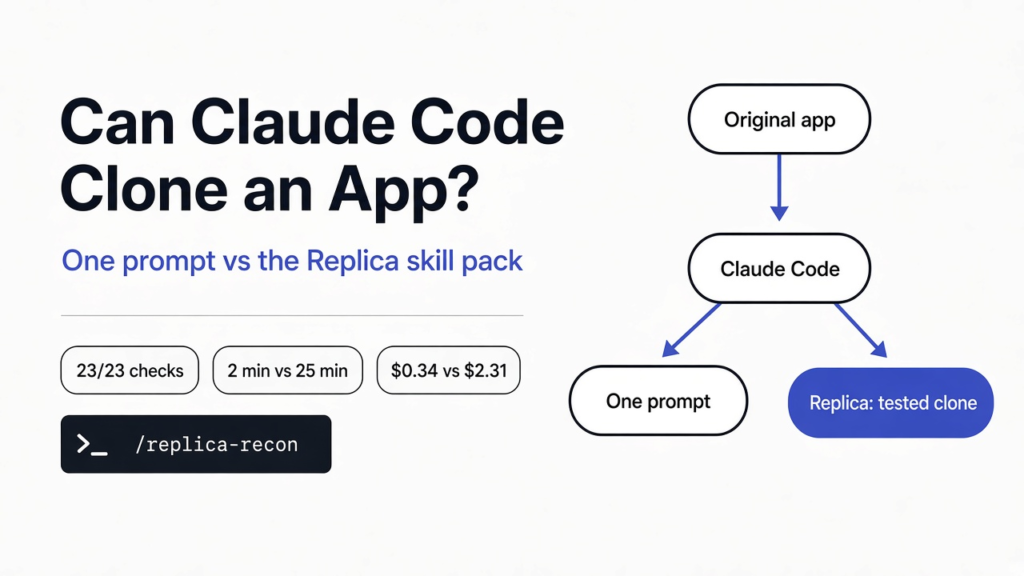

You see an app you like and think, “I could build that.” Then you open Claude Code, paste the link, and type “clone this.” Does it work? And is the result something you could actually ship?
Those are two different questions. The first is about features. The second is about what you copied along the way, what you missed, and whether anyone tested it.
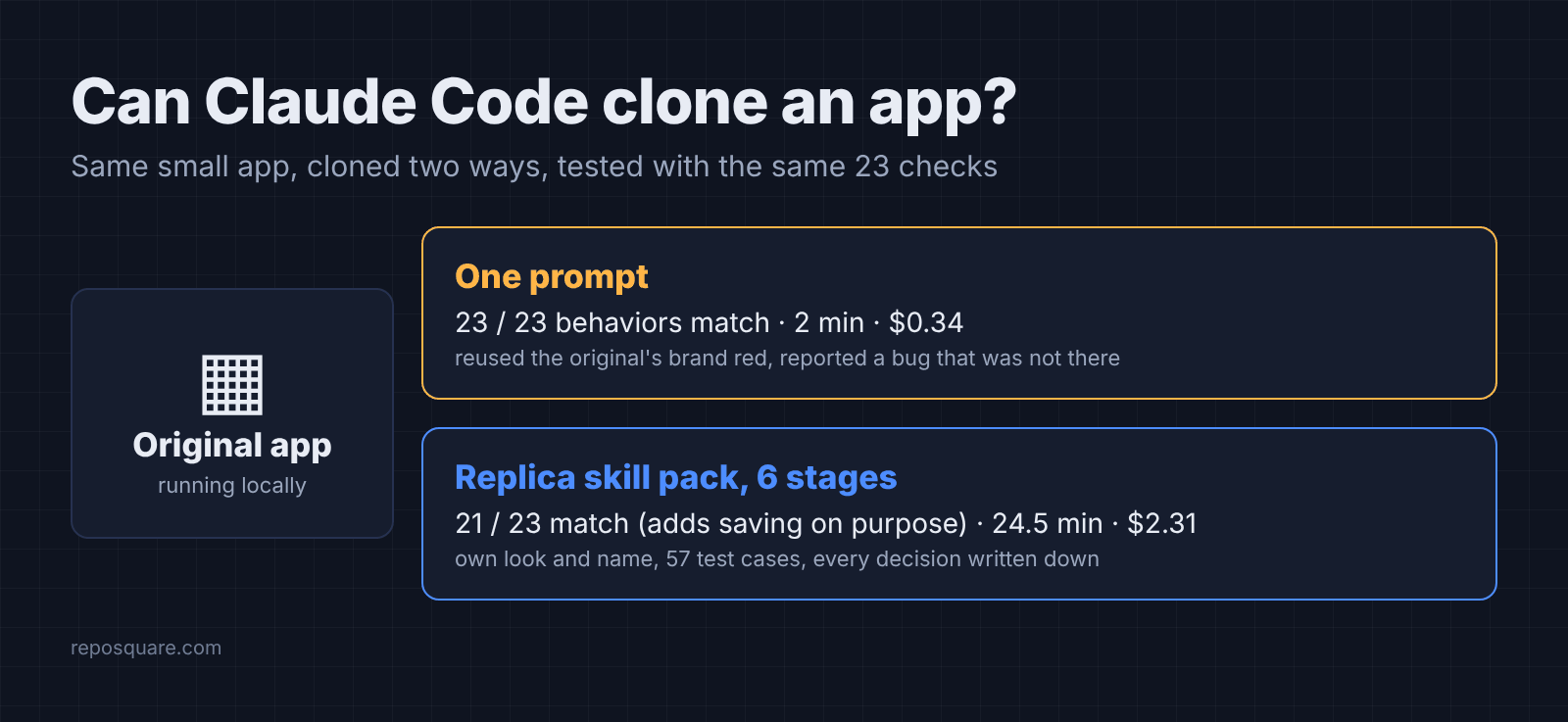
So I ran the experiment to see whether you can really clone an app with Claude Code. I gave Claude Code the same small app twice: once with a single prompt, once with Replica, an open source pack of eleven Claude Code skills built for cloning apps (replica-skill on GitHub). Then I tested all three apps with the same 23 checks.
What does cloning an app with AI actually mean?
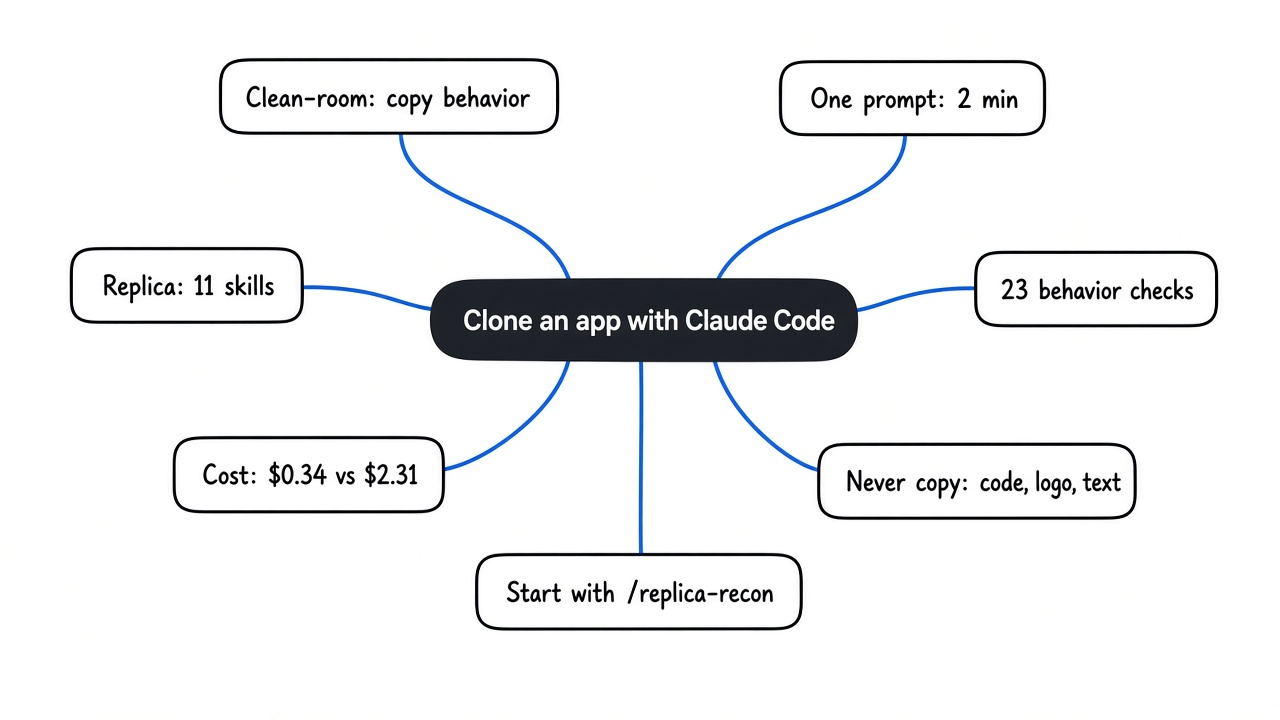
It means rebuilding what an app does, not copying what it owns.
Start with what the AI can see. When you point Claude Code at a running app, it can load the page, click through it, and read whatever the server sends, including the app’s own code and stylesheets.
That access is the risk. The safe way to clone is clean-room (rebuild from watching the app work, never from its code), the same method companies use when they make a compatible product. You copy behavior: what happens when a user presses Enter, what the counter says, which items a filter shows.
You do not copy the code, the logo, the colors that make up its brand, or the text. Think of a cook who tastes a dish and recreates it at home. The recipe is theirs. The copy of the menu is not.
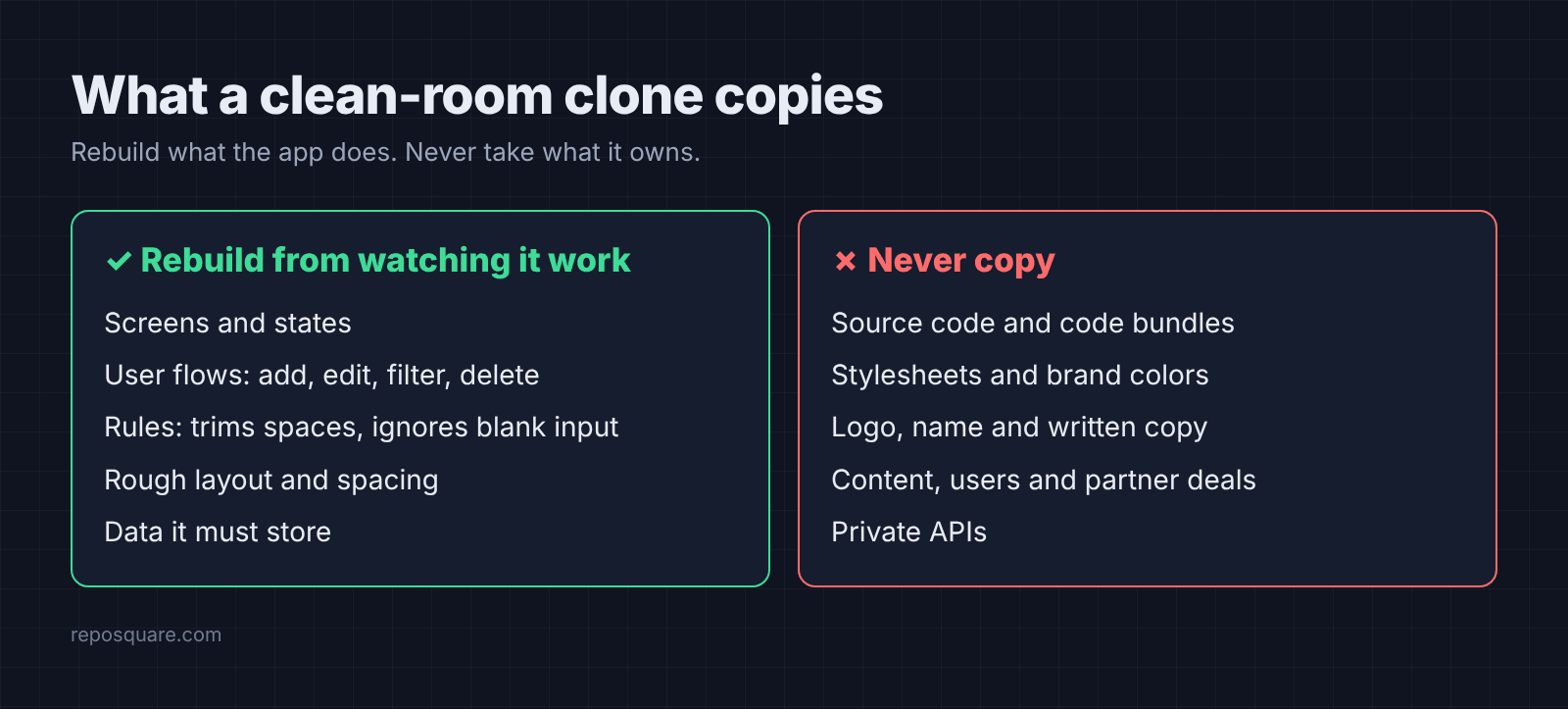
That line matters in the test below. One of the two runs crossed it, even though it was told not to.
What is the Replica skill pack for Claude Code?
Replica is eleven Claude Code skills that walk an AI through a full clone, one stage at a time.
A skill (a folder of instructions Claude Code loads when a task matches it) turns a vague request into a fixed method. Replica splits cloning into stages, and each stage writes files the next one reads, all inside a replica/ folder in your project.
That chain runs recon, architect, design, build, backend, test, diff, entrepreneur, brand, launch and deploy. Recon (studying the app from the outside) maps every screen, flow and state. Design turns what it measured into tokens (named values for colors, sizes and spacing) using your own assets. Diff scores your clone against the original.
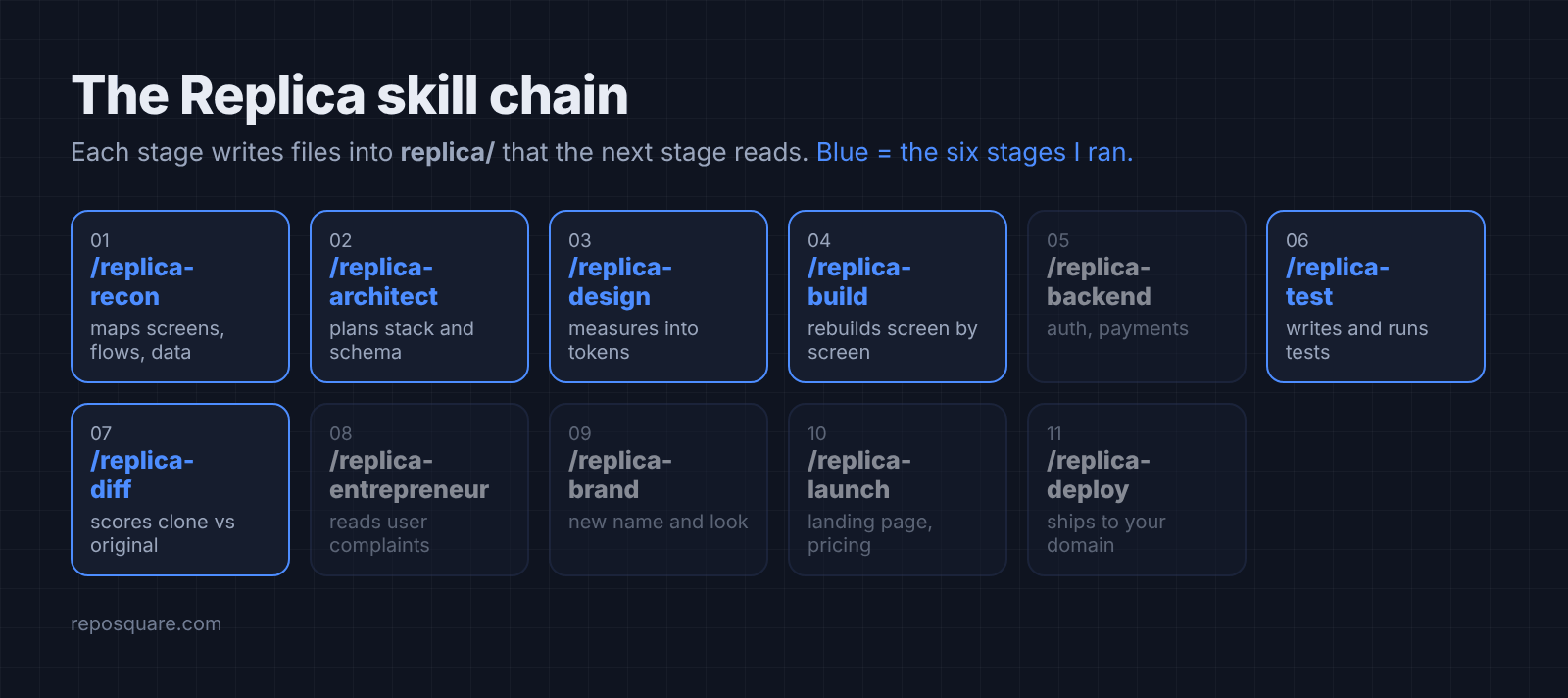
It is MIT licensed and has nothing to sign up for. Its tools are plain Python files with no packages to install, and none of them touch the network. Its rules are strict: public sources and your own account only, no reading the app’s code bundles (the packed JavaScript files a site sends to your browser), no logos or copy. Get it on GitHub.
How did I test one prompt against Replica?
Same app, same model, two ways of asking, and one checklist run on the original first.
The original was a TodoMVC build (a small to-do app that many web frameworks use as a sample) running on my machine. It is small enough to test completely, and it has quirks: added items go to the top of the list, and a page reload wipes everything.
Both runs used Claude Code with the Sonnet model, an empty settings folder, and the same limited tool permissions. Limiting tools is also one of the ways to stop Claude Code from deleting your files. They got the same description of the app and the same build target: a static web app (plain HTML, CSS and JavaScript files) with no framework. Every stage ran headless with the same flags:
claude -p --model sonnet --output-format json --permission-mode acceptEdits- One prompt: “Clone the app,” plus “clean-room: do not copy its source code, CSS or text.”
- Replica: six commands in a row, from
/replica-reconto/replica-diff, each in a fresh session.
Then I wrote 23 checks from the public TodoMVC spec, driven by Playwright (a tool that clicks through a web page like a person would). They cover adding, trimming spaces, the item counter, editing with Enter, Escape and click-away, deleting, filters, reloads, and typed HTML showing as plain text. I ran them on the original first, so the question for each clone was simple: does it behave the same? Tested in October 2026 with Claude Code 2.1.309 and the replica-skill main branch.
Did the clones actually work?
Both clones worked. The one-prompt clone matched the original on all 23 checks.
Here is how each one did against the original’s own behavior:
- One prompt: 23 of 23 the same, including both quirks. It put added items on top and lost them on reload, like the original.
- Replica: 21 of 23 the same. The two differences were on purpose: it saves your list in localStorage (a small storage space every browser gives a website), so items survive a reload.
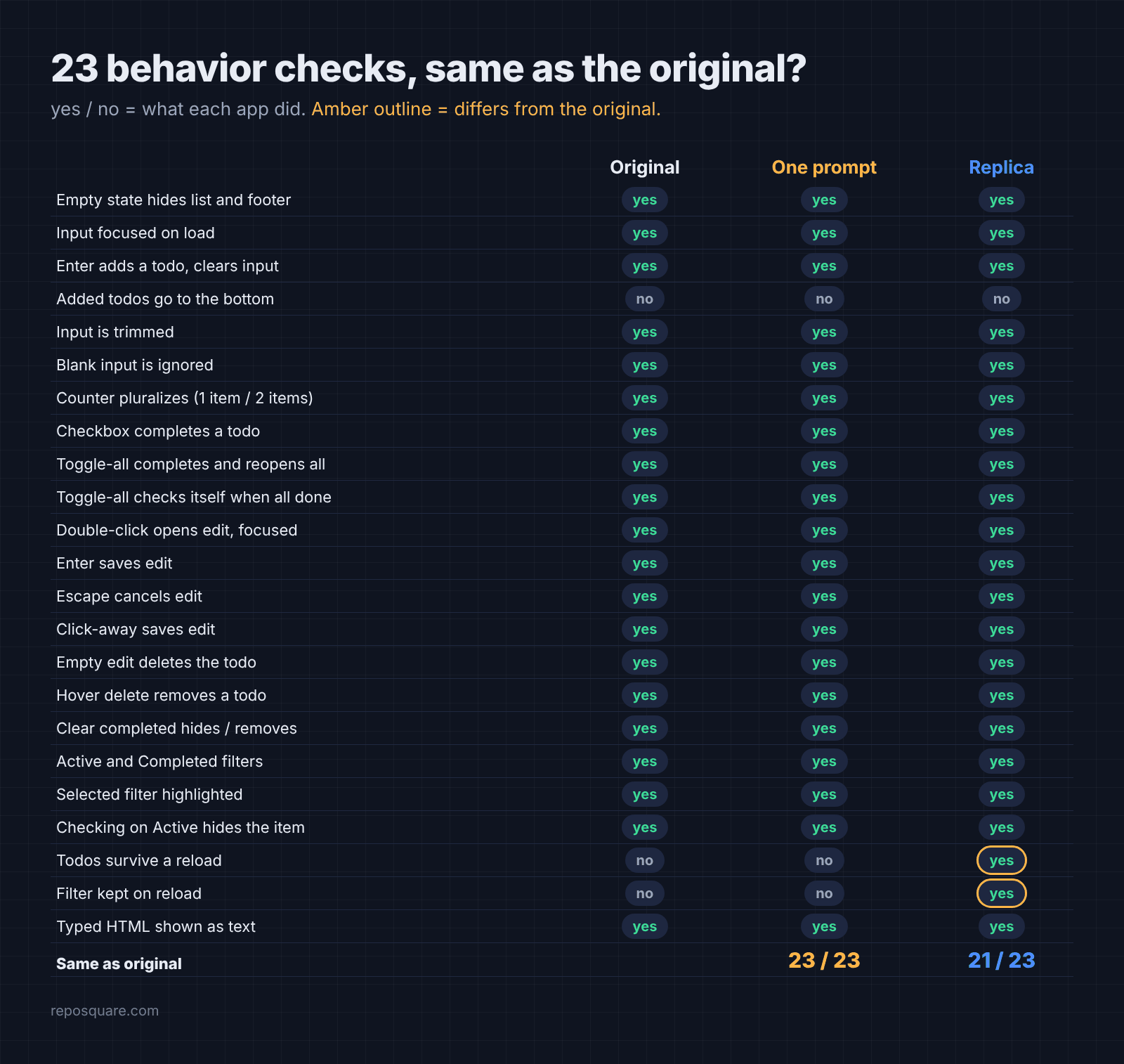
That difference was a choice. Replica’s recon noticed the missing save feature and wrote it down. Its architect stage then added saving as a “could have” improvement. I had asked that stage for “browser storage only,” so my wording likely nudged it there.
So on features alone, one prompt won. It was faster, and nothing was missing. But a clone that passes tests is only half the job.
What did the skill pack do that one prompt didn’t?
It kept the clone clean, tested it like a real product, and avoided one false alarm.
So open the screenshots side by side. The first difference jumps out.
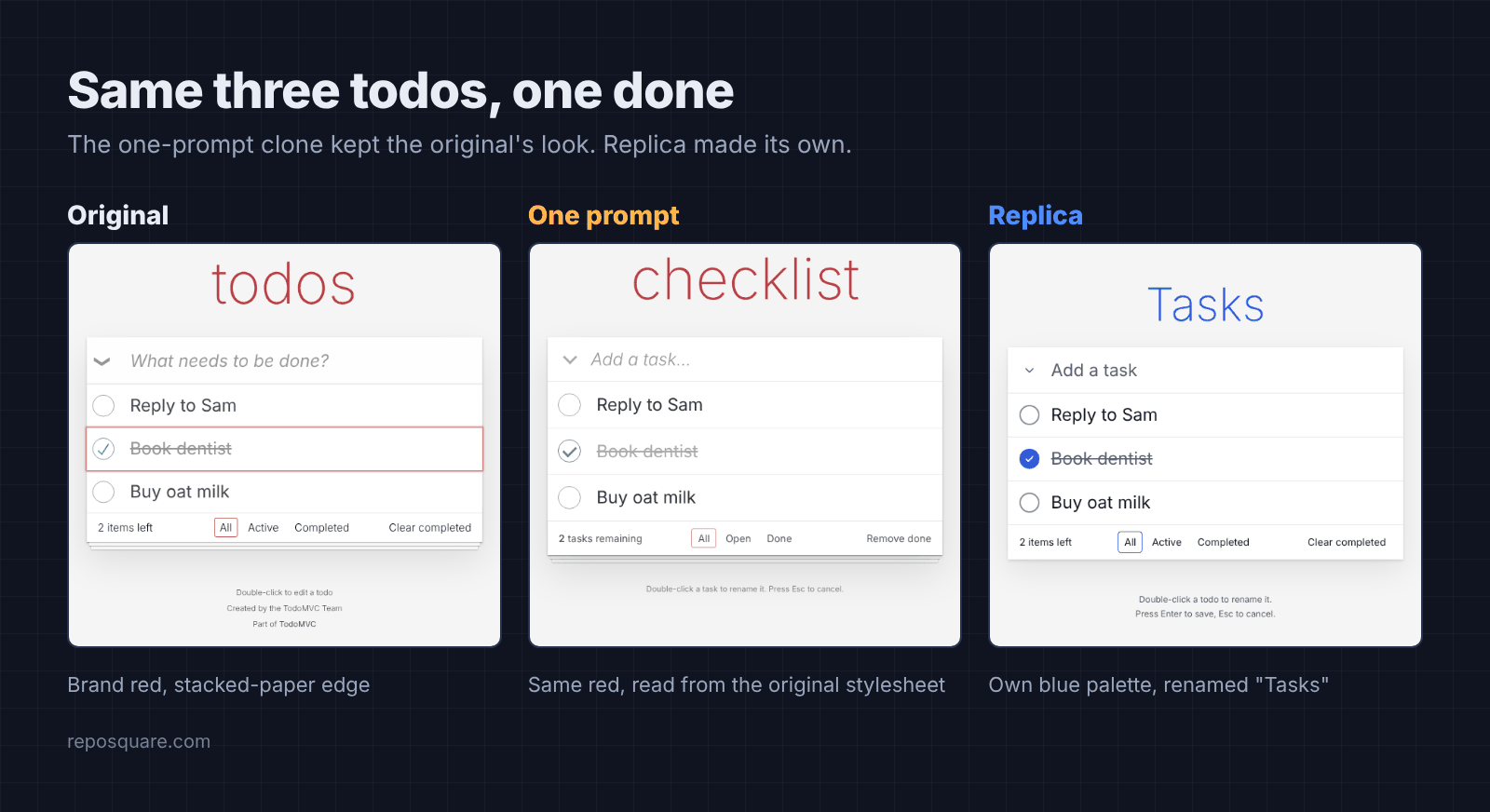
Look at the colors. The one-prompt clone looks like the original, with the same dark red title, the same stacked-paper edge, and the same sizes. That is because it read the original’s stylesheet during the build, even though the prompt said not to copy its CSS. The exact brand red shows up four times in its own stylesheet. No line was pasted in, but the values were.
Replica never fetched the stylesheet or the code bundle to read them. It measured the running page and its screenshots, picked its own blue palette, and renamed the app “Tasks.” If you plan to put a clone online, that is the version you want. Giving Claude your own look up front also helps with the other common complaint, websites that look AI generated.
Then came testing. Replica’s test stage wrote 57 test cases covering keyboard-only use, a narrow phone screen, slow network, and blocked storage. 55 passed. It found three minor bugs, fixed two, and reported the third honestly: double-clicking delete removes two items.
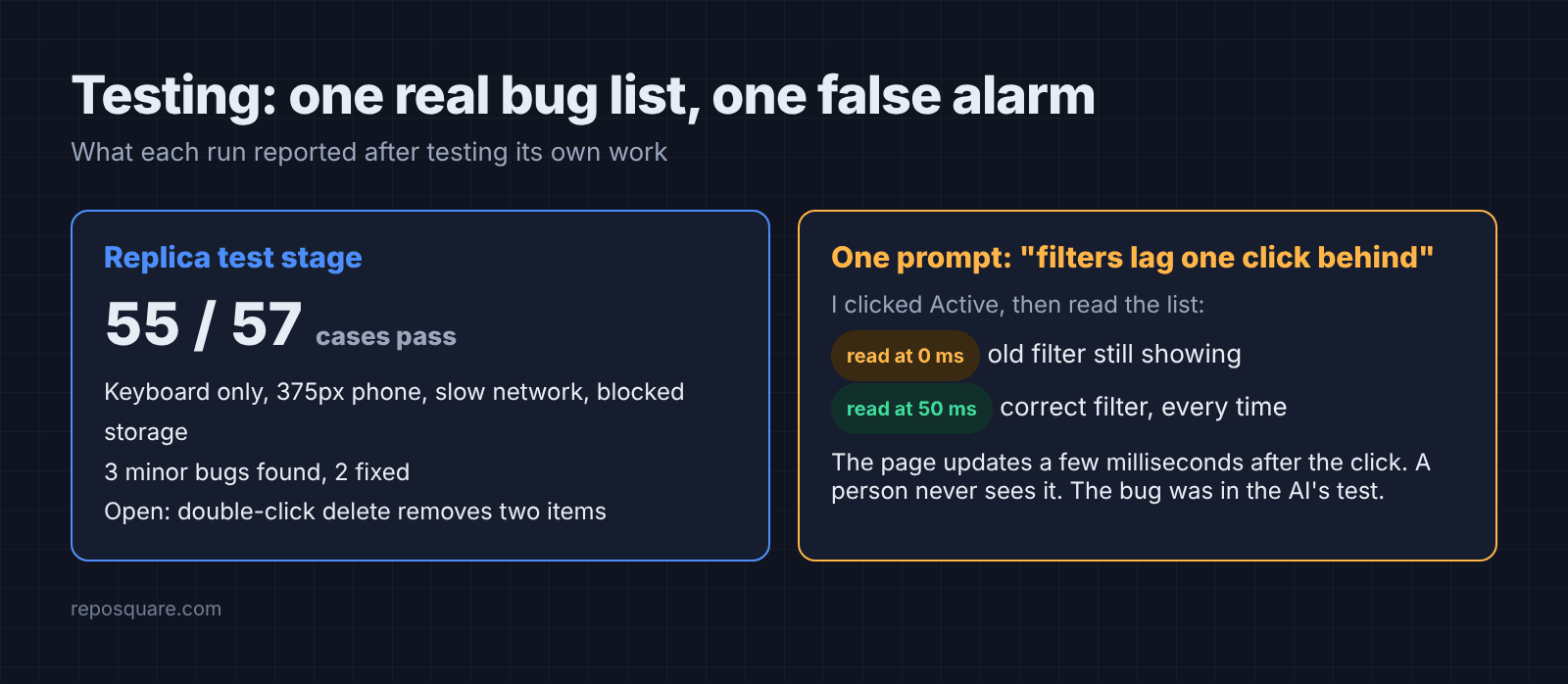
But the one-prompt run tested itself too, and that is where it slipped. It told me the original app had a bug where filters “lag one click behind,” and that it had fixed it in the clone.
So I checked. When a script reads the list the instant after a click, it does see the old filter for a moment, because the page updates a few milliseconds later. When I waited 50 milliseconds, every filter was correct. A person clicking would never see it. The “bug” was a flaw in the AI’s own test.
How long did it take and what did it cost?
One prompt took about 2 minutes. Replica took about 25.
These are the numbers Claude Code reported for each run, at API prices:
| One prompt | Replica, six stages | |
|---|---|---|
| Time | 2 min 6 s | 24 min 30 s |
| Cost | $0.34 | $2.31 |
| Files written | 7 | 57 |
| Clone size | 420 lines | 545 lines |
| Tests it wrote | 1 script | 57 cases |
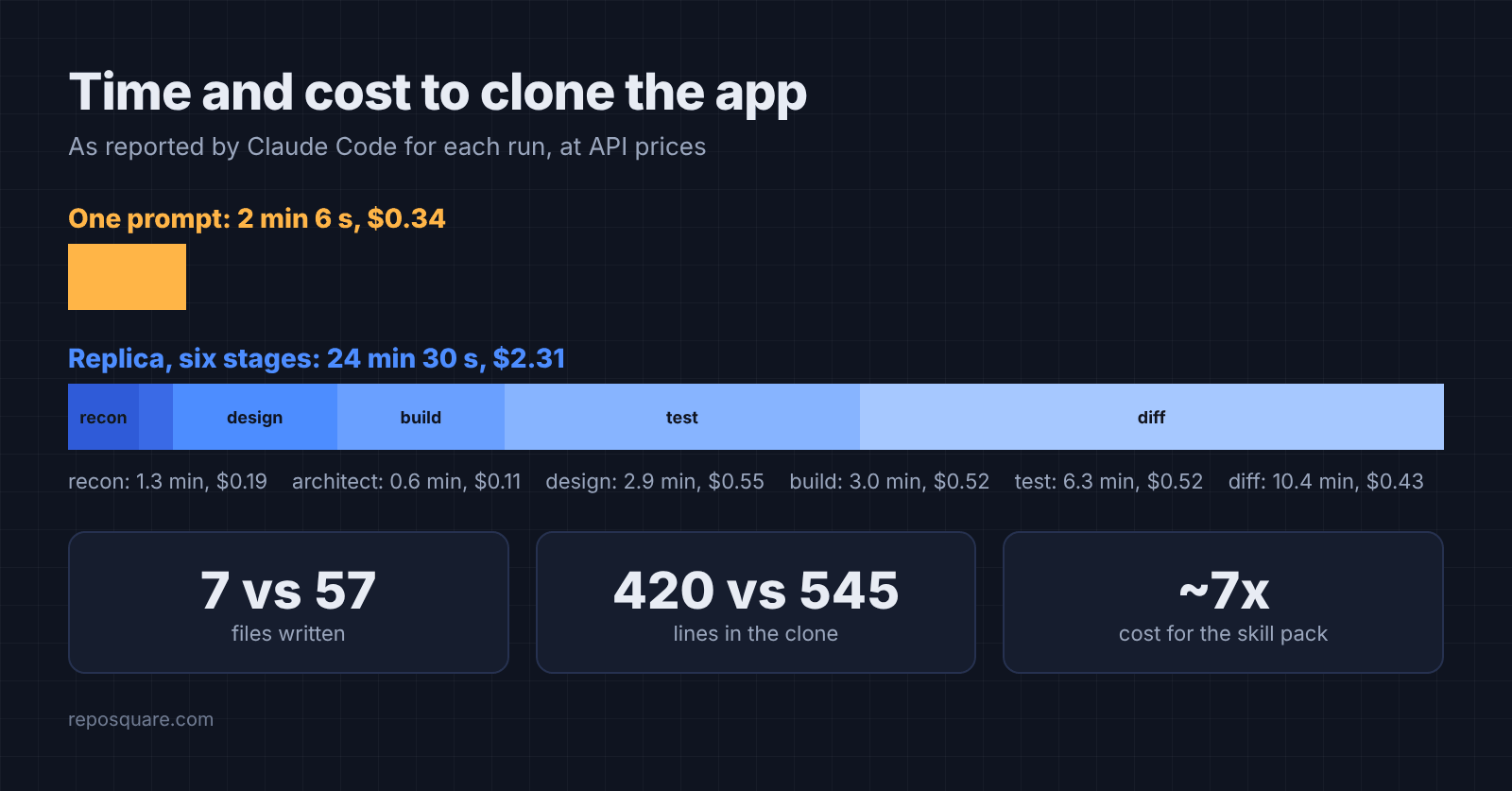
That extra time went mostly into the test stage (about 6 minutes) and the diff stage (about 10). The diff stage spent its time re-capturing both apps at two screen sizes so the comparison was fair. It scored its own clone 100 on features and 56 on layout, then explained that small shifts, like rows being one pixel taller, pull that layout number down more than your eye would.
And on a Claude subscription you pay in usage limits, not dollars, but the ratio holds. Replica costs about seven times more to get roughly the same working app plus a paper trail.
When is one prompt enough to clone an app?
One prompt is enough when the clone is for you. Use the skill pack when it is for anyone else.
Still, there is a fair case for the quick way. If you are learning how an app works, building a personal tool, or testing an idea for an afternoon, one prompt gave me a perfect behavioral copy in two minutes. Spending seven times more for documents you will not read is waste.
But the moment a clone leaves your laptop, the trade flips. The quick version reused another product’s look and reported a bug that did not exist. Neither one breaks the app, but both are the kind of thing you find out about later, at a bad time.
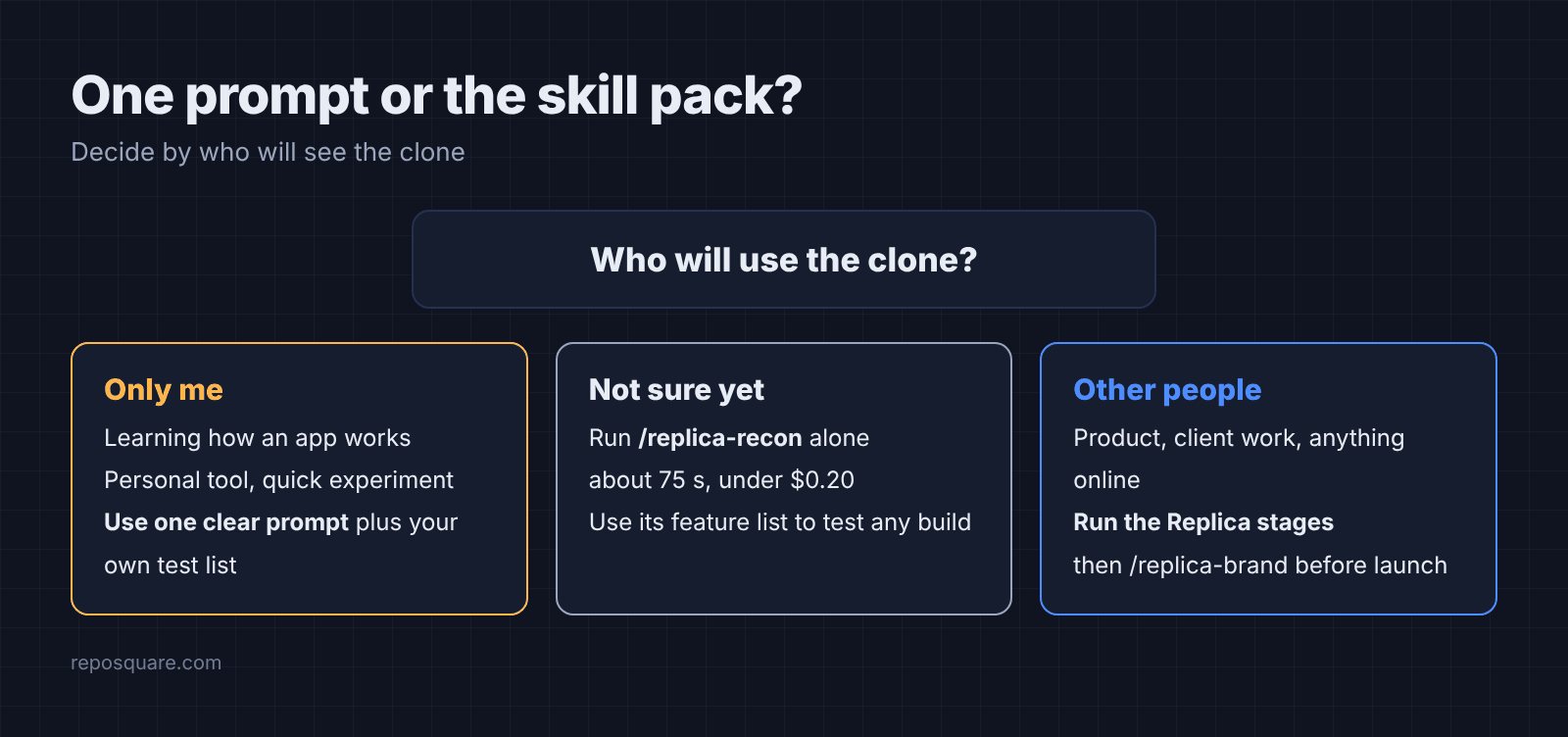
Then there is a middle path. Run /replica-recon alone first. It took about 75 seconds and cost under $0.20, and it gives you the screen list, the flows and the feature checklist. Then build however you like, and use that checklist to test the result.
How do I clone an app with Claude Code step by step?
Install the skills, run recon, then build in stages and check each one.
- Install the pack. In Claude Code, run
/plugin marketplace add Jakeschincariol/replica-skill, then/plugin install replica-skill@replica-skill. Or copy thereplica-*folders into~/.claude/skills/. Until you call a skill, only its short description sits in Claude’s memory, so eleven of them cost little, unlike some Claude Code plugins that add thousands of tokens to every request. - Decide the slice. “All of Notion” is too big. Pick the one flow users pay for, and say who the clone is for.
- Run
/replica-reconwith the app’s address. Readreplica/recon.mdand fix anything it guessed wrong. - Run
/replica-architect,/replica-designand/replica-buildin order. Tell the design stage to use your own colors and fonts. - Run
/replica-test, then/replica-diff. Fix every must-have it marks as missing. - Before anyone else sees it, run
/replica-brandso nothing of the original’s name or look is left.
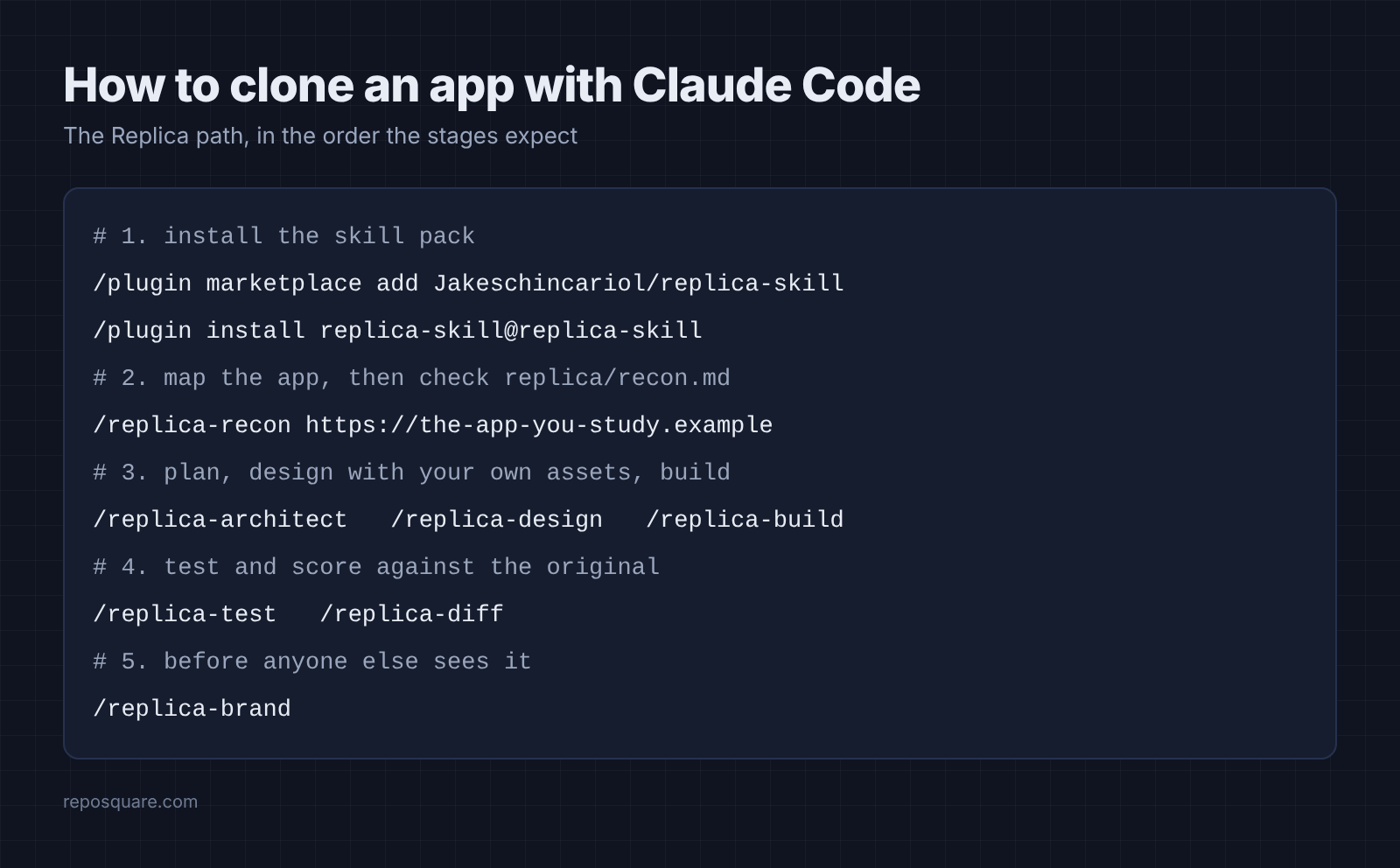
Installed as a plugin, the commands carry a prefix, such as /replica-skill:replica-recon. If you install skills from strangers often, it is worth knowing how to check a Claude Code add-on before you install it.
What can’t you clone with AI?
You can rebuild features and flows, never the content, the network or the brand.
Take a booking app. Its calendar logic is fair game. Its user base, its partner deals, its music catalogue and its logo are not, because those are what the company owns. Replica marks these as “skip” rows in its feature list instead of pretending to build them.
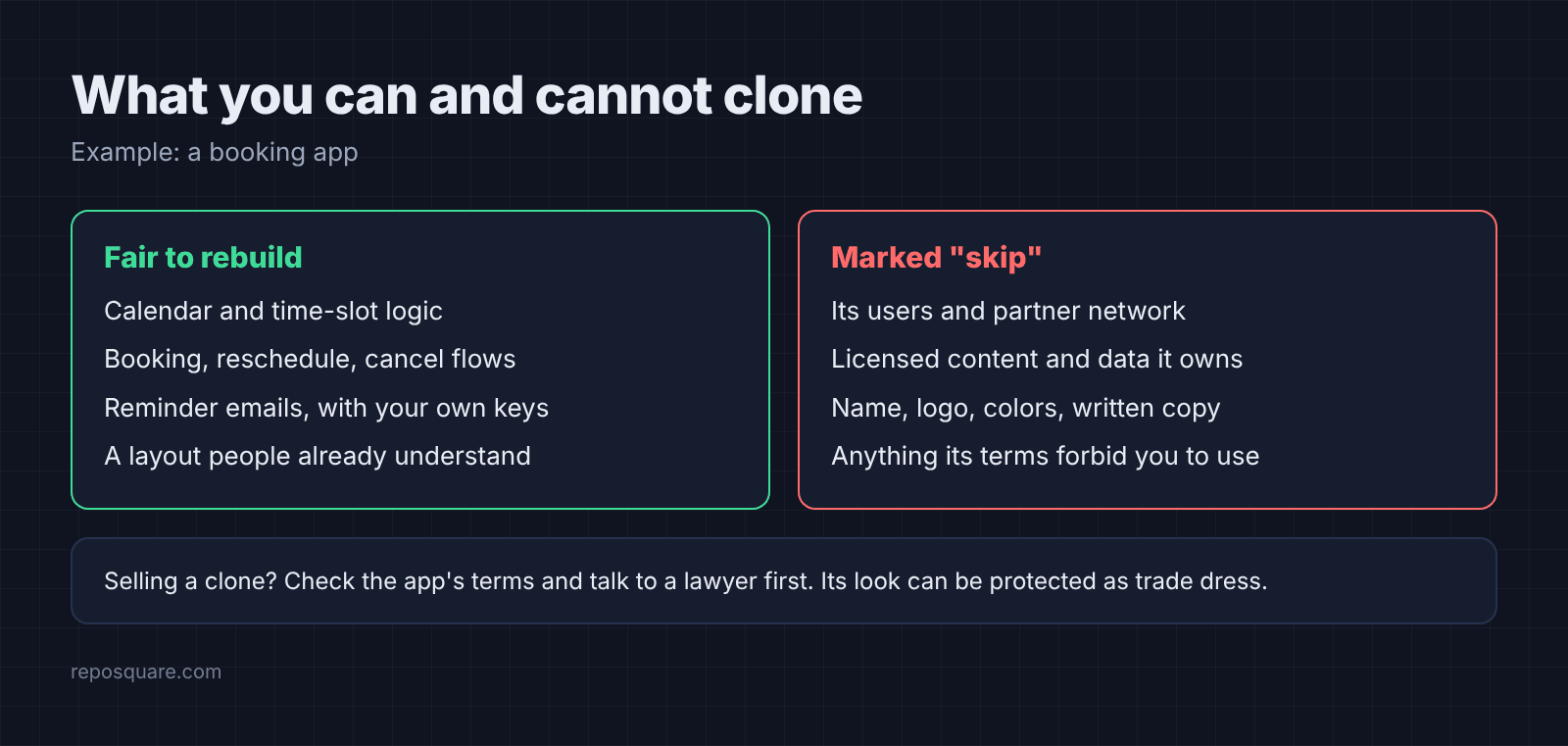
There is also a legal edge. Some services’ terms forbid using your account to build a competing product, and a product’s distinctive look can be protected as trade dress (the legally protected look and feel of a product). Replica’s own advice is to talk to a lawyer before launch if there is money on the line. This post is not legal advice either.
And watch the quieter limit. Even a perfect behavioral match told me nothing about how the clone looks to a stranger. The one-prompt version passed every test while still wearing the original’s colors.
Common questions about cloning an app with Claude Code
Is it legal to clone an app with AI?
Rebuilding features and flows from public use is common practice, but copying code, text, logos or brand colors is not safe. Check the app’s terms of service and get legal advice before you sell a clone.
Can Claude Code clone a website from a URL?
Yes. Claude Code can load a page, click through it with Playwright and rebuild it. Tell it clearly not to read the site’s code or stylesheets, and check the result, because a plain prompt may still read them.
What is the best Claude Code skill to clone an app?
Replica is a complete open source option, with eleven skills that run from recon to deploy. For a quick personal clone, a single clear prompt plus your own test list can be enough.
How much does it cost to clone an app with Claude Code?
In my test, a small app cost $0.34 with one prompt and $2.31 through Replica’s six main stages, at API prices. Bigger apps with logins, payments and many screens will cost much more.
So clone with one prompt when you are the only user. When someone else will see it, let the skills keep it yours.