
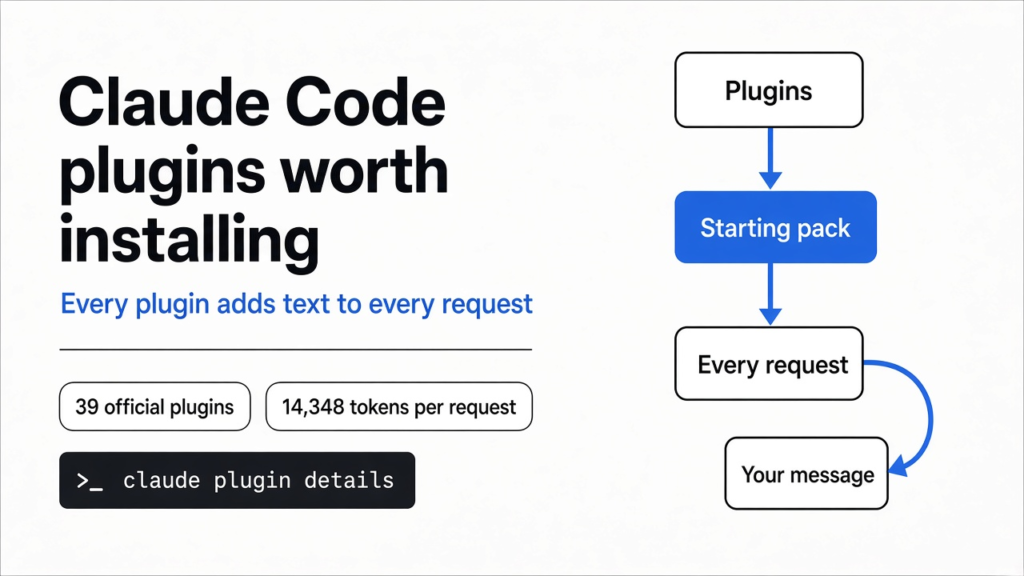
Short answer: most official Claude Code plugins are cheap to keep on. Thirty-nine of them, all enabled, added about 14,300 tokens to every request in my test. Fourteen add nothing up front. A few big kits and two style plugins carry most of that weight, and one security plugin quietly runs a second, paid Opus review after your turns. So the Claude Code plugins worth installing are mostly the small ones, with the big kits switched on only for the job.
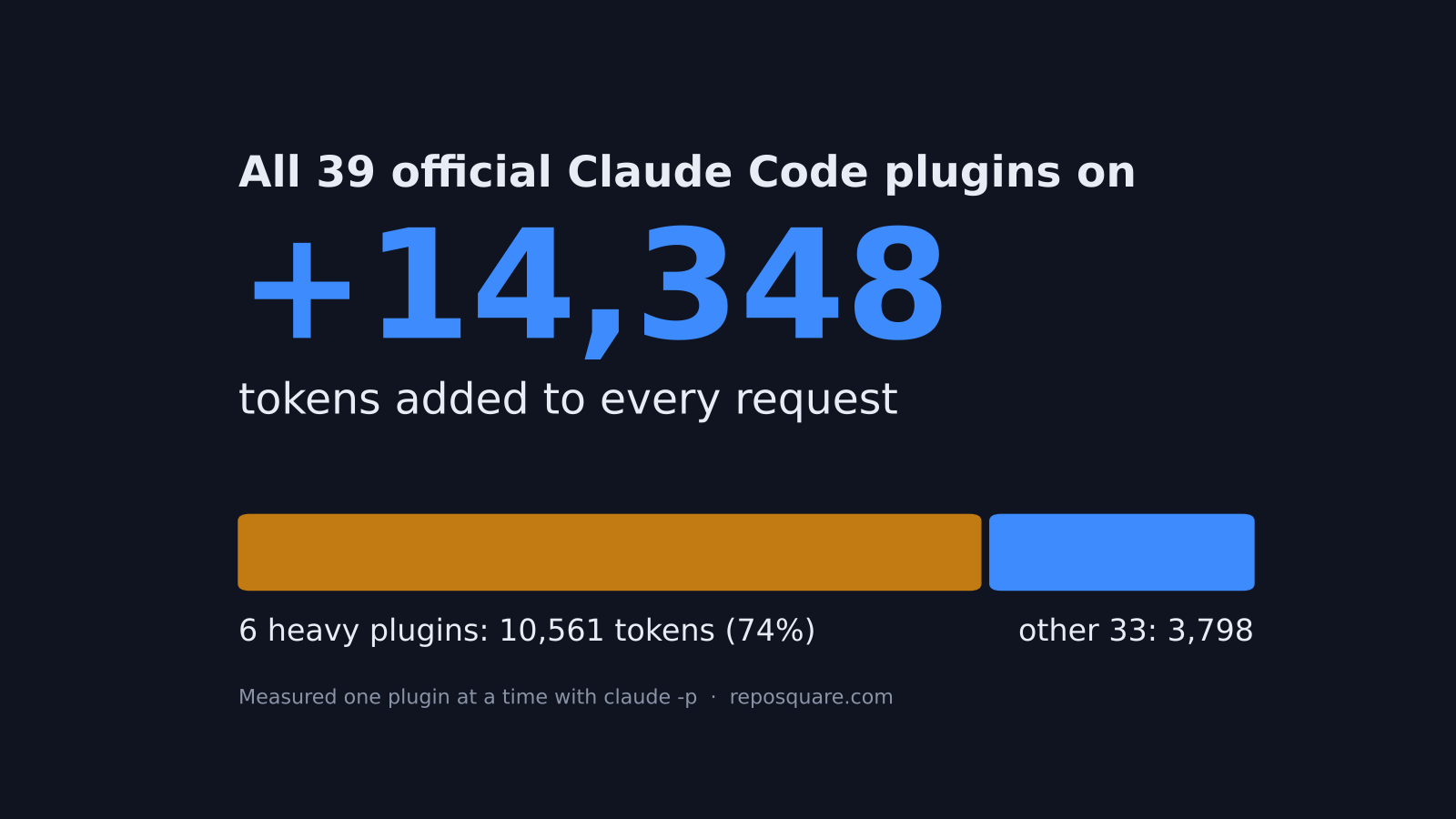
You open the plugin list in Claude Code and see dozens of names from Anthropic itself. Each one promises to make Claude better at something. Why not install five? Then ten?
Nothing breaks. That is the problem.
A plugin (a bundle of extra skills, commands, helper agents or hooks you add to Claude Code) has a price. It does not show up as a bill. It shows up as text.
Before Claude reads your question, Claude Code sends it a starting pack. That pack holds its rules, its tools, and a short card for every skill (a saved set of instructions for one kind of task) it knows about. Every plugin you turn on adds cards to that pack. MCP servers add to the same pack, and we measured that cost here.
So here is the one idea to hold on to. A plugin’s real price tag is the text it adds to every request.
I measured that price for all 39 internal plugins in Anthropic’s official plugin directory, one at a time. Then I checked each number against the estimate Claude Code itself shows you.
What does a plugin actually cost you?
It costs space and money on every message, even when you never use it.
Start with the base fact. Claude reads text in tokens (small chunks of text, roughly three quarters of a word each). It can only hold a fixed number of them at once, a limit called the context window (the model’s working memory for one chat).
Now build one step up. Claude Code resends the whole starting pack with every message you send. So if a plugin adds 1,000 tokens to the pack, it adds 1,000 tokens to message one, message two, and message fifty.
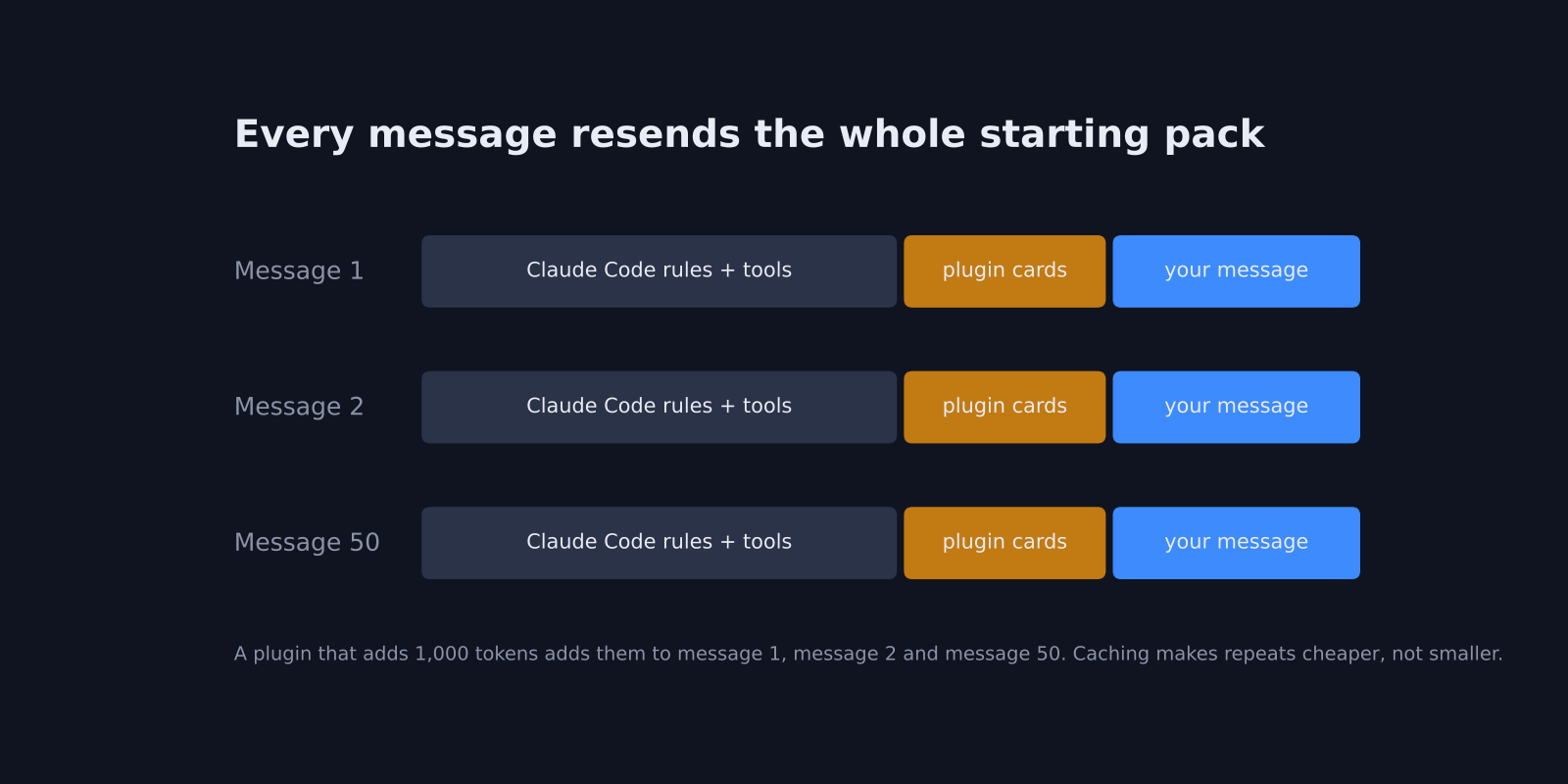
Two things soften this. Prompt caching (the API remembers text it saw a few minutes earlier, so it charges far less to read it again) makes the repeats cheap in money. And skills load in two stages: only a short description sits in the pack, and the full instructions load when the skill actually fires.
But cheap is not free. Cached text still fills the context window, and a fuller window means Claude has less room for your code before it starts summarizing and forgetting. That is why the up-front number matters.
How I measured it
One plugin on, everything else off, one tiny prompt, then count the tokens.
I installed the 39 internal plugins from the official directory into a clean, isolated Claude Code setup. Then I ran the same one-line request, “Reply with the single word OK”, with exactly one plugin enabled each time. Claude Code’s JSON output reports how many input tokens it sent, so the difference from a run with no plugins is that plugin’s up-front cost.
The no-plugin run gave the same count three times in a row, to the token. That made every difference clean. I also ran all 39 at once to check that the costs simply add up. They do: the single-plugin numbers summed to within a dozen tokens of the all-on run.
One thing worth knowing before the numbers: a plugin you installed but switched off costs nothing. With all 39 installed and disabled, the request came within 4 tokens of an empty setup.
Which official plugins are almost free?
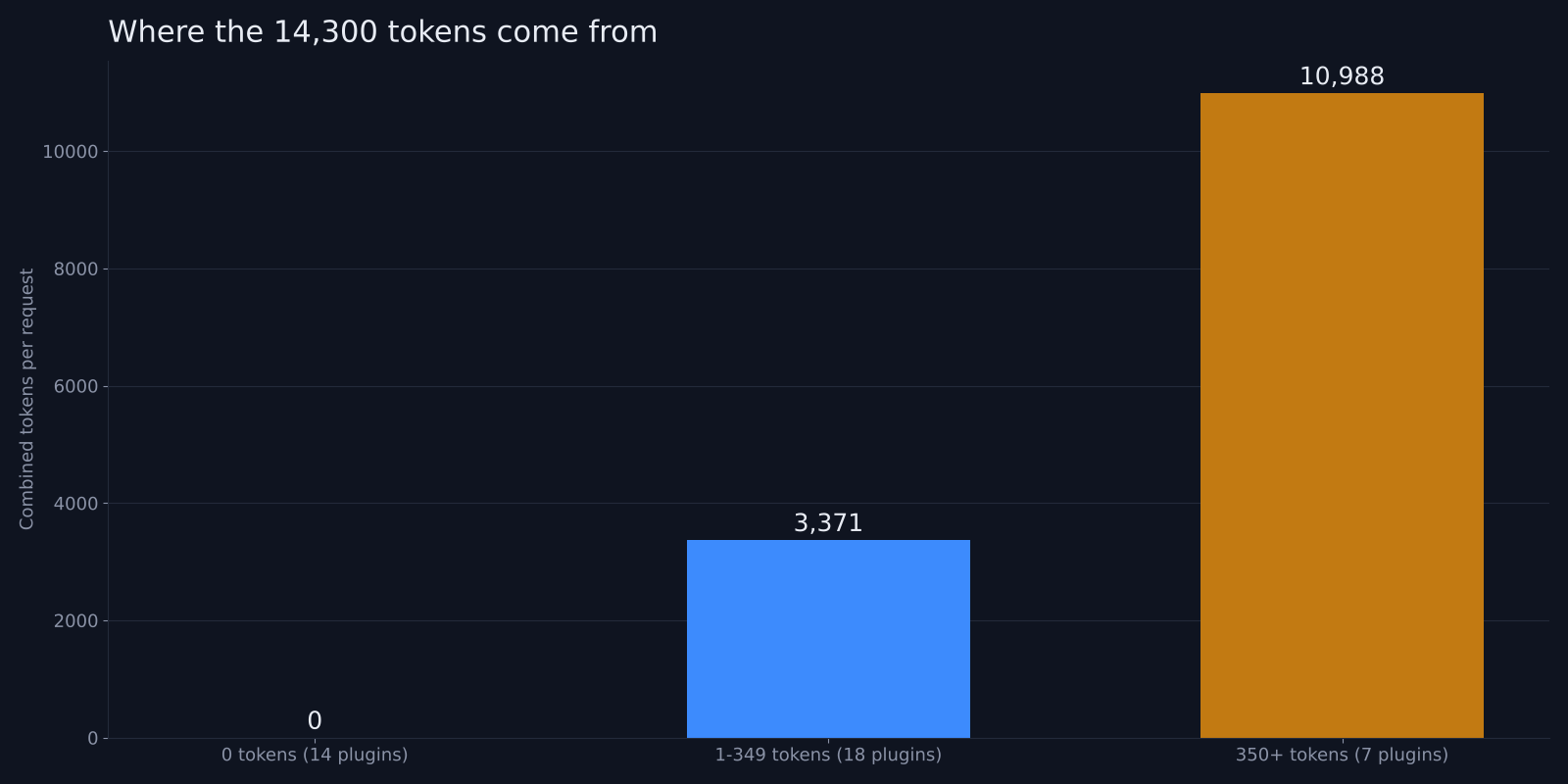
Thirty-two of the 39 add less than 350 tokens each, and fourteen add zero.
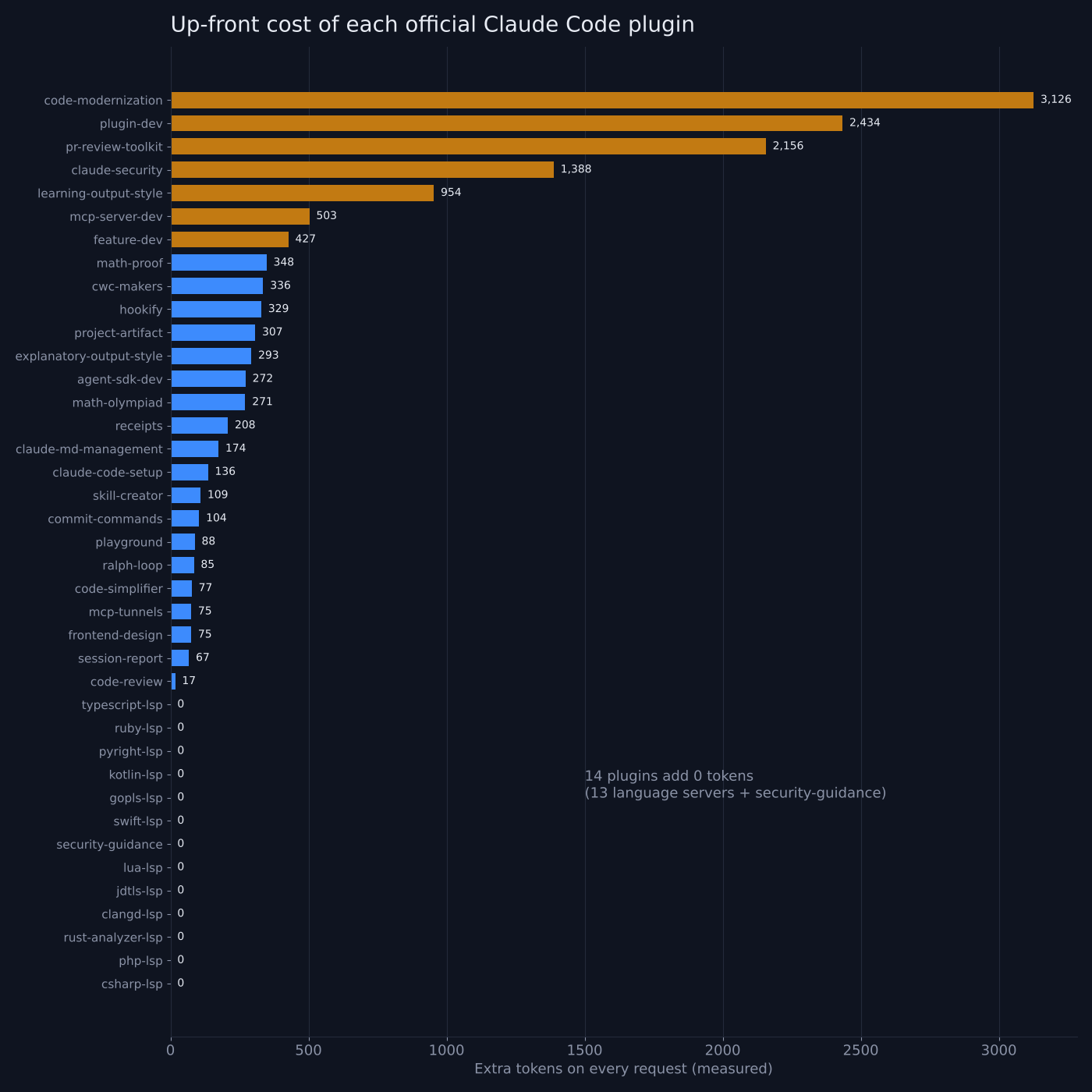
The fourteen zero-cost ones are the language server plugins and security-guidance. A language server (a background program that understands one programming language, like the type checker in your editor) runs outside the model, so it puts nothing in the pack. The catch is that the plugin is only a connector. The pyright-lsp plugin, for example, tells you to install Pyright yourself with npm or pip before it does anything.
Then comes a long, cheap middle. These are the ones I would install without thinking twice, if the job fits you:
| Plugin | What it adds | Measured cost per request |
|---|---|---|
| code-review | A pull request review command that uses several helper agents | 17 tokens |
| frontend-design | A skill for interfaces that do not look like templates (tested here) | 75 tokens |
| code-simplifier | One agent that cleans up code without changing what it does | 77 tokens |
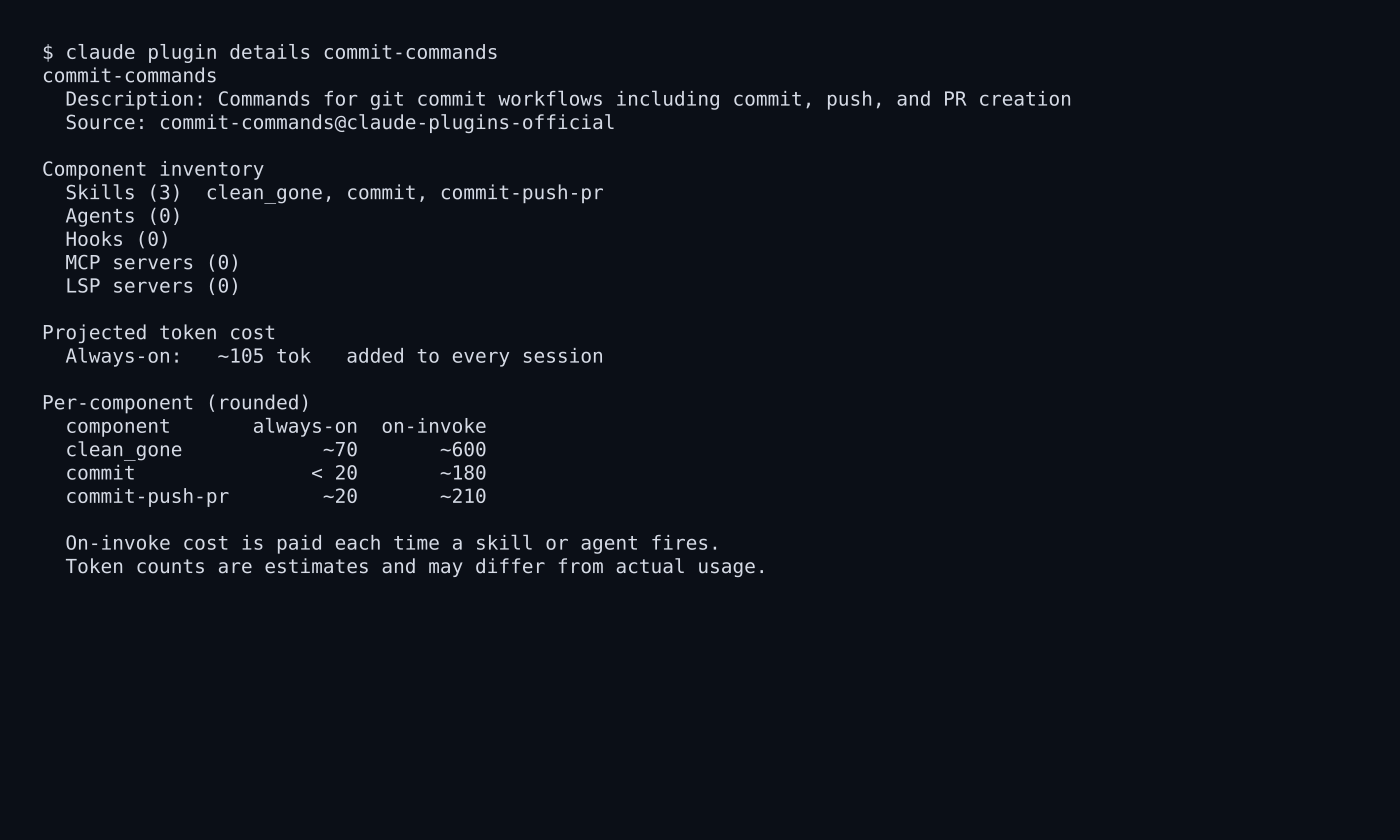
| commit-commands | Commit, push and pull request shortcuts | 104 tokens |
| claude-code-setup | Looks at your project and suggests hooks, skills and MCP servers | 136 tokens |
| claude-md-management | Audits and updates your CLAUDE.md project notes | 174 tokens |
Why so small? Because a skill’s card is a name plus one or two sentences. The real instructions behind clean_gone in commit-commands are about 600 tokens, but you only pay that when it runs.
Which plugins are heavy?
Three big kits cost 2,000 to 3,100 tokens each, on every message.
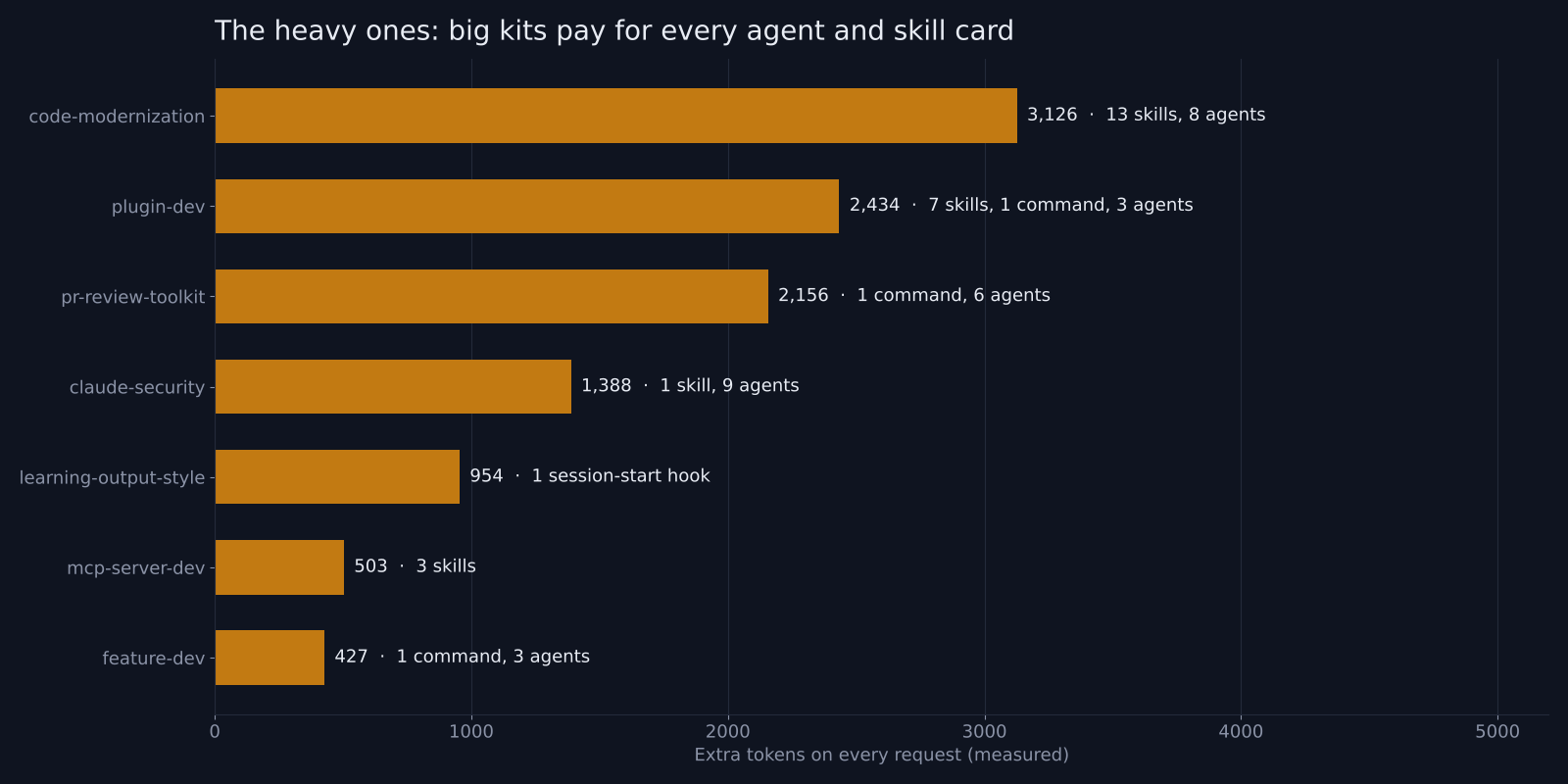
code-modernization is the heaviest at 3,126 tokens. That makes sense once you open it: 13 skills and 8 helper agents (separate Claude workers it can hand a sub-task to) for moving an old codebase onto a modern stack. plugin-dev (2,434) and pr-review-toolkit (2,156) follow, and claude-security sits at 1,388.
Are they bad plugins? No. They are toolboxes for a specific job. The waste comes from leaving a migration toolkit switched on for a year of everyday bug fixes.
So treat the heavy ones like a power drill. Get it out for the job, then put it back with claude plugin disable code-modernization. The same idea works for stray skills, and pruning them follows the same logic.
Does the built-in estimate tell the truth?
Mostly yes, but it missed by up to 2.3 times on the big kits and showed zero for two plugins that cost real tokens.
Claude Code has a command, claude plugin details <name>, that lists what a plugin contains and a projected “always-on” token cost. That is a great idea, and for most plugins it was close. commit-commands was estimated at about 105 tokens and measured 104. mcp-server-dev was estimated at 504 and measured 503.
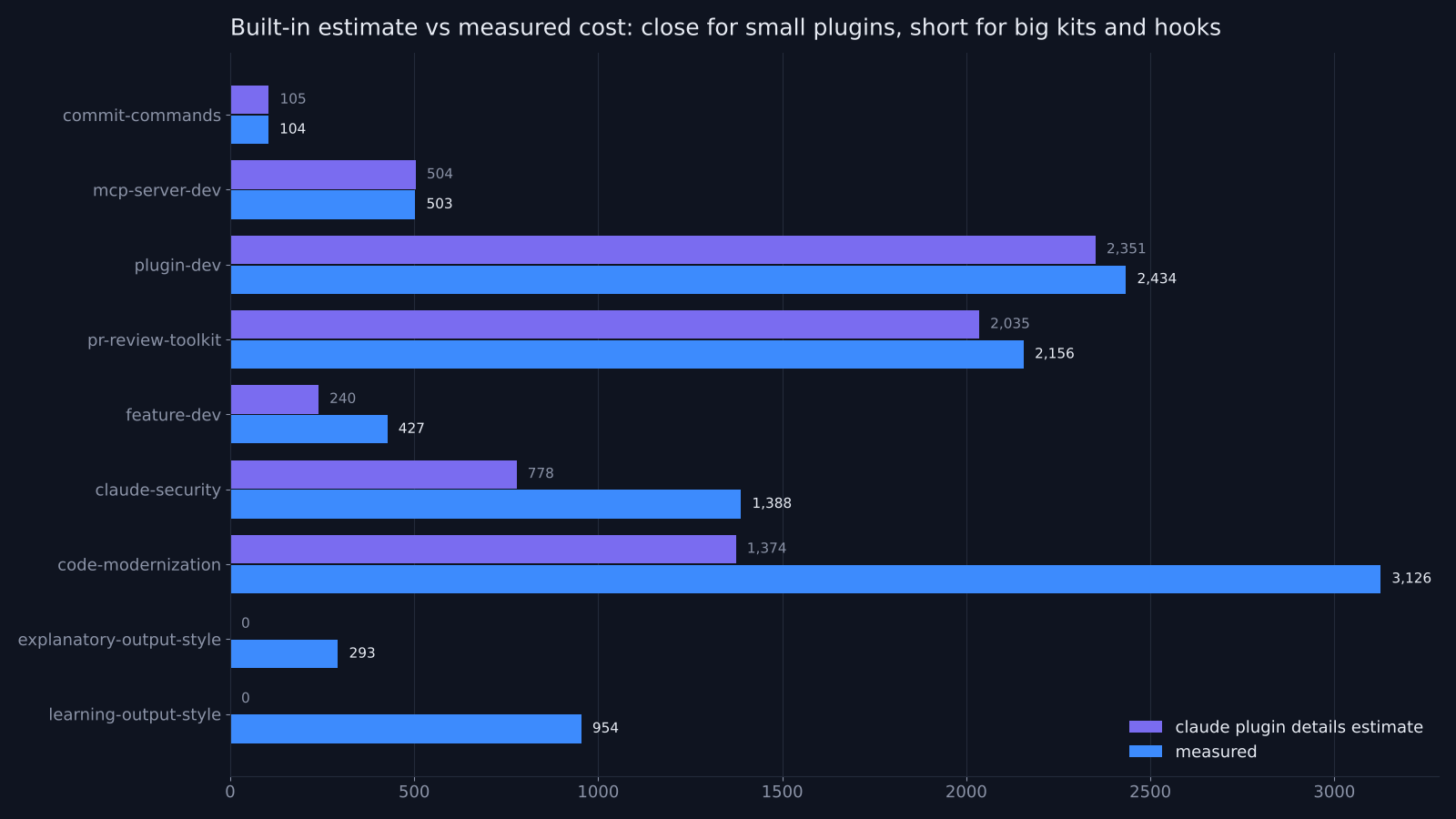
The big kits drifted. code-modernization was estimated at about 1,374 and measured 3,126. claude-security was estimated at 778 and measured 1,388. feature-dev was estimated at 240 and measured 427.
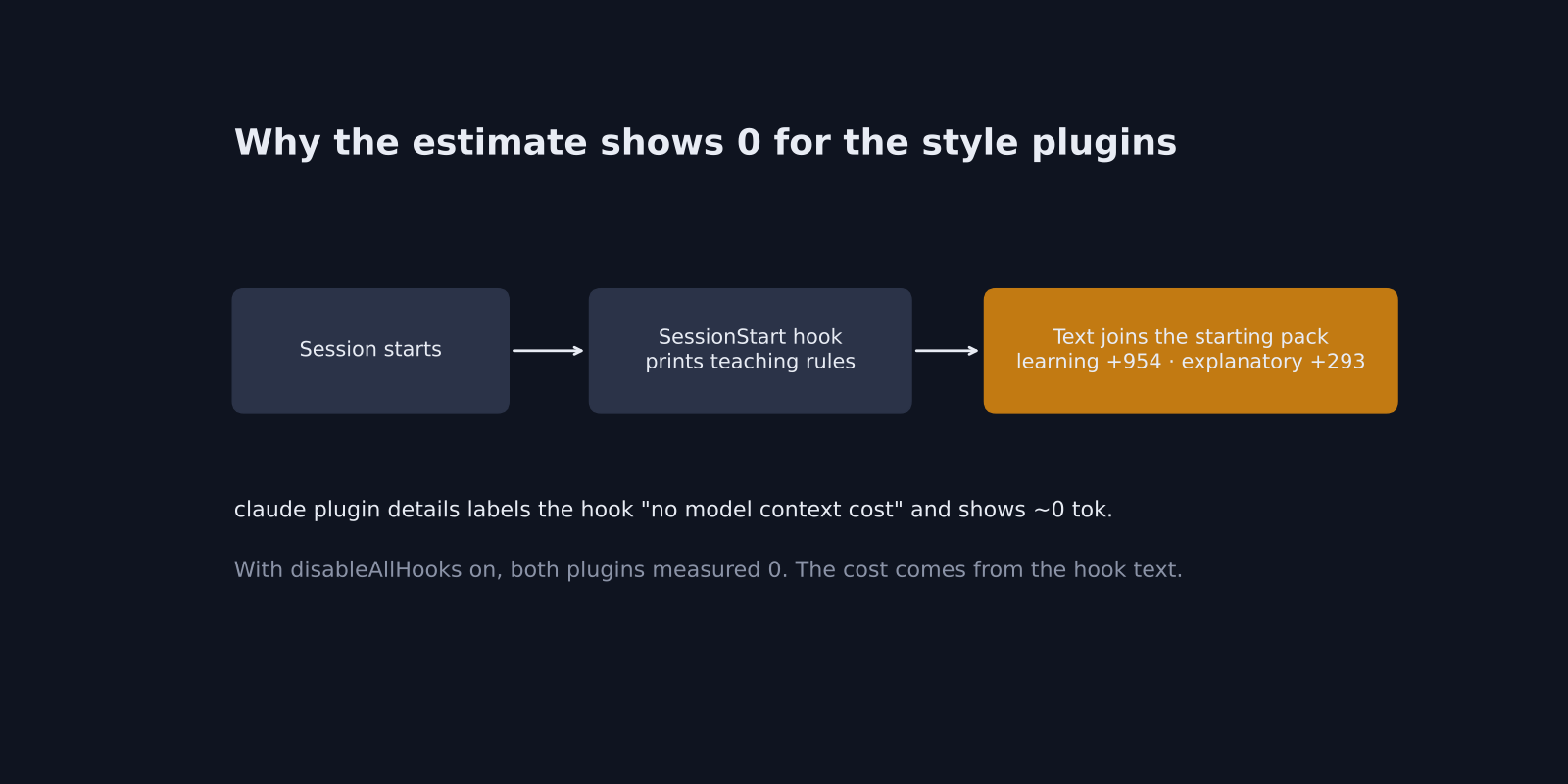
The bigger surprise was the two style plugins. learning-output-style and explanatory-output-style both show “~0 tok” and label their hook as “no model context cost”.
A hook (a small script Claude Code runs automatically at set moments, like the start of a session) can print text that gets handed to the model. (The same hooks can also block risky commands, as in this guide.) These two do exactly that: they inject a page of teaching instructions at session start.
Measured, learning-output-style added 954 tokens and explanatory-output-style added 293. When I turned hooks off with the disableAllHooks setting and ran them again, both dropped to zero. So the cost is real, it comes from the hook, and the estimate cannot see it.
The practical rule: trust claude plugin details for skill-only plugins, and assume it undercounts anything with hooks or lots of agents.
What about the security plugin that shows zero?
security-guidance adds nothing to your context, but it runs a second model review after Claude edits code, and that bill sits outside your session cost.
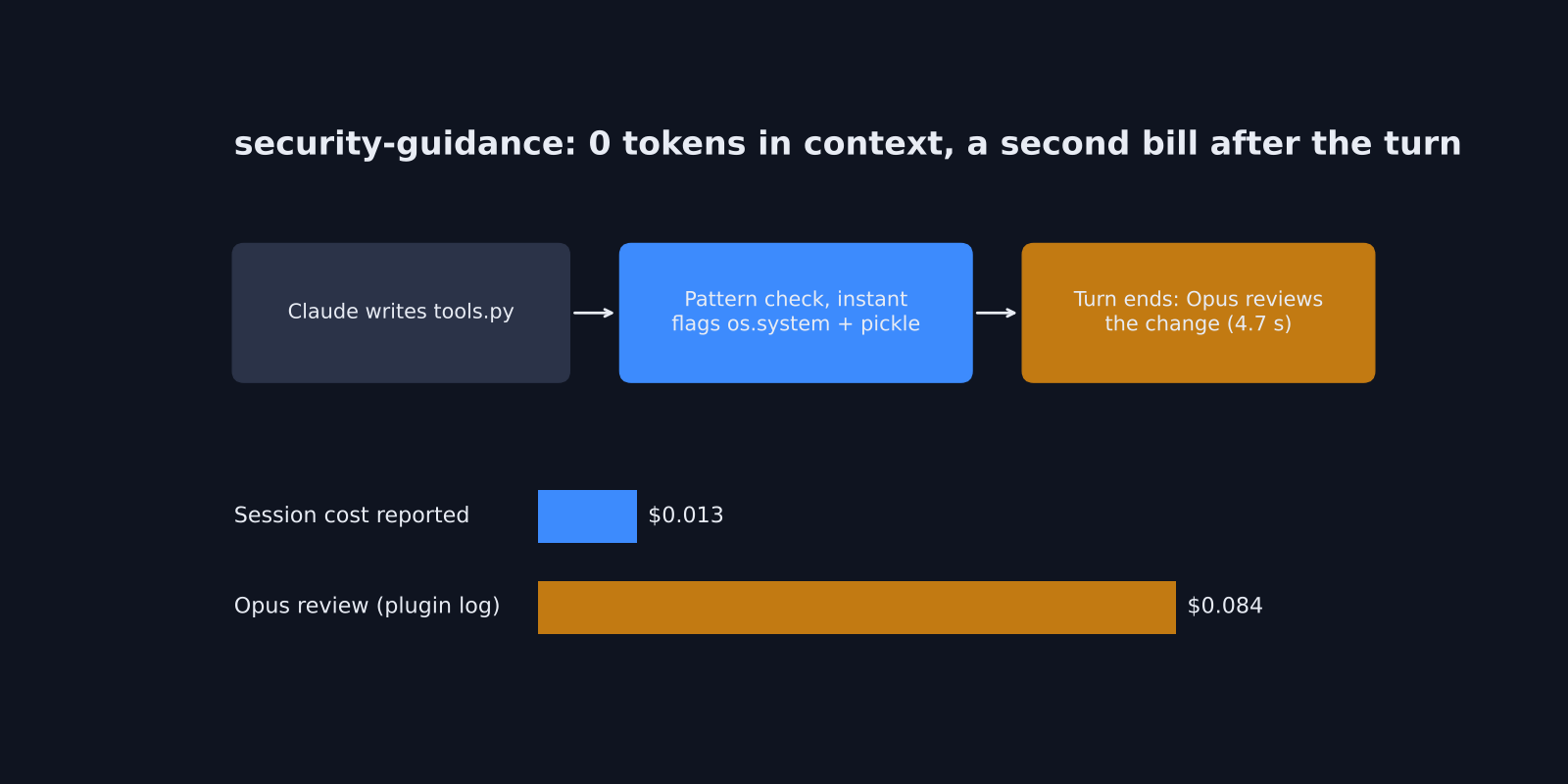
This one needs its own test, because its up-front cost really is zero. Its work happens in hooks. So I gave Claude a small, risky task in a fresh git repo. Write a tools.py file with one function that runs a shell command through os.system, and one that loads a file with pickle (a Python format that can run code when you open it).
Here is what happened, step by step.
- The moment Claude wrote the file, a fast pattern check flagged both os.system and pickle. Claude passed both warnings on to me in its reply.
- When Claude finished, the plugin sent the code change to Claude Opus for a deeper review. That took 4.7 seconds and passed the file.
- The plugin’s own log estimated that review at about 8.4 cents. Claude Code reported 1.3 cents for the whole session.
So the second review cost more than six times what the session showed me. It happens after turns that change code, so a busy day of edits adds up.
The README is upfront about it. The review runs on the newest Opus by default. You can point it at a cheaper model with SECURITY_REVIEW_MODEL, or switch off just the end-of-turn review with ENABLE_STOP_REVIEW=0.
I still think it is worth having. The instant pattern warnings cost nothing and caught both problems. Just choose the review model on purpose instead of by default.
Is it worth installing all of them?
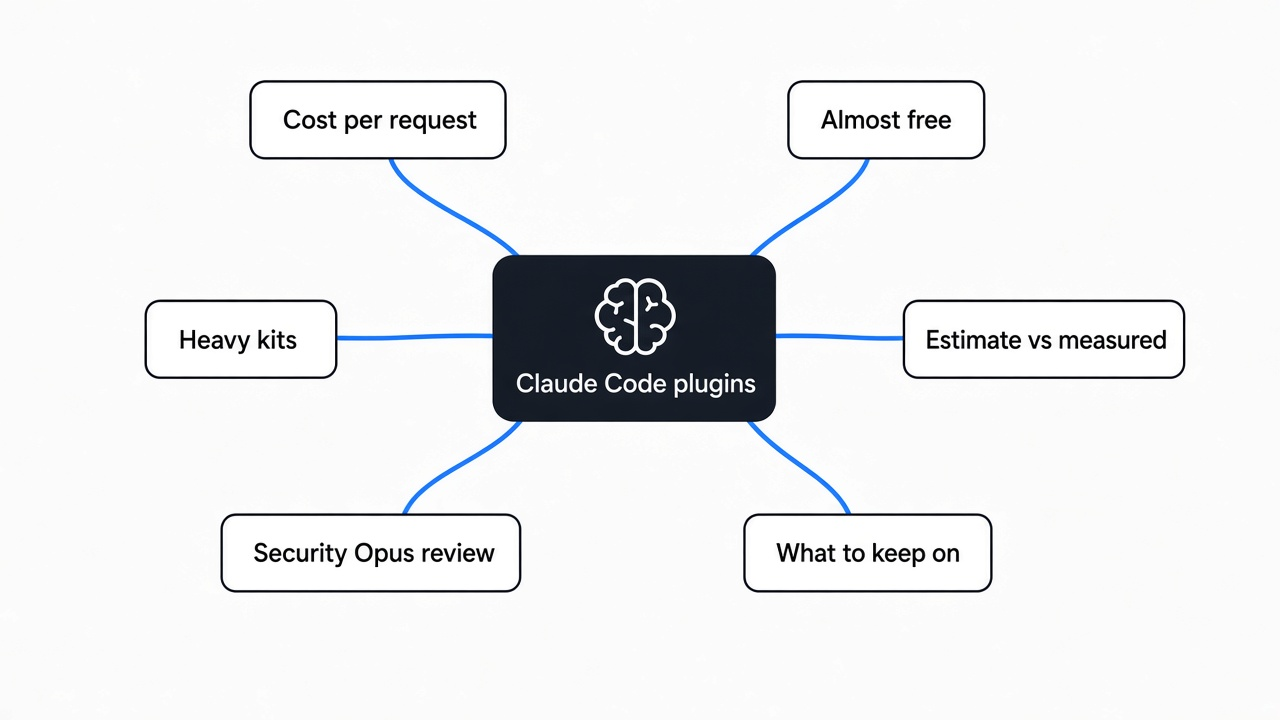
No. All 39 together add about 14,300 tokens, roughly 10,000 words, to every single request.
To be fair to the other side: with prompt caching, those repeated tokens are cheap in money, and on a large context window 14,000 tokens is not a crisis. If you only work in short sessions, you may never notice.
But long sessions are where Claude Code earns its keep, and that is exactly when the window fills. Every token spent on the card for a math-proof skill you never call is a token not spent on your code. Six heavy plugins make up about three quarters of the total. Switching off those six frees more room than removing the other thirty-three.
How do you install and check a plugin?
Install by name, check the cost, and switch off what you are not using.
Before you install anything from outside the official list, run the safety check for mods and plugins first.
- Install from the built-in directory:
claude plugin install commit-commands, or/plugininside a session to browse. - If a guide tells you to add
@claude-plugins-officialand it says “not found”, either drop the suffix or first runclaude plugin marketplace add anthropics/claude-plugins-official. On a fresh setup in my test, only the plain name worked until I added that marketplace. - Check the estimate:
claude plugin details <name>. Look at the Hooks line. If it lists SessionStart, expect more than the estimate says. - Turn off the heavy ones between jobs:
claude plugin disable <name>. Turning one back on isclaude plugin enable <name>.
The Claude Code plugins worth installing, and the ones to keep off
Keep the cheap daily helpers on, keep the big kits off until the job, and pick the security review model yourself.
My everyday set would be commit-commands, code-review, code-simplifier, claude-md-management and frontend-design if you build interfaces. Together that is under 450 tokens. Add the language server plugin for your main language once you have installed the server itself.
Then keep security-guidance, but set SECURITY_REVIEW_MODEL if Opus on every edit is more than you want to pay. Leave code-modernization, plugin-dev, pr-review-toolkit and claude-security installed but disabled, and switch them on for the week you need them.
A plugin is not free just because nothing broke. Run claude plugin details on the five you have on right now, and look at the number.
Common questions about Claude Code plugins
Do Claude Code plugins use tokens?
Yes. Each enabled plugin adds its skill, command and agent descriptions to every request, from 17 tokens to over 3,000 in my test of the official set. Disabled plugins add nothing.
How do I see how many tokens a Claude Code plugin uses?
Run claude plugin details <name> for an estimate. It was accurate for skill-only plugins but undercounted plugins with session-start hooks or many agents.
Should I install all the official Claude Code plugins?
No. All 39 internal plugins together added about 14,300 tokens per request. Install the cheap ones you use daily and enable the big toolkits only when you need them.
Does the security-guidance plugin cost extra?
It adds no tokens to your context, but its end-of-turn review calls Opus by default. In my test that review cost about six times more than the session it checked.
1 comment