
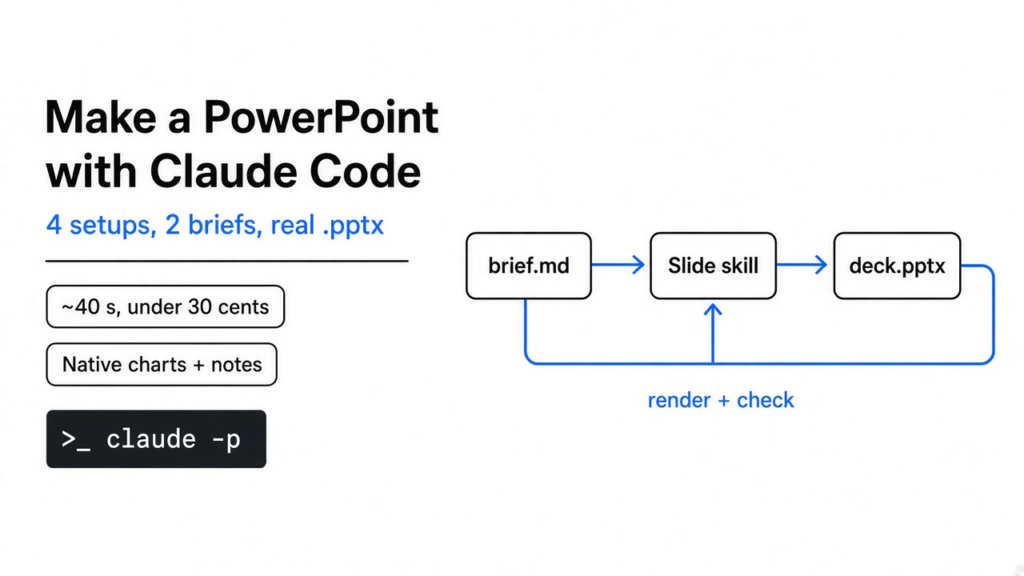
You have a doc full of numbers and a meeting tomorrow. You ask Claude Code for slides, and something comes back. Is it a real PowerPoint file your manager can open and edit, or a pretty web page you can’t change?
Short answer: install Anthropic’s pptx skill and ask for a .pptx in everyday language. The same two briefs went through Claude Code four ways. Anthropic’s skill was the best default: about 40 seconds, under 30 cents, real charts and speaker notes. ppt-master looked the most designed. dashi-ppt-skill had the most style and the most mistakes.
That question is the whole post. A deck you have to fix by hand didn’t save you any time. So these tools were not judged on screenshots from their READMEs. Each one ran on the same inputs, every file was opened, and every fix it would need was counted.
Can Claude Code make a PowerPoint by itself?
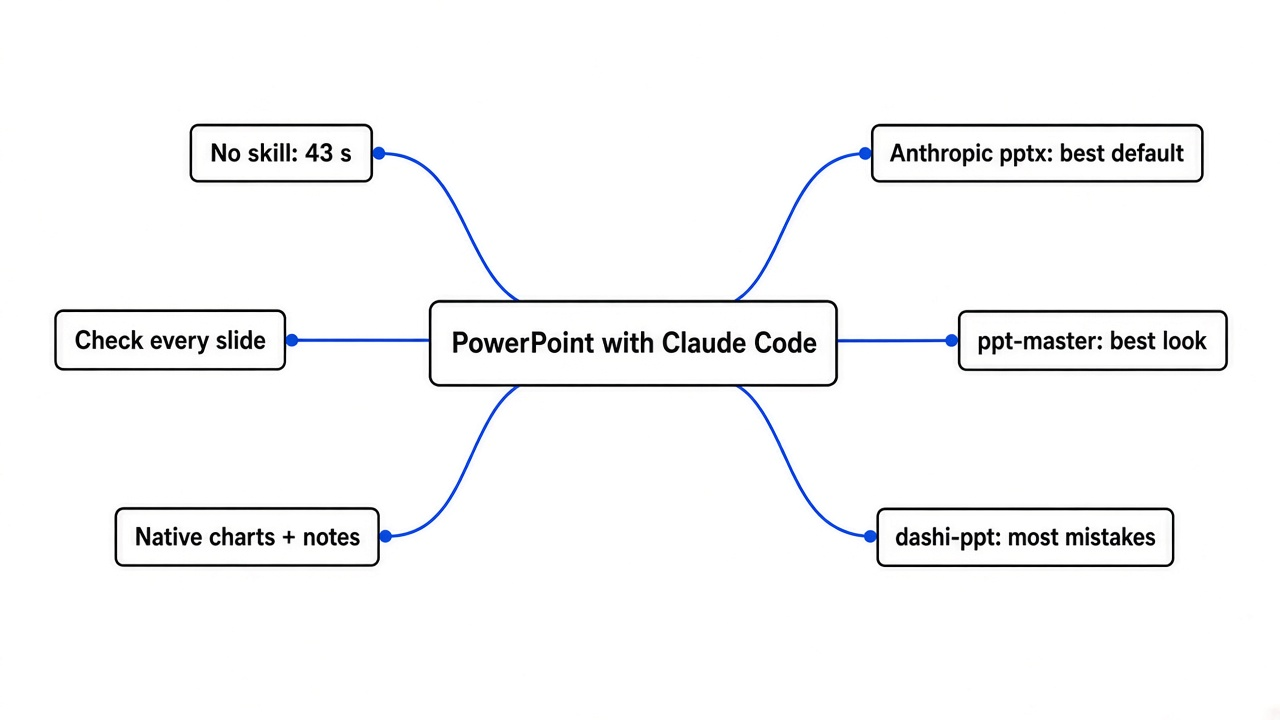
Yes. Even with no skill installed, Claude Code wrote a clean, editable deck in under a minute.
Start with the base. A .pptx file is not a picture. It is a zip folder of small XML files (a text format that describes each slide’s boxes, text and colors). PowerPoint reads those files and draws the slides.
So any program that can write those XML files can make a PowerPoint. Python has a library for it called python-pptx, and JavaScript has one called pptxgenjs. Claude Code already knows both.
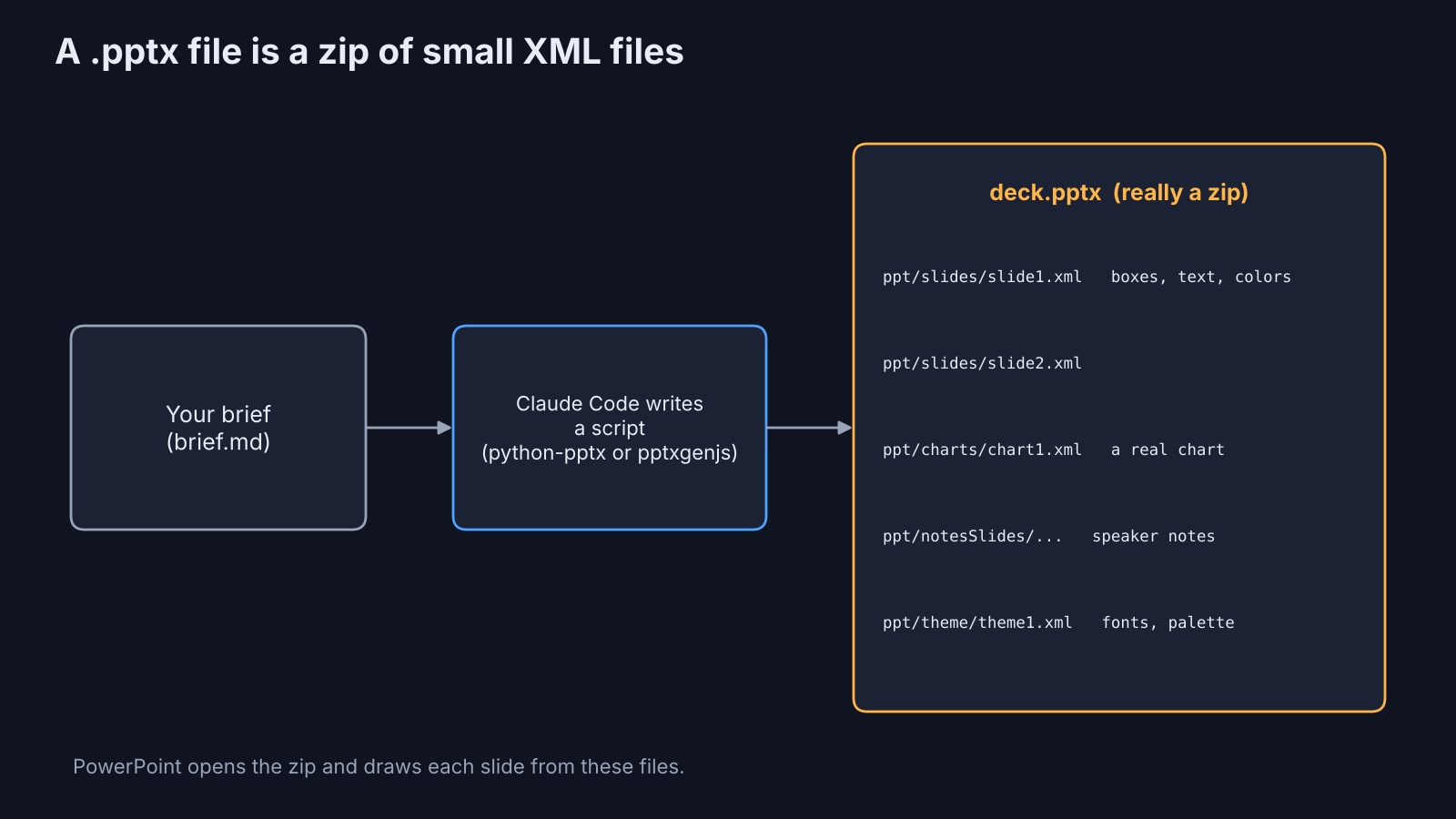
That’s why the plain prompt worked. Claude Code read the brief, wrote a short Python script, ran it, and checked its own result by turning the slides into images. Five slides, a real bar chart, speaker notes, done in 43 seconds.
But “it works” and “it works every time” are different things. That gap is what skills fill.
What is a Claude Code skill, and why does it help with slides?
A skill is a folder of instructions and scripts that Claude Code loads only when your task needs it.
Think of it like a recipe card taped inside a cupboard door. The cook already knows how to cook. The card says how this kitchen does it: which pans, which mistakes to avoid.
A skill (a SKILL.md file plus helper scripts) works the same way. Claude Code sees a short description of every installed skill. When you ask for slides, it opens the slide skill and follows it. The longer version of how skills load is in how to prune unused Claude Code skills.
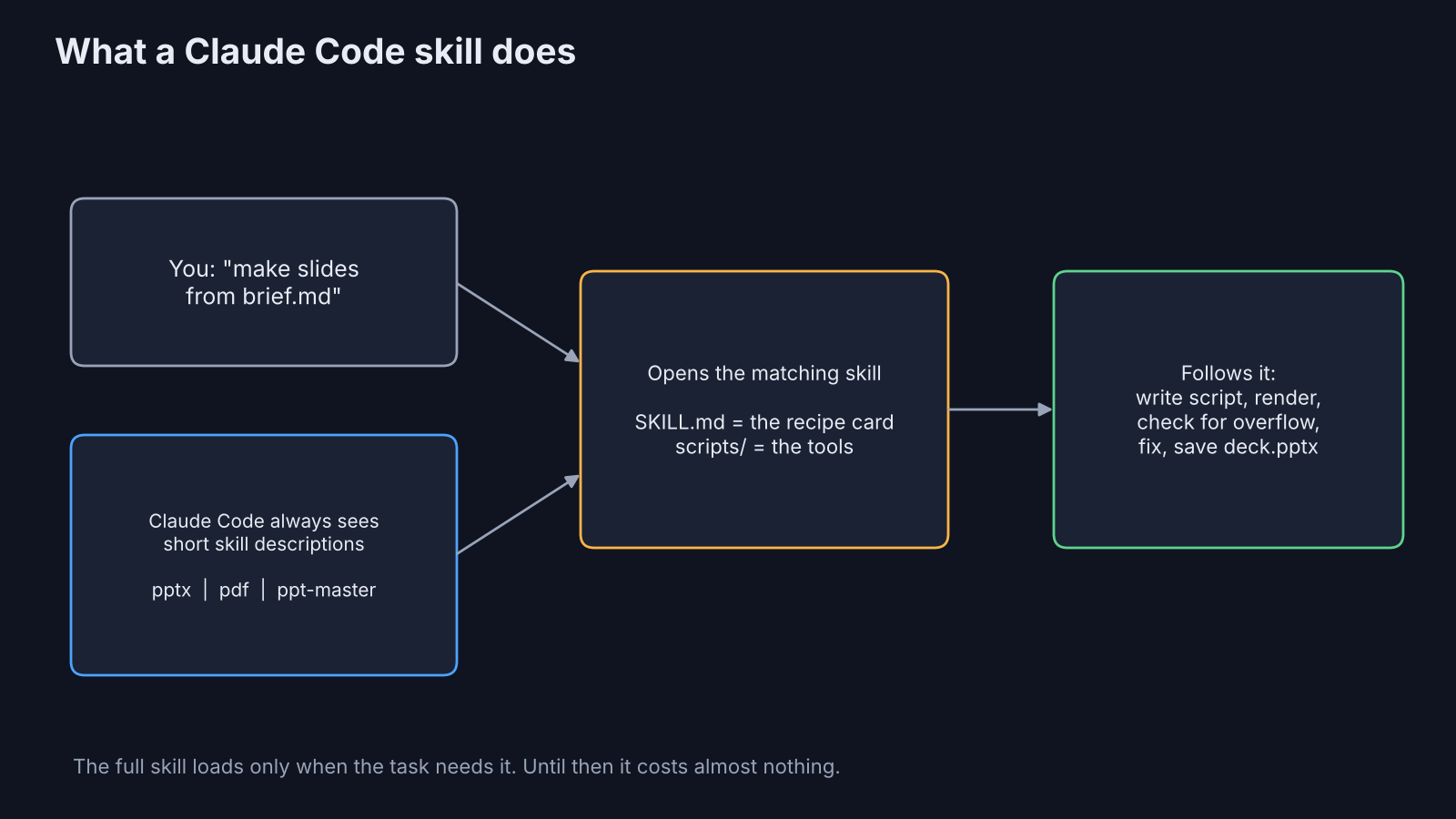
For slides, a good skill carries the boring knowledge. Which chart settings make PowerPoint refuse to open a file. How to check that text doesn’t spill out of a box. Which fonts are safe. The model knows the library; the skill knows the traps.
Which slide skills were tested?
Three skills, each built a different way, plus a no-skill baseline.
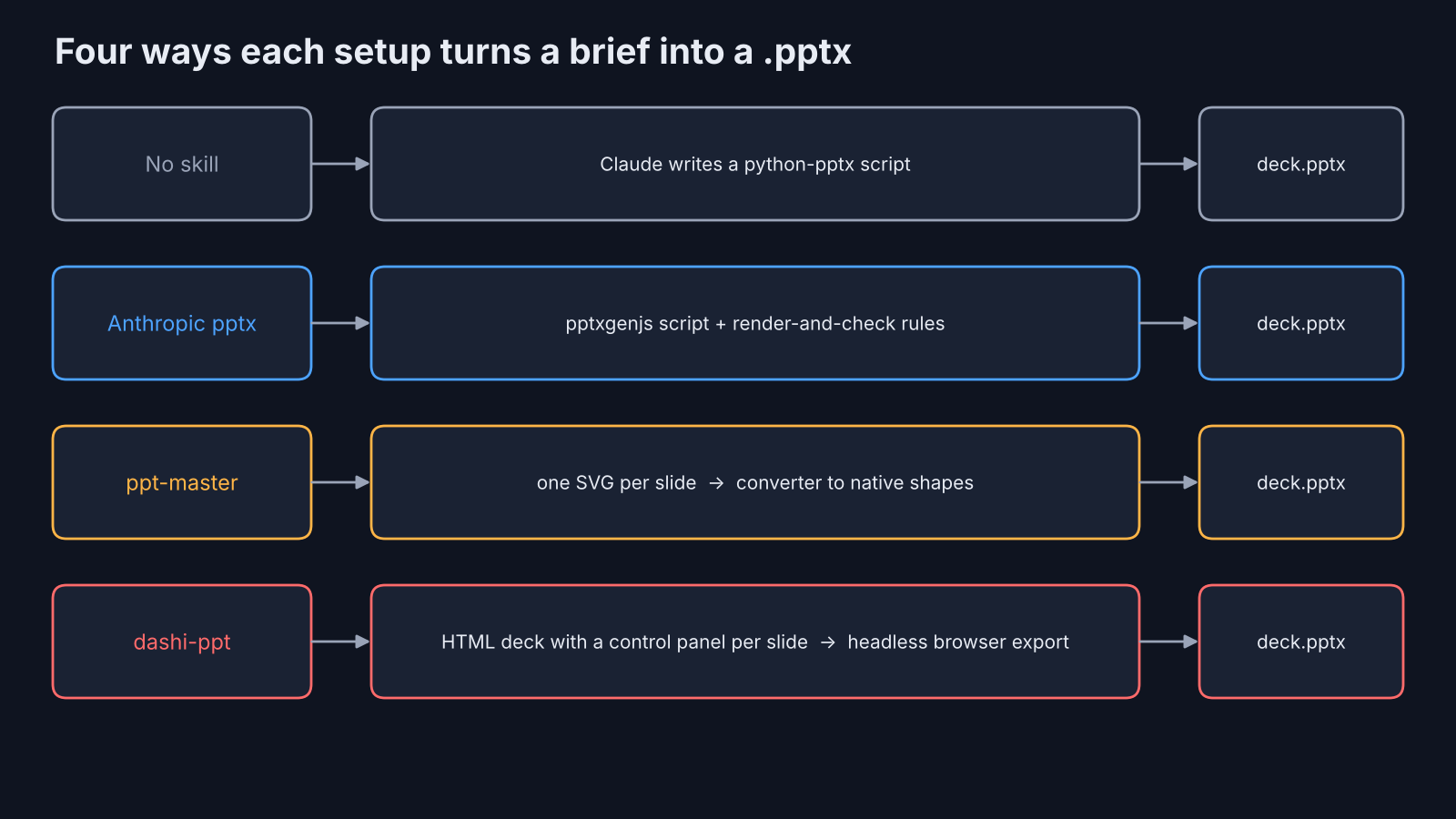
Anthropic’s pptx skill is the one behind Claude’s own file creation. It tells Claude to write a pptxgenjs script, then render and inspect the slides before handing them over. It is source-available, not open source: you can read it and use it with Claude, but you can’t fork and redistribute it.
ppt-master is MIT-licensed. Claude draws every slide as an SVG (a text-based vector image format) and a converter turns each SVG shape into a native PowerPoint shape. Its default route asks you questions first, like a designer would. Because every run was told not to ask questions, it chose its faster “Quick” route.
dashi-ppt-skill is AGPL-3.0 (a copyleft license: if you share a changed version, or run one as a service for others, you must publish your changes). It builds the deck as an HTML page with a control panel on every slide. You tweak in the browser, then export to PPTX through a headless browser (Chrome running with no window).
How was the test run?
Two briefs, four setups, one prompt, the same model every time.
The first brief was a number-heavy quarterly review for a fictional coffee chain: revenue for three quarters, wins, problems, a four-step plan. The second was a text-heavy onboarding guide for new engineers, with no numbers worth charting.
Each setup lived in its own folder, so no run could see another’s skill. Every run got the same prompt: “Make a presentation for my team from brief.md. Save the final file as deck.pptx. Do not ask me questions.” All eight ran on Claude Sonnet in headless mode (claude -p, which runs one task and exits).
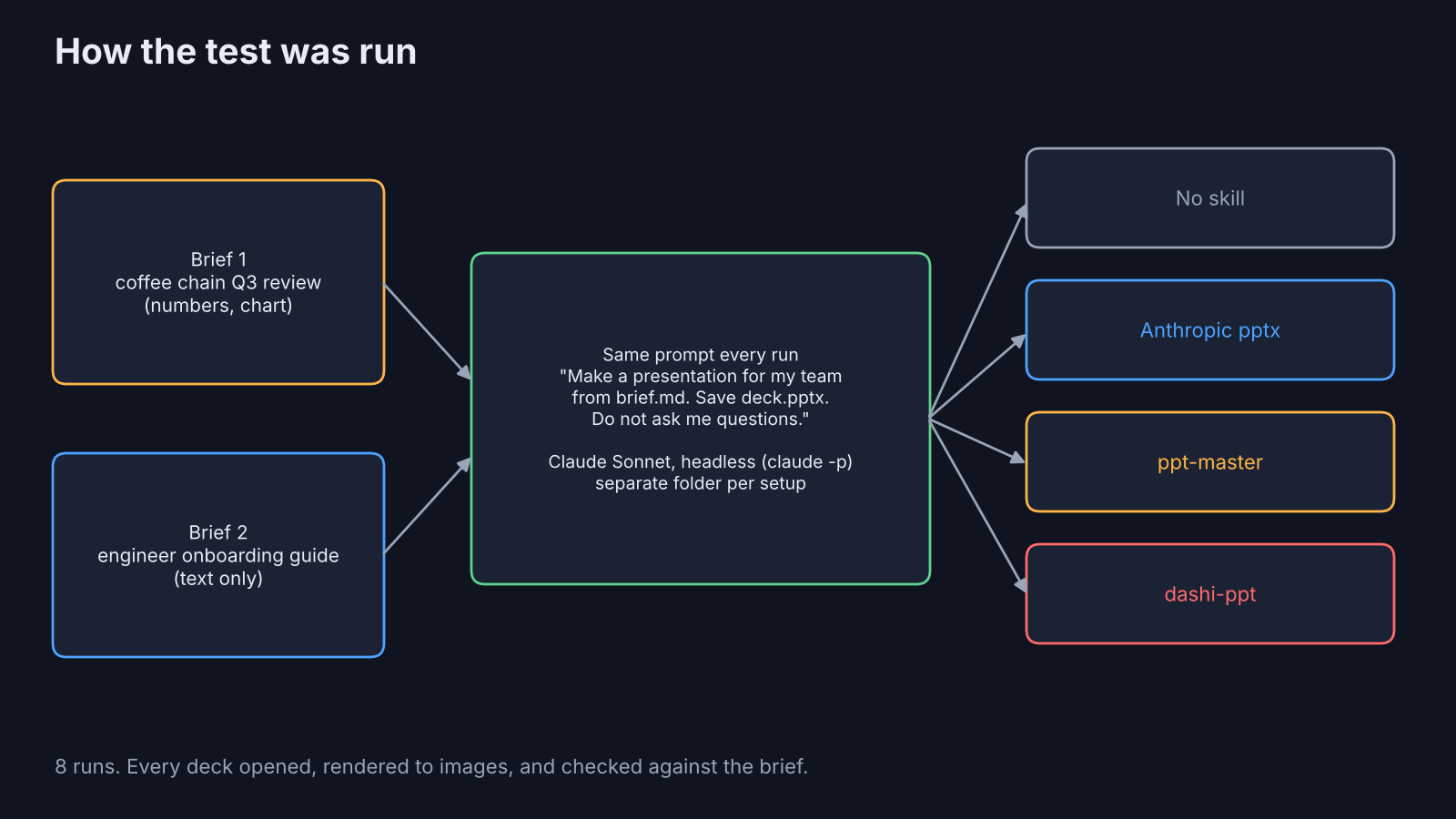
Then three things were checked. Did a real .pptx come out? What did it cost in time and money? And how much would a human have to fix before showing it to anyone?
How long did each one take, and what did it cost?
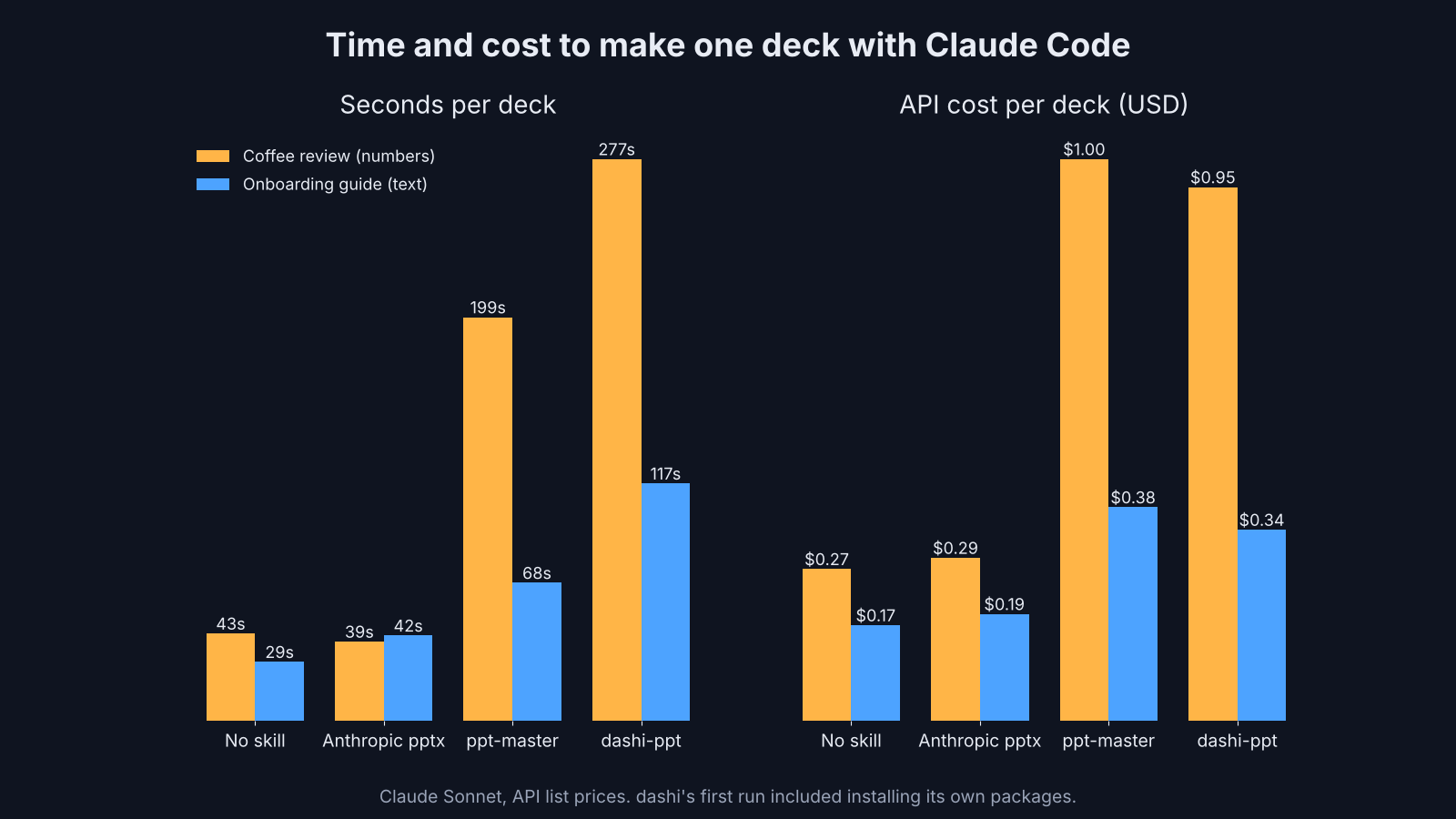
The no-skill run and Anthropic’s skill both finished in under 45 seconds for about 20 to 30 cents. The other two took longer and cost about three times as much.
| No skill | Anthropic pptx | ppt-master | dashi-ppt | |
|---|---|---|---|---|
| Coffee review: time | 43 s | 39 s | 199 s | 277 s |
| Coffee review: cost | $0.27 | $0.29 | $1.00 | $0.95 |
| Onboarding guide: time | 29 s | 42 s | 68 s | 117 s |
| Onboarding guide: cost | $0.17 | $0.19 | $0.38 | $0.34 |
| Slides made | 5 and 8 | 6 and 7 | 6 and 6 | 8 and 8 |
Those dollar figures are API list prices for the tokens (the chunks of text a model reads and writes) each run used. On a Claude subscription you don’t pay per run, but a heavier run eats more of your usage limit.
One catch on the dashi numbers. Its first run also installed its own helper packages, about 70 MB of them, so part of that 277 seconds was setup. The second run, with everything installed, still took twice as long as the no-skill run.
Which one made the best-looking slides?
ppt-master, by a clear margin. Its slide titles read like conclusions, not labels.
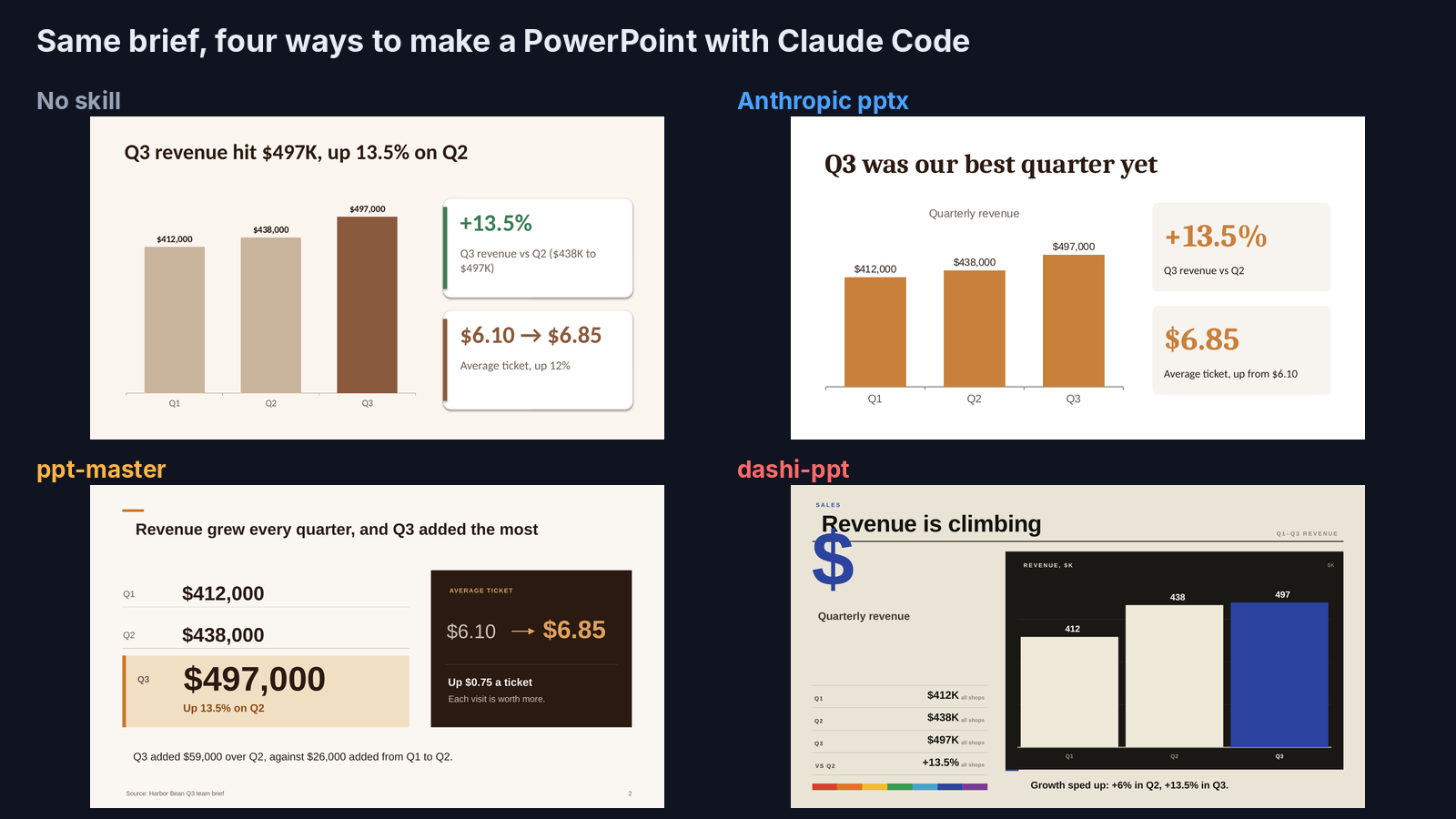
Here is the coffee review from all four, slide by slide.
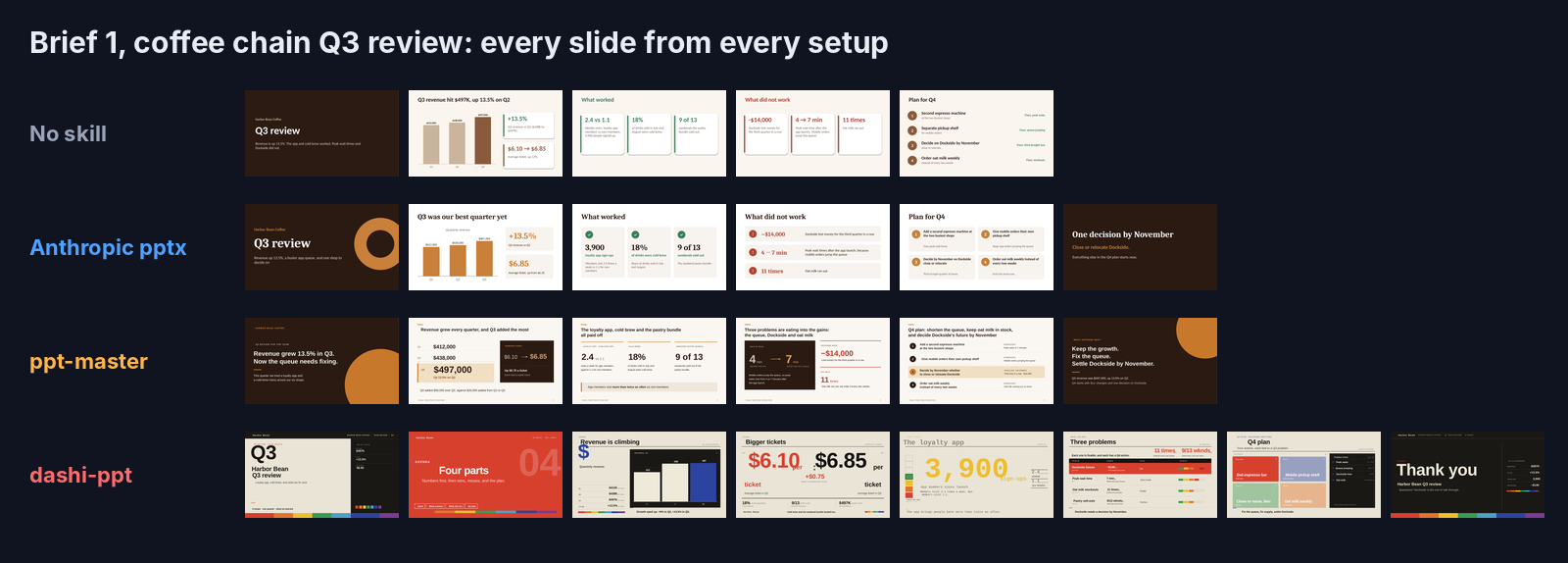
Look at the titles. The no-skill deck says “What worked”. ppt-master says “The loyalty app, cold brew and the pastry bundle all paid off”. That second style is what consultants call an action title (a title that states the takeaway), and it means a reader who only skims titles still gets the story.
Anthropic’s skill came close. Clean cards, a real chart, a closing slide that pulled the one decision out of the brief. The no-skill deck was plain but correct.
The onboarding guide told the same story. Three tools made tidy, readable slides. dashi made the most striking ones, with soft glass panels and big type.
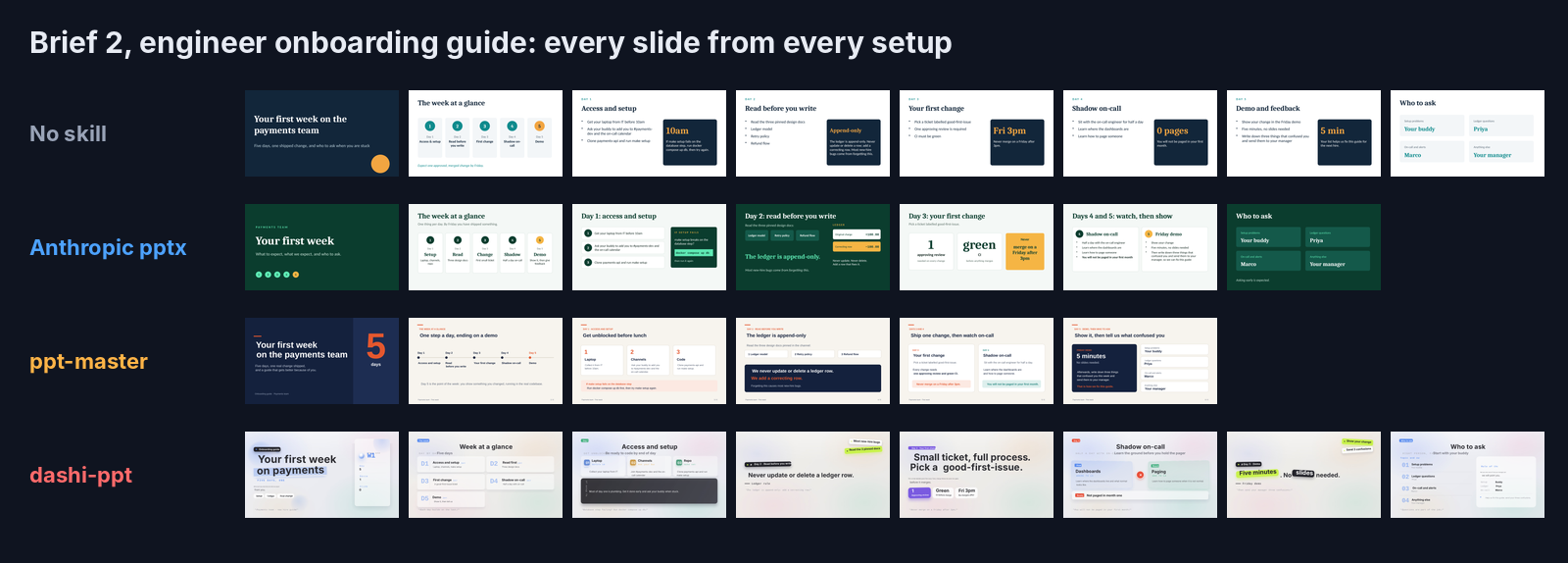
But striking isn’t the same as finished. Zoom into dashi’s cover and the side panel says “Review 1” and “Slides 0”. Neither number means anything. They are leftover slots from the template, filled with whatever was handy.
Did the PowerPoint files match what the skill showed?
For three tools, yes. dashi’s browser preview looked right, but its exported PPTX had clipped and overlapping text.
Every deck here was opened in LibreOffice and turned into images. These files were not opened in Microsoft PowerPoint, so treat this section as “how it renders outside the browser”, not a PowerPoint verdict.
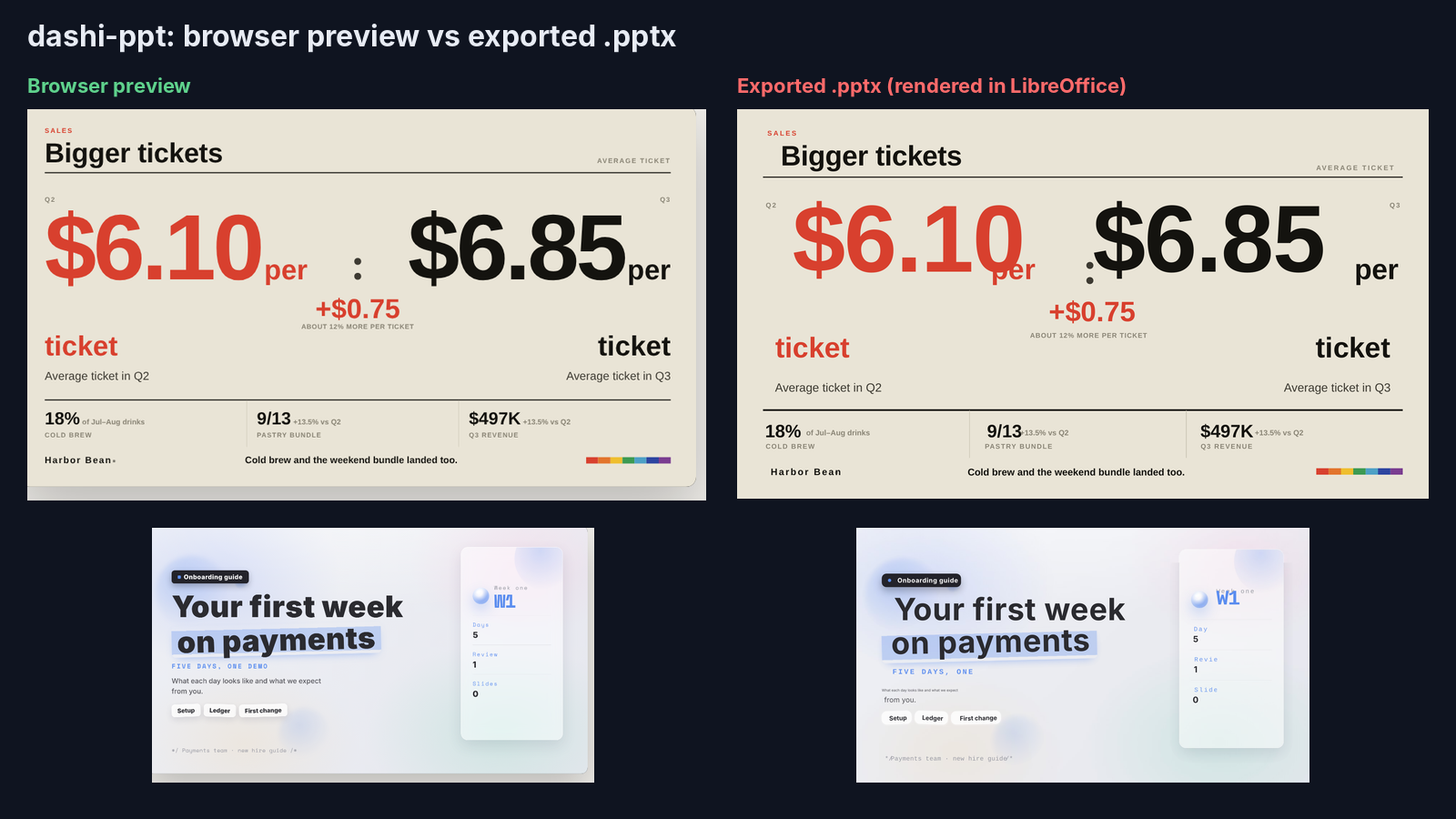
With that said, the gap was plain to see. On the coffee deck, dashi’s browser preview showed “$6.10 per ticket” neatly. In the exported file, “per” sat on top of the price. On the onboarding cover, the tagline “FIVE DAYS, ONE DEMO” lost its last word, and labels like “Review” were cut to “Revie”.
That matters because of how dashi works. You do your editing in the browser console, and the PPTX is a copy made afterwards. If the copy drifts, your careful fixes don’t come with it.
Did any skill get the facts wrong?
No skill invented a wrong number. One reshaped the story.
Every number in every deck was pulled out and compared to the brief. Every extra number was correct math, like “$59,000 more than Q2” or “about 12% more per ticket”. Good.
But dashi’s problem slide was titled “Three problems” and listed four. It moved the pastry bundle, a win in the brief, into the problems table as “Good news, but lost sales”. And it added a “Cause” column (Ops, Store leads, Supply, Kitchen) and colored severity bars that came from nowhere.
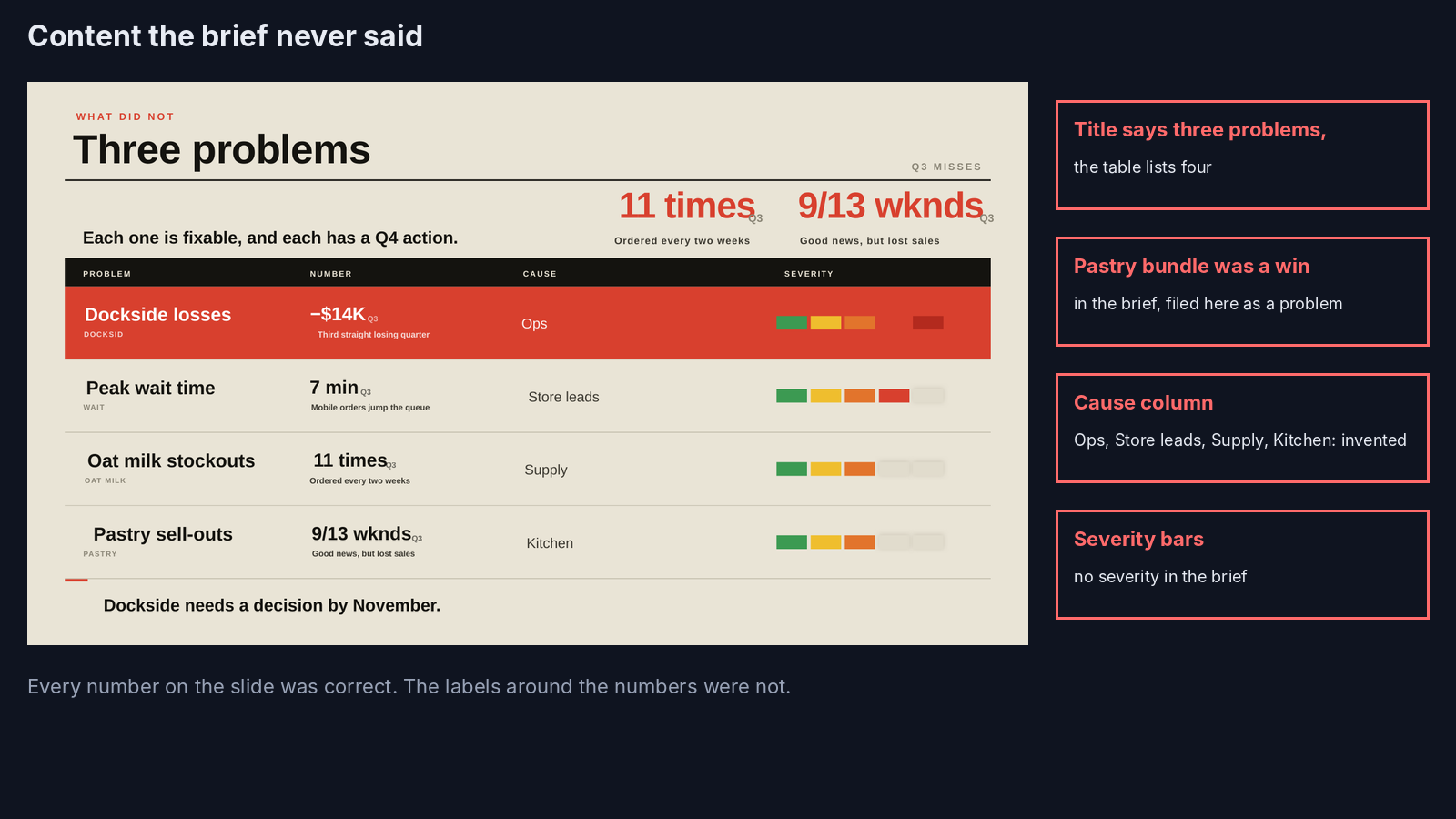
None of that is in the source. It’s the template asking for fields, and the model filling them so the slide looks complete. In a team meeting, someone will ask who decided Dockside’s losses were an “Ops” problem.
How easy are the files to edit afterwards?
Anthropic’s skill and the no-skill run made the easiest files to change. dashi made the hardest.
Editing comes down to three things. Is the chart a real chart? Are there speaker notes? And how many separate boxes do you have to click through?
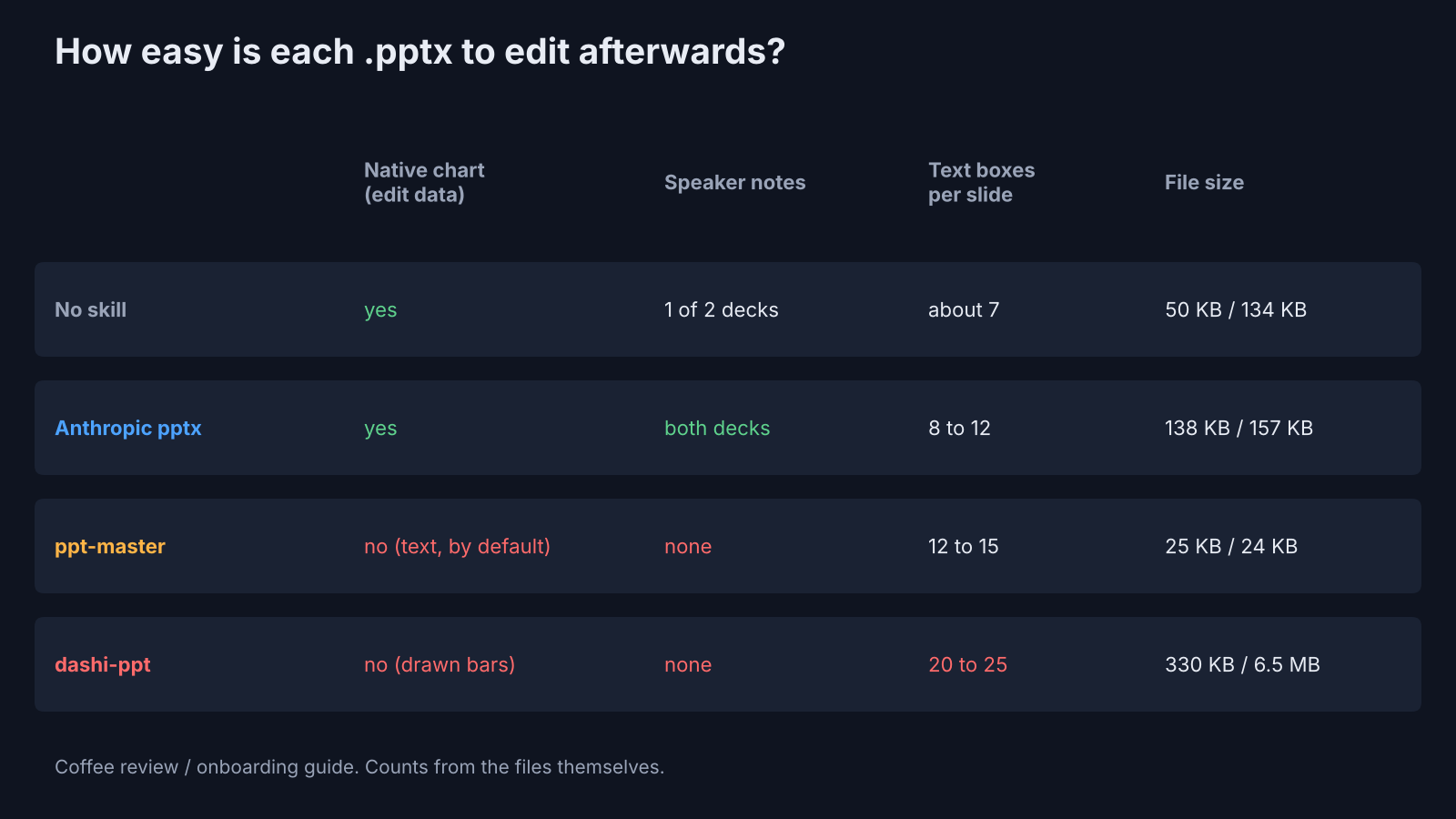
A native chart (a real PowerPoint chart object, with its numbers in a small built-in spreadsheet) lets you right-click, edit the data, and watch the bars move. Only the no-skill run and Anthropic’s skill made one. ppt-master showed revenue as big text, and dashi drew its bars as plain rectangles. Change a number there, and you also have to resize a bar by hand.
To be fair to ppt-master, it can make real charts. Its exporter ships charts as editable shapes by default and has a switch for data-backed charts and tables. So if your deck is chart-heavy, ask for native charts by name.
Speaker notes followed the same pattern. Anthropic’s skill wrote them for every slide in both decks. The no-skill run added them once out of two. ppt-master and dashi wrote none.
And dashi’s slides are busy under the hood. It averaged about 20 to 25 text boxes per slide, against about 7 to 15 for the others. Its onboarding file was also 6.5 MB, because each slide’s soft background is a full-size picture. The other three stayed under 160 KB.
How do you install each one?
Anthropic’s skill is two commands inside Claude Code. ppt-master and dashi each need one more step.
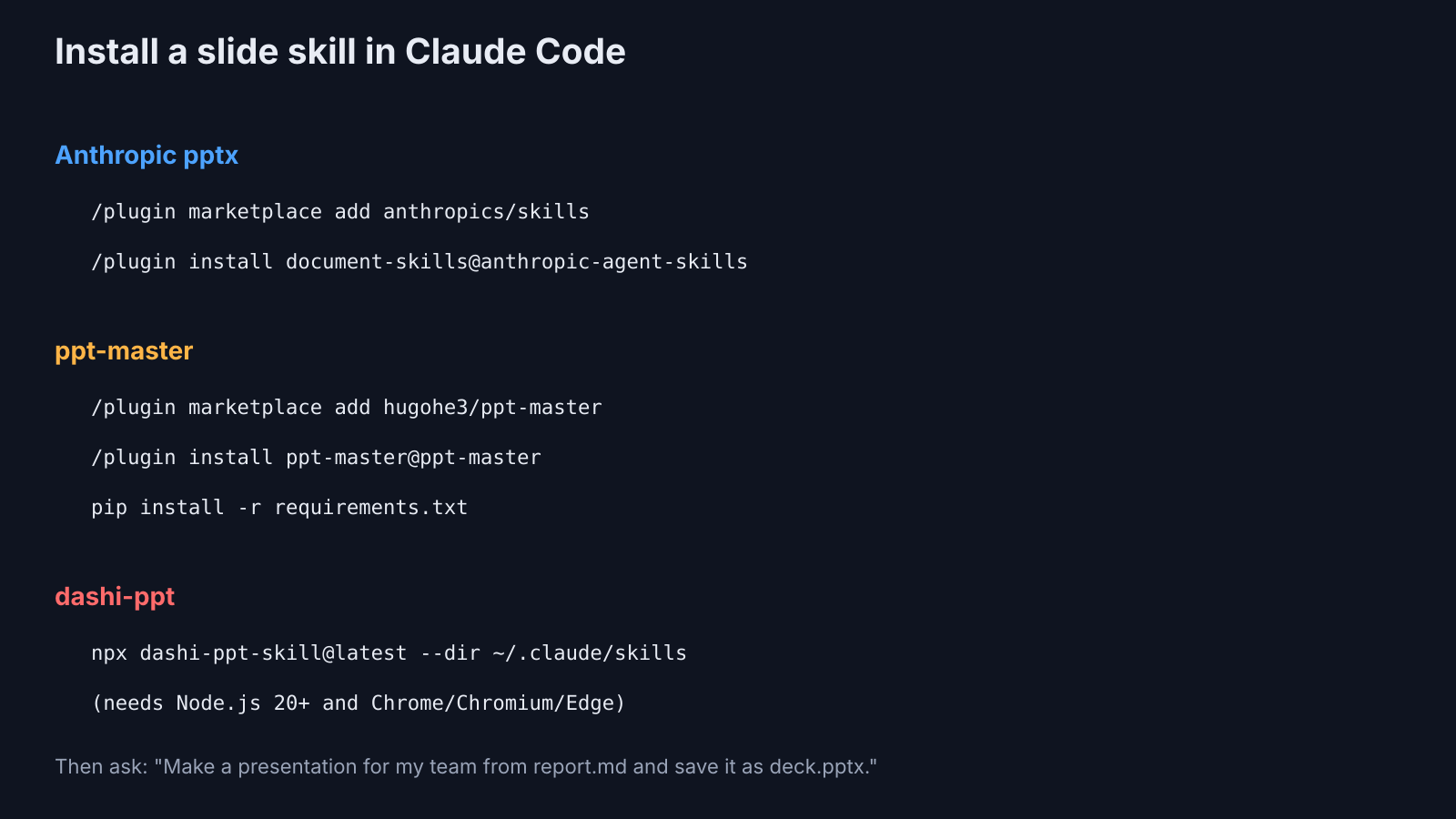
For Anthropic’s pptx skill, run these inside Claude Code:
/plugin marketplace add anthropics/skills
/plugin install document-skills@anthropic-agent-skillsFor ppt-master, install it as a plugin, then add its Python packages from the folder it lands in:
/plugin marketplace add hugohe3/ppt-master
/plugin install ppt-master@ppt-master
pip install -r requirements.txtFor dashi-ppt-skill, run this in your terminal. It needs Node.js 20 or newer, and Chrome, Chromium or Edge for the PPTX export:
npx dashi-ppt-skill@latest --dir ~/.claude/skillsThen ask in everyday language: “Make a presentation for my team from report.md and save it as deck.pptx.”
Naming the skill (“use the pptx skill”) helps Claude Code pick the one you meant when you have more than one installed.
Before you install any skill, it’s worth a quick look at what its scripts do. There is a simple way to check one in are Claude Code mods safe.
Which Claude Code PowerPoint skill should you use?
Start with Anthropic’s pptx skill. Reach for ppt-master when the deck has to impress.
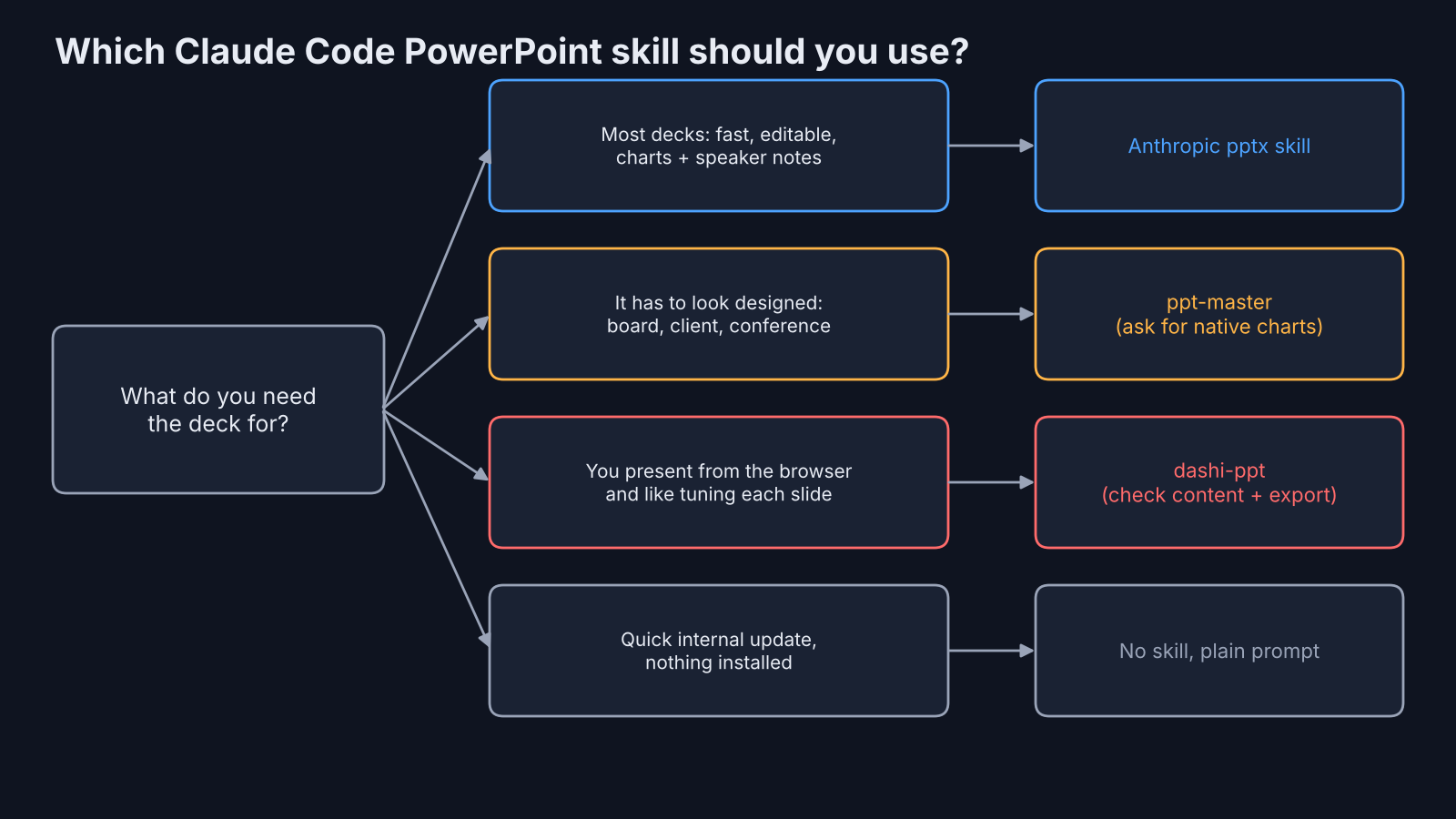
There’s a fair case for dashi. If you present from the browser and like tuning each slide with sliders and toggles, it gives you the most visual range of the four. Just check every slide’s content against your source, and check the exported PPTX before you send it.
And don’t skip the no-skill option. For a quick internal deck, a plain prompt produced a correct, editable file in 43 seconds, and a skill only made it better, not possible.
The honest limit: two briefs and one model is a small test, and a different model or an interactive session (where ppt-master asks its questions) could change the gap. But the pattern held across both decks.
So install the pptx skill, run your next brief through it, and spend the time you save reading the slides once. A deck you don’t have to fix is the only kind that saved you time.
Common questions about making a PowerPoint with Claude Code
Can Claude Code make a PowerPoint without any plugin?
Yes. Claude Code can write a python-pptx or pptxgenjs script and run it to produce a real .pptx. In this test the no-skill run made an editable deck with a native chart in 43 seconds.
Is Anthropic’s pptx skill open source?
No. It is source-available: you can read it and use it with Claude, but its license does not allow copying or redistributing it. ppt-master is MIT and dashi-ppt-skill is AGPL-3.0.
Are the slides from these skills editable in PowerPoint?
All four produced native text boxes you can click and edit. Only the no-skill run and Anthropic’s skill produced native charts whose data you can change.
Why does my exported deck look different from the browser preview?
HTML-first skills like dashi draw the deck in a browser, then convert it. Fonts and text widths can shift in that conversion, so open the exported file and check every slide before sharing it.
1 comment