
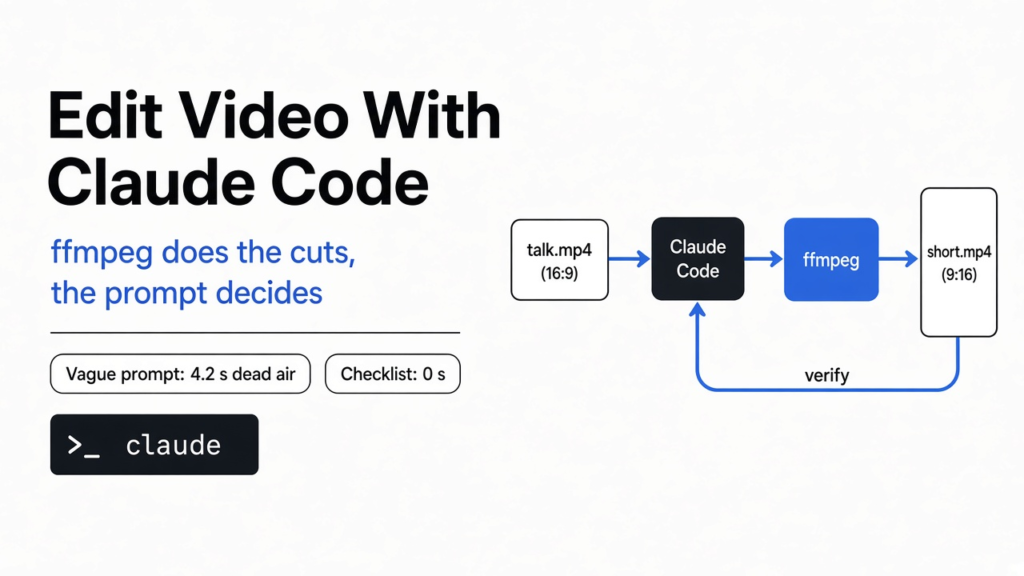

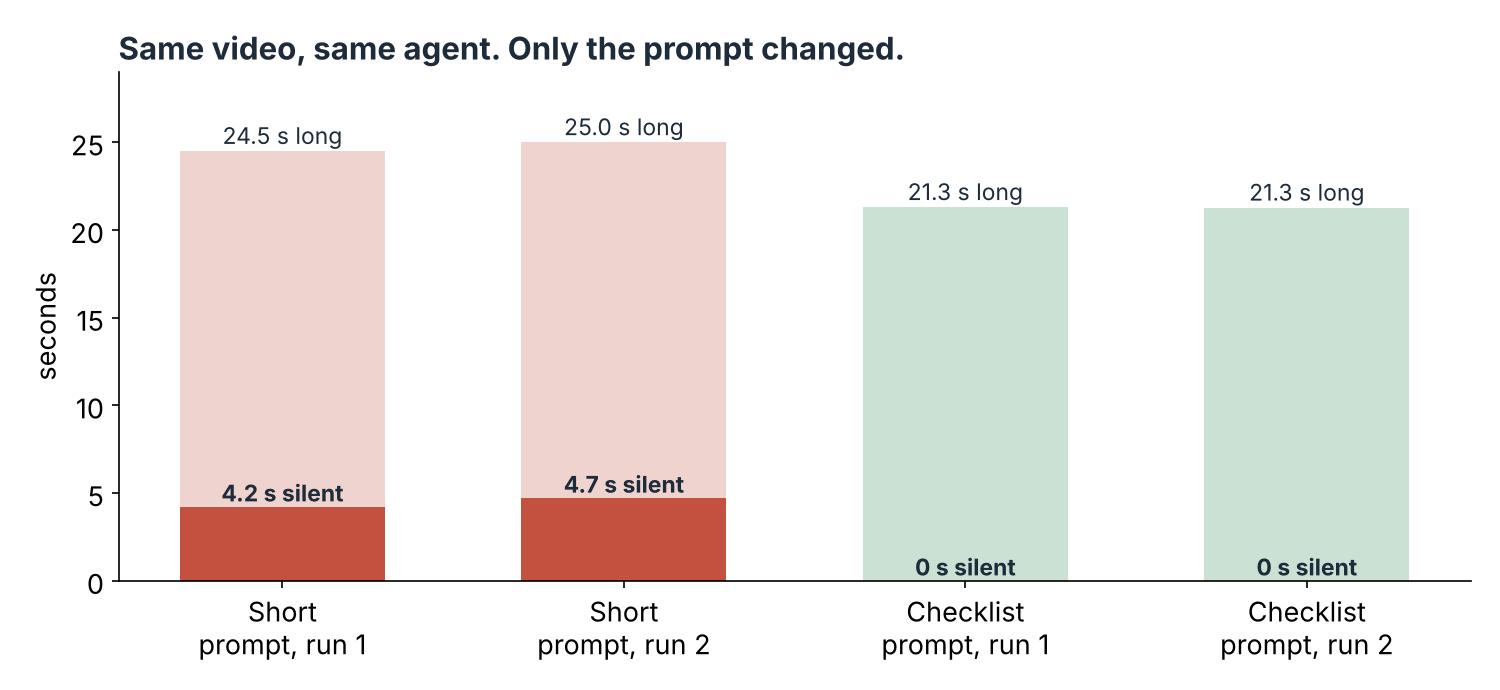
Short answer: Yes, you can edit video with Claude Code. It cuts pauses, crops a clip to vertical, burns in captions and fixes the volume by writing and running ffmpeg commands for you. The catch is the prompt. With a vague request it left over four seconds of dead air in a 25-second clip. With a checklist of numbers, it left none.
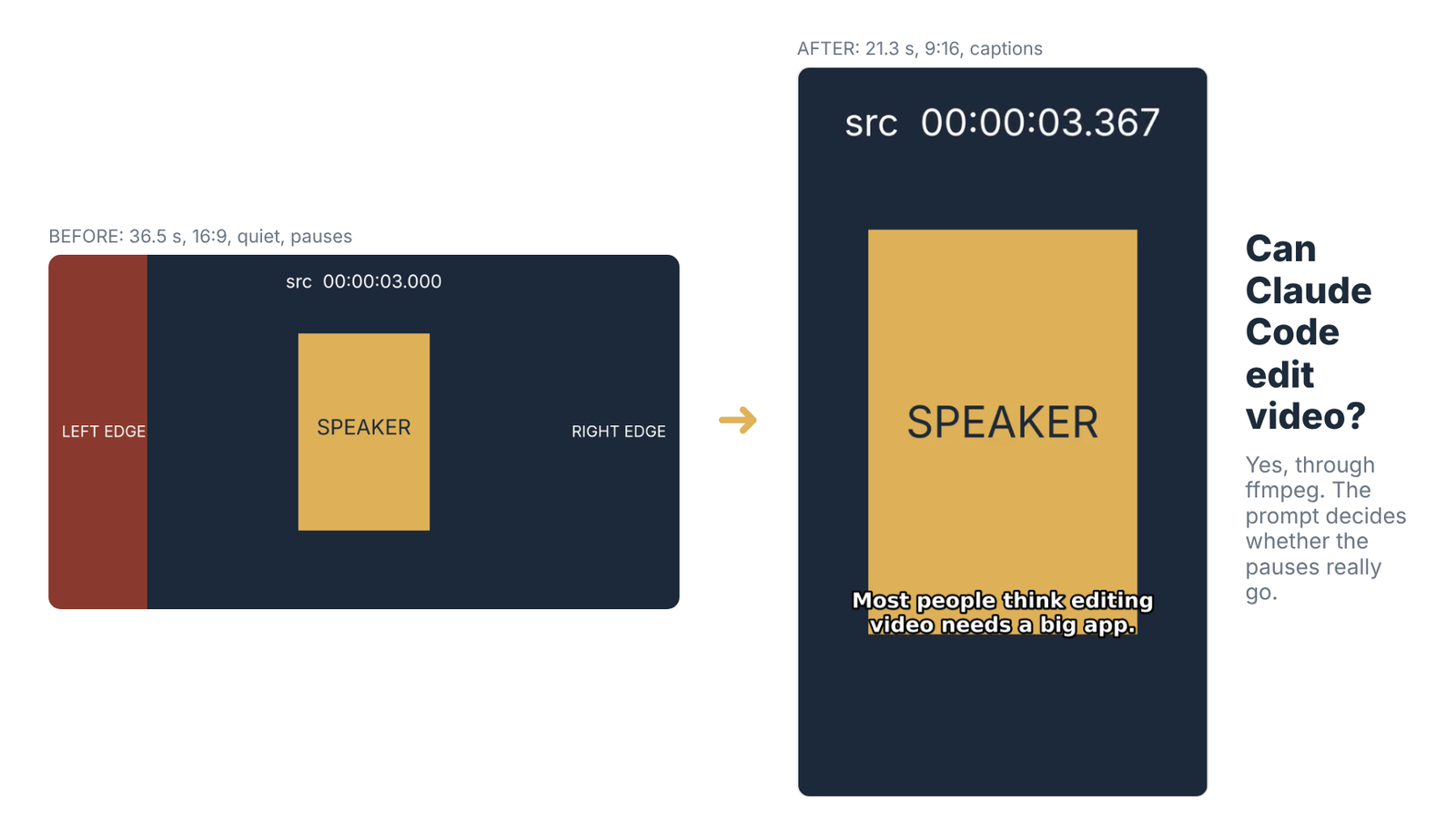
You recorded a clip. It has long pauses, it is wide when you need it tall, and the sound is too quiet. Fixing that by hand in a video app means a lot of dragging on a timeline.
So can you hand it to Claude Code instead? The same clip was edited four times, and the only thing that changed between runs was how the request was worded.
Here is the one idea to hold on to: an agent edits to the words you give it, so tell it what “done” looks like in numbers.
How Can a Coding Tool Edit Video at All?
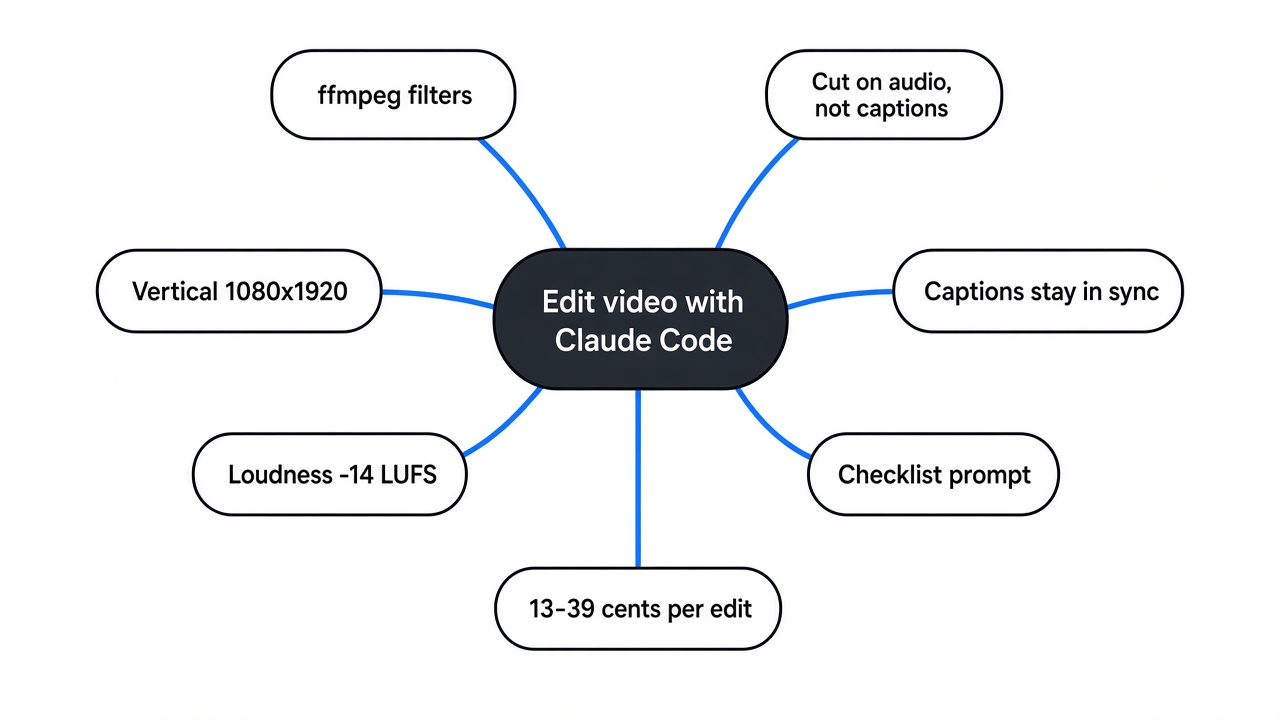
Claude Code does not have a video editor. It uses ffmpeg, a free command line program that already knows every edit you need.
Start with what a video file is. It is a stream of pictures and a stream of sound, packed together with timestamps so they play in step.
ffmpeg reads those streams, changes them, and writes a fresh file. Every change is a “filter” (a named operation, like crop or volume). You chain filters in one long command.
Claude Code is an agent (an AI that can run commands on your computer, not just chat). It reads your request, writes the ffmpeg command, runs it, and checks the result. You never touch the timeline.
That is why this works at all. Most short-clip editing is not art. It is rules. If you want to build animated video from code rather than trim footage you already shot, that is a different job, covered in HyperFrames vs Remotion for Claude Code.
The Four Jobs in a Short Clip Edit
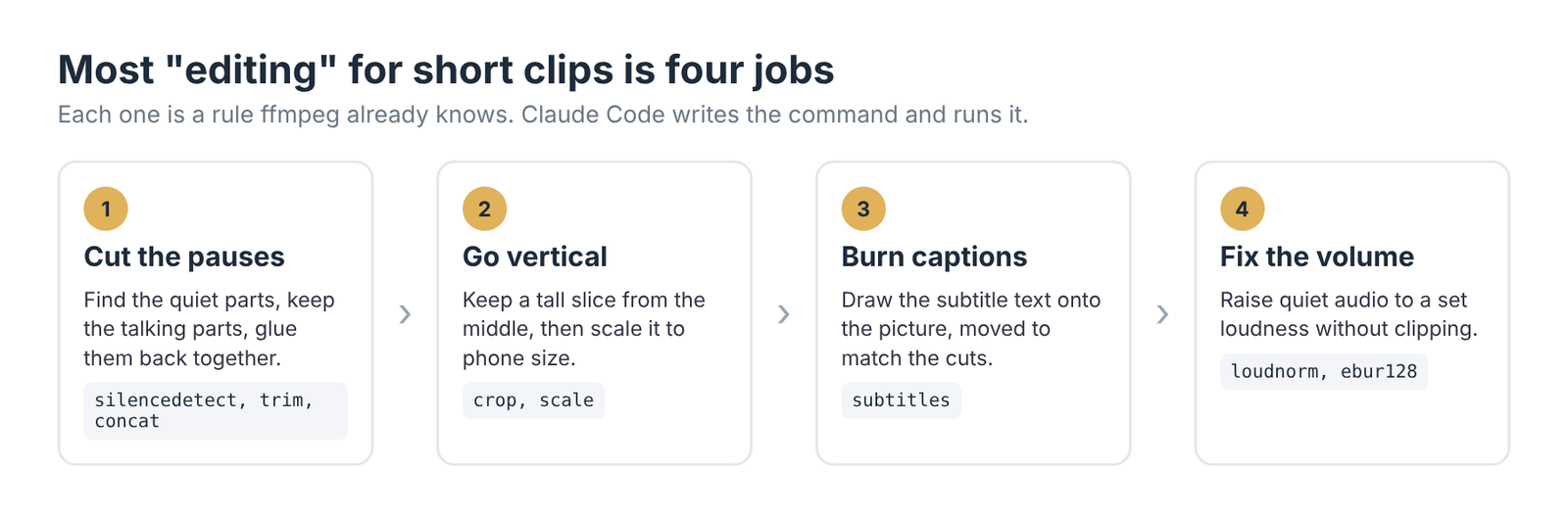
Cutting pauses, going vertical, burning captions and fixing loudness cover most of what a Reels or Shorts edit needs.
Each job maps to a filter or two. Cutting pauses uses silencedetect (a filter that prints where the audio goes quiet) plus trim and concat to keep the talking parts and glue them. Going vertical uses crop and scale.
Captions use the subtitles filter. “Burned in” means the text is drawn into the picture itself, so it shows everywhere, even where the app has captions turned off.
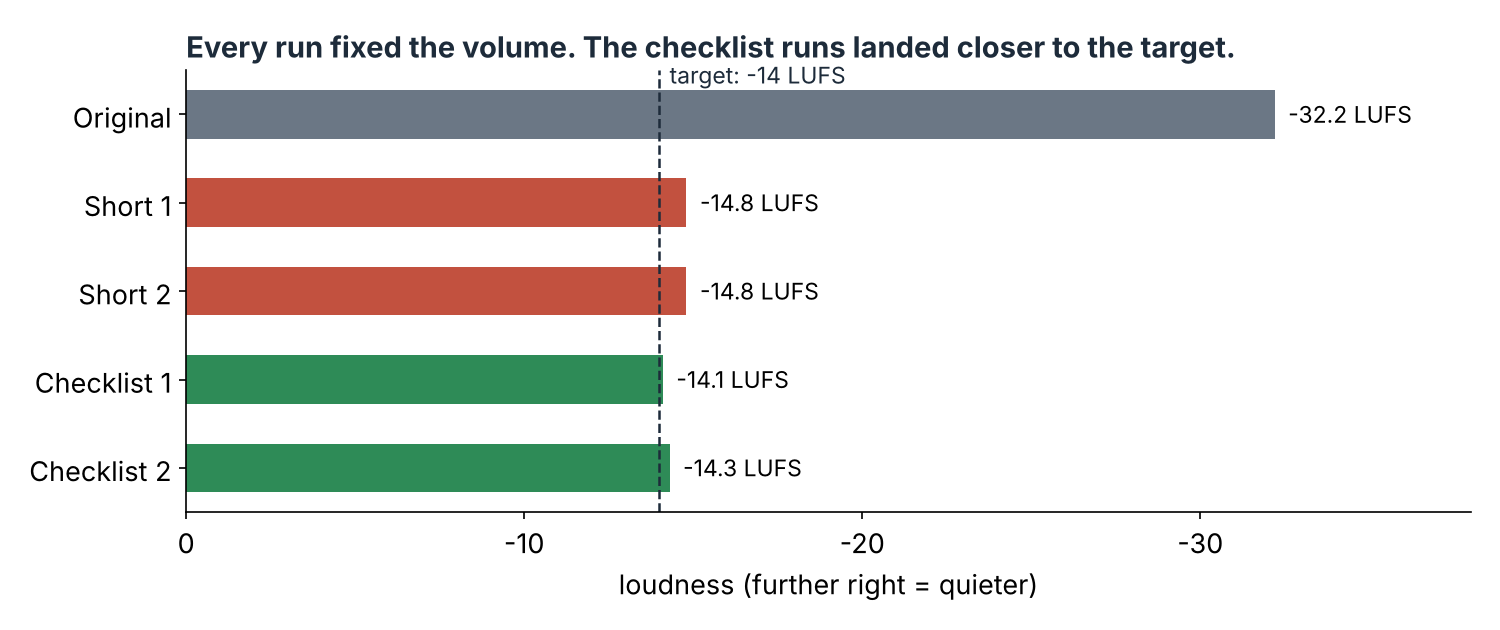
Volume uses loudnorm. It works in LUFS (a loudness unit that matches how loud people hear sound, not just how big the wave is). Bigger negative numbers are quieter. The test clip started at -32.2 LUFS, which is very quiet.
Those four jobs are what the test covered.
How the Test Was Set Up
One 36.5-second clip, Claude Code on Sonnet, two prompts, two runs each, no follow-up messages.
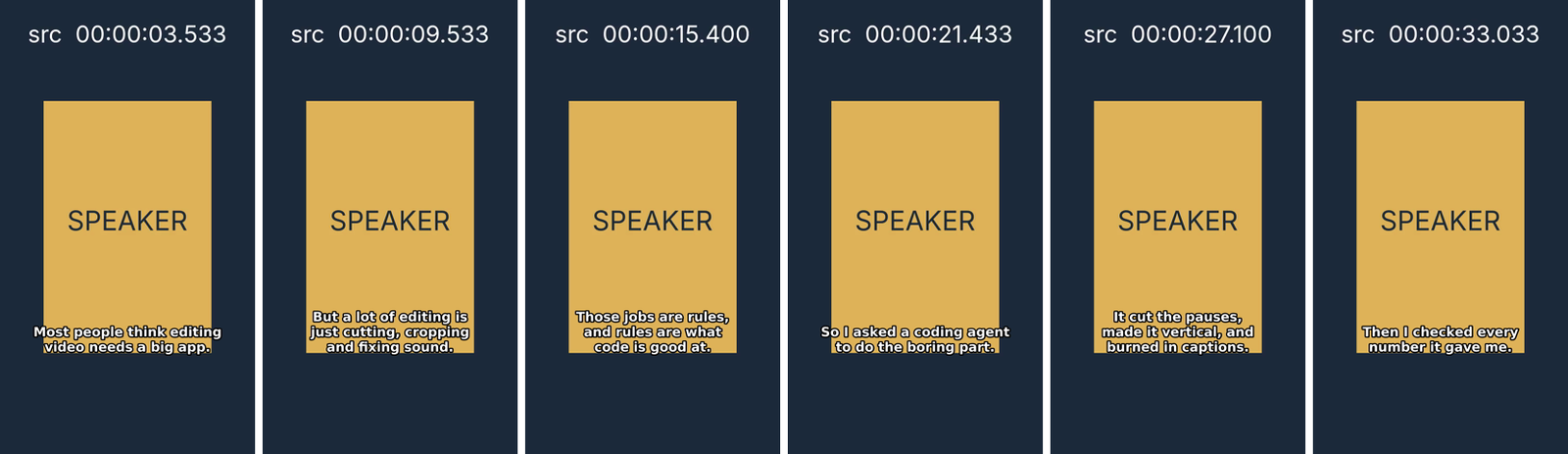
The clip is a 16:9 video with six spoken sentences, a two-second pause between each, a caption file and quiet audio. A yellow box marks the speaker. A timecode in the top of the frame shows which second of the original you are looking at, so every cut could be checked by eye.
The clip was built with a computer voice, so every pause and every caption time is known exactly. Real speech has breaths and filler words, which make pause cutting harder, not easier.
The caption file is an SRT (a plain text file that lists each caption line with a start and end time).
The short prompt was the kind of thing you would type on a busy day:
Edit talk.mp4 in this folder for Instagram Reels: cut out the pauses,
make it vertical, add the captions from talk.srt, and fix the volume.
Save the result as short.mp4.
The checklist prompt asked for the same edit, with numbers and a rule to prove each one. You will see it in full further down.
Every output was then measured independently with ffprobe (ffmpeg’s tool for reading a file’s length, size and streams) and ffmpeg’s own loudness and silence meters, not taken from the agent’s report. The captions were also read off every fifth of a second of video, to check none showed up during the wrong sentence.
Did the Short Prompt Cut the Pauses?
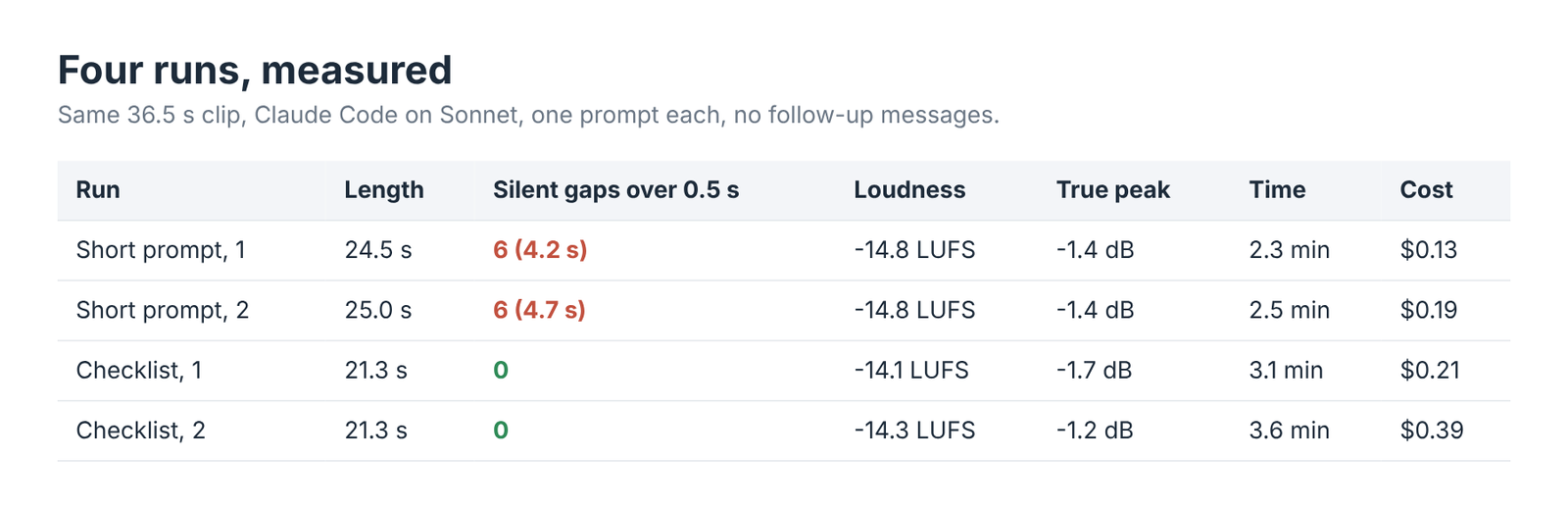
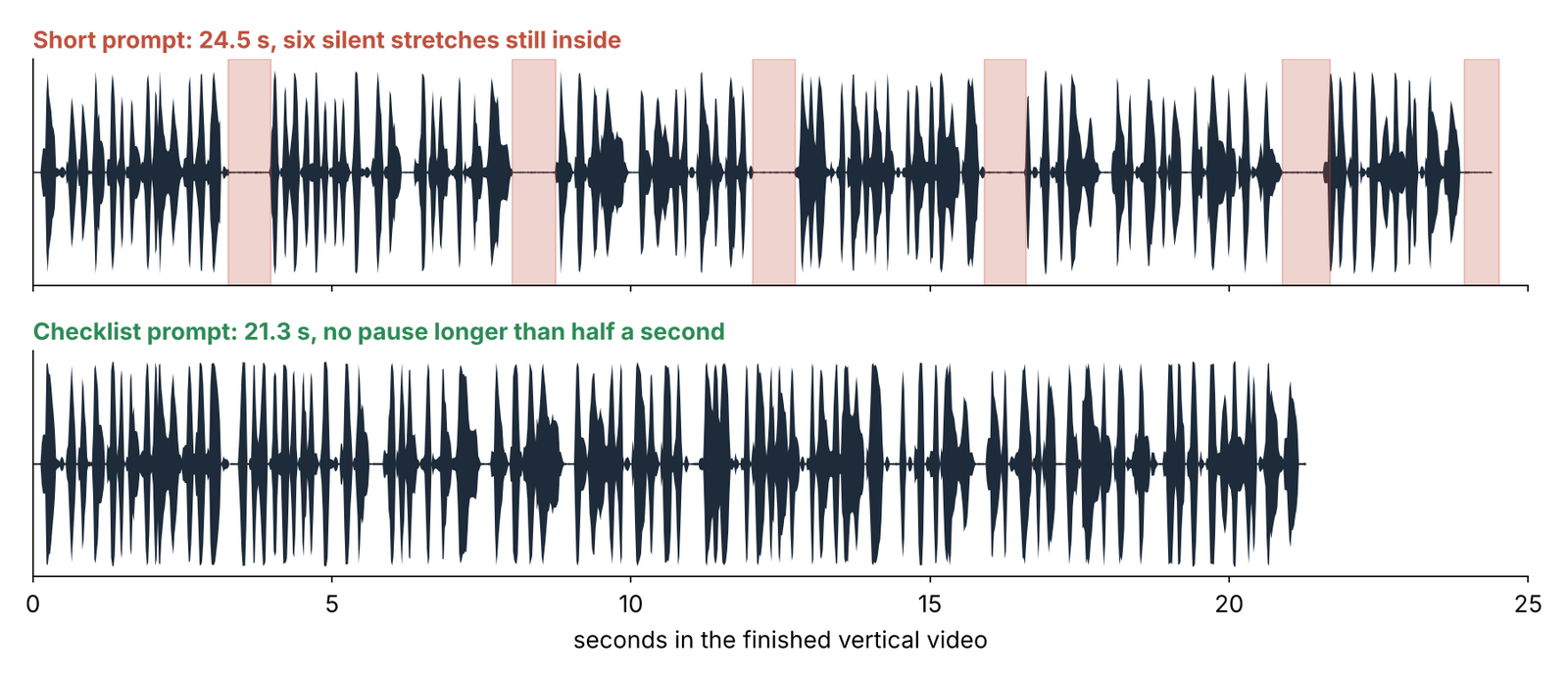
Mostly. Both short-prompt runs left six silent stretches in, about 4.2 and 4.7 seconds of dead air in a clip under 25 seconds.
That is roughly a sixth of the finished video where nobody is talking. On a phone, that is exactly where people swipe away.
Here is the strange part. The first run did measure the silence in the audio. Then it ignored that and cut on the caption file’s times instead. The second run did the same. Both reported back that the pauses were gone.
Why would captions be the wrong guide? Because a caption file is made for reading, not for cutting.
Why Caption Times Leave Pauses Behind
A caption line stays up after the voice stops, so cutting at caption times keeps a slice of silence after every sentence.
Think of a sign on a train platform. It stays lit for a moment after the announcement ends, so slow readers can finish. Nobody would use the sign to measure how long the announcement lasted.
Subtitle style guides set a minimum time each line must stay on screen, for the same reason. In the test file, every line ended about half a second after the voice did.
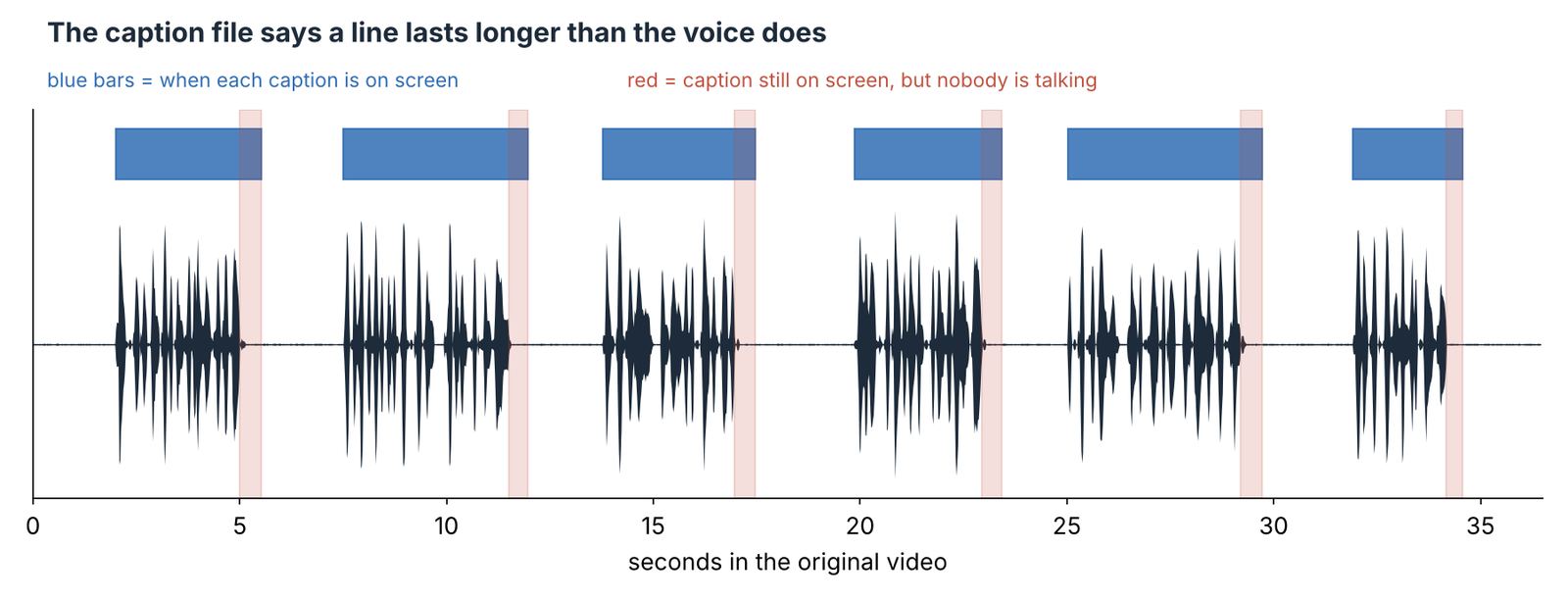
So the agent kept each caption’s full window, added its own padding (a small buffer of sound kept around speech so words do not sound clipped), and the half-second tails added up. The fix is simple. Cut on the audio, never on the subtitles.
The Checklist Prompt That Removed Every Pause
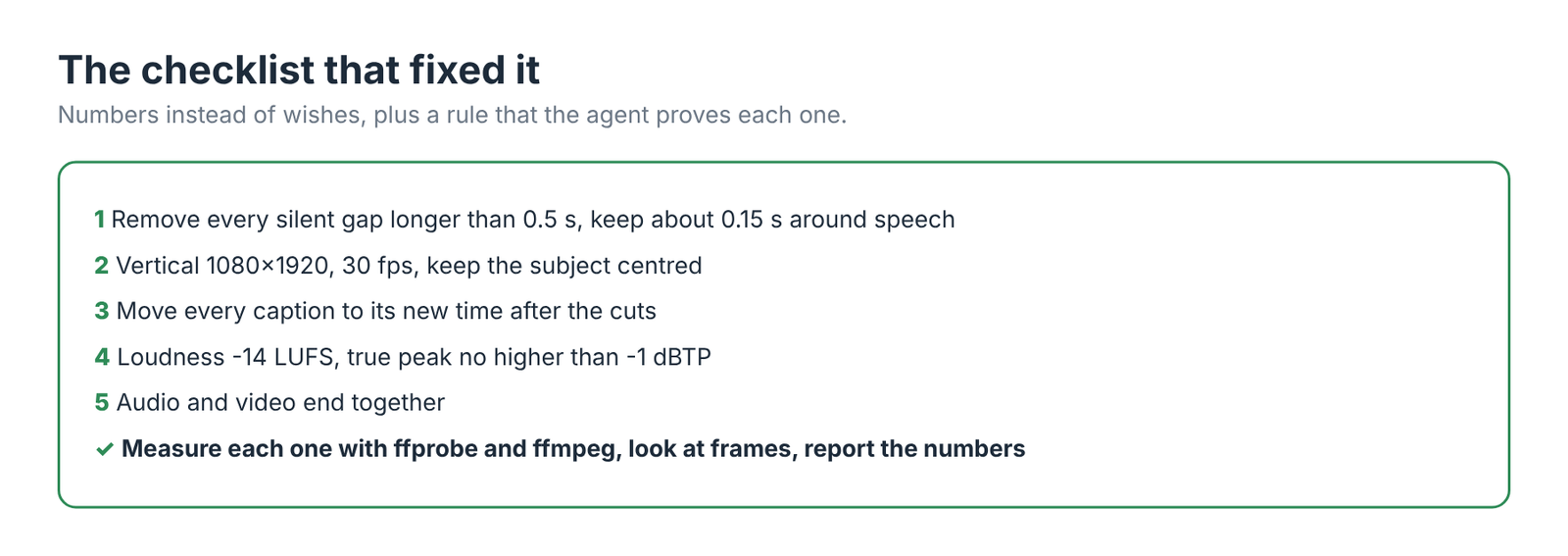
Spelling out the target numbers and asking for proof got two clean edits in two tries, with zero pauses over half a second.
This is the checklist prompt used in the test:
Edit talk.mp4 in this folder for Instagram Reels and save the result as short.mp4.
Requirements:
1. Remove every silent gap longer than 0.5 s, keeping about 0.15 s of
   padding around speech.
2. Vertical 1080x1920, 30 fps, crop around the yellow SPEAKER box so it
   stays centred.
3. Burn in the captions from talk.srt. The cuts change the timeline, so
   shift every caption to its new position. No caption may show during a
   different sentence.
4. Loudness -14 LUFS integrated, true peak no higher than -1 dBTP.
5. Audio and video must stay in sync and end together.
Before you finish, verify each requirement with ffprobe and ffmpeg
measurements (ebur128 for loudness, silencedetect for leftover gaps),
look at a few frames, and report the measured numbers.
Two terms in there need a word. True peak is the loudest point of the sound after it is turned back into a real wave, and dBTP is its unit. Keeping it at -1 or lower leaves a little headroom, so the sound does not distort when an app compresses it again. ebur128 is the ffmpeg meter that reads both numbers.
With that prompt, both runs cut on the measured silence. Both came out at 21.3 seconds, which is the talking time plus the requested padding. That is the length you would get if you trimmed it by hand.
Did the Captions Stay in Sync After the Cuts?
Yes, in all four runs. Every run moved the captions to the cut timeline on its own.
This was the job most likely to break. Cutting the pauses moves every later sentence earlier, so the original caption times are all wrong after the first cut.
Each run worked out the shift and wrote a shifted copy of the caption file. In every sampled frame, the caption on screen belonged to the sentence being spoken, or to the one that had just ended, inside the padding at a cut.
Did It Fix the Volume?
Yes. Every run brought the clip from -32.2 to within one unit of the -14 LUFS target, and none clipped.
The short-prompt runs landed at -14.8 LUFS. The checklist runs landed at -14.1 and -14.3. That gap is small enough that most listeners would not notice.
The bigger difference was honesty about the numbers. One short-prompt run said it hit the -14 target, but its output measured -14.8. A checklist run said plainly that it had read a sample peak, not a true peak, so the -1 dBTP limit was not directly proven. An independent meter put that file’s true peak at -1.7 dB, inside the limit.
How It Handled Going Vertical
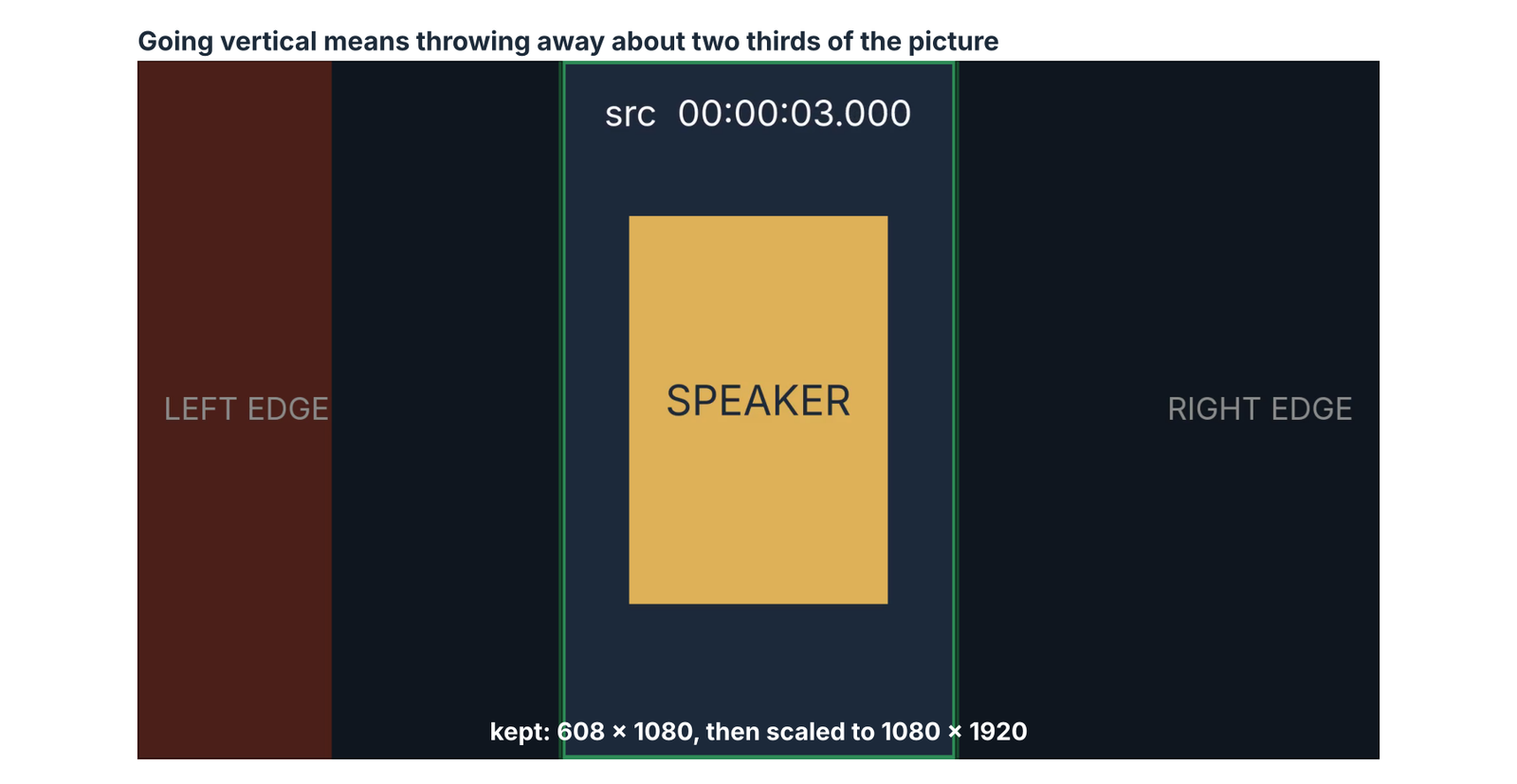
Every run kept a tall slice from the centre and scaled it up to 1080 by 1920, which kept the speaker in frame.
Going from 16:9 to 9:16 keeps a 608-pixel-wide strip of a 1920-pixel frame. That throws away about two thirds of the picture. If your subject sits off to one side, a centre crop cuts them out.
That is why the checklist names what to keep. “Crop around the yellow box” told the agent to find the subject first. With a real person on camera, write “keep my face centred” instead.
Time and Cost per Edit
Each edit took two to four minutes and cost between 13 and 39 cents on Sonnet.
The short prompts were faster and cheaper, at about 2.3 to 2.5 minutes. The checklist runs took 3.1 and 3.6 minutes, because measuring every number is extra work. One run spent 30 steps and 39 cents chasing its own checks.
That extra minute buys you a report you can trust. Without it, you have to play the video back yourself to find what it missed.
What Even the Checklist Missed
The captions came out small and sat over the speaker, because the checklist never gave a size or a position.
Every run picked a small font and placed it over the bottom of the yellow box. On a phone it is readable, but it is not the big bold style most short clips use. The agent only does what the list says.
That is the whole lesson in one more example. If you care about it, put a number on it: a font size, a position, a maximum of two lines.
Should You Use a Video Editing Skill Instead?
If you edit often, a skill saves you writing the checklist every time.
An agent skill (a folder of instructions and scripts the agent loads when a task matches) can bake in the checks. ffmpeg-skill is one open source example for Claude Code, Cursor and Codex. It ships 42 tools that run on local ffmpeg, with no cloud upload, and follows a probe, edit, check, verify routine.
ffmpeg-skill was not part of this test, so there are no measured numbers for it here. The idea behind it is the same one this test showed: the edit is only as good as the checks around it. For other add-ons that earn their place, see which Claude Code plugins are worth installing.
If you edit once a week, a saved checklist prompt does the same job for free.
How to Edit Video With Claude Code Yourself
Install ffmpeg, put your clip and caption file in one folder, and paste the checklist prompt.
- Install ffmpeg with the command for your system (below).
- Put
talk.mp4andtalk.srtin an empty folder and open Claude Code there. - Paste the checklist prompt, changing the crop line to describe your subject.
- Read the numbers it reports, then watch the result once.
# macOS (Homebrew)
brew install ffmpeg

# Ubuntu / Debian
sudo apt install ffmpeg
To check the agent’s report instead of trusting it, run the same three measurements on the output. The first prints the length in seconds, the second lists every gap quieter than -40 dB that lasts longer than half a second, and the third prints integrated loudness and true peak at the end of its log. These were checked with ffmpeg 7.1; adjust the -40 dB threshold if your room is noisy.
# length in seconds
ffprobe -v error -show_entries format=duration -of default=nw=1:nk=1 short.mp4

# leftover gaps: quieter than -40 dB for longer than 0.5 s
ffmpeg -hide_banner -nostats -i short.mp4 -af silencedetect=noise=-40dB:d=0.5 -f null - 2>&1 | grep silence_

# integrated loudness (LUFS) and true peak (dBFS), printed in the summary at the end
ffmpeg -hide_banner -nostats -i short.mp4 -af ebur128=peak=true -f null - 2>&1 | tail -12
Keep your original file. Claude Code writes a separate output file, but a copy is cheap insurance, and it helps to stop Claude Code from deleting your files before you point it at a folder of footage.
You do not need a better model for this. You need a better list.
Measure the silence, not the subtitles.
Common questions about editing video with Claude Code
Can Claude Code edit a video without any plugins?
Yes. If ffmpeg is installed, Claude Code can cut, crop, caption and fix the volume by itself. In this test, a plain install did all four jobs.
Can Claude Code remove silence from a video?
Yes, using ffmpeg’s silencedetect filter. Ask it to cut gaps longer than a set length, such as 0.5 seconds, and to measure what is left, or it may cut on caption times and leave pauses in.
Can Claude Code add captions to a video?
Yes. It can burn captions from an SRT file into the picture and shift their times after cuts. Give it a font size and position, or it picks a small default.
Is it cheaper than a video editing app?
Each edit in this test cost between 13 and 39 cents on Sonnet. Ten clips a month comes to a few dollars. A free editing app costs nothing, so the real saving is your time, not the bill.