
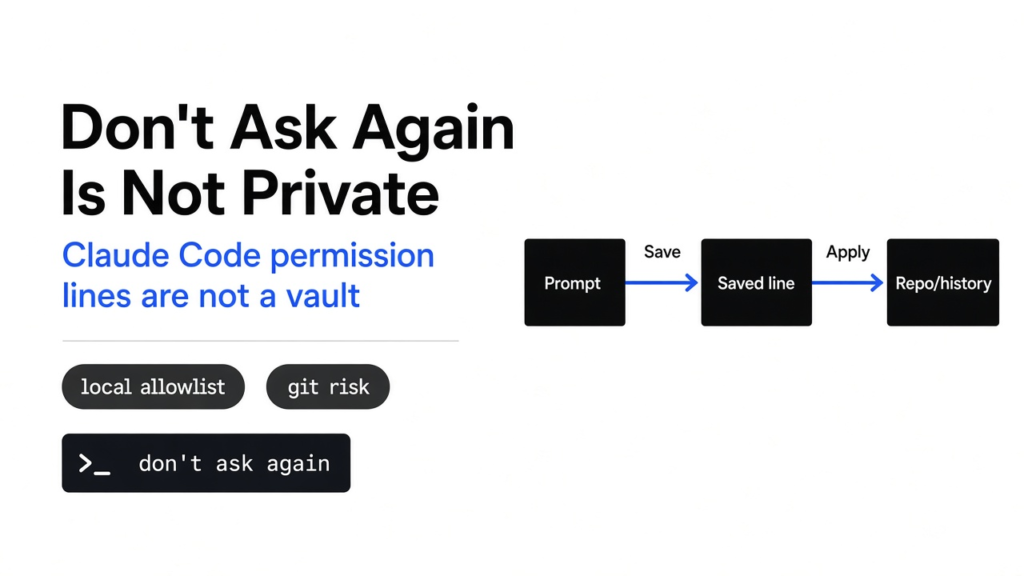

Short answer: Claude Code don’t ask again is not private. It stores a permission line on your machine, not a sealed vault, and that line can let a secret reach git.
The count is Apiiro’s, from a scan they say they ran on 1 to 3 November 2026. The coat on the count is wrong. Claude Code did not sneak your keys off the machine. A button copied a command you had just approved, and if that command contained a secret, the copy contained the secret. Git, the tool that remembers old versions of your files, then published the copy when someone saved that version to a public repository. This page takes the coat off, then tells you what to do, in the only order that works.
Related reading: What Does Claude Code Send to Anthropic? is about model traffic, not the local allowlist. For disk clutter from agent sessions, see How Do I Free Up Disk Space From Claude Code?.
Clint Budd photographed this key on 5 April 2014. It opened Automobile Association call boxes that no longer exist.
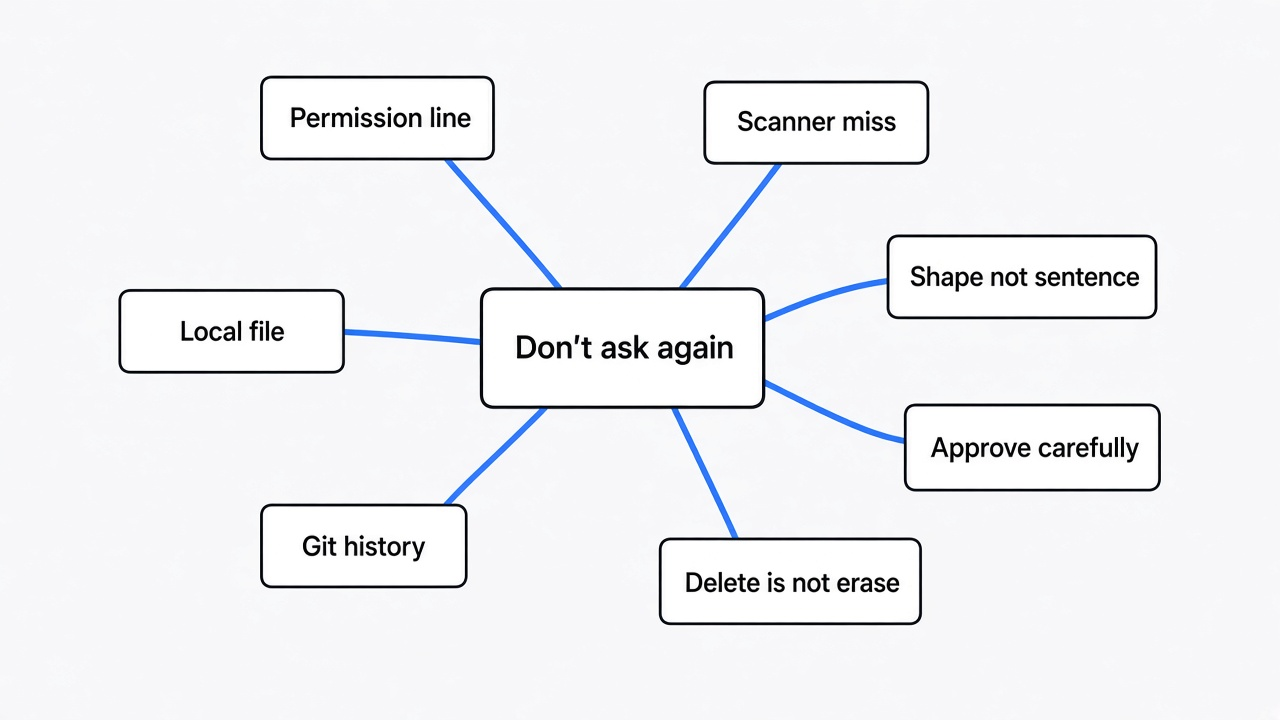
If you only keep one line, keep this one. “Yes, and don’t ask again” does not remember a permission. It stores the command. If the command contains a secret, the file contains the secret.

A Secret Is a String That Opens a Door
Start before the product. A string is a line of characters (letters, digits, symbols, stored as text). A secret is a string that opens something you do not want the public to open. A password is a secret a person can type. An API key (a string a program shows instead of a person, so a service will accept the call) is a secret too. A token is the same idea with a shorter life, or a narrower door. People say credential (any of those, treated as proof you are allowed in) when they do not want to pick one word.
Plaintext means the secret is written as itself. Not scrambled. Not replaced with a blank. Anyone who can open the file can read the secret the way you read this sentence.
The door is not the secret. A database (a program that stores rows of data and answers questions about them) is a door. SSH (a way to log into another computer’s command line, over the network) is a door. A cloud account (someone else’s computers, rented, that run your app) is a door. The password is the key. Publishing the key is not the same as proving someone walked through. It is enough reason to change the lock.
The Met lists this as accession 37.148.2a–c, American or British, about 1700 to 1800, given to the public domain.
Claude Code Is a Program on Your Computer
Claude Code is Anthropic’s coding agent (a program that reads your project, proposes edits, and can run commands, with a model supplying the guesses). It runs on your machine, inside a folder you chose. That folder is the project. A shell is the text window where you type commands. Bash is one common shell. A command is one line you ask the shell to run, such as “start the tests” or “connect to the database.”
The model (the large list of numbers that guesses the next words) proposes the command. The tool around the model decides whether to run it, and where to write your answer. Apiiro says they reproduced the save-the-command behavior with Opus 5.5 and Fable 5.1, two of Anthropic’s models, and that the behavior belongs to the tool. Swapping the model does not remove the button.
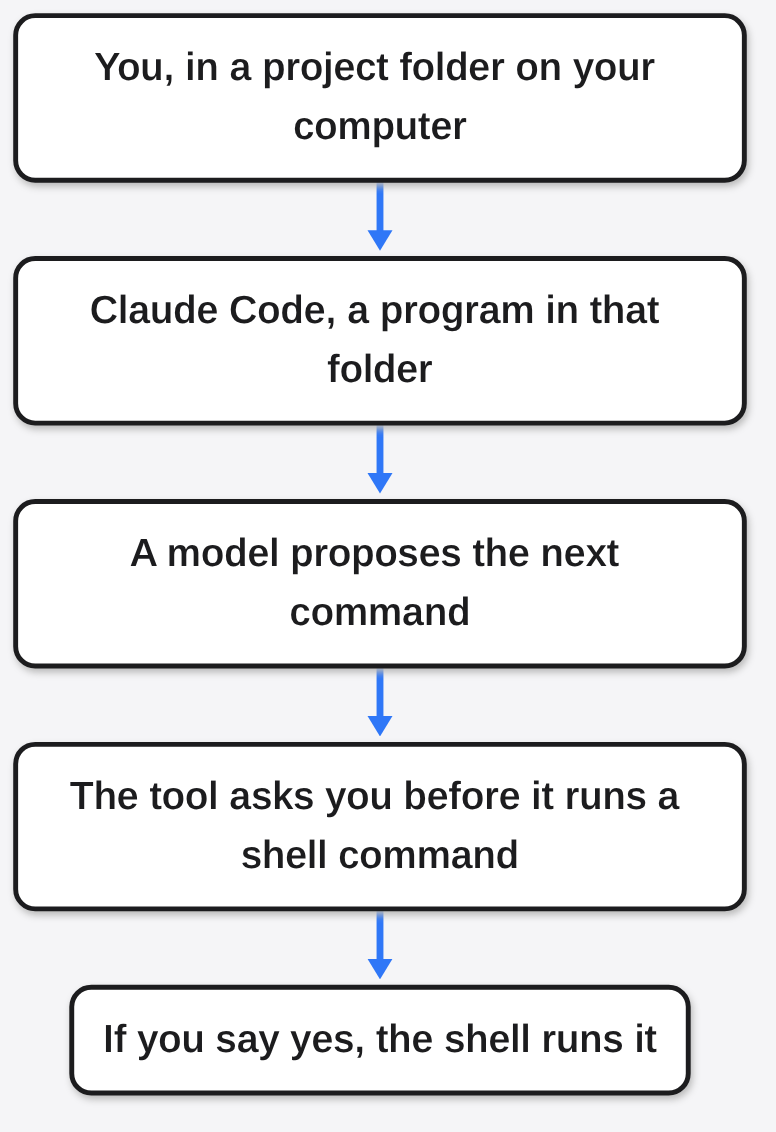
Read-only looks inside the folder (reading a file, searching text) usually do not ask. Running a shell command does, unless you already allowed that command. That ask is the whole story.
The Button Stores the Line, Not a Sealed Yes
A permission prompt is the question on screen: may I run this. “Yes” runs it once. “Yes, and don’t ask again” runs it, and writes a rule so the next time can skip the question.
An allow rule is a line in a settings file that means “this is already approved.” Claude Code’s own permissions docs say a Bash allow rule has the shape Bash(the command). A star, *, means “any text here.” Their example of a safe shape is Bash(npm run *), which allows any npm run script without pasting one exact line.
Apiiro’s finding is the other shape. When the command you approved already had a password inside it, the saved rule was that exact line. The password came along because it was part of the line. Nobody had to “extract” it later. It was never taken out.
The file is .claude/settings.local.json. The dot at the start means many file browsers hide it. JSON (JavaScript Object Notation, a text format of names and lists) is how the file is written. The settings docs say Claude Code creates this file the first time you give a standing approval, including “Yes, and don’t ask again” for a Bash command, and that the file is for you, in this one project only.
This is the shape, not a copied leak. The password below is one I invented so this page does not repeat a real one.
{
  "permissions": {
    "allow": [
      "Bash(psql -h db.example.com -U app PGPASSWORD=not-a-real-password)"
    ]
  }
}psql is a program that talks to a Postgres database. PGPASSWORD= is that program’s way of taking the password on the same line. Once the line is in the file, the password is in the file, in plaintext.

A pattern would have been Bash(psql *). That pattern is broad, and broad has its own risk: it would also allow a destructive psql you did not read. The narrow rule is the one that copies the secret. Both are bad in different ways. The leak in the news is the narrow one.
Two Files — Only One Should Stay Home
Claude Code keeps more than one settings file. The settings page splits them by who they are for.
| File | Who it is for | What the docs say about git |
|---|---|---|
~/.claude/settings.json | You, on every project, on this computer | Lives outside the project |
.claude/settings.json | Everyone in this project | Commit it, so teammates get the same rules |
.claude/settings.local.json | You, in this one project | Claude Code tries to keep it out of git when it creates the file |
The tilde, ~, means your home folder (the folder that belongs to your user account, not to one project). A shared settings file is supposed to be committed. A local one is not. People mix them up because the names differ by a single word, .local.
Apiiro did not only look at the local file. They also checked shared .claude/settings.json files: 76,011 of them, 298 with a secret. A shared file is worse when it leaks, because the docs tell you to commit it. A secret never belonged in that file in the first place.
Eflon photographed these catalogs in Ithaca on 26 September 2010.
“Keep It Out of Git” Still Lives on Your Computer
Git is the program that snapshots a folder. A repository, or repo, is that folder plus the snapshots. A commit is one snapshot, with a message about what changed. GitHub is a website that hosts repos. Public means anyone can open it. A push is sending your commits to that website.
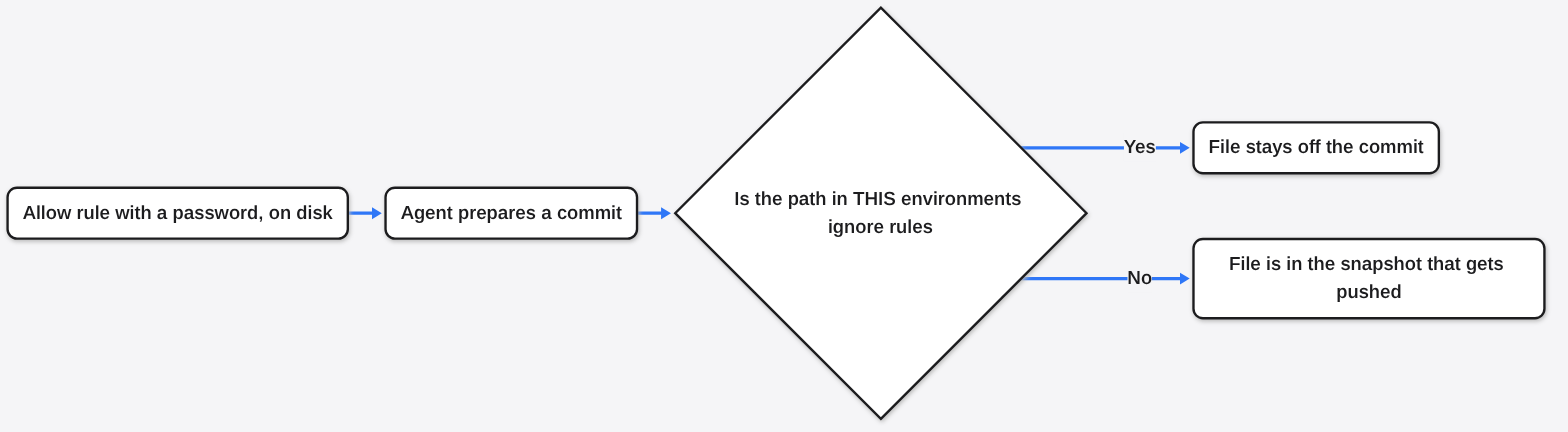
Ignore, in git, means “do not include this path in the next snapshot.” A .gitignore file is a list of paths, stored inside the repo, so every clone (a copy of the repo on another machine) gets the same list. That list travels with the project.
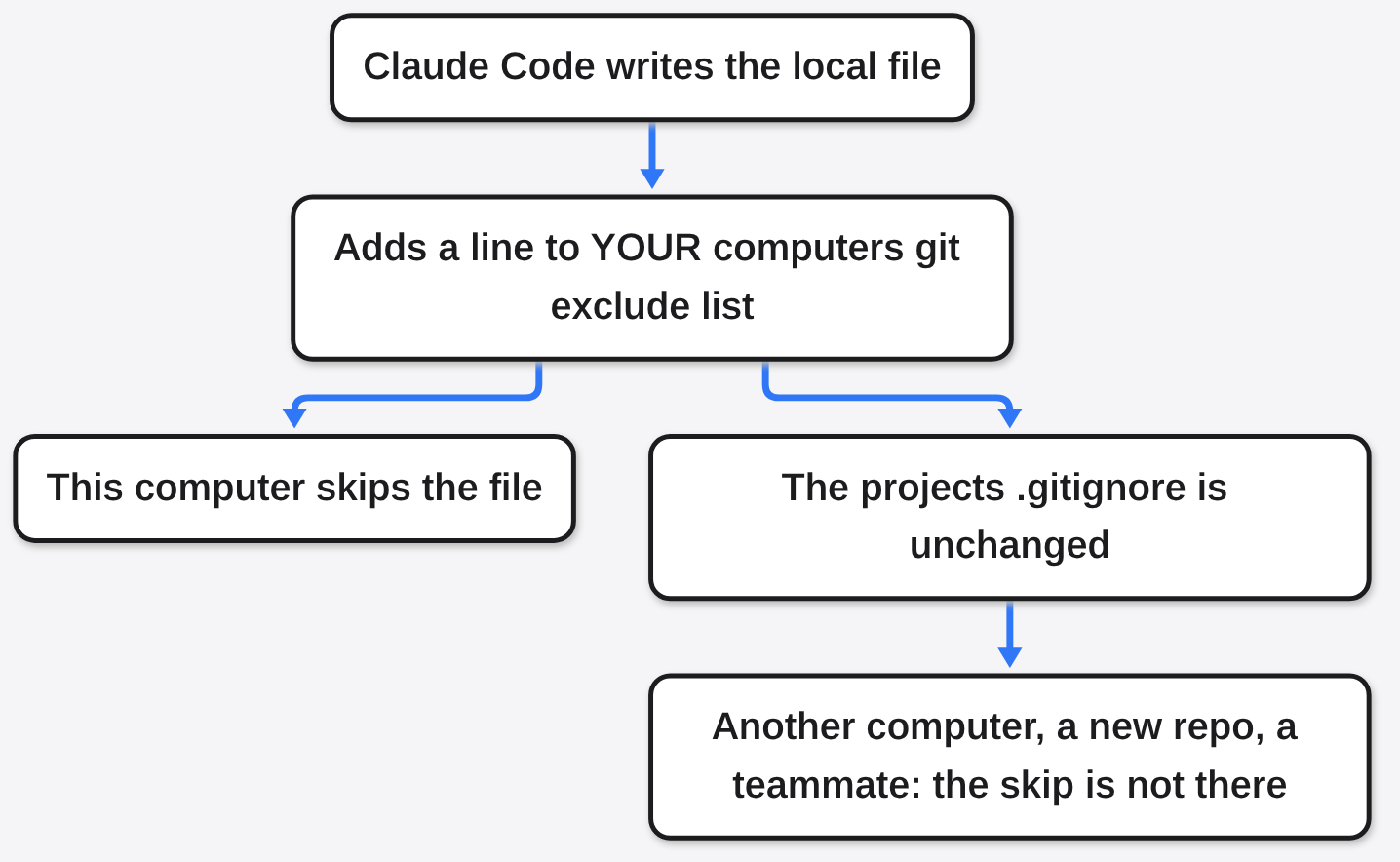
Claude Code does not, on the docs’ own account, write the local settings file into the project’s .gitignore. The settings page says the first time it creates the file in a git repo that does not already ignore it, it adds **/.claude/settings.local.json to your global git excludes file. Global means “for this user, on this computer, in every repo.” The docs name the place: core.excludesFile if you set that to a full path, otherwise $XDG_CONFIG_HOME/git/ignore, or ~/.config/git/ignore when that variable is unset.
Apiiro’s sentence is the one that matters: the rule never goes into the repo’s own .gitignore, so nothing travels with the project to protect it. A folder that becomes a repo later, a clone on a second machine, a teammate, a CI runner (a computer in the cloud that builds your project) do not inherit your home-folder ignore list.
The same docs add a second hole. If you created .claude/settings.local.json by hand, and Claude Code has not written it yet, you have to ignore it yourself.
A worktree (a second checkout of the same repo, so you can have two branches on disk at once) does not save you a search in the wrong folder. The permissions docs say the local file is stored at the main checkout, even if the session started in the worktree.
Deleting the File Does Not Delete the Past
A commit is permanent inside the history (the chain of snapshots) until someone rewrites that chain. Removing a file in a new commit hides it from the latest snapshot. It does not remove it from the older ones. Anyone who can see the repo can check out (restore) an old snapshot. A fork is someone else’s copy of the repo, with its own copy of the history. A force-push (rewriting the shared history and replacing it) does not reach forks you do not control, or clones already on other disks, or a search engine that saved the page.
Apiiro says earlier versions of the file hold 734 real secrets, in 509 repos, that appear in no current copy. Deleting the file today does not touch those. They also say the median repo with a real secret had the file committed 217 days before 2 November 2026, and 118 repos had it committed more than a year earlier. Median means the middle of the list, not the average. Half the repos had been exposed at least that long.

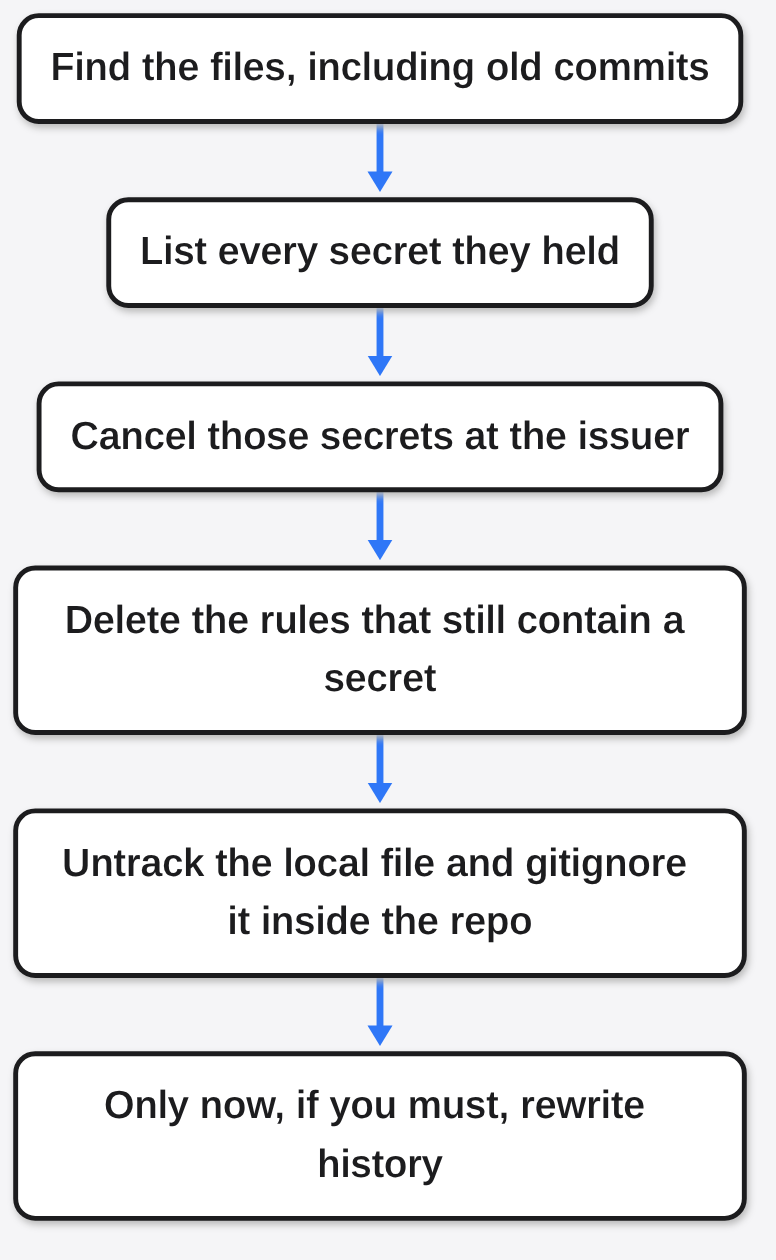
So the order, which the next section will not let you skip: change the lock first. Then clean the file. Then clean the history, knowing the cleaning is incomplete.
What 2,539 Actually Counts
Apiiro says they collected public copies from GitHub code and commit search on default branches, 1 to 3 November 2026. GitHub’s code search caps a query at 1,000 results, so they split queries by file size. They call the history pass a floor, not a ceiling: file history checked in 43,120 repos. A floor means “at least this many,” because the search can miss some.
“Real secret,” in their post, does not mean “we logged in.” They say they used no credentials and contacted no hosts. A value counted as real if it matched a known provider’s key format, or if it was a password or token sitting next to a public host (a server address on the internet, not a name that only works inside one office). They say they removed placeholders, defaults, private hosts, and keys that are public by design. The final 2,539 was agreed by those rules and a separate review of 2,774 masked values. Masked means the reviewer saw a redacted form, not a fresh live test.
One company, they say, confirmed that its key had still been live. That is one confirmation, not 2,539 working keys. I am not promoting the rest from “looks like a secret” to “we opened the door.”
| Where they looked | Scale they published | Hit they published |
|---|---|---|
Current .claude/settings.local.json | 104,185 files in 103,617 repos | 1,122 files, about 1.1 percent, holding 1,379 secrets |
| Older copies of that file | History in 43,120 repos | 734 secrets in 509 repos, absent from the current file |
Shared .claude/settings.json | 76,011 files | 298 files with a secret |
| Agent chat transcripts (saved logs of the conversation) | 2,523 files | 120 files in 87 repos |
| Agent memory files | 1,200 checked | 9 repos |
| Handoff notes | 2,095 checked | 33 files |
| VS Code Copilot settings, a different product’s file | 173 checked | 9 repos |
| All of those sources together | 2,539 secrets in 1,994 repos, 63 organizations |
Do not add the hit column and expect 2,539. Some rows count files, some count secrets, and the same secret can sit in more than one place. The 2,539 is their total, not my sum of the rows.
Of the 1,379 secrets in current local files, they split the detection method, and this pair does add up: 636 matched a known provider format, and 743 were a password or token next to a public host. 636 plus 743 is 1,379.
They also name piles that are not a full split of that 1,379. I am labeling them that way on purpose. 379 database passwords. 122 Supabase service-role keys (a Supabase key that can bypass the usual row rules and act as the service itself). 103 Supabase account tokens. 43 SSH logins, some of them with root (the all-powerful account on a Unix machine) inside an sshpass command. 42 GitHub, GitLab, or npm tokens. 23 AWS keys. 6 private keys (the secret half of a cryptographic pair, the half you do not publish). Those named piles overlap the two detection methods. They are the examples, not a second census.
The organizations, in Apiiro’s telling, are mostly software companies, startups, agencies, and open-source projects. The examples they give, without me repeating a customer list I do not have: a database vendor’s own cloud key with manage access and no expiry; a startup’s production Azure Postgres password; an agency’s Square production token; an open-source project’s OpenAI-format key; an IT firm’s owner password for a cloud Postgres database behind a medical-records app. “Behind a medical-records app” is Apiiro’s description of the database. It is not a report that patient records were copied. I will not add that.
A Scanner Can Miss a Password It Looks At
A secret scanner is a program that reads files and hunts for strings that look like keys. Gitleaks and TruffleHog are two widely used ones. They are good at shapes they have been taught: a prefix, a length, a checksum (a small check number inside the key). A database password is often just a word after a flag.
Apiiro ran both, without trying the secrets, over all 104,185 local files. Of the 1,122 files they called real, gitleaks flagged 564 and TruffleHog flagged 643. Neither flagged 215. That is about one in five of the files that mattered. The misses, they say, are mostly passwords typed inside commands, after PGPASSWORD=, sshpass -p, or mysql -p, or a bearer header (the word Authorization plus the token) in a curl call. To a scanner tuned for key shapes, that password looks like any other argument.
Niabot made this image in Blender on 20 May 2011. The text underneath is from Max Hasak’s public-domain Die Baukunst.
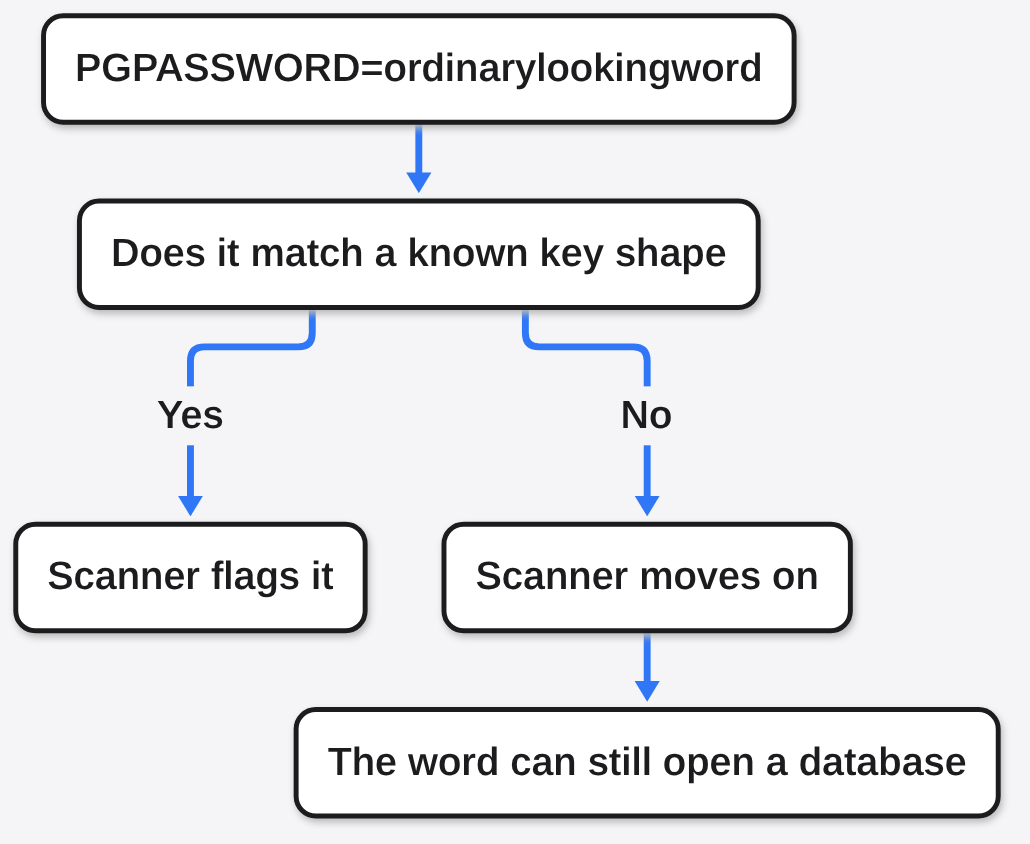
If your comfort is “CI runs gitleaks,” this is the paragraph that removes it. Add rules for passwords inside commands, and do not treat a green scan of .claude/ as a clean bill. Also scan history, not only the latest snapshot. The 734 secrets that exist only in old copies are invisible to a scan of the current file.
The Same Tool Can Write the File and Commit It
A co-author trailer is a line in a commit message, Co-authored-by:, naming a second author. Claude Code adds one when it helps make a commit. Apiiro says that in 539 of 1,105 repos with a real secret, a commit co-authored by Claude modified .claude/settings.local.json.
Read that carefully. It does not say the model decided to steal the file. It says the agent was in the loop on the commit that added or changed the file. An agent that can run git add will add whatever is not ignored. If the ignore rule lives only in your home folder, the agent’s commit on another machine, or in a fresh clone, will not see it.
Apiiro also says people filed the underlying behavior on the Claude Code GitHub project, and names issues 5544, 11982, 13106, and 91270. Their account: none got a reply from Anthropic, and three were closed automatically as inactive or duplicate. Those four threads were not re-opened on 8 November. Treat that sentence as Apiiro’s, dated with their 5 November post, not as my fresh check of the tracker.
I also have not found, in the docs I read on 8 November, a change that says the button now strips passwords out of the saved command. Absence from the two docs pages is not a proof that no patch exists. If you are about to tell a team “Anthropic fixed it,” check the changelog yourself. This page will not say fixed.
What to Do, In This Order
Rotate first. Rotate means: go to the service that issued the secret, cancel the old one, and issue a new one. Deleting your copy does not cancel the copy already on GitHub, in a fork, or in someone else’s clone. Until the issuer cancels it, the old string still opens the door. If you want a hard stop on cut-off answers instead of a sticky allowlist, see Uncut vs Claude Code.
Then, and only then, clean up.
- Search every repo you are responsible for, including history, for
.claude/settings.local.jsonand.claude/settings.json. Look at agent transcripts too. Apiiro found secrets in those, not only in the settings file. - Make a list of every secret those files ever held. Include the old copies, not only the file you see today.
- Rotate each one at the issuer. Database passwords, cloud keys, SSH passwords, npm tokens, the Supabase service-role key. A service-role key is not a mild leak. It is the key that skips the row rules.
- After the issuer has canceled the old value, delete the rules that contain a secret, even if you never committed them. A local-only copy is still plaintext on disk.
- Stop tracking the file:
git rm --cached .claude/settings.local.json. The--cachedflag removes it from the next commit without deleting your working copy (the files you actually have on disk). Then add the path to the repo’s own.gitignore, so the rule travels with the project. The global exclude is not a substitute. - Rewriting history, with a tool such as
git filter-repo, is optional and incomplete. It can drop the file from the branches you force-push. It does not recall forks, old clones, or caches. Do it after rotation, never instead of rotation.
Security teams, the extra three from the same research: treat .claude/, and the sibling agent folders, the way you treat .env (the file where projects traditionally keep secrets). Put the local settings path in the organization’s gitignore template. Teach the scanner the command-line shapes, not only the key prefixes. Prioritize any secret that sits next to a public host, because that one tells you where the door is.
Approve a Shape or a Name — Not the Key
An environment variable is a name the shell replaces when the command runs. You write $PGPASSWORD in the command. The shell looks up the value somewhere else, a secrets manager or your own session, and the settings file only stores the name. The name is not the secret. If the allow rule is Bash(psql *) you have a different problem, a wide door, and you should not use a wide door to dodge the narrow one. The useful pattern is the command without the value:
{
  "permissions": {
    "allow": [
      "Bash(npm test)",
      "Bash(npm run lint)"
    ]
  }
}That is the shape in Claude Code’s own example, narrowed further: exact safe commands, no star that swallows a password flag, no literal secret. If a prompt shows a command with a password already pasted in, do not click “don’t ask again.” Run it once if you must, or don’t run it, and put the secret in a variable before the next attempt.
The habit Apiiro names is the whole bug, in one line of theirs: typing a secret into a command that an agent then records.
Common questions about Claude Code don’t ask again
Does don’t ask again keep a secret private?
No. It stores a permission line so Claude Code stops prompting for matching commands. It does not encrypt secrets or keep them out of git.
Is deleting the allowlist file enough?
Deleting the file stops future matches. It does not erase commits, logs, or past pushes that already left the machine.
Should I approve a full command that contains a key?
No. Approve a shape or a safe name. Do not approve a sentence that embeds the secret.