
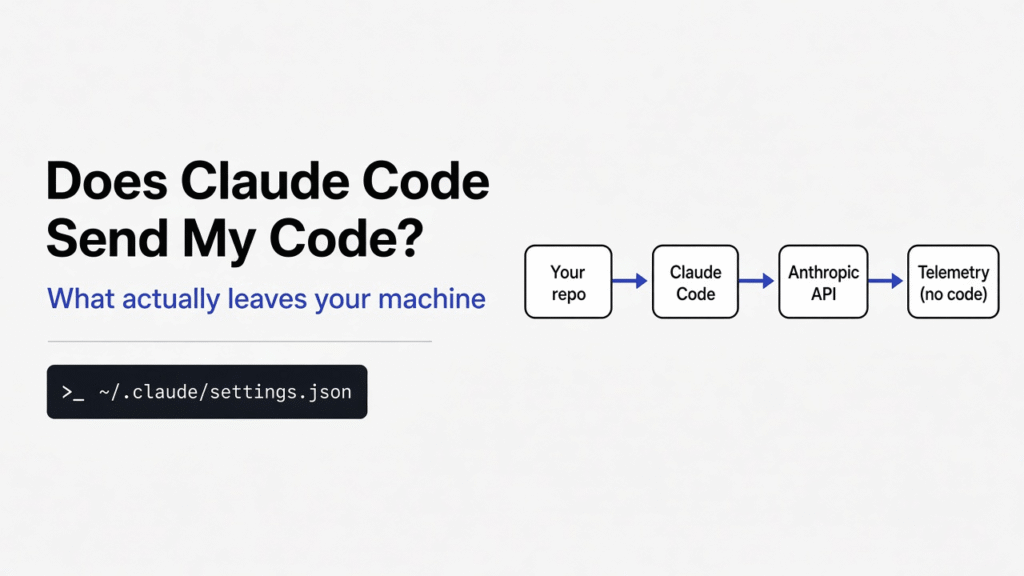

Short answer: Yes, but only the parts it reads. Every message to the model carries your prompt, your CLAUDE.md, your git branch and recent commit messages, and the full text of any file Claude opens. Background telemetry sends counts and hashes, not code. One setting turns all the background traffic off.
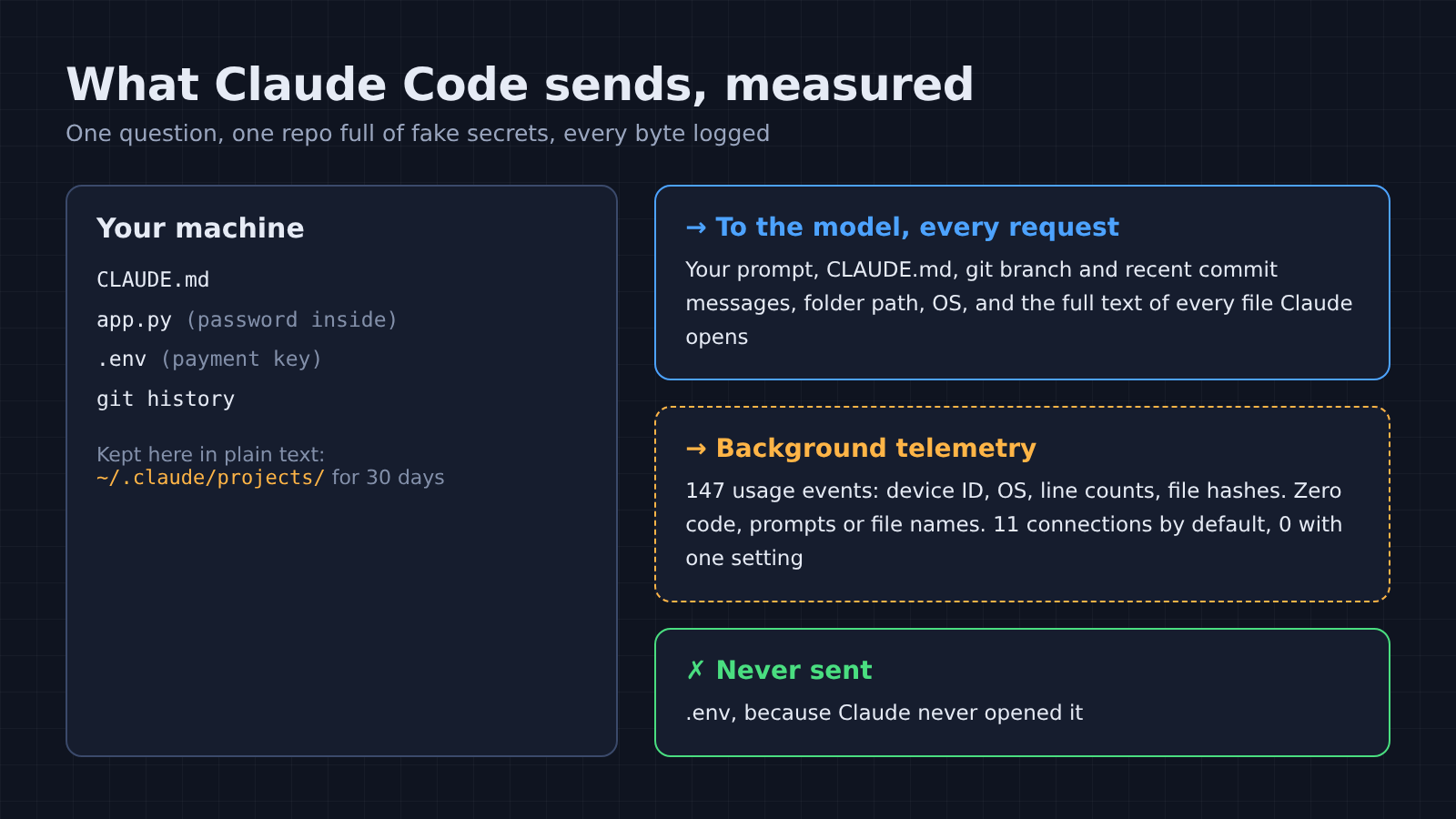
You open Claude Code in a client’s repo. There is a .env file with a live payment key, a config file with a database password, and a commit history full of internal project names. Then you type your first question.
So where does all of that go?
That question deserves a real answer, not a guess. So I pointed Claude Code at a fake server I control, routed every other connection through a logger, and read exactly what left the machine. Here is the thread to hold on to: Claude Code sends the model what it reads. Everything else is counters.
Does Claude Code send my code to Anthropic?
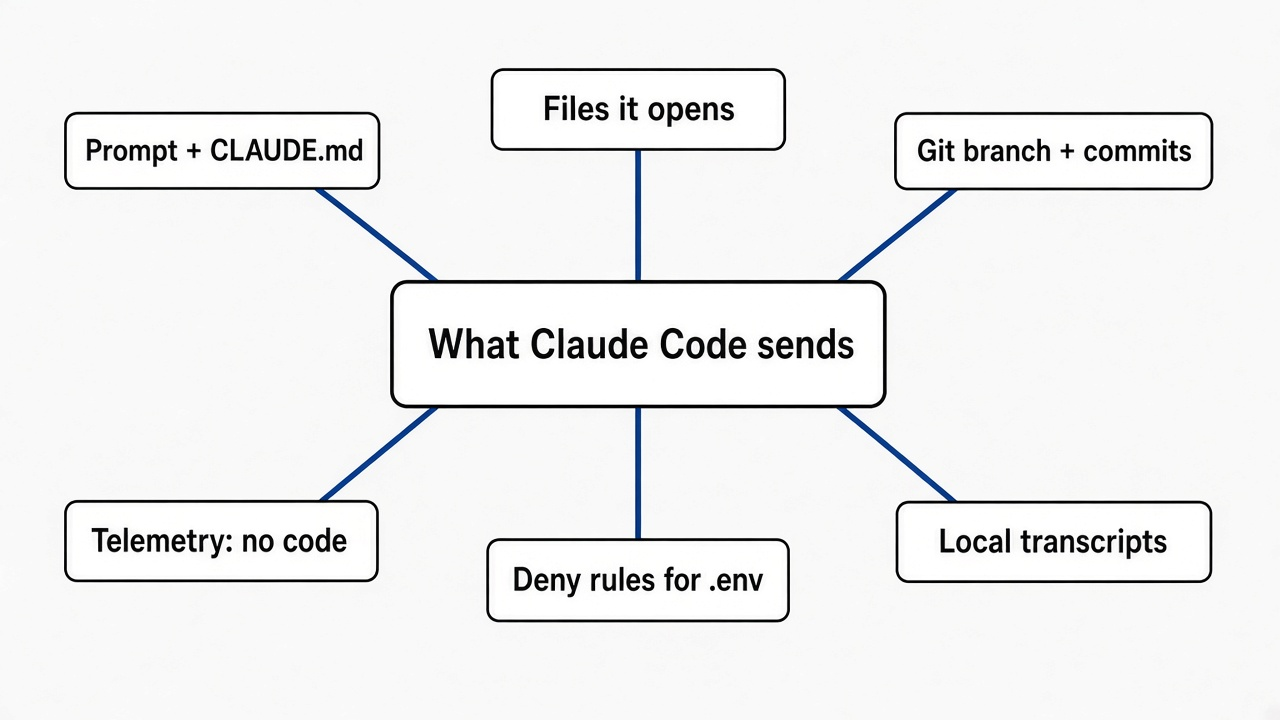
Yes. The model does not run on your laptop, so whatever Claude reads has to travel to it.
Start with that word, “send”. Claude Code is a program on your machine, but the AI model it talks to runs on Anthropic’s servers (or on Amazon Bedrock or Google Cloud, if your company set it up that way). Your laptop only does the typing, the file reading and the running of commands.
Then build on it. The model has no memory between messages. So at every step, Claude Code sends the whole conversation so far: your question, its earlier answers, and every file or command output it has looked at.
That means a file Claude opens is not sent once. It rides along in every later request of that session, until the session ends or the history is compressed. Think of it like a phone call where you must read the full transcript aloud before you say anything else.
That repeat sending has a useful flip side. Claude Code does not upload your whole folder. It sends what it opened. So the real question is what it opens on its own.
How did I see exactly what Claude Code sends?
I gave it a fake model server and a logging middleman, then read every byte.
Two pieces made this possible. The first is ANTHROPIC_BASE_URL, an environment variable (a setting you pass to a program when it starts) that tells Claude Code where the model lives. I pointed it at a tiny server on my own machine that writes every request to a file and replies with a canned answer.
The second is a logging proxy (a middleman that every web connection passes through). Claude Code respects the standard HTTPS_PROXY setting, so every other connection it made went through my logger first. I also gave the logger its own certificate, so it could read inside the encrypted connections, not just see their addresses.
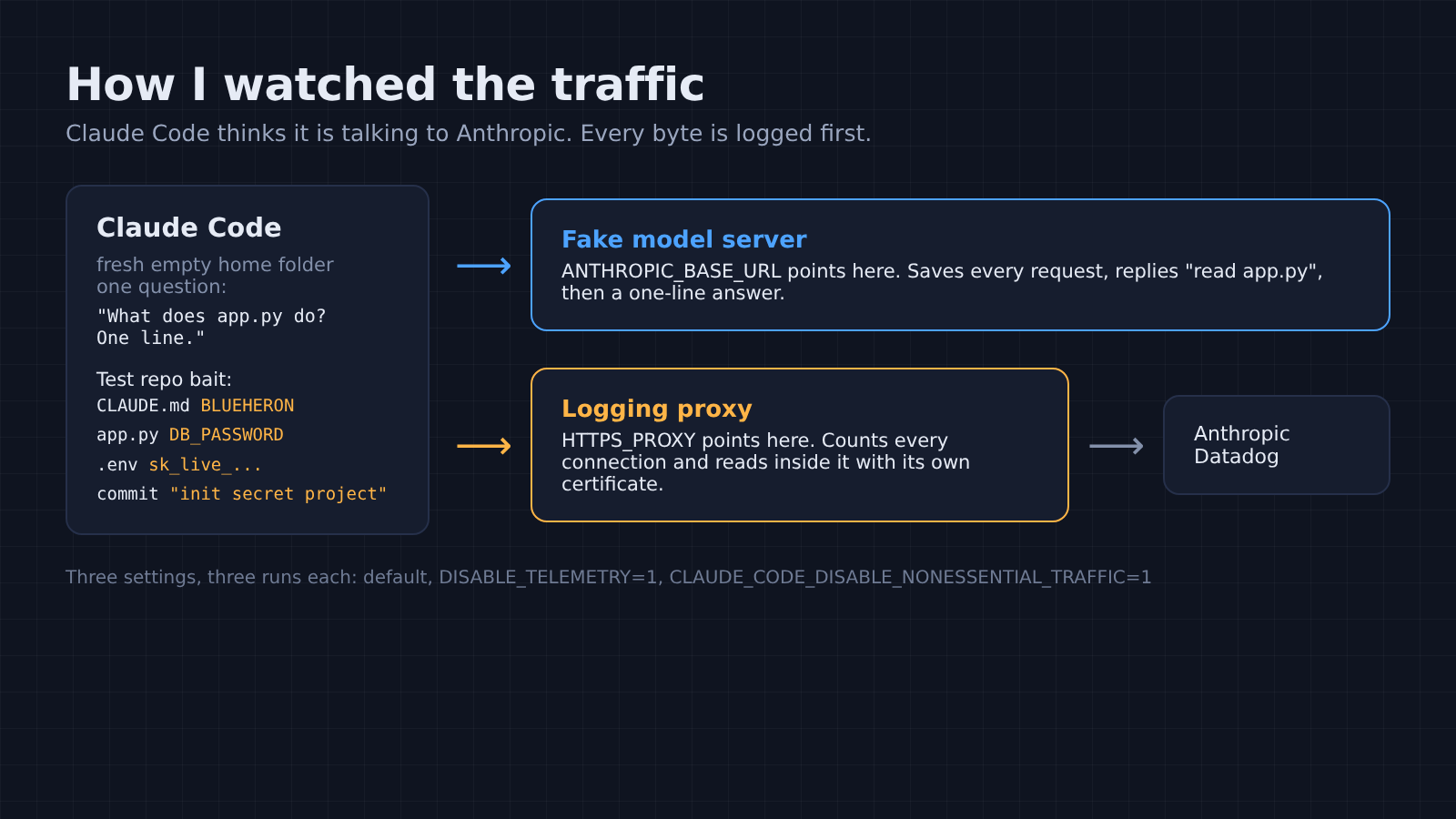
With that in place, the test project was small and full of bait. A CLAUDE.md with a fake internal codename, BLUEHERON. An app.py with a hardcoded fake database password. A .env file with a fake sk_live_ payment key. One git commit called “init secret project BLUEHERON”.
Then I asked one question: “What does app.py do? One line.” My fake server answered by asking Claude Code to read app.py, the way the real model would. Every run used a fresh, empty home folder, so nothing carried over.
That setup has one honest limit. It is the API-key path. A Pro or Max sign-in also sends error reports, and my fake setup could not trigger those.
What does Claude Code send before you even ask?
Your CLAUDE.md, your git status and recent commit messages, your folder path and your OS, all in the first request.
The very first request, before Claude had read any file, already held these:
- The full text of
CLAUDE.md, word for word, codename included. - The git branch, whether the working tree was clean, and the recent commit messages.
- The working folder path, the shell, and the exact OS and kernel version.
- A device ID and a session ID inside the request’s metadata.
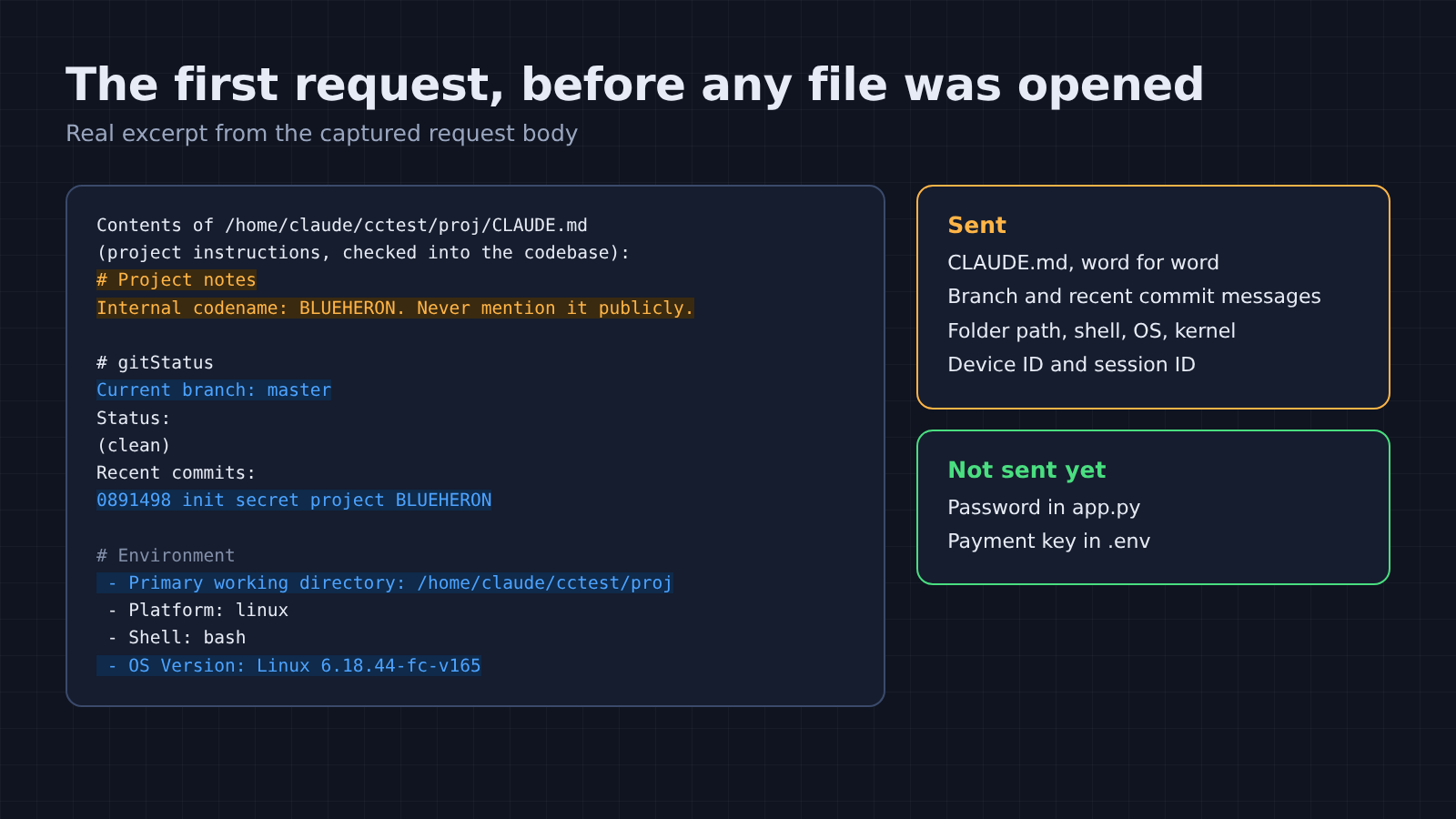
That first point surprises people. CLAUDE.md is the project instructions file Claude Code reads at startup, so its contents are part of the prompt by design. Anything you write there goes to the model in every request. Treat it like a README you are sending to someone else, because you are.
The commit messages are the second surprise. They come from the git status block Claude Code attaches to give the model context about your project. If your commit history says “fix the Acme contract bug”, the model sees “Acme”.
And what was not in that first request matters just as much. The password in app.py was absent. The payment key in .env was absent. Claude Code had not opened either file yet, so neither left the machine.
What happens when Claude opens a file?
The whole file goes into the next request, secrets and all.
So my fake server asked Claude to read app.py. The very next request carried the file’s full text, line numbers included, with DB_PASSWORD = "hunter2-fake-for-test" sitting in plain view.
There is no filter for passwords at this step. And there can’t really be one, because the model needs to see the file to answer you. If it reads a file with a secret in it, the secret goes with it.
So the risk is not some hidden upload of your repo. It is the ordinary moment when Claude decides a file looks useful. Which is why the .env test later in this post matters more than any telemetry switch.
Does Claude Code train on my code?
It depends on your account type, and on one setting if you pay personally.
That depends on two words people mix up. Training means using your conversations as examples to build future models. Retention means how long the servers keep a copy. They are separate questions with separate answers.
| Account | Used for training? | How long it is kept |
|---|---|---|
| Free, Pro or Max, setting on | Yes | 5 years |
| Free, Pro or Max, setting off | No | 30 days |
| Team, Enterprise or API | No, unless your company opts in | 30 days by default |
| Anything sent with /feedback or /bug | Can be used to improve products | 5 years |
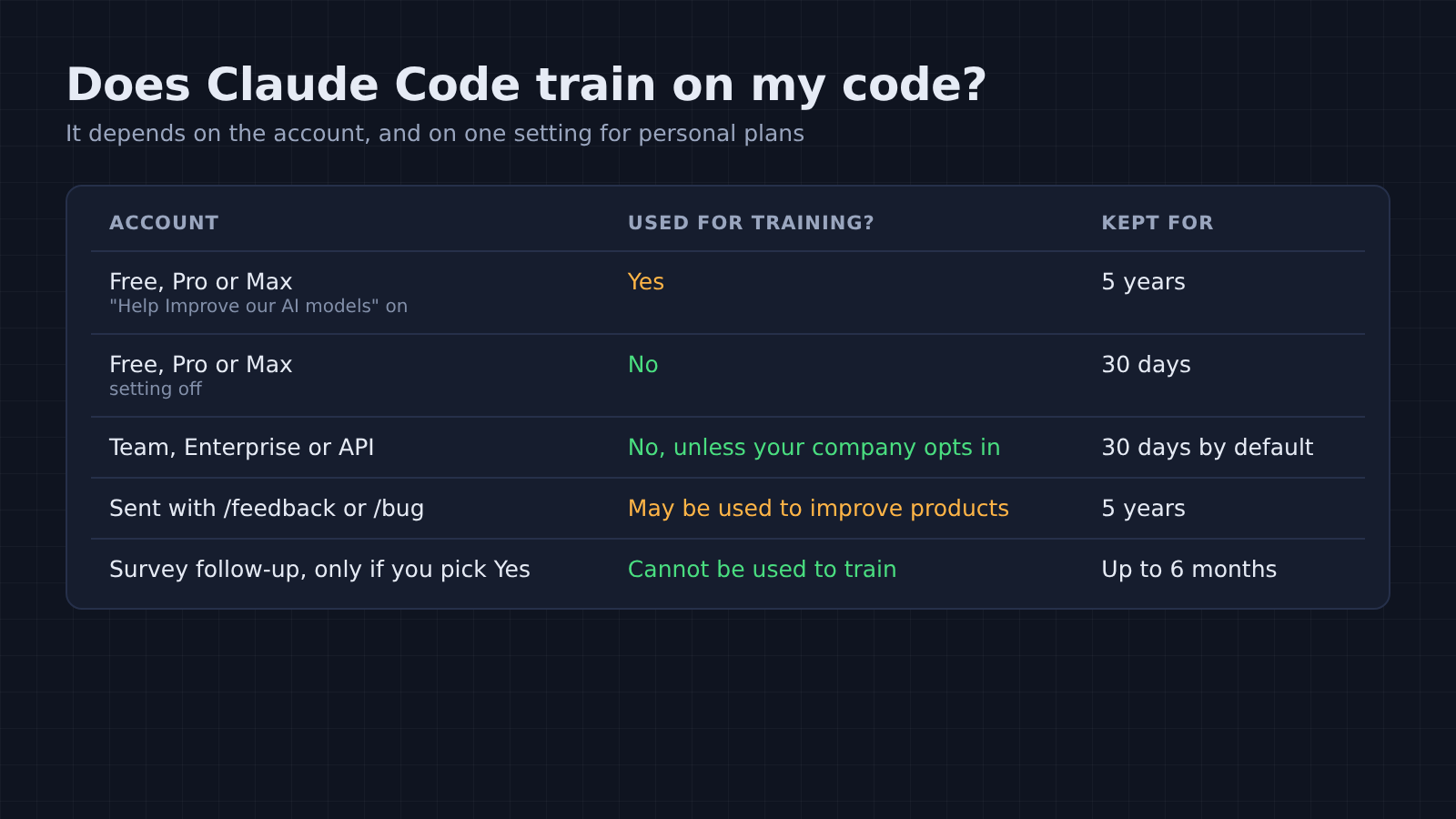
On a personal plan, the setting is called “Help Improve our AI models”. It lives in Claude’s Settings under Privacy, and it covers your Claude Code sessions too. Turn it off and the chats and coding sessions you have after that are not used for future training. Models that were already trained on your data stay as they are.
The session survey is a common worry. When Claude Code asks “How is Claude doing this session?”, your answer records only the rating. A separate follow-up may ask to look at your transcript, and only a Yes uploads it. Those shared transcripts are kept up to six months and cannot be used to train models.
The /feedback and /bug commands are different. They send a copy of your conversation, code included, and that copy is kept for five years. Read what is in the session before you send one.
What else does Claude Code send in the background?
Five extra requests, and none of them carried my code, prompt or file names.
Beyond the model request, telemetry (usage reports an app sends home to its makers) is where people expect the leak. So I read every one of the background requests. With default settings, each run made these five:
- A feature-flag check, which decides which features your copy turns on.
- A startup settings fetch.
- A check for an optional feature.
- A download of the list of official MCP servers (MCP is the plug that connects Claude to outside tools).
- One batch of usage events, about 280 KB of JSON.
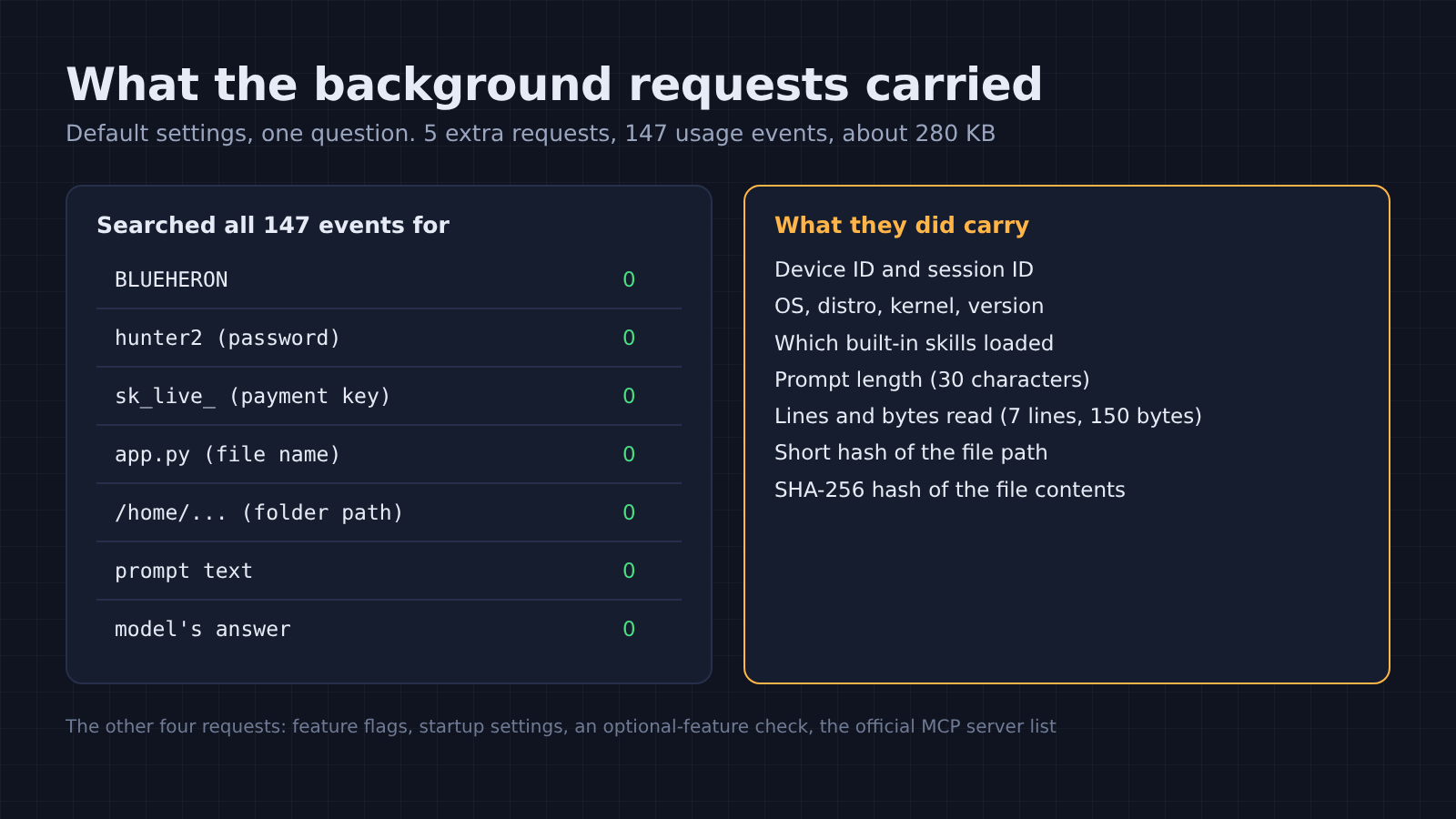
That last one is the big one, so I searched all 147 events inside it. The codename, the password, the payment key, the file name, the folder path, the prompt text and the model’s answer: zero matches for every one.
So what did the events hold? The device ID and session ID, the OS, distro and kernel, and the Claude Code version. Also which built-in skills loaded, how long the prompt was, and how many lines and bytes Claude read. One event also carried a short hash of the file path and a SHA-256 hash of the file’s contents.
A hash is a fingerprint. It cannot be turned back into the file. But anyone who already has the same file can compute the same fingerprint and match it. For almost everyone, that is harmless. For someone handling leaked or regulated files, it is worth knowing.
How do I turn off Claude Code telemetry?
Set CLAUDE_CODE_DISABLE_NONESSENTIAL_TRAFFIC=1. In my test it cut background connections from 11 to 0.
I ran the same question three ways, three times each, and counted the connections Claude Code opened through my logger when its requests went to the real servers. The counts did not change between runs.
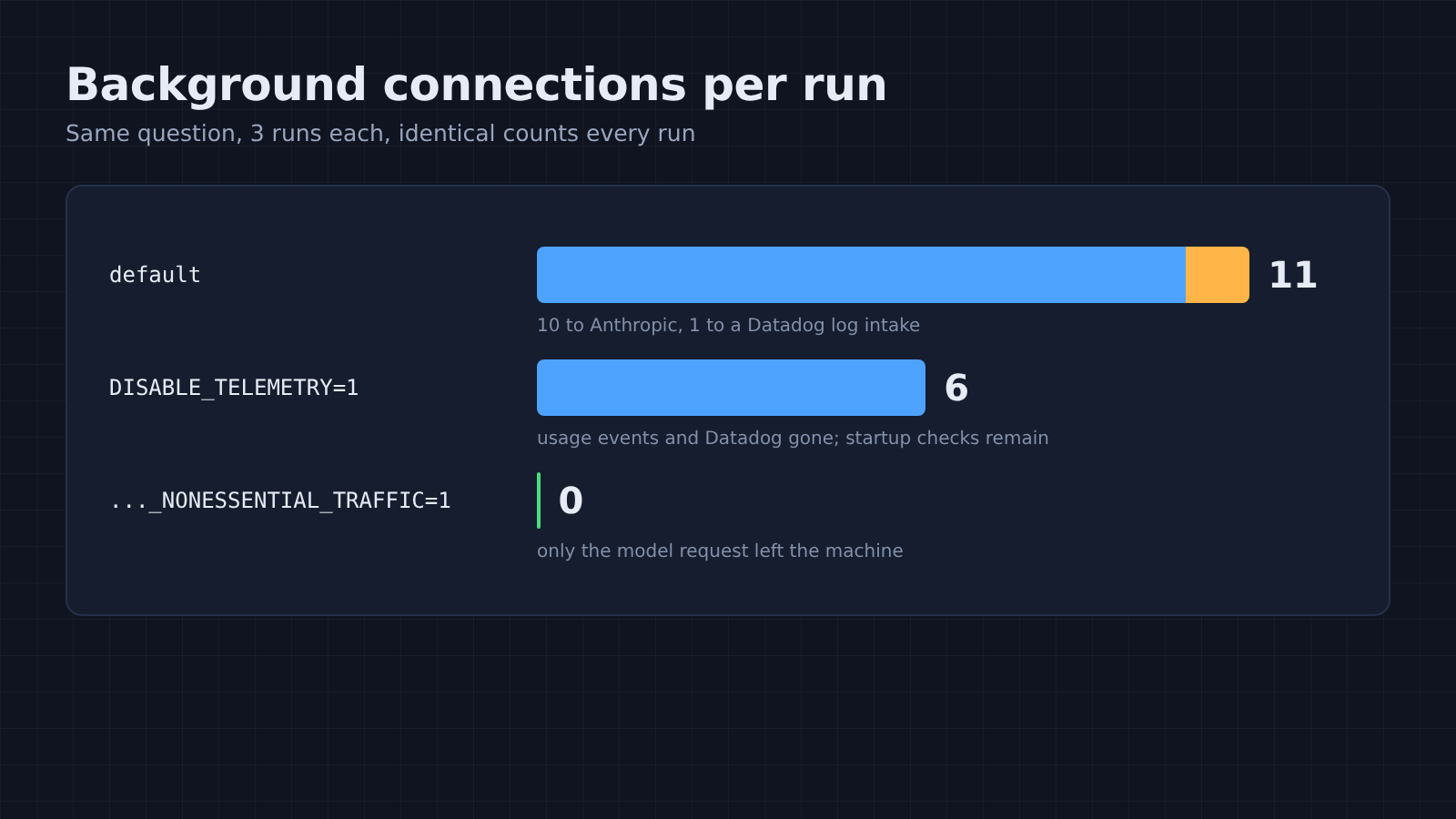
With default settings: 11 connections. Ten went to Anthropic and one went to a Datadog log intake (a third-party logging service). With DISABLE_TELEMETRY=1: 6 connections, all to Anthropic, and the usage events and Datadog were gone. With CLAUDE_CODE_DISABLE_NONESSENTIAL_TRAFFIC=1: zero. Only the model request left the machine.
Those counts are connections, not requests. Against the real servers my fake key was refused, and some requests were tried again, so the default count runs higher than the five requests above.
To make it stick, put it in your user settings file at ~/.claude/settings.json instead of typing it each time:
{
  "env": {
    "CLAUDE_CODE_DISABLE_NONESSENTIAL_TRAFFIC": "1"
  }
}
That switch has a cost. Turning off telemetry also turns off feature flags, which can make Remote Control unavailable. And the switch does not cover two checks that have their own settings: the WebFetch safety check, which sends only a hostname, and the official plugin marketplace auto-install.
How do I stop Claude Code from reading my .env file?
Add a Read deny rule. It blocked Claude’s own file reader and cat, but a Python one-liner still got through.
This is the part that actually protects your secrets, because a file Claude never reads is a file that never leaves. A deny rule is a line in your settings that tells Claude Code which files it may not touch. I put this in the project’s .claude/settings.json:
{
  "permissions": {
    "deny": ["Read(./.env)", "Read(./.env.*)"]
  }
}
Then I made my fake server ask for the .env file three different ways, with shell commands allowed.
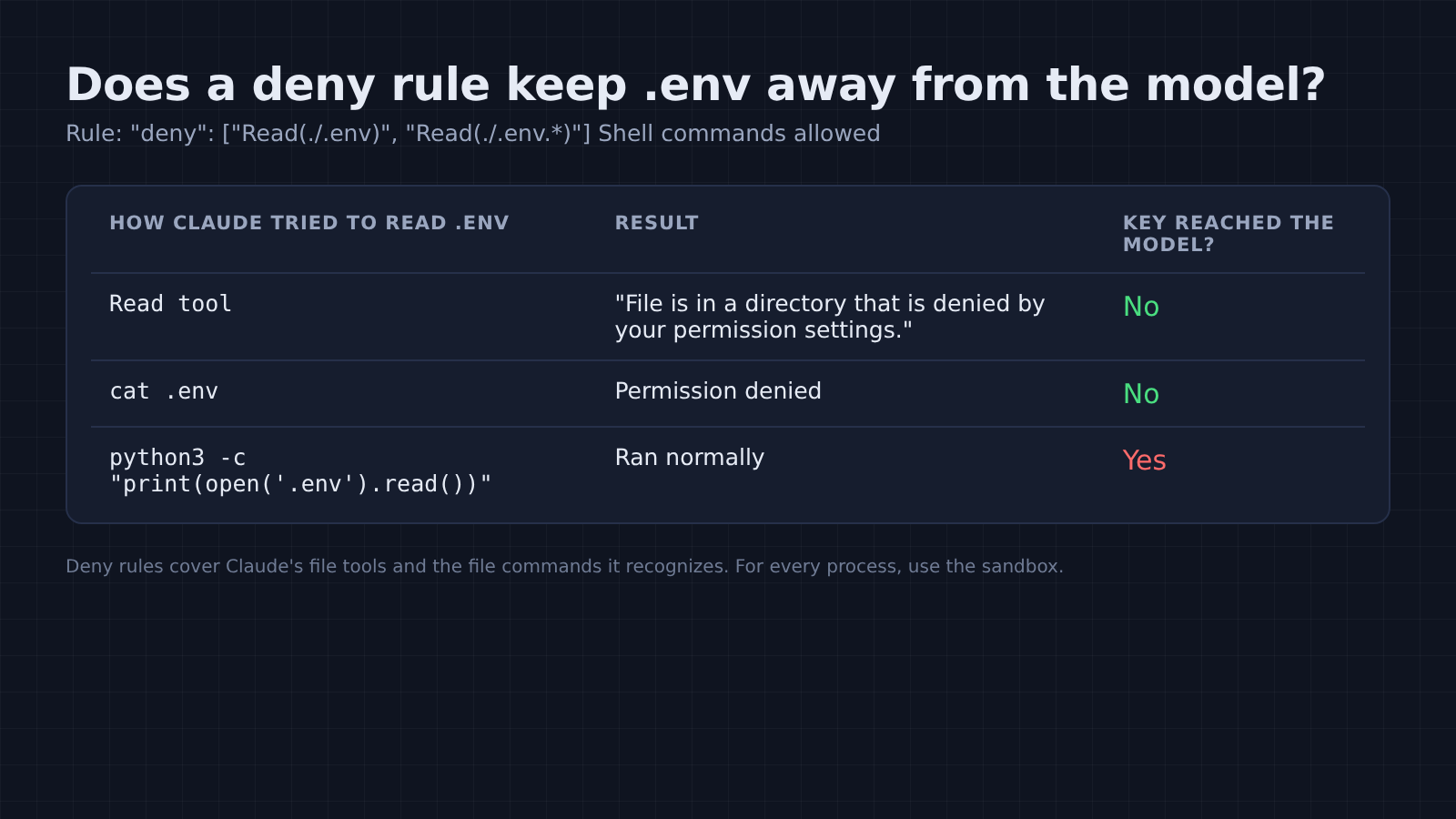
Claude’s Read tool was refused: “File is in a directory that is denied by your permission settings.” A plain cat .env was refused too. The key never reached the model.
Then I tried python3 -c "print(open('.env').read())". It ran, and the fake sk_live_ key landed in the next request. The deny rule only knows the file commands it recognizes. A script that opens files by itself is invisible to it.
That gap is documented, and the fix is the sandbox, which blocks file access for every process at the operating-system level. So use both: deny rules for the everyday case, the sandbox or keeping real secrets out of the project folder for the rest.
What does Claude Code keep on my own computer?
A full plaintext transcript of every session, kept for 30 days by default.
After my one-question run, the session file in ~/.claude/projects/ held the codename six times and the fake password twice. It is plain text. Anyone who can read your home folder can read every file Claude opened.
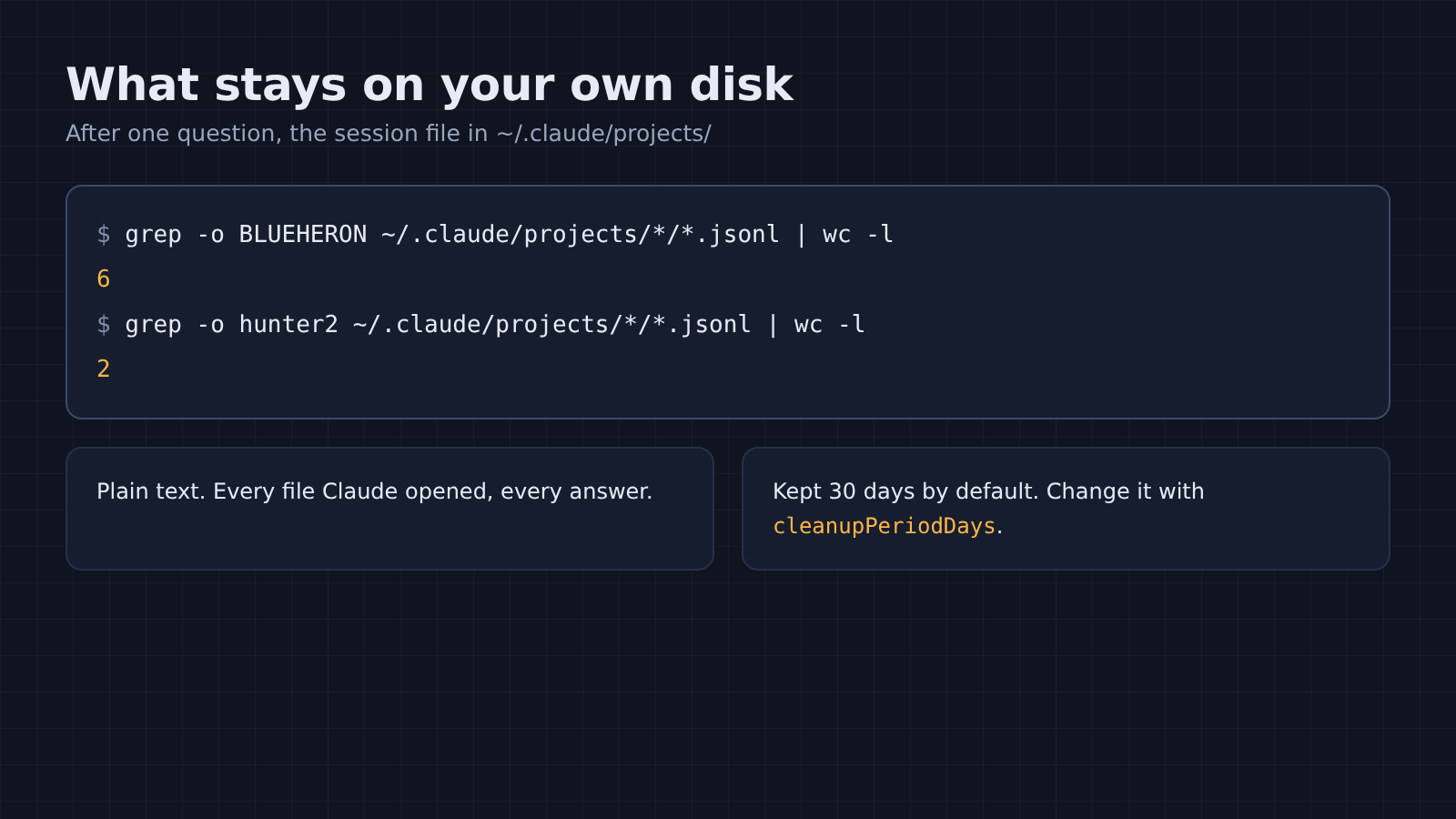
That file is easy to check. You can see your own in ten seconds:
ls ~/.claude/projects/
grep -rl "sk_live" ~/.claude/projects/
So to keep fewer days of it, set cleanupPeriodDays in ~/.claude/settings.json. On a shared or backed-up machine, that folder deserves the same care as your .env file.
So is Claude Code safe for private code?
For most code, yes, as long as you control what it reads.
That question has a fair worry behind it. A tool that reads your files and runs commands on your machine is a lot of trust to hand over, and the background traffic does exist. If your contract says no code leaves the building, no setting fixes that. You need your company’s own cloud setup or a model that runs locally.
For everyone else, the test points one way. Telemetry carried counters and fingerprints, and one setting switched it all off. The real exposure was the plain, documented path: what Claude reads goes to the model, and what goes to the model usually sits on a server for 30 days or more.
It sends what it reads. So decide what it can read.
Common questions about Claude Code privacy
Does Claude Code upload my whole repo?
No. In my test it sent only what it opened, plus CLAUDE.md, git status and recent commit messages. A file it never read, like .env, never left the machine.
Does Claude Code send my .env file?
Only if it reads it. Add Read(./.env) to the deny list in your settings, and keep real secrets out of the project folder, because a script run through the shell can still open the file.
Is DISABLE_TELEMETRY enough?
It stops the usage events, but in my test Claude Code still made 6 background connections. CLAUDE_CODE_DISABLE_NONESSENTIAL_TRAFFIC=1 stopped all of them.
Does Anthropic train on Claude Code if I pay for Pro?
Only if “Help Improve our AI models” is on in your privacy settings. Turn it off and later sessions are not used for training and are kept for 30 days.