


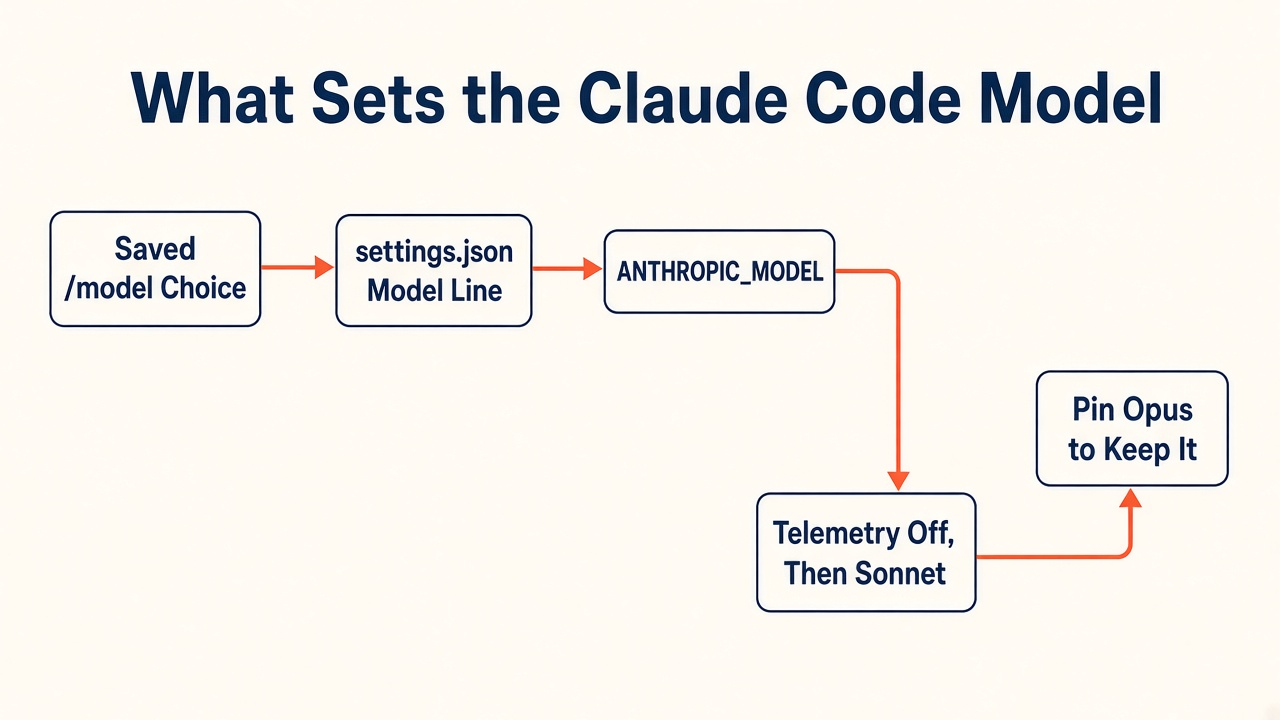
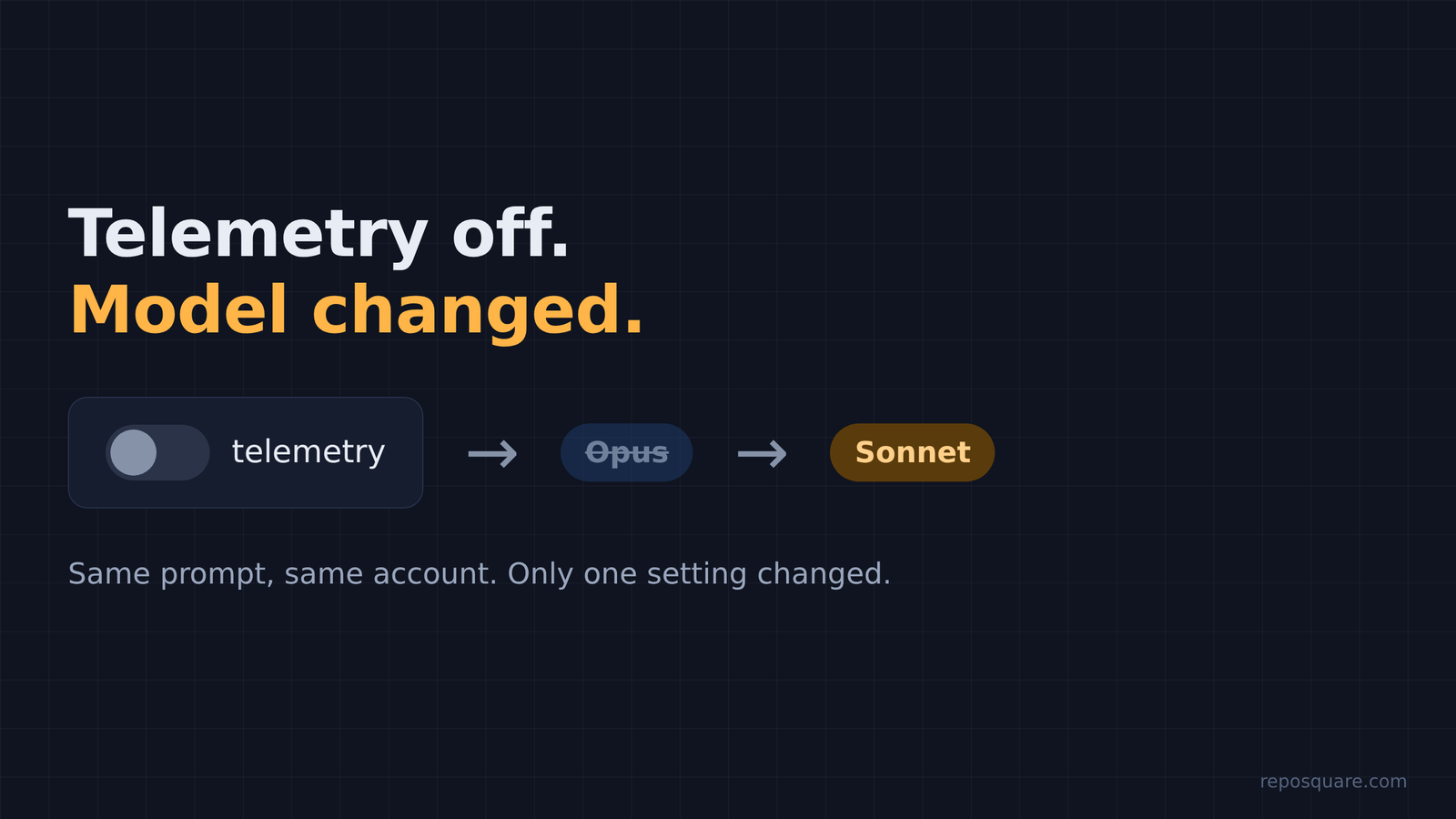
In my test, turning off Claude Code telemetry dropped the default from Opus to Sonnet. I routed every request through a logger: with default settings it asked for Opus, and with telemetry switched off the same prompt went to Sonnet. A saved /model choice, a model line in a settings file, the ANTHROPIC_MODEL variable, an admin default or opusplan mode can also pick the model before you do. Pin the model, and the surprise goes away.
You turn off Claude Code’s telemetry because you care about privacy. A week later the answers feel a little thinner, and you can’t say why. Nothing on screen told you anything changed.
That is the case this post is about. I routed every request Claude Code made through a logger and read which model each one asked for. With default settings it asked for Opus. With telemetry switched off, the same prompt went to Sonnet.
Here is the thread to hold on to: when Claude Code can’t phone home, it falls back to the defaults it shipped with.
The Fastest Way to See the Real Model
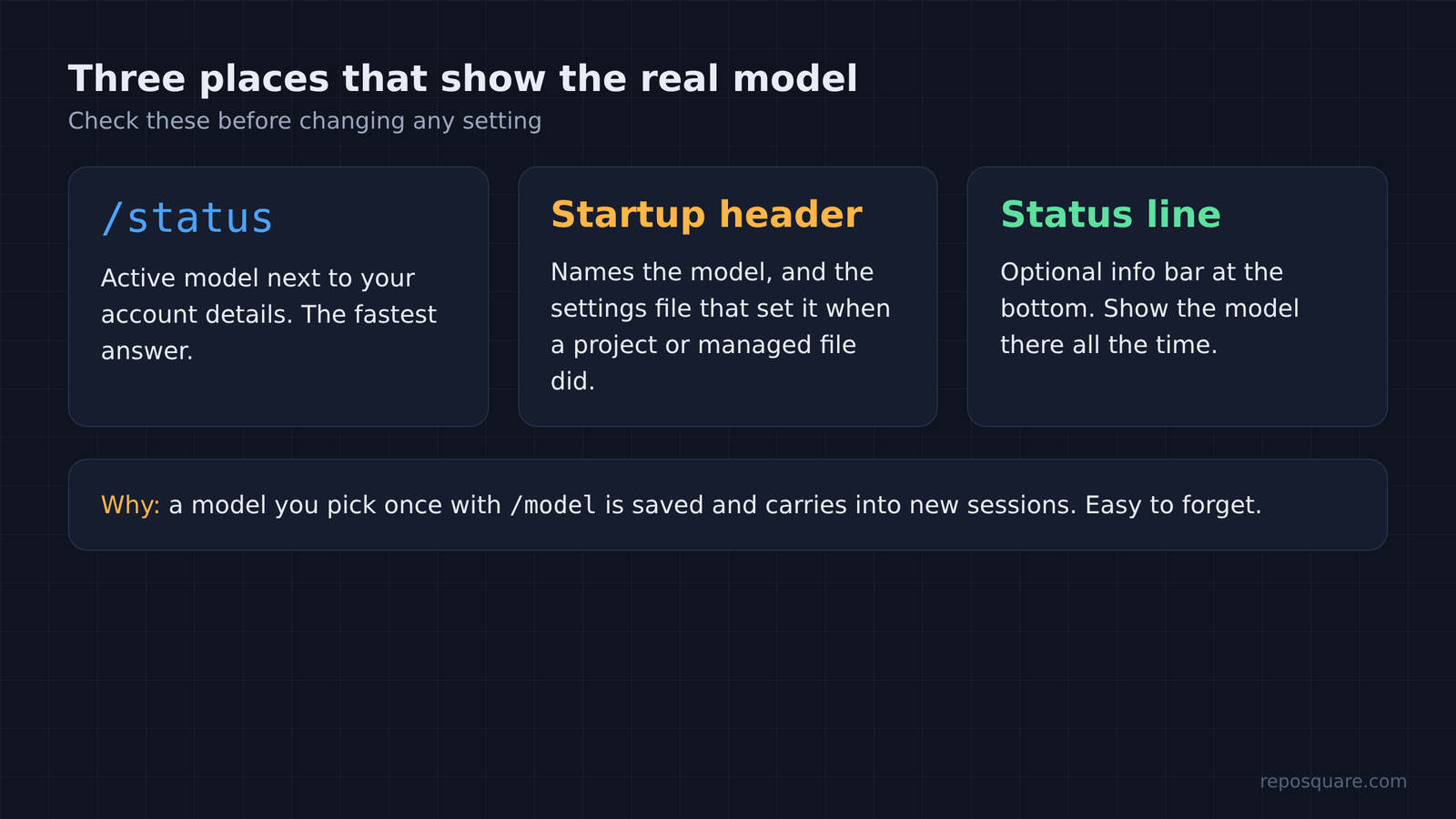
Type /status before you blame anything else. It shows the active model next to your account details, so it settles the question in a second.
Why start here? Because the model name in your head and the model on the wire are not always the same. People switch with /model once, forget, and the choice sticks for later sessions.
And /status is not the only place to look. The startup header names the model, and when a project or managed settings file set it, the header names that file too. If you use a status line (the custom info bar at the bottom of the screen), you can show the model there all the time.
So the check is quick. The harder question is what set that model in the first place.
Turning Off Telemetry Changed the Model
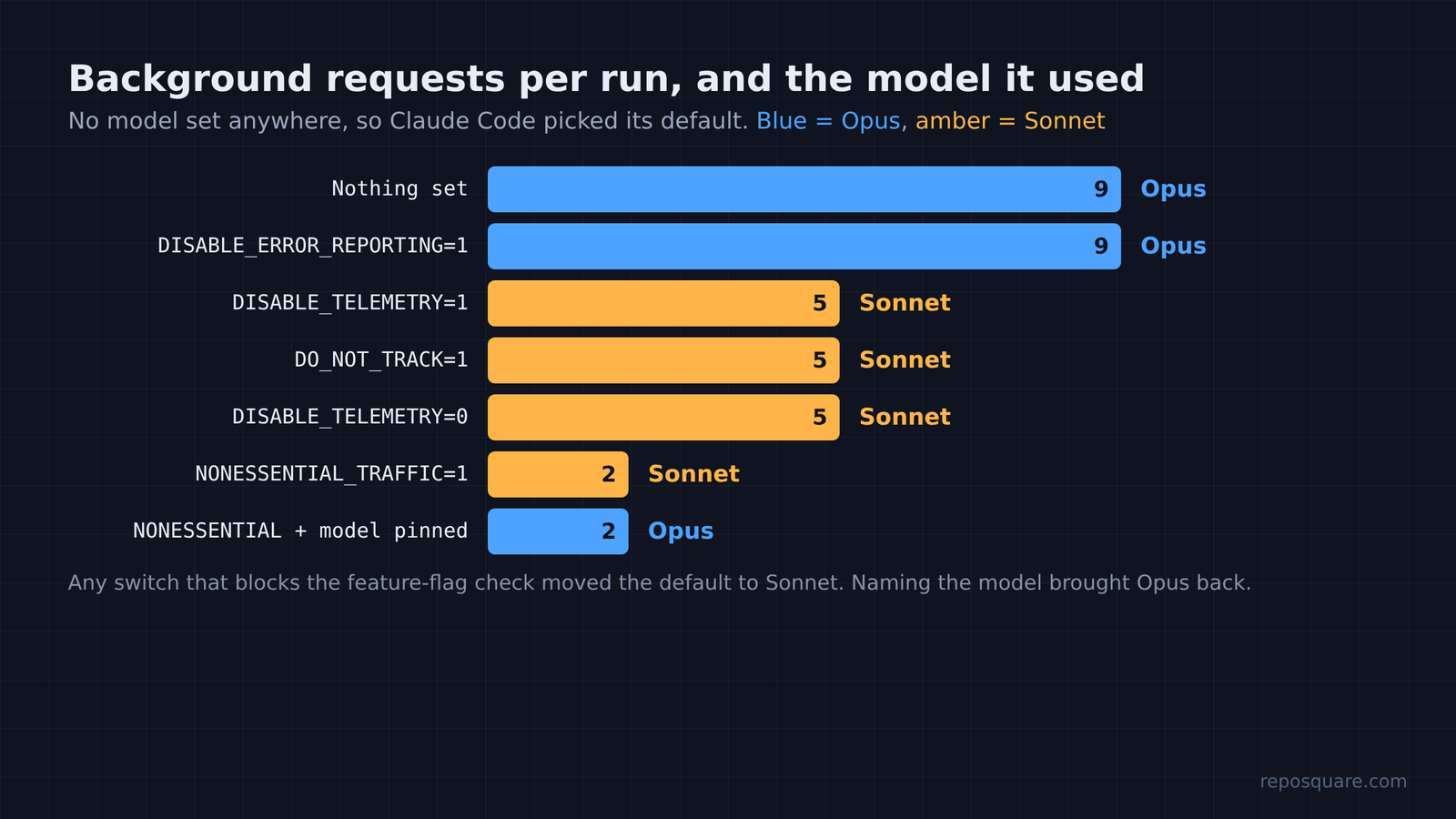
Yes. In my test, every switch that blocks feature flags moved the default from Opus to Sonnet.
First, two words. Telemetry is the usage report an app sends to its makers: what features ran, how long things took, what broke. A feature flag is a remote on/off switch the makers flip from their servers, so they can roll a change out to some users before others.
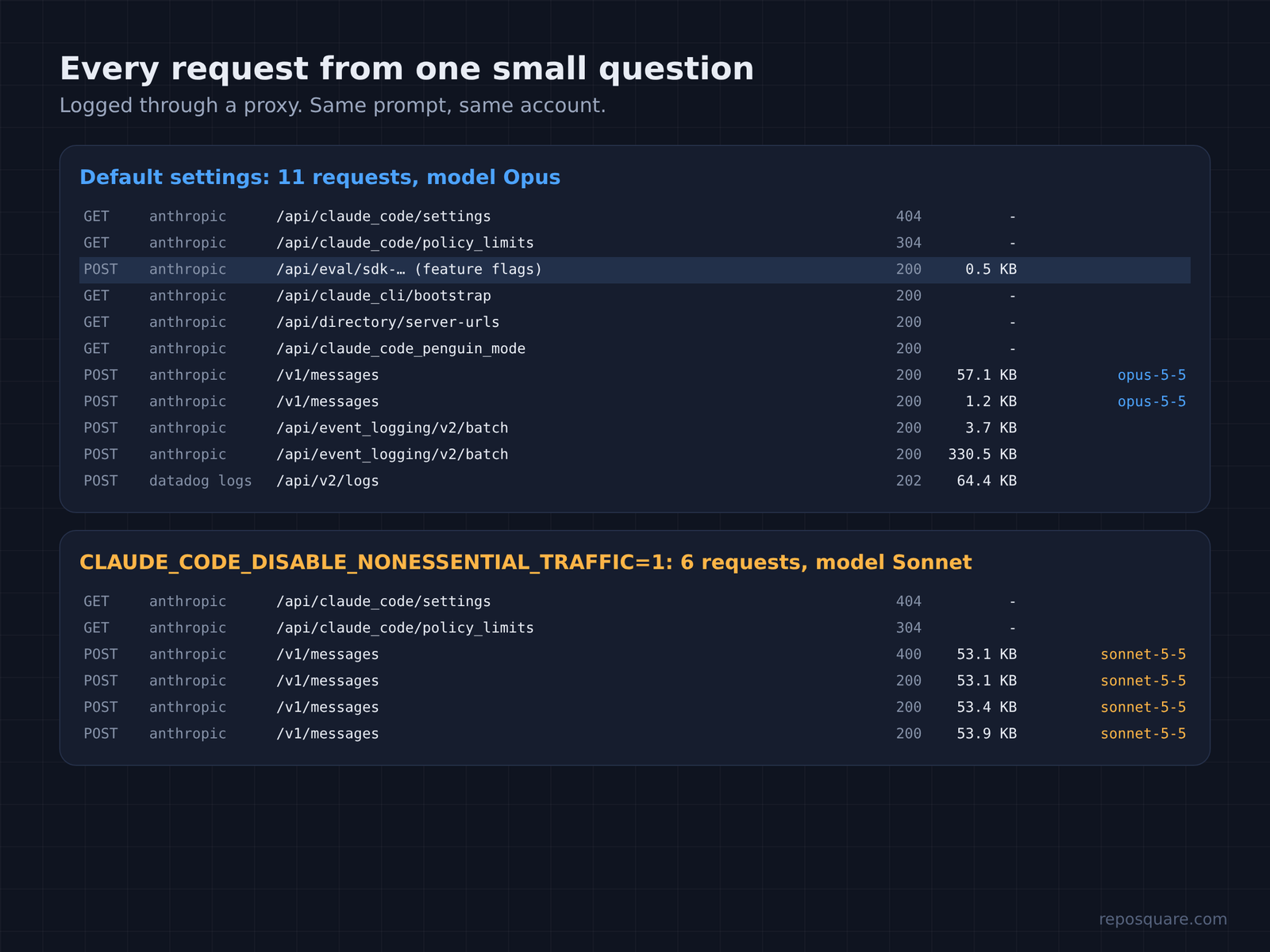
Now the test. I asked Claude Code one small question (“Read billing.py and tell me in one sentence what monthly_total does”) in headless mode, signed in with a subscription account. I set no model anywhere, so it used its default. A logging proxy (a middleman that every connection passes through) recorded each request and the model it named.
Here is what came back, run by run:
| Setting | Model the requests used | Background requests |
|---|---|---|
| Nothing set (3 runs) | Opus | 9 per run |
DISABLE_ERROR_REPORTING=1 (2 runs) | Opus | 9 |
DISABLE_TELEMETRY=1 (2 runs) | Sonnet | 5 |
DO_NOT_TRACK=1 (2 runs) | Sonnet | 5 |
CLAUDE_CODE_DISABLE_NONESSENTIAL_TRAFFIC=1 (4 runs) | Sonnet | 2 |
DISABLE_TELEMETRY=0 | Sonnet | 5 |
Nonessential off plus ANTHROPIC_MODEL=claude-opus-5-5 | Opus | 2 |
So look at the last two rows. Setting DISABLE_TELEMETRY=0 did not turn telemetry back on. For this variable, any value at all counts as “on”, so only removing it brings the flags back.
And pinning the model fixed it. With every nonessential request blocked, naming Opus directly got Opus. So the privacy setting never forced Sonnet. It only removed the thing that had been choosing Opus for me.
Still, the sample has a catch. This was one account, one plan, headless runs. Your plan may land somewhere else. That is exactly why the /status check comes first.
The Privacy Setting That Changes the Model
Because the flag check and the usage reports travel together, and the default model can depend on that check.
That link is easier to see with a TV. Picture one that downloads its channel list when you switch it on. Unplug the internet cable and it still works. It just shows the factory list it came with.
And Claude Code does something similar at startup. In my logs, the default run made one small request to a flag service before the first message. That request is where the program learns which features and settings your account should get right now.
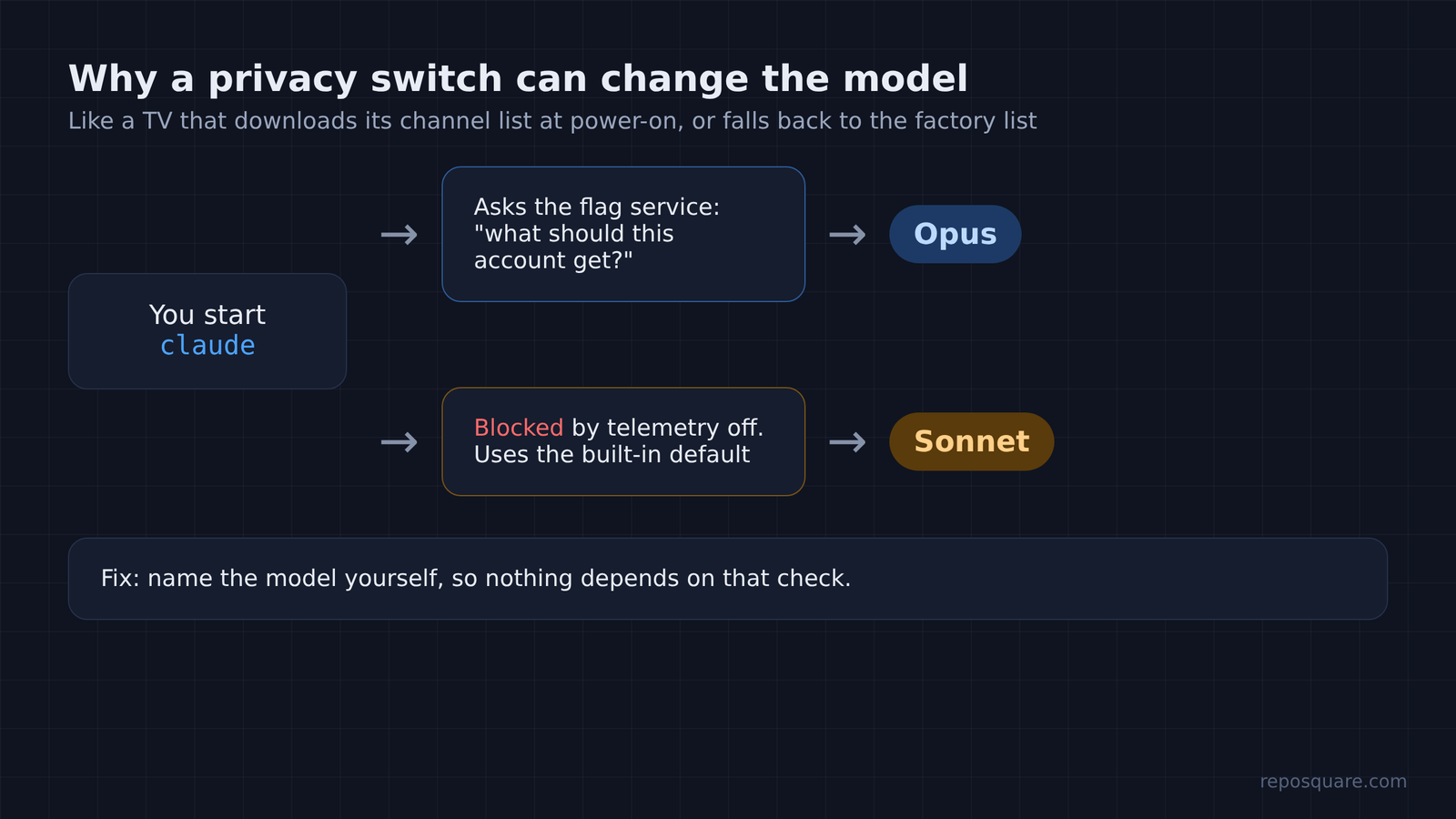
Block that request and the program has no fresh answer. So it uses the values built into the program itself. In my runs, that built-in default was Sonnet, even though the account normally starts on Opus.
That fallback is not fully documented. Switching off feature-flag fetching is known to disable some features, such as Remote Control (driving a session from your phone or another device). The default model isn’t on that official list. My test says it belongs there.
And the flags changed something else too. Without them, every follow-up request resent the whole conversation, about 54 KB each time. With them, the follow-up only carried the new tool result, about 1 KB. Same answer, more data on the wire.
Other Ways Claude Code Switches to Sonnet
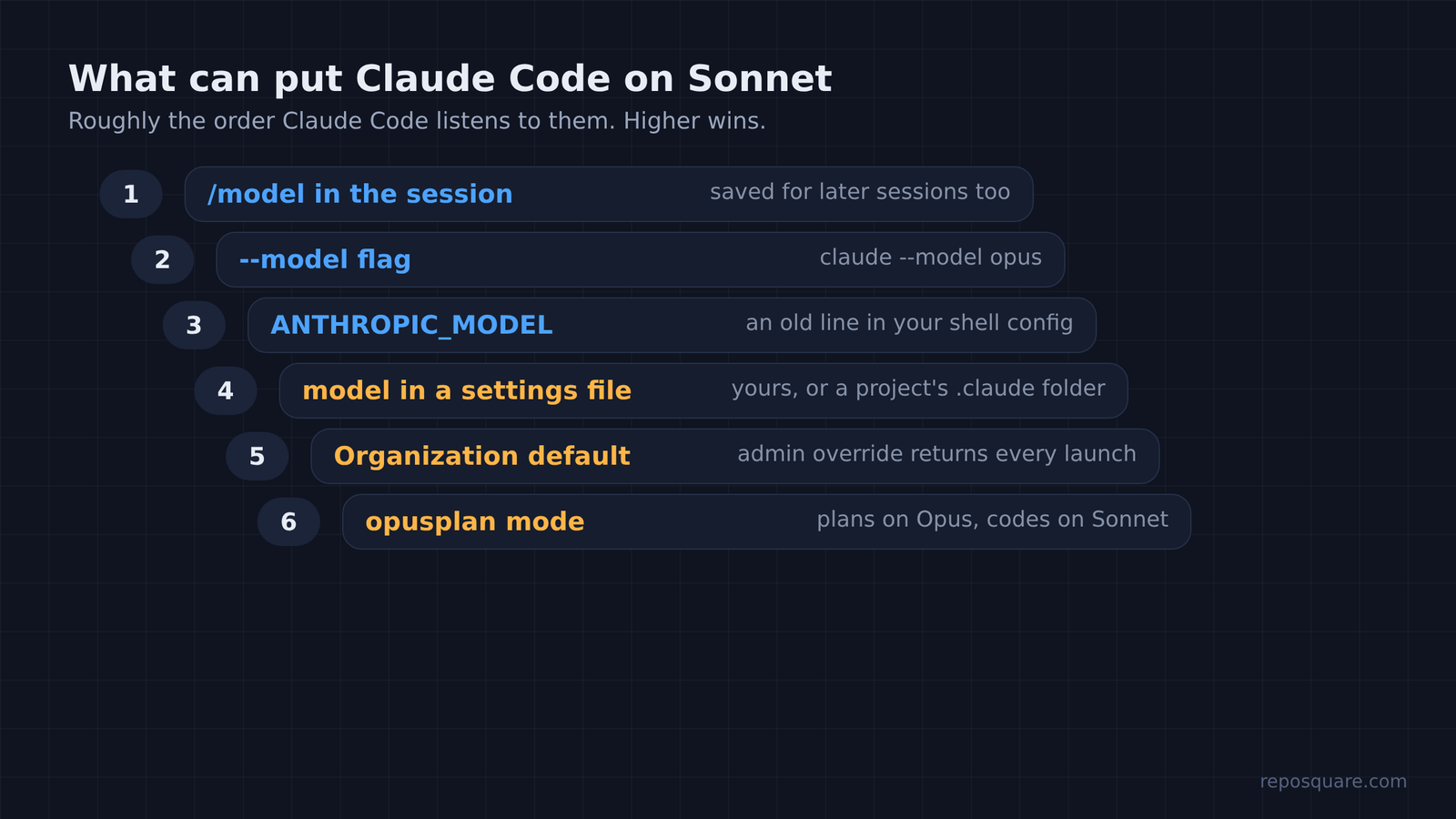
Six other things can pick the model, and most of them stick around between sessions.
Here they are, roughly in the order Claude Code listens to them:
/modelin the session. It wins right away, and the choice you save there carries into new sessions.- The
--modelflag when you startclaude. ANTHROPIC_MODELin your shell. Check your shell config file for an old line.- A
modelline in a settings file. That can be your own~/.claude/settings.json, or a project’s.claude/settings.jsonthat a teammate checked in. - An organization default set by an admin. With override on, it comes back every launch, whatever you saved.
- opusplan mode. It plans with Opus and then switches to Sonnet to write the code, by design.
There is also an automatic switch people mistake for this. When a safety check (an automatic filter for risky topics like cybersecurity) flags a request, Claude Code can rerun it on an older model. That reroute goes to an older Opus or Sonnet model, and an Opus request never lands on Sonnet that way. So if you saw Sonnet, look at the list above first.
And sub-agents (helper sessions Claude starts for side tasks) can run on their own model. A custom agent file with model: sonnet or model: haiku in it will use that model even while your main session runs Opus. If you’re comparing usage numbers and seeing several models, this is often why.
How to Keep Opus After You Turn Telemetry Off
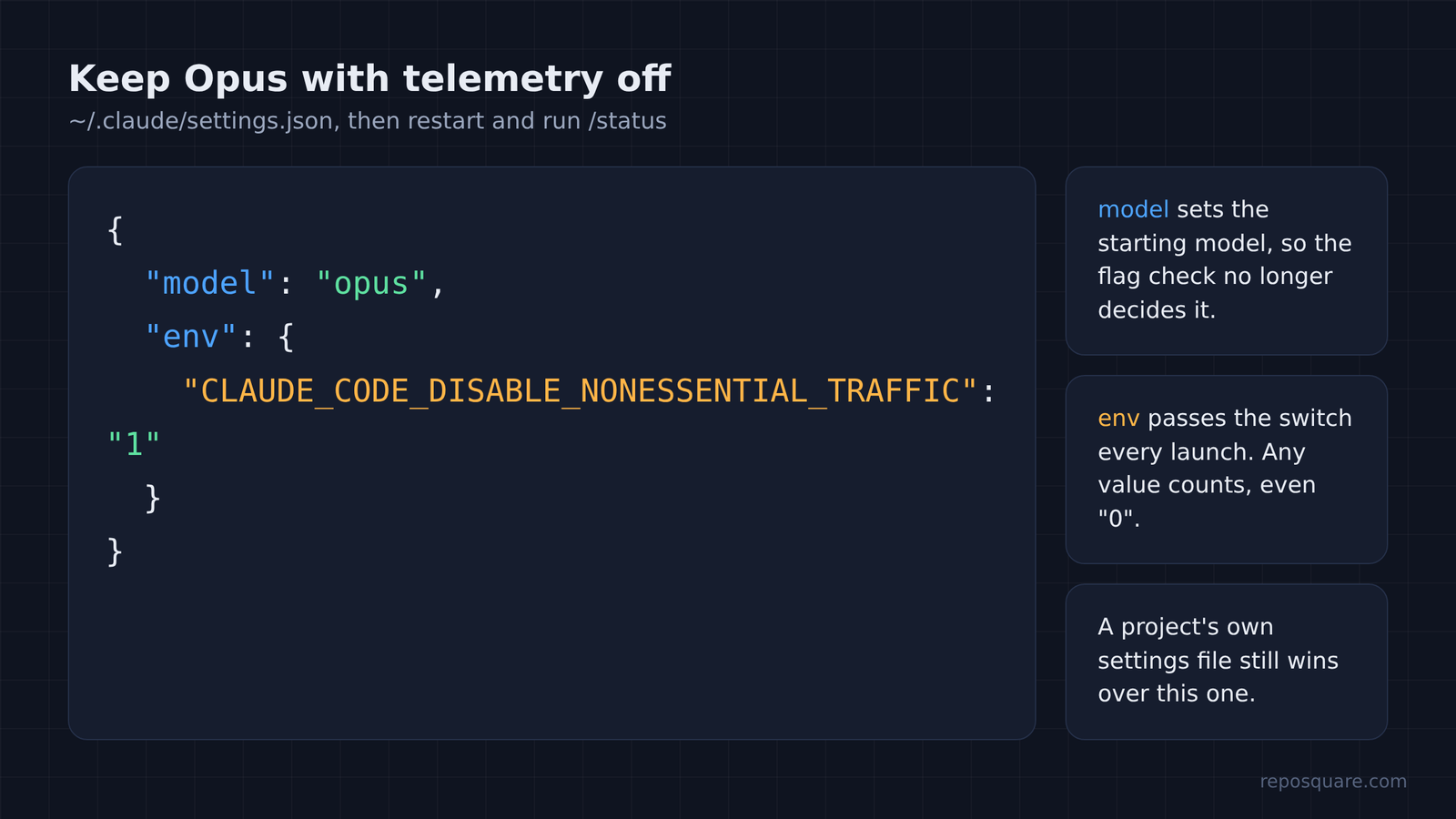
Turn the background traffic off and name the model yourself, in the same settings file.
That way nothing depends on the flag check. Put this in ~/.claude/settings.json (create the file if it isn’t there):
{
 "model": "opus",
 "env": {
 "CLAUDE_CODE_DISABLE_NONESSENTIAL_TRAFFIC": "1"
 }
}In that file, the model line sets the starting model for every new session. The env block passes the variable to Claude Code each time it starts, so you don’t have to type it. Restart Claude Code, then run /status to confirm.
Prefer the shell to a settings file? Start it as claude --model opus instead. One warning about either route: a model line in a project’s settings file still wins over your own file. If a repo keeps putting you on Sonnet, look inside its .claude folder.
What Telemetry Actually Sends
In my capture, no. It sent IDs, system details and counters, not file contents or your words.
I planted a unique marker string inside the test file and searched every background request for it. It never appeared. Neither did the prompt text, the file name, or the folder path. The event details are packed in base64 (a way of writing data as plain letters), so I unpacked them before searching.
So what did the reports carry? IDs first: your account, your organization and your device. Then system details like your operating system, kernel and shell. The rest was counters: the model name, which tools ran, the file extension, the path length and how long each step took.
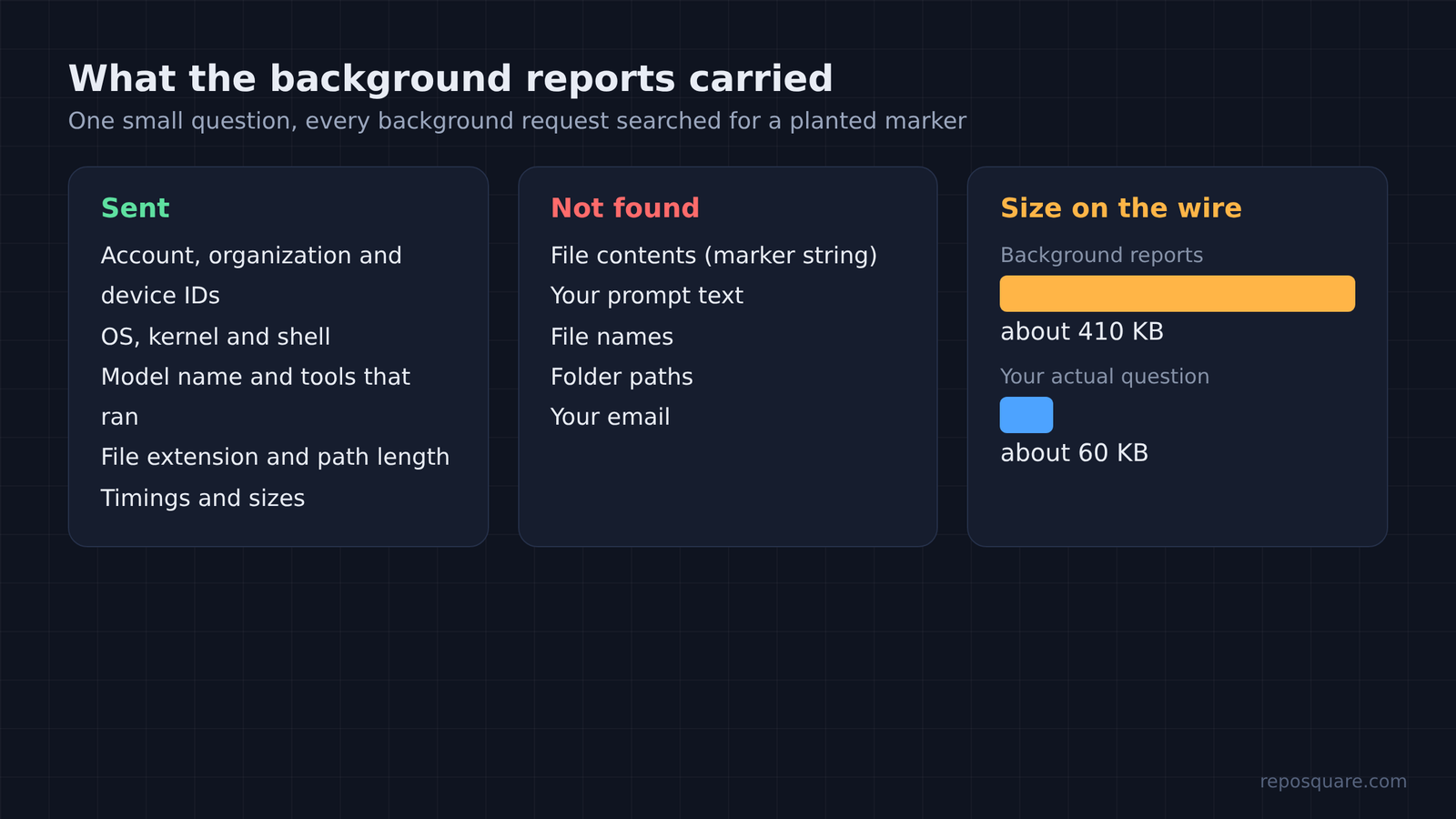
But the size of those reports surprised me. For one small question, the background reports added up to about 410 KB. The model requests that carried my actual question totaled about 60 KB. So the reporting was roughly seven times bigger than the work.
Your code does still leave the machine. Every file Claude reads goes to the model in the normal request, because that is how it answers. Telemetry is a separate stream. I covered that model side in detail in what Claude Code sends to Anthropic.
Should You Turn Telemetry Off?
If privacy or bandwidth matters to you, yes. Just pin your model when you do.
Still, the other side has a fair point. Feature flags are how you get fixes and improvements early, and some features need them. If you rely on Remote Control, leaving the flags on is the simpler life.
And training is a different setting entirely. None of these variables decides whether your chats train future models. On a personal Free, Pro or Max account that lives in your account’s privacy settings on claude.ai, under the model-improvement toggle. Business and API accounts are not used for training by default.
If you want to go further with model choice, planning with Opus and coding with Haiku shows when a smaller model is fine on purpose. And running Claude Code and Codex on the same model shows how much the model, not the tool, shapes the answer.
So keep the switch off if you like. Just write the model down, so the program never has to fall back to the defaults it shipped with.