
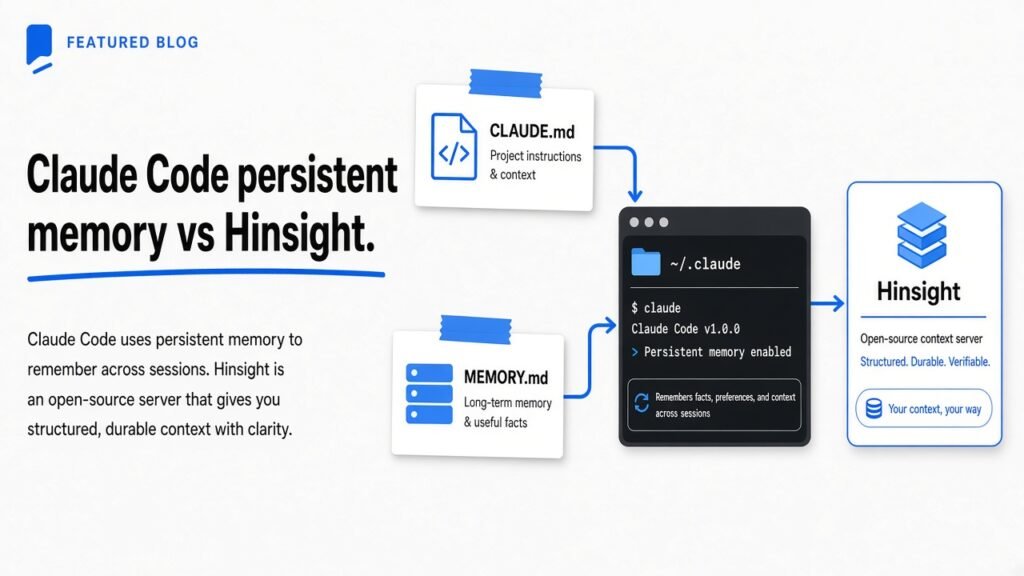
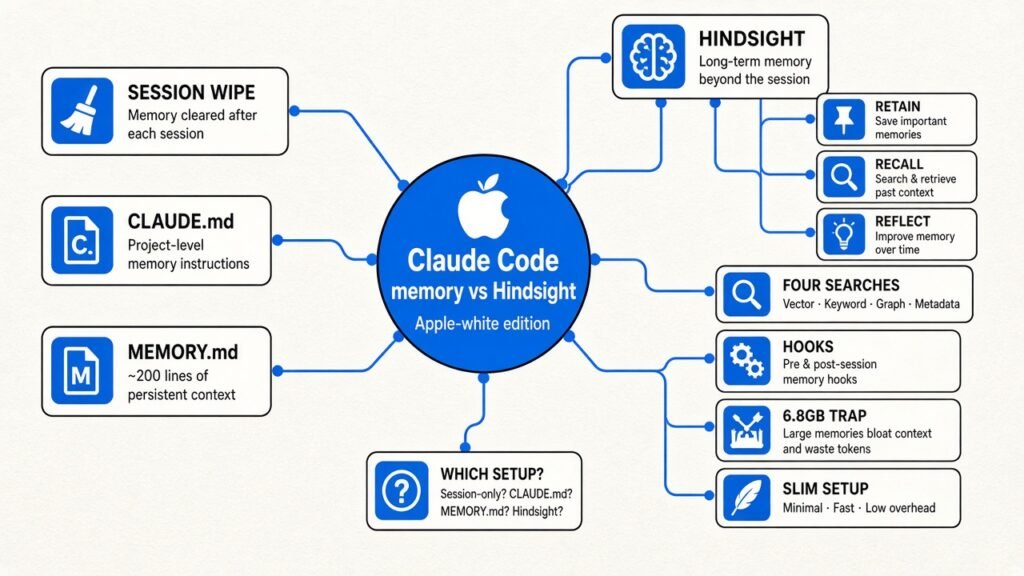
Short answer: Yes, partly. Claude Code carries two things between sessions: CLAUDE.md (rules you write) and auto memory (notes Claude writes for itself, first 200 lines loaded). That covers most solo projects. Add Hindsight, an open source memory server, only when you need memory shared across tools or searchable history. Install the slim build. The full one weighs 6.8 GB.
You open a new Claude Code session and explain, again, that the tests need a local Redis. Again you say “use pnpm, not npm.” It feels like the tool has amnesia.
That repetition costs you minutes every day and makes the agent look dumber than it is. This post shows what Claude Code already remembers, where that memory runs out, and when a memory server like Hindsight is worth adding (plus the install mistake that eats 6.8 GB of your disk).
Why does Claude forget in the first place?
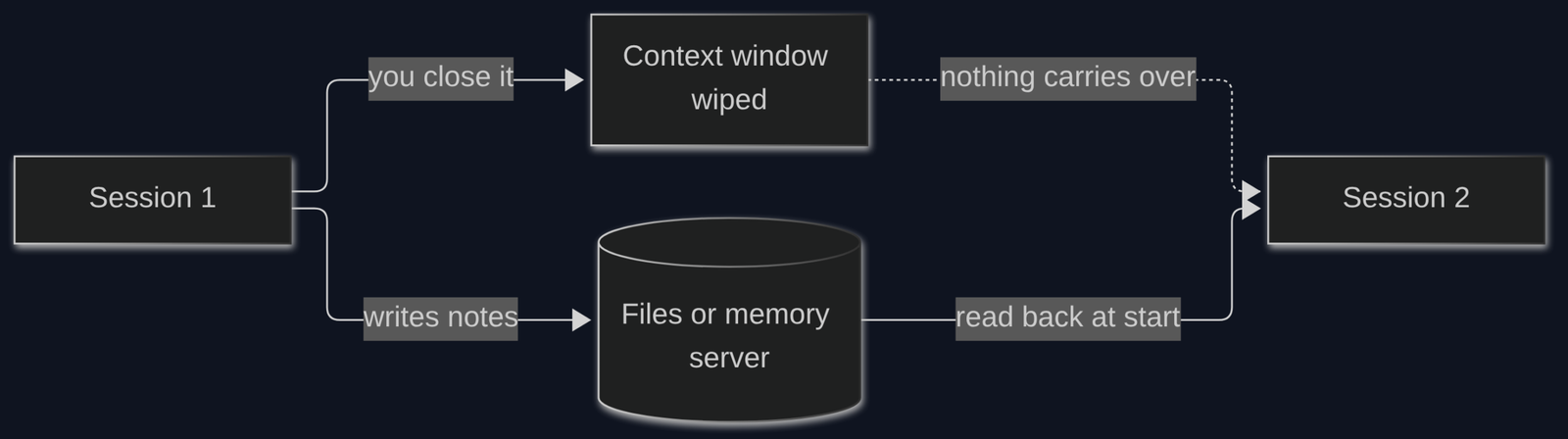
Every session starts with an empty head, by design.
Start with the base fact. An AI model can only read a fixed amount of text at once. That space is called the context window (the model’s short-term working area, measured in tokens, roughly word pieces).
Now build on it. When you close a session, that working area is thrown away. The next session starts with a fresh, empty context window. Nothing you said last time is in it.
So “memory” for a coding agent can only mean one thing: something written down outside the model, then read back in at the start of the next session. Like a sticky note on your monitor. You do not remember the Wi-Fi password, you just read the note every morning.
Every tool in this post is a different kind of sticky note. They differ in who writes it, how much fits, and how the right note gets found.
What does Claude Code already remember on its own?
Two built-in note systems load at the start of every session: one you write, one Claude writes.
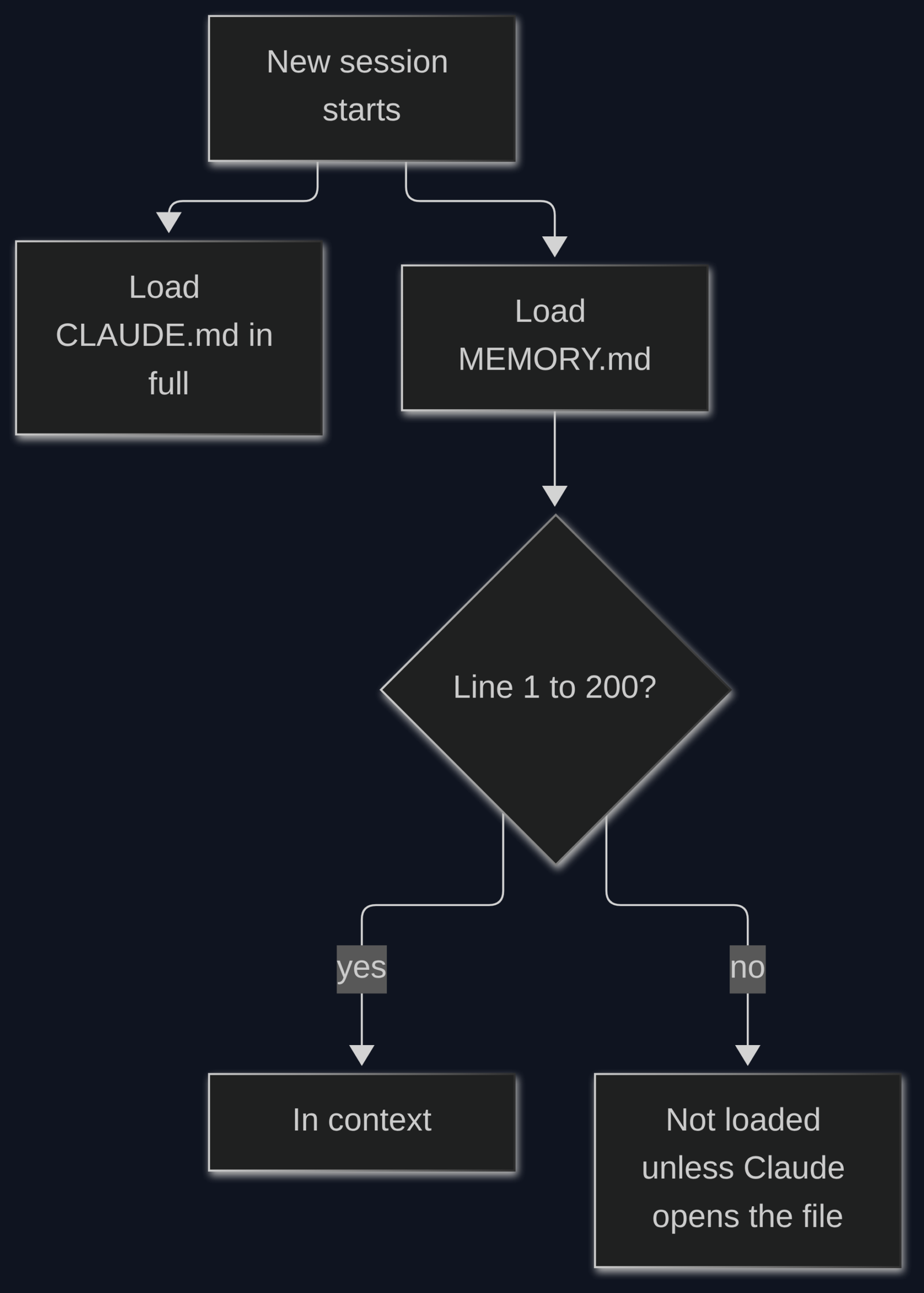
The first is CLAUDE.md, a plain text file of instructions you write for your project. Build commands, “always use pnpm”, folder layout. It loads in full every session. The official advice is to keep each one under about 200 lines, because a longer file eats context and Claude follows it less closely.
The second is auto memory. This is where Claude writes notes to itself when you correct it or tell it to remember something. It lives in a folder on your machine at ~/.claude/projects/<project>/memory/. Inside is an index file called MEMORY.md plus one small file per topic.
Here is the part most people miss. Only the first 200 lines (or first 25 KB, whichever comes first) of MEMORY.md load at session start. Anything below that line is invisible until Claude goes looking for it.
| CLAUDE.md | Auto memory | |
|---|---|---|
| Who writes it | You | Claude |
| What goes in | Rules and project facts | Corrections, preferences, lessons |
| How much loads | The whole file | First 200 lines of the index |
| Where it lives | In your project (can be committed to git) | In your home folder, on this machine only |
Try this now. It takes ten seconds and tells you which projects are close to the cutoff:
wc -l ~/.claude/projects/*/memory/MEMORY.md
Any number near 200 means Claude is about to start forgetting its own notes. Run /memory inside a session to open and trim them. If you want a good CLAUDE.md to start from, the 65-line CLAUDE.md breakdown shows what earns a place in that file.
Where does built-in memory run out?

It is a stack of text files, so it breaks when you need search, sharing, or more than one tool.
For one person on one project, CLAUDE.md plus auto memory is enough. Problems start in four places:
- Size. The 200-line index cap means older lessons quietly fall off.
- Search. Claude finds notes by reading file names and opening files. It cannot ask “what did we decide about auth three weeks ago?” and get the right paragraph back.
- One machine. Auto memory lives in your home folder. Your laptop and your work desktop each have their own.
- One tool. Codex, Cursor and Claude Code each keep separate notes. Switch tools and you start from zero.
Image: Hindsight project
If none of those hurt you yet, stop here. You do not need anything else.
If they do, you need a memory server (a small program that stores memories in a database and hands back only the relevant ones when asked). Hindsight is one of the strongest open source options, and it plugs straight into Claude Code.
What is Hindsight and how does it remember things?
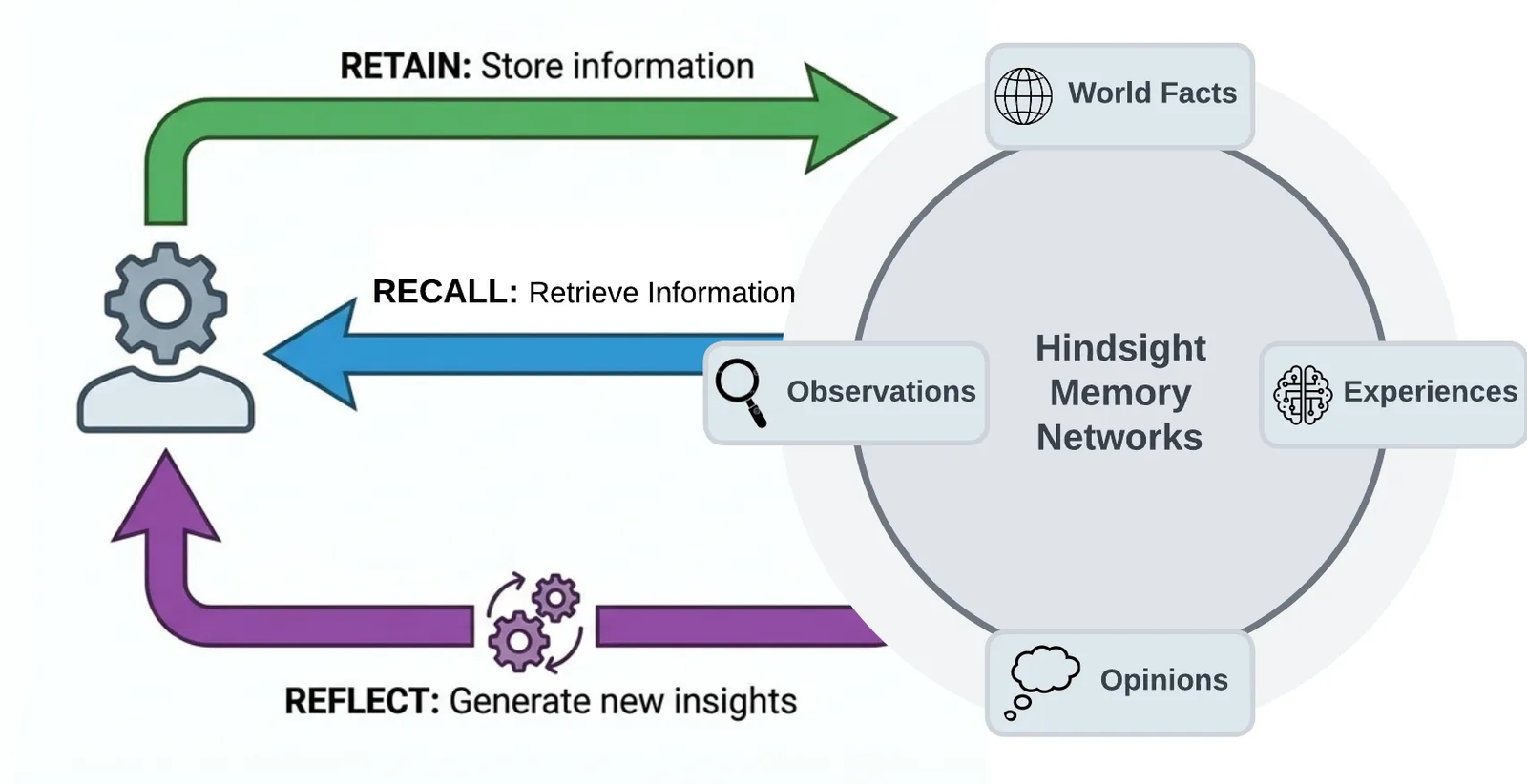
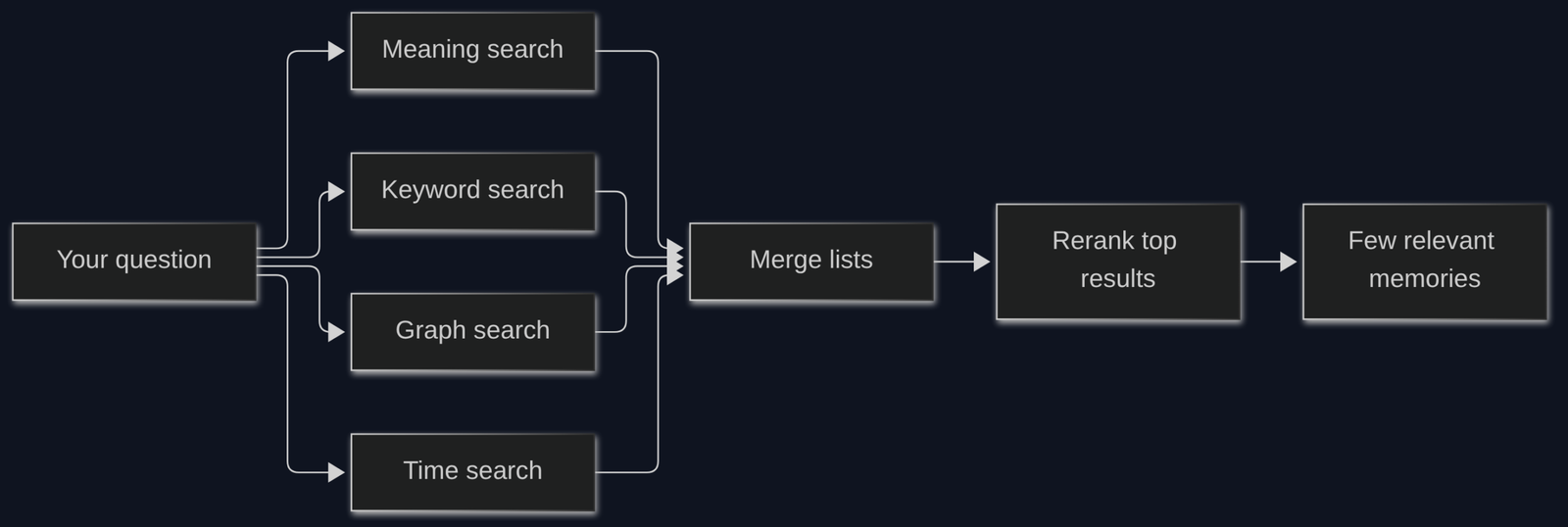
Hindsight stores facts, not chat logs, and finds them with four searches at once.
Hindsight is a free, MIT-licensed (a permissive license: use it anywhere, even commercially) memory system for AI agents. It keeps everything in PostgreSQL (a popular open source database) with pgvector (an add-on that lets the database search by meaning, not just exact words).
It works with three verbs:
- Retain. You hand it text. An LLM (large language model, the AI that reads and writes text) pulls out facts, people, dates and how they relate. “This user prefers pnpm” becomes a stored fact, not a copy of the whole chat.
- Recall. You ask a question. It returns only the memories that matter.
- Reflect. It reasons over many memories to form a bigger conclusion, like “this user always wants tests before refactors.”
Recall is where it beats plain files. It runs four searches in parallel:
- Meaning search, using embeddings (a list of numbers that captures what a sentence means, so “car” and “vehicle” land close together).
- Keyword search, using BM25 (the classic ranking method behind most search boxes: rare matching words count more).
- Graph search, following links between things (this bug, that file, that person).
- Time search, for questions like “what changed last week?”
Then it merges the four result lists with reciprocal rank fusion (a simple rule: an item ranked high in several lists wins overall) and re-sorts the top ones with a reranker (a small model that double-checks which results really answer the question).
Memories live in banks (separate memory boxes, one per user, agent or project), so one project’s notes do not mix with another’s. Keep that word in mind. It matters in the next section.
Image: Hindsight project
How does Hindsight plug into Claude Code?
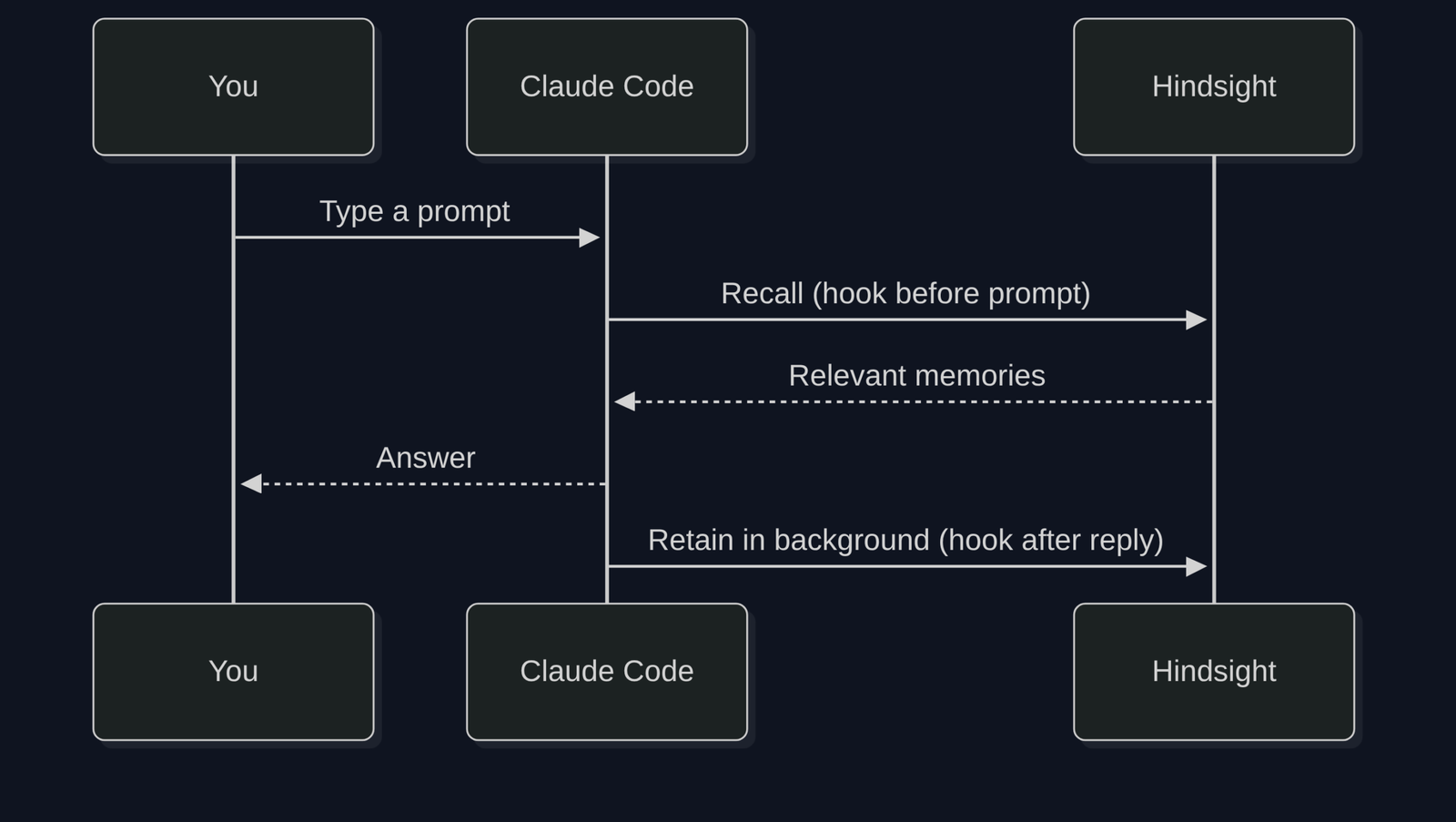
A plugin adds two hooks: one reads memory before your prompt, one saves memory after Claude replies.
A hook is a small script Claude Code runs automatically at a set moment. The Hindsight plugin uses two main ones:
- Before each message you send, it runs a recall and quietly adds the relevant memories to the context (capped at about 1,000 tokens by default, so it does not flood the window).
- After Claude answers, it sends the conversation to Hindsight in the background to retain new facts. By default it batches this every 10 turns.
Setup is two commands inside your terminal:
claude plugin marketplace add vectorize-io/hindsight
claude plugin install hindsight-memory
Two things will bite you if nobody tells you.
It needs an LLM to save anything. The retain step uses a model to pull out facts. Set an OpenAI or Anthropic API key, or set HINDSIGHT_LLM_PROVIDER=claude-code to use the Claude login you already have. With no model set, recall runs but nothing new gets saved.
All your projects share one bank by default. The default bank is called claude_code. That means a fact from your client project can show up while you work on your side project. Turn on per-project banks in ~/.hindsight/claude-code.json:
{
  "dynamicBankId": true,
  "dynamicBankGranularity": ["agent", "project"]
}
The same server also exposes an MCP endpoint (Model Context Protocol, a standard plug that lets any AI app call outside tools). That is how Codex, Cursor and Claude Code can all read one shared memory, which fixes problem 4 from earlier.
How big is the Hindsight install, really?
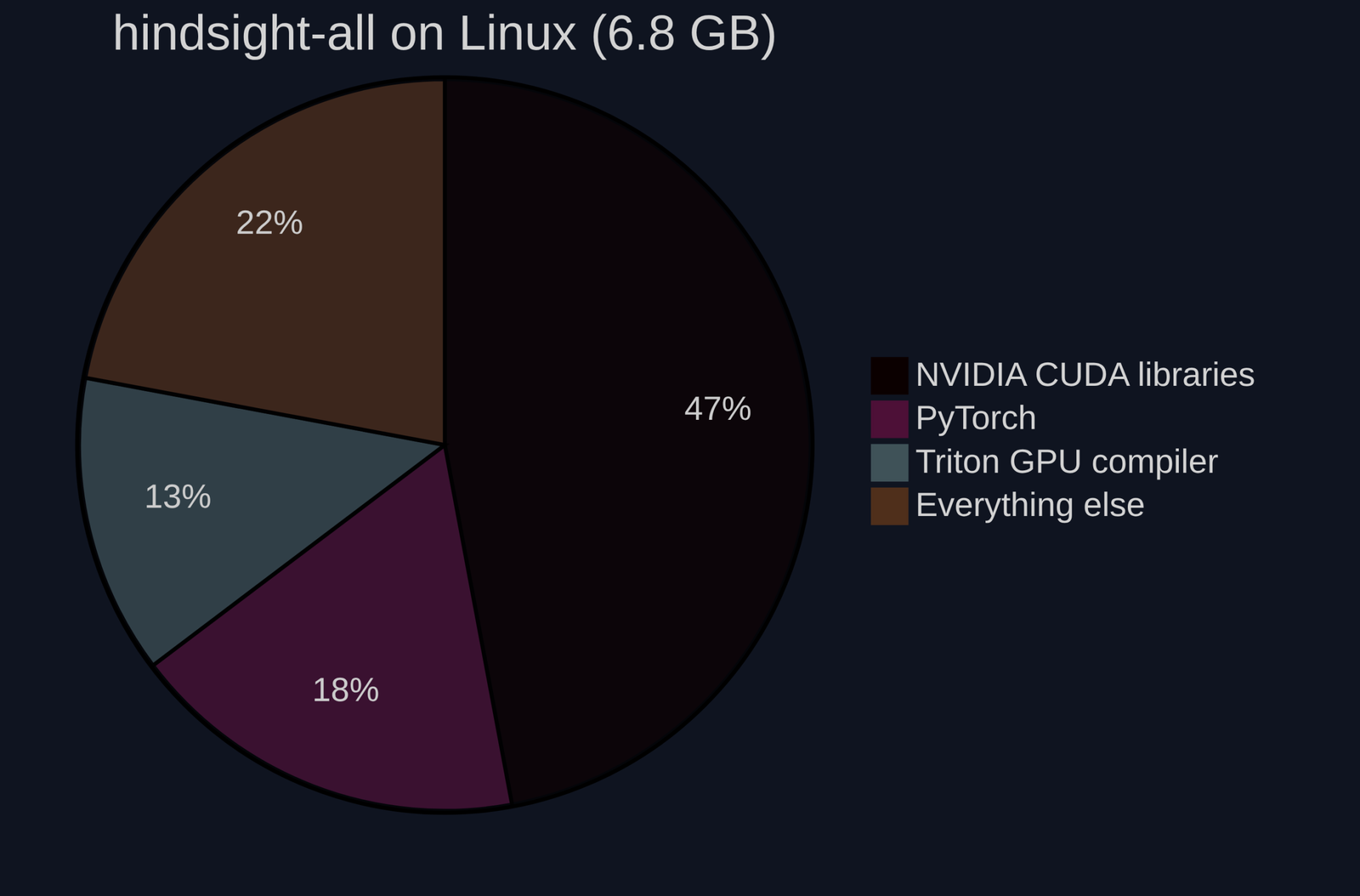
The default package is 6.8 GB on Linux. The slim one is 1.2 GB and skips the GPU stack.
I installed each package in a clean Python 3.11 environment on a Linux x86 machine and measured the folder:
| What I installed | Disk used | Packages pulled | GPU libraries |
|---|---|---|---|
hindsight-all (the one the README suggests) | 6.8 GB | about 230 | Yes, 3.2 GB of NVIDIA CUDA files |
hindsight-all-slim | 1.2 GB | about 195 | None |
slim plus local-onnx (small local embedding model) | 1.3 GB | about 196 | None |
hindsight-embed alone (the launcher the plugin uses) | 57 MB | 17 | None |
Why the gap? The full bundle runs its own embedding and reranker models on your machine. Those need PyTorch (a big machine learning library), and on Linux, pip pulls the GPU build of PyTorch by default, with CUDA (NVIDIA’s GPU toolkit) attached. You get 3.2 GB of graphics card code even on a laptop with no NVIDIA card.
This matters for the plugin too. In local mode, the plugin’s small launcher starts the full memory server by default, and that server expects those local models. First run can quietly fill your disk.
One limit of my test: the box had no model API key, so I measured the installs but did not run a full retain and recall loop. The numbers above are disk and package counts, not speed or accuracy.
What is the lighter way to run it?
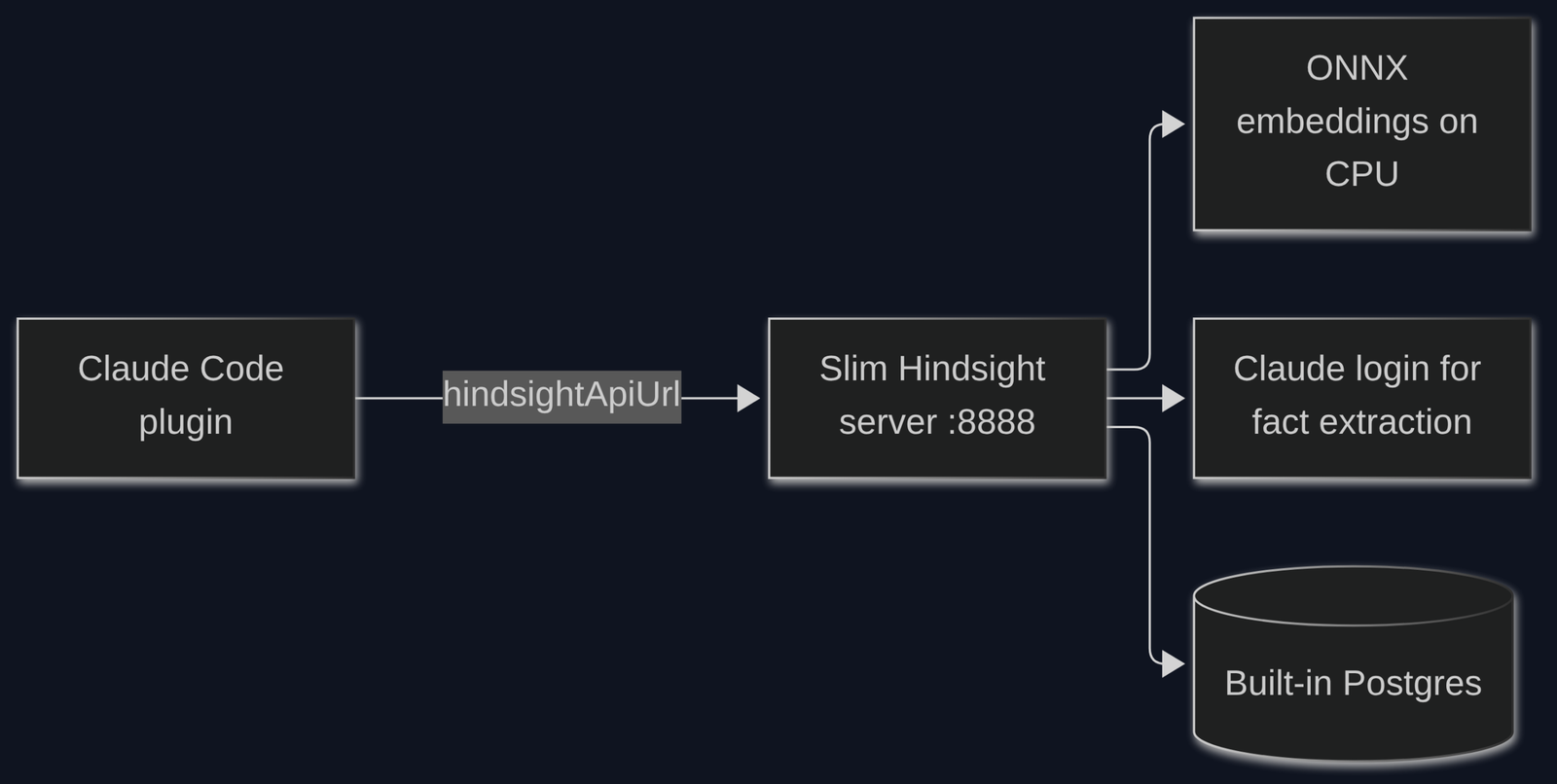
Run the slim server yourself with a small local embedding model, then point the plugin at it.
This keeps everything on your machine and skips the GPU download. It is the setup the Hindsight docs describe for machines without a big graphics card:
pip install hindsight-all-slim "hindsight-api-slim[local-onnx]"
export HINDSIGHT_API_EMBEDDINGS_PROVIDER=onnx
export HINDSIGHT_API_RERANKER_PROVIDER=rrf
export HINDSIGHT_API_LLM_PROVIDER=claude-code
hindsight-api
What each line does, in plain words:
- ONNX (a lightweight format for running small models on a normal CPU) handles embeddings, no PyTorch needed.
rrfskips the neural reranker and keeps only the rank-merging step. You lose a little precision, you save a model.claude-codeuses your existing Claude login to extract facts, so you need no separate API key (it uses your Claude plan’s allowance).
Then tell the plugin where the server lives:
mkdir -p ~/.hindsight
echo '{"hindsightApiUrl": "http://localhost:8888"}' > ~/.hindsight/claude-code.json
Add the dynamicBankId settings from earlier to the same file so projects stay separate.
Which memory setup should you actually use?
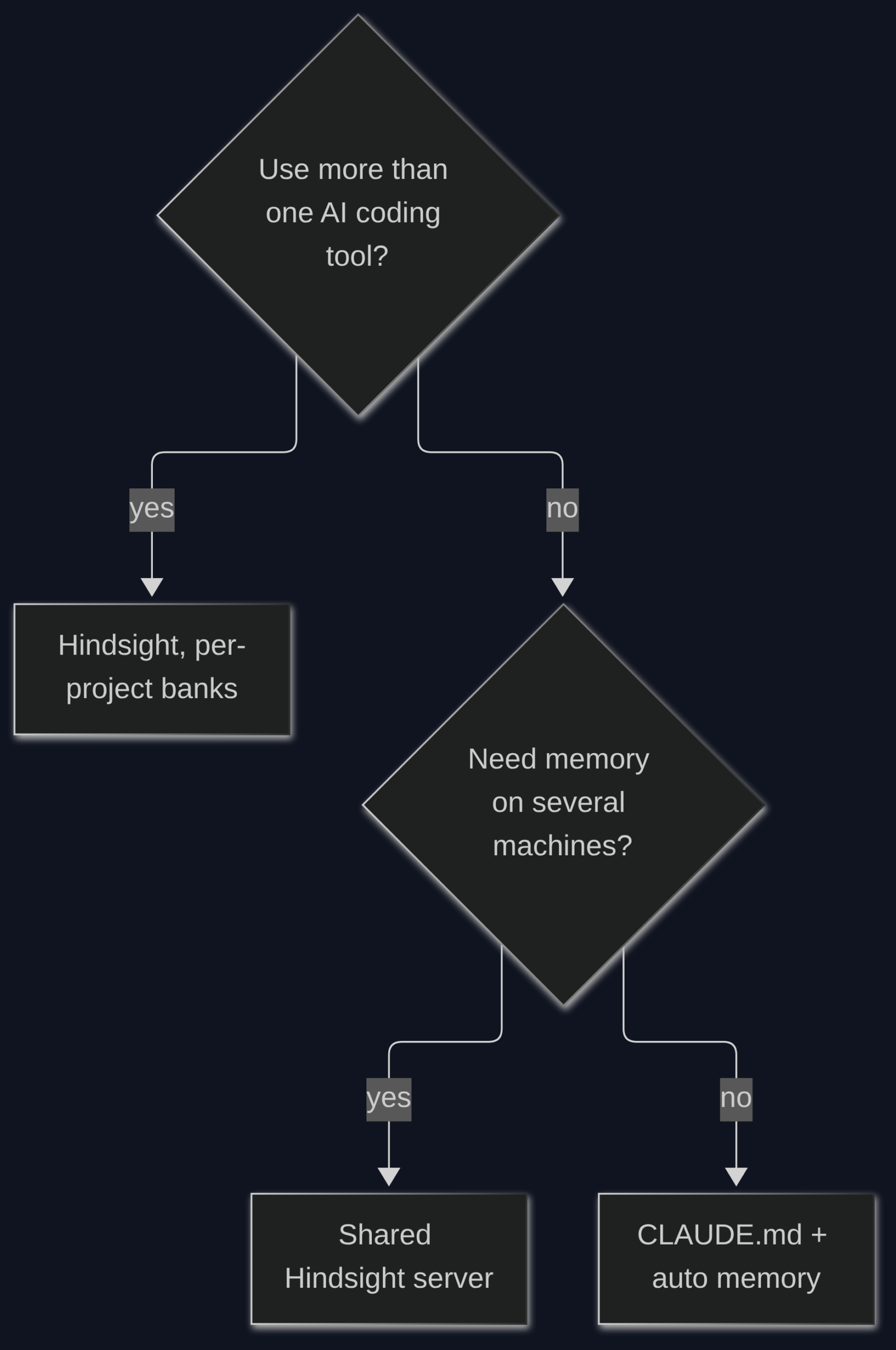
Start with the free built-in files. Add Hindsight only when a real problem forces it.
- Solo, one project, one tool:
CLAUDE.mdplus auto memory. Check the 200-line count once a month. - Many projects, lessons keep falling off: move stable facts into
CLAUDE.md, keep auto memory short, use.claude/rules/files for rules that only apply to some folders. - You switch between Claude Code, Codex and Cursor: Hindsight with per-project banks, so every tool reads the same memory.
- Team, or memory must survive across machines: run one Hindsight server (Docker or the slim package) and point every laptop at it.
The biggest win is not the fanciest tool. It is knowing that Claude only reads the top 200 lines of its own notes, and that a memory server is a database you now have to look after.
Where this fits with the other Claude Code notes
Memory, skills and MCP all compete for the same context window, so trim all three together.
If auto memory keeps growing, your skills folder probably is too; the AutoHarness post shows how to prune skills you never use. Hindsight adds an MCP endpoint, and the MCP token cost breakdown explains what every connected server adds to each request. Want to try a memory server without touching your main machine? The coop sandbox walkthrough sets up a safe box for exactly that.
FAQ
Does Claude Code remember between sessions?
Yes, through CLAUDE.md and auto memory, both loaded at the start of every session. It does not remember the chat itself, only what got written into those files.
Where does Claude Code store its memory?
CLAUDE.md sits in your project folder. Auto memory lives in ~/.claude/projects/<project>/memory/, with MEMORY.md as the index.
Is Hindsight free?
The software is free and MIT-licensed. Saving memories needs an LLM, which costs API tokens, or uses your Claude plan’s allowance if you pick the claude-code provider.
Why is the Hindsight install so big?
The default hindsight-all package bundles local ML models and the GPU build of PyTorch. The hindsight-all-slim package drops those and comes in around 1.2 GB.