
On 25 September 2026, a security firm said it had found 16,326 hosted databases where a stranger could read at least one table. The host is Supabase. The databases were not pulled out of Supabase’s own vault. The apps’ builders left a door open, and coding agents leave that door open by the way they create tables.
I would publish this. A recap of 16,326 would not be worth the click. Two locks decide whether that number includes your app, and the October date people will wait for does not turn the second lock.
A grid, then a program, then a public key
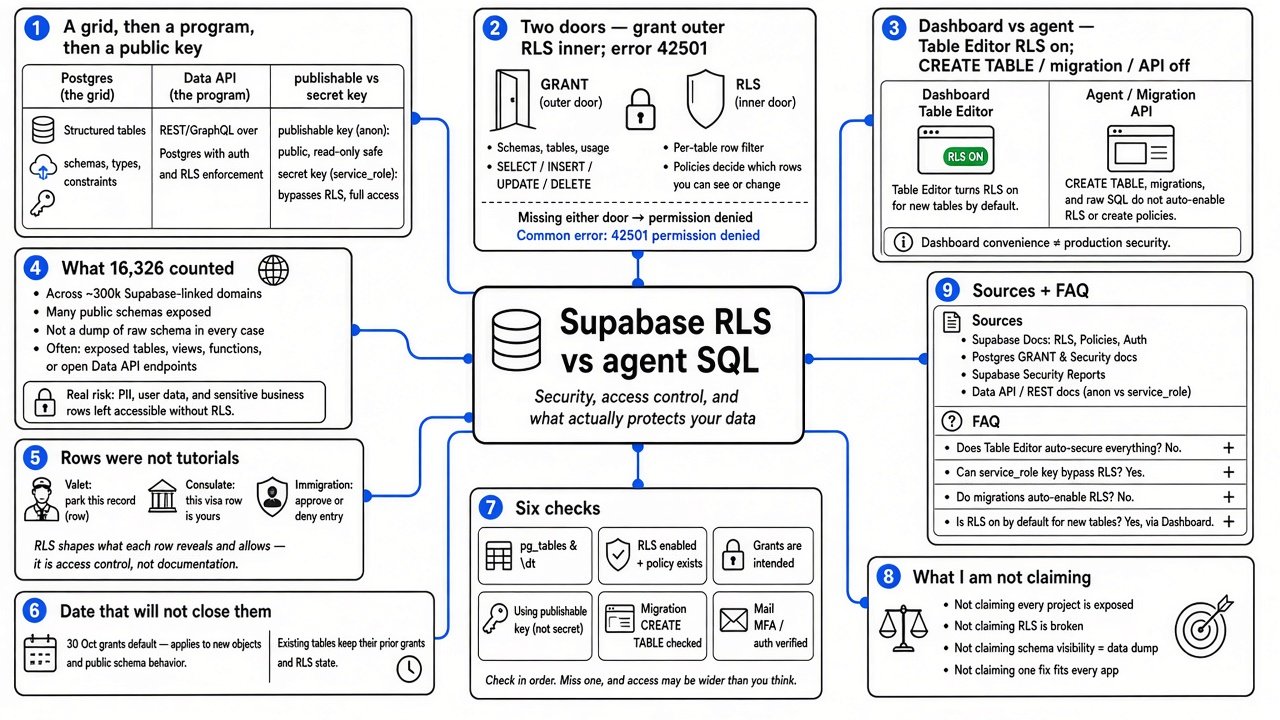
Start with the grid, before any product name. A table is a grid. A column is one kind of fact, such as a name or a phone number. A row is one set of those facts, such as one person. A database is many grids, plus the rules for who may touch them.
Postgres (the database program that actually stores the grids and applies the rules) is what Supabase runs for you. Supabase (the hosted service in front of that program, valued by UpGuard at $10 billion as of June 2026) also adds a Data API (a web address your app can call, so the page in the browser does not need the database’s private login).
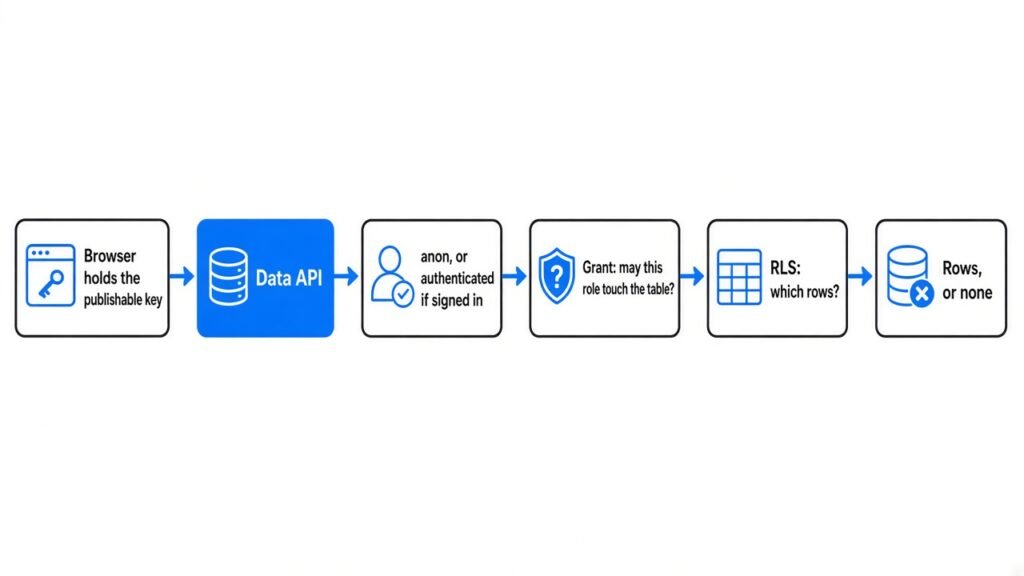
The browser is not supposed to hold that private login. It holds a publishable key (a key that is designed to be public; older docs call it the anon key). Anyone who can load your site can copy it out of the page. That is normal. The key names a role (a named user the database uses for permissions). Logged-out callers are the anon role. After sign-in they are the authenticated role (the “this person has an account” role). Secrecy of the publishable key is not the lock. The rules behind it are.
There is a second key, and it skips the row rules. The secret key (the private one; older docs call the powerful form a service_role key) acts as a role with bypassrls (a marker that means “ignore the row filter”). Supabase’s row-level security guide says never put a secret key in the browser and never expose it to customers. If an agent pasted it into a file the website ships, the rest of this page cannot save that table.
Two doors, in the order a request hits them
A request for rows is asked two different questions. They are not two words for the same lock.
A grant (permission to touch the table at all: read, add, change, or delete) is the outer door. If the role has no grant, Postgres stops. The error code is 42501, which means permission denied. No row rule runs. Supabase’s own line: a missing grant raises that error before any policy runs.
Row Level Security, shortened to RLS (a switch that attaches a hidden filter to every query on that table) is the inner door. A policy (one rule, on one table, for one action such as “read”) is the filter. Supabase describes it as a WHERE clause (the part of a query that says “only these rows”). A typical shape is: only rows whose user id equals the signed-in person.
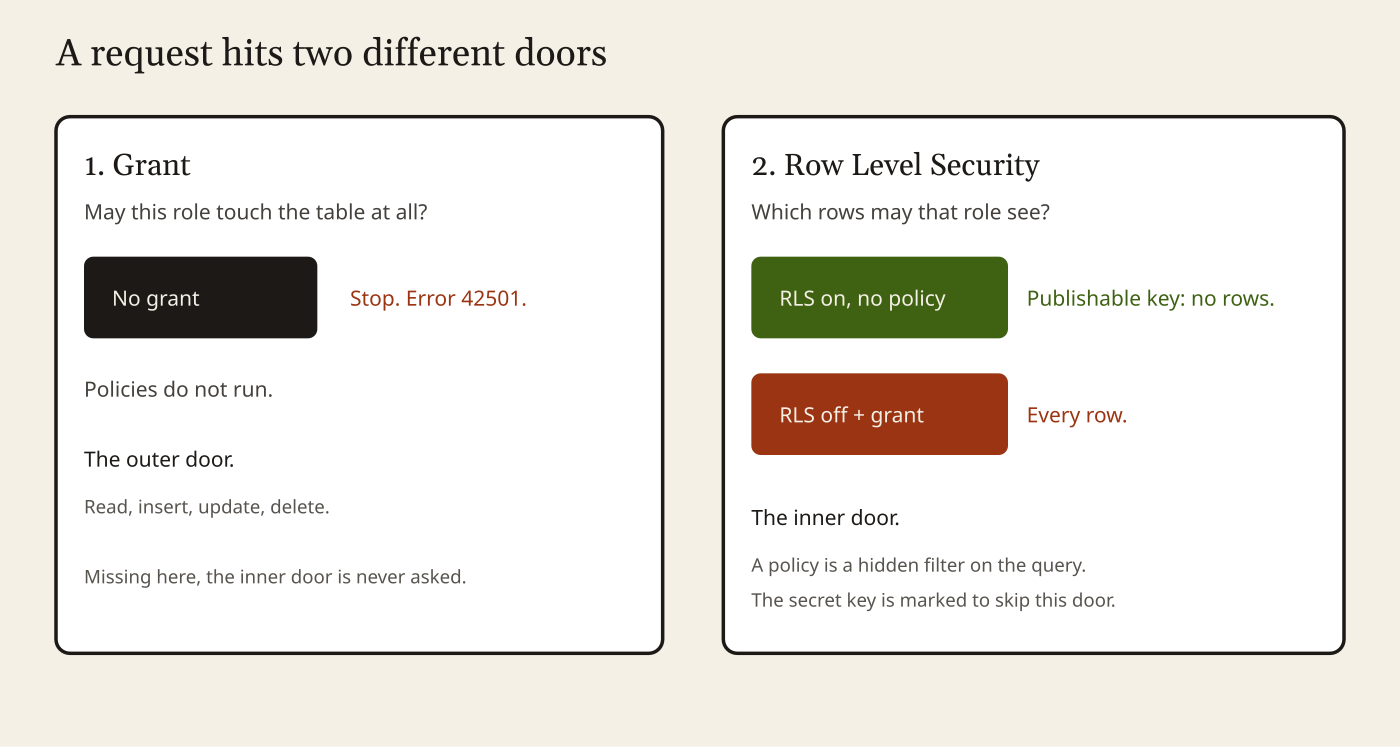
If RLS is on and you have written no policy, the publishable key sees no rows. That is a closed inner door. It is not a broken app, until you add the policy you actually meant.
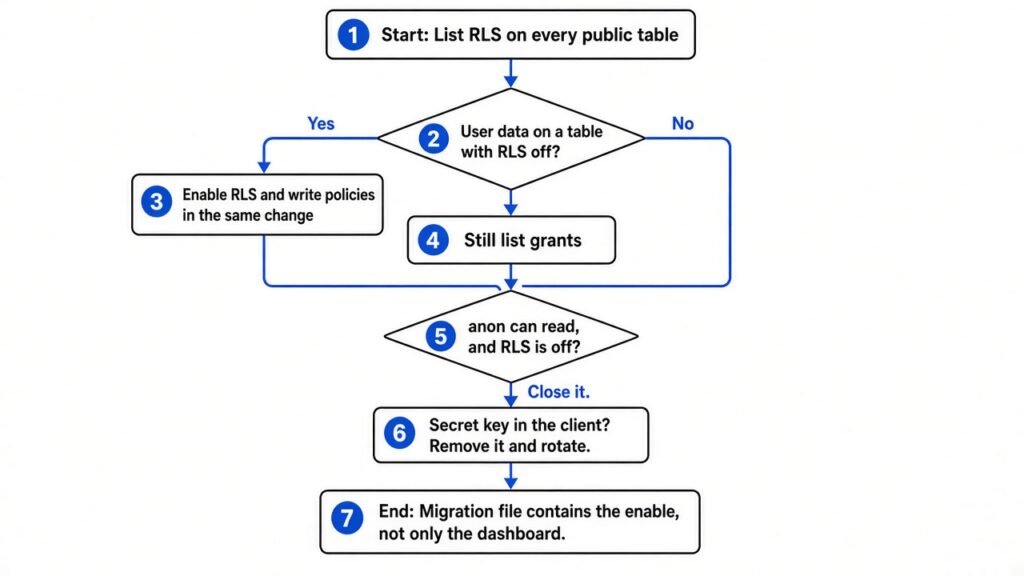
If RLS is off, there is no inner door. A grant for anon then means the publishable key can read every row. That is the hole in the study.
Adding a policy does not take a grant back. Supabase says a table “protected only by policies” can still hand anon a way to insert, if you never revoked that grant. Use both. A public bulletin board is a policy that says every row is allowed, written using (true). That is a choice. It is the wrong choice for a table of people.
Why the dashboard and the agent disagree
Supabase’s table guide says the Table Editor (the point-and-click grid in the dashboard) turns RLS on when you create a table there. The same guide says that when you create a table with SQL (the text commands the database runs), you turn RLS on yourself. The hardening guide repeats it: tables made in the dashboard get RLS; tables made in the SQL editor, in a migration, or by an outside tool do not.
A migration (a saved SQL file that creates or changes tables, so the next environment matches this one) is how an agent ships a database. The click in the dashboard does not rewrite that file.
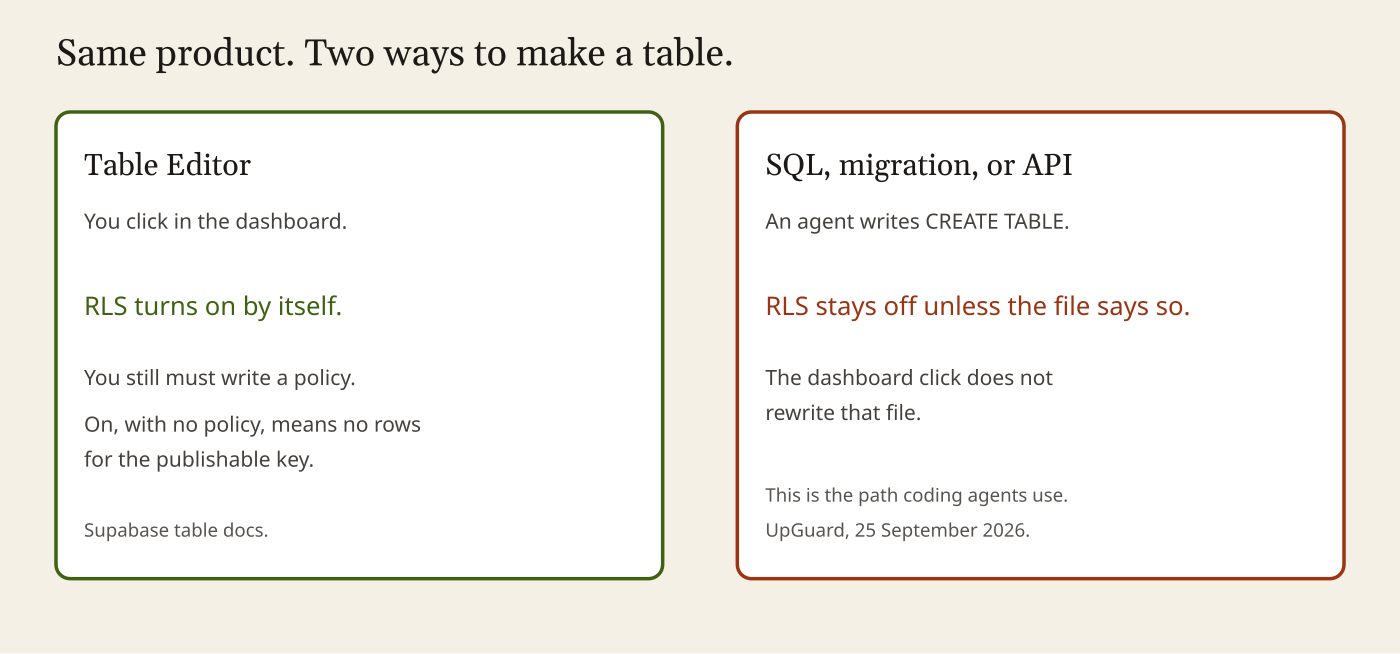
UpGuard’s report, written by Greg Pollock and published 25 September 2026, states the split in the words that matter here: tables created in the Table Editor get RLS by default; tables created through the API, which is how coding agents talk to Supabase, do not. UpGuard ties the scale of the problem to Supabase becoming a default store for those agents, including Claude Code (Anthropic’s coding agent that edits a repo and runs commands).
Bil Harmer, Supabase’s chief information security officer, told TechCrunch the same day that he had not seen the research. He said projects are “secure by default,” and: “We provide secure defaults and tooling, and customers control how their own projects are configured.” He also said, “Security at Supabase is never finished.” The default he can point at is real for the Table Editor, and, since May, for a different lock on new projects. It is not what a CREATE TABLE does to RLS.
What 16,326 actually counted
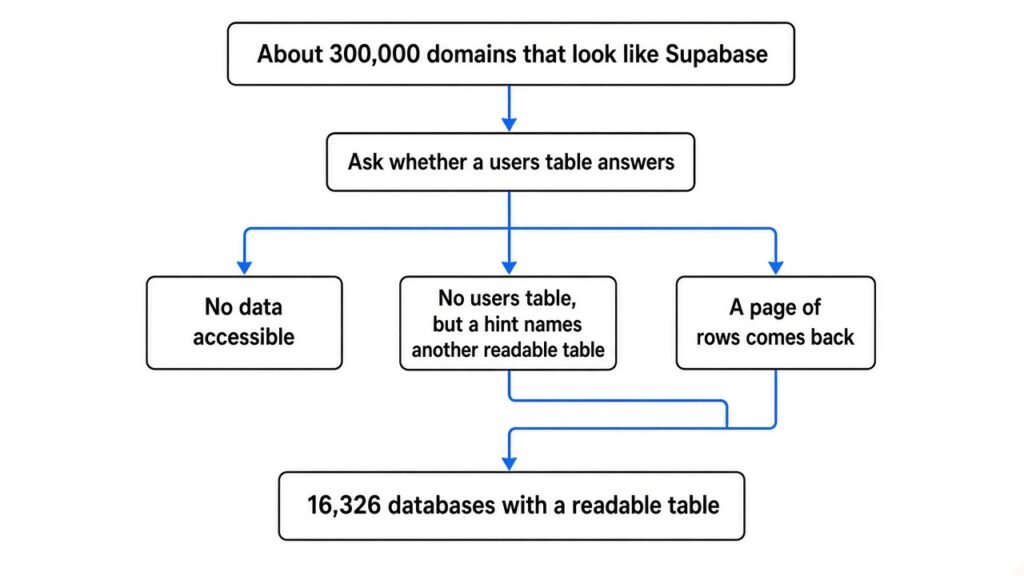
UpGuard did not claim to have opened every Supabase project. The report says they gathered about 300,000 unique domains (website names) that looked like they used Supabase. The two sources they name are BuiltWith (a service that fingerprints which software a site runs) and the Chrome UX Report (a public Google set of scripts from real sites). They then asked each domain whether a table named users would answer.
Three answers came back. No data was accessible. Or there was no users table, but some data was accessible, and the database named another accessible table as a hint. Or a page of results came back. 16,326 databases were the ones with a readable table under that probe.
Because that set is large, UpGuard says they judged the kind of data from the schemas (the column names and types, the shape of the table, not every cell) rather than reading every row. Over half of the 16,326 had indicators of some PII (personal data: names, contact details, and facts of that kind). A smaller share showed passwords or authentication tokens (strings that prove you are a given account). A very small number had plausible credit card data. More often they saw signs of a payment system, which is not itself a card number. It is a hint that money moves through the app.
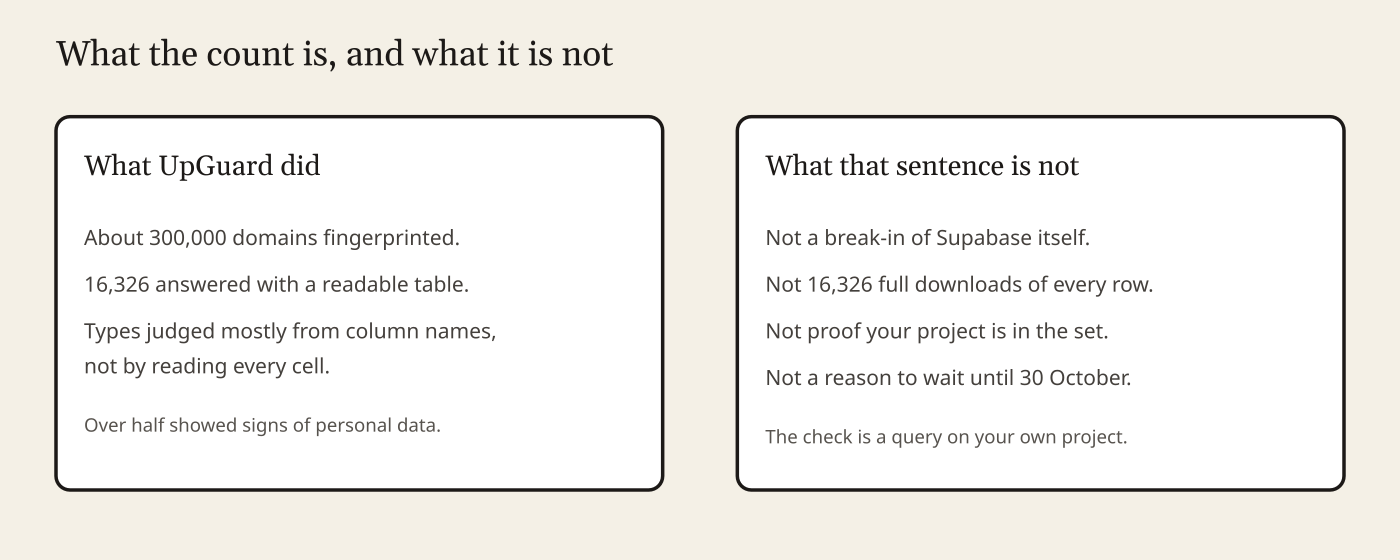
Hold the number there. It is large enough to matter. It is not “16,326 complete copies of every customer’s life were downloaded.” It is also not a list you can search to see if you are on it. The check is a query on the project you own.
The rows were not tutorial apps
UpGuard published case notes without, in the passages used here, naming the companies. This page does not add names, addresses, or a way to query someone else’s project. The shapes are the point.
A U.S. valet service: more than 100,000 customers, each with a phone number; about 43,000 with an email and a full name; about 78,000 license plates; visit history, tips, and a free-text notes field. A separate staff table had 665 rows, with email, phone, and push tokens (the address a phone uses to receive an alert). About 4,560 of the customer emails, roughly 11 percent, were at other companies.
A consulate in France, run by an African government: 25,000 people, with street addresses, and a field for which emergency housing site they were in.
A Canadian immigration and relocation service: nearly 5,000 people, almost all with name, email, phone, and date of birth. 884 of those rows stored a password in plain text (the password itself). A hash (a one-way scramble of the password, which is what you should store) would not have made the open table fine. It would have made this one column less useful to a thief after the table was copied. RLS does not fix a plain-text password. A plain-text password does not fix a missing RLS switch. Both are wrong, for different reasons.
A text-message service in the Philippines: more than 100,000 SMS messages, most of them one-time codes, plus a slice of ordinary texts between drivers and passengers.
An adult platform in India: on the order of 65,000 accounts, with identity-document fields and payout details, and a messages table past 100,000 private chats. The document types are not listed here on purpose. The lesson is the same as the valet parking lot. This is not sample data.
Smaller scans, as UpGuard lists them, were already pointing the same way. Modern Pentest: 28 percent of 107 Y Combinator startups exposing personal data. Symbiotic Security: 39 of 1,072 vibe-coded apps (apps built by describing them to an agent, then shipping what it wrote) had a table readable with the public key. Escape: 175 leaking databases across about 1,400 such apps. Red Access: about 5,000 reachable apps inside 380,000 addresses, about 2,000 of them with sensitive data. Those figures are UpGuard’s summary of other people’s studies. They were not re-run for this page.
The date that will not close them
There is a second change, and headlines will staple it onto this one.
A schema (the namespace your tables live in; the one the Data API exposes is called public) used to hand new tables a full set of grants for anon, authenticated, and the service role. Supabase’s changelog says that on 30 May 2026 this stopped being the default for new projects, rolled out over a few weeks. On 30 October 2026 that setting is applied to existing projects.
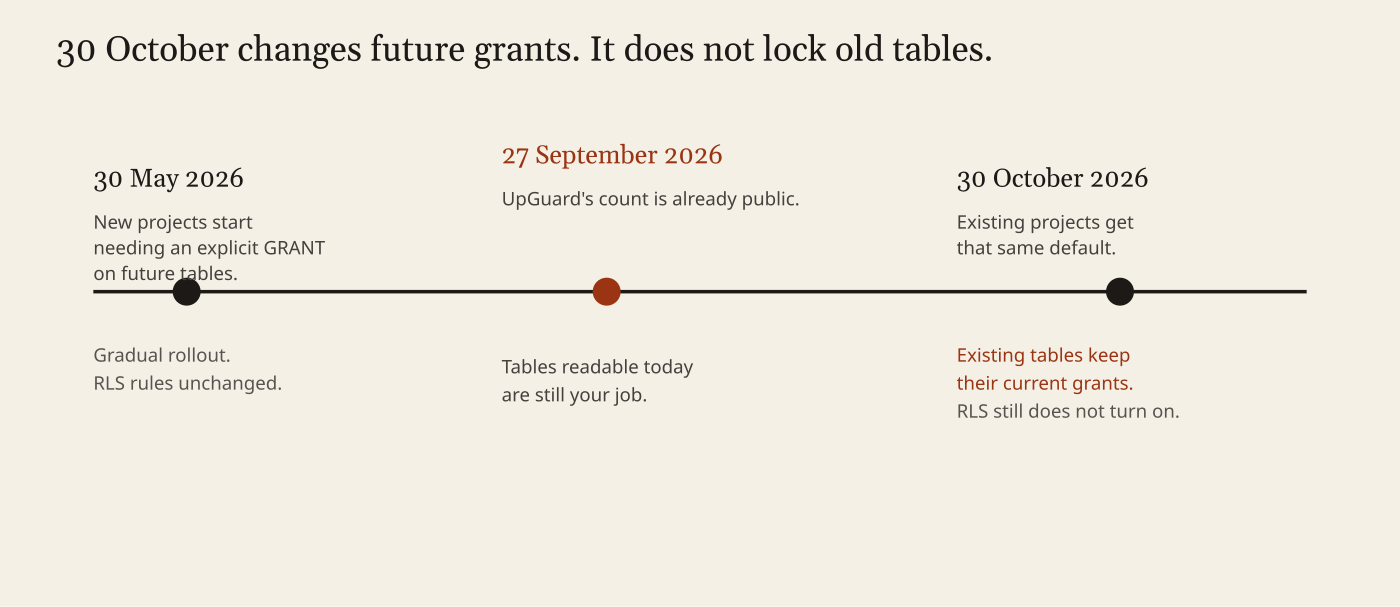
Read the next line from that same changelog before you wait. “Existing tables are not affected in your project, they keep their current grants and stay reachable.” The change is the default for future tables. It does not turn RLS on. It does not take grants away from tables that already have them.
So 30 October will not sweep the 16,326. A table that is readable this Sunday is still readable that morning, unless you change it. A table an agent creates after the deadline, on a project that has the new default, will be refused until a GRANT exists. That is a better outer door. It is still not the inner door.
The error even coaches the agent. Supabase documents the hint: grant the privilege to anon. An agent that “fixes” the error by granting, and then stops, has opened the outer door and left the inner one off. That is the loop to interrupt. Put the grant you mean, enable row level security, and the policies in the same migration. Supabase tells people who use coding agents to install their agent skill, which they say includes the grant step and which they update when the platform changes. A skill that grants, and never enables RLS, is not finished. Read the file it writes.
Six checks, on the project you own
Run these in your project’s SQL editor. Nothing below is a request to send at someone else’s site.
1. List the inner door. This is the query in Supabase’s table guide.
select tablename, rowsecurity
from pg_tables
where schemaname = 'public'
order by tablename;rowsecurity true means RLS is on. False means it is off. Every table you meant to create should appear. A table of people should not be false.
2. Turn the switch on in the same change as the policy.
alter table public.your_table enable row level security;Until a policy exists, the publishable key sees no rows. The SQL editor can still show every row, because you are the table owner, and the owner is not stopped by RLS. If you only look at the editor, the app and the database will seem to disagree. They do not. You are looking through a door the website’s key does not use.
For a table that stores one person’s rows, and has a user_id column of the same type as auth.uid() (the id of the signed-in user), a read rule looks like this:
create policy "read own rows"
on public.your_table
for select
to authenticated
using ( (select auth.uid()) = user_id );Add the matching rules for insert, update, and delete, or those actions stay closed. Do not “make the app work” with using (true) on a users table. That policy is a public board.
On a project created after the May 2026 default, you also need the GRANT, or the API returns permission denied before the policy runs. Grants and policies belong in one file.
3. List the outer door.
select grantee, privilege_type
from information_schema.role_table_grants
where table_schema = 'public'
  and table_name = 'your_table'
order by grantee, privilege_type;If anon has SELECT, and rowsecurity is false, the key in your JavaScript can read the table. That pair is the hole.
4. Search the repo for the secret key. Look for service_role, the secret key, and any public-prefixed variable (NEXT_PUBLIC_, VITE_) holding it. The publishable key in the client is normal. The secret key in the client is the bypass. Take it out, rotate it in the dashboard, and assume it was copied.
5. Read the migration, not the badge. Open the SQL file the agent added. If it contains create table and does not contain enable row level security, the badge in the Table Editor is a wish about a different path. The Supabase agent skill is their recommended update for the grant step. It does not replace reading the file.
6. Open the mail they already send. The hardening guide says Supabase sends daily email when a table is exposed to the Data API without RLS. The Security Advisor (a linter, meaning an automatic critic, in the dashboard) lists the same class of mistake. Mail that lands in an inbox nobody opens is not a control. Also turn on MFA (a second check at login, past the password) on the Supabase account. That does not close a table. It stops a stolen login from becoming a second hole.
If the worry is the agent itself, not only the table it creates, the fence around the machine is the coop sandbox writeup. This page is the database on the other side of that fence.
What I am not claiming
This is not a break-in of Supabase’s own servers. It is not “your password manager was hacked,” and it is not a break of encryption. It is customer projects whose tables answered the key those projects publish on purpose. UpGuard judged most of the 16,326 from column shapes, not from a full read of every row. Harmer’s “secure by default” fits the Table Editor, and the May 2026 grant default on new projects. It does not describe a CREATE TABLE an agent ran where anon is still granted and RLS is off. 30 October 2026 will not revoke grants on tables that already exist, and it will not turn RLS on.
Common questions about supabase row level security
What is supabase row level security?
Supabase row level security is Postgres RLS on your hosted tables: a hidden filter on every query so the publishable key only sees the rows a policy allows. It is the inner door. A table grant is the outer door. You need both.
Why does the dashboard turn RLS on but an agent does not?
The Table Editor enables RLS when you create a table there. A CREATE TABLE in SQL, a migration, or an API call from a coding agent does not. The click never rewrites the migration file the agent commits.
Will 30 October 2026 close the 16,326 open tables?
No. That deadline changes the default grants for future tables on existing projects. Existing tables keep their current grants. It does not turn RLS on. Check your own project with the six queries on this page.
What should I put in the same migration as CREATE TABLE?
The grant you mean, enable row level security, and the policies. A skill that only grants for anon and stops leaves the inner door off.