
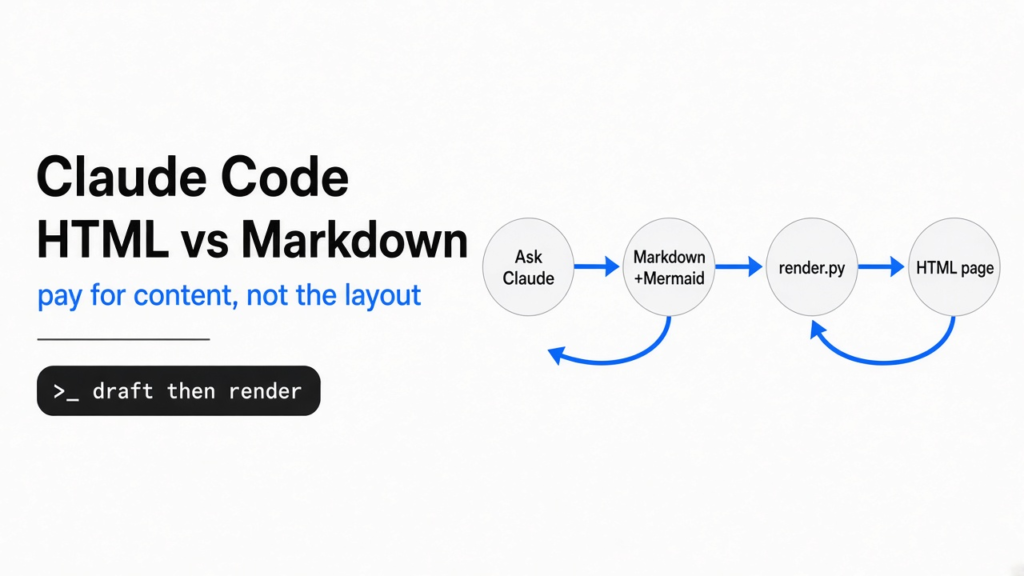
Short answer: asking Claude Code to write a full HTML page costs about 2.8 times the output tokens of a Markdown answer and takes about 2.4 times as long. You can keep the nice page and skip most of that bill: let Claude write a short Markdown draft with Mermaid diagrams, then turn it into HTML with a 15-line script. It takes under a second.
You ask Claude Code to explain something tricky, and it hands back 200 lines of Markdown. You scroll, you skim, you close the file. The answer was right there. You just never read it.
That is why a lot of developers now tell Claude to answer in HTML instead. A web page can hold real diagrams, tables, colors and sections you can jump between, so you actually read it.
But a web page is a lot more text for the model to type. So I ran the test that matters for your bill: same questions, three ways of asking, real numbers. The thread of this post is one idea: the model should write the content, not the layout.

Why does HTML cost more than Markdown in Claude Code?

Because every tag, style rule and diagram coordinate is text the model has to type, one token at a time.
Start with the base. An AI model reads and writes in tokens (small chunks of text, often a piece of a word). It reads your question in one fast pass. It writes its answer one token after another, like a person typing.
So the length of the answer decides how long you wait. Those written tokens, called output tokens, are also the expensive ones: on Claude Sonnet 5.5 an output token costs five times as much as an input token.
Now picture the same explanation in two formats. In Markdown, a heading is ## Steps. In HTML, it is an opening tag, a class name, a closing tag, and a style rule somewhere above that says what the class looks like. A diagram is worse: every arrow is a line with x and y numbers that the model has to work out and type.

That extra typing is the whole cost. The content is the same. The packaging is what you pay for.
How much more does an HTML answer cost? I measured it
HTML answers used about 2.8x the output tokens, took about 2.4x as long, and cost about 1.9x as much per answer.
The question: what does the HTML habit actually cost in Claude Code? Here is what I did. I asked Claude Code (Sonnet 5.5, one-shot runs with claude -p) to explain three topics: how a DNS lookup works, the TCP handshake, and git merge vs rebase. Each topic ran twice in each of three styles.
The three styles were plain Markdown, Markdown with Mermaid diagrams, and a full HTML page. Mermaid is a short text language that a browser turns into a diagram. The HTML page had to carry its own CSS and SVG (drawings written as code).

Here are the averages across all 18 runs:
| How you ask | Output tokens | Time per answer | Cost per answer |
|---|---|---|---|
| Plain Markdown | 2,046 | 17.0 s | $0.056 |
| Markdown + Mermaid diagrams | 1,889 | 14.7 s | $0.054 |
| Full HTML page | 5,224 | 35.5 s | $0.101 |
The HTML pages were never cheap. The smallest HTML answer still used more output tokens than the biggest Markdown answer.
Why is cost only 1.9x when tokens are 2.8x? Because every Claude Code run also pays to read its own setup: the tools, the system rules and your project context. That part does not grow with the answer, so it softens the gap. Run ten explainers a day and the gap is still real.
(If tokens are your worry in general, the same logic applies to command output that floods Claude's context.)
One honest caveat: six runs per style is a small sample, and longer topics will move the numbers. The direction never changed, though. Not once.
What do you actually lose with Markdown?
With Mermaid diagrams, almost nothing that matters for reading.
Here is the catch with plain Markdown. When Claude has no diagram tool, it draws with text characters, and those ASCII diagrams look fine in a terminal but break the moment fonts or widths change.
Mermaid fixes that. Claude writes a few lines like Client->>Server: SYN, seq=x, and the browser draws real boxes and arrows from them. The model types the meaning. The browser does the geometry.

Put the two pages side by side and the full HTML page looks a little more custom. It has its own colors and a hand-placed diagram. Look closely, though: that hand-placed diagram cuts off its last label, because the model guessed the coordinates. The Mermaid page has the same diagram, the same table and the same steps, for roughly a third of the tokens.
So the trade is simple. You give up a bit of custom styling. You keep the part you came for: a page you will actually read.
How do you turn Claude's Markdown into an HTML page?
Save the answer as Markdown, then run one small script that wraps it in a page and draws the diagrams.
You need two things. Pandoc (a free command-line tool that converts documents between formats) and Python. Most Linux machines can install pandoc with the package manager, and macOS users can use Homebrew.
First, ask Claude Code for the draft. Here is the prompt I used, lightly trimmed:
Explain <your topic> in Markdown. Draw every diagram as a mermaid code block
(sequenceDiagram or flowchart), and use Markdown tables for comparisons.
Save it to ./out.md with the Write tool.
Then save this as render.py:
# render.py: turn a Markdown answer (with ```mermaid blocks) into one HTML page
import re, sys, html, subprocess
src, out = sys.argv[1], sys.argv[2]
md = open(src, encoding="utf-8").read()
md = re.sub(r"```mermaid\n(.*?)```",
            lambda m: '<pre class="mermaid">' + html.escape(m.group(1)) + "</pre>",
            md, flags=re.S)
head = ('<script type="module">import mermaid from '
        '"https://cdn.jsdelivr.net/npm/mermaid@11/dist/mermaid.esm.min.mjs";'
        'mermaid.initialize({startOnLoad:true});</script>'
        '<style>body{max-width:820px;margin:auto;font:16px/1.6 system-ui;padding:24px}'
        'table{border-collapse:collapse}td,th{border:1px solid #ddd;padding:6px 10px}</style>')
open("/tmp/head.html", "w").write(head)
subprocess.run(["pandoc", "-s", "--metadata", "pagetitle=Answer", "-H", "/tmp/head.html",
                "-f", "markdown", "-o", out], input=md, text=True, check=True)
Run it with python3 render.py out.md page.html and open page.html in your browser.
Want this as the default? Add one line to your CLAUDE.md, the setup file Claude Code reads at the start of every session. Something like: "For long explanations, write Markdown with mermaid diagrams to a .md file instead of HTML." Then you run the script only when you want the page.

What does the script do? It finds each Mermaid block and marks it so the Mermaid library will draw it. Then pandoc turns the rest of the Markdown into clean HTML, with a little CSS for width and tables. In my runs it took well under half a second, usually under a tenth, and it costs zero tokens because no model is involved.
One thing to know: the page loads Mermaid from a CDN (a public server that hosts code files), so the diagrams need an internet connection to draw. If you want a page that works offline, download the Mermaid file once and point the script at your local copy.
Is there a skill that does this for you?
Yes. Answer me with HTML is a free agent skill built on the same idea, with a smarter renderer.
An agent skill (a folder of instructions and scripts that Claude loads only when a task needs it) can do the whole loop for you. Answer me with HTML is one. Claude writes a short Markdown draft, and the skill's bundled command-line tool lays out the page: panels, flowcharts, sequence diagrams, trees, timelines and comparison tables, in a single HTML file with no outside files needed.

Its own benchmark tells the same story as mine. Compared with asking for HTML directly, it reports about 7.4 times fewer output tokens and about 3.6 times faster answers.
It is also honest about the catch: cost per answer stayed about the same. The skill adds two short extra turns, one to load the skill and one to run its renderer. Each turn re-reads the conversation context, and that reading costs money.
So pick by what bothers you. If waiting is the pain, the skill helps a lot. If the bill is the pain, a plain Markdown draft plus a local script, like the one above, keeps both low because it adds no extra model turns.
Setup is light. It needs Node.js 20 or newer, it is MIT licensed, and in Claude Code you can add it with /plugin marketplace add QingYunA/answer-me-with-html and then /plugin install answer-me-with-html@answer-me-with-html. It also installs for Codex, Cursor and OpenCode through npx skills add QingYunA/answer-me-with-html.
One habit worth keeping: an agent skill runs scripts on your machine, so read its SKILL.md and scripts before you install it, like you would any tool.
When should you still ask for full HTML?
When the page is a product, not an answer.
There are good reasons to pay the full HTML price. Maybe you want an interactive tool with sliders and buttons. Maybe it is a page your team will keep for months, or a mockup where the exact look matters. Then let Claude write every line. The extra minute is worth it.

For everything else, the daily explainers, code walkthroughs and "how does this part of my repo work" questions, the Markdown draft wins. You read it as a page, and you pay for the content, not the packaging.
The model writes the content. A script handles the layout. Save the 15 lines, and let the browser draw.
Common questions about Claude Code HTML vs Markdown
Is HTML better than Markdown for Claude Code output?
HTML is easier to read for long answers because it can show diagrams, tables and sections. It costs about 2.8 times the output tokens, so use a Markdown draft plus a renderer when you want the page without the cost.
How many more tokens does HTML use than Markdown?
In my tests with Claude Code on Sonnet 5.5, full HTML answers averaged 5,224 output tokens against 2,046 for Markdown. They also took about twice as long.
Can Claude Code show Mermaid diagrams?
Claude Code writes Mermaid code well, but a terminal cannot draw diagrams, so you see the code, not the picture. Save the answer as a Markdown file and render it in a browser with the Mermaid library, or use a skill that renders it for you.
Does the Answer me with HTML skill save money?
It mainly saves time. Its own benchmark shows far fewer output tokens and faster answers, but cost per answer stays about the same because of extra tool turns.