
You have more than one coding agent now. A coding agent is a program that edits your repo with tools, not a chat box that talks about code. Claude Code and Codex are two of those.
The next urge is to run both at once. That is when paperclip vs orca shows up. They look similar on a board. They are not the same job.
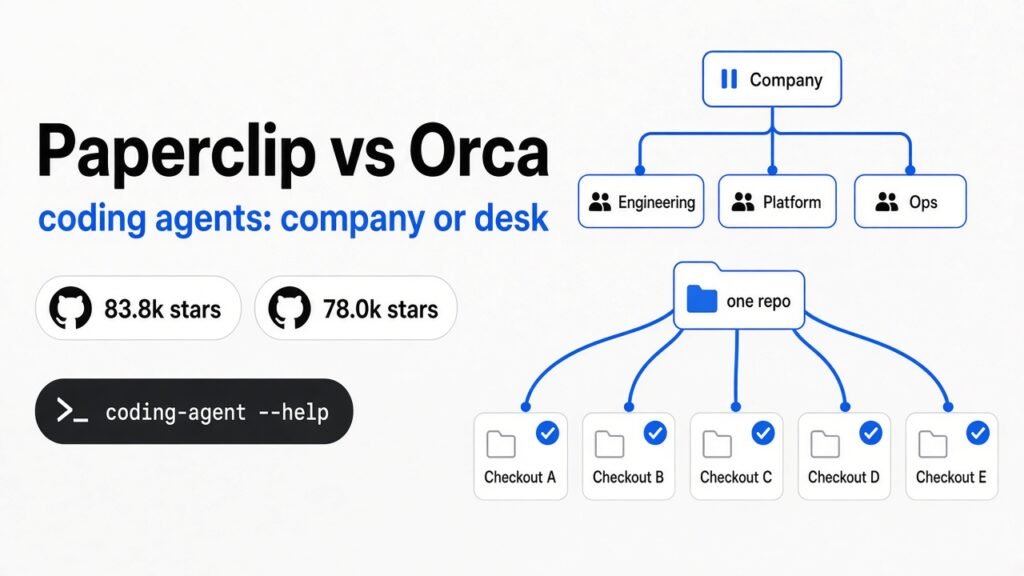
Paperclip runs agents like a company. It hires a CEO, sets a budget, and pauses work when the money is gone. Orca runs agents like extra checkouts of the same repo. Each attempt sits in its own folder so they do not overwrite each other.
Use Paperclip when agents must stop at a budget cap. Use Orca when you want several isolated attempts on one repo. If you cannot say which mess you have, install neither.
I did not install a company on this machine, and I did not boot a desktop app. I read the files a careful person reads before curl | bash. Paperclip’s README is long. Orca’s is shorter. The decision is already in those two files, plus one docs page about what happens when the money runs out.
Why paperclip vs orca showed up on the same board
They showed up together because both help you run more than one coding agent. They solve different messes.
One mess is a pile of agents and no idea what they spent. The other is one bug and several attempts that keep overwriting the same files. Those are not the same afternoon.
Once you have two tools like Claude Code and Codex, opening both and hoping is the default. Paperclip and Orca both react to that default. One adds a company. One adds isolated folders.
What I actually opened
Paperclip’s first real line is this: if OpenClaw is an employee, Paperclip is the company. OpenClaw (a long-running agent some people treat like a hire) is not required. The README lists Claude Code, Codex, Cursor, bash, and HTTP as things it will “hire” if they can receive a heartbeat.
A heartbeat is a short wake-up. The agent checks its inbox, does one burst of work, then sleeps. The docs list five ways one can fire: a timer, a new task, an @-mention, a click on Run Heartbeat, or an approval getting a yes or a no. The CEO agent is always the first hire. It reports to you. Everyone else reports to exactly one manager.
Orca never asks you to hire a CEO. The README calls it an ADE (a desk for running coding agents side by side, not a framework that invents the agents). The line under the title is concrete: run Codex, Claude Code, OpenCode, or Pi next to each other, each in its own worktree. A git worktree is a second checkout of the same repo, on its own branch, in its own folder. That is the whole isolation story. Their docs say every task gets its own on-disk copy so the agents do not step on each other’s files. git fetch and git worktree add run in the background when you create one. You bring the subscriptions. Orca does not resell the model.
I counted the named CLIs in Orca’s README. Thirty-one, plus a catch-all for any CLI agent. Claude Code and Codex are on that wall. So are Grok, Cursor, Pi, Hermes, Kimi, and Qwen Code. If it runs in a terminal, they claim it runs in Orca. That is a compatibility boast, and it is a warning. Orca will not log you into Claude for you.
npm view paperclipai returned the current package and the description “orchestrate AI agent teams to run a business.” That matches the product pitch. Orca’s install path is a download, a Homebrew cask (brew install --cask stablyai/orca/orca), or an AUR package. Paperclip’s quickstart is an install script from paperclip.ing, with a sha256 file served from the same origin. The README says so, and it tells you to use a commit-pinned copy when you want a source you can trust separately. The no-install trial is:
npx --registry https://registry.npmjs.org paperclipai onboard --yesThere is a second door, npx paperclipai test-drive, which stays in the foreground, does not install a service, and can start with a CEO already initialized. I did not run it. It wants an API key, and a test-drive that spends your key is not a README check.
The 10-minute paperclip vs orca test
You can finish this without a GUI. The test is whether you can say which complaint you have, out loud, after four reads.
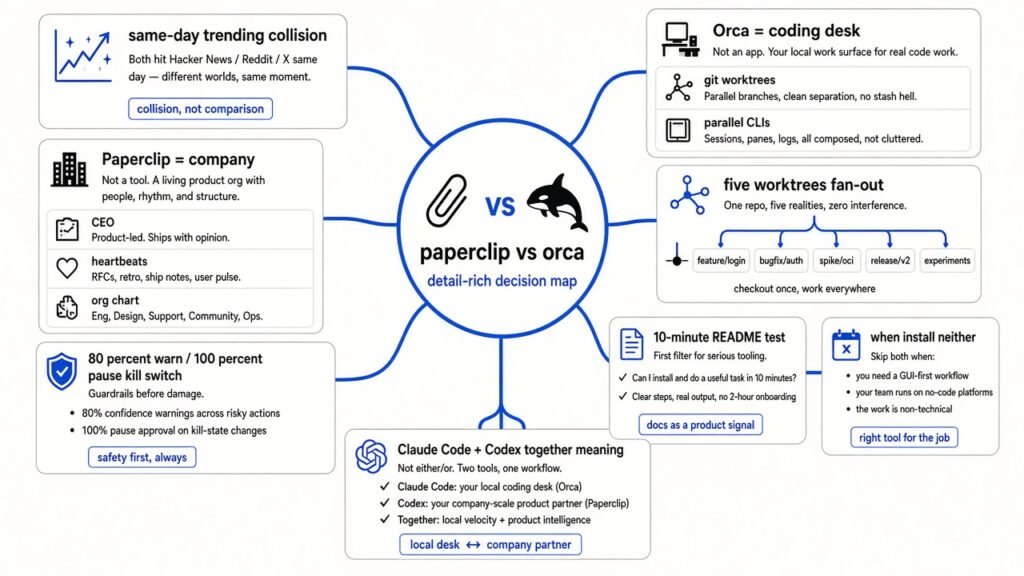
Minute 0 to 3. Open Paperclip’s README at the section “What Paperclip is not.” Six rows. The ones that matter: it is not an agent framework, it is not a single-agent tool, and it is not a code review tool. The single-agent row says if you have one agent you probably do not need Paperclip, and if you have twenty you definitely do. The code review row says it orchestrates work, not pull requests, and you should bring your own review process. If your pain is “I want three patches for this bug and I will merge one,” you just bounced off the product. Good. That saved you an onboarding flow.
Minute 3 to 6. Open Orca’s README at Parallel Worktrees, then the worktree docs. The pitch is one prompt across five agents, each isolated, then you compare and keep a winner. The docs page I read does not describe a magic merge button. It describes git: commit, push, open a PR, rebase, cherry-pick. Shared junk like node_modules and .env is your problem. You list paths in settings, in orca.yaml under worktree.sharedDirectories, or in a .worktreeinclude file. Globs in that file are skipped with a warning. Only literal paths. If you do not already have git and at least one CLI agent authenticated, stop. The desk will open and the agents will not.
Minute 6 to 8. Read Paperclip’s key concepts page, the budget part, not the marketing film. You set a company ceiling and a per-agent limit. At 80 percent use you get a warning. At 100 percent the agent is paused and no more heartbeats fire. An agent can hit its own cap while the company still has money left. That sentence is the product. If a pause sounds annoying, you wanted a desk. If a pause sounds like the feature you have been missing, you wanted a company.
Minute 8 to 10. Write one sentence on paper. “I need X because Y.” If X is “five attempts at this function,” install Orca, or learn git worktree add and skip the app until the tab count hurts. If X is “a scheduled agent that stops when the month’s money is gone,” look at Paperclip’s test-drive and do not point it at a production database on the first hour. If you cannot finish the sentence, install neither.
# the reads, not a tour
wc -l README.md
npm view paperclipai versionA dirty briefing file still rides along with either tool. Isolation of a worktree does not fix a manifesto the agent reads at the start of every session. The CLAUDE.md writeup is the cleanup if that file is still a speech. The Opus 5.5 prompt audit is the next pass if the agent keeps redoing the plan after the folder layout is fine.
Can I use Orca instead of Paperclip to run Claude Code and Codex together?
Sometimes. Only if “together” means “on this repo, in parallel, where I can see both diffs.” That is Orca’s job, and it is also a thing you can fake with two terminals and two worktrees until the bookkeeping gets stupid. Orca adds the bookkeeping: a sidebar, notifications, a phone companion, usage meters for Claude and Codex rate limits, and a CLI so an agent can run orca worktree create. Treat the phone app as a remote control. Android on the README is still an early APK.
You cannot use Orca instead of Paperclip if “together” means “a marketer agent and a support agent wake up on a schedule, spend against a cap, and ask me before they do something sharp.” Orca has no org chart in the pages I read. It has no 100 percent pause. It will happily let five subscriptions burn while you are in another window. The usage screen tells you the tank is low. It does not fire the employee.
You also cannot use Paperclip instead of Orca if you wanted a diff. The README is blunt that it is not a code review tool. Heartbeats resume task context. They do not, by themselves, lay five implementations of one function side by side and ask you to pick. People will try anyway, because the Paperclip problem table mentions twenty Claude Code tabs. That row is about losing track of work across reboots. It is not a promise that the UI is a review bench.
The harness question is a third fork. Which terminal agent you trust is MiniMax Code CLI vs Claude Code. Where that agent is allowed to touch Docker and git is the coop sandbox. How a cluster schedules many tasks as objects is the Google AX hands-on. Paperclip vs Orca is the remaining cut: company control plane, or coding desk. AX will not pause a CEO at 80 percent. coop will not fan a prompt across five worktrees. Keep the pages separate or you will install a VM to solve a budget.
The pause at 100 percent is the whole product
Paperclip’s README prices the failure, not the license. The license is free. The failure mode in their own table is a runaway loop that wastes a lot of tokens before you notice. Cost control is a monthly budget per agent. Hit the limit, the agent stops. Governance is the other half: you approve hires, you can pause or terminate anyone, and the ticket log is supposed to hold the tool calls.
I am not going to invent a dollar figure the key concepts page did not print. Some reviews quote a monthly band from Paperclip’s docs, and another review waves at Claude Code Max seats. I did not find those prices on the page I read, so they stay out of the recommendation. What I did find is operational. Warning at 80 percent. Hard stop at 100 percent. Heartbeats cease. A thrifty agent can be paused while a sibling still has room under the company ceiling. If you run a support heartbeat every hour, that pause is how the bill stays boring. If you forget the cap is per agent, you will stare at a quiet CEO and think the product crashed.
There is a fuel gauge on the Orca side, and it is not the same object. The app is free. Fan-out is the feature and the bill. Five agents on one prompt are roughly five sessions, five context loads, five chances to wander. The worktree page does not warn you. The README does point at usage tracking, rate-limit resets, and hot-swapping accounts. A gauge is not a kill switch. If you needed the kill switch, you are in the wrong app, no matter how nice the terminal splits look.
One more Paperclip footgun, because install day is when it bites. npx follows your global npm registry. If ~/.npmrc points at a private registry, paperclipai 404s. They print the workaround: --registry https://registry.npmjs.org. Run npm config get registry before you decide the package is missing. And do not pipe install.sh until you have looked at it. A checksum from the same host catches a bad download. It does not catch a host you should not have trusted. Their quickstart says to prefer a release tag or a commit pin when that matters.
When you should install neither
Stay in one terminal when the repo is small, trusted, and the agent is not spending money while you sleep. Paperclip’s README agrees with that more clearly than its popularity does. A CEO agent for a solo bug is costume. You will spend the evening naming roles and still not have a diff.
Stay out of Orca when you do not already pay for two CLI agents. Also stay out if you are not ready to name the shared paths. Five worktrees that each run npm install will fill a disk and teach you nothing about the bug.
Use Paperclip when the sentence you wrote in minute 8 is about schedule, spend, or who is allowed to act. test-drive stays in the foreground and can start with a CEO already sketched. Pass --no-browser if you do not want a window. Use Orca when the sentence is about parallel attempts on one repo and you are willing to merge like a person. git worktree add remains the honest minimum. The app earns its place when you keep losing those folders.
If you try only one thing from this page, make it the “not a code review tool” row and the 100 percent pause. If both feel like the wrong feature, close the tab. The tools will still be there tomorrow. Your quota might not.
Common questions about paperclip vs orca
Can I use Orca instead of Paperclip to run Claude Code and Codex together?
Yes, if together means side by side on one repo, each in its own git worktree, with you picking a winner. No, if together means a staff of agents with titles, a monthly cap, and a hard stop when the cap hits. Orca runs the CLIs you already logged into. Paperclip schedules them and can pause them.
Why does Paperclip feel like a company when I just want two agents on one bug?
Because that is the object model, not a skin. The first agent you create is a CEO. Every other agent has one manager. Work arrives on heartbeats, not as a pair of terminals you watch. For two agents on one bug, use worktrees. Paperclip will feel like a company because it is one.
How do I stop parallel agents from burning my Claude budget?
Orca can show Claude and Codex usage and rate-limit resets. It does not, in the docs I read, pause the run at a dollar figure. Paperclip does: warning at 80 percent of the agent’s budget, pause at 100 percent, no further heartbeats. If the burn is happening while you watch a fan-out, the fix is fewer parallel attempts, not a dashboard. Five agents cost about five runs.
Is Paperclip worth it if I only write code?
Usually no. The README says it is the wrong tool for a single agent, and that it is not a code review tool. It is worth it when code is one job among scheduled jobs, and you need an audit log plus a spend cap. If all you do is edit a repo you trust, stay in Claude Code or Codex until the tab count or the bill forces a second tool.
1 comment