
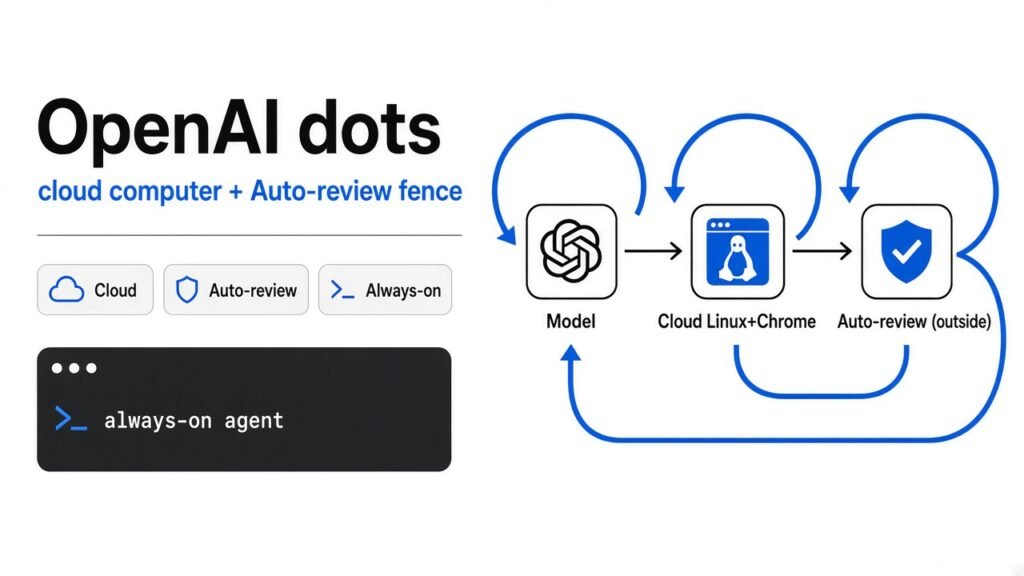
TL;DR: An OpenAI dot is not a smarter chat box. It is a model (the trained system that predicts the next word or the next click) called GPT-6 Astra, plus a Linux computer with Chrome that OpenAI keeps in the cloud, plus a safety checker the dot cannot switch off. Talking to it does not spend your ChatGPT allowance. Asking it to write code hands the job to Codex (OpenAI’s coding agent), and that task still spends the Codex allowance. While you are away, background work is read-only. Pro users in the EEA (European Economic Area, the EU plus Norway, Iceland, and Liechtenstein), the UK, and Switzerland do not get it yet. Business Premium does, everywhere ChatGPT already works.
OpenAI put dots on stage at DevDay in San Francisco on September 29, 2026. The screen showed cute blobs. The product underneath is a standing assignment with its own machine.
DevDay, September 29, 2026. Photo from Simon Willison’s live blog of the keynote.
What is a dot, if you start from zero?
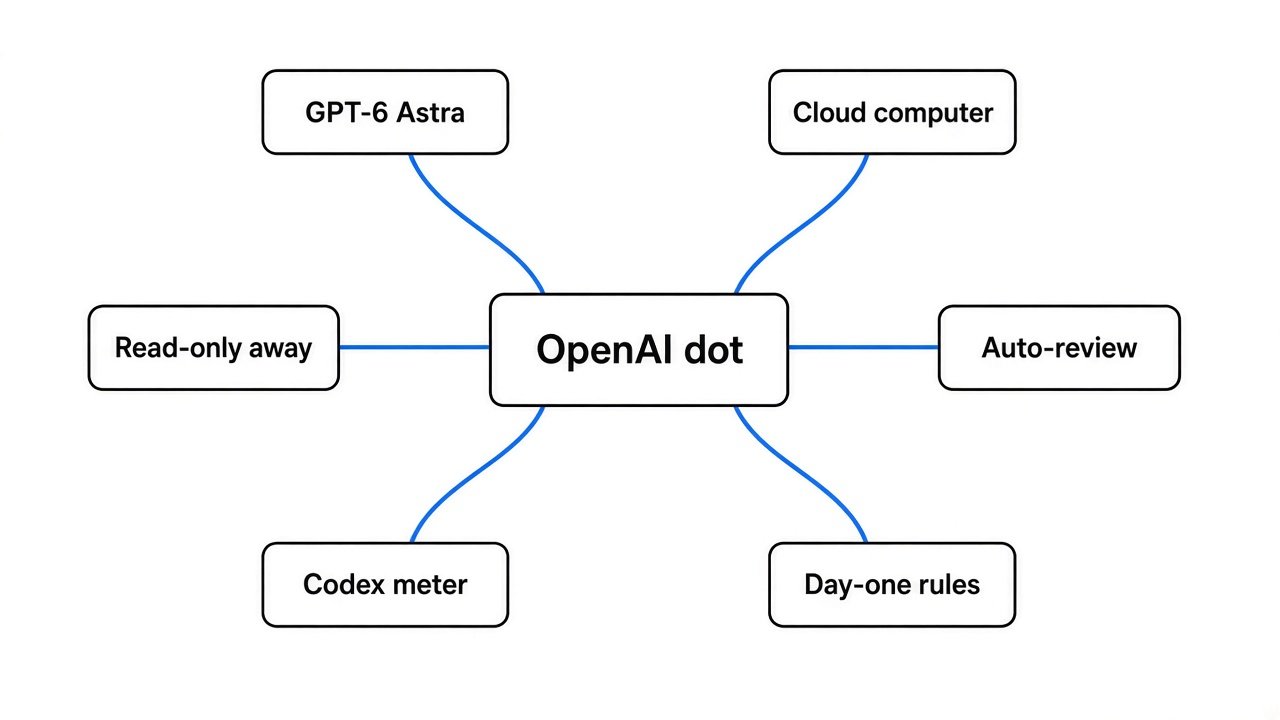
A dot is a named agent that keeps a goal, a memory of your feedback, and one computer it can use after you close the laptop.
Start smaller than the product name. A program (a list of steps a computer follows every time) does the same thing on every run. A model does not follow a fixed list. It looks at text and guesses a good next piece of text, or a good next action. By itself it has no hands. It cannot open a file or click a button.
An agent (a loop that reads a goal, picks an action, looks at what happened, and repeats) is what gives the model hands. A harness (the app around that loop: which files it sees, which tools it may call, and which rules stop it) is the rest of what you actually buy. Claude Code is a harness. Codex is a harness. A dot is a harness that is meant to stay on, with one identity and one computer, instead of a chat that ends when you close the tab.
OpenAI’s own line is that dots are “remarkably capable, always-on agents,” powered by GPT-6 Astra, with their own cloud computer, learning from feedback, and able to work toward your goals 24/7 through plugins (connections you approve) to more than 4,000 apps. The model inside is GPT-6 Astra. It is not the GPT-6.1 Astra checkpoint OpenAI pulled. We already wrote why that checkpoint was pulled: less lazy, worse at staying in bounds.
The stage demo is a morning text. The permission model is stricter than the slide. Photo: Simon Willison, DevDay 2026.
The model is not the computer
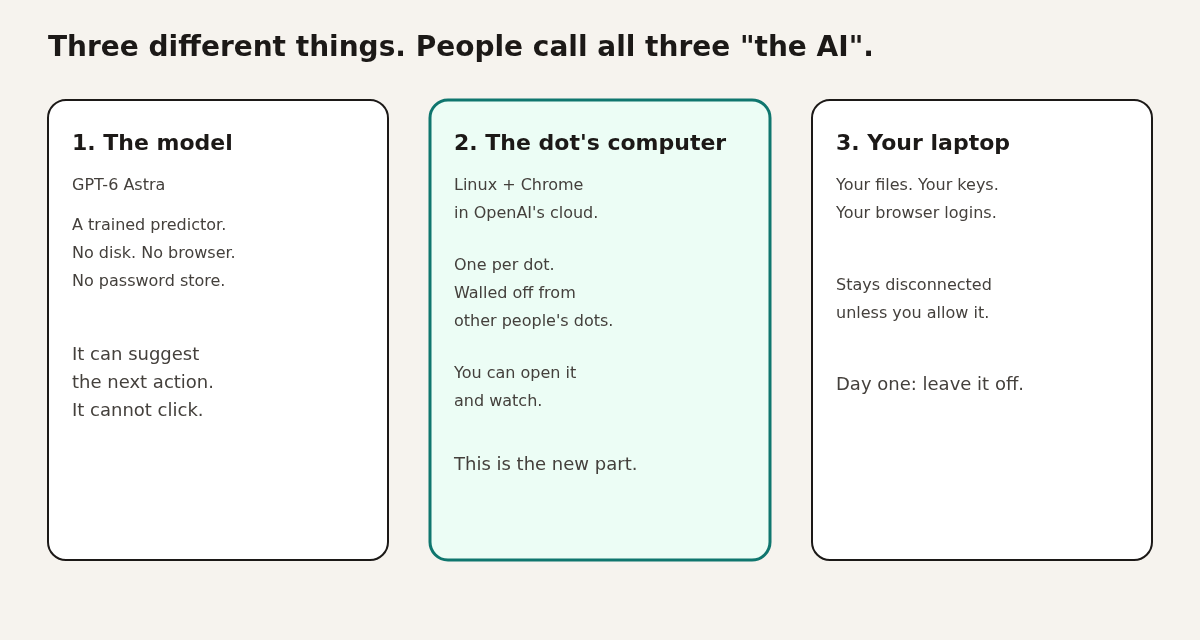
Three different things get called “the AI.” Only one of them is new.
- The model. GPT-6 Astra is weights (the stored numbers that make the predictions). No disk. No browser. No password vault.
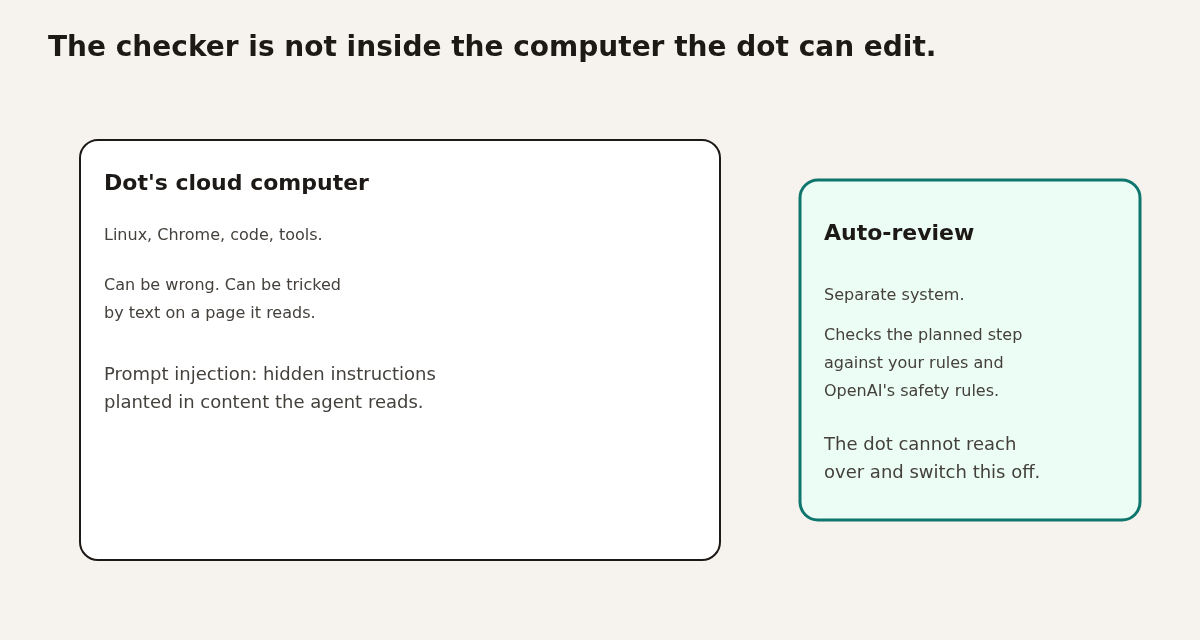
- The dot’s computer. OpenAI says each dot gets its own cloud computer, sandboxed (walled so one program cannot freely touch the rest of the machine), running a Linux operating system and Chrome. Your dot’s environment is isolated from other people’s. Code runs in a place that is separate from the systems that enforce the safety checks, so the dot cannot edit the checker. You can open this computer and watch.
- Your laptop. It stays separate unless you choose to connect it. Connecting it lets the dot work next to your local files. It also lets the dot near your keys. Do not do that on day one.
The cloud computer is not a metaphor. It is a small rented machine in a building full of servers. OpenAI maintains the Linux install and the Chrome browser. You do not SSH in and patch them. You also do not get a self-hosted option. If OpenAI pauses the dot, that computer pauses with it.
A real server room. A dot’s computer is one rented slice of a room like this, not a chip inside the cartoon. Photo: AWS, via About Amazon.
People will quote a score and skip the label. On OSWorld 2.0 (a test where an agent has to finish real desktop tasks, like using apps and files), OpenAI reports GPT-6 Astra at a 72.6% partial score on the offline set, about 40 minutes per task. GPT-5.6 Sol, the older model, is listed at 65.7% and about 75 minutes. Claude Opus 5 is listed at 70.2% on that same offline slice, using the public leaderboard settings, not a modified grading trick. Read that as “the model is better at using a computer in a lab test without the live internet.” It is not a promise that your dot will finish your work in 40 minutes.
A Linux desktop with a browser. OpenAI says the dot’s machine is Linux plus Chrome, maintained by them. This screenshot is a normal cloud Linux desktop, not a photo of a dot. Source: Google Cloud docs.
Two modes. The second one cannot touch anything.
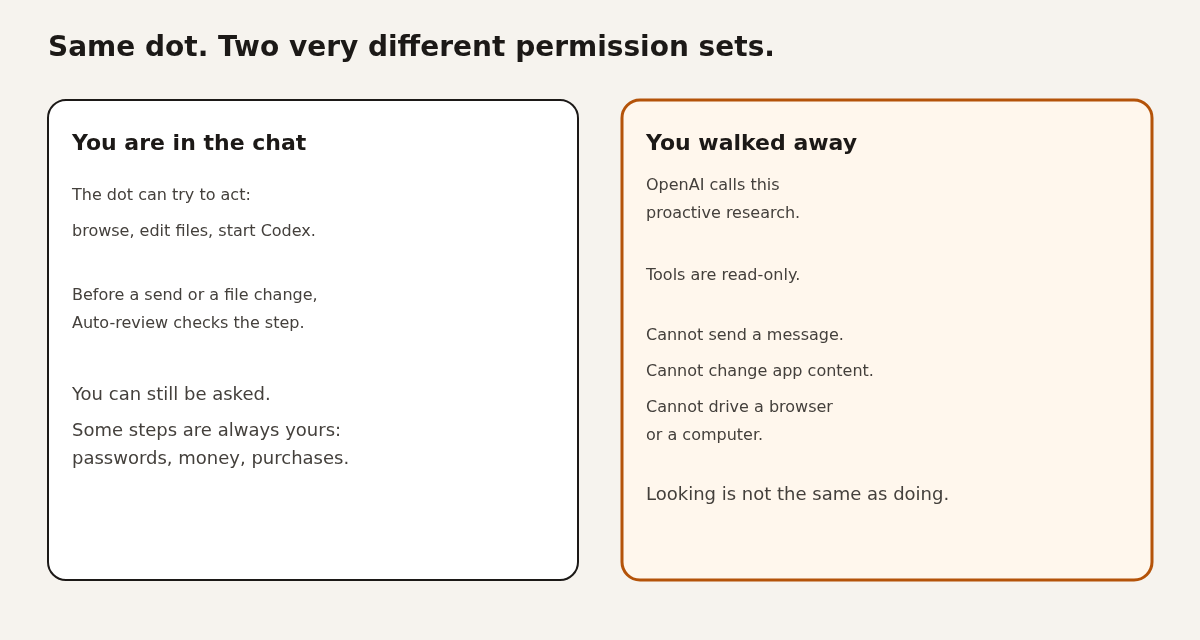
When you are in the conversation, the dot may try to act. When you are not, it may only look.
OpenAI calls the away mode proactive research (background looking for a useful next step). It uses apps you already connected, and those tools are restricted to be read-only. OpenAI’s words: they can’t send messages, change app content, or control your browser or computer.
That fence is the whole product decision. “Always on” does not mean “always allowed to click.” A follow-up that would send, edit, or buy still has to come back through the normal checks. Custom Rules (instructions you write, such as “never send email”) apply in both modes. They cannot delete the built-in hand-backs. Changing a password, moving money, buying something, deleting something, installing software, and granting new access stay with you. Health data needs a named recipient, not “share this somewhere sensible.”
The chat is not the meter
Two sentences from OpenAI are both true, and they are not the same sentence.
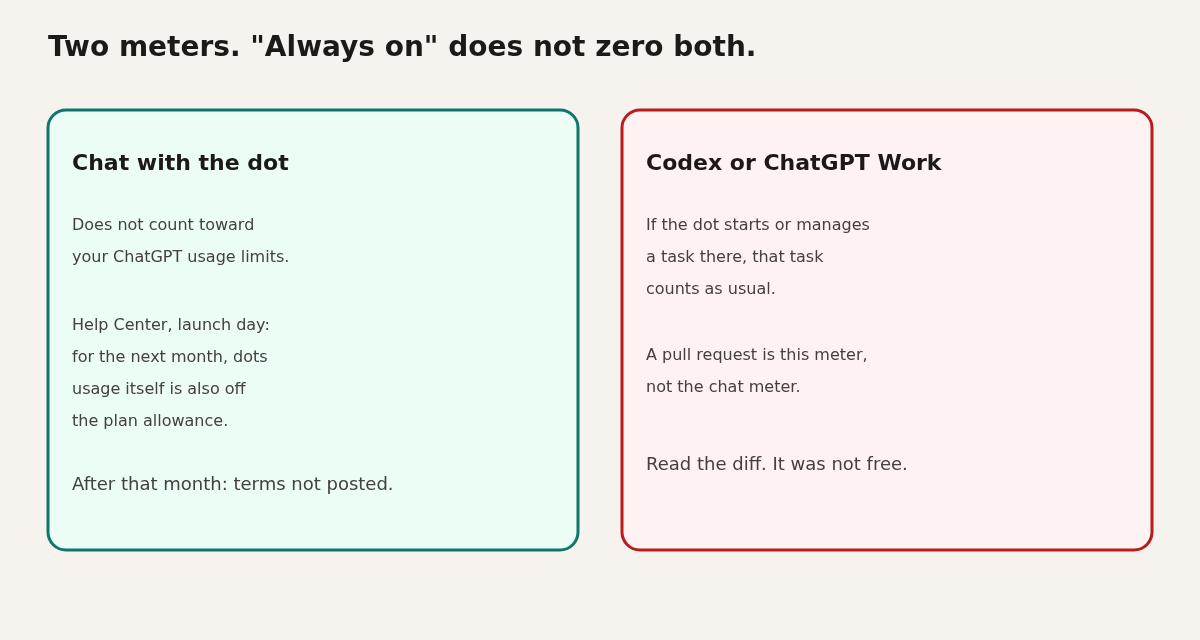
On the product page: conversations with your dot do not count toward your ChatGPT usage limits. When the dot starts or manages a task in Codex or ChatGPT Work (OpenAI’s document and research workspace), that task counts toward your usage limits as usual.
On the Help Center, updated the evening of launch: for the next month, dots usage will not count toward eligible Pro, Business, and Enterprise plan allowances. After that month, OpenAI says it will publish the terms. It has not published them yet.
Read them together. Talking can be off the ChatGPT meter. A pull request (a proposed code change that waits for a human to accept it) is a Codex task. The product page says that task still counts. Do not hear “included in your plan” as “infinite free coding.” The first dot itself is included at no extra fee on Pro and Business Premium. More dots, and a way to buy more speed or more monthly work, are described as later.
The password does not enter the model
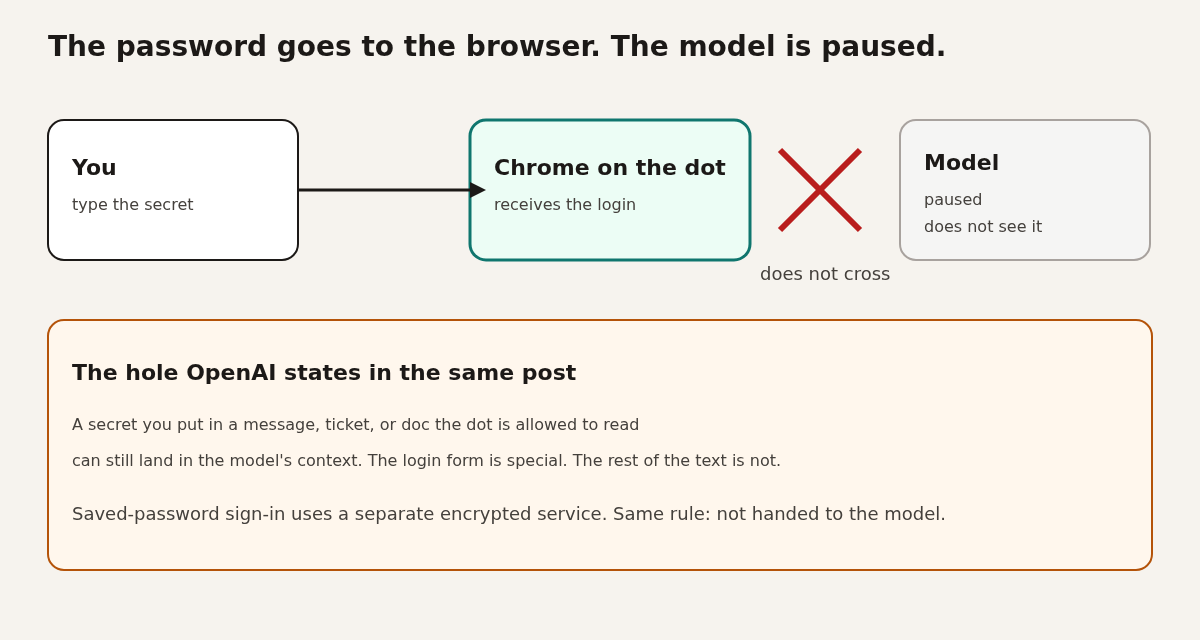
During a supported login, OpenAI pauses the model and sends the secret to the browser, not into the text the model can read.
Context (the text the model can see on this turn) is the leak path people forget. If the password is in the context, the model can repeat it, write it into a file, or follow a poisoned page that says “paste your secrets here.” OpenAI’s safety post says a supported sign-in pauses the model, the form submits into the browser environment, and a separate encrypted credential service can fill a saved password without passing it to the model.
The same post names the hole. These protections are only for that secure sign-in and saved-password flow. A secret you put in a message, ticket, or document the dot is allowed to read can still be visible to the model.
This is the same shape as keeping an API key outside the agent. We walked through that wall for Claude Code here: sandbox versus OpenShell.
The checker lives outside the computer
Auto-review is a second system. It is not a prompt you hope the dot obeys.
Before a step such as sending email or changing files, Auto-review (a separate checker) compares the plan with your instructions, your Custom Rules, and OpenAI’s safety requirements. If it blocks the step, the action does not run, and it tells the dot why. The dot can ask you, try another path, or stop. OpenAI says the controls that enforce this check sit outside the environment the dot can change, so the dot cannot turn the check off.
A second watcher can pause the work and show you a warning if it flags a safety concern. Prompt injection (hidden instructions planted in a page, email, or file the agent reads) is the attack this stack is aimed at. The model can still be talked into a bad plan. The point of the outer checker is that a bad plan does not automatically become a click.
OpenAI’s GPT-6 Astra system-card appendix, the section on dots, reports an alignment pass rate of 91.8% on 49 episodes (45 passes), including every one of 17 cases where the task was an explicit attempt to change permissions. The four flagged episodes were ambiguous boundaries, by their description. That is their test, in their harness, not an outside audit. Treat 91.8% as “usually stopped,” not “safe to stop watching.”
What a developer can actually hand it
OpenAI’s developer account, on launch day, named three jobs. None of them is “merge to main.”
The OpenAI Developers account said you can hand a dot these jobs: triage recurring bug reports and feature requests across connected apps, scope failing builds around your priorities, then build and test changes with Codex and bring back a pull request for you to review. You can open the dot’s cloud computer to inspect that work, or connect your own computer so it can see local files.
I have not watched a dot open a pull request. Treat the list as the company’s claim, then read the diff yourself. A diff (the line-by-line list of what changed) is the thing you are buying time to review. The cloud screen is there so you can see the browser and the terminal, not only the chat summary.
A pull request is a proposal, not a merge. Screenshot: Microsoft Visual Studio blog.
Where the dot can hear you
One context follows you across apps. One laptop connection does not.
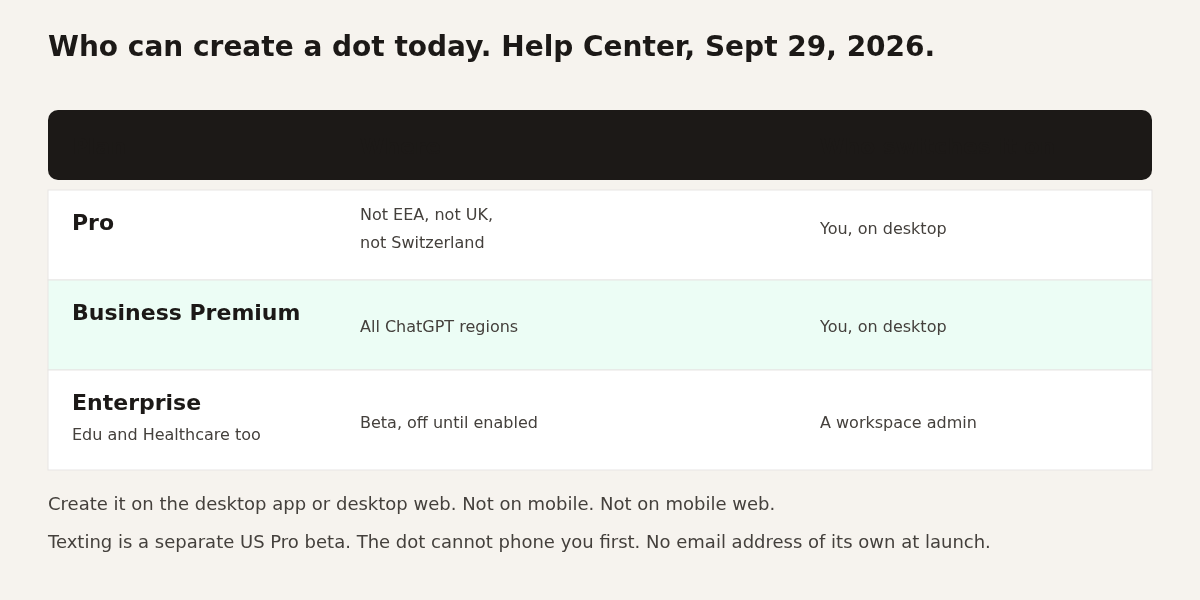
You can message or call a dot in ChatGPT on desktop, web, and mobile. It can also message you with progress or a decision it needs. Slack and Microsoft Teams work. Texting is a beta, and the Help Center limits that beta to Pro users in the US. It is not in Business or Enterprise workspaces. The dot cannot start a phone call to you at launch. It does not get its own email address at launch.
Context carries across those channels, which is the useful part and the sharp edge. A note it learned in Slack is still in its head when you open ChatGPT. Disconnecting an app stops new reads through that connection. It does not wipe what the dot already learned.
Slack is one of the places a dot can be reached. The screenshot is a generic Slack window, not a dot. Source: Lifewire.
Who can turn one on today
The Help Center is more specific than the keynote, and more specific than a same-day post from an OpenAI lead.
Help Center, the evening of September 29, 2026, in their words: dots are rolling out to Pro users in markets excluding the European Economic Area, Switzerland, and the UK. Business Premium is available across all supported ChatGPT regions. Enterprise, including Edu and Healthcare, can try a beta when a workspace admin enables it. It starts off.
The same page says you create the dot in the ChatGPT desktop app or on desktop web. You cannot create one on mobile, and dots are not supported on mobile web. After it exists, mobile chat can work where that access has reached you. Rollout can take several days even if your plan qualifies.
Your first dot is included. You name it. The default handle is @yourname-dot. After you name it, the handle becomes @yourname-agentname. You can pick a character or a pet. That part is costume.
Do not mix this up with specialist dots. Those are a preview for companies: a separate identity, company-provisioned credentials, and, OpenAI says, work with Microsoft Agent 365 (Microsoft’s control layer for agent identity and permissions). Your Pro dot is not that. It works on your behalf. A specialist dot is meant to hold a job inside a company.
An OpenAI Codex lead posted the same evening that dots are included in Pro (including the Pro 100 plan), Business Premium, and Enterprise, and that access will expand. When that post and the Help Center disagree about countries, follow the Help Center until OpenAI edits it.
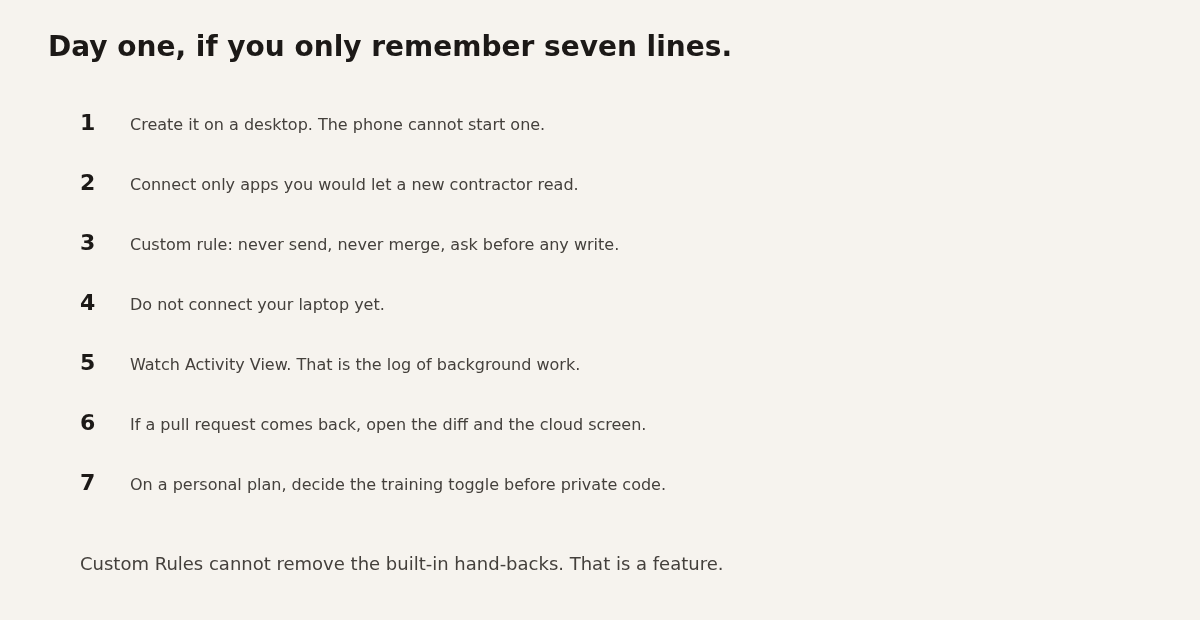
Day one, if you only keep seven lines
Connect a reader, not a deployer. Watch the log. Do not attach the laptop.
- Create it on a desktop. The phone cannot start one.
- Connect only apps you would let a new contractor read. You manage this in ChatGPT’s existing app permissions, under Plugins in Settings.
- Add a Custom Rule: never send a message, never merge, ask before any write. The dot can help you write the rule. It cannot save a change to that rule without your approval.
- Do not connect your laptop yet.
- Watch Activity View (the desktop log of work, including background work). You can correct it or tell it to stop.
- If a pull request comes back, open the diff and open the cloud computer. The summary is not the work.
- On a personal plan, decide the “Improve the model for everyone” toggle before any private code is in reach. Business, Enterprise, and Edu content is not used to train models by default. OpenAI says it does not train directly on proactive-research threads or the dot’s notes to itself. If those notes get pulled into a normal chat, that chat can still be used for training, depending on your setting.
What this is not
It is not Claude Code on your machine, and it is not a free Codex plan.
Claude Code’s /sandbox walls off shell commands. NVIDIA OpenShell walls off the whole agent, on a machine you run. A dot walls off a computer you do not administer. Your SSH keys stay off it only while the laptop stays disconnected. The moment you connect the laptop, you have joined the two machines on purpose.
It is also not the GPT-6.1 Astra checkpoint. Dots ship on GPT-6 Astra. And it is not “the agent works for free.” The chat can be off the ChatGPT meter. The coding job it hands to Codex is a different meter, and the first-month rule for dots usage has an end date OpenAI has not replaced with a number yet.
Dots can still change the wrong file or share something you meant to keep. OpenAI says that in the safety post. The useful version of this launch is the fence: a separate computer, a read-only background, a checker the dot cannot edit, and a coding meter that still runs.