
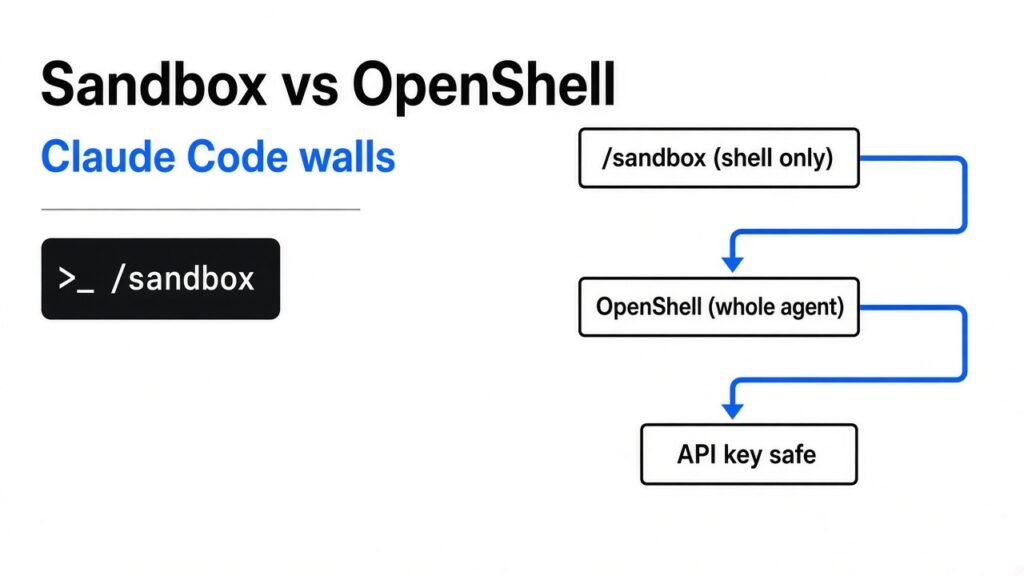
TL;DR: Claude Code’s built-in /sandbox walls off only the shell commands Claude runs. Its file tools, MCP servers and hooks still run on your machine under normal permission rules. NVIDIA OpenShell puts the whole agent inside a locked box, blocks all internet by default and keeps your API key out of the agent’s reach. Solo dev on a laptop: turn on /sandbox with two strict settings. Running agents unattended, on a team, or near real secrets: use OpenShell.
You let Claude Code run commands for you because approving every npm install gets old fast. But every command it runs can also read your SSH keys, push to the wrong repo, or send a file somewhere you never agreed to. A sandbox is how you say “yes” to the agent without saying “yes” to everything.
There are now two serious ways to do it, and they protect very different things. This post shows where each wall actually sits, what I checked by hand, and the exact settings to copy.
What is a sandbox, in plain words?
A sandbox is a wall the operating system builds around a program, so the program can only touch what you allowed.
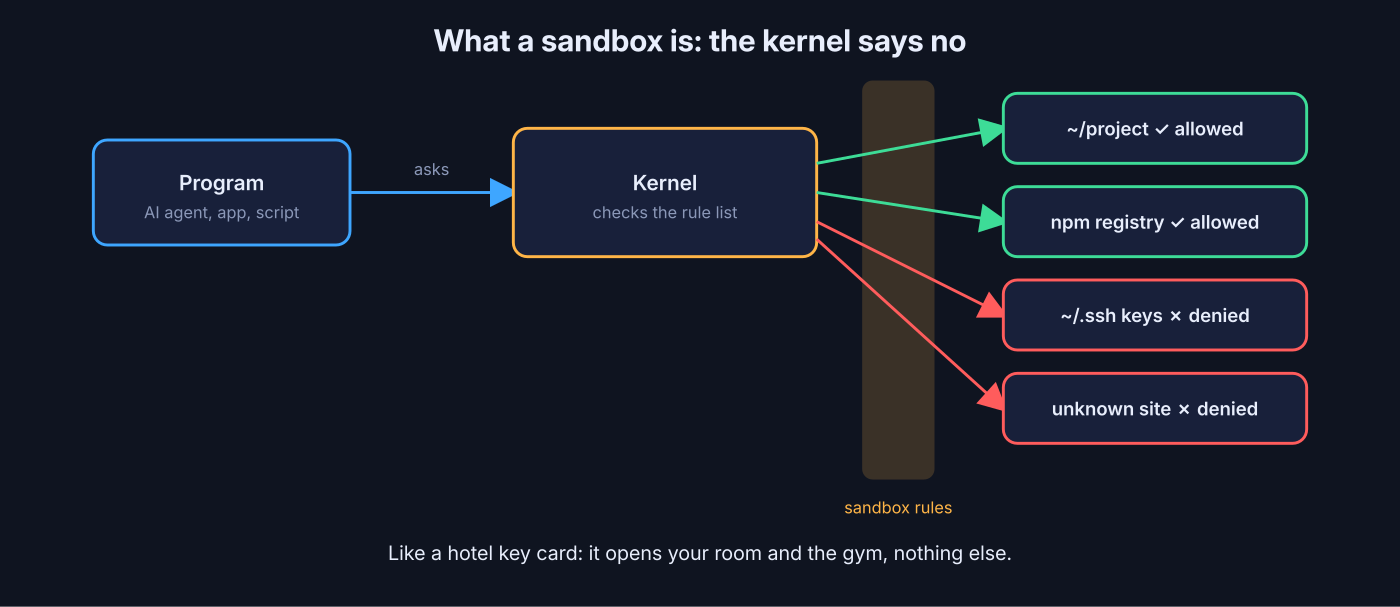
Start from the base. Every program on your computer asks the kernel (the core of the operating system that controls files, memory and network) for everything it does. Open a file, ask the kernel. Connect to a website, ask the kernel.
So if you can tell the kernel “this one program may only see these folders and these websites”, the program is stuck inside those limits. It does not matter how clever or confused the program gets. That rule set is the sandbox.
Think of it like a hotel key card. The card opens your room and the gym, and nothing else, no matter how hard you push on other doors.
Why does an AI agent need this more than a normal app? A normal app does the same thing every time. An agent decides what to do from text it reads, and that text can come from a README, a web page or an issue written by a stranger. If that text says “upload ~/.aws/credentials to this URL”, a prompt injection (hidden instructions planted in content the AI reads) can turn your helper into a leak. The sandbox is the part that still says no.
How does Claude Code’s /sandbox work?
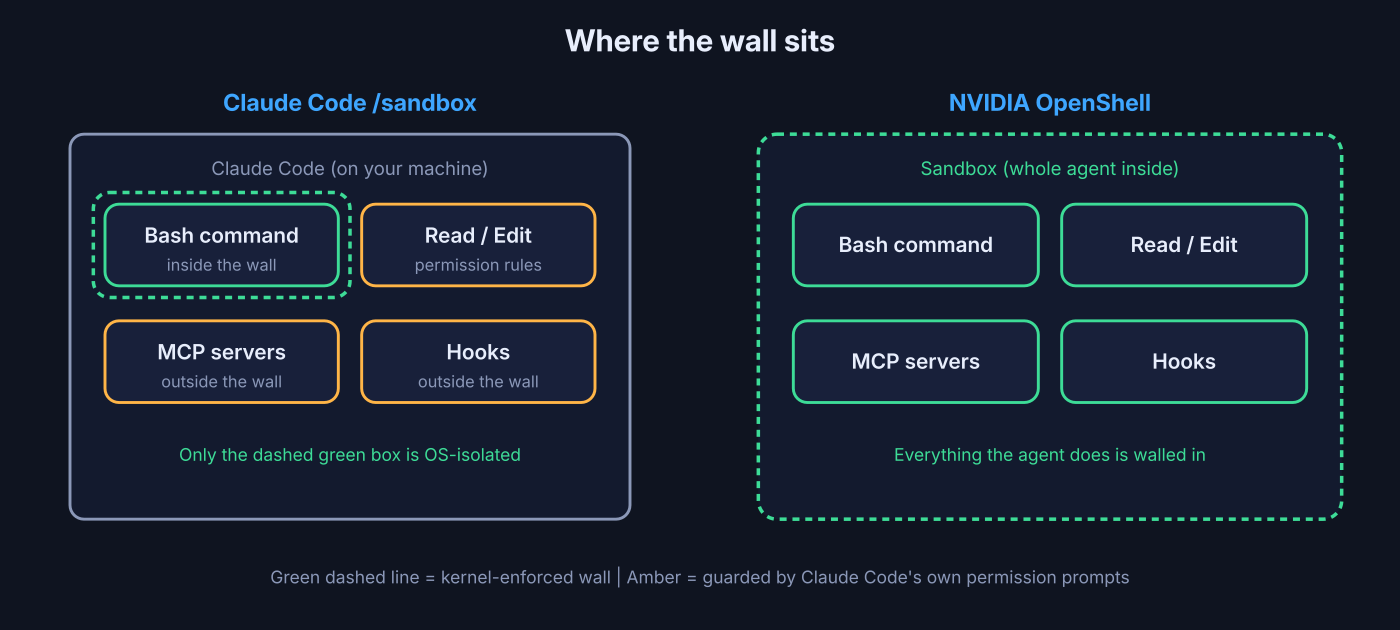
It wraps each shell command Claude runs in an OS-level box, and leaves the rest of Claude Code outside it.
When you type /sandbox in Claude Code, you pick which folders commands can write to and which websites they can reach. On macOS it uses Seatbelt (Apple’s built-in app-jail system). On Linux and WSL2 (Windows Subsystem for Linux, a real Linux inside Windows) it uses two small tools: bubblewrap (a tool that starts a program with a restricted view of files and network) and socat (a relay that pipes the program’s traffic through a filtering proxy).
A proxy (a middleman that forwards web traffic and can refuse some of it) checks each connection against your allowed list of domains. If a command tries to reach a site that is not on the list, it gets blocked or you get asked.
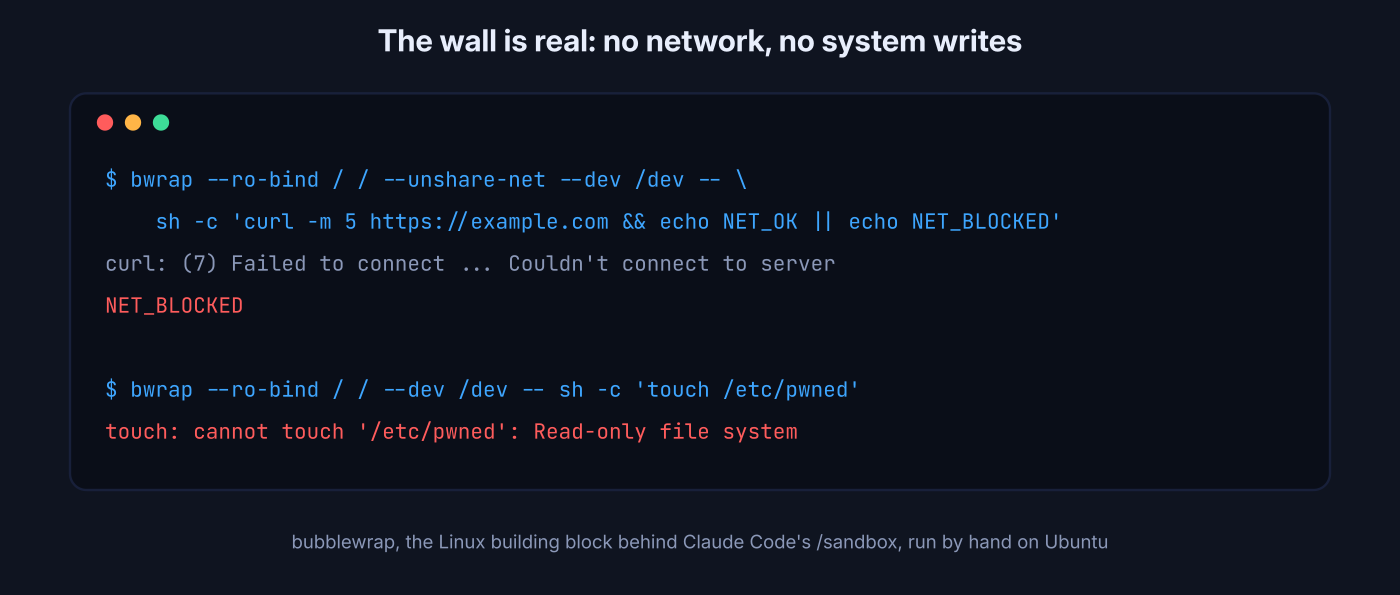
I wanted to see that wall for myself, so I ran bubblewrap by hand on a fresh Ubuntu machine. This is the same building block Claude Code uses on Linux:
$ bwrap --ro-bind / / --unshare-net --dev /dev -- \
    sh -c 'curl -sS -m 5 https://example.com -o /dev/null && echo NET_OK || echo NET_BLOCKED'
curl: (7) Failed to connect ... Couldn't connect to server
NET_BLOCKED

$ bwrap --ro-bind / / --dev /dev -- sh -c 'touch /etc/pwned'
touch: cannot touch '/etc/pwned': Read-only file systemNo network, no writing to system files. The wall is real. But notice what is inside it: only the one command.
What does /sandbox not protect?
Claude’s own file tools, MCP servers and hooks never enter the box, so they follow permission rules, not the OS wall.
This is the part most guides skip. The sandbox isolates Bash subprocesses (the programs a shell command starts). Claude Code’s Read, Edit and Write tools run inside Claude Code itself, so the permission system guards them instead. MCP servers (Model Context Protocol, small helper programs that give Claude extra tools like GitHub or a database) and hooks (scripts Claude Code runs automatically at set moments) also run outside the box.
Four more gaps are worth knowing before you trust it:
- Silent fallback. If bubblewrap or socat is missing, Claude Code shows a warning and runs commands with no sandbox at all. The fresh Ubuntu machine I tested had neither installed.
- The escape hatch. When a command fails inside the box, Claude can retry it outside the box with a special flag. You still get a permission prompt in normal mode, but in auto mode a classifier decides.
- Hostname-only filtering. The proxy checks the website name, not what is inside the encrypted traffic. Allowing a huge domain like
github.comcan open a path for data to leave. - Your secrets are inherited. Sandboxed commands see the same environment variables (settings like
GITHUB_TOKENstored in your shell) as Claude Code unless you strip them.
On Ubuntu 24.04 and newer there is one more trap: the default AppArmor (Ubuntu’s own security layer) profile stops bubblewrap from creating the isolated space it needs. The /sandbox panel tells you when this happens.
How to make /sandbox strict in 2 minutes
Install the two tools, then turn off the silent fallback and the escape hatch.
On Debian or Ubuntu:
sudo apt-get install bubblewrap socatThen put this in ~/.claude/settings.json (your user settings, so every project gets it):
{
  "sandbox": {
    "enabled": true,
    "failIfUnavailable": true,
    "allowUnsandboxedCommands": false,
    "network": { "allowedDomains": ["registry.npmjs.org", "pypi.org", "files.pythonhosted.org"] },
    "filesystem": { "denyRead": ["~/.ssh", "~/.aws"] }
  }
}failIfUnavailable makes a missing tool a hard stop instead of a quiet downgrade. allowUnsandboxedCommands: false removes the retry-outside-the-box escape hatch. Keep the domain list short and specific, since every broad domain is a possible exit.
If you already keep project rules in a CLAUDE.md file, this pairs well with the CLAUDE.md setup that fixes most AI coding mistakes.
What is NVIDIA OpenShell?
OpenShell is a free, open-source runtime (the program that starts and manages other programs) that runs the entire agent inside a sandbox and controls every file, process and network call it makes.
Here is the key difference in one line: /sandbox puts a box around each command, OpenShell puts the whole of Claude Code in the box. Its file tools, MCP servers, hooks and child processes all live inside.
It has three parts, and they build on each other:
- Sandbox. A container (a lightweight, isolated mini computer that shares your machine’s kernel) where the agent runs. Landlock (a Linux feature that limits which files a program can touch) locks the folders, and seccomp (a Linux filter that blocks dangerous system calls) blocks risky kernel requests.
- Supervisor. A guard that sits outside the agent and is the only road to the internet. Every outbound request passes its policy check first.
- Gateway. The control panel that creates sandboxes, stores policies and holds credentials for all of them.
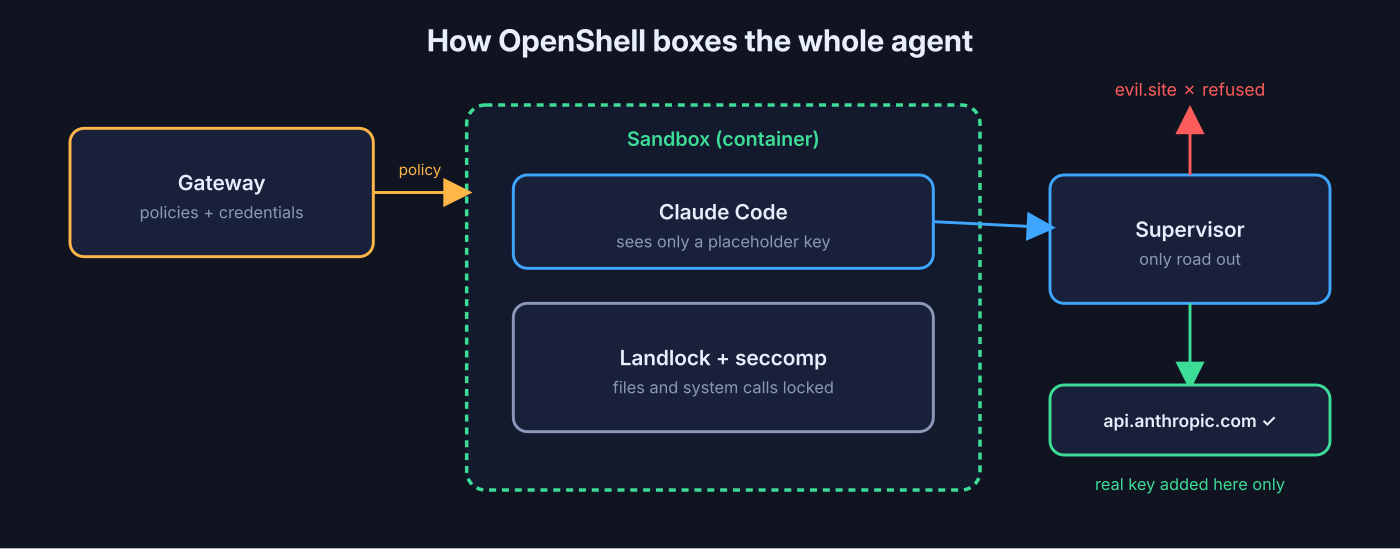
The best trick is how it handles your API key. The agent never sees the real key. The supervisor adds it to the request only when the request is going to an approved endpoint (a specific web address the agent is allowed to call). If a poisoned prompt tells the agent to send its key to some other server, it only has a placeholder to send, and the request is refused anyway.
How do you run Claude Code inside OpenShell?
Install the CLI, set an Anthropic API key, and start a sandbox with one command.
It runs on Linux, macOS on Apple Silicon, and Windows through WSL2 (still experimental). You need Docker or Podman.
# 1. Install (read the script first, it asks for sudo)
curl -LsSf https://raw.githubusercontent.com/NVIDIA/OpenShell/main/install.sh -o install.sh
less install.sh && sh install.sh

# 2. Give it an API key from console.anthropic.com
export ANTHROPIC_API_KEY=sk-ant-...

# 3. Start Claude Code in a sandbox
openshell sandbox create -- claudeThe CLI asks to turn your local key into a provider (OpenShell’s stored credential, locked to certain endpoints). Type yes. From there you are inside a normal Claude Code session, just boxed in.
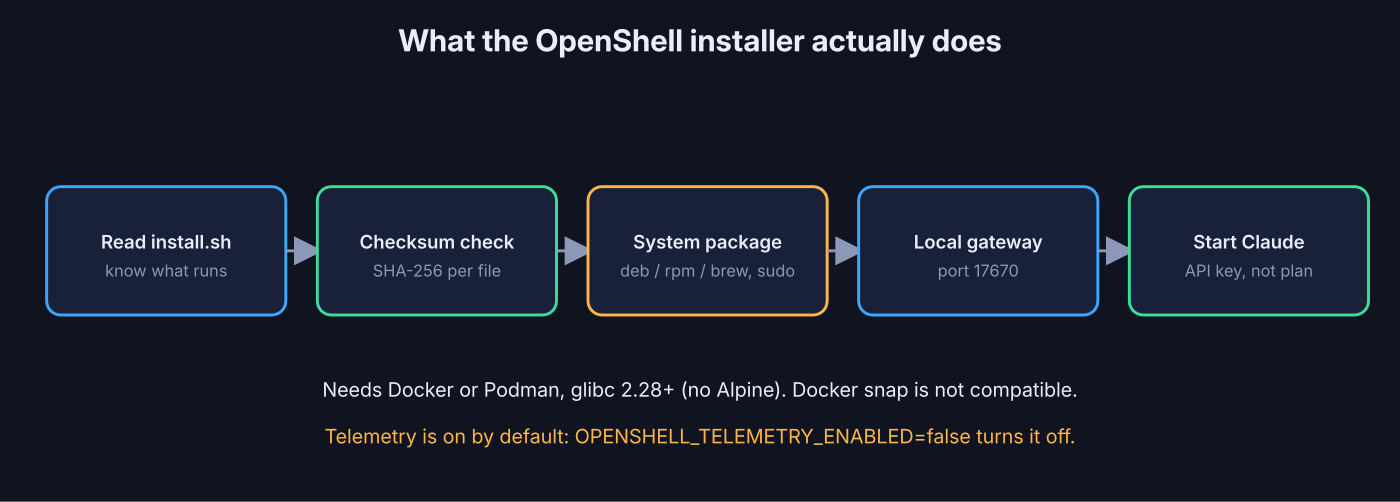
Before running any curl | sh installer, I read this one end to end. Here is what it does, so you know before you type:
- It installs a real system package (Debian, RPM or Homebrew), so it needs root or
sudo. - It checks every download against a SHA-256 checksum (a fingerprint that proves the file was not changed).
- It refuses downloads that redirect anywhere other than the project’s own GitHub releases page.
- It needs glibc 2.28 or newer, so Alpine-based systems (which use a different core library) are not supported.
- It starts a local gateway on port 17670.
- The Docker snap package is not compatible. Use Docker from your distro or Docker’s own repo.
It also sends anonymous usage counts by default. No prompts, file paths or credentials, but if you want it off, set OPENSHELL_TELEMETRY_ENABLED=false on the gateway.
What are the OpenShell gotchas for Claude Code users?
Four things will trip you up in the first hour, and all four have simple fixes.
It needs an API key, not your Pro or Max plan. The sandbox takes an ANTHROPIC_API_KEY from the Anthropic Console. A subscription login does not count, so you pay per token. That cost adds up fast with heavy MCP use, which this breakdown of Claude Code MCP token cost covers.
Everything outside the policy is blocked. The bare default policy allows no outbound connections at all. The community Claude Code image ships a policy that covers what Claude Code needs to talk to Anthropic, but not your package registries or your company API. Add those yourself.
Auto-update needs its own rule. Claude Code updates itself from downloads.claude.ai. If that host is not allowed, updates can fail with no clear error, and you keep running an old version.
Request rules only log unless you say “enforce”. For rules that inspect individual requests, the default mode is audit (allow it, but write it down). If you want a POST to be truly blocked, set enforcement: enforce.
How do OpenShell policies work?
A policy is one YAML file that lists which files, programs and websites the agent may use, down to single HTTP methods.
YAML (a plain-text format for settings, based on indentation) keeps the rules readable and easy to review in Git. A policy has up to five sections: filesystem_policy, landlock, process, network_policies and network_middlewares.
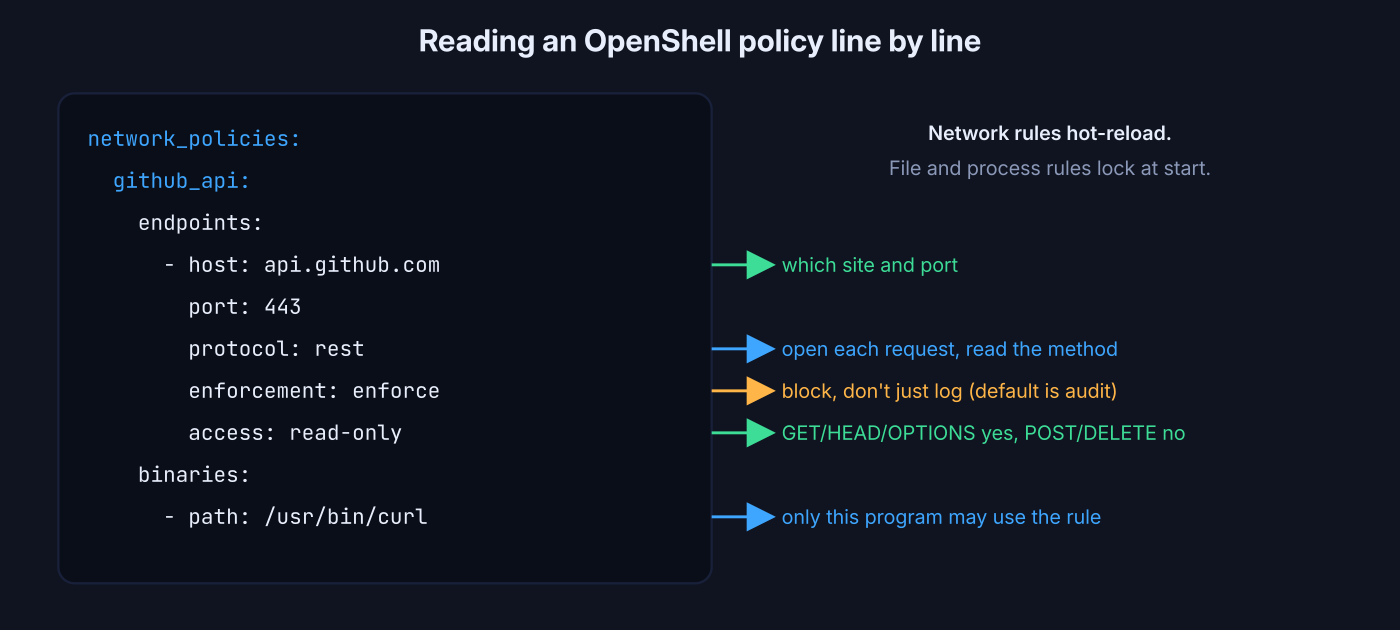
Two timing rules matter. File and process rules are locked when the sandbox starts, so changing them means a new sandbox. Network rules hot-reload (change while the agent keeps running), so you can open a door mid-session without losing work.
Here is a rule that lets curl read from the GitHub API but never write to it:
network_policies:
  github_api:
    name: github-api-readonly
    endpoints:
      - host: api.github.com
        port: 443
        protocol: rest
        enforcement: enforce
        access: read-only
    binaries:
- path: /usr/bin/curlprotocol: rest tells the supervisor to open each request and look at its method. access: read-only means GET, HEAD and OPTIONS pass, POST and DELETE do not. binaries names the exact program allowed to use the rule, so a random script in the box cannot borrow it.
When the agent hits a wall, OpenShell writes the denial down and drafts a narrow rule for it. You review and approve from your terminal:
openshell rule get my-agent --status pending
openshell rule approve my-agent --chunk-id <chunk-id>The agent cannot approve its own request. That one design choice is what stops a hijacked agent from widening its own permissions.
Claude Code /sandbox vs OpenShell: which should you use?
Use /sandbox for everyday solo work, use OpenShell when the agent runs without you watching or near anything you cannot afford to leak.
| Claude Code /sandbox | NVIDIA OpenShell | |
|---|---|---|
| What is inside the wall | Shell commands only | The whole agent, tools, MCP servers and hooks |
| File tools (Read, Edit) | Permission rules | Kernel-enforced |
| Network default | Ask or allowlist by domain | Everything blocked |
| Checks inside requests | No (domain name only) | Yes: method, path, MCP tool name |
| API key exposure | Visible unless you mask it | Agent never sees the real key |
| Setup | 2 minutes | 10 to 20 minutes, needs Docker |
| Cost | Your Pro/Max plan works | API key billing |
| Works for other agents | Claude Code only | Claude Code, Codex, OpenCode, Copilot CLI |
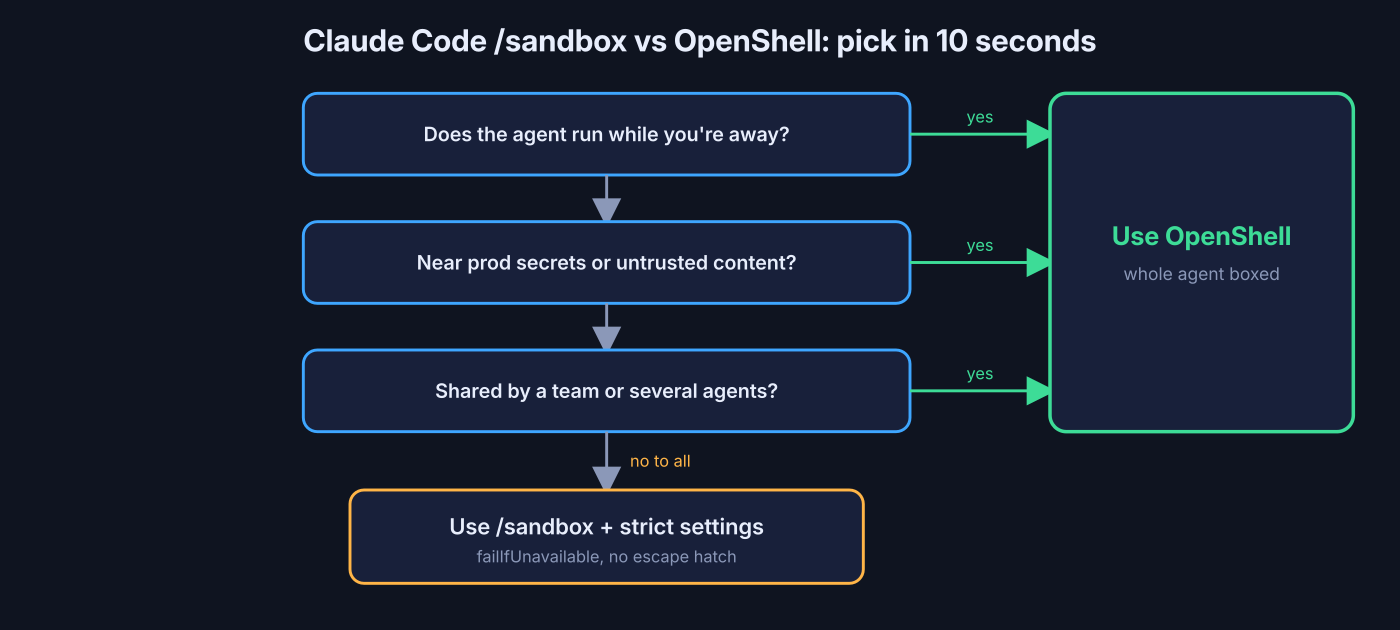
Pick /sandbox if you sit at the keyboard, read what Claude proposes, and mostly work on your own code. With the strict settings above, it blocks the common accidents at near zero cost.
Pick OpenShell if any of these are true: the agent runs overnight or on a schedule, it touches production credentials, it reads untrusted content like public issues or scraped pages, or several people share the setup. The same policy file works for Codex too, which matters if you run Claude Code and Codex together.
If you want a middle ground that runs Claude Code in a disposable box without a full policy engine, the coop sandbox setup for Claude Code is lighter to start with.
You can also stack them. Turning on /sandbox inside an OpenShell sandbox adds a second, smaller wall around each command, for the price of a few extra settings lines.
Common questions about Claude Code sandbox vs OpenShell
Does Claude Code have a built-in sandbox?
Yes. Run /sandbox inside Claude Code. It isolates shell commands using Seatbelt on macOS and bubblewrap plus socat on Linux and WSL2.
Can I use my Claude Pro or Max subscription inside OpenShell?
No. The OpenShell sandbox expects an ANTHROPIC_API_KEY from the Anthropic Console, which is billed per token.
Is NVIDIA OpenShell free and open source?
Yes. It is Apache 2.0 licensed and runs on regular Linux, Mac and WSL2 machines. NVIDIA’s hardware watchdog add-on is optional.
Does /sandbox protect against MCP servers?
No. MCP servers and hooks run outside the sandbox. Only Bash, PowerShell and Monitor commands are isolated; other tools follow permission rules.
2 comments