


How do I check a Postgres migration with Ripplecheck? That question is the whole job of this page.
A database is a program that stores grids. Postgres (PostgreSQL: the database program this page is about) is one of those programs. A table is one grid. A row is one line in the grid. A column is one field in that line, such as a customer type. SQL (the language that asks the database a question, or tells it to write a row) is how an app talks to the grid.
A migration (a file of SQL that changes the shape of those grids) can be valid and still break the app that is already running. I had a file that dropped the column customer_type, and another line that added a required column to a table that already had rows. Squawk, the checker that only reads the file, said a drop may break clients. It did not name an app. Ripplecheck replays the queries you recorded against a throwaway copy of the database. On the drop, it named the one query that died. On the required column, the change itself failed because the rows that already existed had no value to put there.
Checked November 2026 against Ripplecheck docs and a Squawk-style SQL lint comparison for Postgres migrations. The rename example below is the concrete check: old recorded queries against a column that the migration renamed.
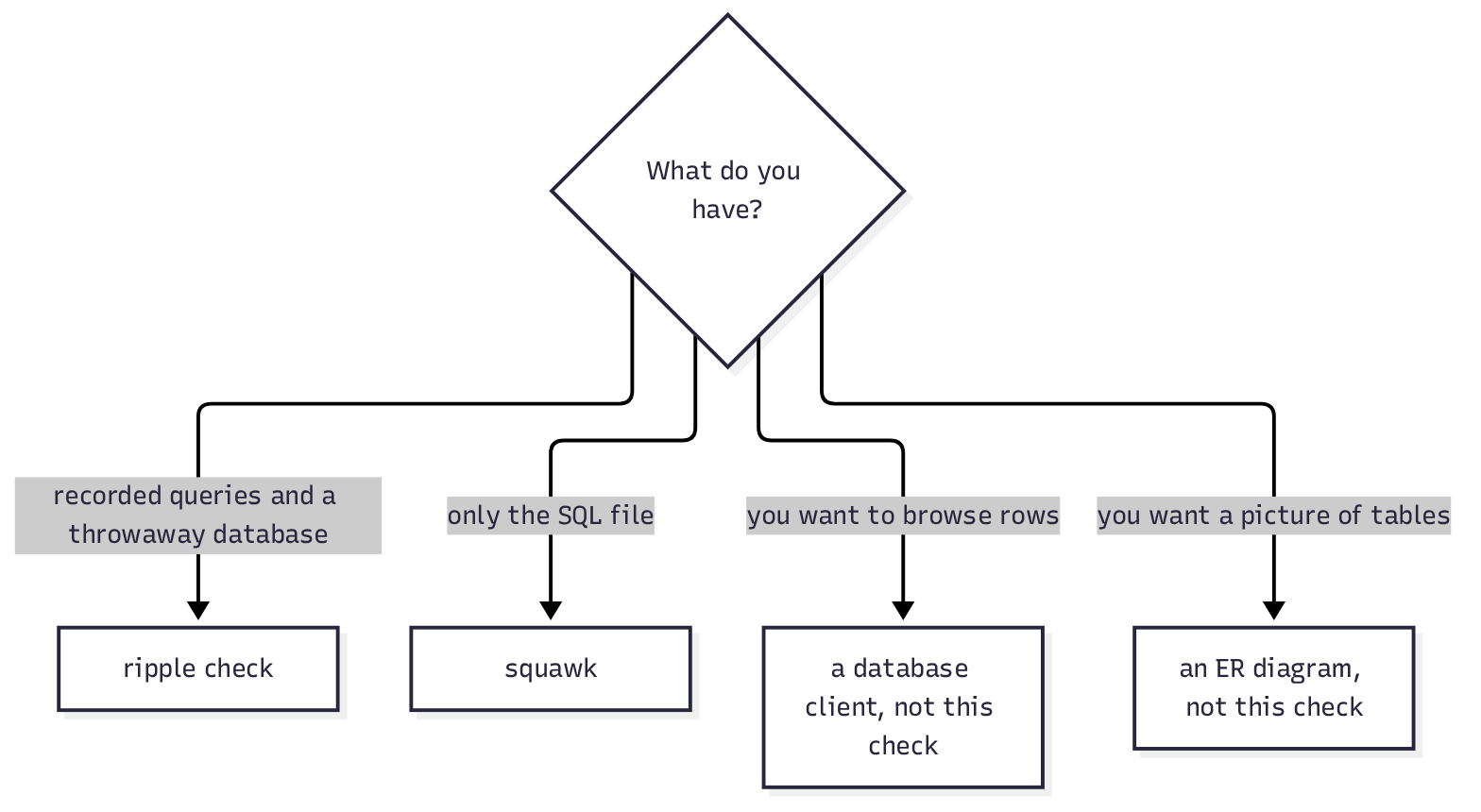
Use ripplecheck when you have those recorded queries and a throwaway database. Use Squawk when you only have the SQL file and you want warnings about locks.
What is a table before the check matters
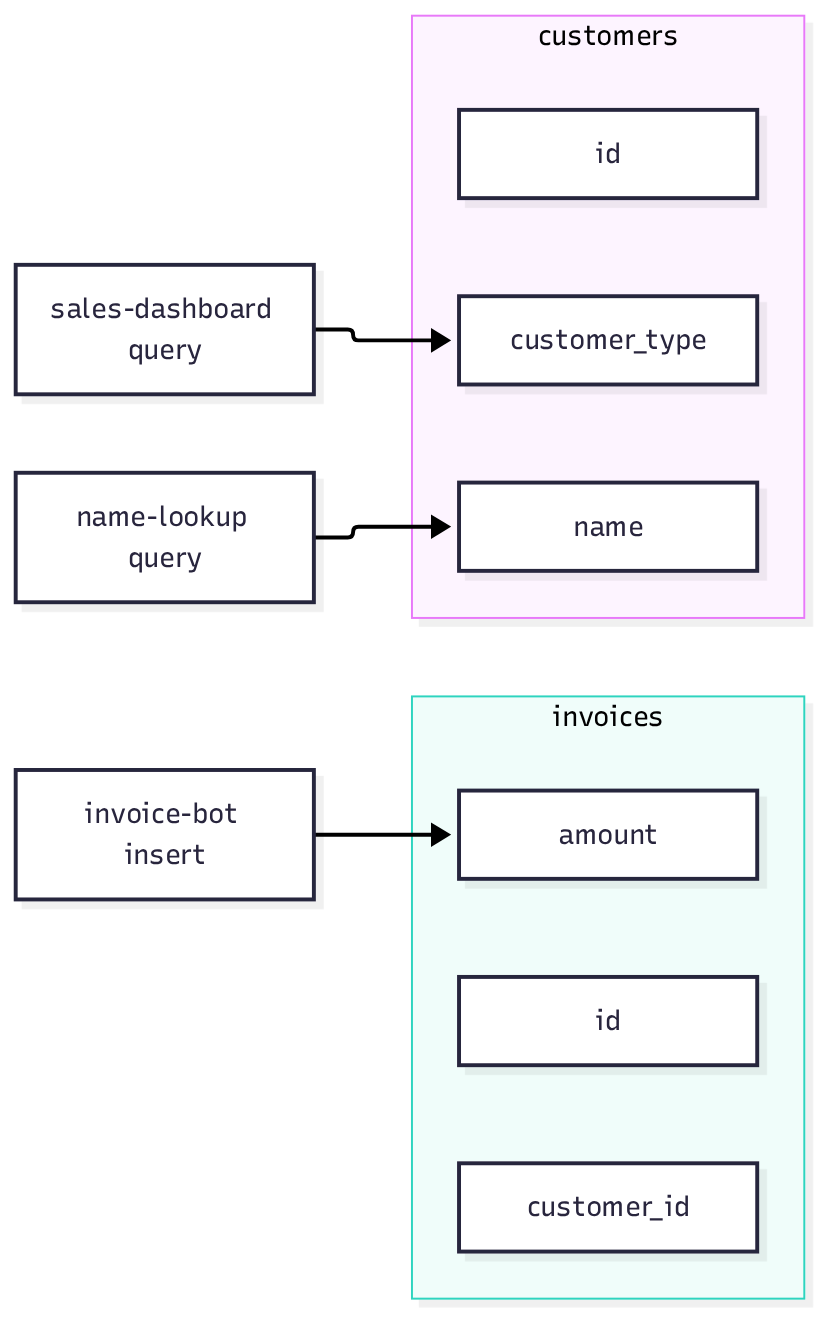
A table is the grid. In the copy I used, customers had three columns: id, customer_type, and name. It had two rows. invoices had id, customer_id, and amount, and two rows of its own. A schema (the shape of the tables, not the data sitting in them) is what a migration edits. The rows are what a bad edit can wipe or reject.
An app does not look at the file. It sends a query (one SQL statement the app already runs). The sales screen in my notes asked for customer_type. The invoice writer inserted id, customer_id, and amount. A name lookup asked for name by id. If the column goes away, the sales screen fails even though the SQL file itself ran.
What is Ripplecheck
Ripplecheck is a free Python program that answers one question: after this SQL file runs, which recorded app query stops working. The package I installed was ripplecheck. The command it put on the disk was ripple, not ripplecheck. ripple --version printed 0.1.0.
pip install ripplecheck
ripple --versionOther products use the word ripple. This page is only the Postgres checker whose command is ripple after pip install ripplecheck. It is not the payments company. It is not a lead list for shops with no website. It is not a scanner that walks your code files looking for broken function calls. If ripple --help does not list collect, map, check, and mcp, you have a different program.
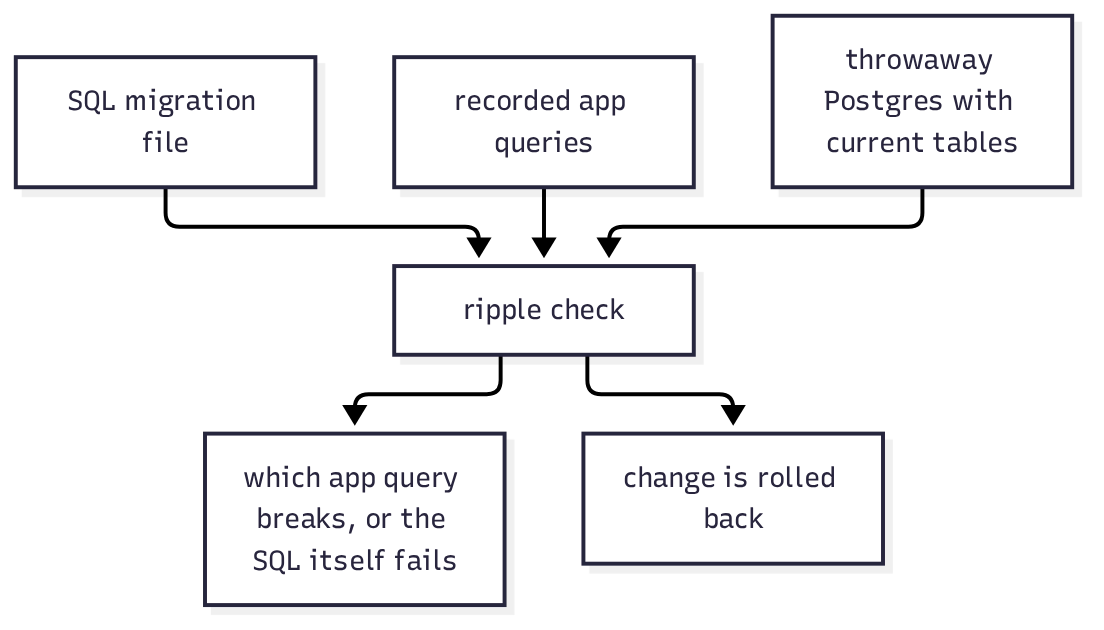
It needs Python 3.10 or newer. It talks only to Postgres. The check wants a scratch database (a throwaway copy that has your current tables, not the live one) and a JSON file of queries. It applies your SQL inside a transaction (a change it can undo) and rolls the change back. After every run, my columns were still customer_type, id, and name.
How do I check a Postgres migration with Ripplecheck
Point ripple check at the SQL file, the scratch database, and the query file. A DSN (the address string that opens the database) is the --dsn value. Yours will look like postgresql://USER:PASSWORD@HOST:5432/DATABASE.
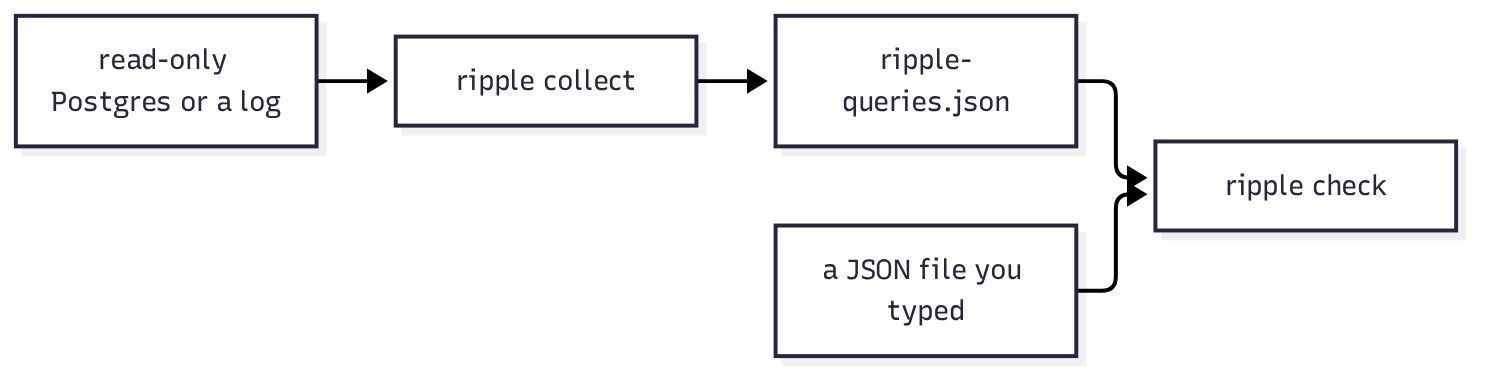
I wrote the queries by hand in the shape the tool stores. Each item has app, sql, and calls:
{
  "version": 1,
  "source": "hand",
  "queries": [
    {"app": "sales-dashboard", "sql": "SELECT customer_type, count(*) FROM customers GROUP BY customer_type", "calls": 40},
    {"app": "invoice-bot", "sql": "INSERT INTO invoices (id, customer_id, amount) VALUES ($1, $2, $3)", "calls": 12},
    {"app": "name-lookup", "sql": "SELECT name FROM customers WHERE id = $1", "calls": 9}
  ]
}The drop file was one line:
ALTER TABLE customers DROP COLUMN customer_type;ripple check migration-drop.sql \
--dsn "$RIPPLE_DATABASE_URL" \
--queries ripple-queries.json \
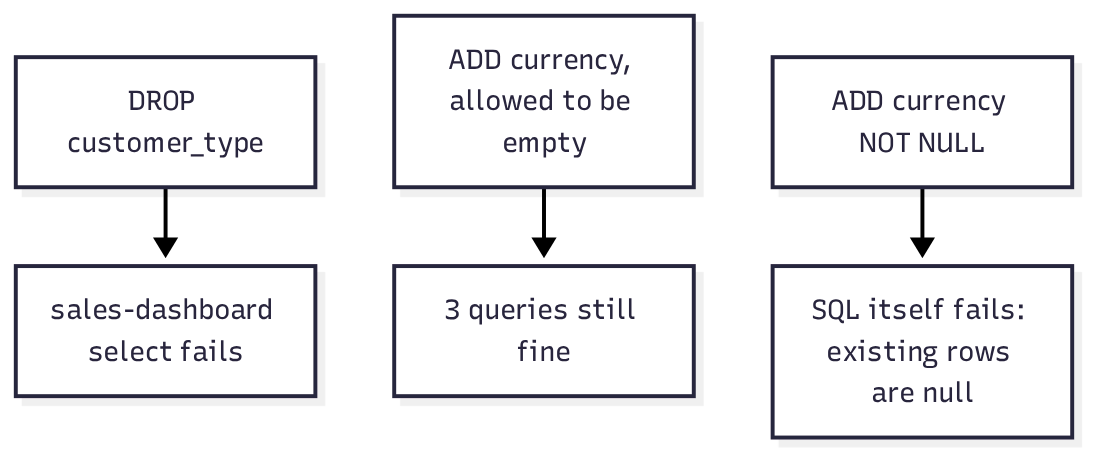
--fail-on neverThe report said this change breaks 1 app (1 query). Under sales-dashboard it printed the select, then column "customer_type" does not exist. Under data warnings it said column public.customers.customer_type is deleted, with all its data, used by sales-dashboard. The invoice insert and the name lookup were not listed as broken. Two of the three apps were fine. One was not, and the report named it.
A second file only added a column that is allowed to be empty:
ALTER TABLE invoices ADD COLUMN currency text;Ripple printed: Safe. None of the 3 queries from 3 apps break, and no data is at risk.
A third file added the same column as required. NOT NULL means every existing row must already have a value:
ALTER TABLE invoices ADD COLUMN currency text NOT NULL;Ripple did not get as far as listing queries. It printed: The change itself fails on this database: column “currency” of relation “invoices” contains null values. The two invoice rows had no currency, so Postgres refused the line.
ripple map on the same query file printed which app reads which column. customer_type belonged to sales-dashboard. name and id belonged to name-lookup. invoices was written by invoice-bot. Run map first when you do not yet know which column is load-bearing.
Ripplecheck vs Squawk
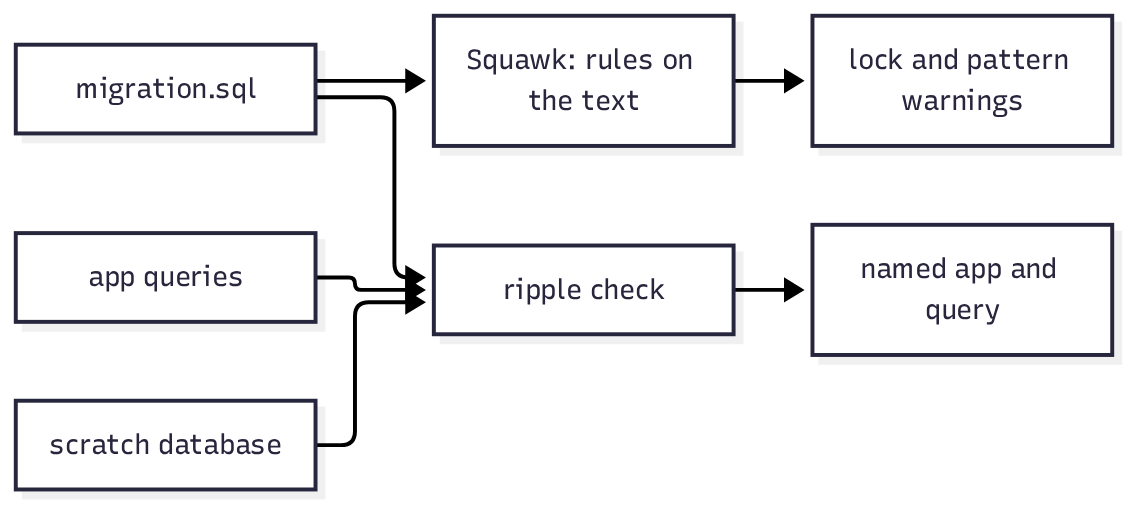
Squawk does not open a database and it does not know your apps. It reads the SQL file and matches rules. I installed it with pip install squawk-cli. The command was squawk. squawk --version printed 2.71.0.
On the same one-line drop, Squawk found 4 issues. The one that matches the real failure was ban-drop-column: dropping a column may break existing clients. The other three were about a missing lock timeout, a missing statement timeout, and a missing IF EXISTS. A lock means other sessions cannot read or write that table while the change waits. Squawk is right that a drop asks for a strong lock. My table had two rows, so that lock would be instant. I am not using Squawk’s lock text as a timing result. I am using it as a label on the statement.
It did not print sales-dashboard. The app names lived only in the query file, and Squawk never sees that file.
| Question | Ripplecheck | Squawk |
|---|---|---|
| What it reads | SQL file, scratch database, recorded queries | SQL file only |
Drop customer_type | Names sales-dashboard and the exact select. Warns the column’s data is deleted | Says a drop may break clients. Also warns about lock timeout and IF EXISTS |
Add nullable currency | Safe. 3 queries, no data risk | Use it when you only have the file and want pattern warnings |
Add currency text NOT NULL on a table with rows | The SQL fails: existing rows contain nulls | Warns from the text that a required column with no default is a problem |
Rename customer_type to segment | Still breaks the old select, because the text still says customer_type | Says a rename may break clients, and that the rename takes a strong lock |
| MySQL or SQLite | No. Postgres only | No. Postgres only |
| Needs recorded queries | Yes, or there is nothing to replay | No |
Pick Squawk when the file is all you have, or when the question is whether the statement asks for a lock. Pick ripplecheck when the question is which app dies. I would run both. They fail in different places.
What does a rename do to old queries
I expected a rename to be the safe version of the drop. The data would stay. The column would just have a new name:
ALTER TABLE customers RENAME COLUMN customer_type TO segment;
ALTER TABLE invoices ADD COLUMN currency text;Ripple said this change breaks 1 app (1 query). Same sales select. Same reason: column "customer_type" does not exist. The rows were still there, under the new name. The app does not know the new name until someone edits the app. A rename keeps the data and breaks the old sentence. A drop throws the data away and also breaks the old sentence. Ripple’s data warning showed up on the drop. It did not show up on the rename. The broken query showed up on both.
Squawk’s matching line was renaming-column: renaming a column may break existing clients. No app name. In my file only one of three queries mentioned the old name, so “may” was true for one app and false for the other two.
The repair is ordinary. Change the app query to segment, record the new query, and run ripple check again. SKIPPED_PHRASE do that second edit. The first result is enough to show why “the data is safe” and “the app still works” are different sentences.
How do I record the queries Ripplecheck checks
A hand-written JSON file is enough for a test. It is a bad picture of a live app, because you will forget a query. ripple collect reads what Postgres has already seen. It can read pg_stat_statements (a Postgres view that remembers query text and how often each one ran) through a read-only DSN, or it can read a Postgres log. The help text says a read-only connection is enough.
ripple collect --dsn "$RIPPLE_DATABASE_URL" --source statsThat writes ripple-queries.json unless you pass another path. If the file is missing, the tool stops before it touches the database. I pointed it at a path that was not there. It told me to run ripple collect, or write the file by hand.
Two limits sit on collect. It only checks queries that were recorded. A rare report that did not run in the collect window is invisible, and ripple will call the migration safe. It also does not notice a change in meaning. If the column name stays but the values inside it now mean something else, the old select still prepares, and ripple says ok.
ripple mcp is the same check behind MCP (a small server a coding tool is allowed to run). SKIPPED_PHRASE start it. The help text says it needs the same scratch DSN. --fix asks a model to suggest a repair and then re-checks it. SKIPPED_PHRASE pass --fix. I have no repair text to show, so do not treat a suggestion as something this page verified.
When should I not use Ripplecheck
Do not point --dsn at production. The tool applies the SQL and rolls it back, and it warns if the database looks full of real rows. A rollback can still hold a lock while it runs. Use an empty copy of the schema, or a small copy you can throw away. My copy had two rows in each table on purpose, so the NOT NULL failure was about “rows exist,” not about a table with millions of rows.
Do not use it as a lock timer. Squawk labels the lock. Neither tool told me how long a drop would block a busy table, because SKIPPED_PHRASE have a busy table.
Do not use it on MySQL or SQLite. Do not skip Squawk just because ripple printed Safe. Safe means these recorded queries still prepare. It does not mean the statement is kind to other sessions. A drop of a column no query uses would be “safe” for the query list, and it would still delete the data. Read the data warnings, not only the first line.
Do not install a random project named ripple and assume it is this one. Check that ripple check --help mentions a migration file, --dsn, and --queries.
Looking at the rows is a different job. A small database client is what dbx, tested as a lighter DBeaver is for. A picture of the schema is what an ER diagram from a Prisma schema is for, when you want a drawing rather than a check that old SQL still runs. None of those three tell you that sales-dashboard still selects a column you are about to drop.
The project page is yashpb5005/ripple. Squawk’s rules are at squawkhq.com/docs. The line that failed on existing rows is ordinary Postgres, documented as ALTER TABLE.
Common questions about Ripplecheck Postgres migrations
does ripplecheck need a copy of production
It needs the shape, not your customer list. The check prepares each recorded query before the change and again after it. Prepare means the sentence still fits the tables. It does not mean the names that come back are correct. A scratch database with the same columns is enough for that. Real rows matter for one case I hit: adding a required column fails when a row is already there and has nothing to put in the new column. An empty scratch copy hides that failure. Load a few rows.
will squawk tell me which app breaks
No. On the drop, Squawk said a drop may break existing clients. It did not say sales-dashboard, and it did not print the select. Squawk never receives the query file. If you need the app name, use ripplecheck. If you need the lock warning, use Squawk.
can ripplecheck check mysql
No. The package I ran speaks Postgres. Squawk, on the same machine, is also a Postgres linter (a program that reads SQL and prints warnings, without applying it). A MySQL file needs a different checker. SKIPPED_PHRASE run one.
what if i have no recorded queries
Ripple stops. A missing file told me to run ripple collect or write the file by hand. An empty list has nothing to call broken, so a green line would be a lie. Write the three queries you are afraid of before collect works. The sales select was enough to catch the drop and the rename. The insert and the name lookup are what showed the damage was narrow.
I would keep Squawk on the file so the lock warnings still appear. I would not ship a drop because Squawk said “may.” I would ship, or not, from the app name ripple printed. In this run that name was sales-dashboard, and the sentence that died was the one that still said customer_type.