
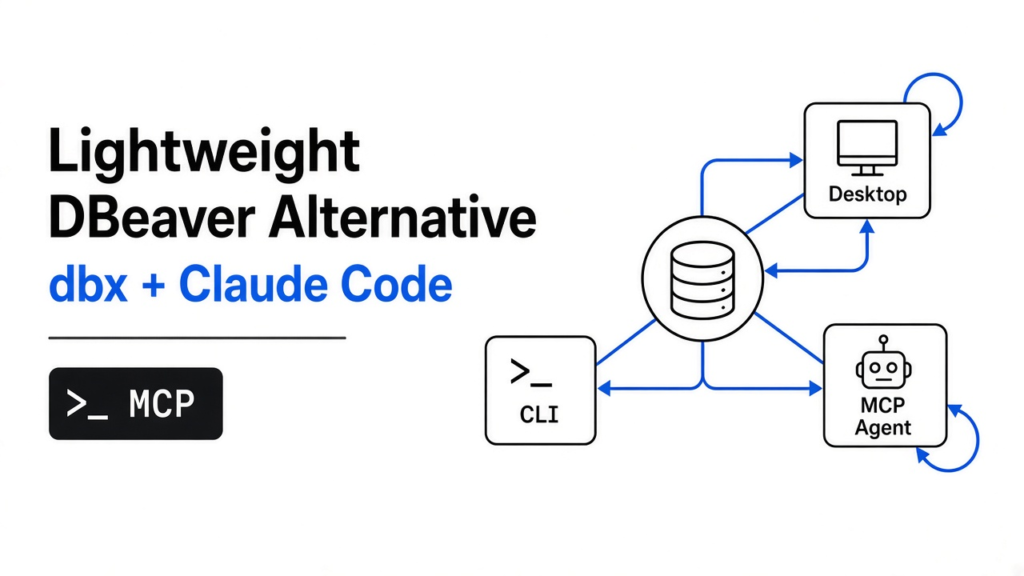
Short answer: yes for most daily work. dbx is a free, open source database client (an app that lets you look inside a database) with a small installer, a CLI and an MCP server, so Claude Code can query your data too. The catch: on a fresh setup, the AI could delete rows until I locked it down.
You need one number from a database. Maybe how many orders came in last week. So you open your database app, wait for it to load, click through a tree of folders, and finally type one line of SQL.
That wait is why people search for something lighter. And now there is a second reason: you want your AI coding agent to answer the question for you.
dbx tries to do both. I installed it, pointed it at a real Postgres database, and handed the keys to Claude Code. Here is the thread of this post: a small client is easy to find, but what decides if you can trust it is what it lets an AI change by default. Get the project at github.com/t8y2/dbx.
What is dbx, and what does it replace?
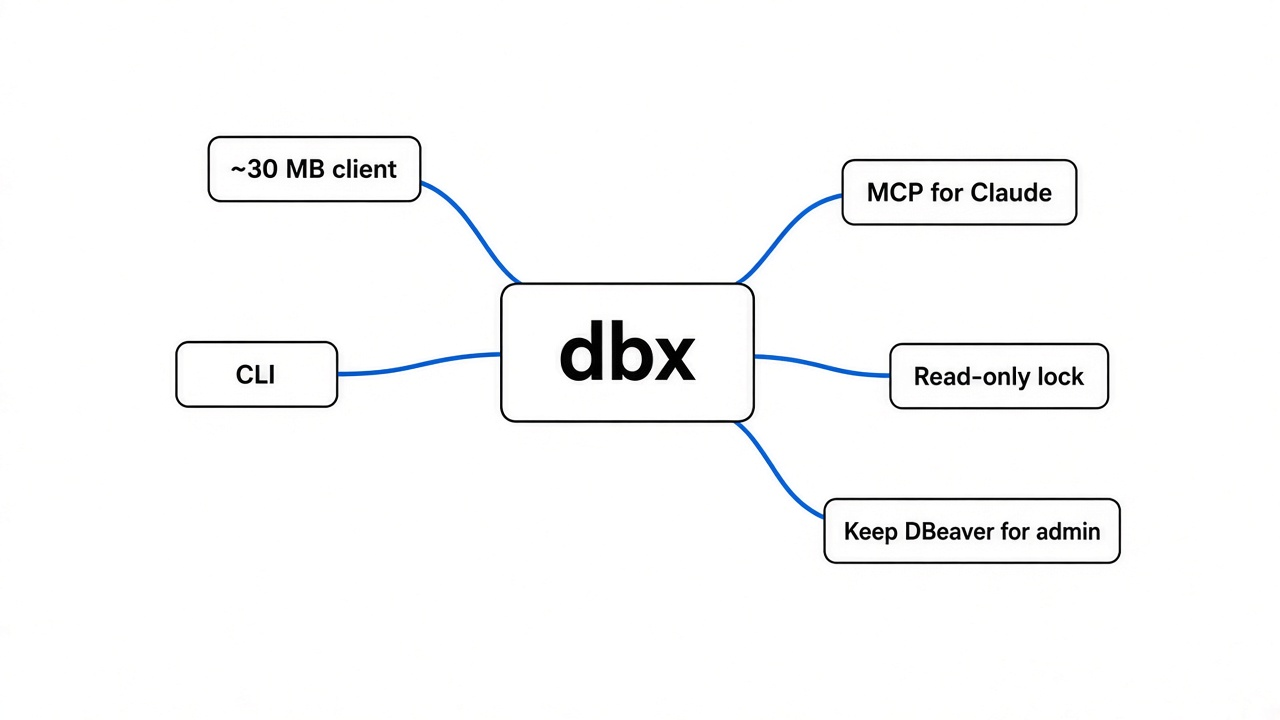
dbx is a free, open source database client that tries to be small, so it opens fast and stays out of the way.
First, the base idea. A database stores your data, but you cannot see it directly. A database client is the window: it connects, shows your tables, and runs your queries.
DBeaver is the most popular free window. It is a Java app built on Eclipse (the same plugin platform behind the Eclipse code editor), and it ships its own Java runtime inside every download. That is why the download is around 120 MB and it feels heavy: you are starting a whole Java platform to look at one table.
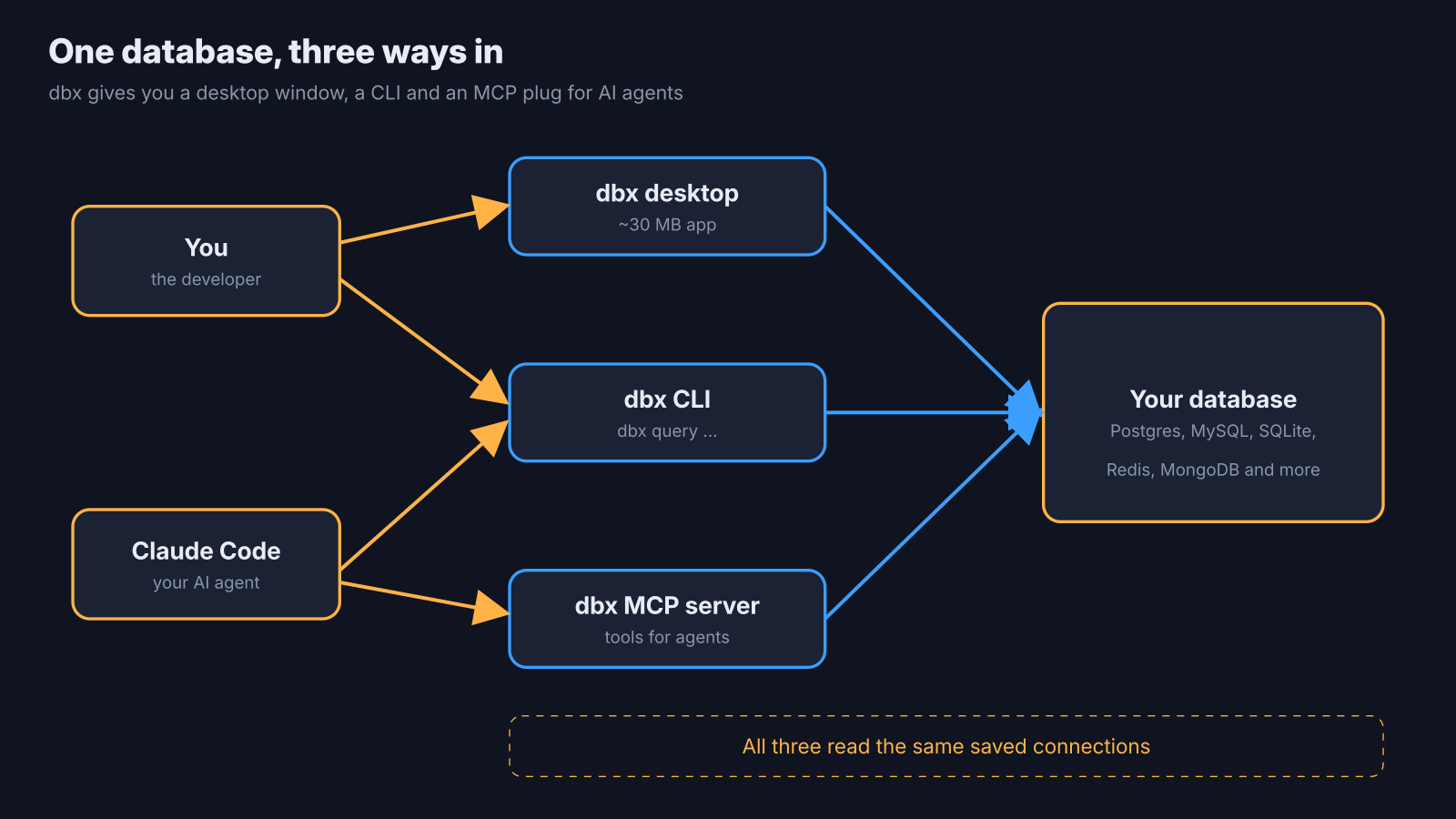
dbx takes the other road. It is built with Tauri (a way to build desktop apps that uses the web view already inside your operating system, instead of bundling a full browser). The rest is written in Rust. The result is a desktop installer of around 30 MB for macOS and Linux.
It works on macOS, Windows and Linux, and you can also run it in Docker and open it in a browser. The license is Apache 2.0, so it is free for work use too. It speaks to MySQL, PostgreSQL, SQLite, Redis, MongoDB, DuckDB, SQL Server and many more.
So the size story checks out. The more interesting part is what comes in the box for AI agents.
How hard is dbx to set up?
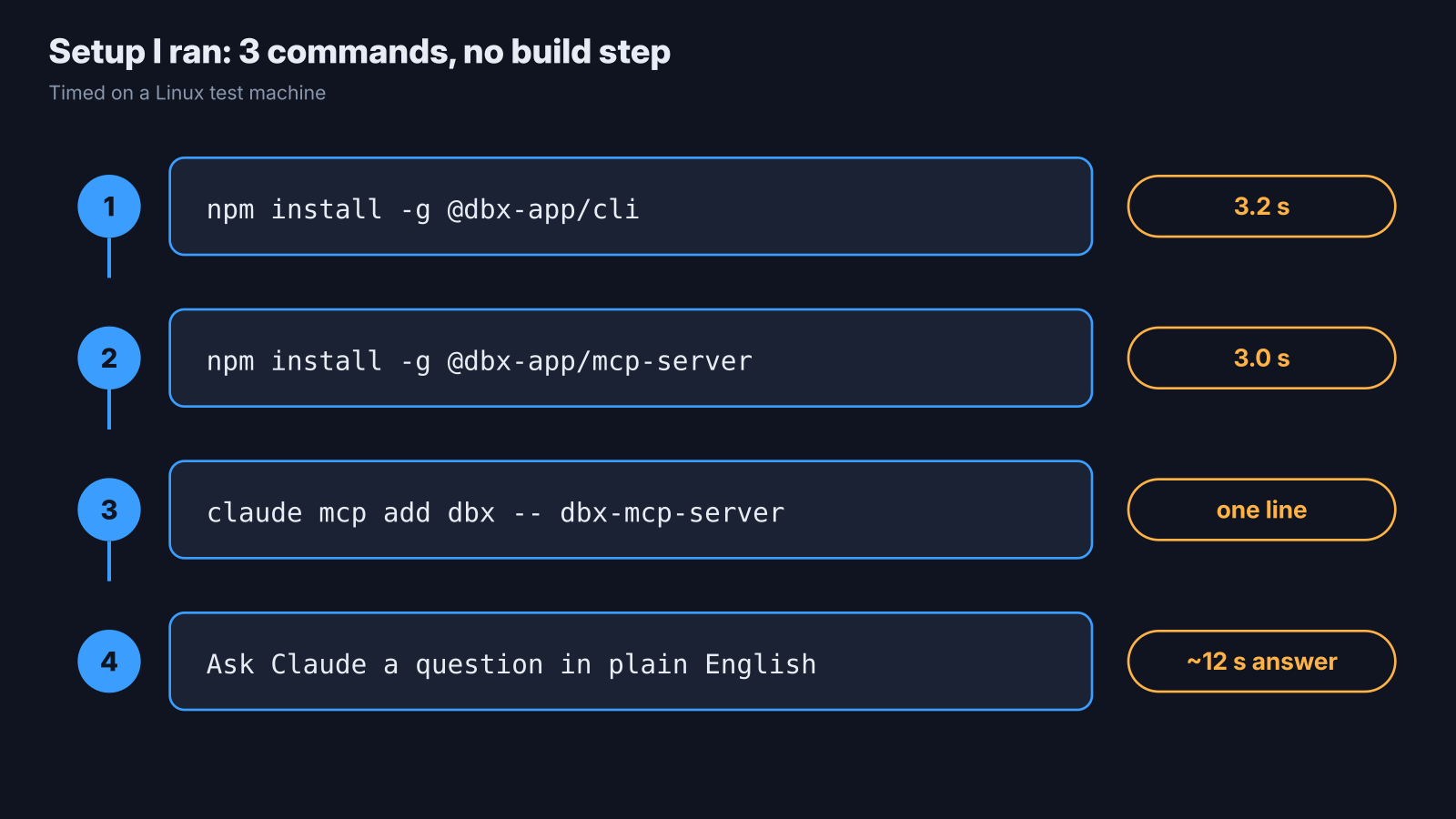
The agent tools installed in about 3 seconds each, with one command and no build step.
dbx ships two extras next to the desktop app. A CLI (a command you type in the terminal) called dbx, and an MCP server.
MCP needs a quick base first. An AI agent like Claude Code can only do what its tools allow. MCP (Model Context Protocol, a standard plug that gives an AI app new tools) is how you add tools. An MCP server is the small program on the other end of that plug.
Here is exactly what I ran:
npm install -g @dbx-app/cli          # took 3.2 seconds
npm install -g @dbx-app/mcp-server   # took 3.0 seconds
claude mcp add dbx -- dbx-mcp-serverEach npm package pulls a ready-made Rust program for your system, around 34 to 38 MB on disk. No Rust, no Java, no compiling.
One snag hit me right away, and it will hit you on a headless Linux box (a server with no desktop). dbx encrypts saved passwords, and it keeps the key in your system keyring (the built-in password vault on your computer). My test machine had no keyring running, so saving a connection with a password failed with KEY_PROVIDER_UNAVAILABLE.
The fix for a local dev database was simple: a database that needs no password. On a laptop with a normal desktop, the keyring is already there, so you will likely never see this.
Can Claude Code query your database through dbx?
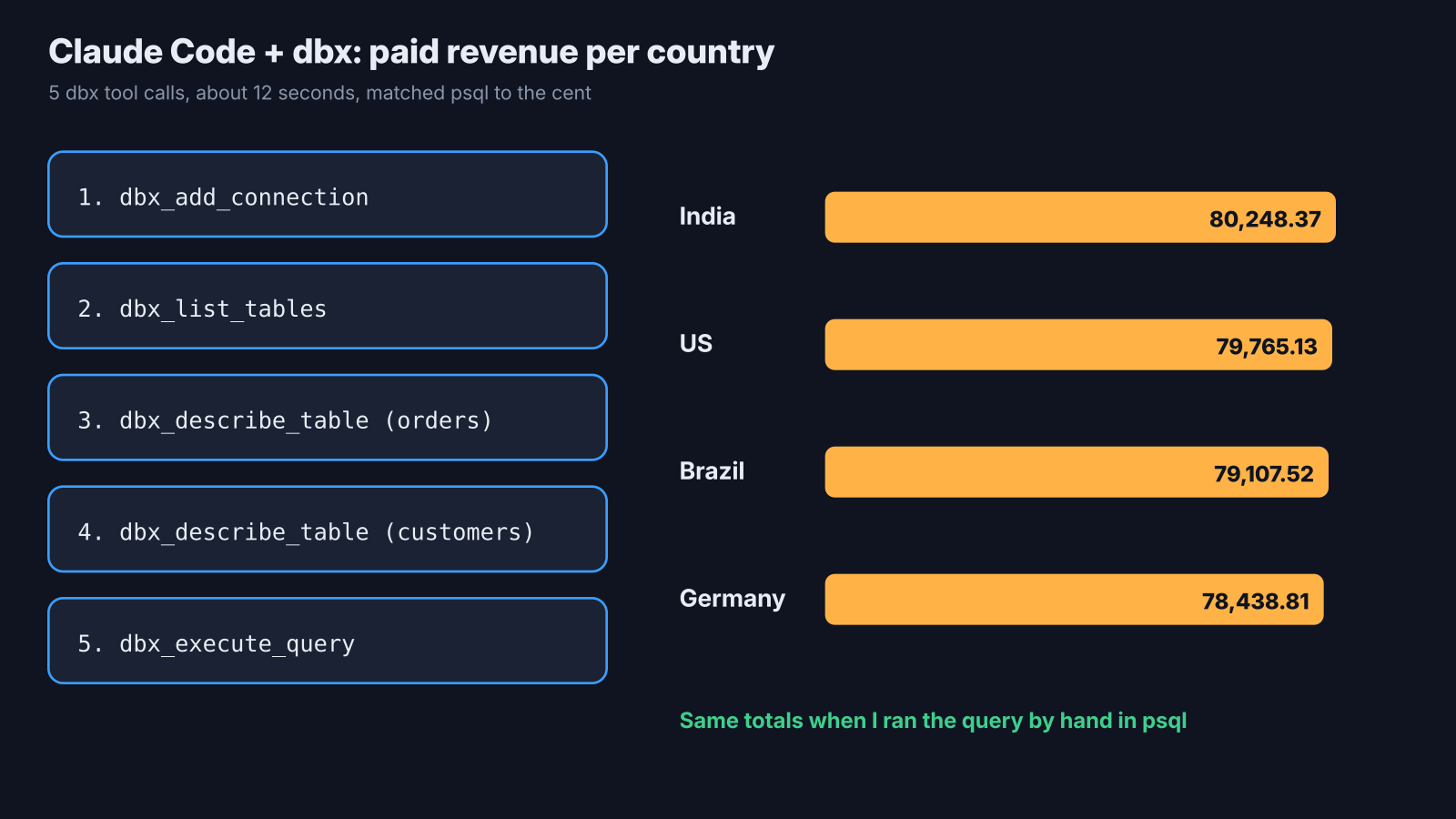
Yes. Claude Code added the connection, read the tables and returned correct numbers in about 12 seconds.
The question was simple: can an agent answer a real business question with only dbx tools?
What I did: I started Postgres with a small shop database, 500 customers and 5,000 orders. Then I asked Claude Code to add the connection, look at the tables, and give me paid revenue per country, highest first. I allowed only the dbx tools.
The results:
- It made 5 dbx tool calls: add connection, list tables, describe
orders, describecustomers, run the query. - It checked the
customerstable on its own before writing the join, instead of guessing the column name. - The whole run took about 12 seconds.
- The totals matched what I got by hand in
psql, to the cent: India 80,248.37, US 79,765.13, Brazil 79,107.52, Germany 78,438.81.
What this means for you: you can ask questions in plain English and get the SQL and the answer back, without leaving your editor. If token cost of tool-heavy agent loops worries you, that is a separate problem — see RTK vs Caveman on Claude Code tokens.
The catch: this was a small, clean database. On a messy schema with 200 tables, the agent will need more describe calls before it can write a good query.
Reading data is the safe half, though. The real question is what happens when the agent tries to change something.
What can an AI change in your database through dbx?
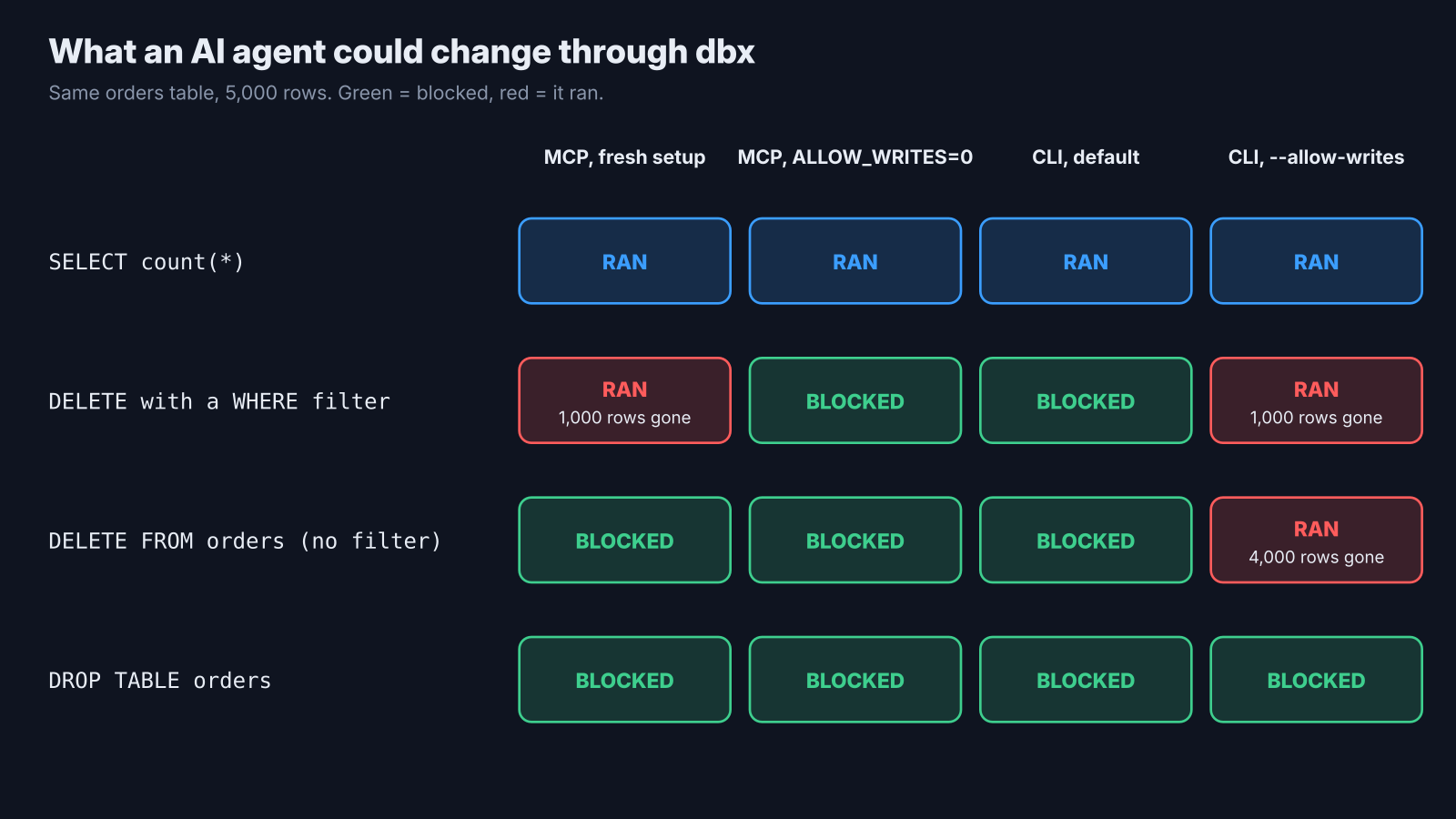
On a fresh setup, the AI could delete rows, but it could not drop a table or wipe a whole table.
Think of a hotel key card. A card that opens every door is handy until someone else is holding it. Database permissions work the same way: read, write, and “dangerous” (dropping or wiping whole tables).
dbx sorts every SQL statement into those levels before it runs. So I asked Claude Code to try three things on the same orders table:
| What the agent ran | Fresh setup | With DBX_MCP_ALLOW_WRITES=0 |
|---|---|---|
SELECT count(*) FROM orders | Allowed | Allowed |
DELETE FROM orders WHERE status = 'refunded' | Allowed: 1,000 rows gone | Blocked |
DELETE FROM orders (no filter) | Blocked | Blocked |
DROP TABLE orders | Blocked | Blocked |
That second row is the one to remember. With no policy saved yet, a filtered delete went straight through and removed 1,000 rows. The blocks on the other two came back as clear errors, like High-risk SQL is disabled in DBX MCP settings.
So set read-only before you let an agent near real data. You have two ways:
- In the dbx desktop app, open Settings, then MCP, and pick Read only.
- Without the desktop app, add the variable when you register the server:
claude mcp add dbx -e DBX_MCP_ALLOW_WRITES=0 -- dbx-mcp-serverWith that set, the same delete came back as MCP_READ_ONLY: ... SQL write blocked, and all 5,000 rows stayed. One detail: that variable only counts until a policy is saved in the app. After that, the app’s setting wins.
Is the dbx CLI as safe as the MCP server?
No. The CLI blocks writes by default, but one flag lets an unfiltered delete wipe the whole table.
The CLI reads the same saved connections, so an agent can also just call dbx query from the shell. By default that is read-only, and a delete is refused with SQL_BLOCKED: write statement is blocked.
Then I added the write flag and ran a delete with no filter:
dbx query shop-local "delete from orders" --allow-writes
# Query executed. 4000 row(s) affected.Every row was gone. DROP still needed a second flag, --allow-dangerous-sql, but a full-table delete did not.
Here is why that matters. The MCP server checks if a delete has a real filter. The CLI does not; the agent skill that ships with it only asks the agent to check. Asking is not blocking.
My rule after this test: give agents the MCP server, keep it read-only, and keep --allow-writes for your own hands. Same habit as locking agent CLIs elsewhere — see OfficeCLI for agent office automation.
Is dbx faster than psql?
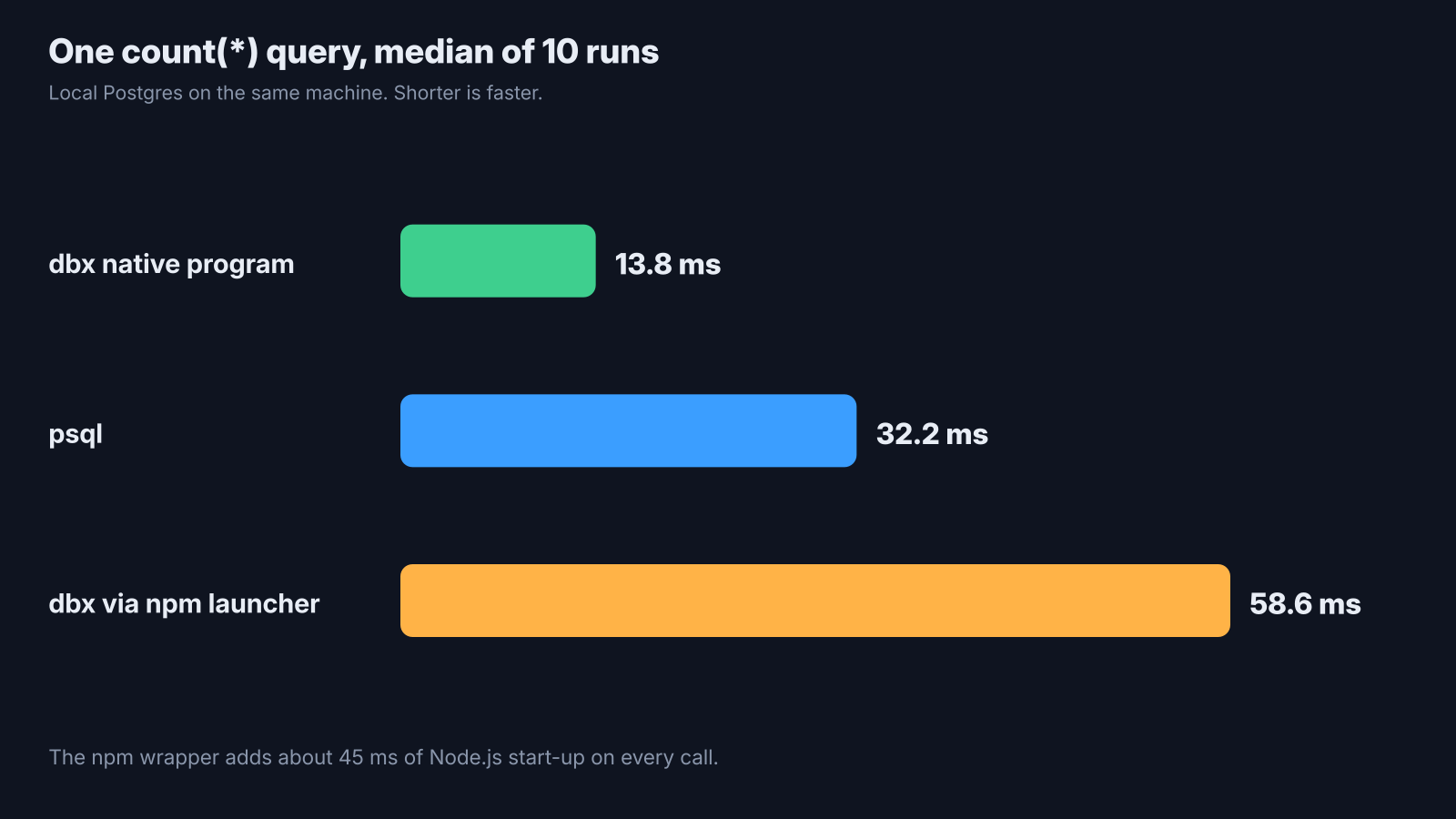
For a one-line query, the native dbx program answered in about 14 ms, faster than psql.
Speed matters here because an agent may run dozens of small queries in one task. I timed the same count(*) query 10 times each and took the middle value:
- dbx native program: 13.8 ms
psql: 32.2 ms- dbx through the npm launcher: 58.6 ms
What this means: the Rust program itself is quick, and the npm wrapper adds about 45 ms of Node.js start-up. If you care, point your config at the native file inside the npm package instead of the wrapper.
The catch: this was a local database on the same machine. Over a real network, the trip to the server will swamp all three numbers.
Where does dbx fall short?
The direct, no-desktop mode covers only some databases, and the project changes fast.
Without the desktop app running, the CLI can query 10 database types directly: PostgreSQL, Redshift, MySQL, Doris, StarRocks, Manticore Search, SQLite, rqlite, KWDB and QuestDB. Redis, MongoDB, DuckDB, SQL Server, Oracle and the rest need the desktop app open as a bridge. dbx doctor prints this list for your install, which saves guessing.
The MCP server covers more on its own: Postgres, MySQL, SQLite, Redis and MongoDB run natively. Oracle and other enterprise databases need extra Java parts from dbx.
And it moves quickly. Even the project’s own pages give different counts for how many databases it supports. That is normal for a young tool, but pin a version for anything your team depends on.
dbx vs DBeaver: which should you pick?
Pick dbx for a small, fast client your AI agent can use. Keep DBeaver for heavy admin work.
DBeaver deserves its fair point. It has years of polish, deep features like ER diagrams (drawings of how tables link) and data migration, and plugins for almost anything. If you live in a database all day, that depth is worth the weight.
| dbx | DBeaver Community | |
|---|---|---|
| Price | Free, Apache 2.0 | Free, Apache 2.0 |
| Built on | Tauri + Rust | Java + Eclipse, Java runtime included |
| Desktop download (macOS, Linux) | About 30 MB | About 120 MB |
| AI agent access | CLI + MCP server in the box | AI chat inside the app |
For everyone else, the question is simpler. Do you want to check data quickly and let your agent help? Then dbx is the lighter pick, as long as you lock it down first.
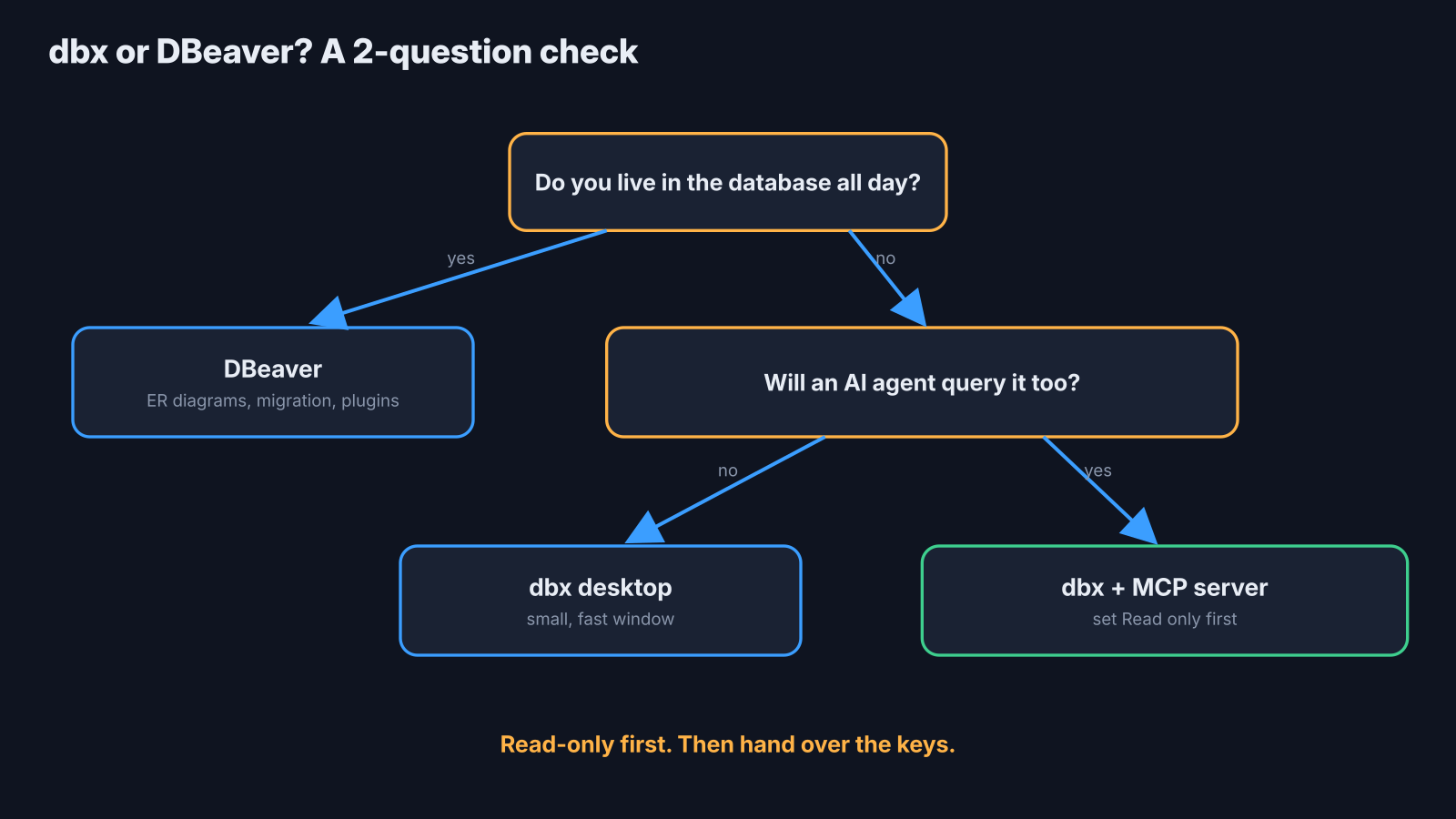
Small was never the hard part. Set read-only first, then hand over the keys.
Common questions about dbx
Is dbx free for commercial use?
Yes. dbx uses the Apache 2.0 license, which allows work and commercial use at no cost.
Does dbx need Java like DBeaver?
No. The desktop app uses Tauri and Rust, and the CLI and MCP server are standalone native programs. Only some enterprise databases, like Oracle, need extra Java parts.
How do I make the dbx MCP server read-only?
Pick Read only in the desktop app under Settings, then MCP. Without the app, register the server with DBX_MCP_ALLOW_WRITES=0 until a policy is saved.
Why does dbx say KEY_PROVIDER_UNAVAILABLE?
dbx could not reach your system keyring to protect a saved password. This happens on headless Linux; use a desktop session with a keyring, or a local database with no password.