

MicYou is a free, open-source app that turns an Android phone or iPhone into a microphone for your Windows, Linux or Mac computer. The phone captures your voice and streams it over Wi-Fi, a USB cable or a web page; a small server on the PC receives it and feeds it into a virtual microphone, so Discord, Zoom, OBS or a game can pick it up like any other mic.
I installed the Linux server, checked the release files, and started each connection mode from the PC side to see which ports it opens, what it needs from your system and where it trips up. This guide walks through setup on each platform, the settings worth changing and the gotchas that are not obvious from the README.
Checked on Oct 23, 2026 with MicYou v2.1.1 (released Oct 11, 2026) on Debian x86-64.
How MicYou turns a phone into a PC microphone
There are three pieces. The phone app records audio. The desktop server, built with Tauri 2 and Rust, receives the stream. And a virtual audio device on the PC presents that stream to other apps as a microphone input. MicYou does not create that device itself on every platform, which is the step most people miss:
| Computer | Virtual mic it uses | What you install |
|---|---|---|
| Windows | VB-CABLE | The free VB-CABLE driver |
| Linux | PipeWire virtual sink | PipeWire and pipewire-pulse (most current desktops have them) |
| macOS | BlackHole | The free BlackHole audio driver |
Without that device the server still runs, but audio has nowhere to go. On my headless test box it said so plainly: Output device unavailable; audio will be silent.
Downloading MicYou for your phone and computer
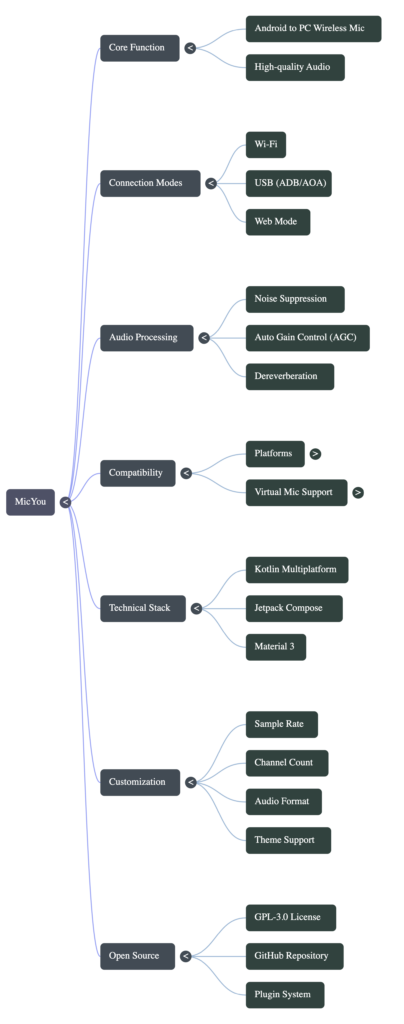
Everything is on the project’s GitHub releases page. Version 2.1.1 ships an Android APK (about 2.5 MB), a 40 MB Windows installer, macOS disk images for Apple silicon and Intel, and Linux AppImage, .deb and .rpm packages. The iPhone and iPad app lives in a separate MicYou-iOS repository and is distributed as an IPA you sideload, not through the App Store, so allow extra time for that route.
The project moved from its original LanRhyme/MicYou address to the MicYou-Dev organisation; old links redirect. Each release asset on GitHub shows a SHA-256 digest, and the .deb I downloaded matched it:
sha256sum MicYou-Linux-2.1.1.deb
# compare with the digest shown next to the file on the release page
sudo apt install ./MicYou-Linux-2.1.1.debThe Debian package depends on libwebkit2gtk-4.1-0, libgtk-3-0 and libayatana-appindicator3-1, and installs three programs: micyou (the window), micyou-cli (a lightweight server for terminals and systemd) and micyou-tui (a terminal dashboard). It also bundles the ONNX Runtime library used by the AI noise suppression.
Routing MicYou into Zoom, Discord or OBS
Once the virtual device exists, the routing is the same idea on every platform: MicYou plays your voice into one side of the virtual cable, and your call or recording app listens on the other side.
- Windows: after installing VB-CABLE, set MicYou’s output device to CABLE Input, then pick CABLE Output as the microphone in Zoom, Discord or OBS.
- macOS: after installing BlackHole, set MicYou’s output to BlackHole 2ch and choose the same device as the input in your app.
- Linux: with PipeWire running,
micyou-cli micsreports whether the virtual sink is available; select it as the input in your app or in your desktop’s sound settings.
Test with your system’s sound recorder before a real call. If the level meter in MicYou moves but the recorder hears nothing, the app is listening to the wrong input.
Wi-Fi, USB or web: choosing a connection
| Mode | Phone side | What I saw on the PC | Best for |
|---|---|---|---|
| Wi-Fi | Android or iOS app, same network | Listens on TCP 8554 and UDP 8555, announces itself over mDNS | Moving around the room |
| USB | Android with USB debugging, or iOS cable mode | Needs ADB on the PC for Android; Windows needs iTunes for iOS | Lowest delay, no Wi-Fi congestion |
| Web | Any phone browser, scan a QR code | Serves an HTTPS page on port 8554 with a self-signed certificate | Quick use without installing an app |
The CLI shows the shared connection settings, which the GUI and terminal dashboard also use:
$ micyou-cli server get
mode: wifi
port: 8554
webPort: 8443
bindAddress: 0.0.0.0
autoBind: trueGotchas I hit on Linux
Web mode ignores webPort. The settings list webPort: 8443, but micyou-cli serve --mode web started on 8554: Web server listening on https://0.0.0.0:8554. If you open a firewall port for web mode, open 8554 (or whatever port is set to), not 8443. The page it serves is titled “MicYou Web Audio”.
Expect a certificate warning on the phone. Phone browsers only allow microphone access on secure pages, so web mode uses HTTPS with a self-signed certificate it generates itself. Your phone will warn that the connection is not private. That is expected on your own network; check the address matches your PC before accepting.
Check PipeWire first. The quickest health check is micyou-cli mics. On a system without PipeWire it tells you what to install:
$ micyou-cli mics
PipeWire status:
  available: false
  virtual sink: false
  PipeWire not detected (is pipewire-pulse running?)
Install command: sudo apt install pipewire pipewire-pulseUSB mode needs ADB. micyou-cli adb-devices reported that ADB was not found. Install Android platform tools (sudo apt install adb on Debian or Ubuntu) and enable USB debugging on the phone before choosing USB. If you have an old Android phone in a drawer, it is a good candidate for this, and our guide to using an old Android phone as a Linux server covers the ADB basics.
Subcommand help is in Chinese. The top-level micyou-cli --help is in English, but help for individual commands such as serve and settings is in Chinese in v2.1.1. The options are still readable: --mode wifi|usb|web, --port, --device, --bind and -q for quiet logs.
Wi-Fi mode listens on every interface. The default bindAddress: 0.0.0.0 accepts connections from any network the PC is on. On a laptop you take to cafés, bind it to your home network’s address with --bind.
Noise reduction and other audio settings
MicYou has a full processing chain, applied in this order: echo cancellation (AEC), noise reduction, dereverb, equalizer, amplifier, automatic gain control (AGC) and voice activity detection (VAD). Every stage is off by default, and the output buffer is 300 ms. The noise reduction default type is PureVox, an open-source AI denoiser, and the echo canceller is based on AEC7; both come from the same developer, credited in the README.
You can switch stages on in the app, or from the terminal:
micyou-cli settings set nsEnabled true      # noise reduction
micyou-cli settings set aecEnabled true     # echo cancellation, useful on speaker calls
micyou-cli settings get nsEnabled
# nsEnabled = trueA sensible starting point for calls is noise reduction plus AGC, and AEC only if people hear themselves echo. For recording voice-overs, leave AGC off so your levels stay consistent. The 300 ms buffer favours smooth audio over low delay; if your lips and voice drift apart on a video call, lower outputBufferMs and switch to USB. The app shows live latency, jitter, packet loss and buffer status, so you can see the effect of each change on your own network rather than guess.
Is MicYou safe to run on your PC?
- Open source. The code is GPL-3.0 with an exception for plugins, so it can be audited and forked.
- Direct connection. Audio travels from the phone to your PC over your own network or cable, and the desktop server asks for no account.
- Plugins run code. MicYou has a plugin marketplace with native and WebAssembly plugins. Treat native plugins like any downloaded program and install only ones you trust.
- Sideloaded apps. Both the Android APK and iOS IPA come from GitHub rather than an app store, so download them from the official releases page only.
If you like the idea of reusing a phone as hardware for your PC, the same thinking applies to SMS: see our comparison of httpSMS vs Twilio, which turns an Android phone into a text-message gateway.
Common questions about MicYou
Is MicYou free?
Yes. The apps and desktop server are free and open source under GPL-3.0 with a plugin exception. The virtual audio drivers it relies on, VB-CABLE and BlackHole, are also free.
Does MicYou work with iPhone?
Yes, through a separate MicYou-iOS app distributed as an IPA that you sideload. It supports Wi-Fi and USB. Web mode also works from Safari without installing anything.
Why does MicYou connect but other apps hear nothing?
The virtual microphone is missing or not selected. Install VB-CABLE on Windows, PipeWire on Linux or BlackHole on macOS, then choose that device as the input in your call or recording app.
Can I use MicYou without Wi-Fi?
Yes. USB mode sends audio over the charging cable. On Android it needs USB debugging enabled and ADB installed on the PC; on iPhone choose USB Cable in the app, and on Windows install iTunes so the cable connection is recognised.
Which port does MicYou use?
By default the audio server uses TCP 8554, with UDP on the next port (8555) for Wi-Fi audio. In v2.1.1, web mode also served its page on 8554 rather than the 8443 shown in its settings.