
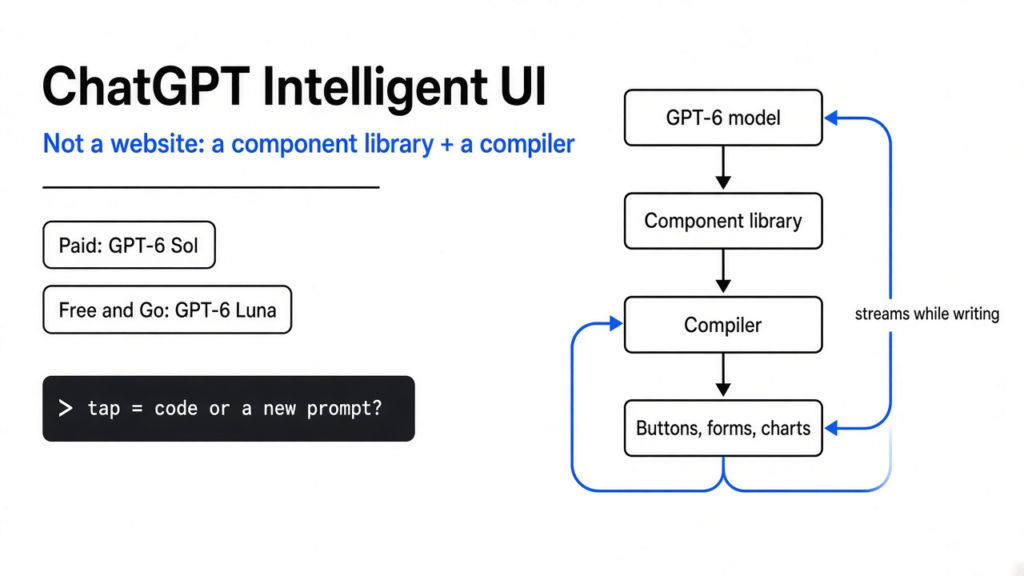
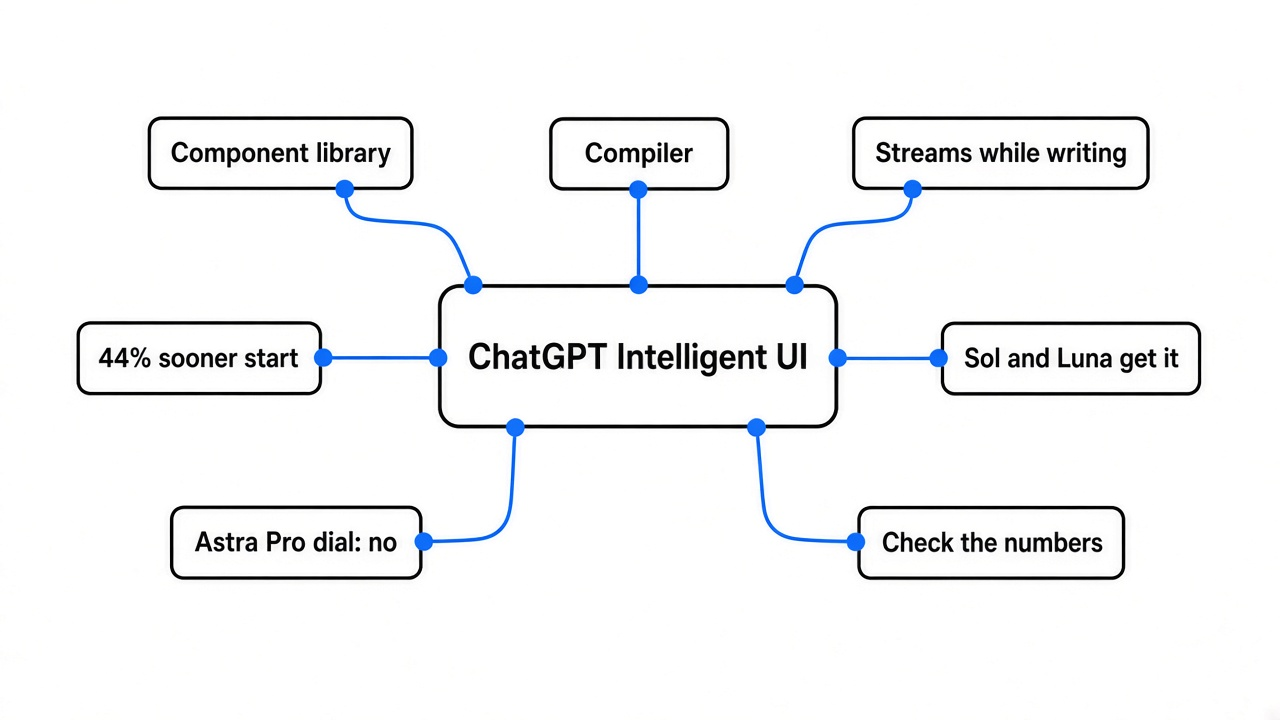
TL;DR: On 7 October 2026 OpenAI started putting GPT-6 into ChatGPT’s Chat tab, with a feature it calls Intelligent UI. With ChatGPT Intelligent UI, a reply can hold buttons, charts, forms, and small tools, not only paragraphs. Paid plans get a model named GPT-6 Sol. Free and Go start on 8 October with a smaller model named GPT-6 Luna. OpenAI says the machinery is a library of native components plus a compiler that draws those pieces while the model is still writing. That is not a website the model invented. The Pro reasoning option still uses GPT-6 Astra and does not get the buttons. Work and Codex do not change in this release. A neat widget can look more certain than a paragraph. Until OpenAI says which taps run their code and which taps ask the model again, do not file a number from the chat into a ledger.
The useful question this week is not “is the new chat smart.” It is “what, exactly, is allowed to draw a button.”
What was a chat, before any new name?
A typewriter with a very large guessing program behind it.
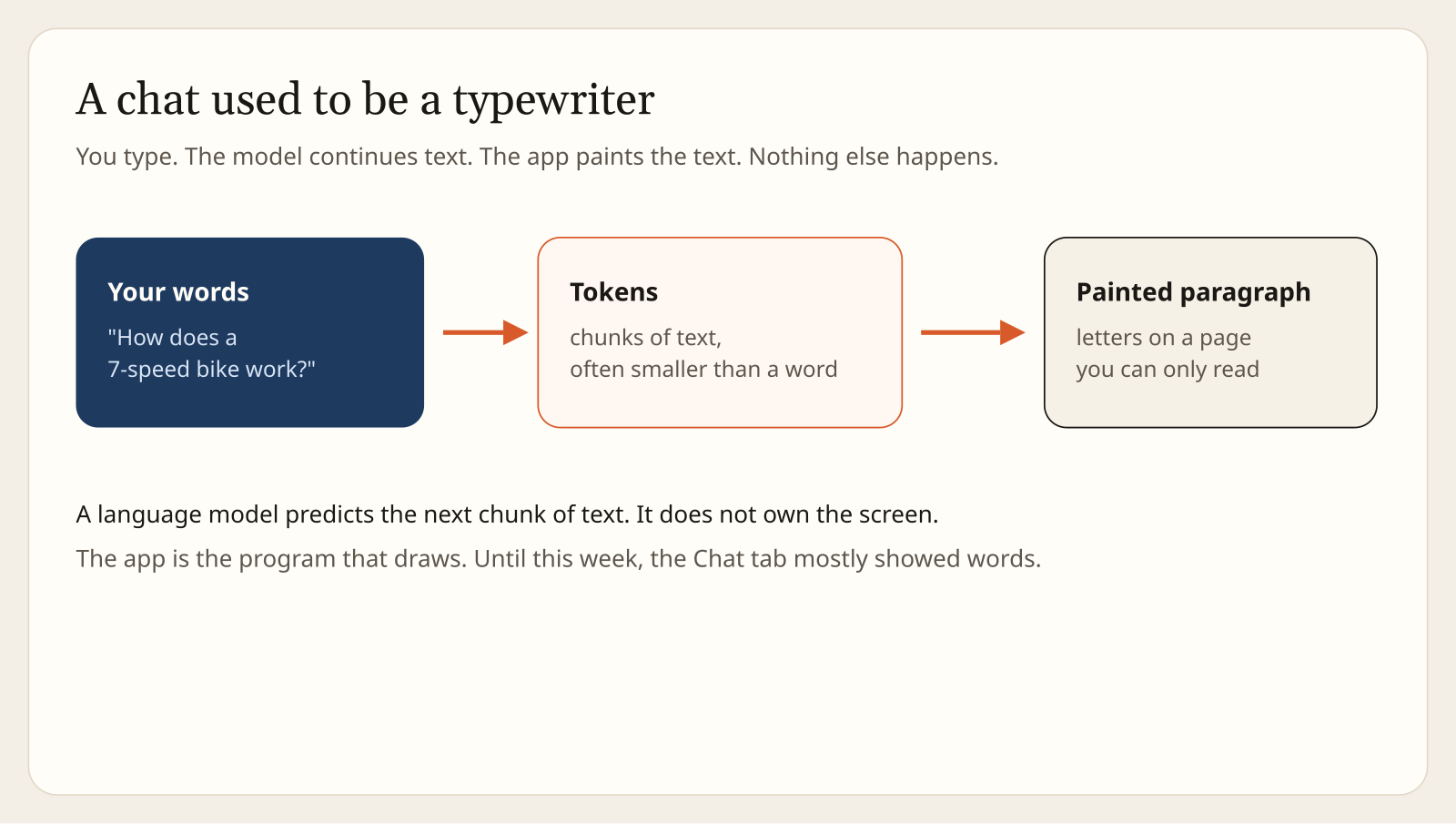
Start from the small thing, before the product name. A language model (a program that continues text by guessing the next chunk) does not own your screen. A token (that chunk, often smaller than a word) is what it actually emits. “Bicycle” might be one token. A long word might be two or three. The app (the ChatGPT program that draws what you see) used to take those tokens and paint them as paragraphs, lists, and the occasional table.
That is the whole old contract. You type. The model continues. The app paints. You can read the result. You cannot press it. If a sentence says “buy 5 pounds of potatoes,” changing your mind means typing again. The paragraph does not remember a new number, because a paragraph has no state (a stored value, such as a guest count, that survives a tap).
OpenAI’s own post, dated 7 October 2026, is about breaking that last limit inside the Chat tab. The post is GPT-6 and Intelligent UI for everyone. Its account on X said the same thing the same afternoon, in a thread that starts at this post. Those two are the primary text. The Verge, MacRumors, and 9to5Mac repeated the announcement. Every demo described below is OpenAI’s own.
What is a button, if a reply was only words?
A button is a piece of the app. Words from the model are not enough to make one.
A user interface, a UI (the parts of a program you can press, not only read), needs three things a paragraph does not have. It needs a shape, such as a button or a slider. It needs state, the stored value. It needs a rule for what a tap does. Those three live in the app. The model can suggest them. It cannot, by emitting tokens alone, become the program that stores “8 guests” after you tapped plus.
So when a vendor says the model “answers with an interface,” translate it before you believe the demo. Someone had to decide which shapes exist, who stores the value, and whether a tap runs code or sends a new sentence back to the model. OpenAI did publish that decision, in one dense sentence. The next section is only that sentence, unpacked.
What did they actually ship?
A library, and a compiler. Not a blank page.
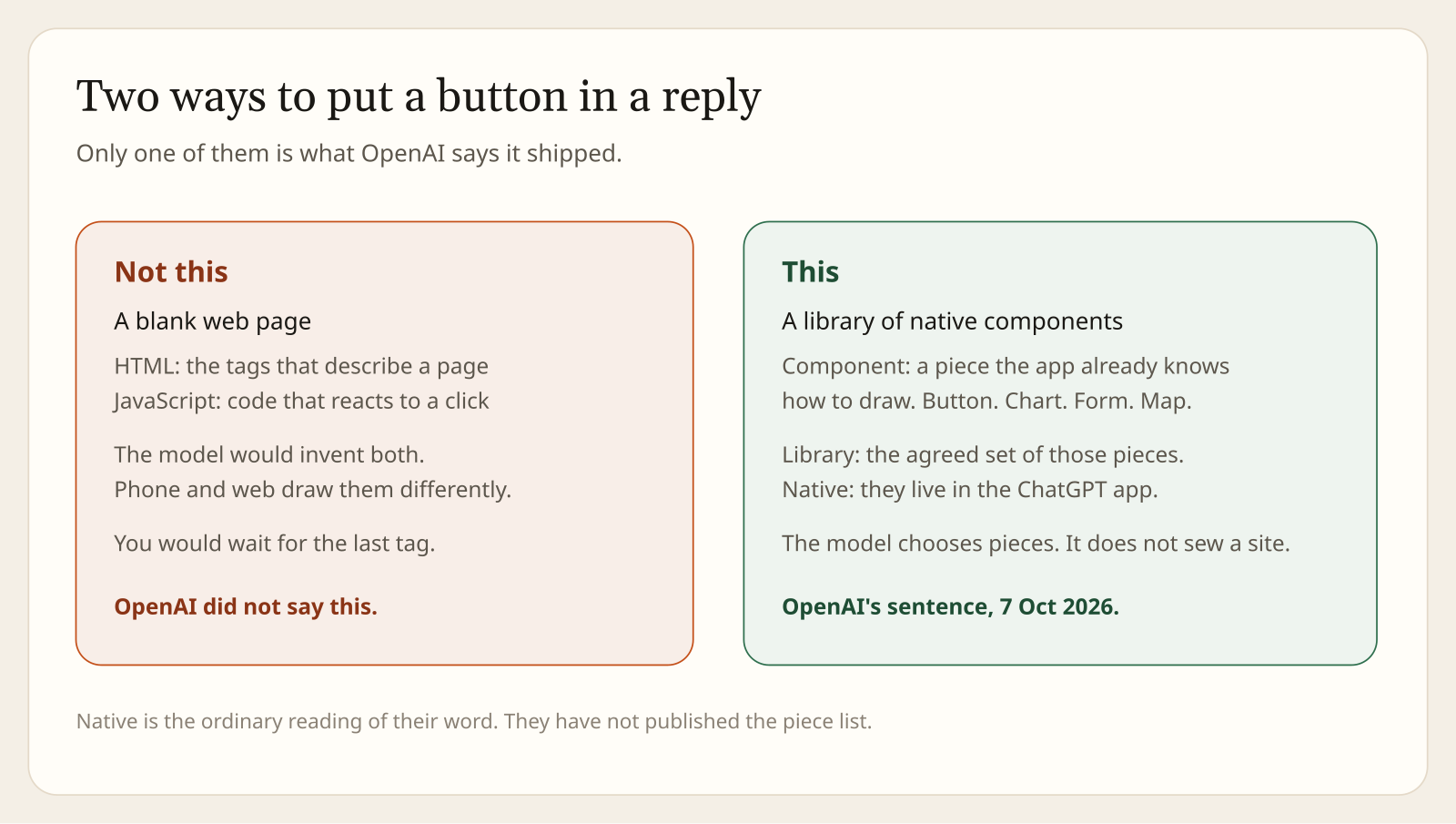
Here is the sentence, from the 7 October post: they built a library of native, streamable components, along with a compiler that processes the interface as the model generates it. MacRumors reports the same sentence. Four words in it carry the whole design.
A component (one pre-built piece, such as a button, a chart, a form, or a map) is drawn by the app, the same way the Send button was already drawn by the app. A library (the agreed set of those pieces) is the list the model is allowed to pick from. Native (living inside the ChatGPT app, rather than invented as a fresh web page) is the ordinary meaning of the word they chose. They have not published the list. Streamable (able to show up before the answer is finished) is why they bother.
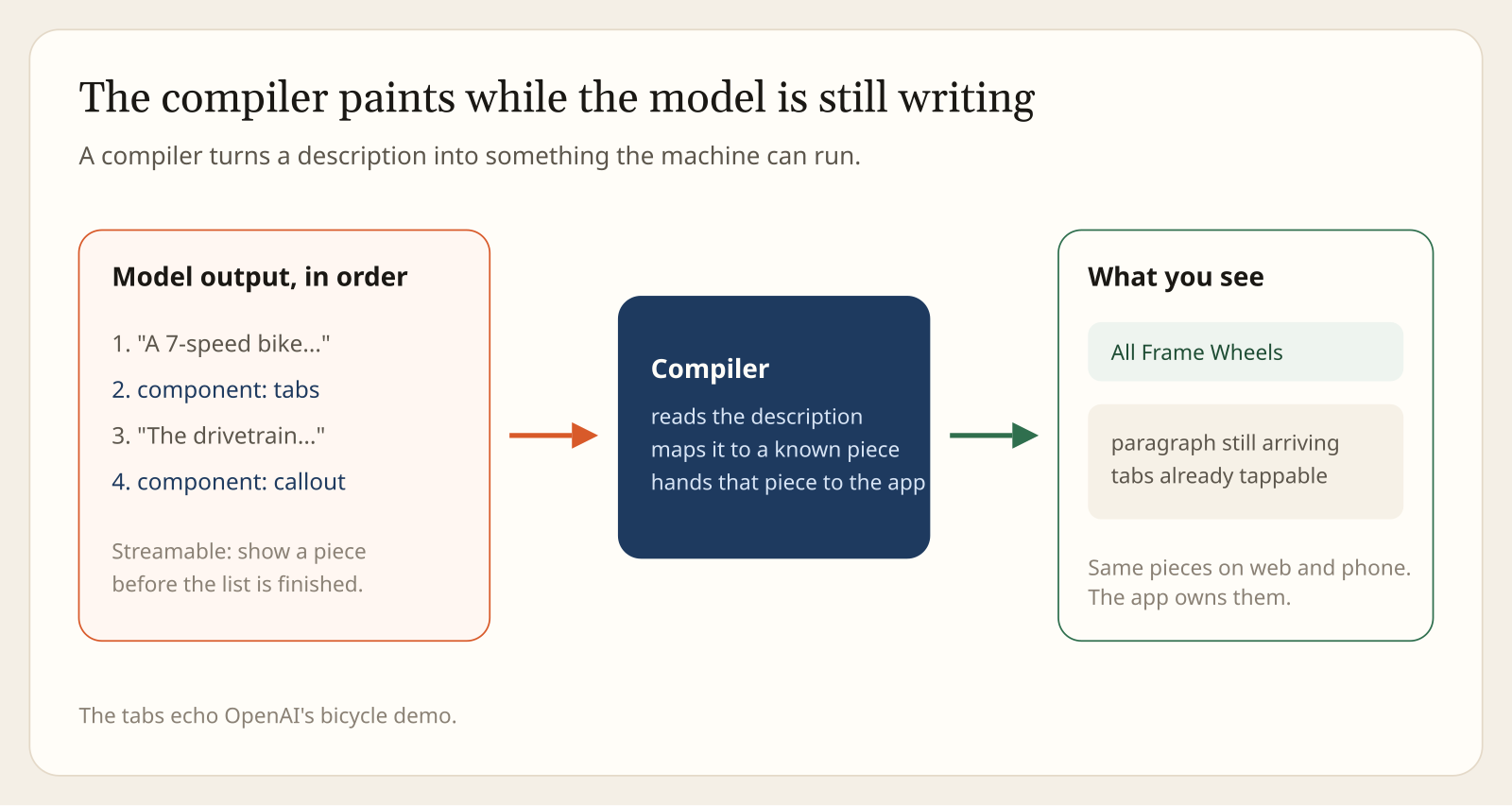
A compiler (a program that turns a description into something the machine can run or draw) sits between the model’s tokens and the screen. The model does not hand you a finished picture. It hands the compiler a description. The compiler maps that description onto a component the app already knows, and the app draws it. Their line continues: the compiler lets the interface appear progressively, without waiting for the entire response.
The contrasting design, which they did not announce, is the model writing HTML (the tag language web pages are written in) and JavaScript (the language that makes a web page react to a click), then the app showing that page in a frame. That design is a website inside the transcript. It is a common thing people will say this week. It is not what the sentence says. That does not mean the model is forbidden from emitting those languages. It means the machinery they described is the library and the compiler.
Their examples, all vendor demos: a 7-speed bicycle with tabs for the frame, wheels, drivetrain, brakes, and cockpit; a Sunday lamb roast whose quantities move when you change the guest count; a road trip whose stops sit on a map; a calculator for how savings could grow; a bill splitter; a game you can play in the thread. When a plain sentence is the useful answer, they say the model can still answer in text. They also write that there is still work ahead on the model’s design judgment, and on expanding what it can create. Read that as their own cap on the demo reel.
Why a compiler, instead of a little website?
Because the phone and the browser must draw the same button, and you should see it before the last token.
Two constraints, both stated in the post if you read them as engineering rather than as marketing.
First, speed of showing, which is not the same as speed of thinking. They want the interface to appear as the model generates it. A web page is awkward to draw halfway through, because a tag opened at the start may not close until the end. A known component can be drawn the moment its description arrives. The paragraph can still be incomplete. The tabs can already be taps.
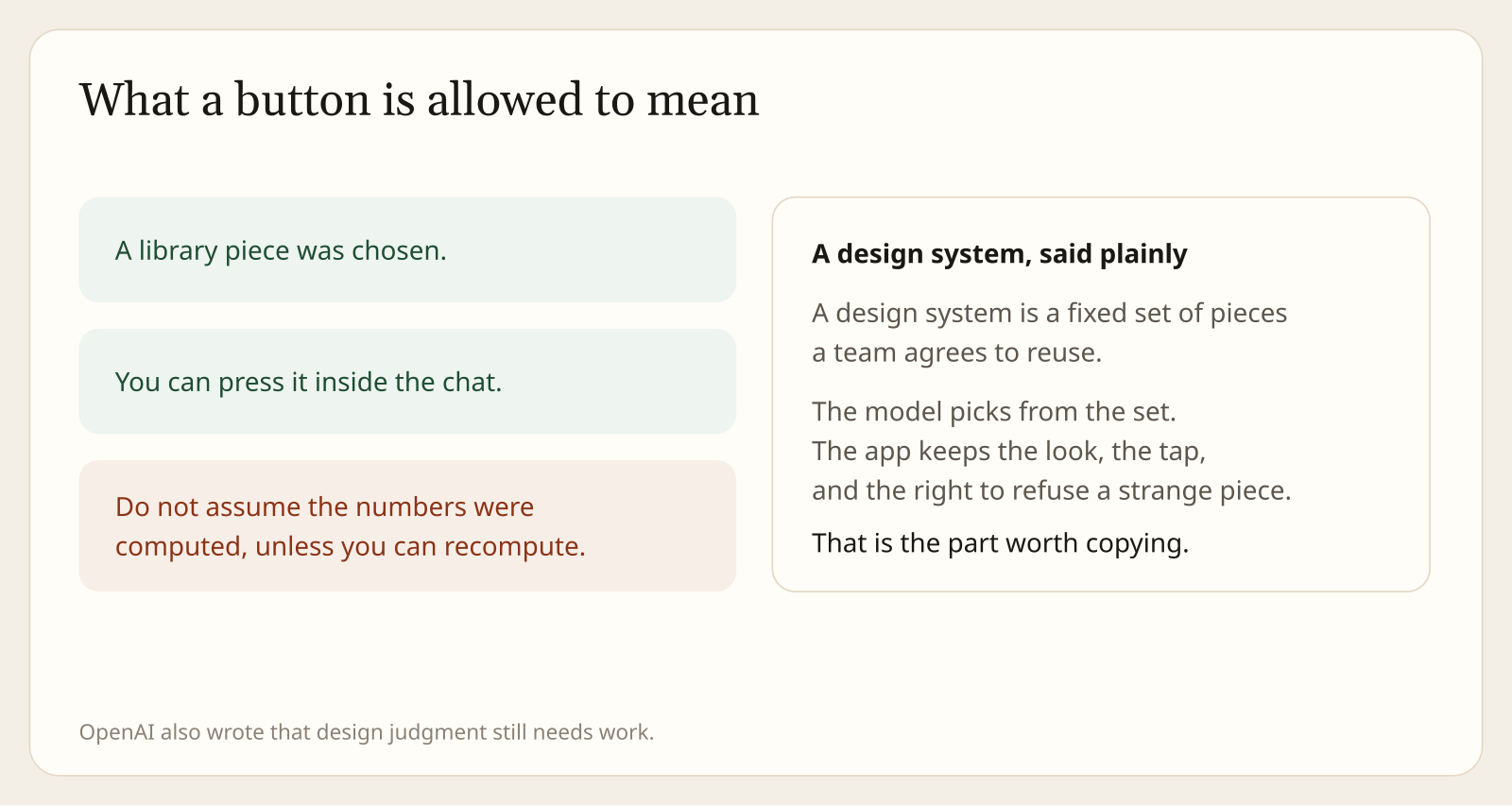
Second, one design on every screen. A library “gives each response a familiar design foundation” while the model decides how the pieces fit. That is a design system (a fixed set of pieces a team agrees to reuse), whether or not they use the phrase. The app keeps the corners, the type, the tap target, and the right to refuse a piece that is not in the library. A page the model invented would look like whatever the model invented, and a phone and a desktop browser would not paint that page the same way.
If you build tools for a living, this is the part worth copying, and it is older than GPT-6. Give the model a small vocabulary of pieces you already trust. Let a compiler, or even a plain parser, place them. Do not let the model ship a new page for every answer. You keep the look. You keep the ability to test one component instead of testing every possible page. OpenAI has not open-sourced that vocabulary. The idea does not require their vocabulary.
What does “44 percent sooner” measure?
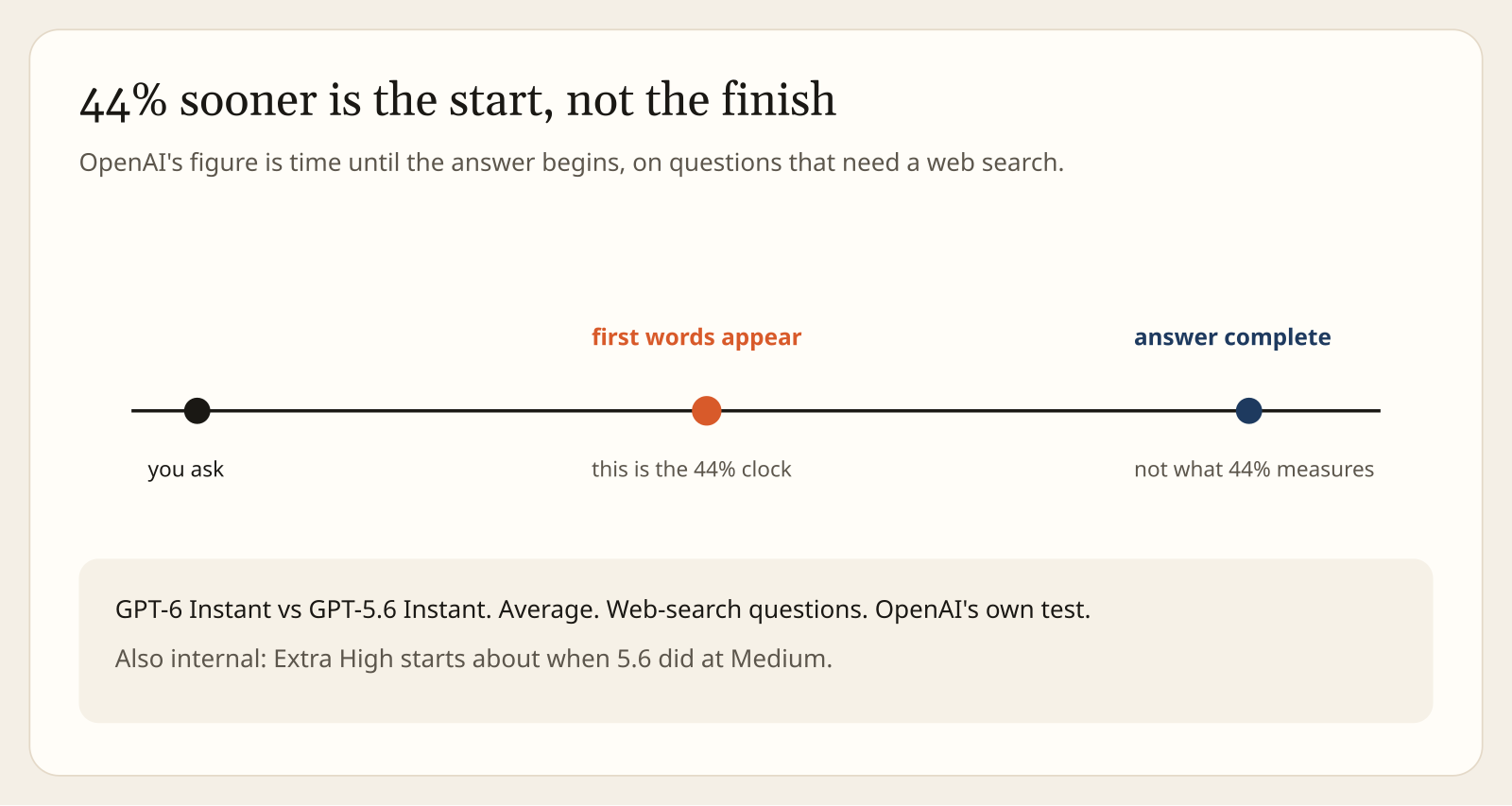
The wait before the first words, on one kind of question. Not the wait until the answer is done.
OpenAI’s post says that for questions that need a web search, GPT-6 Instant starts answering 44 percent sooner, on average, than GPT-5.6 Instant. Instant is a reasoning effort (a dial for how long the model works before and while it answers). The name is theirs. The 44 percent is theirs, from their own test.
Read the noun. “Starts answering” is the moment the first words appear. It is not the moment the bicycle diagram is finished, and it is not the moment a bill splitter is safe to use. A reply can begin earlier and still run long. The progressive UI is a cousin of this claim, not the same measurement: pieces can show up while later pieces are still being written.
There is a second internal comparison in the same post. At Extra High, another mark on that dial, GPT-6 can begin answering in about the time GPT-5.6 needed at Medium, and still score higher overall than GPT-5.6 at Extra High, on a set of everyday tasks they call high-value and agentic. Agentic, here, means the model is doing a task in steps, not only completing a sentence. That score is not published as a table in the post. Treat it as a vendor summary of a private test.
| Claim | What it is | What it is not |
|---|---|---|
| 44 percent sooner | Time until GPT-6 Instant begins, versus GPT-5.6 Instant, on web-search questions, their average | Time until the answer is finished |
| Extra High versus Medium | An internal score on everyday multi-step tasks | A public benchmark you can rerun from a paper |
| Buttons in the reply | Components the app draws from a library | Proof that the numbers inside them were computed by code |
Why is the bill splitter the demo to distrust first?
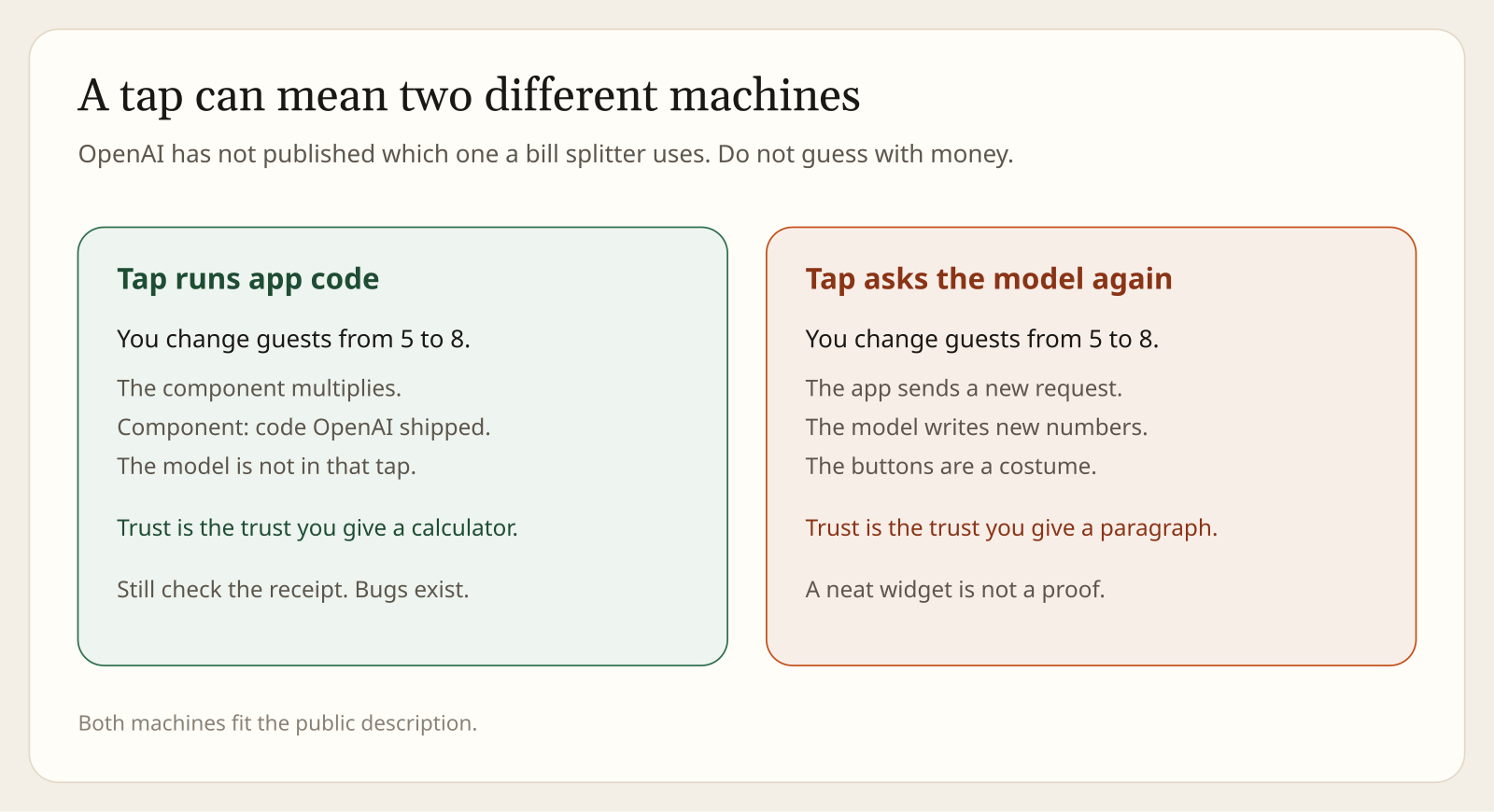
Because a tap can be two different machines, and they have not said which one you are using.
Take the roast, because they showed it. You have not settled the guest count. The reply offers a control. You move it from 5 people to 8. The quantities change. Two machines can produce that moment.
Machine one: the tap runs app code. The component multiplies quantities by a rule OpenAI wrote. The model is not in that tap. Your trust is the trust you give a calculator, which is still not total, because calculators have bugs, but it is a different trust.
Machine two: the tap is a costume on a new request. The app sends “now do it for 8” back to the model. The model writes new numbers. The buttons look like arithmetic. They are a paragraph that learned to dress up. Your trust is the trust you give a chat reply, which is: check it.
Both machines fit the public description. A native component can do real arithmetic, or it can display numbers the model already wrote. OpenAI’s post says you can adjust the guest count and that the model can create a bill splitter and a savings calculator. It does not say the multiplication happens outside the model. Until OpenAI says which one it is, neither answer is safe to assume.
The practical rule is short. If you can recompute the figure on a receipt, the widget is a convenience. If you cannot, the widget is a picture of a claim. Do not paste it into a spreadsheet, a tax note, or a group payment until you have done the sum yourself. A chart does not become a measurement because it has axes.
Who gets ChatGPT Intelligent UI, and which switch turns it off?
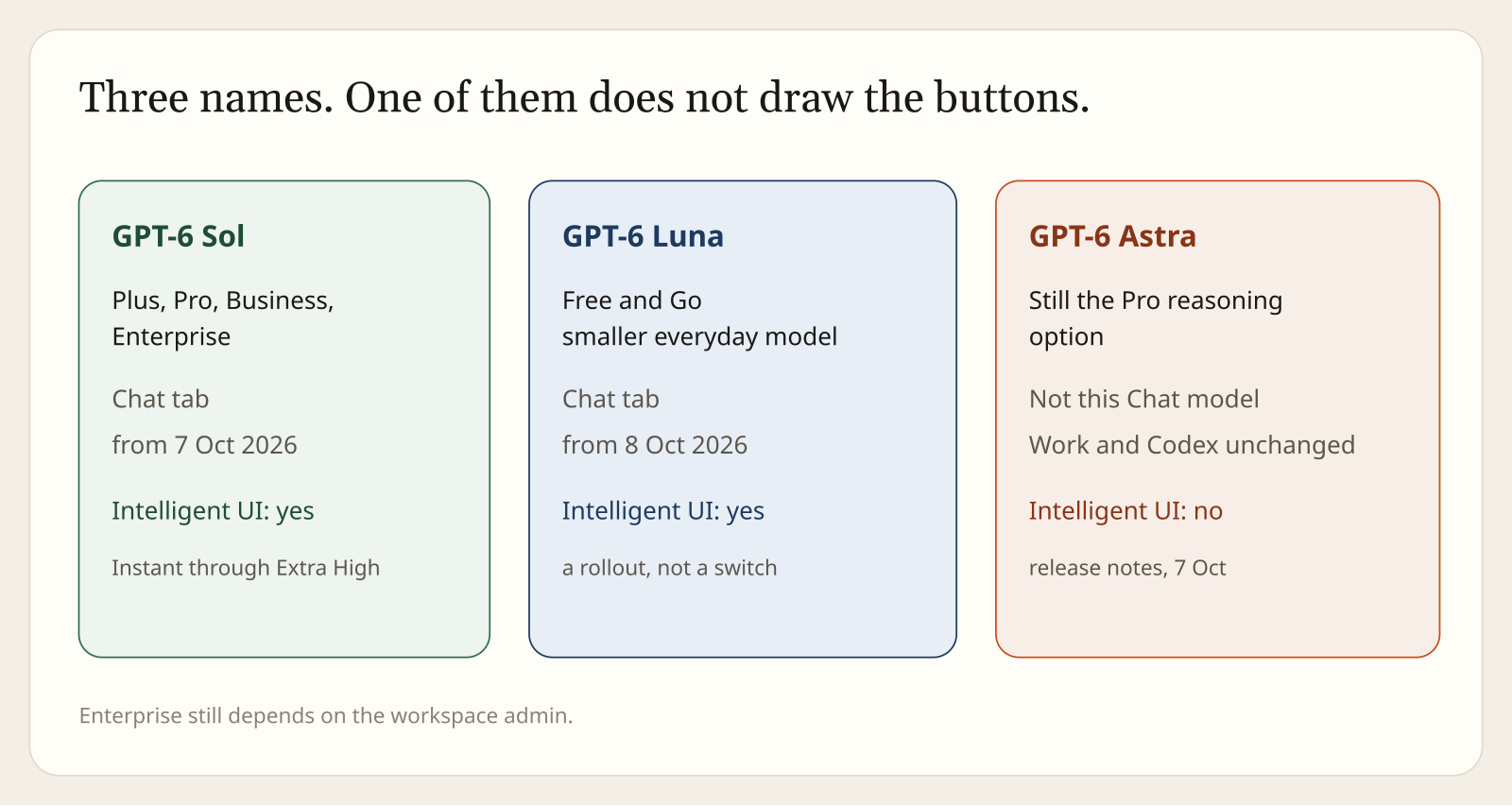
Sol for paid Chat. Luna for Free and Go. Astra, on the Pro dial, does not draw the buttons. Work and Codex stay put.
A rollout (a gradual switch-on, not a light that flips for every account at one minute) started on 7 October 2026 for Plus, Pro, Business, and Enterprise, in the Chat tab. Those plans get GPT-6 Sol, the everyday GPT-6 model for paid Chat. Free and Go start on 8 October with GPT-6 Luna, the smaller one. Both names are in OpenAI’s thread on X, not only in the blog. Enterprise still depends on the workspace admin. “Starts” and “expands” are the verbs in the ChatGPT release notes for 7 October. If the buttons are missing on the morning of the 8th, that is not yet a bug report.
The same release-note entry draws a hard edge that the launch headlines skip. Intelligent UI is available from Instant through Extra High. The Pro reasoning option continues to use GPT-6 Astra and does not support Intelligent UI. Astra is the heavier GPT-6 model OpenAI introduced earlier (see also why OpenAI killed GPT-6.1 Astra). If you are on a Pro plan and you have the reasoning dial set to Pro, you are not looking at Sol, and you should not expect the buttons. Switch the dial before you decide the feature is broken.
The thread on X is just as hard about the other products in the same window. This update applies to the Chat tab. The models powering Work (the side of ChatGPT aimed at documents and tasks) and Codex (the side aimed at coding) are not changing as part of this release. A coding agent did not gain a tappable UI because the Chat tab did. If you write prompts, harnesses, or editor plugins against Codex, nothing in this announcement is a change to your tool’s model.
The desktop app is not listed as excluded. The release notes also do not walk through a desktop version number. If a client shows only text, check the plan, the Chat tab, the date, and the reasoning dial, in that order.
| Where you are | Model in this release | Buttons | Source |
|---|---|---|---|
| Plus, Pro, Business, Enterprise, Chat tab, dial from Instant through Extra High | GPT-6 Sol | Yes, rolling out from 7 Oct | Blog, X, release notes |
| Free, Go, Chat tab | GPT-6 Luna | Yes, rolling out from 8 Oct | Blog, X, release notes |
| Reasoning dial set to Pro | GPT-6 Astra | No | Release notes, 7 Oct |
| Work, or Codex | Unchanged by this release | Not this announcement | Thread on X, 7 Oct |
| Enterprise, admin has not enabled it | Sol, if the admin allows | Depends on the admin | Release notes |
What should you do with it this week?
Use it to see a shape. Do not use it to close a number. Do not tell a coding tool that it changed.
Open the Chat tab, not Work and not Codex. If you pay, look for Sol, and make sure the dial is not sitting on Pro. If you do not pay, Luna is the name, and “not yet” is still a normal state on 8 October. Ask for something with parts, such as the bicycle, if you want to see whether tabs appear. Ask for something with a quantity, such as the roast, if you want to see a control. Then recompute one figure by hand. That single check tells you more about machine one versus machine two than the launch post does.
Do not describe this, in a design review or a status update, as “the model now runs apps.” The accurate sentence is shorter. The app runs pieces. The model chooses pieces from a library. The compiler places them while the text is still arriving. When the text is enough, the model can skip the pieces. That is the system. The gaps they have not closed are the piece list, the rule for what a tap computes, and their own note that design judgment is unfinished.
The safety write-up they point at is the 7 October card, GPT-6 Sol and GPT-6 Luna. The blog says this generation is harder to push off its safety training, especially across many turns, and better at saying when it lacks the information. A button does not inherit a safety score. If a control shows up after the model has read a web page, the page can still be trying to steer the answer. Pressing is still a decision.
If the piece list or the tap contract shows up in a later note, the table above should grow one row, not a new adjective. Until then the honest summary is the one at the top. ChatGPT can draw a small tool inside an answer. The tool is theirs. The certainty is still yours to check.
Common questions about ChatGPT Intelligent UI
What is ChatGPT Intelligent UI?
It is OpenAI’s name for replies in the ChatGPT Chat tab that can include buttons, charts, forms, maps, and small tools alongside text. It started rolling out with GPT-6 on 7 October 2026.
Does the model build a website inside the chat?
No, not by OpenAI’s description. The model picks from a library of native components the app already knows, and a compiler draws those pieces while the reply is still streaming.
Which model do I get with Intelligent UI?
Paid Chat plans (Plus, Pro, Business, Enterprise) get GPT-6 Sol from 7 October. Free and Go get GPT-6 Luna from 8 October. Enterprise depends on the workspace admin.
Why do I not see buttons on a Pro plan?
If the reasoning dial is set to Pro, you are on GPT-6 Astra, which does not support Intelligent UI. Switch the dial to anything from Instant through Extra High.
Did Codex or Work change in this release?
No. OpenAI says the models powering Work and Codex are not changing as part of this release. Only the Chat tab gets Intelligent UI.
Can I trust the numbers inside a generated calculator?
Treat them like any chat answer. OpenAI has not said whether a tap runs app code or asks the model again, so recompute any figure you plan to use for money.