
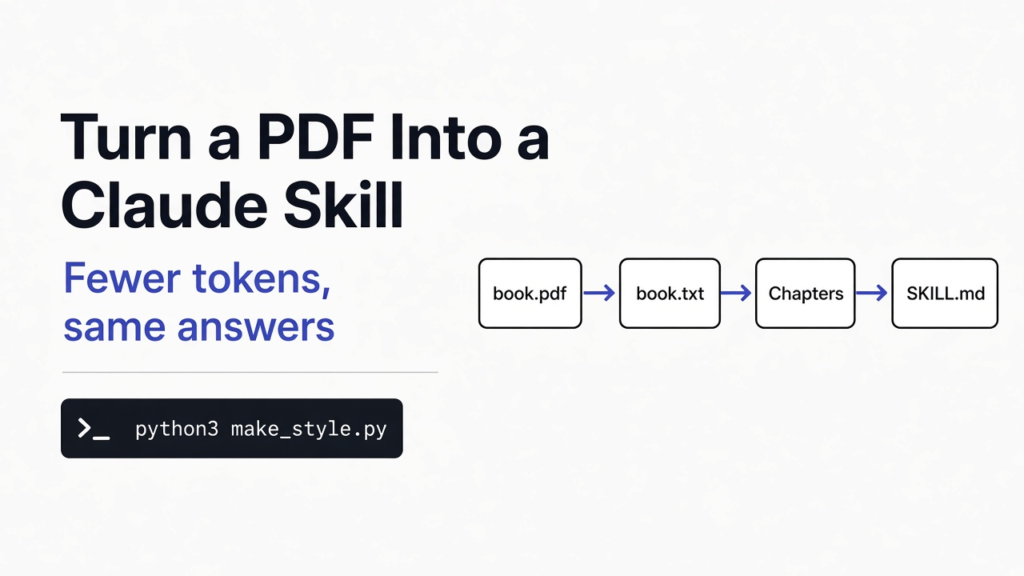

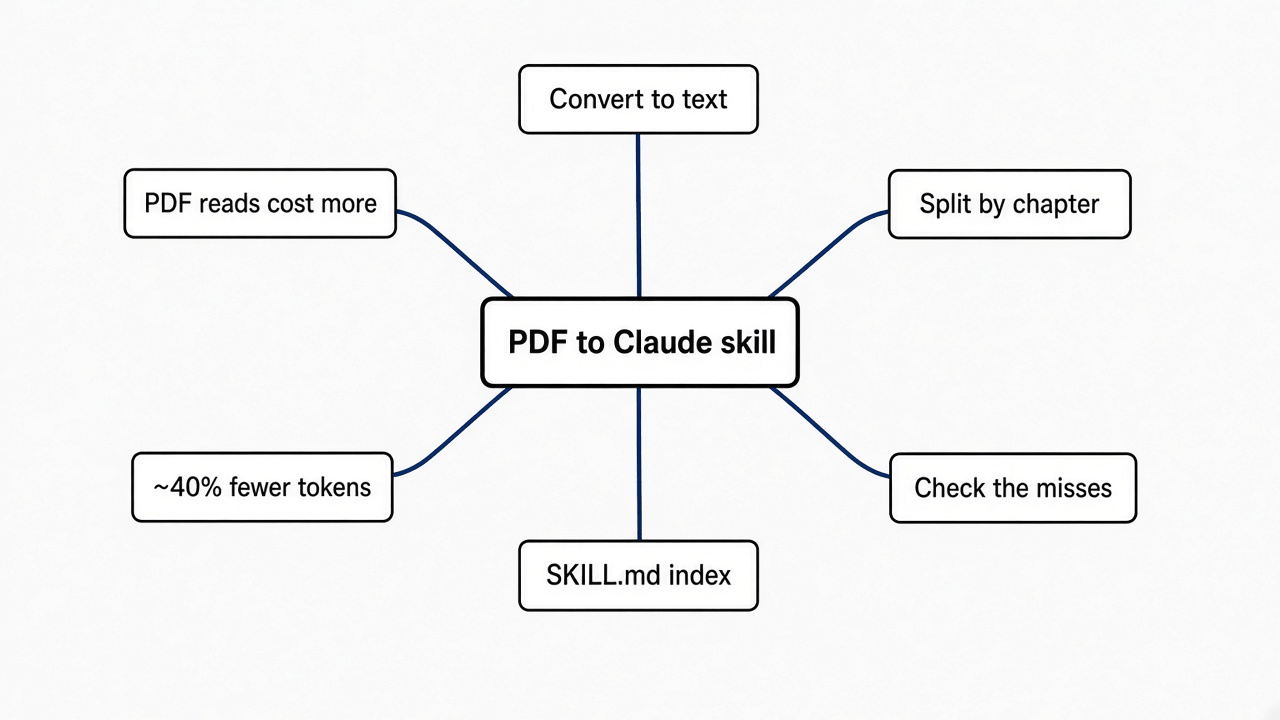
Short answer: Convert the PDF to plain text, split it into one file per chapter, and add a short SKILL.md that lists the chapters. Claude Code then reads only the part it needs. In my test on a 233-page book, the plain text answered every question right at about 40% fewer tokens than the PDF.
You have a long technical book as a PDF. You want Claude Code to answer from that book, with the book’s own words, instead of from whatever it half remembers.
So I gave Claude Code the same book four ways and asked it the same nine questions each time. Nothing else changed.
Here is the one idea to hold on to: Claude Code never needs the whole book. It needs text it can search, and a map of where things are.
Why not just ask Claude what the book says?
Because it answers from memory, and memory gets the details wrong.
An AI model learns from a huge pile of text once, before you ever use it. It does not keep a copy of each book. It keeps a blurry sense of what the books said.
I tested that first. I asked Claude Code nine questions about Producing Open Source Software by Karl Fogel, a free book under a Creative Commons license, with no copy of the book anywhere.
It got four right and one half right. It said “I’m not sure” twice. It got two wrong, and those two came with the same tone as the right ones.
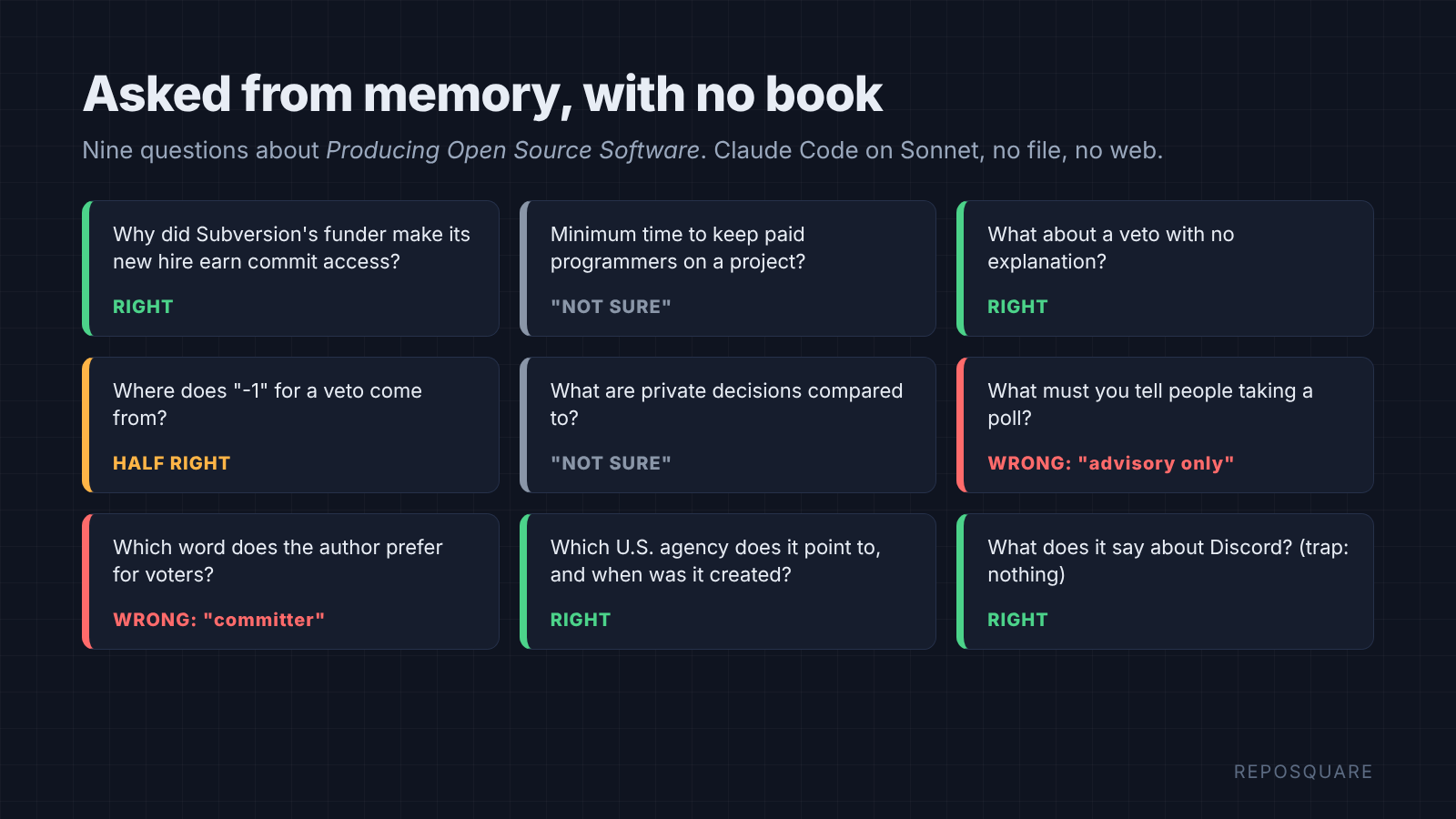
One wrong answer said a poll’s results must be marked “advisory only”. The book actually says to tell people there is a write-in option. The other picked the wrong word for the people who hold voting rights. Both sounded like facts.
That is the problem a book file fixes. So how should you hand it over?
What happens when you drop the PDF into the folder?
It works. Claude Code got every answer right from the raw PDF, but it was the slowest and most expensive way.
Claude Code reads short PDFs whole. Anything longer than ten pages, it reads in chunks of up to 20 pages, and each page is rendered as a picture for the model to look at.
Reading a page as a picture costs more than reading the same words as text. That is the catch, and the numbers below show how big it is.
To see why, you need one idea: tokens.
Why does a PDF cost more than a text file?
A model reads tokens, and a text file lets Claude Code read only the few lines it needs.
A token is a small chunk of text, often a short word or part of a longer one. Everything the model reads or writes is counted in tokens, and you pay per token.
The model also has a context window (the most tokens it can hold in view at once). Claude Code works in steps: search, read, think, answer. At each step it sends the whole conversation so far, so every big read gets paid for again on the next step.
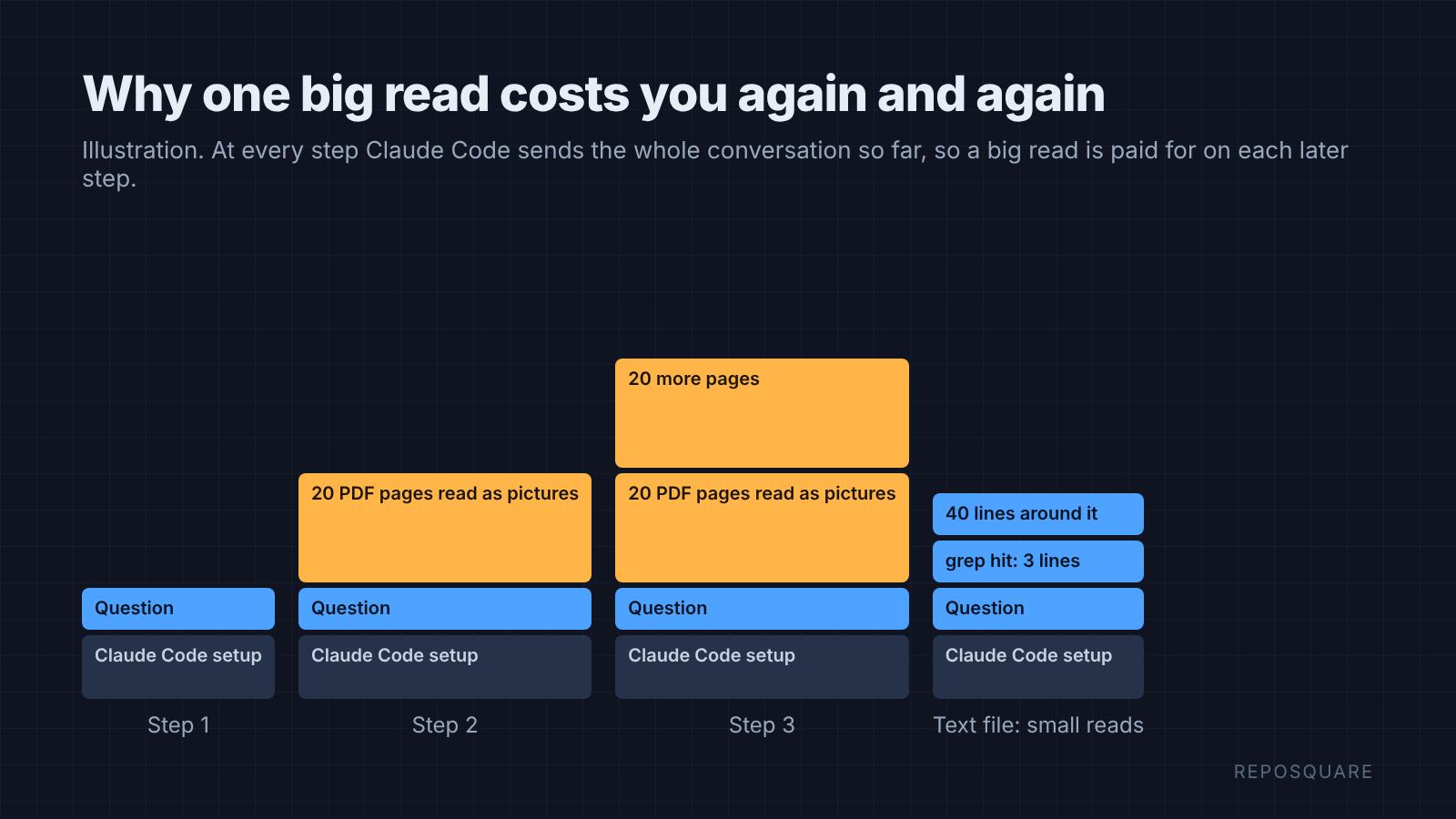
Now put those together. A plain text file can be searched with grep (a command that finds lines containing a word), so Claude Code jumps straight to the right paragraph. A PDF stores its pages compressed, so grep sees almost nothing. In this book, “veto” matched 28 lines of the text file and 1 line of the PDF.
So with a PDF, Claude Code has to read page ranges as pictures until it finds the spot.
This book is about 145,000 words, which is well over 150,000 tokens. Pasting all of it into a chat for every question is the most expensive option of all. None of my Claude Code runs did that. They all searched.
What did I test?
One book, nine questions, four setups, Claude Code on Sonnet, each question asked in a fresh session.
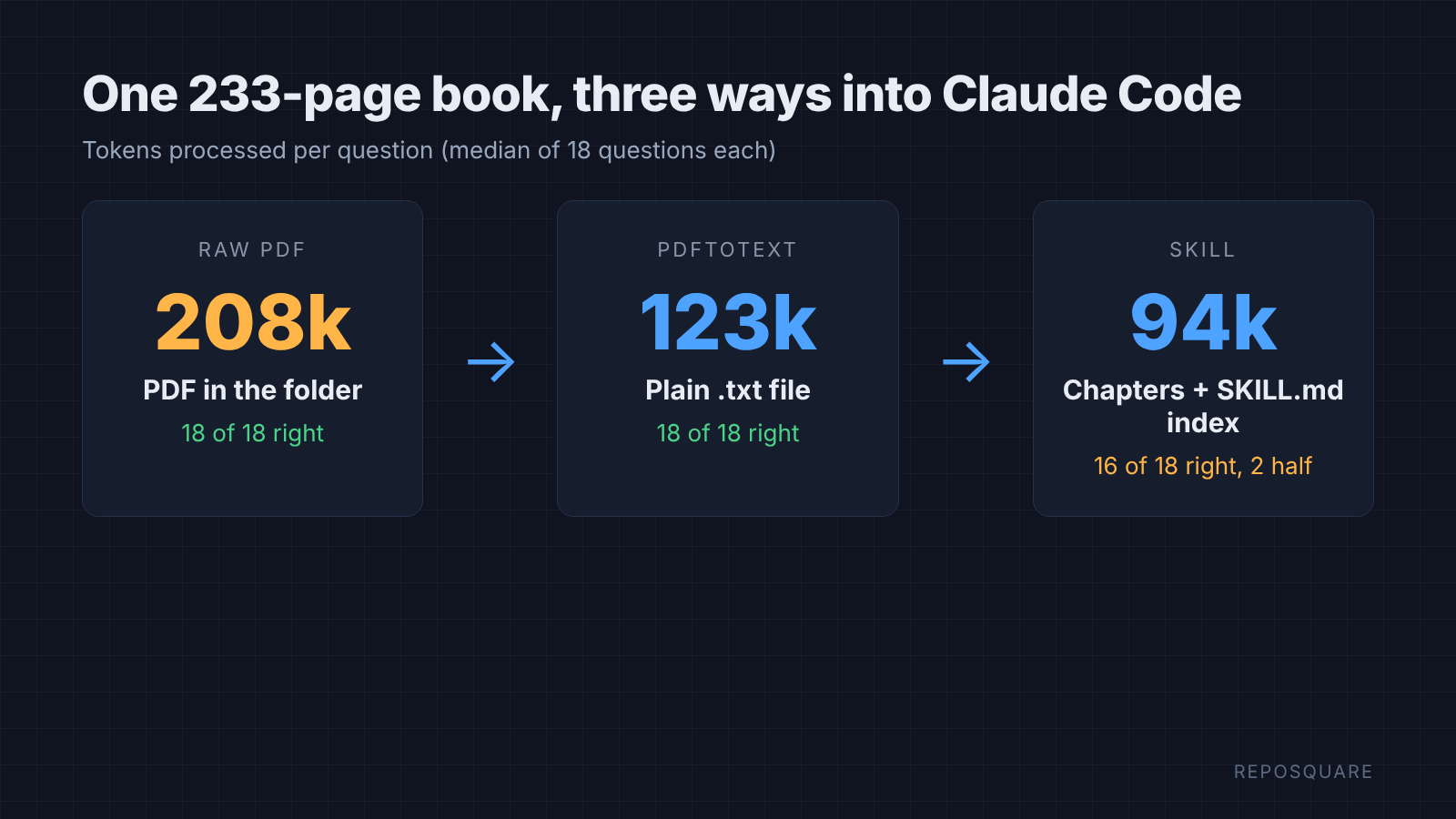
The four setups were: no book, the PDF in the folder, the same book as a .txt file in the folder, and the book as a skill. I asked every question twice for the three book setups, so 18 answers each.
Eight questions had one clear answer in the book. One example: “what does the book say about a veto with no explanation?” The ninth was a trap: the book never mentions Discord, so the right answer is “it doesn’t say”.
I checked every answer against the book text myself. I also read the token count and cost Claude Code reports at the end of each run.
Which way worked best?
Plain text matched the PDF’s 18 of 18 at about 40% fewer tokens and half the cost. The skill used the fewest tokens but slipped on one question.
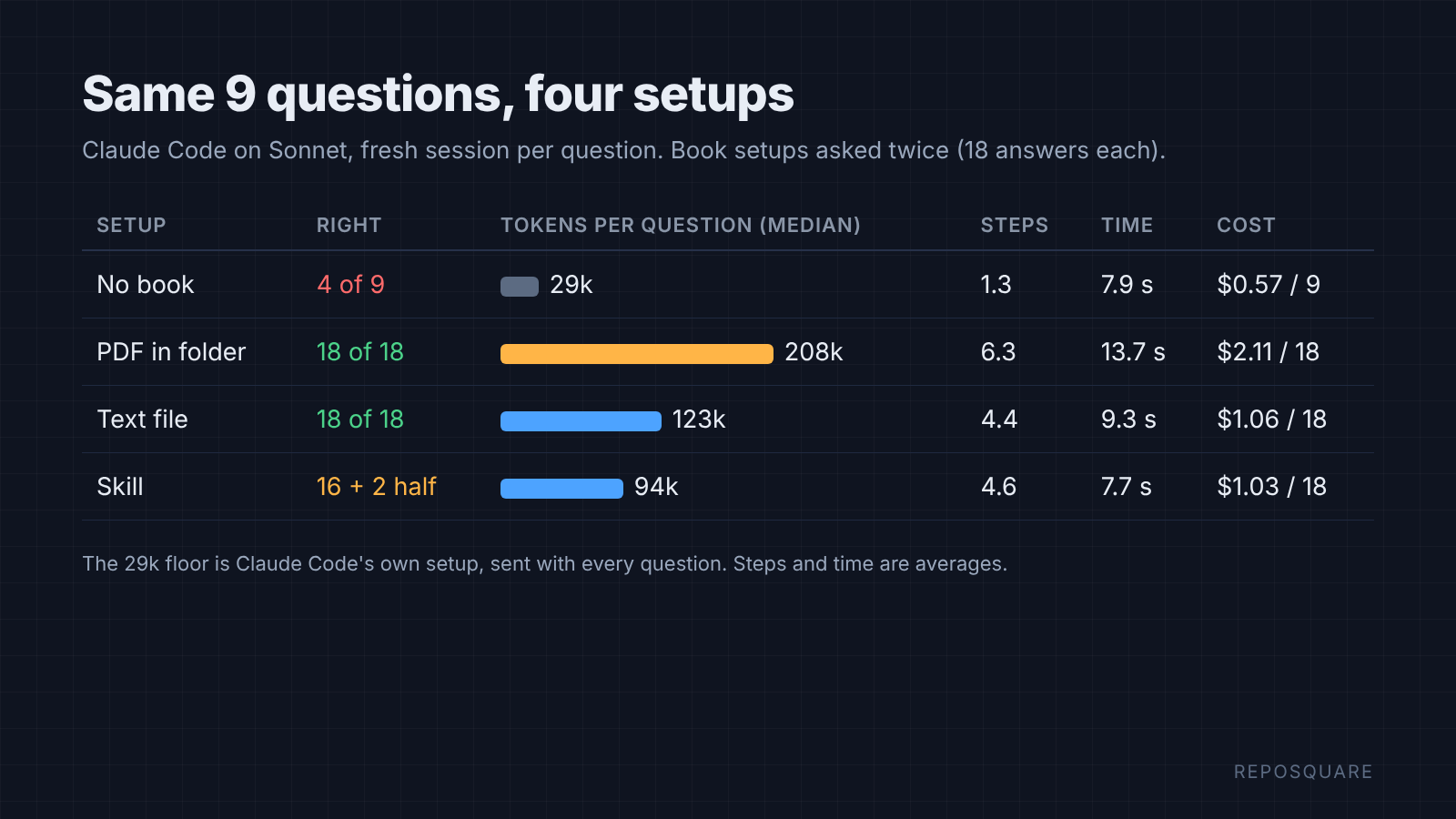
Here are the numbers per setup:
| Setup | Right answers | Tokens per question (median) | Steps (avg) | Time (avg) | Cost for 18 answers |
|---|---|---|---|---|---|
| No book | 4 of 9 | 29,000 | 1.3 | 7.9 s | 0.57 USD (9 answers) |
| PDF in folder | 18 of 18 | 208,000 | 6.3 | 13.7 s | 2.11 USD |
| Text file in folder | 18 of 18 | 123,000 | 4.4 | 9.3 s | 1.06 USD |
| Book as a skill | 16 of 18, 2 half right | 94,000 | 4.6 | 7.7 s | 1.03 USD |
The “no book” row is the floor. About 29,000 tokens is what Claude Code spends on any question at all, because it sends its own instructions every time.
All three book setups caught the Discord trap. Each said the book never mentions Discord and pointed to its general chapter on chat tools instead.
So the biggest win is not the skill. It is getting the words out of the PDF. Want to know if the skill is worth the extra step?
Did the skill beat the plain text file?
Barely. The skill used the fewest tokens, but it fumbled one question that the text file got right.
The skill’s map helped. It used the fewest tokens of the three book setups and answered fastest on average. On most questions it went straight to the right chapter in four steps.
The fumble came on the question about which word the author prefers for people with commit access and voting rights. My index listed a section called “Committers”, which matched the words in my question. Both skill runs started there and led with “committer”, mentioning “maintainer” only as a side option.
Both text-file runs said plainly that the author prefers “maintainer”. Both PDF runs also quoted the footnote where he says why: it “implies responsibility to the project, rather than belonging to a club.”
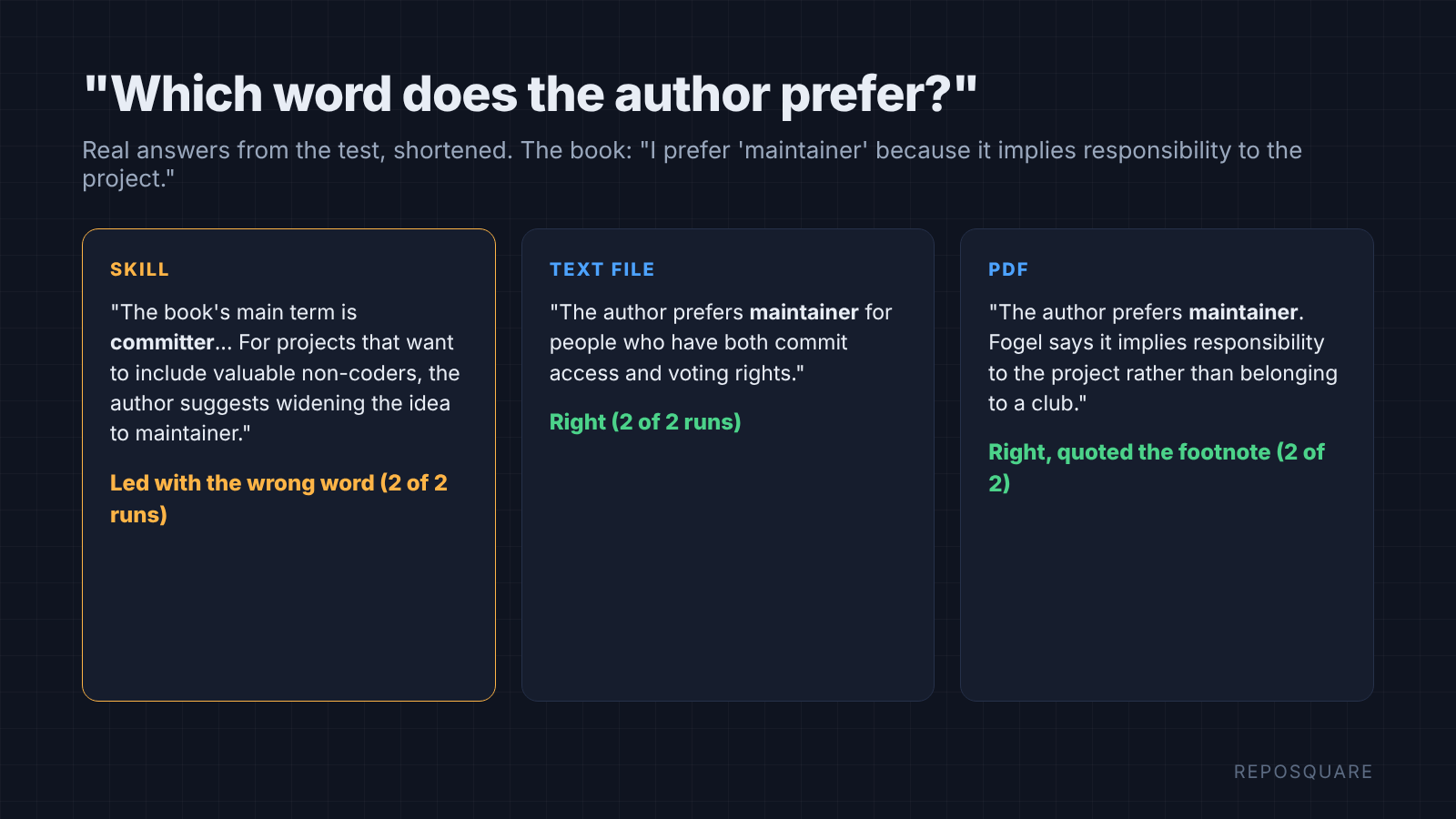
I tried one fix. I added a line to SKILL.md telling it to grep every chapter, footnotes included, before answering. In two more runs it still led with “committer”, and one of them said the author states no preference at all.
There is a fair point on the other side. The skill works from any folder, every session, without you copying the book in. For a book you use every week, that convenience is the whole reason to build one.
Just remember what a map does. It makes Claude Code confident about where to look, so it reads less. Most of the time that is the point. When exact wording matters, open the chapter it names and check the line yourself.
What is a Claude Code skill, and why put a book in one?
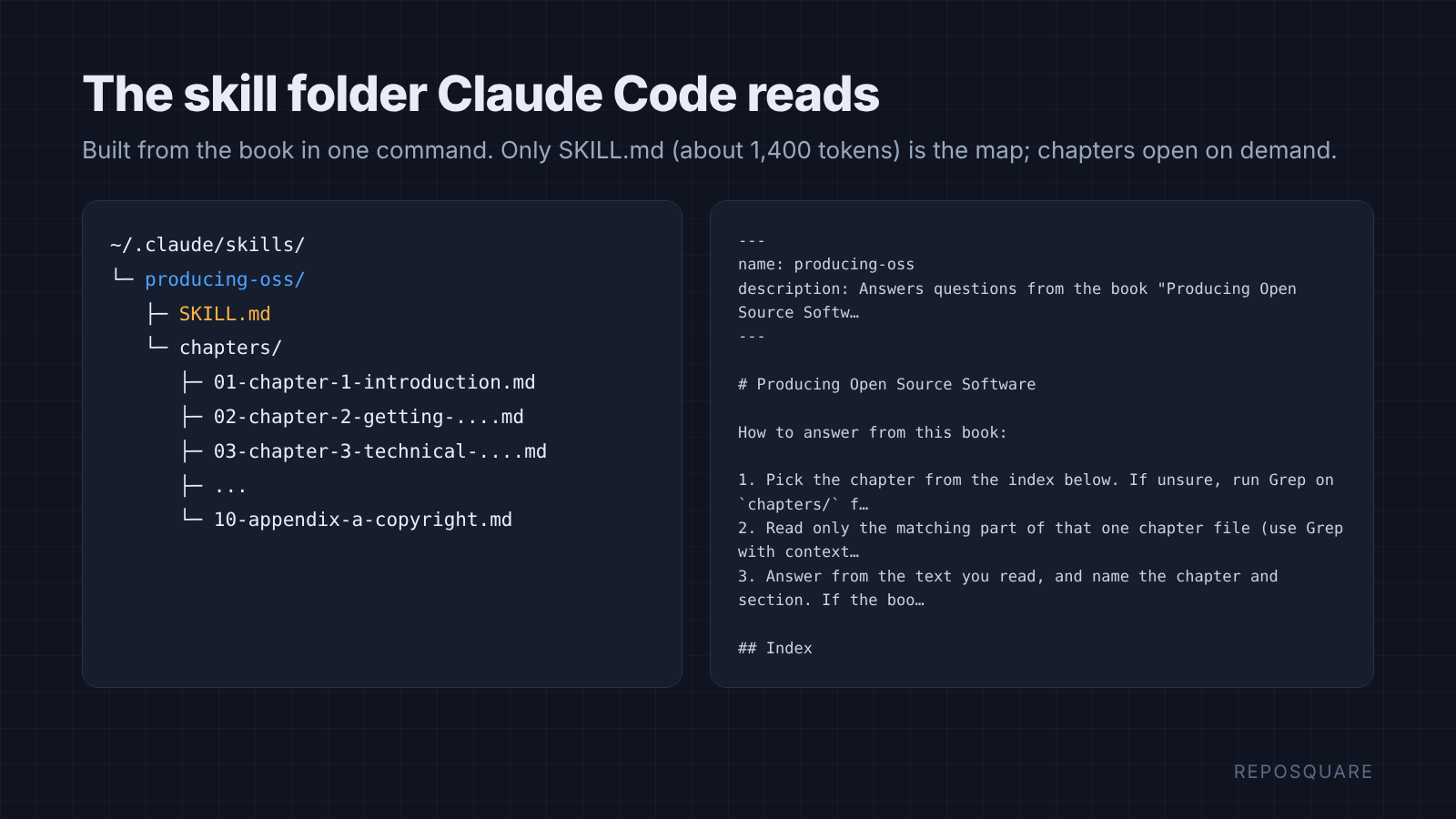
A skill is a folder with a SKILL.md file that Claude Code loads only when a question matches it.
The SKILL.md starts with a short description. Claude Code uses that description to decide when the skill is relevant, and the other files in the folder load only when it needs them.
That on-demand loading is why a book fits. The book can be huge, but Claude Code only carries the short index around. It opens a chapter when a question needs it.
Think of a library card catalogue. You do not carry the library home. You carry the card that tells you which shelf to walk to.
(If you already keep skills for Codex too, you can sync Claude skills to Codex.) Personal skills live in ~/.claude/skills/<name>/, so they work in every project on your machine. Project skills live in .claude/skills/<name>/ inside one repo, so your team gets them too.
How do I turn a PDF into a Claude skill?
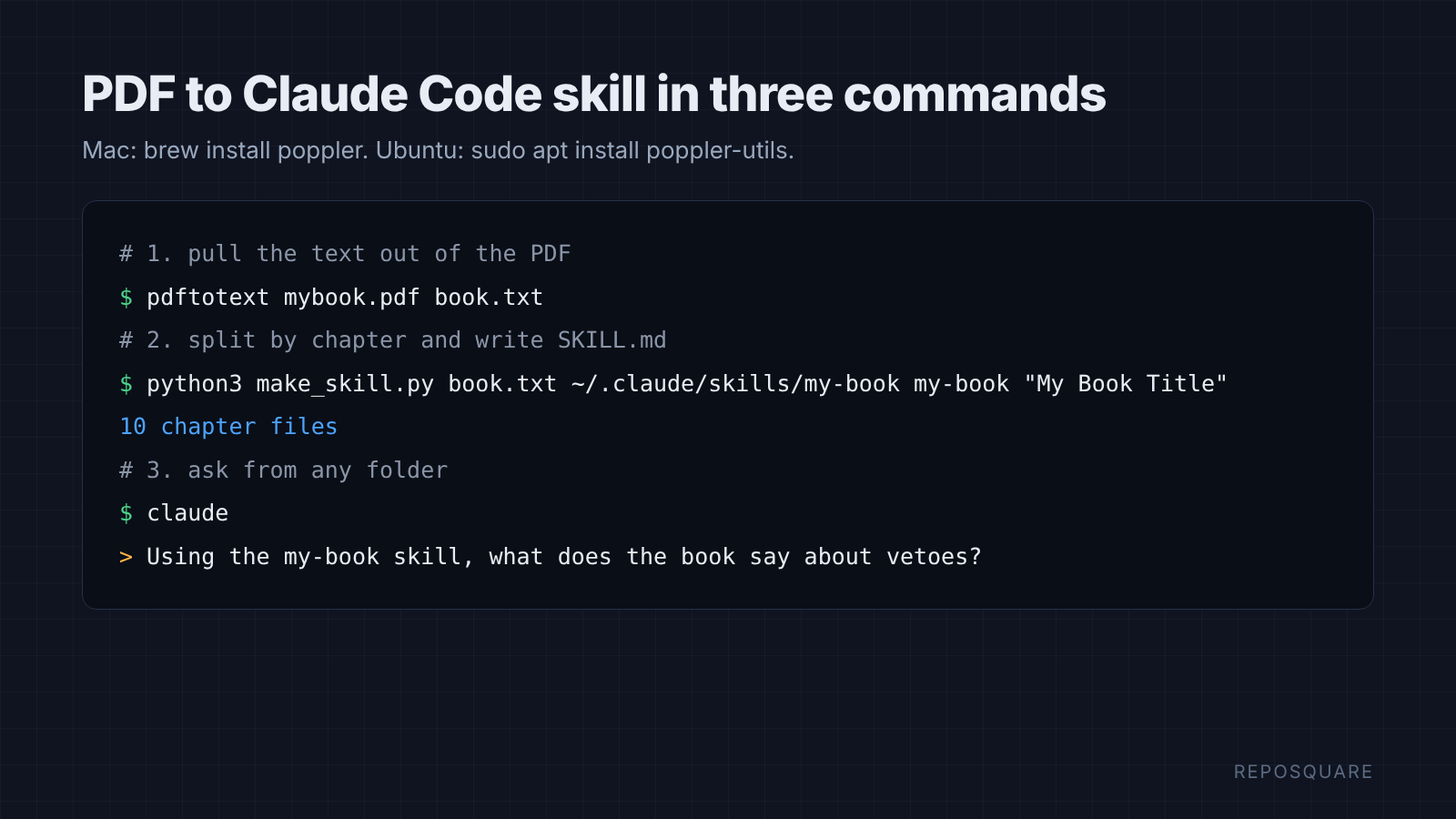
Four steps: extract the text, split it by chapter, write a short index, and put the folder where Claude Code looks.
- Install poppler, which includes pdftotext:
brew install poppleron Mac orsudo apt install poppler-utilson Ubuntu. - Extract the text:
pdftotext mybook.pdf book.txt - Run the script below to split it into chapters and write
SKILL.md. - Open Claude Code anywhere and ask: “Using the my-book skill, what does the book say about X?”
This is the script I used. It splits wherever a line starts with “Chapter 1.”, “Chapter 2.” and so on, and builds the index from the book’s own table of contents:
import re, sys, pathlib
src, out, name, title = sys.argv[1], pathlib.Path(sys.argv[2]), sys.argv[3], sys.argv[4]
text = pathlib.Path(src).read_text().replace("\f", "\n")
lines = text.split("\n")
# section titles come from the table of contents (lines with dot leaders)
toc = [re.sub(r"\s*\.{3,}.*$", "", l).strip() for l in lines[:400] if re.search(r"\.{5,}\s*\d+\s*$", l)]
toc = [t for t in toc if t]
starts = [i for i, l in enumerate(lines) if re.match(r"^Chapter \d+\. ", l.strip())]
appendix = [i for i, l in enumerate(lines) if re.match(r"^Appendix [A-Z]\. ", l.strip())]
cuts = sorted(starts + appendix)
(out / "chapters").mkdir(parents=True, exist_ok=True)
index = []
for n, s in enumerate(cuts):
    e = cuts[n + 1] if n + 1 < len(cuts) else len(lines)
    head = lines[s].strip()
    body = "\n".join(lines[s:e])
    body = re.sub(r"\n\s*\d+\s*\n", "\n", body)            # page numbers
    body = re.sub(r"\n{3,}", "\n\n", body)
    slug = re.sub(r"[^a-z0-9]+", "-", head.lower()).strip("-")[:60]
    f = out / "chapters" / f"{n+1:02d}-{slug}.md"
    f.write_text(f"# {head}\n\n{body}\n")
    # section headings inside this chapter = toc entries that appear as their own line here
    secs = [t for t in toc if any(l.strip() == t for l in lines[s:e])][:40]
    index.append((f.name, head, secs))
md = [f"---\nname: {name}\ndescription: Answers questions from the book \"{title}\" by reading only the chapter that holds the answer. Use when the user asks what the book says, recommends or explains.\n---\n",
      f"# {title}\n",
      "How to answer from this book:\n",
      "1. Pick the chapter from the index below. If unsure, run Grep on `chapters/` for 2-3 keywords from the question.",
      "2. Read only the matching part of that one chapter file (use Grep with context, or Read with offset/limit). Never read the whole book.",
      "3. Answer from the text you read, and name the chapter and section. If the book does not cover it, say so.\n",
      "## Index\n"]
for fn, head, secs in index:
    md.append(f"- `chapters/{fn}`: {head}" + (": " + "; ".join(secs) if secs else ""))
(out / "SKILL.md").write_text("\n".join(md) + "\n")
print(len(index), "chapter files")
Run it like this:
python3 make_skill.py book.txt ~/.claude/skills/my-book my-book "My Book Title"If your book labels chapters differently, change the Chapter \d+ part of the pattern to match. Open book.txt first and look at how one chapter starts.
What does book-to-skill add?
book-to-skill is an open source skill that does this conversion for you, and writes distilled notes instead of raw chapters.
You point it at a PDF, EPUB, Word file or folder. It extracts the text, then writes a SKILL.md with the book’s main ideas, one compact file per chapter, a glossary, a patterns file and a cheatsheet. It works with Claude Code, Codex, Copilot CLI and other agents that read skills.
Those chapter files are distilled notes, about 1,000 tokens each, rather than the full text. That makes them cheap to load. Notes keep the ideas, though, and short notes have little room for exact lines like that footnote.
My test sandbox would not let me run it, so I cannot give you its numbers. If you want frameworks and rules of thumb from a book, it saves you the work. If you want exact quotes, keep the raw chapter files next to its notes.
What can go wrong?
Scanned PDFs, tables and code lose the most in plain text.
pdftotext reads the text layer of a PDF. A scanned book is just pictures of pages, so it has no text layer. Run OCR (software that reads text out of images) first, for example with ocrmypdf.
Tables and code blocks come out flattened. Columns run into each other and indentation can break. For a book full of tables, keep the PDF around for those pages, and let Claude Code read them as pictures only when a question needs one.
And only do this with books you have the right to use. A skill that holds a book’s full text is a copy of the book, so sharing the skill means sharing the book.
Give it text. Give it a map. Keep the PDF for the pictures.
Common questions about turning a PDF into a Claude skill
Can Claude Code read a PDF directly?
Yes. It reads short PDFs whole and longer ones up to 20 pages at a time as page images. In my test it answered every question right from a 233-page PDF, but used about 70% more tokens than a text copy.
Does turning a book into a skill save tokens?
Compared to pasting the whole book into a chat, by a lot. Compared to a plain text file in your folder, only a little: 94,000 versus 123,000 tokens per question in my test.
Where do I put a Claude Code skill?
Put it in ~/.claude/skills/<name>/ to use it in every project, or in .claude/skills/<name>/ inside a repo to share it with your team. The folder needs a SKILL.md with a description.
Is the answer more accurate with a skill?
Not in my test. The text file and the PDF got 18 of 18 right. The skill got 16 of 18, with one question half right twice, because a heading in its index pulled it toward the wrong word.