
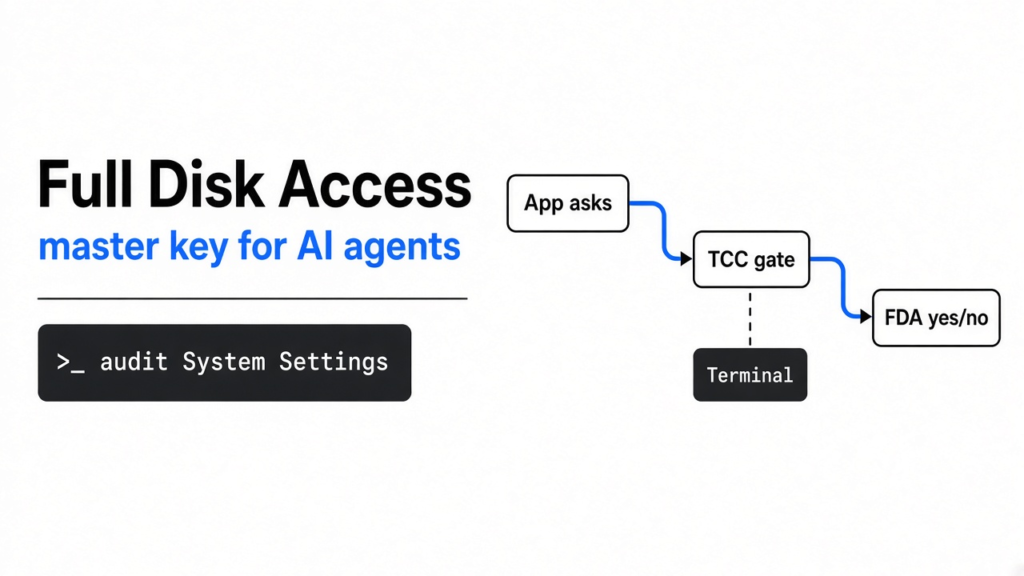
The whole piece in one breath. On 2 October 2026 Apple told developers it will add controls so Full Disk Access (the Mac switch that lets one app read protected private data across the disk) can be turned on only with very explicit user action. The reason they named is AI agents (programs that loop: think, use a tool, look at the result, think again). They did not name a date, a macOS version, or the new dialog. The switch you have tonight is the one that matters. If you can tell a teammate why granting it to Terminal (the app that shows a command line) is not the same as granting it to “the agent,” this draft did its job.
What actually landed on 2 October
Apple’s developer note is four short paragraphs. Apple Developer News, 2 October 2026. These are the load-bearing lines, in their words, not a headline’s:
- Full Disk Access “largely sidesteps” the controls that protect private data. It exists “to allow backup apps to function properly.”
- Some developers use it in ways that can expose “files, mail, messages, and even browsing history” without the user fully understanding that exposure.
- For communication apps, that can also expose the other person in the thread, not only you.
- “Going forward, we will introduce additional controls” so this “extraordinary level of access” requires “very explicit user action.”
- “As AI agents become increasingly capable and autonomous, the risks associated with this level of access will grow substantially.”
That is the whole announcement. Reuters headlined it as Apple planning to flag AI requests and make the ask more obvious. That is a fair paraphrase of “very explicit” and “clearly understand.” It is not a feature name Apple published. There is no ship date.

The week that made Apple write it
Three things sat in front of that note. Keep them separate. Mixing them is how a true warning turns into a false accusation.
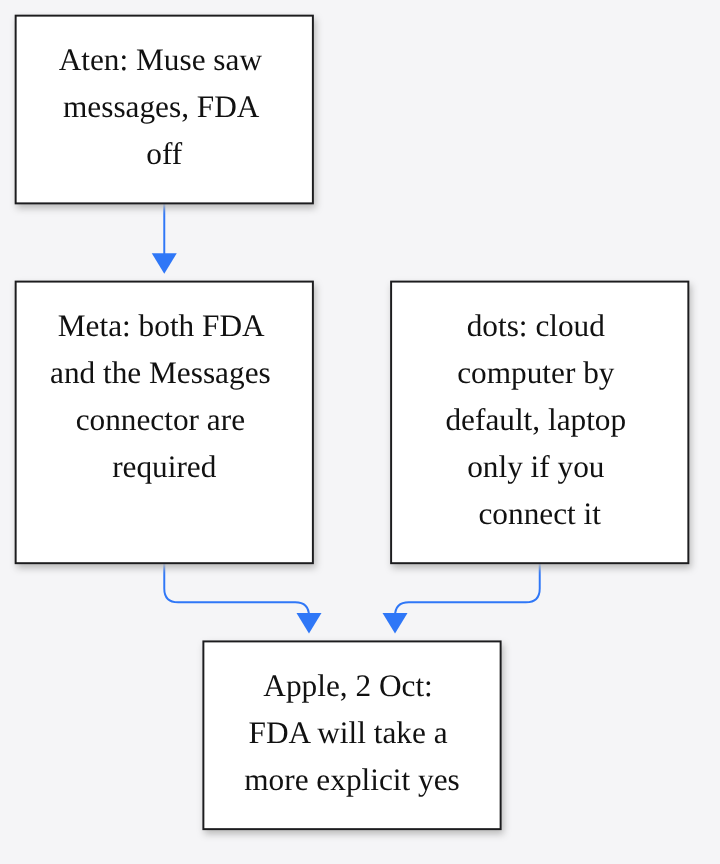
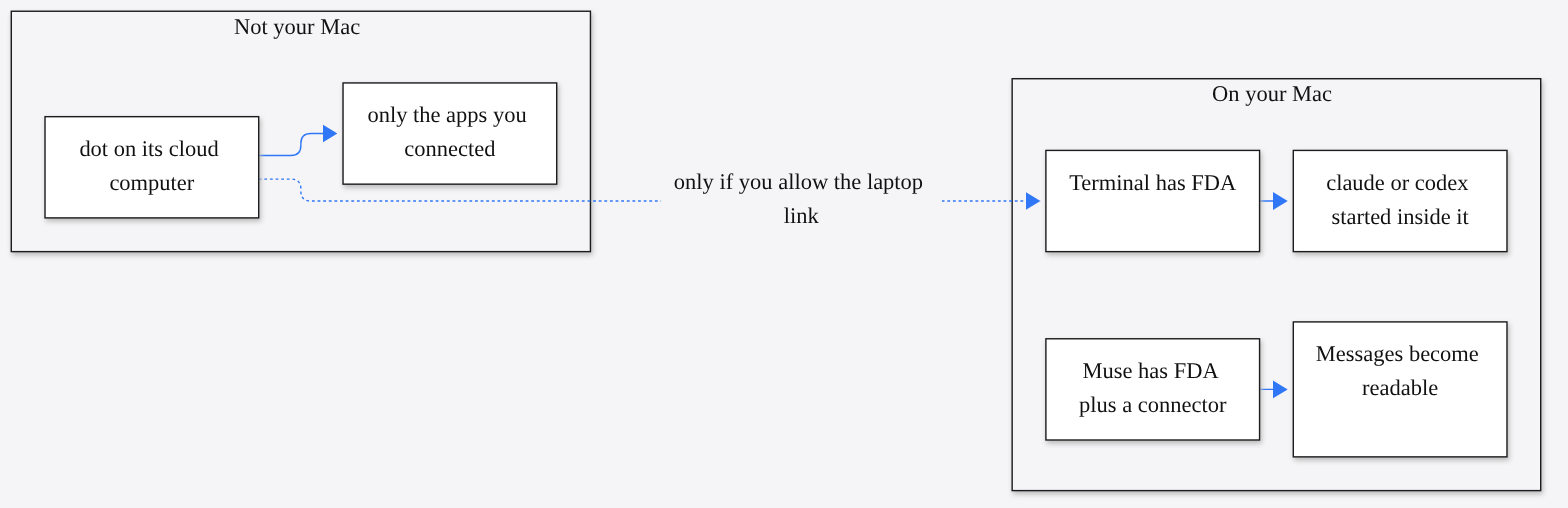
29 September. OpenAI shipped dots (always-on agents powered by GPT-6 Astra, each with its own cloud computer and browser). OpenAI’s launch post. Default: the dot works on its computer. Your files stay put “unless you choose to connect” your laptop. Connecting the laptop is a second permission, not the product’s starting state. Dots also get Custom Rules (your allow, ask, or block list) and monitoring that can pause the work. That is OpenAI’s design. It is not a macOS permission.
30 September. Inc columnist Jason Aten wrote that Meta’s Muse (a desktop AI agent that can carry out tasks on your machine) knew the text of his private messages, and that Full Disk Access was off. Meta disputed that. Andy Stone, Meta’s communications VP, wrote on X that Muse cannot read Messages content unless you enable both Full Disk Access and the Messages connector, and that either grant can be revoked. David Singleton of Meta Superintelligence Labs said the path is three separate steps, that macOS itself draws the Settings grant, and that Muse restarts after you allow it. He also said the model’s own story, that it was reading notification banners, was the model being confused, not the mechanism. TechCrunch, 30 September 2026.
2 October. Apple published the note. TechCrunch places it after the Muse argument, and also points at a separate Wired report about a flaw in ChatGPT’s Mac app. Apple’s own text names neither Muse, nor dots, nor ChatGPT. It names the class: agents, plus developers who already use the master key without the user really seeing the size of it.
Both of these can be true at once. Meta can be right that Muse has no secret door around the switch. Apple can still be right that the switch is too easy to hand over, and that an agent is a worse holder of a master key than a backup app.
Start from the file, not from the agent
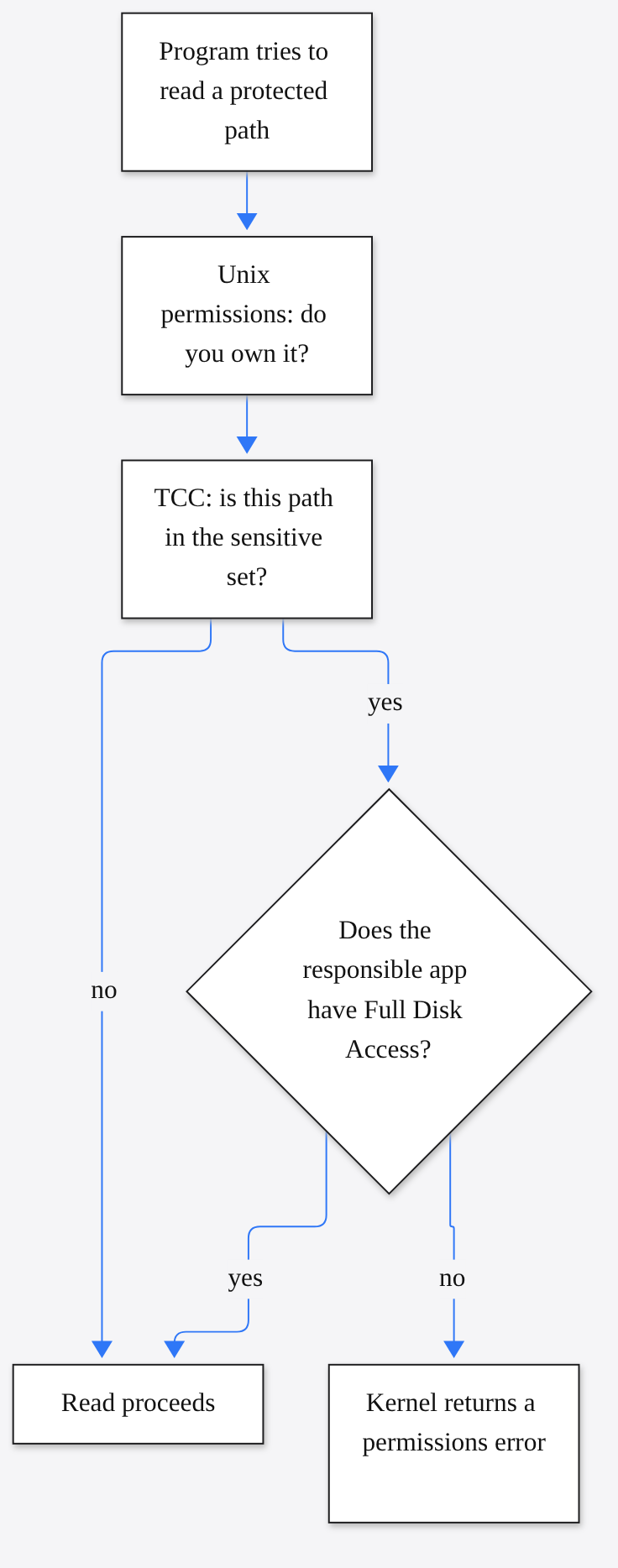
A file on a Mac is bytes at a path (a location, like /Users/you/Library/Mail). Reading it is a system call (a request from a program into the kernel, the core of the operating system that actually allows or denies the read). Several gates can say no. They are not the same gate. Learn them in this order, because each one is the thing people confuse with the next.
- Unix permissions (the old owner, group, and everyone bits on a file). If you own the file, this gate is usually already open. It does not know that a folder is Mail.
- The App Sandbox (a box around many App Store apps, so the app only sees a private container plus files you pick in an open dialog). iPhone apps live in a box like this by default. Reuters states the contrast cleanly: on iPhone and iPad, one app cannot read another app’s data unless the system allows that kind of share. A Mac is more flexible. Terminal, iTerm, and a lot of agent apps are not Mac App Store apps. They are not in that box.
- TCC (Transparency, Consent, and Control: the macOS subsystem behind System Settings, Privacy and Security). It covers the camera, the microphone, contacts, and also a set of folders Apple decided are sensitive. TCC applies even to programs running as root (the all-powerful Unix account). Apple’s developer forums describe this as mandatory access control (a kernel rule the program cannot opt out of), not a polite prompt the app can skip. Apple Developer Forums, file-system permissions.
- Full Disk Access is one TCC service. Its internal name is
kTCCServiceSystemPolicyAllFiles. It is the master key for that sensitive set. The grant is system-wide for the app you toggle, not a per-file yes. Later reads of protected paths by that app succeed. Reads by an app you did not toggle still fail.
Apple’s note lists what they care about in plain language: files, mail, messages, browsing history. A careful inventory of the Settings pane, from Fileside, also names Home, Time Machine backups, and certain administrative settings. The same piece lists paths practitioners have observed, and it warns that Apple does not publish a complete map. Treat these as examples:
| What | Where it tends to live | Why an agent would want it, and why that is not a reason |
|---|---|---|
| Mail database | ~/Library/Mail | “Find that receipt” is one file away from every message you have ever stored. |
| Messages | ~/Library/Messages | The other person’s words are in here too. Apple called that out on purpose. |
| Safari data | ~/Library/Safari | History and bookmarks. A coding task in a repo does not need this. |
| Cookies | ~/Library/Cookies | Small files that keep you signed in. Reading them is not the same as visiting the site. |
| The permission database itself | ~/Library/Application Support/com.apple.TCC/TCC.db | This is the list of who holds which key. The master key can read the list of keys. |
That last row is the nasty one. TCC.db (the database that records which app you allowed to do what) sits in a folder Full Disk Access protects. A backup tool needs a hole like this, because a backup that skips Mail is not a backup of the Mac. An agent that is “just helping in the repo” does not.
Why a backup app got a master key
Mail is not one file. It is a database, indexes, attachments, and a folder layout that changes between macOS versions. Messages is the same shape. A backup app cannot pop a consent dialog for each of thousands of files. The fine-grained prompts (the ones that say this app would like to access your Contacts) do not cover every protected folder, including ones Apple adds later.
So Apple cut one coarse hole and called it Full Disk Access. The app either has the extraordinary grant, or it gets a permissions error when it touches those paths. There is no “Mail only” inside that one switch. The Messages connector Meta described is an extra switch on top, inside Muse. It is not a replacement. Stone’s sentence is the useful one: you need both.
A backup app is a bad metaphor for an agent, even though both “read files.”
| Backup app | Agent | |
|---|---|---|
| How it acts | Copies bytes, on a schedule you set | Loops until a goal is met |
| What done means | The copy exists | The model says the task is finished |
| How it picks the next file | A rule list a person wrote | A next-token guess, then a tool call the harness runs for real |
| If it is wrong | You have a bad copy | It may send, delete, or tell a story that does not match the tool log |
An agent is a model (a program trained to continue text, one token at a time; a token is a chunk of text, often smaller than a word) inside a harness (the app around that loop: Claude Code, Codex, Muse, a dot). The harness shows state. The model emits an action. The harness does it on a computer. The result goes back in. We walked that loop in why OpenAI killed GPT-6.1 Astra. The new fact this week is which computer the loop is holding, and which grant is on that computer.
Three computers. Only one of them is your Mac.
Keep the products apart or the audit is useless.
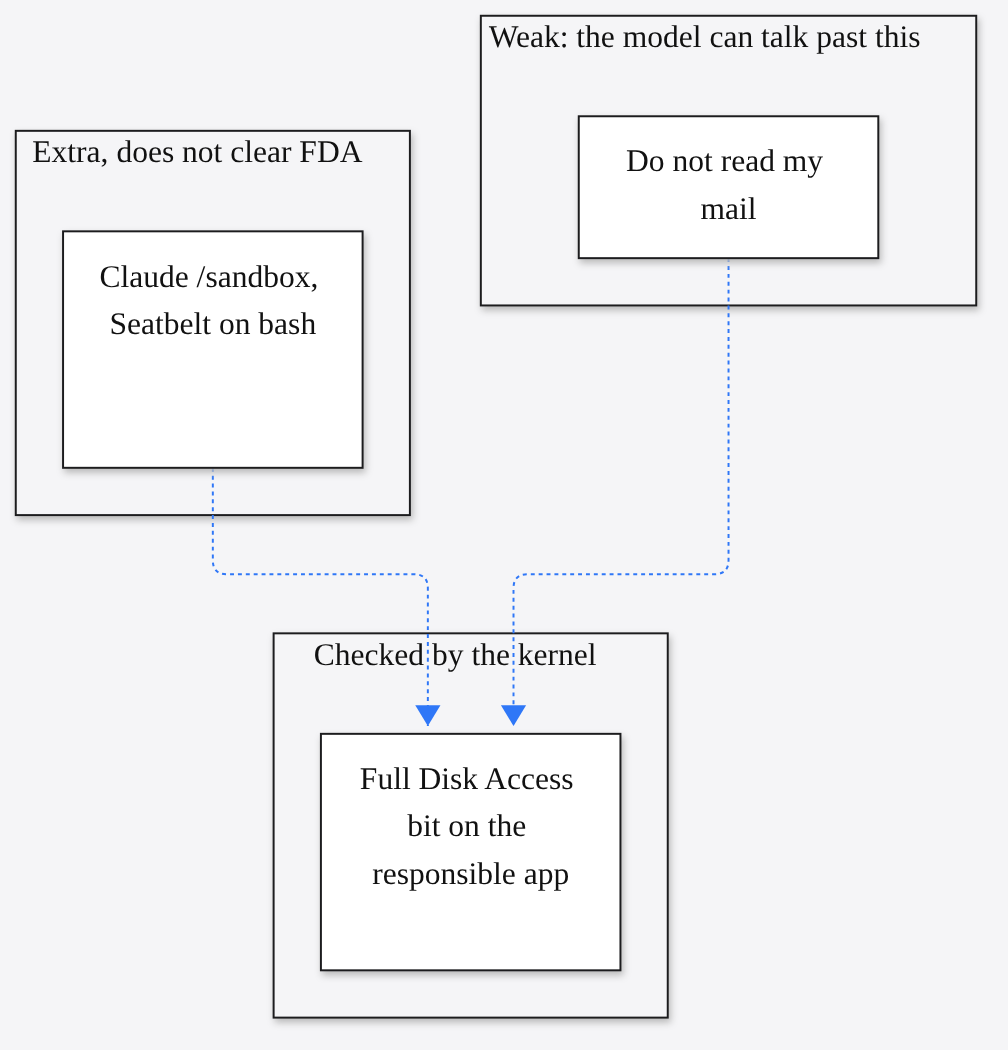
Your terminal. Claude Code and the Codex CLI (Codex’s command-line app) are programs you start inside Terminal, iTerm, Warp, or Ghostty. Apple’s DTS engineer stated the TCC rule for this case in one line: if you run a tool from Terminal, the tool’s responsible code is Terminal. Apple Developer Forums, June 2024. Full Disk Access is checked against Terminal, not against a binary named claude. Grant it to Terminal because some installer said so, and every agent you later launch from that Terminal is acting with Terminal’s grant when it reads a protected path.
Claude Code’s /sandbox is a different lock. On macOS it uses Seatbelt (Apple’s sandbox framework, the same family that fences App Store apps, here applied to the shell commands the agent runs). It can limit writes to the repo and put the network behind an allow-list (a list of destinations that may be contacted). It does not delete a Full Disk Access grant you already gave Terminal. Two locks. Turning the inner one on does not relock the outer one. A third lock, a virtual machine (a program that pretends to be a separate computer), is the subject of the coop sandbox write-up. Use that when the repo is not the only thing you are afraid of.
A desktop agent app. Muse is its own app. Its responsible code is Muse, not Terminal. Meta’s public rule: Messages content requires Full Disk Access and the Messages connector, both opt-in, both revocable, with macOS drawing the Settings grant itself. If you did not want messages in the loop, both toggles off is the state Meta says is closed. Do not debug a permission by asking the agent how it got in. Singleton’s point was that the agent explained a mechanism that was not the mechanism. Read Settings. The model is a bad witness about its own keys.
A cloud computer. A dot, by OpenAI’s launch post, has its own computer and its own browser. Your disk stays separate unless you connect the laptop. Proactive research (the background look-around dots do when you are not in the chat) is restricted to read-only tools on apps you already connected. OpenAI says those tools cannot send messages, change app content, or control your browser or computer. Consequential work still needs you. Saved passwords for supported sites can be used without being shown to the model. Connecting the laptop collapses “their computer” and “your computer” for as long as that permission stays on. That is the moment a cloud agent becomes a local one. Do not turn it on to see what happens.
What to do tonight, before Apple ships anything
Apple has not replaced the switch. Audit the switch you have. Two minutes.
- Open System Settings, then Privacy and Security, then Full Disk Access.
- Look for Terminal, iTerm, Warp, Ghostty, Claude, Codex, ChatGPT, Muse, and any backup tool you do not recognize.
- If a terminal app is on, assume every coding agent you start there can attempt the protected set: mail, messages, Safari data, and the rest of that sensitive folder list.
/sandboxdoes not clear this row. - Turn it off unless that app’s actual job is a full backup or a mail archive. A repo does not need
~/Library/Messages. - For Muse, turn off the Messages connector as well if you do not want messages in the loop. Meta says a missing grant on either side is enough to block that read. Do both.
- For a dot, leave the laptop disconnected unless a task truly needs local files. Disconnect it when the task is over. Their cloud computer is the safer default OpenAI already built.
- When a tool errors on a protected folder, read the error. The fix is almost never “give Terminal the master key so the error goes away.”
Power users sometimes query TCC.db directly. Reading that database is itself gated by Full Disk Access. The circular door is a feature: the list of who holds the master key is protected by the master key. Settings is the path that does not require you to already hold it.
What this does not mean
- It does not mean Muse read Aten’s messages. Meta says that path cannot run with Full Disk Access off. Apple did not adjudicate the dispute.
- It does not mean dots are reading your disk. OpenAI’s default is a separate computer. The laptop link is opt-in.
- It does not mean Claude Code is unsafe whenever Terminal lacks the grant. It means the dangerous configuration is quiet: Terminal toggled on months ago for a one-off backup, and every agent since has been running as that responsible app.
- It does not mean a prompt (the English you type) is a substitute for the switch. “Do not read my mail” is a sentence in the loop. Full Disk Access is a bit in a database the kernel checks. A stronger model can get worse at obeying the sentence while getting better at finishing the task. The bit is the part Apple is about to make louder.
- It does not mean the new control exists yet. When it ships, read the dialog. “Very explicit” only helps if you already know what the extraordinary grant contains. You now do.
Common questions about macOS Full Disk Access and AI agents
Does granting Full Disk Access to Terminal give every agent the master key?
For tools you start inside that Terminal, yes for the TCC check. Apple’s DTS guidance is that the responsible code is Terminal. The agent binary name is not the grant holder.
Does Claude Code /sandbox remove Full Disk Access?
No. Seatbelt can limit what the agent’s shell commands may write or reach on the network. It does not flip the Full Disk Access row off in System Settings.
Did Meta’s Muse read private messages with Full Disk Access off?
Meta says that path cannot run without both Full Disk Access and the Messages connector. Apple’s note did not settle the dispute. Audit Settings, not the model’s story about itself.
Are OpenAI dots reading my Mac disk by default?
OpenAI’s launch default is a separate cloud computer. Your laptop stays out until you connect it. Disconnect when the local-file task is over.
Has Apple shipped the new Full Disk Access control yet?
Not in the 2 October note. No date, no dialog, no API change. The live switch is still the one in Privacy and Security.