
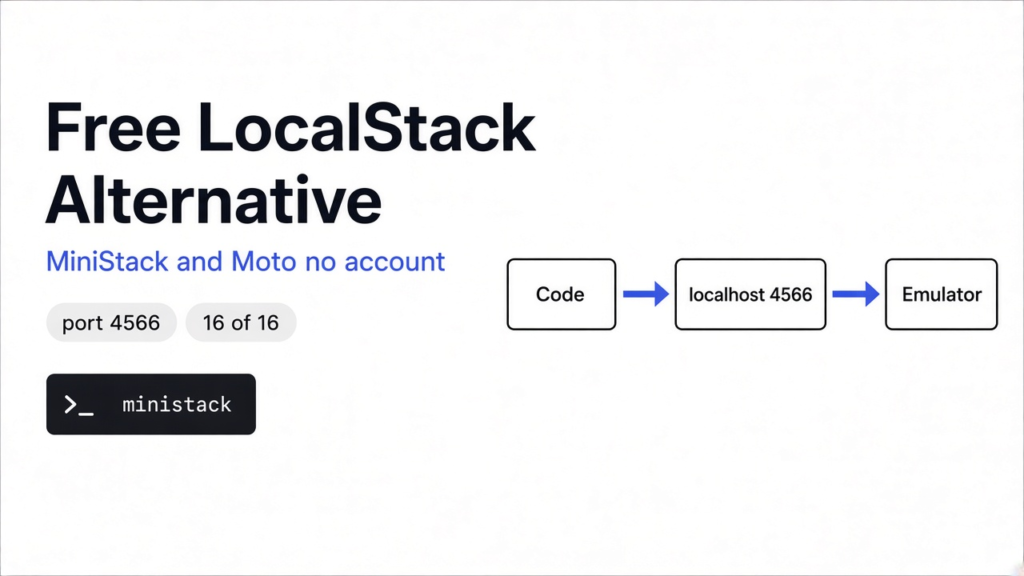

Is there a free LocalStack alternative? Yes: MiniStack and Moto need no account.
Yes. MiniStack and Moto are both free, open source and need no account. On this machine MiniStack 1.5.39 started on port 4566 with 91 services, and Moto 5.2.5 round-tripped S3 and SQS on port 5000 (Asia/Calcutta, 9 Nov 2026). In our test, both passed 16 of 16 everyday AWS checks. Both also failed 3 of 10 harder Lambda and workflow checks on default settings, and both hit 10 of 10 after one settings change each. Floci is the third free option.
Your test suite pulls the LocalStack image, and the run stops. The container wants an account and an auth token (a secret key that proves who you are) before it will start. The free plan that comes with that account is for non-commercial use only, so a commercial project needs a paid seat.
That costs real money per developer, and it breaks every CI pipeline (the server that runs your tests on each push) that pulled the image without a token. So people go looking for the free swap.
This post gives you that swap, tested. We ran the same 26 AWS checks against MiniStack and Moto, on default settings first, then fixed. The short version: the easy checks all pass, so the defaults are the real test.
What does LocalStack actually do?
It pretends to be AWS on your laptop, so your code can’t tell the difference. Start with the base fact. Your code talks to AWS by sending web requests to an address called an endpoint (the URL a service listens on), like the public S3 endpoint. The AWS SDK (the library your code uses to call AWS) builds those requests for you.
Now the build. If you point the SDK at http://localhost:4566 instead, the requests go to a program on your own machine. That program is an emulator (software that copies how another system behaves). It answers “bucket created” or “message sent” just like AWS would.
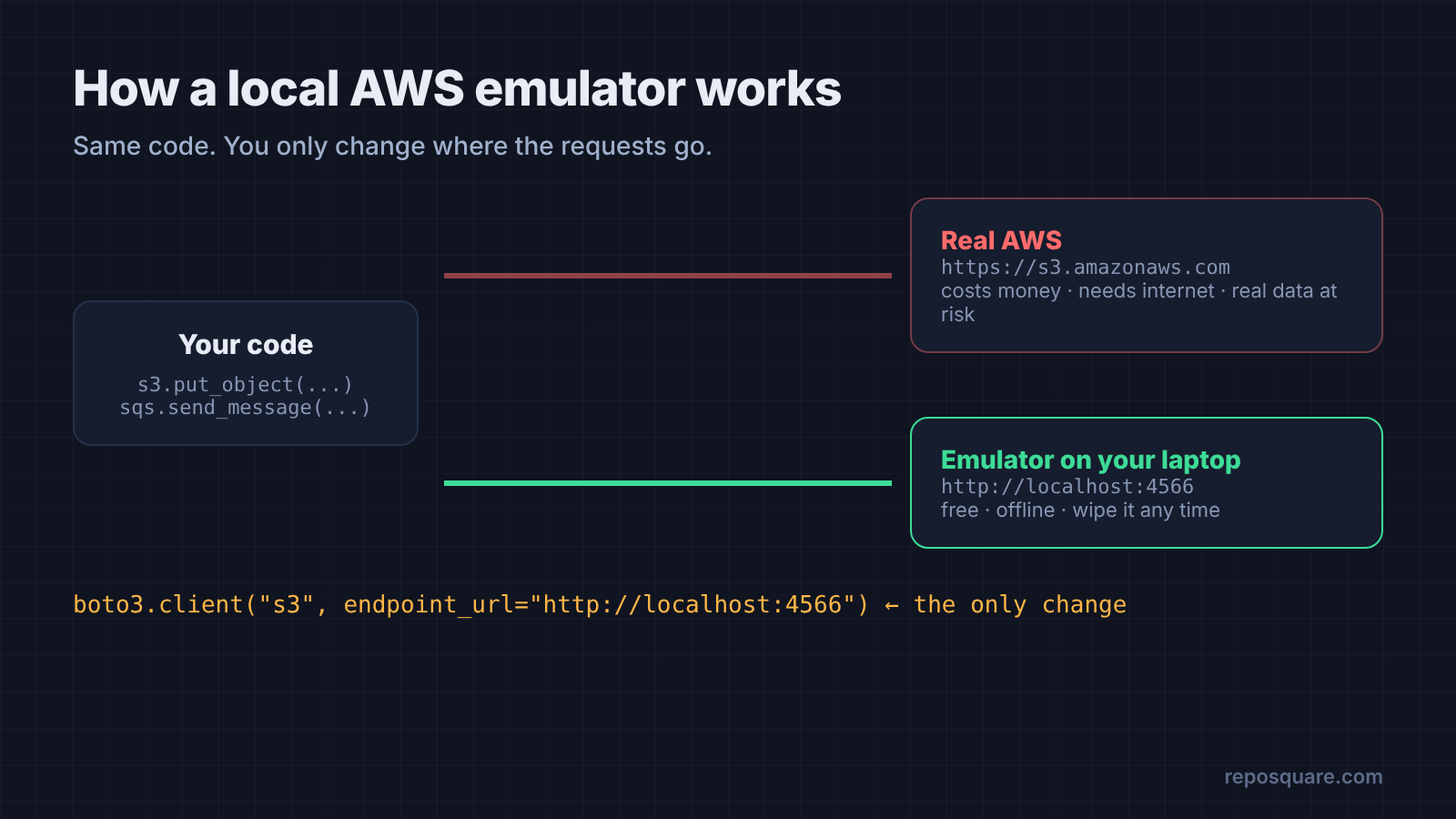
Think of a flight simulator. The pilot pulls the same levers, the screen reacts the same way, and nothing real crashes when they get it wrong. An AWS emulator gives your tests that same safety: no bill, no internet, no risk of wiping a real bucket.
LocalStack is the best-known emulator. Every tool below copies its idea, and two of them copy its port too.
Why do people need a LocalStack alternative?
Because the free version needs an account, and the free plan rules out commercial use. The LocalStack image requires a user account and an auth token to run. Its free Hobby plan is for hobbyists and non-commercial use. Paid plans are charged per license, per month.
For a solo side project, that is fine. For a team, it means a paid seat per person plus a token stored in every CI job. Forget the token and the tests fail before they start.
So the real question is not “which emulator has the most services.” It is “which free one runs my actual code without surprises?”
Which free LocalStack alternatives are there?
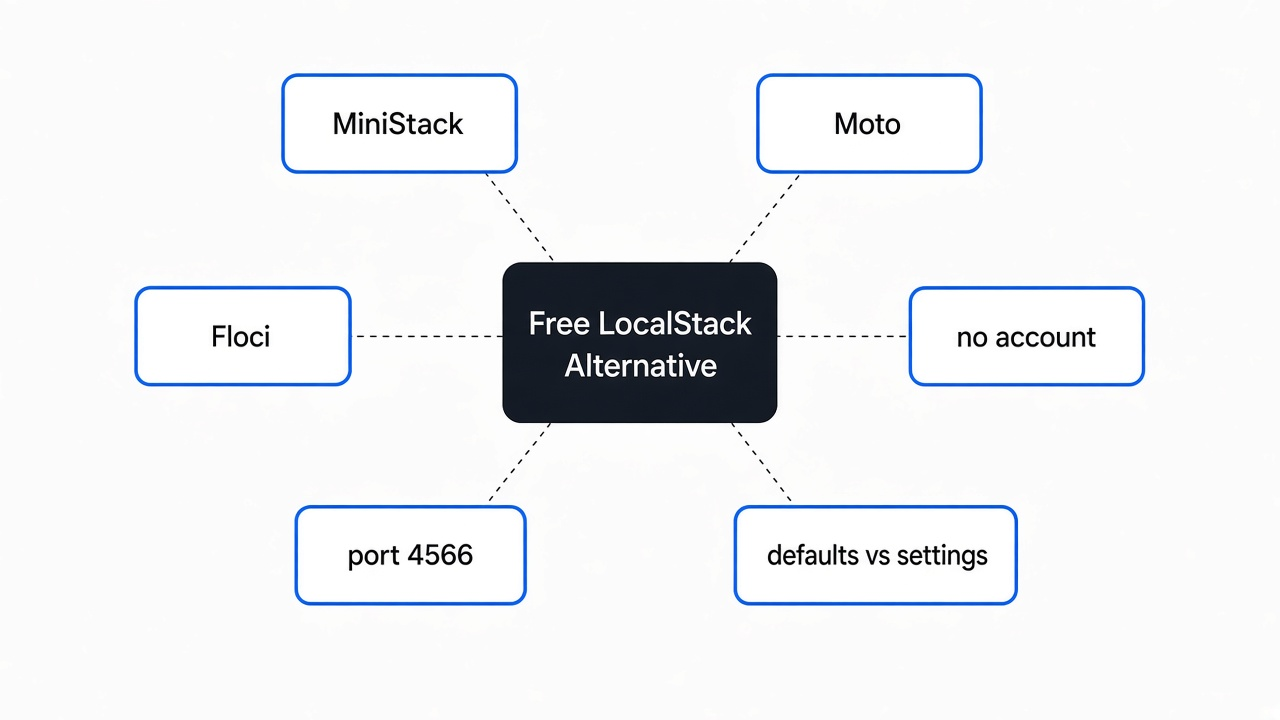
Three serious ones: MiniStack, Moto and Floci. All three are free with no account.
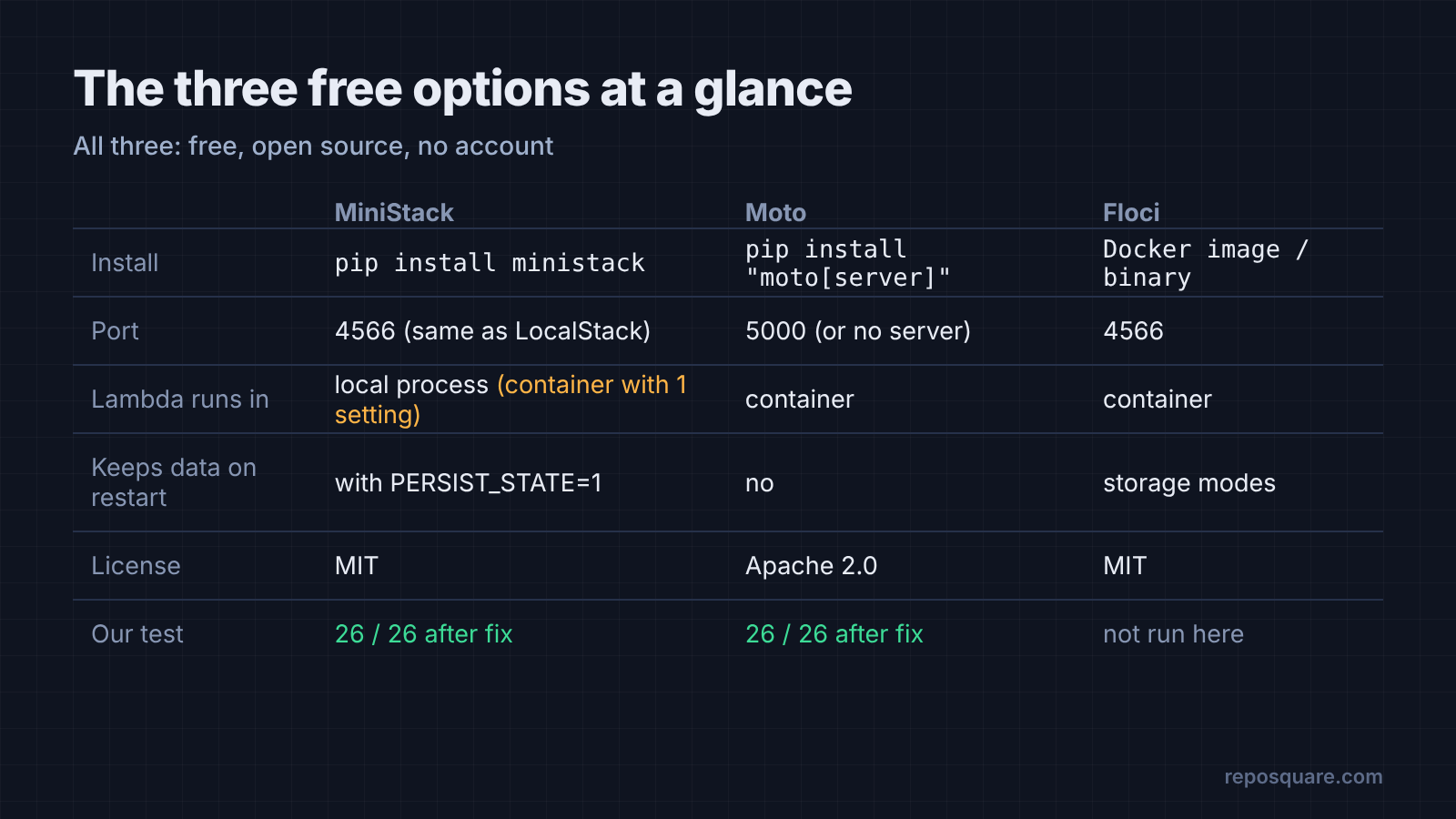
MiniStack is a Python program that listens on port 4566, the same port LocalStack uses. You install it with pip install ministack and start it with one word: ministack. On start it listed dozens of services, from S3 and DynamoDB to Step Functions and Cognito. It uses the MIT license (a short license that lets you use the code for anything, including work).
Moto is the classic Python choice. It works two ways: as a decorator (a one-line tag above a test function) that fakes AWS inside your Python test, or as a standalone server for any language. You install it with pip install "moto[server]", and the server listens on port 5000. It uses the Apache 2.0 license, which also allows work use.
Floci ships as a Docker image or a standalone binary. It also listens on port 4566 and needs no account or token. It runs Lambda inside real AWS runtime containers. We could not run Floci in our test machine, so it gets no scores here. Treat it as a third option to try with the same checks.
How we tested them
Same 26 checks, same machine, same Python client, pointed at each emulator in turn. Here is the question: if you swap LocalStack for one of these, does your code still work?
What we did: we wrote two test files with boto3 (the AWS SDK for Python). Round one has 16 everyday checks. Round two has 10 harder checks that real apps hit: Lambda (AWS’s “run this function when something happens” service), queues, transactions and workflows. Each emulator ran on its default settings first.
Every check does a real round trip. Create a bucket, upload a file, read it back, compare the bytes. Send a queue message, receive it, delete it. If anything comes back wrong, the check fails.
Round one: the everyday stuff
Both passed all 16. On basic AWS calls, you can’t pick a loser.
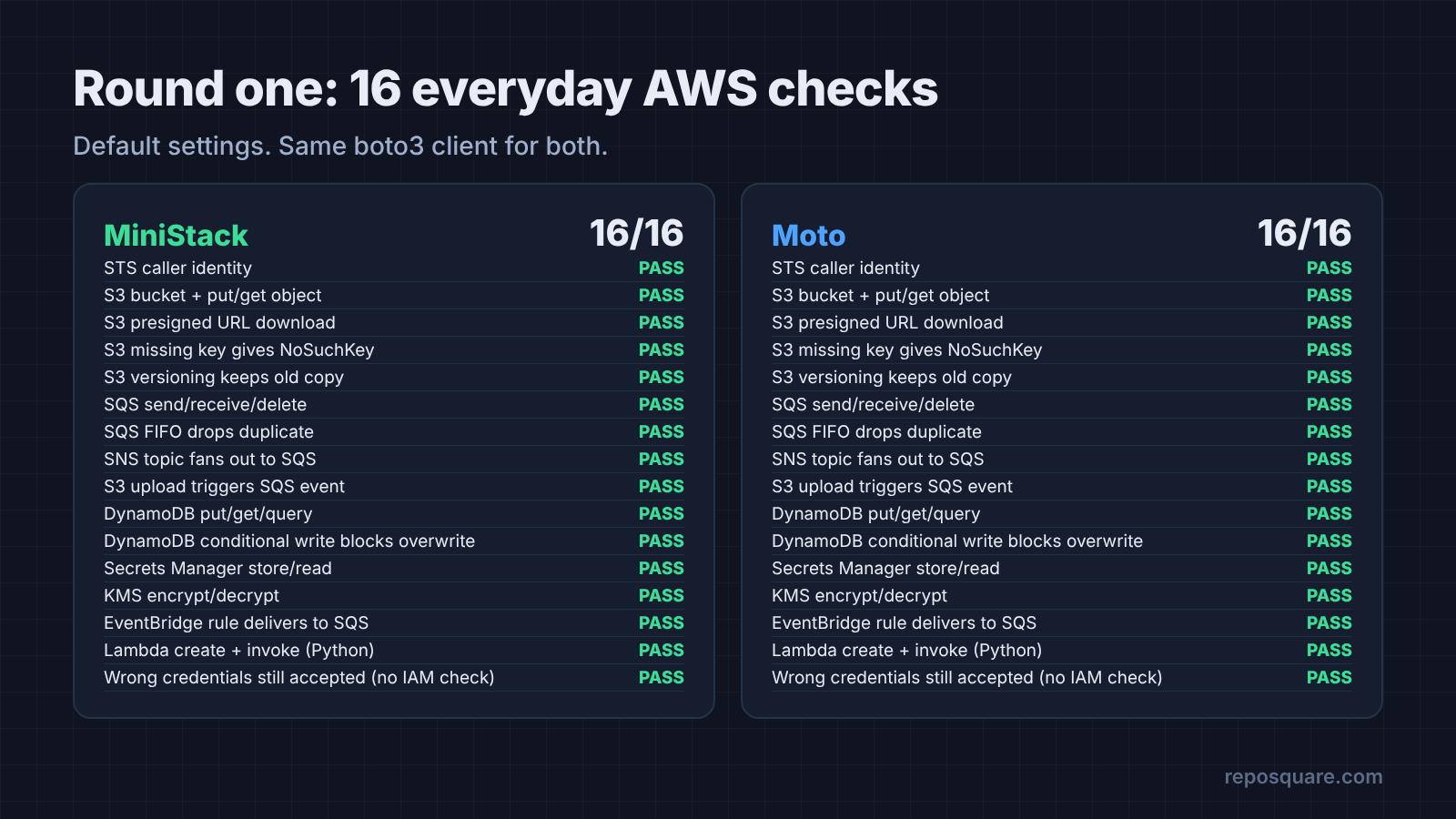
The 16 checks started with storage: S3 uploads, presigned URLs (a link that lets someone download one private file for a short time) and file versioning. Then messaging: SQS (AWS’s message queue), FIFO queues (queues that keep order and drop duplicates), SNS fan-out and S3 upload events.
The rest covered DynamoDB (AWS’s key-value database) queries and conditional writes, Secrets Manager, KMS encryption, EventBridge rules and a simple Lambda call. Sound like your app? Then this round is your answer.
Both emulators also returned the right error names. Asking for a missing file gave NoSuchKey, and a blocked overwrite gave ConditionalCheckFailedException. That matters, because your error-handling code checks those exact names.
One thing both get “wrong” on purpose: they accept any username and password. We sent fake keys and both let the request through. So your tests will never catch a missing IAM permission (the AWS rules for who can do what). Test those against real AWS.
If your app only stores files, sends messages and reads a table, stop here. Either one works.
Round two: where the defaults bite
Both scored 7 of 10, and they failed for different reasons.
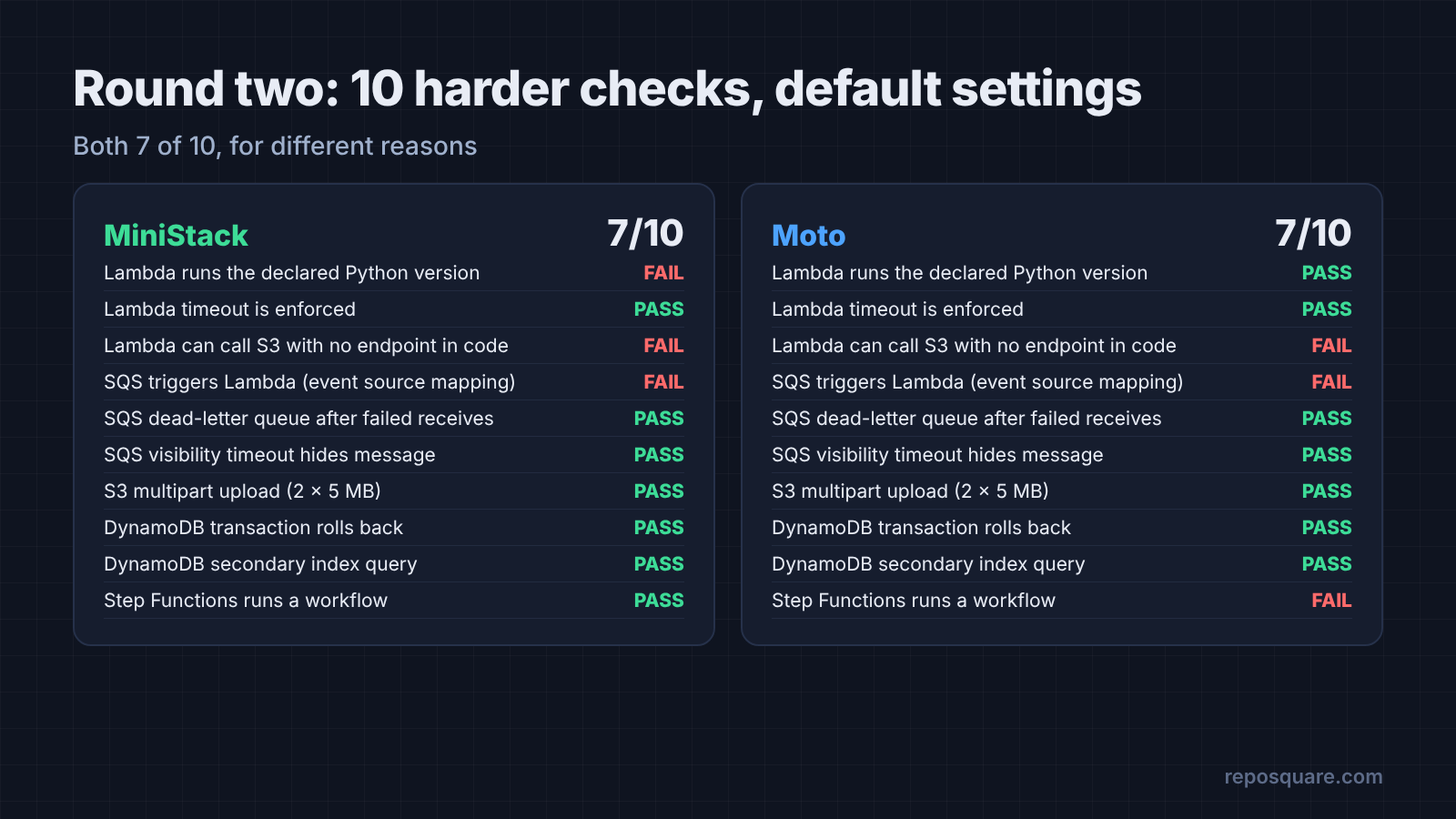
The easy checks all passed, so this round is the one that decides it. Both handled dead-letter queues (a side queue that catches messages that keep failing) and message hiding while a worker is busy. Both also passed 10 MB multipart uploads, a DynamoDB transaction that must fully roll back, and a secondary index query.
Moto failed on three things. A Lambda function that called S3 from inside could not reach the server. The queue that should trigger a Lambda never wrote its row. And a Step Functions workflow (AWS’s tool for chaining steps) sat at “RUNNING” forever.
MiniStack failed on three different things. We asked for Python 3.12 and it ran our function on Python 3.13. A function that imported boto3 crashed with No module named 'boto3'. And the queue-to-Lambda check failed because of that crash.
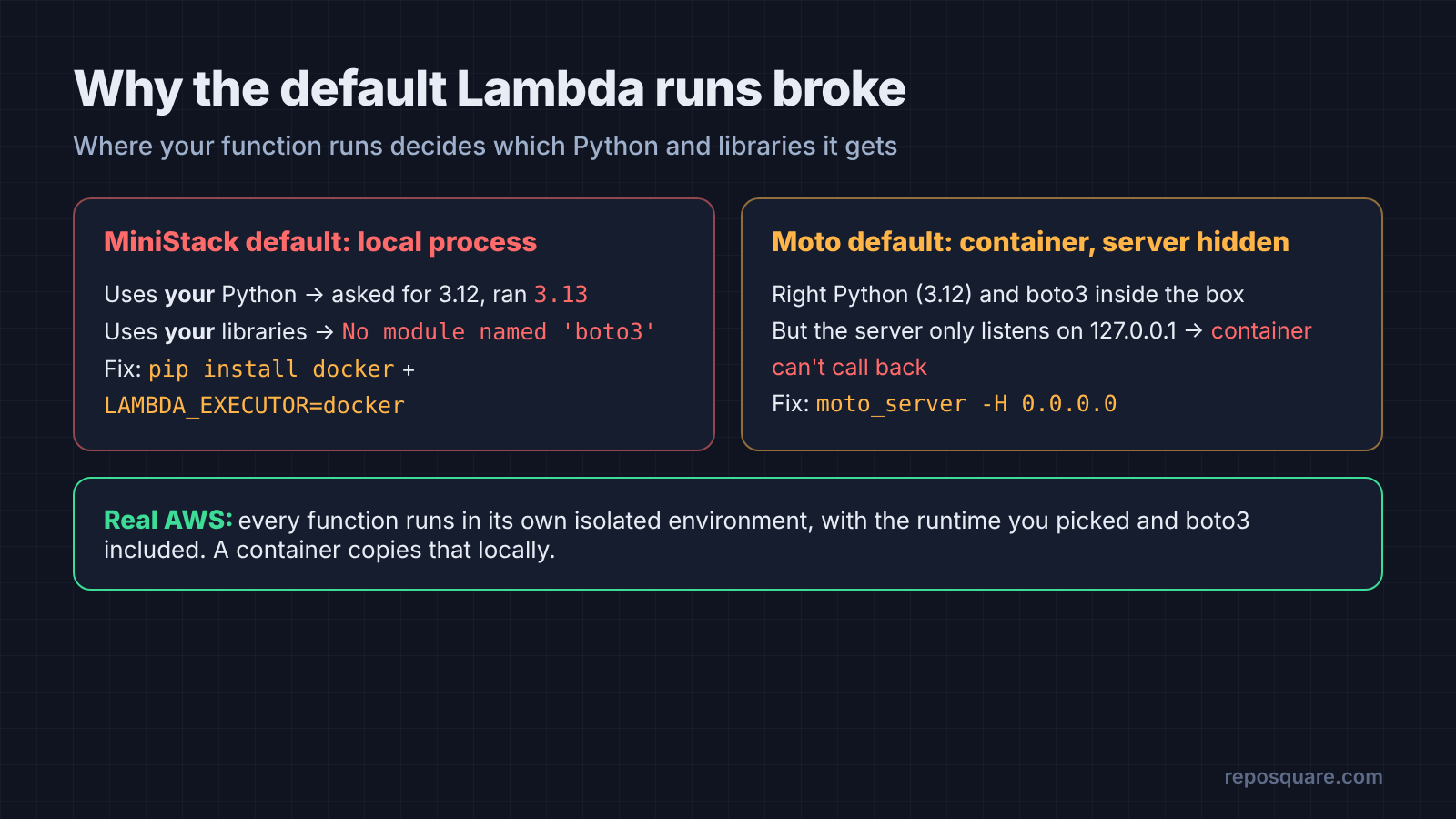
Here is why MiniStack slipped. By default it runs your Lambda code as a plain process on your own machine, using whatever Python you have. Real AWS runs it in a sealed, isolated environment with the exact Python you picked, and that environment ships with boto3.
So code that works on AWS can break here, and code that breaks on AWS can pass. The fix is to run it in a container (a sealed box with its own Python and libraries) built from AWS’s own runtime image.
Moto runs Lambda in a container by default, which is much closer to AWS. But its server only listens on your machine’s own address unless you say otherwise. The container is a separate box, so it can’t call back to a server it can’t see.
The one setting that fixes each
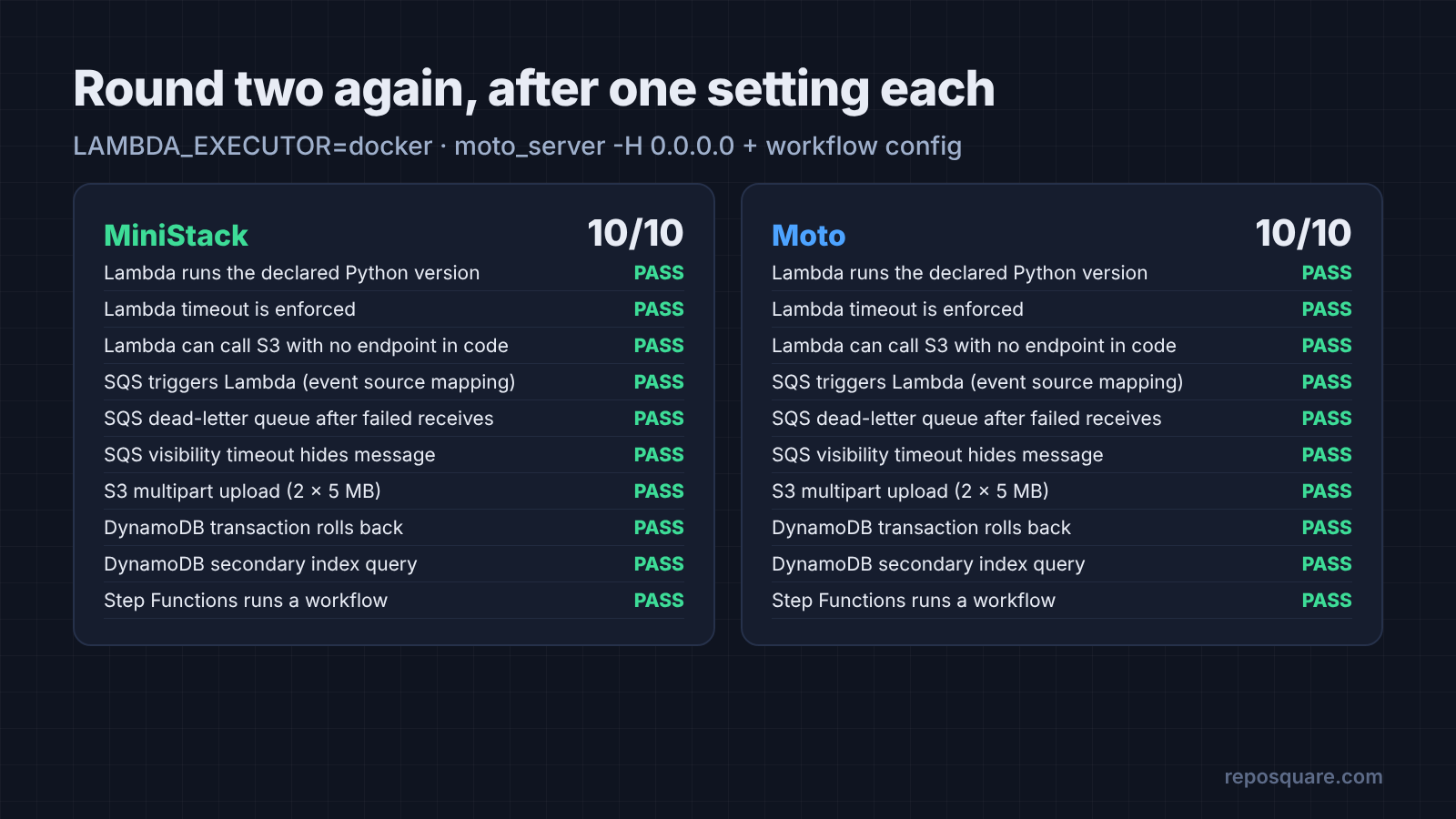
One change each, and both hit 10 of 10.
For Moto, start the server so containers can reach it, then turn on real workflow runs:
moto_server -H 0.0.0.0 -p 5000
curl -X POST http://localhost:5000/moto-api/config \
-d '{"stepfunctions": {"execute_state_machine": true}}'The -H 0.0.0.0 part tells the server to listen on every network address, not only your own machine. Moto’s docs warn that other people on your network can then reach it too, so keep it on a trusted network. Without the second command, Moto only pretends to run workflows.
For MiniStack, install the Docker library for Python and switch Lambda into containers:
pip install ministack docker
LAMBDA_EXECUTOR=docker ministackWithout the docker library, MiniStack quietly falls back to local processes and only says so in a warning line in its log. With it, MiniStack pulled the official AWS Lambda Python image, ran our function on Python 3.12, and boto3 worked inside it.
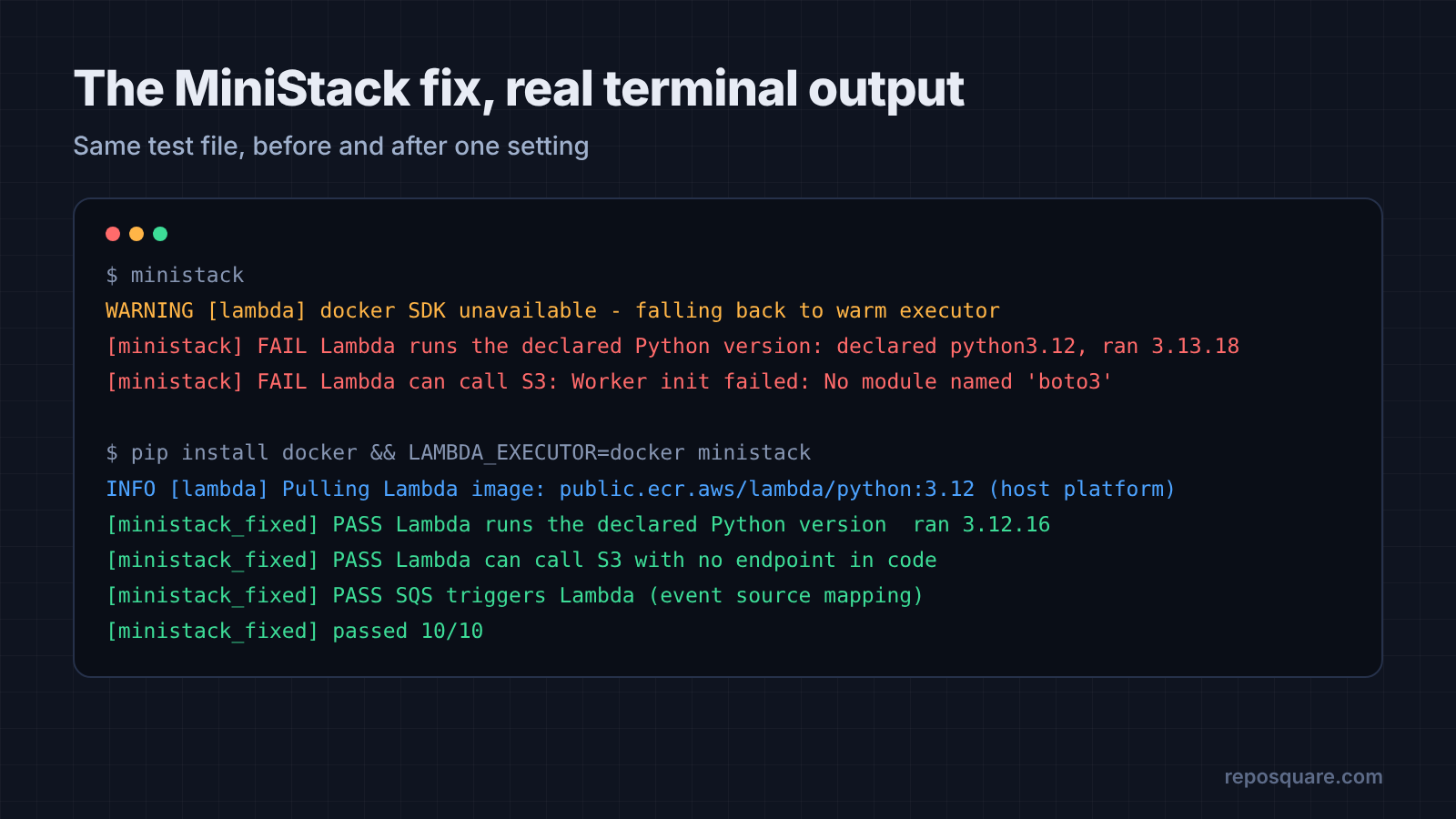
After those changes, both passed all 10 hard checks. That is the whole lesson of round two. The tool was fine both times. The default was the trap.
Do they keep your data after a restart?
Not by default. MiniStack can, with one setting. We created a bucket, stopped the emulator, started it again and listed buckets. Moto came back empty. MiniStack came back empty too.
Then we started MiniStack with PERSIST_STATE=1 and ran the same thing. The bucket was still there after the restart.
For tests, empty is often what you want, since every run starts clean. For a local dev setup where you seed data once and keep working for days, MiniStack’s persist mode saves you a reload script.
Which one is faster?
Both are fast enough that speed should not decide it.
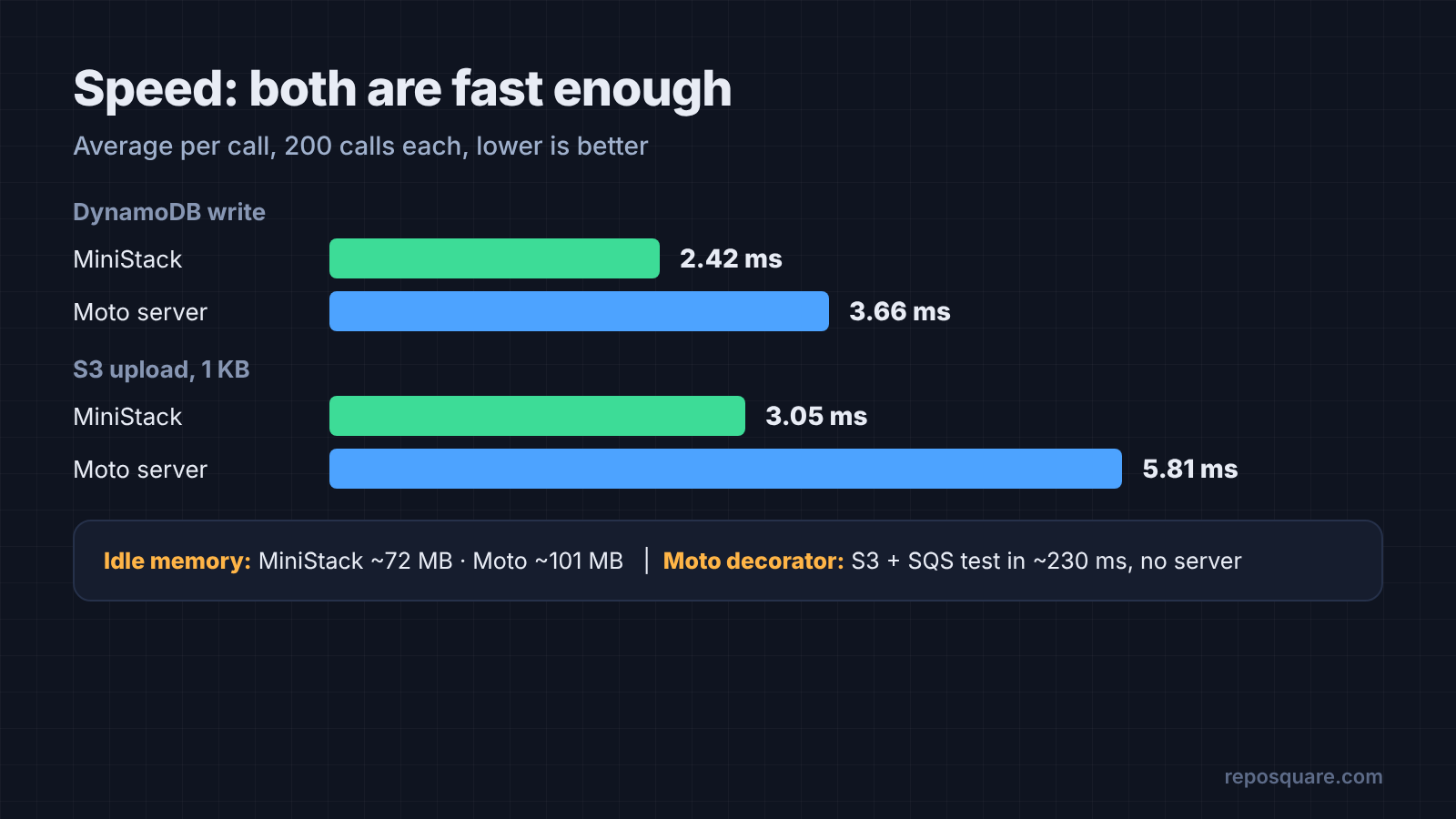
We timed 200 DynamoDB writes and 200 small S3 uploads on each, one at a time. MiniStack averaged 2.4 ms per DynamoDB write and 3.1 ms per upload. Moto averaged 3.7 ms and 5.8 ms. At idle, MiniStack used about 72 MB of memory and Moto about 101 MB.
Does that gap matter? Barely. A test suite with 500 AWS calls spends about one extra second on Moto.
The bigger speed win is Moto’s decorator mode, if your tests are in Python. There is no server and no Docker at all. Our S3 and SQS test ran in about 230 ms inside the test process, and setup is one line:
from moto import mock_aws

@mock_aws
def test_upload():
... # boto3 calls here hit a fake AWS, not the real oneLambda in container mode is the slow part on both. The first call pulls a large runtime image and starts a container, which took about 12 to 15 seconds. Later calls reuse it.
So which free LocalStack alternative should you pick?
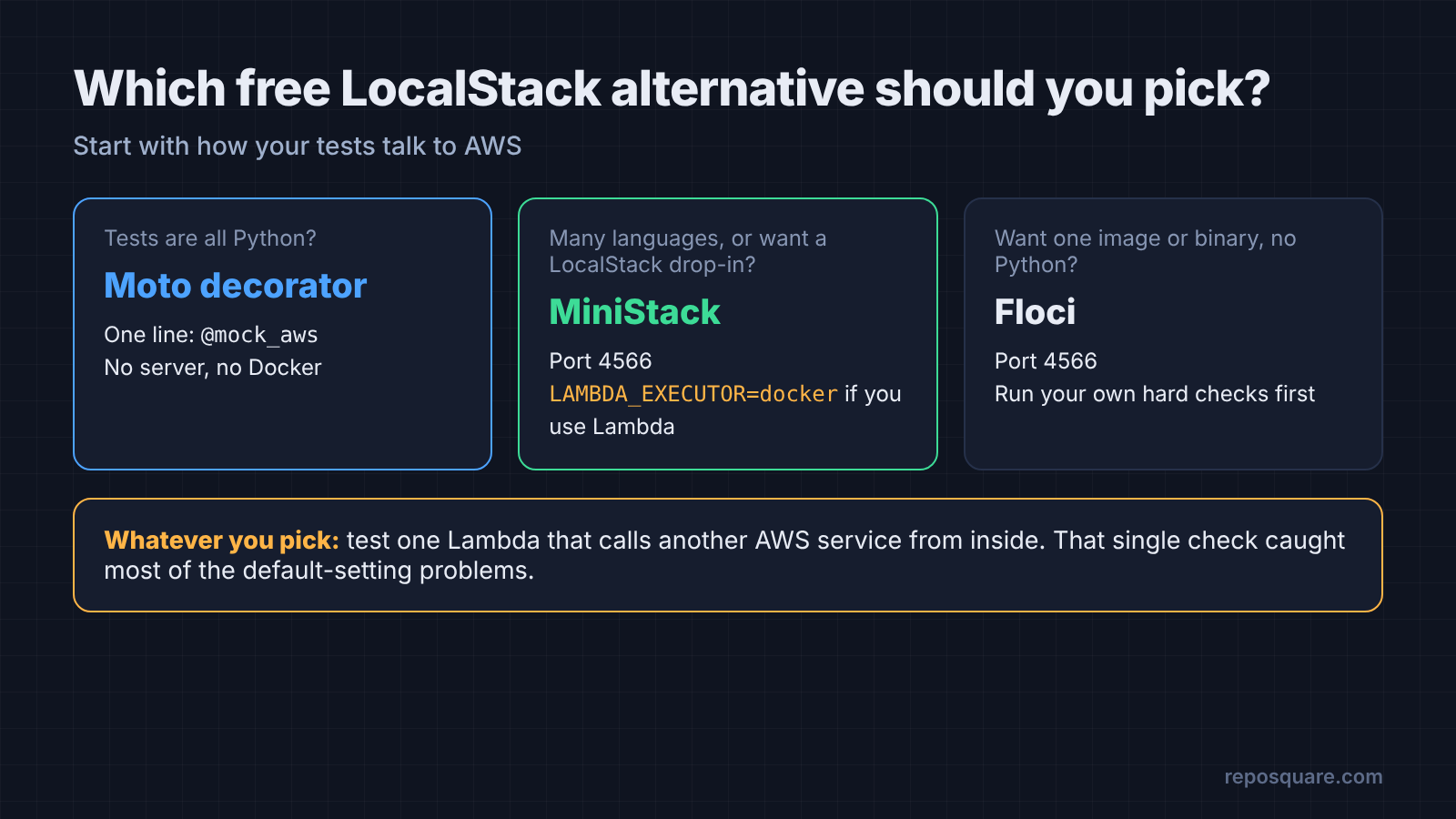
Pick by how your project talks to AWS, then change the one setting.
There is a fair case for paying for LocalStack. It has the biggest company behind it, paid support, and the longest record of matching AWS behavior. If your team already pays for it, nothing here is a reason to rip it out.
For everyone else, the choice is simple:
- Python tests only: use Moto’s decorator. No server, no Docker, fastest setup.
- Mixed languages or a LocalStack drop-in: use MiniStack on port 4566, with
LAMBDA_EXECUTOR=dockerif you use Lambda. - You want one Docker image or binary, no Python needed: try Floci, and run your own hard checks first.
Whichever you pick, test the hard path once: a Lambda that calls another AWS service from inside. That one check caught most of the default-setting problems we found.
Swap the endpoint. Then change the one setting.
Common questions about free LocalStack alternatives
Is LocalStack still free?
LocalStack has a free Hobby plan, but it requires an account and auth token, and it is for non-commercial use only. Commercial projects need a paid plan.
Is Moto a drop-in replacement for LocalStack?
Mostly, for common services. Its server listens on port 5000 instead of 4566, so you change the endpoint, and you need -H 0.0.0.0 for Lambda calls that reach back to other services.
Does MiniStack work with the AWS CLI and Terraform?
MiniStack answers standard AWS API calls on port 4566, so any tool that lets you set a custom endpoint can point at it. Check the services your Terraform code uses before you rely on it.
Can a local AWS emulator test IAM permissions?
Not by default. Both emulators we tested accepted fake credentials, so permission mistakes only show up against real AWS.