

The largest free collection of GPT Image 2 prompt examples is awesome-gpt-image-2-API-Prompts, a CC0-licensed GitHub library run by EvoLink. Its English README holds 462 prompts gathered from creators on X, each paired with the image it produced, sorted into categories such as e-commerce, ads, portraits, posters and UI mockups. CC0 means you can copy, edit and use the prompts commercially with no attribution required.
Rather than reprint a page of prompts, I parsed the library to see what its prompts actually have in common, then checked them against OpenAI’s GPT Image 2 documentation to find the parts that do not translate to an API call. The result is a guide to using the collection well: which prompts to start from, how to adapt one, and which habits from other image tools quietly do nothing here.
Checked against commit e2a269a (last updated Jul 18, 2026) and OpenAI’s docs on Oct 23, 2026.
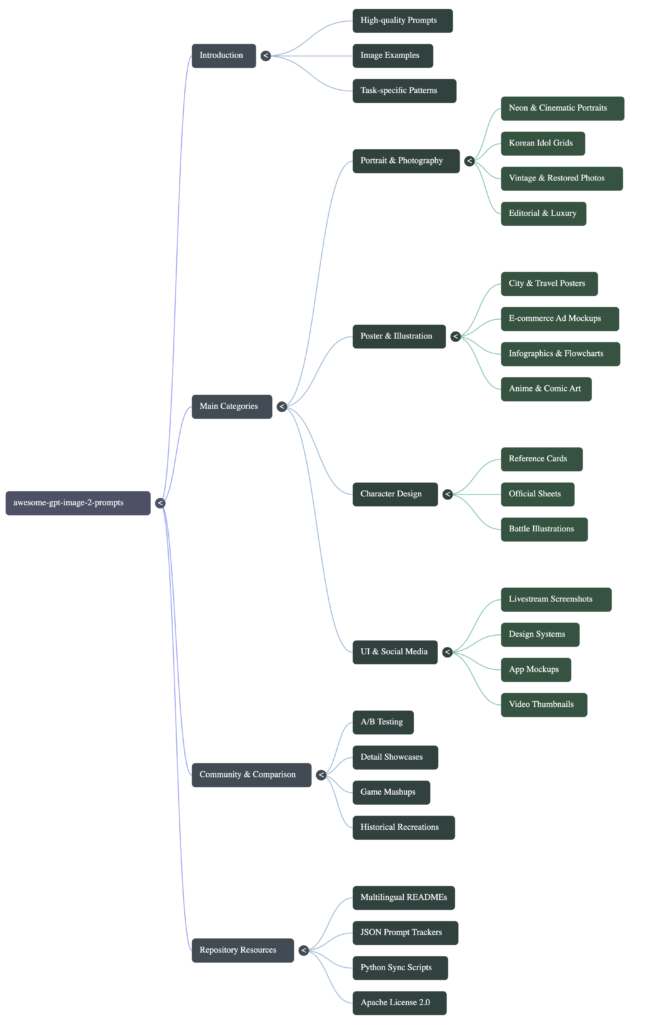
What is inside the GPT Image 2 prompt library
The repo’s own verification script, scripts/verify_prompt_repo.py, reported 462 English cases and passed its checks. The README is mirrored in 11 languages, and an images/ folder holds about 1,000 result images (262 MB), so clone with care on a slow connection. My parser extracted 452 cases cleanly; the split by category looks like this:
| Category | Prompts |
|---|---|
| Poster and illustration | 170 |
| Portrait and photography | 140 |
| UI and social media mockups | 52 |
| Ad creative | 33 |
| Comparison and community examples | 21 |
| Character design | 20 |
| E-commerce | 16 |
Each case follows the same shape: a title linking to the original post on X, the creator’s handle, the result image, and the prompt in a code block. That makes it quick to judge a prompt by its output before you spend money on it.
What the prompts have in common
Counting across the 452 prompts I extracted:
| Pattern | Prompts | Share |
|---|---|---|
| Length: median 147 words (middle half 85 to 255) | 452 | – |
| Name an aspect ratio in the text | 144 | 32% |
| Put exact on-image text in quotes | 121 | 27% |
| Mention 4K or 8K | 116 | 26% |
| Need an uploaded reference photo | 86 | 19% |
| Use fill-in placeholders such as [PRODUCT NAME] | 69 | 15% |
| Contain Chinese or Japanese text | 21 | 5% |
| Use Midjourney-style –ar flags | 7 | 2% |
Two other numbers matter when you browse. One account, @iamaiistudio, contributed 127 of the 452 prompts (28%), so a large slice of the library reflects a single creator’s style. And 135 different creators appear in total, so it is still broad. The prompts are long by habit: written as full art-direction briefs with scene, subject, lighting, lens, style and constraints, rather than a line of keywords.
Adapting a prompt: a worked example
Start with the placeholder prompts. They were written to be reused. This one, from the e-commerce section, needs one change:
A soda can featuring the label [BRAND NAME], constructed entirely from soft,
colorful plush material, centered against a matching plush background in
[BRAND NAME]'s brand colors.
Pop Art and Memphis-inspired style, vibrant and premium at the same time.
Crisp studio lighting that highlights every fiber, the plush texture, and the
tactile softness of the material.
Razor-sharp focus, vivid color saturation, clean shadows, sleek commercial
product photography, minimalist composition, ultra-high resolution.To make it yours, I would change four things, each based on OpenAI’s prompting guide:
- Replace the placeholder and quote the label. The guide says to put literal text in quotes or capitals and spell out unusual brand names.
[BRAND NAME]becomesthe label "FIZZLO". - Add what it is for. Naming the use (“square product tile for an online shop”) sets the level of polish.
- State what to leave out. “No extra text, no watermark, no other logos” prevents the most common clutter.
- Drop “ultra-high resolution”. Resolution comes from the
sizeparameter, not the words, as covered below.
Settings the prompt text cannot control
The biggest gap between a social-media prompt and an API call is that some instructions belong in parameters. From OpenAI’s API reference and prompting guide:
- Size. GPT Image 2 accepts any
WIDTHxHEIGHTwhere both edges are multiples of 16, the long side is at most three times the short side, and the total is between 655,360 and 8,294,400 pixels. Anything above 2560×1440 is described as experimental. Writing “8K” in the prompt does not raise the resolution. - Quality.
low,mediumorhigh(defaultauto). The guide suggestshighfor small text and dense layouts. - Aspect ratio. Set it with
size. A--ar 9:16flag is Midjourney syntax and is just text to this model. - Prompt length. Up to 32,000 characters. The longest prompt in the library is 22,846 characters, so even the outliers fit.
- Reference photos. Prompts that say “use the uploaded image” need the image edits endpoint with your photo attached. The
input_fidelitysetting from older models does not work with GPT Image 2, because the guide says it already keeps inputs at high fidelity. - Camera details. The guide notes that detailed camera specs “may be interpreted loosely”. “Shot on Hasselblad, 85mm” sets a look, not an exact optical result.
Because the size rules trip people up, I wrote a small checker and ran it against common sizes:
def check(w, h):
    problems = []
    if w % 16 or h % 16: problems.append("edges must be multiples of 16")
    if max(w, h) >= 3840: problems.append("longest edge must be under 3840")
    if max(w, h) / min(w, h) > 3: problems.append("ratio wider than 3:1")
    if w * h < 655_360: problems.append("too few pixels")
    if w * h > 8_294_400: problems.append("too many pixels")
return problems or "ok"| Ratio in the prompt | Size to request | Result |
|---|---|---|
| 9:16 (stories, reels) | 864×1536 | ok |
| 16:9 (thumbnails) | 1536×864 | ok |
| 4:5 (feed posts) | 1024×1280 | ok |
| 3:4 | 1152×1536 | ok |
| 1:1 | 1024×1024 | ok |
| 2:3 / 3:2 | 1024×1536 / 1536×1024 | ok |
| – | 512×512 | too few pixels |
| – | 1000×1000 | not multiples of 16 |
One note on the upper limit: OpenAI’s API reference lists 3840×2160 as the maximum, while its prompting guide says to keep the long edge under 3840 and suggests 3824×2144. My checker follows the stricter reading. Every ratio named in the library’s prompts fits inside the allowed 1:3 to 3:1 range.
A minimal call with the official Python SDK looks like this:
from openai import OpenAI
import base64

client = OpenAI()
result = client.images.generate(
    model="gpt-image-2",
    prompt=open("prompt.txt").read(),
    size="1024x1280",      # 4:5
    quality="medium",
)
open("out.png", "wb").write(base64.b64decode(result.data[0].b64_json))Things to know before you rely on the library
- It has paused. The README’s news log was updated every few days until Jun 30, 2026, and the last commit was Jul 18. It is a snapshot of what worked in the model’s first months, not a live feed.
- It doubles as marketing. EvoLink sells API access to GPT Image 2, and the English README mentions evolink.ai nearly 500 times, mostly as “try it” links with tracking tags. You can run every prompt with your own OpenAI key instead.
- Results are cherry-picked. Each image is the creator’s best output, not an average. Expect to run a prompt a few times, and at
lowquality first, before judging it. - Mind the subjects. CC0 covers the prompt text. It does not give you rights to a brand, a celebrity’s likeness or a character a prompt mentions.
Which prompts to try first
| If you need… | Look in | Tip |
|---|---|---|
| Product shots for a shop | E-commerce, Ad creative | Start with placeholder prompts and quote your label text |
| Social posts or thumbnails | UI and social media mockups | Set 4:5 or 9:16 in size, not in the text |
| Edits of your own photos | Portrait and photography | Use the edits endpoint; about one in five prompts need a photo |
| Posters with lots of text | Poster and illustration | Use high quality and keep copy short |
If what you really need is diagrams rather than pictures, a text-to-diagram tool will give you something you can edit; see Diagram Design vs Mermaid. For layouts you want to keep tweaking by hand, try one of the free open source Canva alternatives, and for retouching a generated image, our test of PhotoCraft vs GIMP covers the editing side.
Common questions about GPT Image 2 prompt examples
Can I use these prompts commercially?
Yes. The library is released under CC0-1.0, which places the prompt text in the public domain. That does not cover trademarks or real people a prompt may depict.
Do the prompts work with other image models?
Most are plain English art direction, so they are a reasonable starting point for any model. Results will differ, and features such as exact on-image text depend on the model.
Why does my image not match the example?
Example images are the best of several tries, and some prompts expect an uploaded reference photo. Check whether the prompt mentions an input image, set the size to the intended ratio and try high quality.
Is the library available in other languages?
Yes. The README is mirrored in 11 languages, including Spanish, Portuguese, Japanese, Korean, German, French, Turkish, Russian and both Chinese scripts. The prompts themselves are mostly in English, with about 5% in Chinese or Japanese.
How long should a GPT Image 2 prompt be?
Half the prompts in the library fall between 85 and 255 words. OpenAI’s guide recommends a clear order (scene, subject, details, constraints) and small follow-up changes over one overloaded prompt.