


The bounce says three records are missing. Often only one is, and sometimes none of them are.
Short answer: If mail to an outlook.com, hotmail.com, live.com or msn.com address comes back as 550 5.7.1 with the words “lacks SPF/DKIM/DMARC Auth Records”, look up _dmarc on the domain in the From address. No record means publish v=DMARC1; p=none and stop there. A record that already passes is not the bug. On November 9 a Microsoft moderator called delivery to those consumer addresses a service problem.
A person sends a normal email. Some of it arrives. Some of it comes back with a paragraph of codes. Resending sometimes works. That pattern started showing up on November 5, 2026, and by November 9 it was still not a single, announced rule.
What does the bounce actually say?
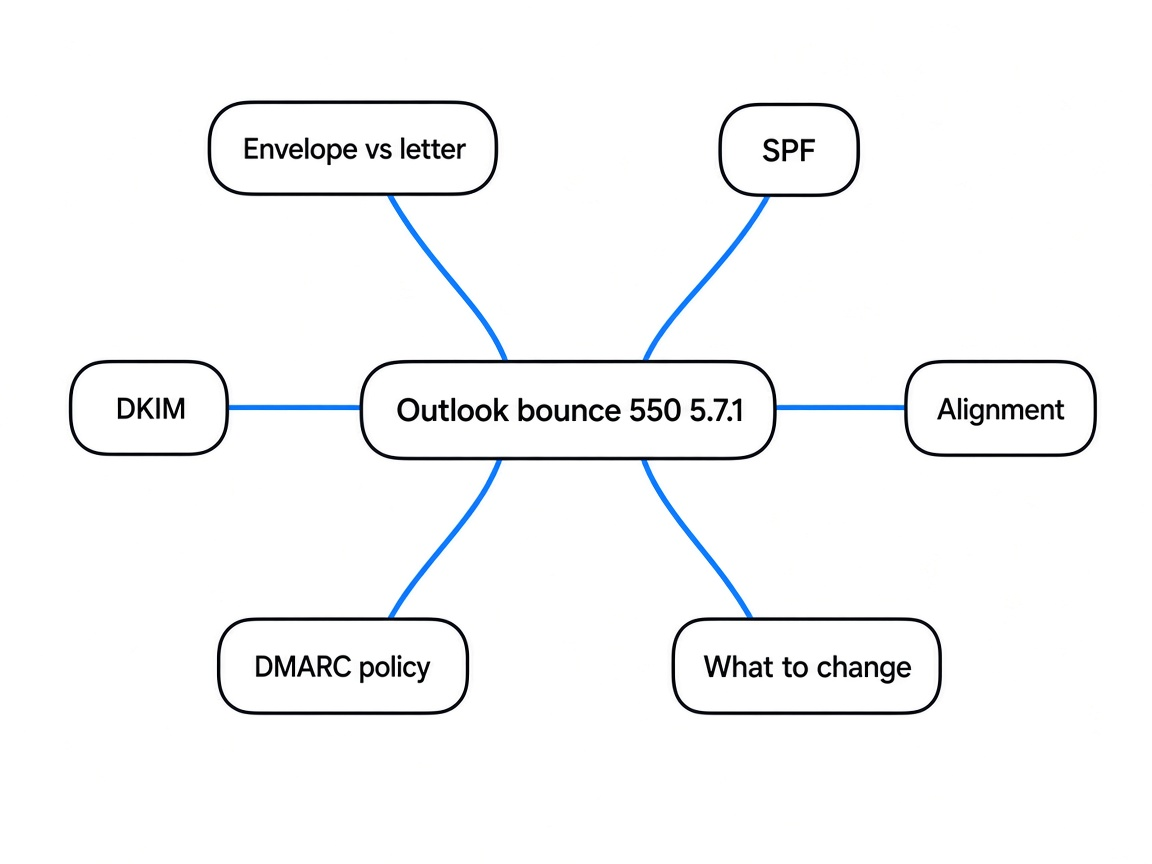
It says the message was refused, and it names three checks at once. The checks are not the same thing, which is why the sentence is a bad diagnosis.
A bounce (a failure notice sent back to the sender) from this week often contains this line, sometimes followed by a server name that changes per message:
550 5.7.1 Message rejected: Message lacks SPF/DKIM/DMARC Auth Records (AS9031519)Read it in pieces. 550 means “no, and do not retry the same way” (a permanent refusal, not a busy signal). 5.7.1 is the reason slot Microsoft is using. The words blame missing authentication records. AS9031519 is an identifier that showed up on November 6. On November 5 the same sentence appeared without it. MailRoute, which runs a mail relay (a service that sends mail onward for other people), published that timeline on November 6. The identifier is not in Microsoft’s published bulk-sender rules.
The recipients in the reports are Microsoft’s consumer addresses: outlook.com, hotmail.com, live.com and msn.com. A business address hosted on Microsoft 365 (Microsoft’s paid mail for companies) is a different door, and a test on November 7 got through that door. More on that test below.
Before the acronyms: one email is an envelope plus a letter
Nothing else in this post makes sense until those two addresses are separate in your head. They can belong to two different domains (the part after the @).
You write to a person. What you see is the letter: a From line, a subject, a body. The mail server also builds an envelope, which the reader does not see. The envelope has its own sender, called MAIL FROM (also the return path, the bounce address, or the envelope sender). If delivery fails, the bounce goes there, not necessarily to the From you typed.
Those two names are how forgery works. Anyone can type From: you@yourdomain.com on the letter. The envelope can still be theirs. A check that only looks at one of them cannot tell those cases apart.
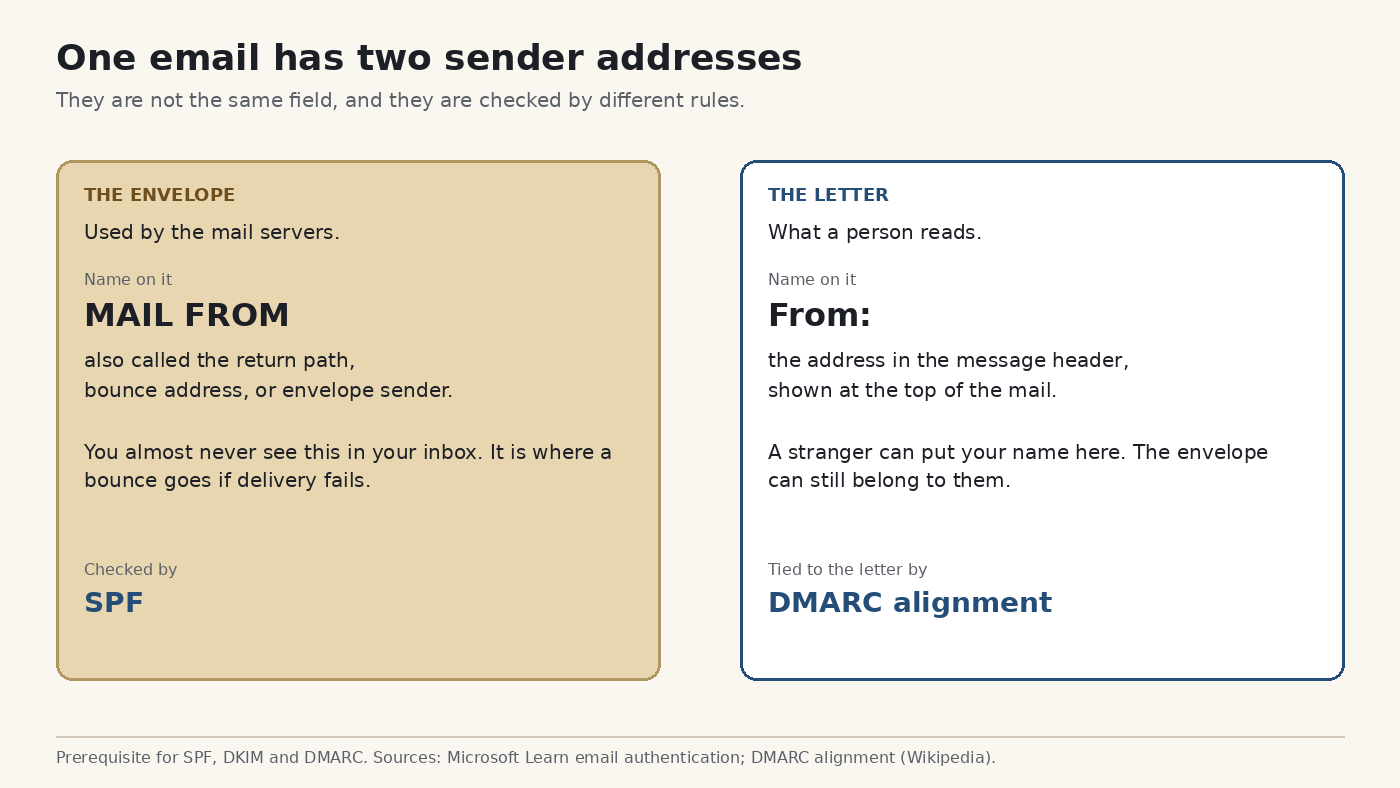
Hold that picture. The next three words are three different questions about that picture.
What is SPF, and which address does it check?
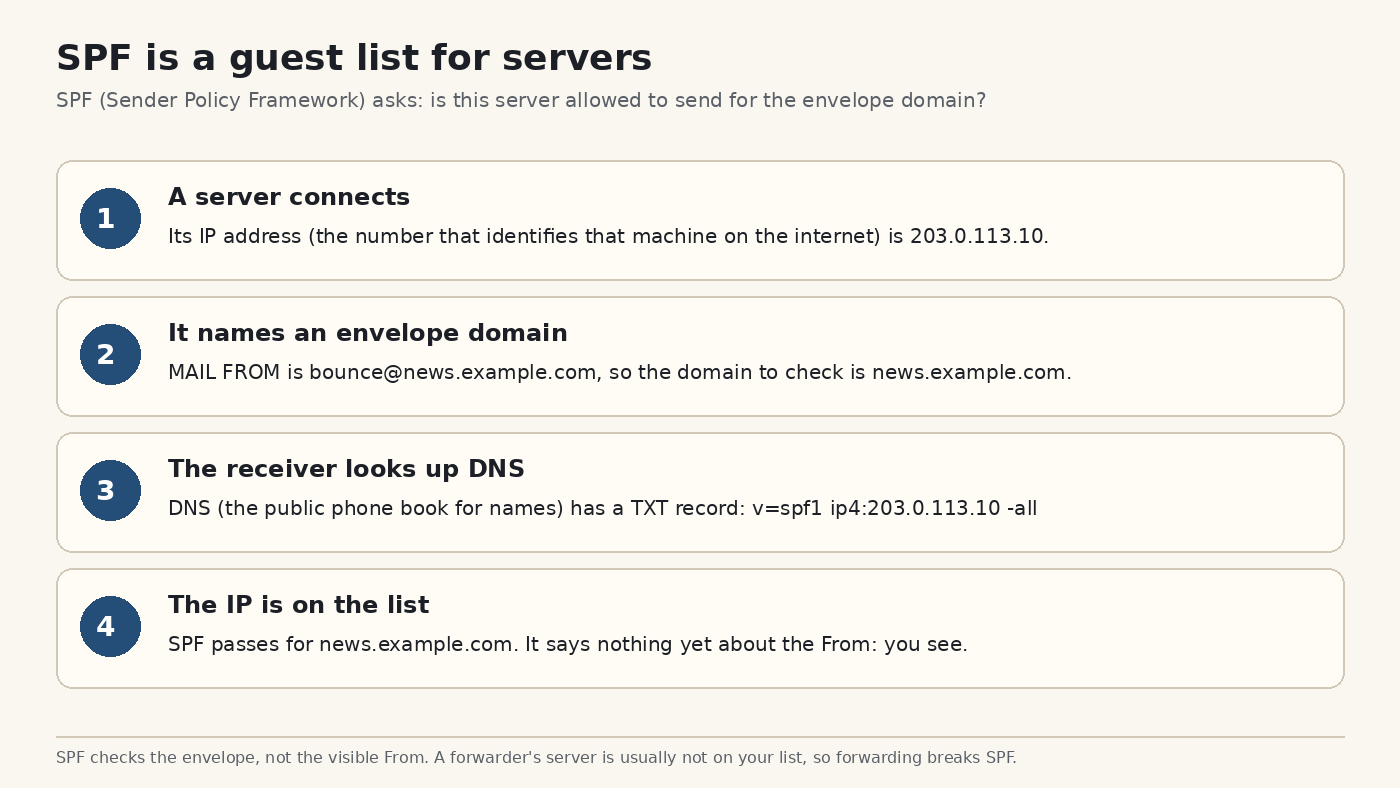
SPF is a guest list of servers, and it checks the envelope. It does not check the From line a person reads.
SPF (Sender Policy Framework, a list you publish of which servers may send mail for a domain) lives as a TXT record (a short note in DNS, the public phone book that turns names into addresses) on the envelope’s domain. A receiver looks at the connecting server’s IP address (the number that identifies that machine) and asks whether the list allows it.
If the list says yes, SPF passes for the envelope domain. That is all it passes for. A pass does not mean the visible From is yours.
Forwarding breaks this, and it is not a misconfiguration. A forwarder (a mailbox that sends your mail on to another address) connects from its own server. That server is not on your guest list, so SPF fails even when you really sent the letter. There is a second limit: SPF allows only 10 DNS lookups inside one record. Stacking extra include: vendors until the list “has everyone” can make a good record fail. Do not “fix” this week’s bounce by stuffing the SPF record.
What is DKIM, and what does a pass prove?
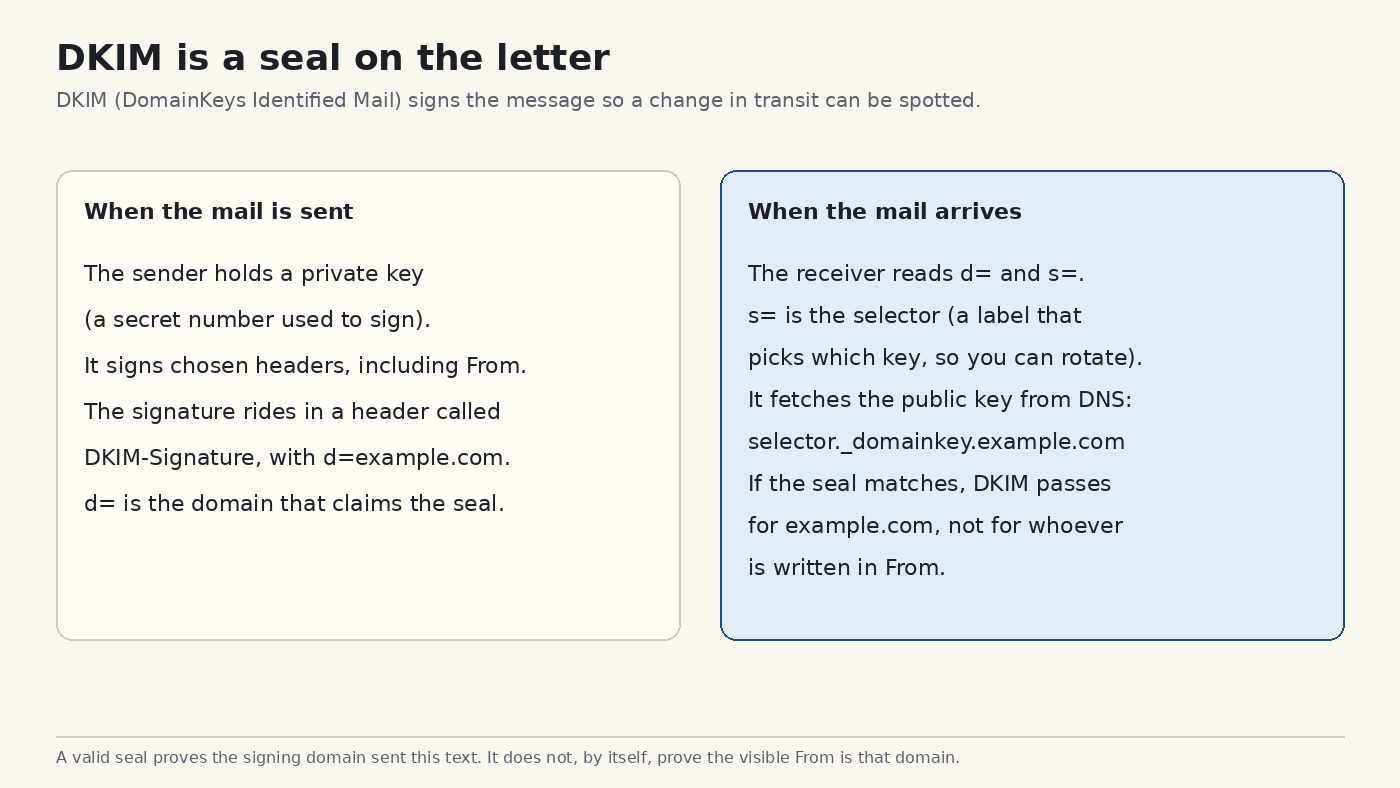
DKIM is a seal on the letter. A valid seal proves who sealed it, and that the sealed parts were not changed on the way. It still does not, by itself, prove the visible From.
DKIM (DomainKeys Identified Mail) uses a key pair. A private key (a secret held by the sender) signs selected headers, including From. A public key (the matching half, safe to publish) lets the receiver check the seal. The signature travels in a header named DKIM-Signature. Inside it, d= is the domain that claims the seal, and s= is the selector (a label that picks which key, so you can change keys without a gap).
The receiver fetches the public key from DNS at selector._domainkey.that-domain. If the math matches, DKIM passes for d=. If d= is some other company’s domain, the pass belongs to them.
Why can SPF and DKIM both pass, and the mail still not be yours?
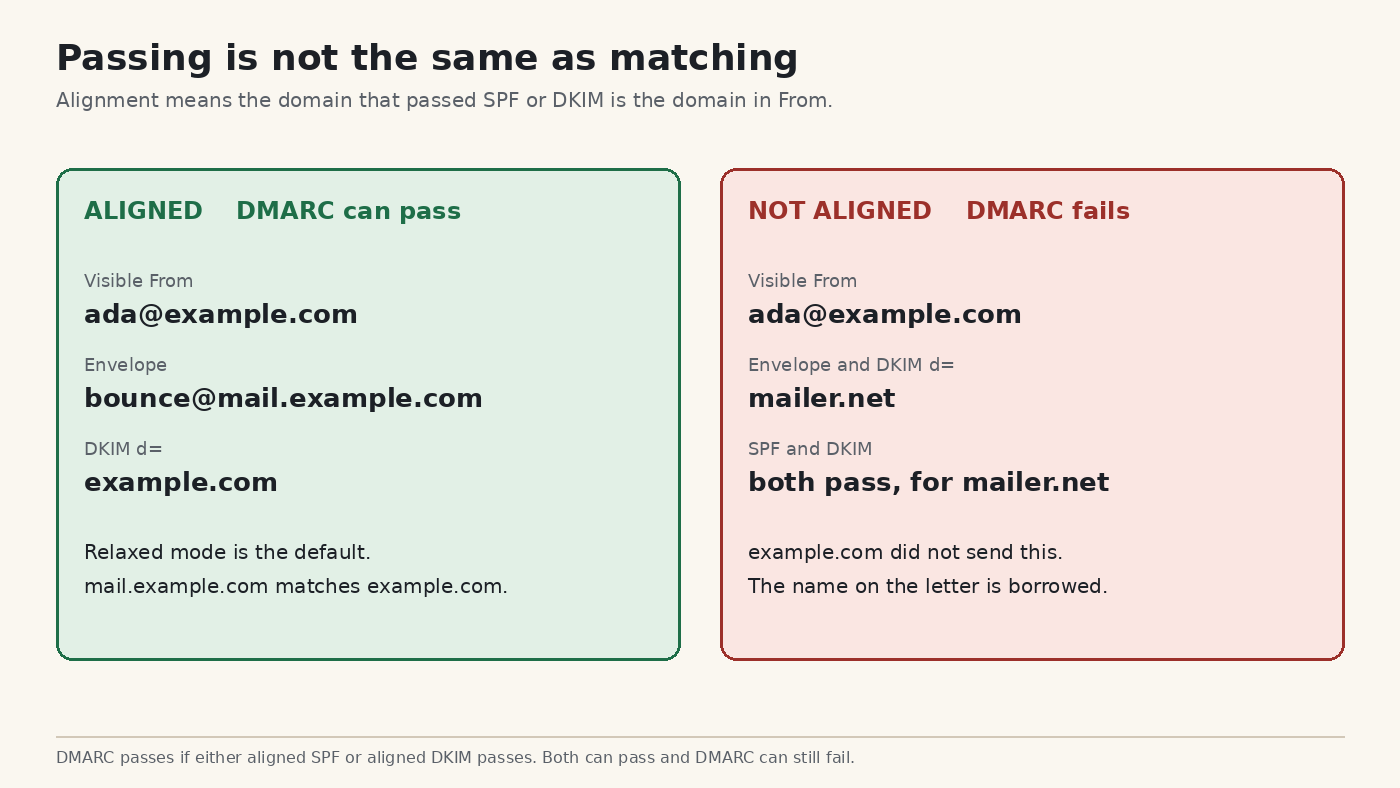
Because each one can pass for a domain that is not the domain on the letter. The missing idea is alignment (a match between the domain that passed and the domain in From).
Take a newsletter. The letter says From: ada@example.com. The sending company uses its own envelope, bounce@mailer.net, and seals the letter with d=mailer.net. SPF passes for mailer.net. DKIM passes for mailer.net. Neither name is example.com. A receiver that only asks “did something pass?” will say yes. A receiver that asks “did example.com pass?” will say no.
The other way around is a match. Envelope bounce@mail.example.com and seal d=example.com, with From at ada@example.com. Relaxed alignment (the default, which compares the organizational domain, meaning example.com rather than the full subdomain) treats mail.example.com and example.com as the same family. Strict alignment (set with aspf=s or adkim=s) demands the exact same domain. You do not want strict on a first record.
DMARC (Domain-based Message Authentication, Reporting, and Conformance) is the public note that adds this question. It does not replace SPF or DKIM. It passes when at least one of them passes and is aligned with From. It fails when both fail that test. Microsoft’s own authentication docs describe it that way.
What does the DMARC record itself say?
It is one TXT record, at _dmarc, and its policy is a request to receivers. The request has three strengths, and only the weakest belongs in a first record.
The name in DNS is _dmarc.yourdomain.com. The value starts with v=DMARC1. Then p= is the policy (what you ask receivers to do when alignment fails):
p=nonemeans take no policy action. Deliver the mail. You may still ask for reports.p=quarantinemeans treat the failure as suspicious, often by filing it as spam.p=rejectmeans refuse the mail.
p=none does not tell Gmail, Yahoo or anyone else to start rejecting your mail. It also does not make you immune to spam filters. It publishes a policy of “do not enforce.” That is why it is the safe floor.
There is an optional mailbox for reports, written rua=mailto:.... Skip it today. If that mailbox is on a different domain, the other domain has to publish a separate authorization or the reports are dropped. A report address you have not set up is not what gets this week’s mail delivered.
One record on the parent domain covers subdomains that do not publish their own. Check the domain that is actually in From.
Which Microsoft rule is this, and which rule is it not?
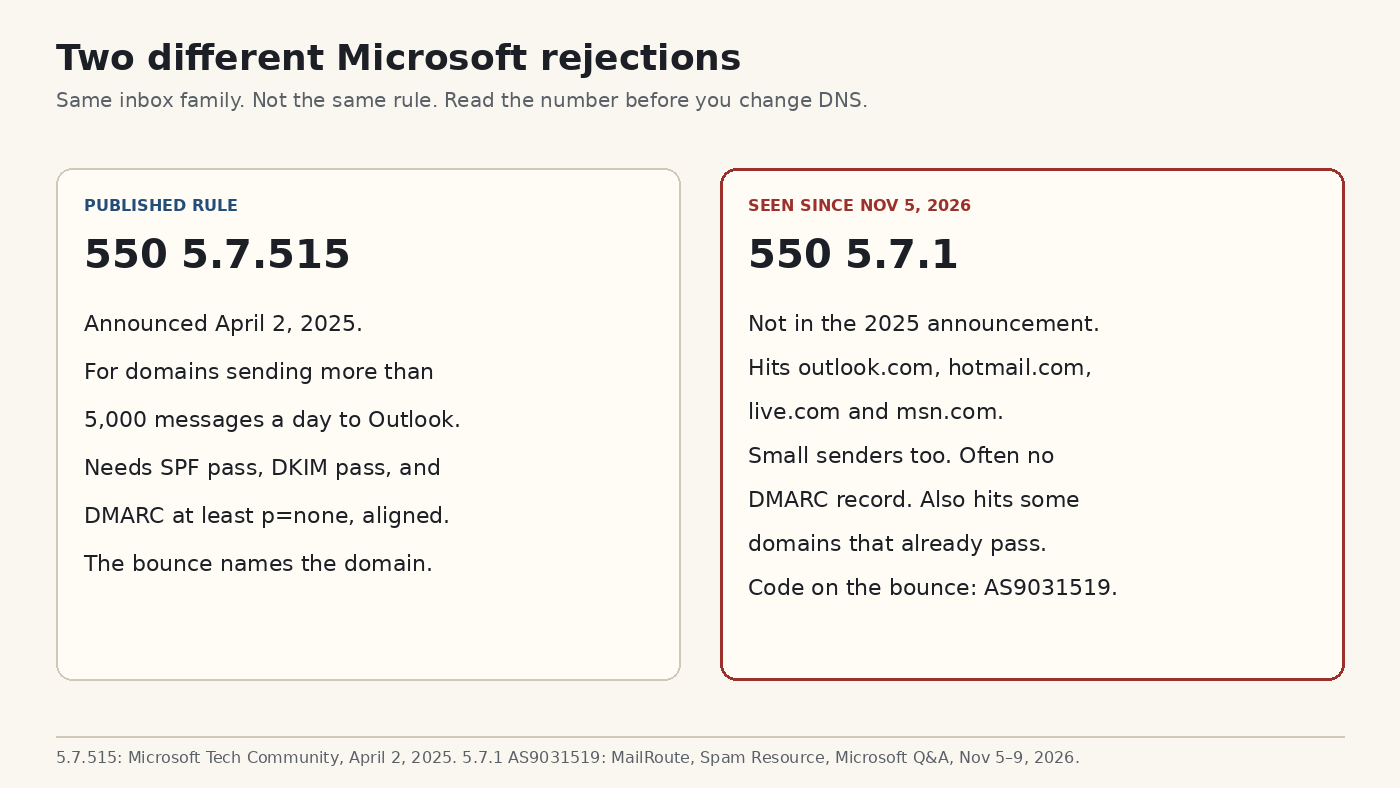
This is not the bulk-sender rule from 2025. That rule has a different code, a published threshold, and a bounce that names the failing domain.
On April 2, 2025, Microsoft told domains sending more than 5,000 messages a day to Outlook.com to pass SPF, pass DKIM, and publish DMARC at least at p=none, aligned with one of those two. Mail that falls short gets 550 5.7.515 (see Microsoft’s fix page for that error). The post says enforcement starts with large senders, and that smaller senders still benefit. It does not say a one-person domain with no DMARC record will be refused.
The November bounce is 550 5.7.1, plus AS9031519, and it has no matching announcement. Vendor write-ups and a Microsoft Q&A thread describe it hitting low-volume domains. It is also intermittent: one message fails, a resend works. A missing record cannot, by itself, explain a resend that then succeeds.
What was tested, and what was only reported?
Deleting the DMARC record was enough to make consumer Outlook refuse mail, in a published test. The same week, domains that already had a passing record were refused too. Both reports can be true.
Al Iverson, a deliverability writer, deleted the DMARC record from a few of his own low-volume domains and sent mail on Saturday, November 7, 2026, about 2:00 pm US Central. He published the mail-server log. Mail to outlook.com was rejected by outlook-com.olc.protection.outlook.com with 550 5.7.1 and AS9031519. Mail to a Microsoft 365 company domain was accepted, with 250 2.6.0. He wrote that you want a DMARC record even if this filter turns out to be a mistake and gets rolled back.
EasyDMARC, a company that sells DMARC tooling, says that on November 8 it sent from a Zoho-hosted domain with SPF and DKIM both passing and aligned, and no DMARC record. Mail to a live.com address bounced with the same 550 5.7.1 line. I did not rerun their lab. Treat it as their report, in the same direction as Iverson’s.
On Microsoft’s Q&A thread, the other direction is also there. Omar Valencia wrote on November 9 that SPF and DKIM were already configured, and adding a DMARC record made mail to hotmail.com and outlook.com go through. Austin W wrote on November 8 that the bounce headers say dmarc=pass, and that the affected customers send like one or two people, not 5,000 messages a day. Hornblower409 wrote on November 7 that rejections were also intermittent for domains whose SPF, DKIM and DMARC were already correct.
So a missing record is a real way to get this bounce. It is not the only way.
What did Microsoft say on November 9?
A Microsoft moderator called it a service degradation. He did not say “you lack DMARC.” Read his sentence next to the vendor sentence, not instead of it.
On November 9, 2026, at 9:24 am, Daniel-Vo, marked Microsoft External Staff and Moderator, replied on the Q&A thread “SPF Validation Error”:
Based on the information available to me, there is currently an ongoing Exchange service issue messages to Outlook.com, Hotmail.com, or Live.com addresses. Affected users may receive Non-Delivery Reports (NDRs) citing 550 5.7.1 or 550 5.7.23 errors related to SPF validation failures. This advisory is currently active and classified as a service degradation.
He does not mention DMARC. He does not mention AS9031519. He groups 550 5.7.1 with 550 5.7.23 and calls both SPF-validation failures inside an ongoing Exchange issue (Exchange is Microsoft’s mail system). If your report says 5.7.23, you are in the incident he described, not in a different project.
As of his post, Microsoft had not published a postmaster notice that says “every domain now needs a DMARC record.” Anyone who writes “Microsoft confirmed the new DMARC requirement” is ahead of what he said.
What should you change, and what should you leave alone?
If the record is missing, add the weakest one. If the record already passes, change nothing and resend later. Jumping to p=reject this week can refuse mail you still want, including mail from a tool whose seal uses a different domain.
Check from any computer that has dig (a DNS lookup command). Use the domain in the From address:
dig +short TXT _dmarc.example.comA line containing v=DMARC1 means a record exists. Empty output means it does not. That empty output is the case Iverson reproduced.
At your DNS host, add a TXT record:
| Field | What to enter |
|---|---|
| Type | TXT |
| Name | _dmarc |
| Value | v=DMARC1; p=none |
Some panels append your domain for you. If you type _dmarc.example.com and the panel also appends it, you publish the record at the wrong name. Afterward, run the dig command again. Wait for DNS to update before you judge a resend. Minutes is common. A few hosts take longer.
Do not set p=reject or p=quarantine as the first record. p=reject asks every receiver that honors it to refuse mail that fails alignment. A form tool, a support desk, or Microsoft 365 itself can fail that test while your own mail server passes it.
MailRoute’s warning on Microsoft 365 is the case to check if you send from there. Until you turn on DKIM for your own domain, Microsoft 365 can seal mail with a name ending in onmicrosoft.com. That seal can pass DKIM and still fail alignment, because onmicrosoft.com is not your From domain. Turn on DKIM for the domain you actually show people. Then look at a real message header and find d= before you tighten p=.
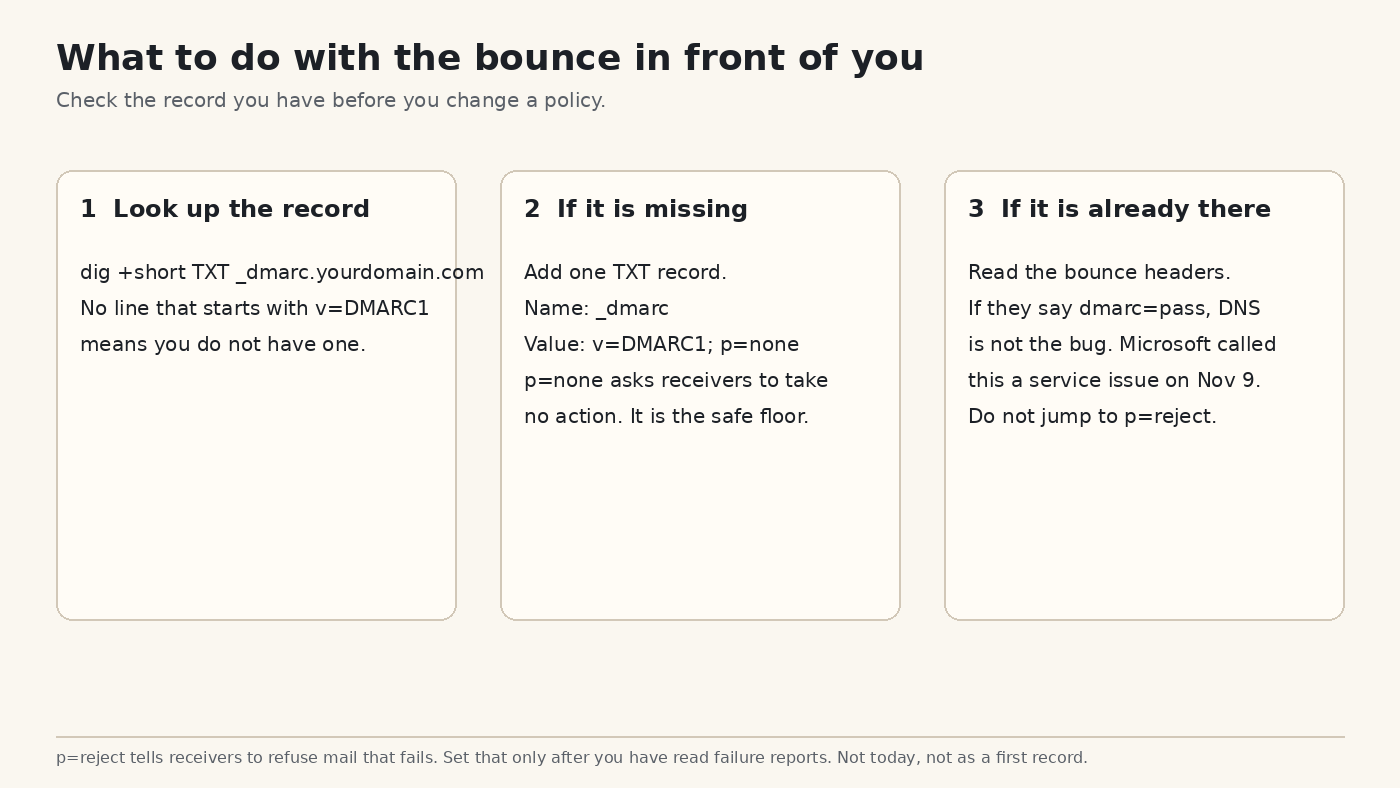
If you already have v=DMARC1 and a bounced copy’s headers say dmarc=pass, the November 9 moderator note is the better explanation. Resend later. Keep the headers. Do not “repair” a passing policy because a status page is unhappy.
What this record will not do
It will not stop phishing that uses a look-alike domain, and it will not force Outlook to accept mail during the service issue. A record is a statement about your name. It is not a ticket to someone’s inbox.
p=none does not tell receivers to throw away forgeries. It tells them you are participating, and that you are not yet asking for enforcement. Forgery protection starts later, at p=quarantine or p=reject, after you have seen which of your real senders fail alignment. That is a second project. It is a good one. It is not the repair for a bounce that says dmarc=pass.
And a domain with no mail of its own still benefits from a record, because the record is how you say “nobody is allowed to pretend this name.” If the domain never sends, the same p=none line is still the right first line. Enforcement comes after, not before, you are sure nothing legitimate uses it.
Common questions about Outlook bouncing mail that passed SPF
Does this hit Gmail too?
Not this bounce. AS9031519 is the consumer Outlook, Hotmail, Live and MSN path described above. Gmail has had its own bulk-sender rules since 2024. A different company, a different code.
I only send a few emails a day. Does the 5,000-a-day rule cover me?
The April 2025 rule, code 5.7.515, is the one with the 5,000-a-day line. The November 5.7.1 reports include small senders. Volume does not put you in the clear.
SPF already passes. Do I still add DMARC?
If dig shows no v=DMARC1 line, yes. Iverson’s test removed only that record. Add p=none, not p=reject.
The header already says dmarc=pass and it still bounced. Now what?
Leave the DNS record alone. You are in the set of reports the November 9 moderator grouped under a service degradation, including 5.7.1 and 5.7.23. Resend when mail to those domains is flowing again, and keep the failure notice.
How long do I wait after adding the record?
Until dig +short TXT _dmarc.yourdomain.com prints v=DMARC1. Then send one new message. A resend of the old failure is not a clean test.