
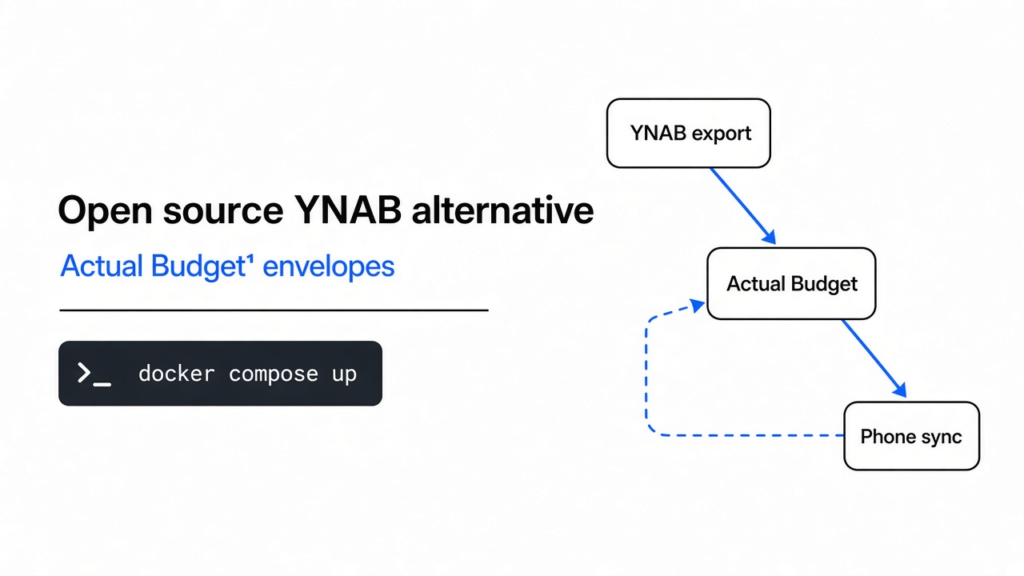

open source ynab alternative: Actual Budget is the closest free envelope match.
Yes. Actual Budget is the closest free, open source match to YNAB. It uses the same envelope method, imports a YNAB plan directly, and runs on your own server. I moved a three-month YNAB plan into it: every balance matched to the cent. Two things did not survive the move: your targets and the credit card payment category.
Checked November 2026 against Actual Budget docs and a local self-host import of a YNAB export. Numbers below are from that import and the credit-card / duplicate checks on the same budget file.
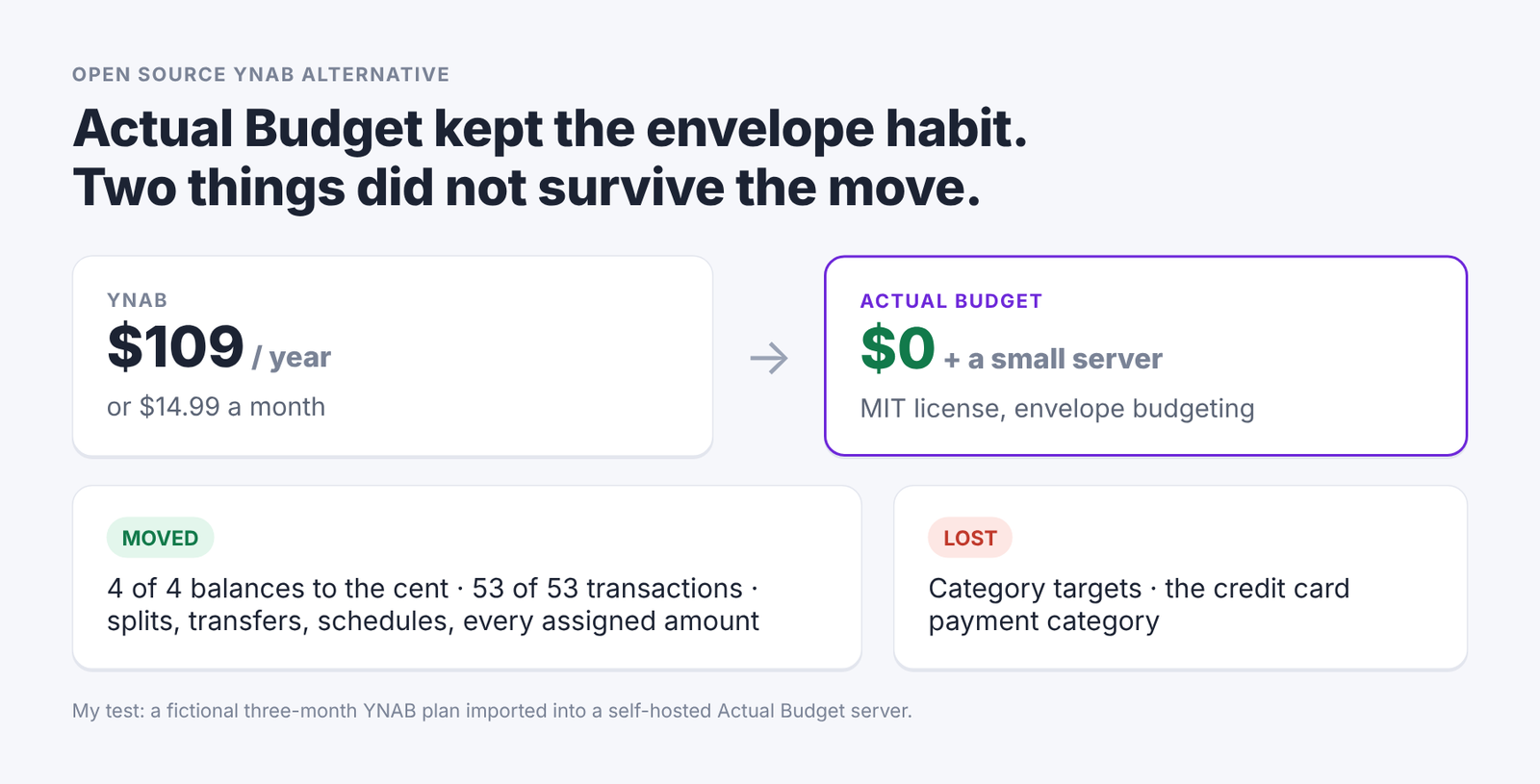
Actual Budget vs YNAB cost and what moved in a YNAB import test
YNAB is a habit, not just an app. You get paid, you give every dollar a job, and you check in a few times a week. That habit costs \$14.99 a month or \$109 a year, and plenty of people want to keep the habit without the bill.
So the real question is not “which free app has budgets?” Almost all of them do. The question is whether the habit survives the move. That is what I tested.
What makes YNAB different from a normal budget app?
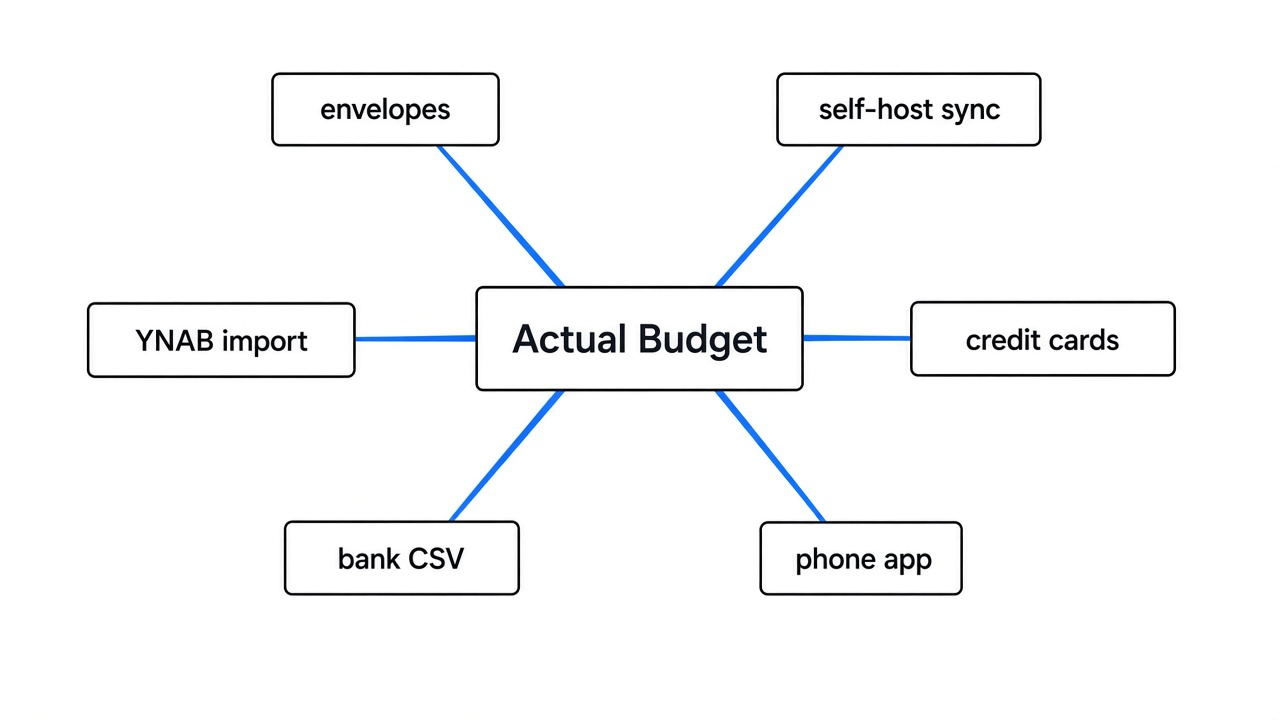
YNAB only budgets money you already have, and that is the part a replacement must copy. Most apps work the other way.
So start with the simplest picture. You cash your paycheck and split the bills into paper envelopes: rent, groceries, fun. When the grocery envelope is empty, you stop buying groceries or you move cash from another envelope.
That is envelope budgeting (splitting money you already have into labeled pots). YNAB calls the leftover, unassigned money “Ready to Assign”. Your goal is to get it to zero, so every dollar has a job.
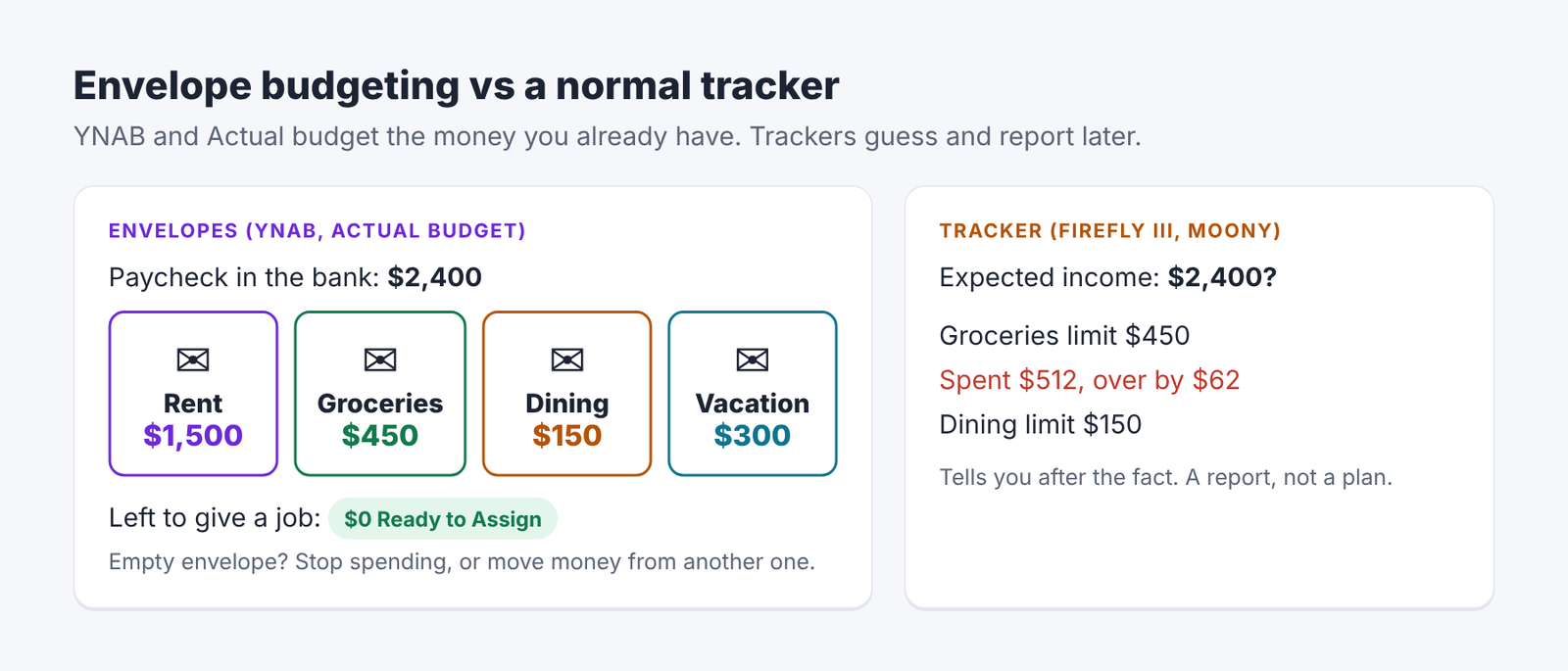
Envelope budgeting compared with a spending tracker
But a normal tracker does something different. It guesses next month’s income, sets spending limits, and tells you later that you went over. That is useful, but it is a report, not a plan. Keep that difference in mind, because it splits the open source options into two camps.
Which open source apps can actually replace YNAB?
Actual Budget copies the envelope habit; Firefly III and Moony track spending instead. All three are free and open source, but only one works the way YNAB does.
| Actual Budget | Firefly III | Moony | |
|---|---|---|---|
| Budget style | Envelopes, like YNAB | Spending limits (soft caps) | Spending limits per category |
| Imports a YNAB plan | Yes, built in | No, bank files only | No, bank files only |
| Where it runs | Your server, used in any browser | Your server, used in any browser | Desktop app only |
| Phone use | Mobile layout in the browser | Browser (0 | AGPL-3.0 |
AGPL (a license that makes anyone who runs a changed version as a public service share their changes) only matters if you plan to modify and host it for others. For personal use, all three are free to run.
Firefly III says it plainly on its own budgets page: budgets are groups “which you can give a soft-cap to limit your expenses.” That is a tracker. Moony is a local desktop app with no account, no cloud and no sync, which is great for privacy but means no phone. If you want YNAB’s habit, Actual is the one to test.
How hard is it to self host Actual Budget?
One Docker command, about two seconds to start, and around 50 MB of memory at idle. Self hosting (running the app on a computer or server you control) is what makes it free.
docker run -d --name actual -p 5006:5006 \
  -v ./actual-data:/data \
actualbudget/actual-server:latestOpen port 5006 in a browser, set a server password, and create or import a budget. On my 2 vCPU test machine the server answered its health check in 1.8 seconds and used about 50 to 60 MB of memory while idle. The image is about 550 MB on disk.
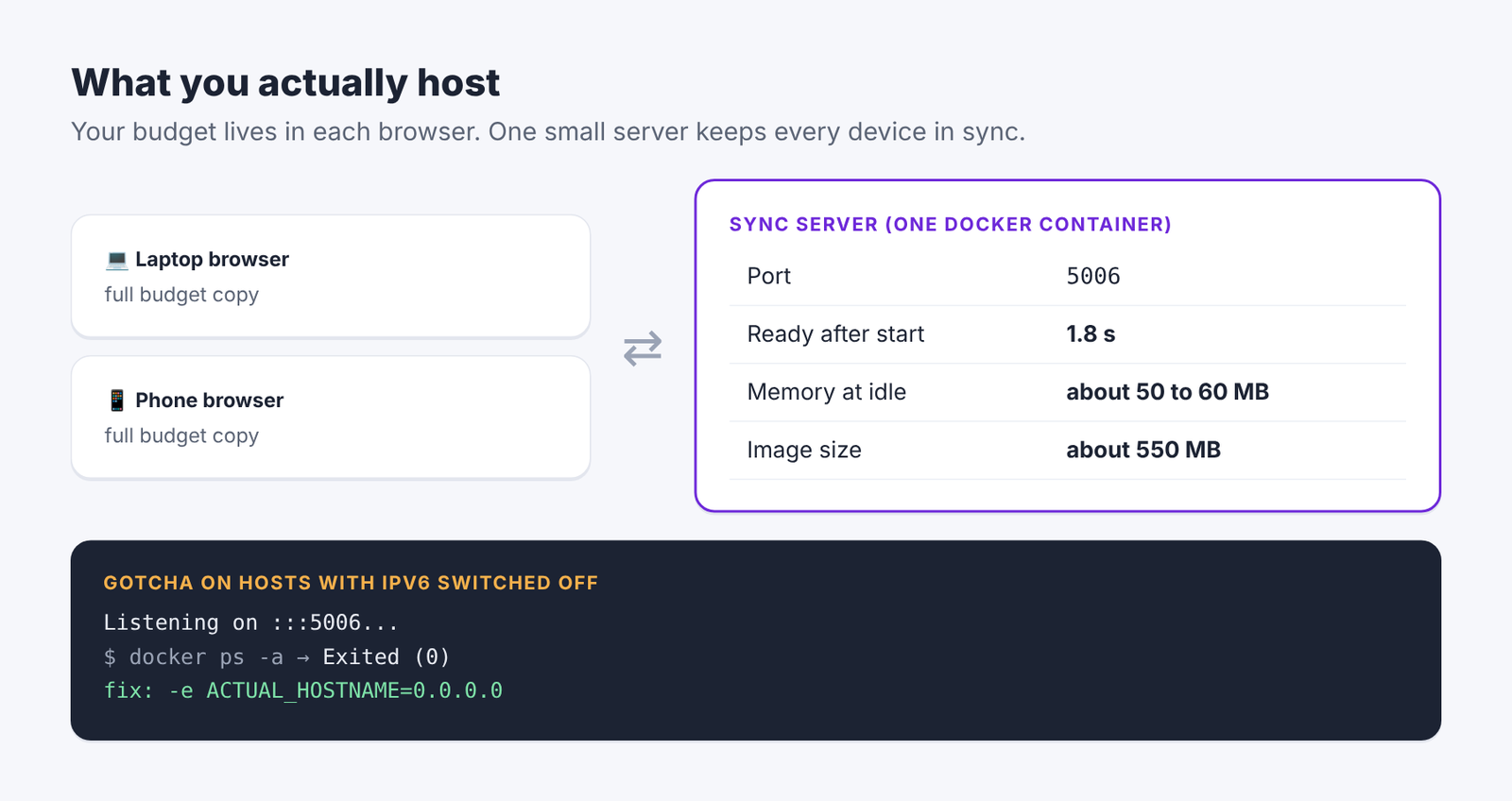
Actual Budget sync server setup and IPv6 hostname fix
Here is the catch I hit. My test machine has IPv6 (the newer internet address format) switched off. Actual listens on :: by default, so the server printed “Listening on :::5006” and then quit with no error.
That fix is one line. Add -e ACTUAL_HOSTNAME=0.0.0.0 so it listens on IPv4 only, and it stays up. If your container keeps stopping quietly on a small VPS or a home box, check this first.
Once it runs, your budget data lives in your browser and syncs to that server. That sync server (the small program that keeps your phone and laptop copies the same) is the only thing you host.
Can you move your YNAB budget into Actual Budget?
Yes, and the core data moved perfectly in my test. I built a fictional three-month plan in YNAB’s export format, JSON (a plain text data format), and imported it.
The plan was messy on purpose, like a real one:
- 4 accounts: checking, a Visa card, savings, and an off-budget brokerage account
- 53 transactions, including 3 split purchases (one receipt spread across two categories)
- 5 transfers between accounts, including 2 credit card payments
- A flagged transaction, a monthly scheduled rent payment, and targets on 4 categories
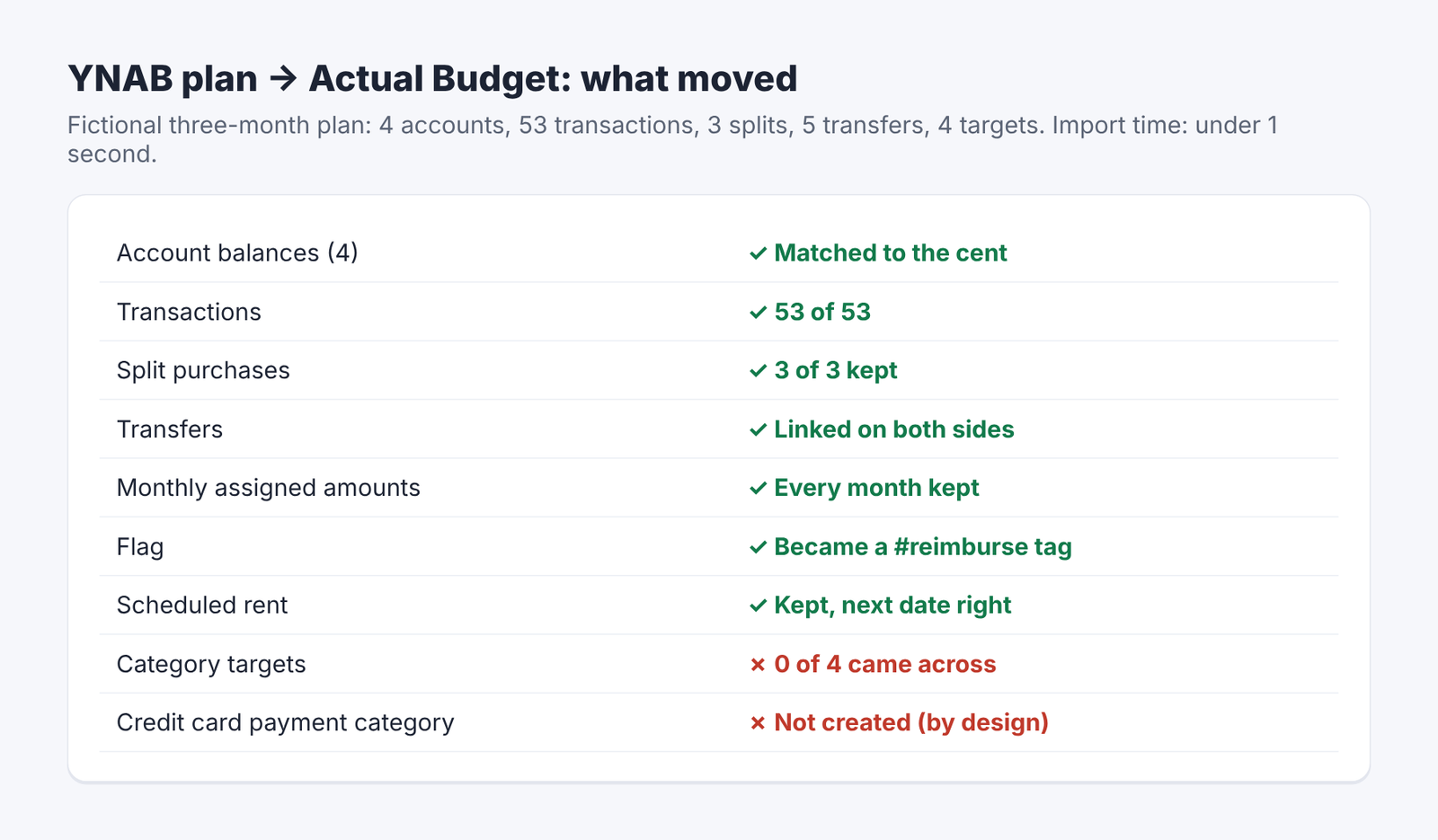
Results of importing a YNAB plan into Actual Budget
That import took under a second. Then I checked everything against the source file:
| What I checked | Result |
|---|---|
| Account balances (all 4) | Matched to the cent |
| Transactions | 53 of 53 |
| Split purchases | All 3 kept their split |
| Transfers | Linked on both sides |
| Monthly assigned amounts | Every month kept |
| Flag | Became a #reimburse tag |
| Scheduled rent | Kept, with the right next date |
| Category targets | Gone, all 4 |
So targets are the one real loss. In YNAB, a target says “Groceries needs \$450 a month” and the app nags you until it is funded. None of my four targets came across, as notes or anything else.
Actual does have its own version of targets, called budget templates, but it sits under experimental features. You would rebuild your targets by hand, and you should expect that part to change.
To get your own export, Actual’s migration guide walks you through YNAB’s developer settings: you create a personal access token, then download your plan as JSON. Treat that token like a password and delete it afterwards.
What happens to credit cards when you leave YNAB?
Actual has no credit card payment category, and overspending on a card hits next month’s money instead of becoming card debt. This is the biggest habit change, so it is worth slowing down.
First, how YNAB does it. When you buy groceries on a card, YNAB moves that money from Groceries into a special “Visa Payment” category. When the bill comes, the money is already sitting there.
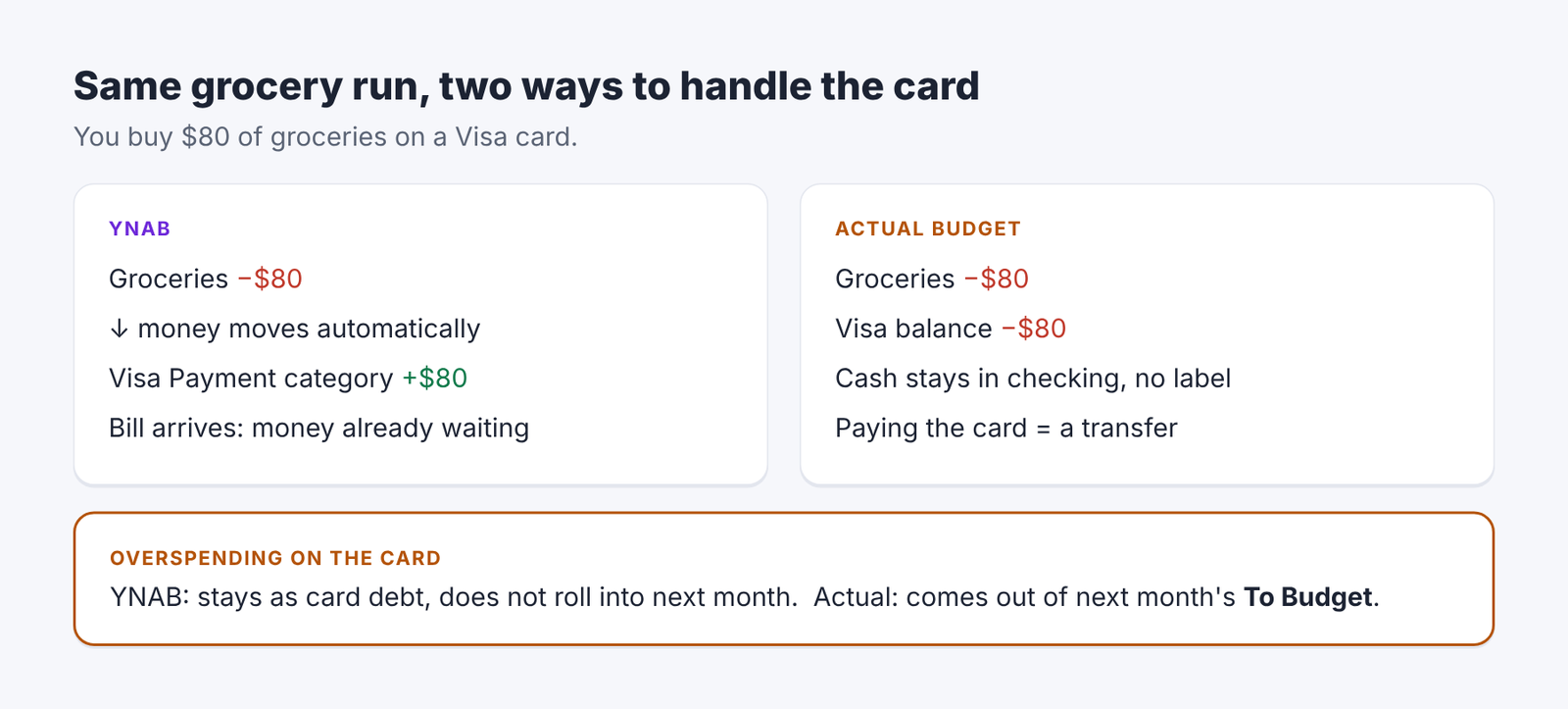
How YNAB and Actual Budget handle credit card spending
Actual skips that step. The grocery money is spent from Groceries, the card balance goes up, and paying the card is just a transfer from checking. The cash is still in checking; it just is not labeled “for the Visa bill”. You read the card’s balance instead.
Then there is overspending. In the plan’s second month I overspent Dining Out by \$12.05, all on the Visa card. YNAB’s own help pages say credit card overspending does not roll over into the next month; it stays as card debt you have not covered.
Actual handled it differently. The next month showed “Overspent in Sep -12.05”, and that amount came straight out of that month’s To Budget (Actual’s name for Ready to Assign). The category itself reset to zero.
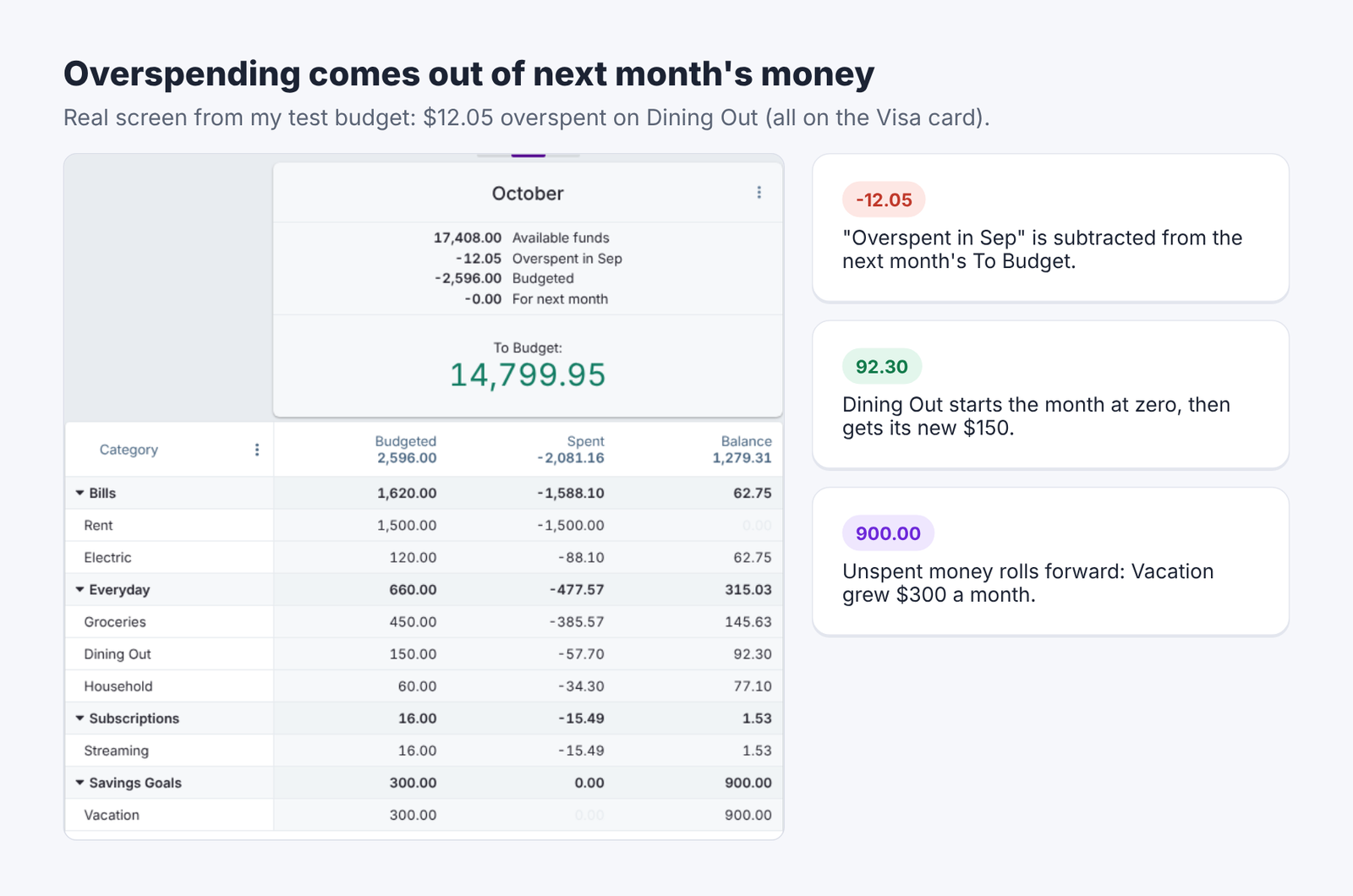
Actual Budget month view showing overspending taken from To Budget
Still, neither way is wrong. Actual’s way is simpler: overspending always costs you next month, cash or card. But if you lean on YNAB’s card handling, you will feel the difference in your first month.
Does importing bank files create duplicates?
No. Actual matched every transaction I already had and ignored the same file the second time. This matters because most people import a bank download every week or two, and the files always overlap.
I wrote a fake bank file the way banks actually send them. Three rows were purchases already in the budget, but posted one or two days later under raw names like “POS FRESHMART #0442 SPRINGFIELD”. Three rows were not in the budget yet.
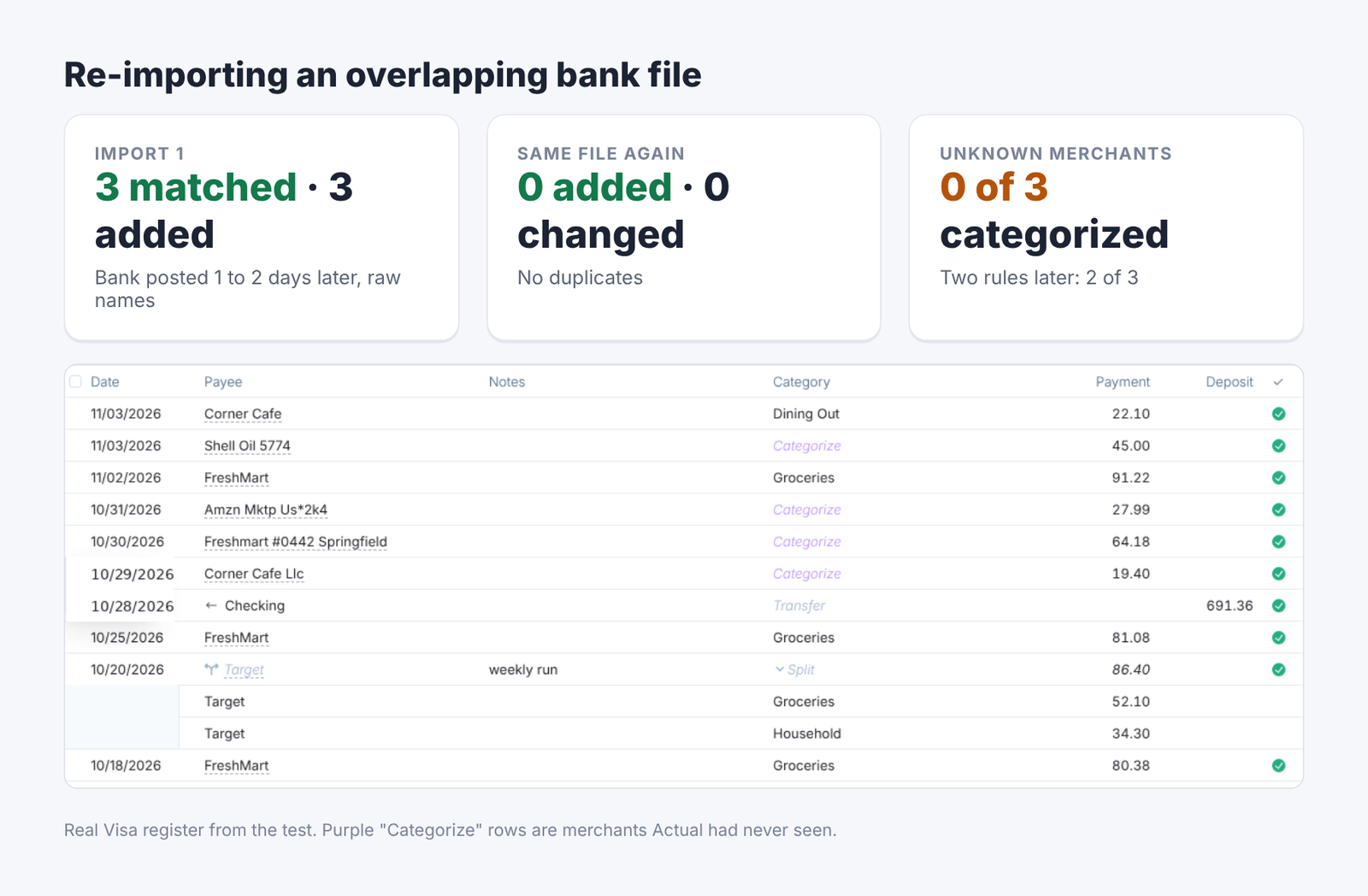
Actual Budget bank file re-import with no duplicates
The first import matched all 3 old rows and added the 3 new ones. The matched rows kept my clean payee, my category and even the split. Then I imported the exact same file again: 0 added, 0 changed.
The weak spot in that import was merchants it had never seen. All 3 of those rows arrived with no category, each under its raw bank name as a separate payee. Actual does not guess.
Rules fix that. A rule (an “if this, then that” instruction that runs on every import) like “if the bank name contains freshmart, set payee FreshMart and category Groceries” takes ten seconds. With two rules, 2 of the next 3 unseen rows filed themselves; the unknown gas station stayed blank, which is what you want.
Can you use Actual Budget on your phone?
Yes, in the phone’s browser, and it is a proper mobile layout, not a shrunken desktop page. You open your server’s address and log in.
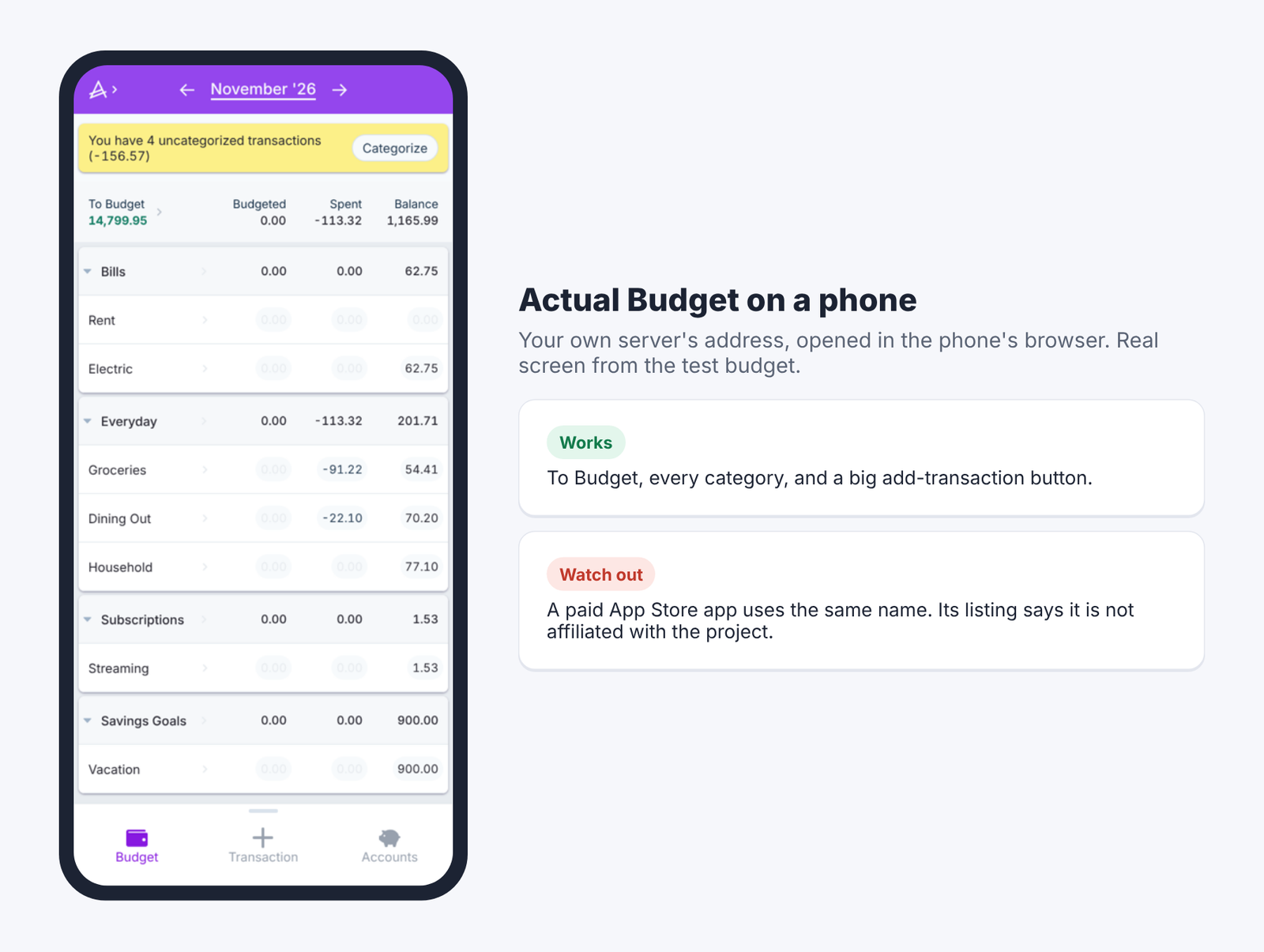
Actual Budget mobile layout in a phone browser
It shows To Budget at the top, your categories with budgeted, spent and balance, and a big button to add a transaction. For the “check in at the checkout line” habit, it works.
One warning about phones. There is a paid app in Apple’s App Store that uses the Actual Budget name. Its own listing says it is an independent app, not affiliated with [actualbudget.org](actualbudget.org), and it sells subscriptions. The real project is free; use your own server’s address.
Does Actual Budget sync with your bank like YNAB?
It can, through outside providers you sign up for, and it depends on your country. YNAB includes bank connections for select US, Canadian, UK and EU banks. Actual connects to services you bring.
The supported providers are SimpleFIN Bridge for North American banks, Enable Banking for Europe, Akahu for New Zealand and [Pluggy.ai](Pluggy.ai) for Brazil. GoCardless is listed for Europe but is closed to sign-ups. SimpleFIN costs \$1.50 a month or \$15 a year and covers up to 25 institutions.
So the full cost of “free YNAB with bank sync” in the US is about \$15 a year plus a small server. Compare that with YNAB’s \$109 a year. Or skip sync and import bank files, which, as the test showed, works cleanly.
Which one should you pick?
Pick Actual Budget if you want YNAB’s habit; pick Firefly III or Moony only if you want to track, not plan. That is the whole decision.
Still, there is a fair case for staying on YNAB. If you need hands-off bank sync, credit card payment categories and targets that nag you, YNAB still does all three with no setup. Your time has a price too.
For everyone else, Actual keeps the part that matters: money you have, split into jobs, checked often.
And the trackers are still good at tracking. I also ran Firefly III from its official Docker image. It started in 9 seconds on SQLite and used about 55 to 70 MB. But it shows soft caps and reports, not envelopes.
Its importer also takes bank files (CSV and CAMT, an XML statement format common in Europe), not a YNAB plan. Moony is the pick if you never want a server and never need your phone.
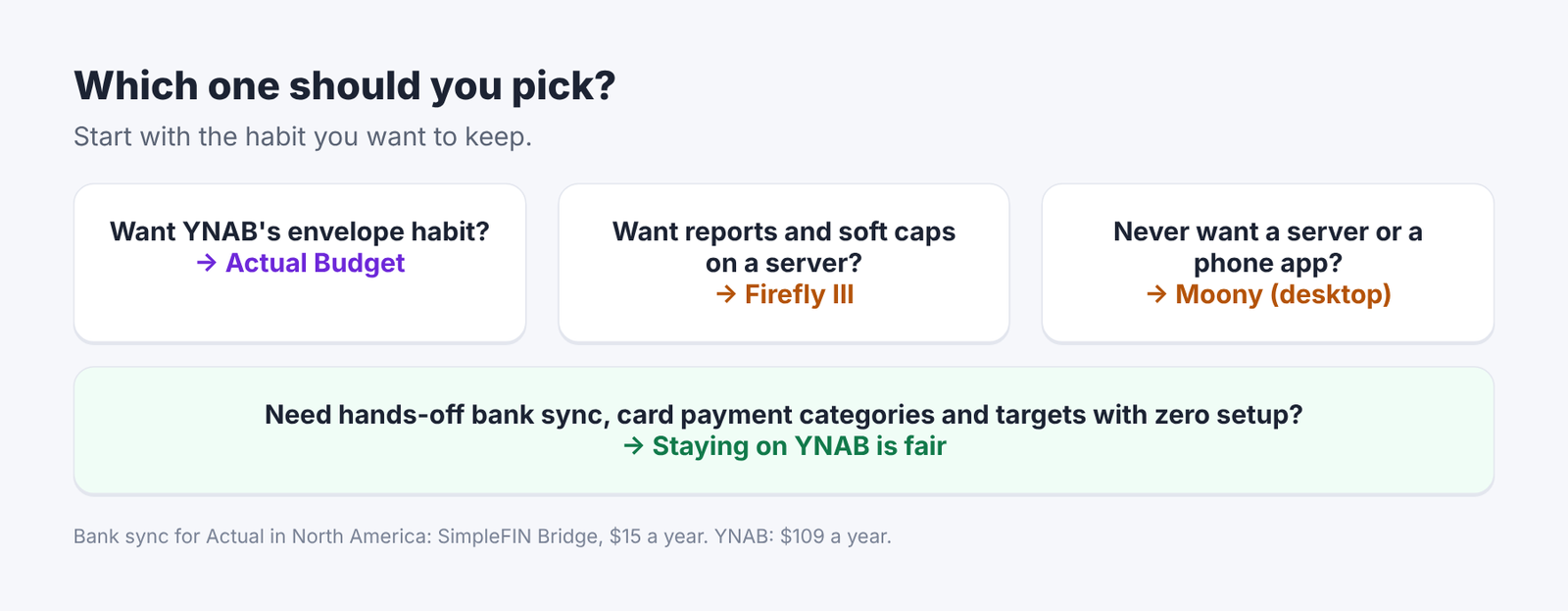
Decision guide for picking a YNAB alternative
YNAB is a habit, not an app. Export one month, import it into Actual, and see if the habit comes with it.
Common questions about open source YNAB alternatives
FAQ
Is Actual Budget really free?
Yes, the app and server are open source under the MIT license. You only pay for the computer you run it on and, if you want automatic bank sync, a provider like SimpleFIN.
Can I import my YNAB data into Actual Budget?
Yes, Actual has a built-in importer for YNAB’s JSON export. In my test, balances, transactions, splits, transfers and assigned amounts all came across, but category targets did not.
Is Firefly III better than Actual Budget?
It depends on the job. Firefly III is a tracker with soft spending caps and reports, while Actual is an envelope budget like YNAB. If you liked YNAB’s method, Actual is the closer fit.
Does Actual Budget work without a server?
You need a sync server to use it across devices. One small Docker container is enough, and it used about 50 to 60 MB of memory at idle in my test.